lock INFINITI FX35 2008 Manual Online
[x] Cancel search | Manufacturer: INFINITI, Model Year: 2008, Model line: FX35, Model: INFINITI FX35 2008Pages: 3924, PDF Size: 81.37 MB
Page 593 of 3924

AV-46
< SERVICE INFORMATION >
ANTENNA
ANTENNA
System DescriptionINFOID:0000000001328702
With the ignition switch in ACC or ON, power is supplied
through 10A fuse [No. 6, located in the fuse block (J/B)]
to audio unit terminal 10.
Ground is supplied through the case of the antenna amp.
When the radio switch is turned ON, antenna signal is supplied
through audio unit terminal 5
to the antenna amp.
Then the antenna amp. is activated.
The amplified radio signals are supplied to the audio unit through the antenna amp.
3AA93ABC3ACD3AC03ACA3AC03AC63AC53A913A773A893A873A873A8E3A773A983AC73AC93AC03AC3
3A893A873A873A8F3A773A9D3AAF3A8A3A8C3A863A9D3AAF3A8B3A8C
Page 620 of 3924

INTEGRATED DISPLAY SYSTEMAV-73
< SERVICE INFORMATION >
C
DE
F
G H
I
J
L
M A
B
AV
N
O P
Self-Diagnosis Mode (DCU)INFOID:0000000001328723
OPERATION PROCEDURE
1. Start the engine.
2. Turn the audio system OFF.
3. While pressing the “4” button, turn the volume control dial clock- wise or counterclockwise for 30 clicks or more. (When the self-
diagnosis mode is started, a short beep will be heard.)
Shifting from current screen to previous screen is performedby pressing “BACK” button.
4. The initial trouble diagnosis screen will be shown, and items “Self Diagnosis (DCU)”, “Confirmation/Adjustment” and “CAN
DIAG SUPPORT MONITOR” will become selective.
5. Perform self-diagnosis by selecting the “Self Diagnosis (DCU)”. Self-diagnosis screen is displayed, and then self-diagnosisstarts.
The bar graph visible below self-diagnosis screen displays progress of the diagnosis.
Mode Description
Self Diagnosis (DCU) Display control unit diagnosis
Analyzes connection between the display control unit and each unit, and
operation of each unit.
Confirmation/
Adjustment Display Diagnosis
Color tone and shading of the display control unit-generated image can be
checked by the display of a color bar and a gray scale.
Vehicle Signals Diagnosis of signals that are input to display control unit can be performed
for Vehicle Speed, IGN, Reverse and Light.
Auto Climate Control Refer to AT C - 4 3 , "
Self-Diagnosis Function".
CAN DIAG SUPPOPT MONITOR The transmitting/receiving of CAN communication can be monitored.
SKIB8743E
SKIB7871E
SKIA4208E
3AA93ABC3ACD3AC03ACA3AC03AC63AC53A913A773A893A873A873A8E3A773A983AC73AC93AC03AC3
3A893A873A873A8F3A773A9D3AAF3A8A3A8C3A863A9D3AAF3A8B3A8C
Page 622 of 3924

INTEGRATED DISPLAY SYSTEMAV-75
< SERVICE INFORMATION >
C
DE
F
G H
I
J
L
M A
B
AV
N
O P
Confirmation/Adjustment ModeINFOID:0000000001328724
OPERATION PROCEDURE
1. Start the engine.
2. Turn the audio system OFF.
3. While pressing the “4” button, turn the volume control dial clock- wise or counterclockwise for 30 clicks or more. (When the self-
diagnosis mode is started, a short beep will be heard.)
Shifting from current screen to previous screen is performedby pressing “BACK” button.
Diagnosis
No. Possible cause Action to take
1 Display control unit malfunction is detected. Replace display control unit.
2 Malfunction is detected on communication signal between
display control unit and display. 1. Check communication circuit between display control
unit and display.
2. Check communication signal between display control unit and display.
3. If the results from the above checkup show no mal-
function, replace either display control unit or display,
and then start self-diagnosis.
4. If self-diagnosis results still show any malfunction, re-
place the other unit.
3 Audio unit power supply circuit malfunction is detected.
Malfunction is detected on communication signal be-
tween display control unit and audio unit. 1. Check audio unit power supply circuit.
2. Check communication circuit between display control
unit and audio unit.
3. Check communication signal between display control unit and audio unit.
4. If the results from the above checkup show no mal-
function, replace either display control unit or audio
unit, and then start self-diagnosis.
5. If self-diagnosis results still show any malfunction, re-
place the other unit.
4 Satellite radio tuner power supply and ground circuit mal-
function is detected.
Malfunction is detected on communication signal be- tween audio unit and satellite radio tuner. 1. Check satellite radio tuner power supply and ground
circuit.
2. Check communication circuit between audio unit and
satellite radio tuner.
3. Check communication signal between audio unit and satellite radio tuner.
4. If the results from the above checkup show no mal- function, replace either audio unit or satellite radio tun-
er, and then start self-diagnosis.
5. If self-diagnosis results still show any malfunction, re- place the other unit.
SKIB8743E
3AA93ABC3ACD3AC03ACA3AC03AC63AC53A913A773A893A873A873A8E3A773A983AC73AC93AC03AC3
3A893A873A873A8F3A773A9D3AAF3A8A3A8C3A863A9D3AAF3A8B3A8C
Page 624 of 3924
INTEGRATED DISPLAY SYSTEMAV-77
< SERVICE INFORMATION >
C
DE
F
G H
I
J
L
M A
B
AV
N
O P
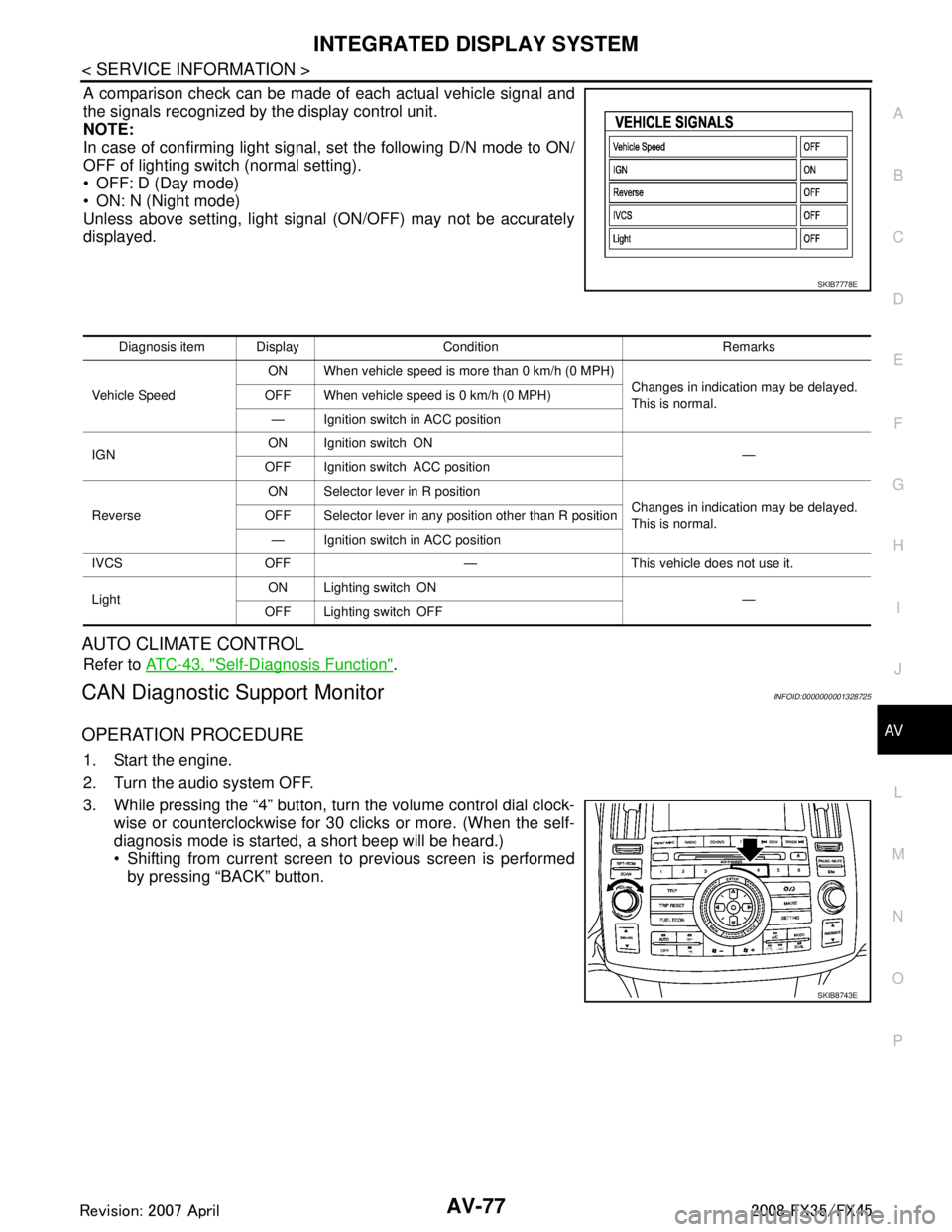
A comparison check can be made of each actual vehicle signal and
the signals recognized by the display control unit.
NOTE:
In case of confirming light signal, set the following D/N mode to ON/
OFF of lighting switch (normal setting).
OFF: D (Day mode)
ON: N (Night mode)
Unless above setting, light signal (ON/OFF) may not be accurately
displayed.
AUTO CLIMATE CONTROL
Refer to ATC-43, "Self-Diagnosis Function".
CAN Diagnostic Support MonitorINFOID:0000000001328725
OPERATION PROCEDURE
1. Start the engine.
2. Turn the audio system OFF.
3. While pressing the “4” button, turn the volume control dial clock-
wise or counterclockwise for 30 clicks or more. (When the self-
diagnosis mode is started, a short beep will be heard.)
Shifting from current screen to previous screen is performedby pressing “BACK” button.
SKIB7778E
Diagnosis item Display Condition Remarks
Vehicle Speed ON When vehicle speed is more than 0 km/h (0 MPH)
Changes in indication may be delayed.
This is normal.
OFF When vehicle speed is 0 km/h (0 MPH)
— Ignition switch in ACC position
IGN ON Ignition switch ON
—
OFF Ignition switch ACC position
Reverse ON Selector lever in R position
Changes in indication may be delayed.
This is normal.
OFF Selector lever in any position other than R position
— Ignition switch in ACC position
IVCS OFF — This vehicle does not use it.
Light ON Lighting switch ON
—
OFF Lighting switch OFF
SKIB8743E
3AA93ABC3ACD3AC03ACA3AC03AC63AC53A913A773A893A873A873A8E3A773A983AC73AC93AC03AC3
3A893A873A873A8F3A773A9D3AAF3A8A3A8C3A863A9D3AAF3A8B3A8C
Page 661 of 3924
AV-114
< SERVICE INFORMATION >
NAVIGATION SYSTEM
Self-Diagnosis Mode (DCU)
INFOID:0000000001328753
OPERATION PROCEDURE
1. Start the engine.
2. Turn the audio system OFF.
3. While pressing the “4” button, turn the volume control dial clock- wise or counterclockwise for 30 clicks or more. (When the self-
diagnosis mode is started, a short beep will be heard.)
Shifting from current screen to previous screen is performed
by pressing “BACK” button.
Mode Description
Self Diagnosis (DCU) Display control unit diagnosis
Analyzes connection between the display control unit and each unit, and
operation of each unit.
Self Diagnosis (NAVI) NAVI control unit diagnosis (DVD-ROM drive will not be diagnosed when
no DVD-ROM is in it.).
Analyzes connection between the NAVI control unit and the GPS anten-
na.
Confirmation/
Adjustment Display Diagnosis
Color tone and shading of the display control unit-generated image can be
checked by the display of a color bar and a gray scale.
Vehicle Signals Diagnosis of signals that are input to display control unit can be performed
for Vehicle Speed, IGN, Reverse and Light.
Auto Climate Control Refer to AT C - 4 3 , "
Self-Diagnosis Function".
Navigation Display Diagnosis
Color tone and shading of the NAVI control unit-generated image can be
checked by the display of a color bar and a gray scale.
Vehicle Signals Diagnosis of signals that are input to NAVI control unit can be performed for
Vehicle speed, Lights, Ignition and Reverse.
Navigation Steering An-
gle
Adjustment
This mode is used to correct difference between actual turning angle of a
vehicle and turning angle of the vehicle mark on the display.
Speed
Calibration Under ordinary conditions, the navigation system distance measuring func-
tion will automatically compensate for minute decreases in wheel and tire
diameter caused by tire wear or low-pressure. Speed Calibration can im-
mediately restore system accuracy in cases such as when distance calibra-
tion is needed because of the use of tire chains.
Error History Malfunctions that occurred in the past are displayed, along with the number
of times each has occurred. Time and location when/where the errors oc-
curred are also displayed.
Delete Unit Connection Log Erase the connection history of unit and error history.
CAN DIAG SUPPOPT MONITOR The transmitting/recei ving of CAN communication can be monitored.
SKIB8642E
3AA93ABC3ACD3AC03ACA3AC03AC63AC53A913A773A893A873A873A8E3A773A983AC73AC93AC03AC3
3A893A873A873A8F3A773A9D3AAF3A8A3A8C3A863A9D3AAF3A8B3A8C
Page 664 of 3924

NAVIGATION SYSTEMAV-117
< SERVICE INFORMATION >
C
DE
F
G H
I
J
L
M A
B
AV
N
O P
Self-Diagnosis Mode (NAVI)INFOID:0000000001328754
OPERATION PROCEDURE
1. Start the engine.
2. Turn the audio system OFF.
3. While pressing the “4” button, turn the volume control dial clock- wise or counterclockwise for 30 clicks or more. (When the self-
diagnosis mode is started, a short beep will be heard.)
Shifting from current screen to previous screen is performedby pressing “BACK” button.
4. The initial trouble diagnosis screen will be shown, and items “Self Diagnosis (DCU)”, “Self Diagnosis (NAVI)”, “Confirmation/
Adjustment” and “CAN DIAG SUPPORT MONITOR” will
become selective.
NOTE:
Select “Self Diagnosis (DCU)” when “Self Diagnosis (NAVI)” is
not available. Repair malfunctioning part.
4 NAVI control unit power supply and ground circuit mal-
function is detected.
Malfunction is detected on communication signal be-
tween display control unit and NAVI control unit. 1. Check NAVI control unit power supply and ground cir-
cuit.
2. Check communication circuit between display control unit and NAVI control unit.
3. If the results from the above checkup show no mal- function, replace either display control unit or NAVI
control unit, and then start self-diagnosis.
4. If self-diagnosis results still show any malfunction, re- place the other unit.
5 GPS antenna connection malfunction is detected. 1. Check if GPS antenna feeder line is snapped or
pinched.
2. If the results from the above checkup show no mal- function, replace GPS antenna, and then restart self-
diagnosis.
3. If self-diagnosis results still show any malfunction, re- place NAVI control unit.
6 Satellite radio tuner power supply and ground circuit mal-
function is detected.
Malfunction is detected on communication signal be-
tween audio unit and satellite radio tuner. 1. Check satellite radio tuner power supply and ground
circuit.
2. Check communication circuit between audio unit and satellite radio tuner.
3. Check communication signal between audio unit and
satellite radio tuner.
4. If the results from the above checkup show no mal- function, replace either audio unit or satellite radio tun-
er, and then start self-diagnosis.
5. If self-diagnosis results still show any malfunction, re- place the other unit.
Diagnosis
No. Possible cause Action to take
SKIB8642E
SKIB7874E
3AA93ABC3ACD3AC03ACA3AC03AC63AC53A913A773A893A873A873A8E3A773A983AC73AC93AC03AC3
3A893A873A873A8F3A773A9D3AAF3A8A3A8C3A863A9D3AAF3A8B3A8C
Page 667 of 3924

AV-120
< SERVICE INFORMATION >
NAVIGATION SYSTEM
3. While pressing the “4” button, turn the volume control dial clock-wise or counterclockwise for 30 clicks or more. (When the self-
diagnosis mode is started, a short beep will be heard.)
Shifting from current screen to previous screen is performed
by pressing “BACK” button.
4. The initial trouble diagnosis screen will be shown, and items “Self Diagnosis (DCU)”, “Self Diagnosis (NAVI)”, “Confirmation/
Adjustment” and “CAN DIAG SUPPORT MONITOR” will
become selective.
5. Select “Confirmation/Adjustment”.
6. Each diagnosis is shown by selecting each screen switch on Confirmation/Adjustment screen.
DISPLAY DIAGNOSIS
Color tone and shading of the display control unit-generat ed image can be checked by the display of a color
bar and a gray scale.
If RGB signal is malfunctioning, the tint of the color bar display is as follows.
SKIB8642E
SKIB7874E
SKIA4220E
SKIB7777E
3AA93ABC3ACD3AC03ACA3AC03AC63AC53A913A773A893A873A873A8E3A773A983AC73AC93AC03AC3
3A893A873A873A8F3A773A9D3AAF3A8A3A8C3A863A9D3AAF3A8B3A8C
Page 672 of 3924

NAVIGATION SYSTEMAV-125
< SERVICE INFORMATION >
C
DE
F
G H
I
J
L
M A
B
AV
N
O P
Erase the connection history of unit and error history that is recorded
in NAVI control unit (clear the connection history of the removed
unit).
CAN Diagnostic Support MonitorINFOID:0000000001328756
OPERATION PROCEDURE
1. Start the engine.
2. Turn the audio system OFF.
3. While pressing the “4” button, turn the volume control dial clock- wise or counterclockwise for 30 clicks or more. (When the self-
diagnosis mode is started, a short beep will be heard.)
Shifting from current screen to previous screen is performedby pressing “BACK” button.
4. The initial trouble diagnosis screen will be shown, and items “Self Diagnosis (DCU)”, “Self Diagnosis (NAVI)”, “Confirmation/
Adjustment” and “CAN DIAG SUPPORT MONITOR” will
become selective.
5. Select “CAN DIAG SUPPORT MONITOR”.
6. The transmitting/receiving of CAN communication can be moni- tored.
SKIB6979E
SKIB8642E
SKIB7874E
Item Content Error counter
(Reference value)
CAN_COMM OK/NG 0 - 50
CAN_CIRC_1 OK/UNKWN 0 - 50
CAN_CIRC_2 OK/UNKWN 0 - 50
CAN_CIRC_3 OK/UNKWN 0 - 50
CAN_CIRC_4 OK/UNKWN 0 - 50
CAN_CIRC_5 OK/UNKWN 0 - 50
CAN_CIRC_6 OK/UNKWN 0 - 50
CAN_CIRC_7 OK/UNKWN 0 - 50
SKIA4288E
3AA93ABC3ACD3AC03ACA3AC03AC63AC53A913A773A893A873A873A8E3A773A983AC73AC93AC03AC3
3A893A873A873A8F3A773A9D3AAF3A8A3A8C3A863A9D3AAF3A8B3A8C
Page 690 of 3924

INFINITI MOBILE ENTERTAINMENT SYSTEMAV-143
< SERVICE INFORMATION >
C
DE
F
G H
I
J
L
M A
B
AV
N
O P
INFINITI MOBILE ENTERTAINMENT SYSTEM
System DescriptionINFOID:0000000001328776
Refer to Owner's Manual for mobile enter tainment system operating instructions.
Power is supplied at all times
through 15A fuse (No. 32, located in the fuse and fusible link block)
to DVD player terminal 16
through DVD player terminals 31 and 32
to DVD display terminals 15 and 16.
With the ignition switch in the ACC or ON position, power is supplied
through 10A fuse [No. 6, located in the fuse block (J/B)]
to DVD player terminal 15
through DVD player terminal 21
to DVD display terminal 5.
Ground is supplied
to DVD player terminal 22
through body ground B15 and B45
to DVD player terminals 19, 27
through DVD display terminals 6, 10 and 12.
When DVD player power switch is ON, power is supplied
through DVD player terminal 9
to audio unit terminal 38 and
through audio unit terminal 40
to DVD player terminal 11.
When DVD player power switch is ON, DVD sound signals are supplied
through DVD player terminals 17, 18, and 20
to DVD display terminals 1, 2 and 4.
DVD sound can be heard by the head phone.
When rear AV switch is ON, audio signals are supplied
through DVD player terminals 1, 2, 3, and 4
to audio unit terminals 37, 39, 43, and 42.
DVD sound can be heard from the speaker.
When DVD player power switch is ON, video signals are supplied
through DVD player terminals 23 and 24
to DVD display terminals 7 and 8.
When remote controller is operat ed, operation signals are supplied
through DVD display terminal 14
to DVD player terminal 30 and
through DVD player terminal 29
to DVD display terminal 13.
Component Parts LocationINFOID:0000000001328777
SKIB8693E
3AA93ABC3ACD3AC03ACA3AC03AC63AC53A913A773A893A873A873A8E3A773A983AC73AC93AC03AC3
3A893A873A873A8F3A773A9D3AAF3A8A3A8C3A863A9D3AAF3A8B3A8C
Page 727 of 3924
BCM (BODY CONTROL MODULE)BCS-7
< SERVICE INFORMATION >
C
DE
F
G H
I
J
L
M A
B
BCS
N
O P
- Door lock/unlock switch
- Front door switch (driver side, passenger side)
- Rear door switch (LH, RH)
- Back door opener switch
- Combination switch (passing, lighting switch 1ST position, front fog lamp)
- Key fob (lock/unlock signal)
- Key cylinder switch
When control performed only by BCM is required by switch, it shifts to CAN communication inactive mode.
Operation mode of combination switch reading function is changed.
SYSTEMS CONTROLLED BY BCM DIRECTLY
NOTE:
Power supply only. No system control.
SYSTEMS CONTROLLED BY BCM AND IPDM E/R
SYSTEMS CONTROLLED BY BCM AND COMBINATION METER
SYSTEMS CONTROLLED BY BCM AND INTELLIGENT KEY UNIT
SYSTEMS CONTROLLED BY BCM, CO MBINATION METER AND IPDM E/R
System Reference
Power door lock system BL-21
Remote keyless entry systemBL-50
Power window system NOTEGW-15
Sunroof NOTERF-10
Room lamp timerLT- 1 3 8
Rear wiper and washer systemWW-30
System Reference
Panic alarm
BL-50
BL-76
Theft warning system BL-163
IVIS (NATS)BL-185
HeadlampLT- 5
Daytime light systemLT- 3 2
Auto light systemLT- 4 7
Front fog lampLT- 6 6
Parking, license plate, side marker and tail lamps
Exterior lamp battery saver control LT- 11 8
Front wiper and washer system
WW-4
Rear window defoggerGW-60
System Reference
Warning chime DI-51
Turn signal and hazard warning lampsLT- 7 8
Tire pressure monitoring systemWT-10
System Reference
Intelligent Key system BL-76
3AA93ABC3ACD3AC03ACA3AC03AC63AC53A913A773A893A873A873A8E3A773A983AC73AC93AC03AC3
3A893A873A873A8F3A773A9D3AAF3A8A3A8C3A863A9D3AAF3A8B3A8C