light INFINITI G35 2006 Owners Manual
[x] Cancel search | Manufacturer: INFINITI, Model Year: 2006, Model line: G35, Model: INFINITI G35 2006Pages: 344, PDF Size: 6.81 MB
Page 214 of 344
ON (Normal operating position)
q E
:
This position turns on the ignition system
and electrical accessories.
START
q F
:
This position starts the engine. As soon
as the engine has started, release the
switch immediately. It will automatically
return to the ON position.
For important safety information, see ªIg-
nition switchº in the ª5. Starting and driv-
ingº section.
The ignition switch cannot be turned back
to the LOCK position unless the shift lever
is in P position. (It can be turned to only
q C
.)
CAUTIONDo not leave the vehicle with the ignition
switch in ACC or ON position when the en-
gine is not running for an extended period.
This can discharge the battery. INFINITI VEHICLE IMMOBILIZER
SYSTEM The INFINITI Vehicle Immobilizer System
will not allow the engine to start without
the use of the registered key.
If the engine does not start using a regis-
tered key (for example, when interference
is caused by another registered key, an
automated toll road device or an auto-
mated payment device on the key ring),
restart the engine using the following pro-
cedures:
1. Leave the ignition switch in the ON po-
sition for approximately 5 seconds.
2. Turn the ignition switch to the OFF or
LOCK position and wait approximately
10 seconds.
3. Repeat steps 1 and 2.
4. Restart the engine while holding the
device (which may have caused the in-
terference) separate from the regis-
tered key.
If this procedure allows the engine to
start, INFINITI recommends placing the
registered key on a separate key ring to
avoid interference from other devices. O Make sure the area around the vehicle
is clear.
O Maintenance items should be checked
periodically, for example, each time
you check engine oil.
O Check that all windows and lights are
clean.
O Visually inspect tires for their appear-
ance and condition. Also check tires
for proper inflation.
O Lock all doors.
O Position seat and adjust head re-
straints.
O Adjust inside and outside mirrors.
O Fasten seat belts and ask all passen-
gers to do likewise.
O Check the operation of warning lights
when the ignition key is turned to the
ON position. See ªWarning/indicator
lights and audible remindersº in the
ª2. Instruments and controlsº section.BEFORE STARTING THE ENGINE
5-10 Starting and driving
w 06.1.4/V35-D/V5.0
X
Page 220 of 344
MANUAL TRANSMISSION
Shifting To change gears, or when up shifting or
down shifting, fully depress the clutch
pedal, shift into the appropriate gear,
then slowly and smoothly release the
clutch.
This vehicle is equipped with a short
throw shifter manual transmission. To en-
sure smooth gear changes, fully depress
the clutch pedal before operating the shift
lever. If the clutch pedal is not fully de-
pressed before the transmission is shifted, a gear noise may be heard. Trans-
mission damage could occur.
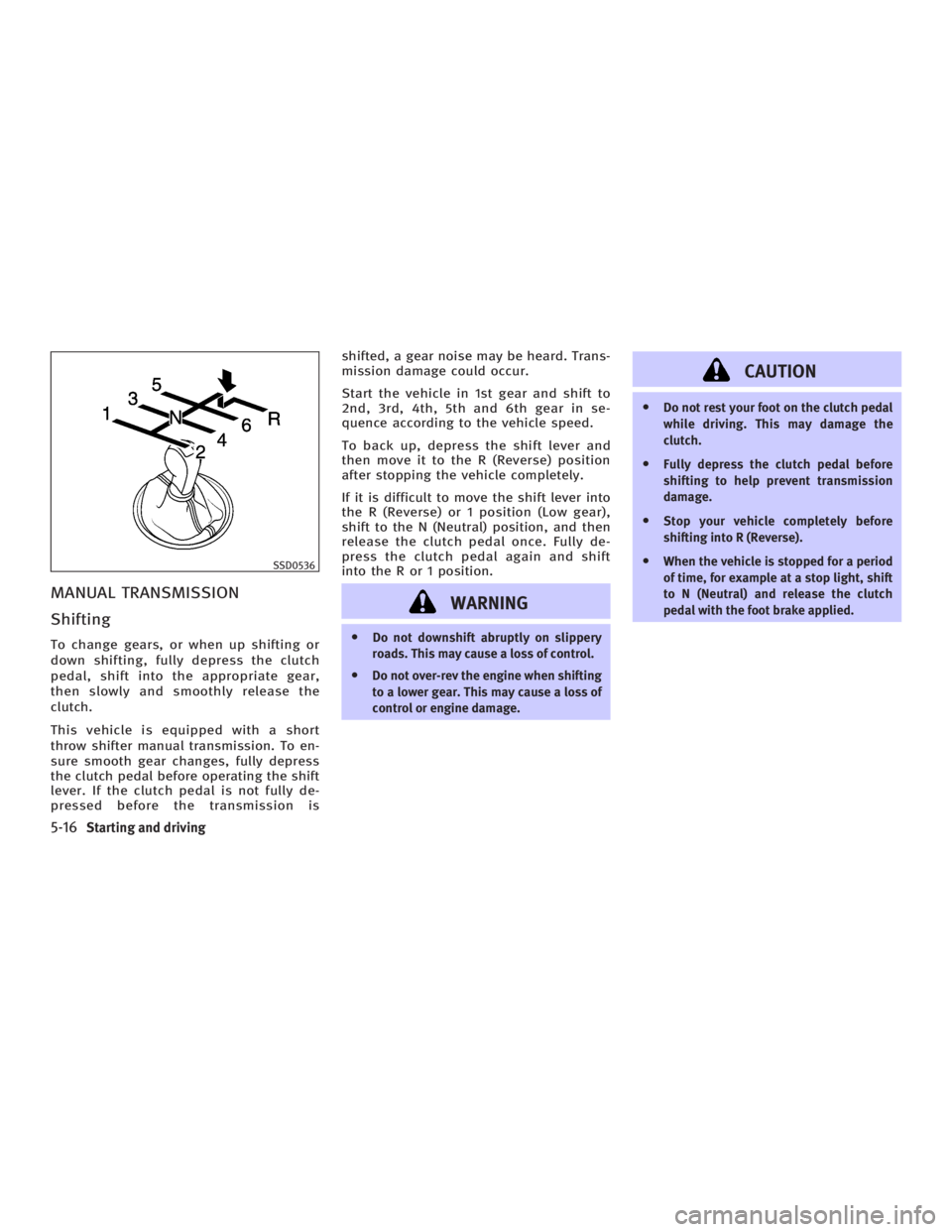
Start the vehicle in 1st gear and shift to
2nd, 3rd, 4th, 5th and 6th gear in se-
quence according to the vehicle speed.
To back up, depress the shift lever and
then move it to the R (Reverse) position
after stopping the vehicle completely.
If it is difficult to move the shift lever into
the R (Reverse) or 1 position (Low gear),
shift to the N (Neutral) position, and then
release the clutch pedal once. Fully de-
press the clutch pedal again and shift
into the R or 1 position.
WARNING O Do not downshift abruptly on slippery
roads. This may cause a loss of control.
O Do not over-rev the engine when shifting
to a lower gear. This may cause a loss of
control or engine damage. CAUTION O Do not rest your foot on the clutch pedal
while driving. This may damage the
clutch.
O Fully depress the clutch pedal before
shifting to help prevent transmission
damage.
O Stop your vehicle completely before
shifting into R (Reverse).
O When the vehicle is stopped for a period
of time, for example at a stop light, shift
to N (Neutral) and release the clutch
pedal with the foot brake applied.SSD0536
5-16 Starting and driving
w 06.1.4/V35-D/V5.0
X
Page 221 of 344
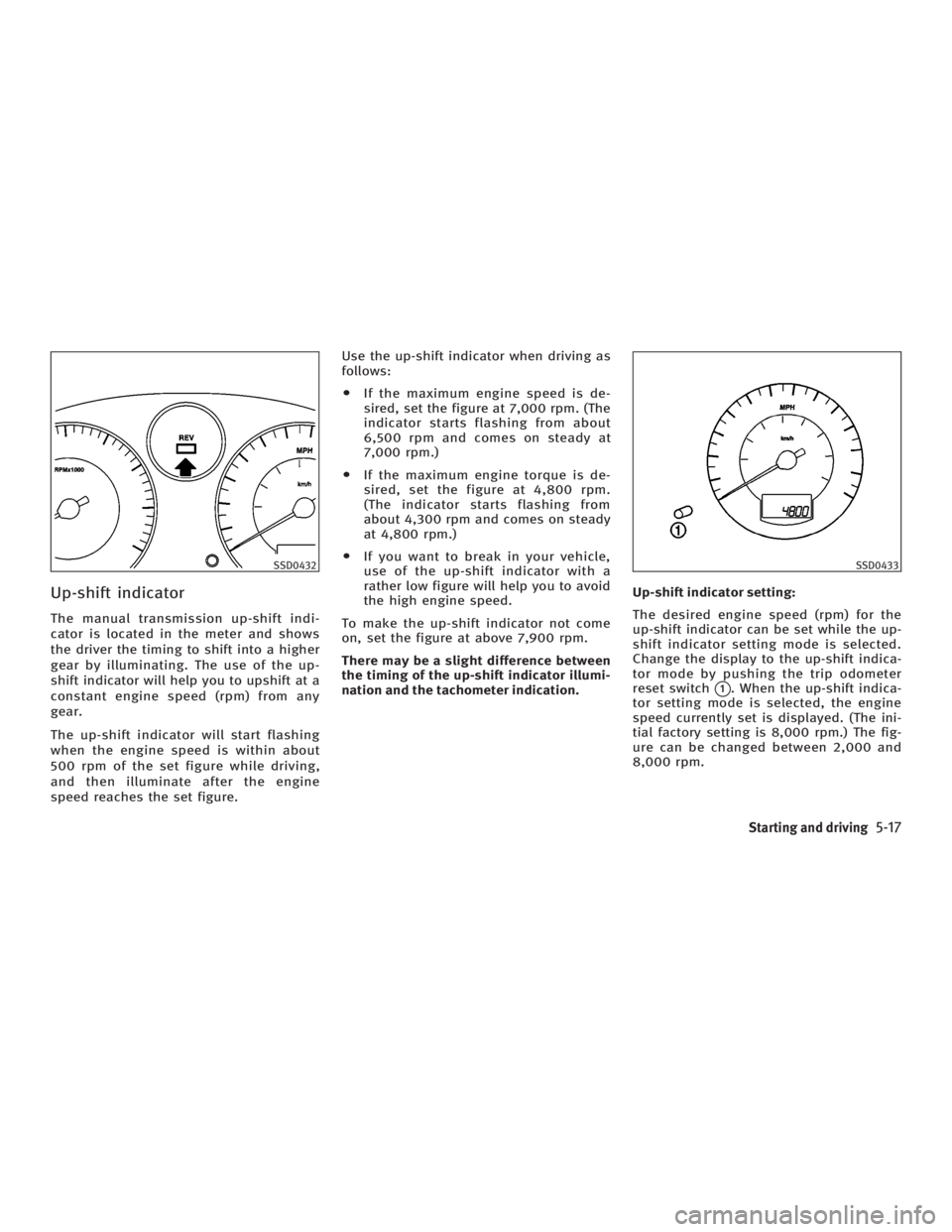
Up-shift indicator The manual transmission up-shift indi-
cator is located in the meter and shows
the driver the timing to shift into a higher
gear by illuminating. The use of the up-
shift indicator will help you to upshift at a
constant engine speed (rpm) from any
gear.
The up-shift indicator will start flashing
when the engine speed is within about
500 rpm of the set figure while driving,
and then illuminate after the engine
speed reaches the set figure. Use the up-shift indicator when driving as
follows:
O If the maximum engine speed is de-
sired, set the figure at 7,000 rpm. (The
indicator starts flashing from about
6,500 rpm and comes on steady at
7,000 rpm.)
O If the maximum engine torque is de-
sired, set the figure at 4,800 rpm.
(The indicator starts flashing from
about 4,300 rpm and comes on steady
at 4,800 rpm.)
O If you want to break in your vehicle,
use of the up-shift indicator with a
rather low figure will help you to avoid
the high engine speed.
To make the up-shift indicator not come
on, set the figure at above 7,900 rpm.
There may be a slight difference between
the timing of the up-shift indicator illumi-
nation and the tachometer indication. Up-shift indicator setting:
The desired engine speed (rpm) for the
up-shift indicator can be set while the up-
shift indicator setting mode is selected.
Change the display to the up-shift indica-
tor mode by pushing the trip odometer
reset switch
q 1
. When the up-shift indica-
tor setting mode is selected, the engine
speed currently set is displayed. (The ini-
tial factory setting is 8,000 rpm.) The fig-
ure can be changed between 2,000 and
8,000 rpm.SSD0432 SSD0433
Starting and driving
5-17
w 06.1.4/V35-D/V5.0
X
Page 223 of 344
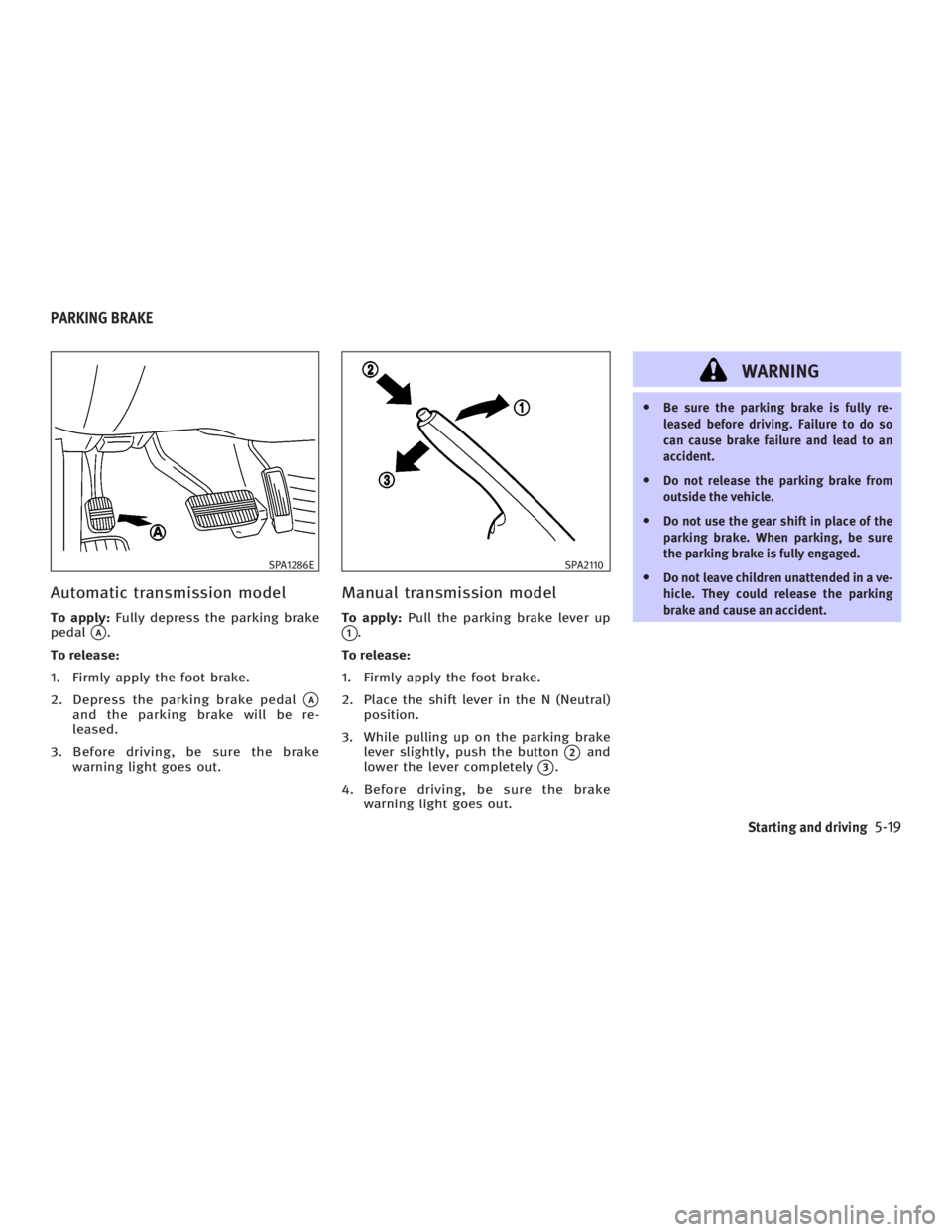
Automatic transmission model To apply: Fully depress the parking brake
pedal
q A
.
To release:
1. Firmly apply the foot brake.
2. Depress the parking brake pedal
q A
and the parking brake will be re-
leased.
3. Before driving, be sure the brake
warning light goes out. Manual transmission model To apply: Pull the parking brake lever up
q 1
.
To release:
1. Firmly apply the foot brake.
2. Place the shift lever in the N (Neutral)
position.
3. While pulling up on the parking brake
lever slightly, push the button
q 2
and
lower the lever completely
q 3
.
4. Before driving, be sure the brake
warning light goes out. WARNING O Be sure the parking brake is fully re-
leased before driving. Failure to do so
can cause brake failure and lead to an
accident.
O Do not release the parking brake from
outside the vehicle.
O Do not use the gear shift in place of the
parking brake. When parking, be sure
the parking brake is fully engaged.
O Do not leave children unattended in a ve-
hicle. They could release the parking
brake and cause an accident.SPA1286E SPA2110
PARKING BRAKE
Starting and driving
5-19
w 06.1.4/V35-D/V5.0
X
Page 224 of 344
WARNINGDo not use the cruise control when driving
under the following conditions:
O When it is not possible to keep the ve-
hicle at a set speed.
O In heavy traffic or in traffic that varies in
speed.
O On winding or hilly roads.
O On slippery roads (rain, snow, ice, etc.).
O In very windy areas.
Doing so could cause a loss of vehicle con-
trol and result in an accident.
CAUTIONOn manual transmission models, do not shift
into N (Neutral) without depressing the
clutch pedal when the cruise control is set.
Should this occur, depress the clutch pedal
and turn the main switch off immediately.
Failure to do so may cause engine damage. PRECAUTIONS ON CRUISE
CONTROL O If the cruise control system malfunc-
tions, it cancels automatically. The
SET indicator light on the instrument
panel then blinks to warn the driver.
O If the engine coolant temperature be-
comes excessively high, the cruise
control system will be canceled auto-
matically.
O If the SET indicator light blinks, turn
the cruise control MAIN switch off and
have the system checked by an
INFINITI dealer.
O The SET indicator light may blink when
the cruise control MAIN switch is
turned on while pushing the
RESUME/ACCELERATE, SET/COAST, or
CANCEL switch. To properly set the
cruise control system, perform the fol-
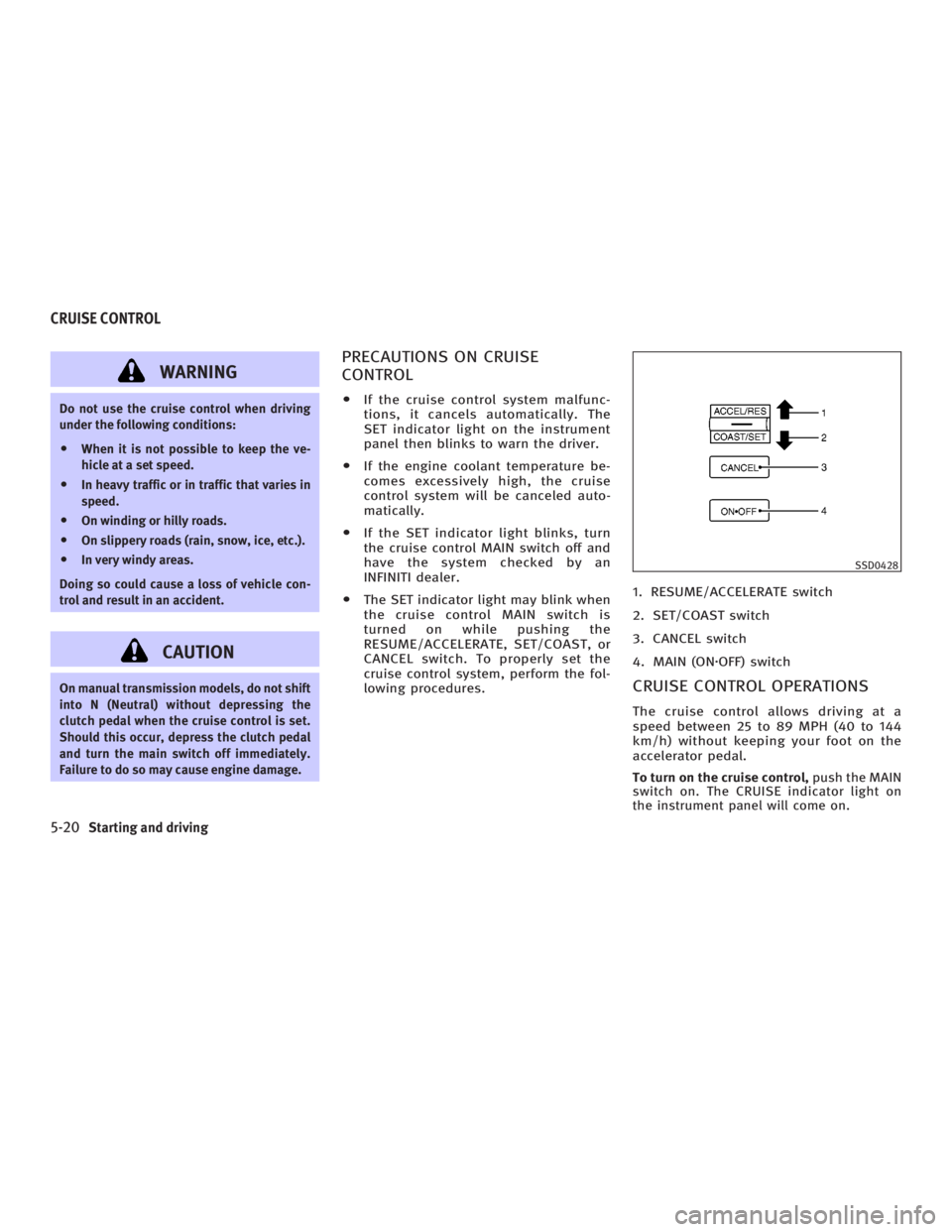
lowing procedures. 1. RESUME/ACCELERATE switch
2. SET/COAST switch
3. CANCEL switch
4. MAIN (ON z OFF) switch
CRUISE CONTROL OPERATIONS The cruise control allows driving at a
speed between 25 to 89 MPH (40 to 144
km/h) without keeping your foot on the
accelerator pedal.
To turn on the cruise control, push the MAIN
switch on. The CRUISE indicator light on
the instrument panel will come on. SSD0428
CRUISE CONTROL
5-20 Starting and driving
w 06.1.4/V35-D/V5.0
X
Page 225 of 344
To set at cruising speed, accelerate your
vehicle to the desired speed, push the
SET/COAST switch and release it. (The
SET indicator light will come on.) Take
your foot off the accelerator pedal. Your
vehicle will maintain the set speed.
O To pass another vehicle, depress the
accelerator pedal. When you release
the pedal, the vehicle will return to
the previously set speed.
O The vehicle may not maintain the set
speed when going up or down steep
hills. If this happens, drive without the
cruise control.
To cancel the preset speed, follow either of
these three methods:
a) Push the CANCEL switch. The SET indi-
cator light will go out.
b) Tap the brake pedal. The SET indicator
light will go out.
c) Turn the MAIN switch off. Both the
CRUISE indicator and SET indicator
lights will go out.
O If you depress the brake pedal while
pushing the RESUME/ACCELERATE
switch and reset at the cruising speed,
turn the MAIN switch off once and
then turn it on again. O The cruise control will automatically
be cancelled if the vehicle slows down
below approximately 8 MPH (13 km/h).
O If you depress the clutch pedal
(manual transmission), or move the
selector lever to the N (Neutral) posi-
tion (automatic transmission), the
cruise control will be canceled.
To reset at a faster cruising speed, use one
of the following methods:
a) Depress the accelerator pedal. When
the vehicle reaches the desired speed,
push and release the SET/COAST
switch.
b) Push and hold the RESUME/
ACCELERATE switch. When the vehicle
reaches the speed you desire, release
the switch.
c) Push, then quickly release the
RESUME/ACCELERATE set switch. This
will increase the vehicle speed by
about 1 MPH (1.6 km/h). To reset at a slower cruising speed, use
one of the following methods:
a) Lightly tap the brake pedal. When the
vehicle reaches the desired speed,
push the SET/COAST switch and re-
lease it.
b) Push and hold the SET/COAST switch.
Release the switch when the vehicle
slows down to the desired speed.
c) Push, then quickly release the SET/
COAST switch. This will decrease the
vehicle speed by about 1 MPH (1.6
km/h).
To resume the preset speed, push and re-
lease the RESUME/ACCELERATE switch.
The vehicle will resume the last set cruis-
ing speed when the vehicle speed is over
25 MPH (40 km/h).
Starting and driving
5-21
w 06.1.4/V35-D/V5.0
X
Page 227 of 344
The full-time all-wheel drive (AWD) system
automatically changes the driving mode. ALL-WHEEL DRIVE (AWD) WARNING
LIGHT The AWD warning light is located on the
instrument panel.
The AWD warning light comes on when
the ignition switch is turned to the ON po-
sition. It turns off soon after the engine is
started.
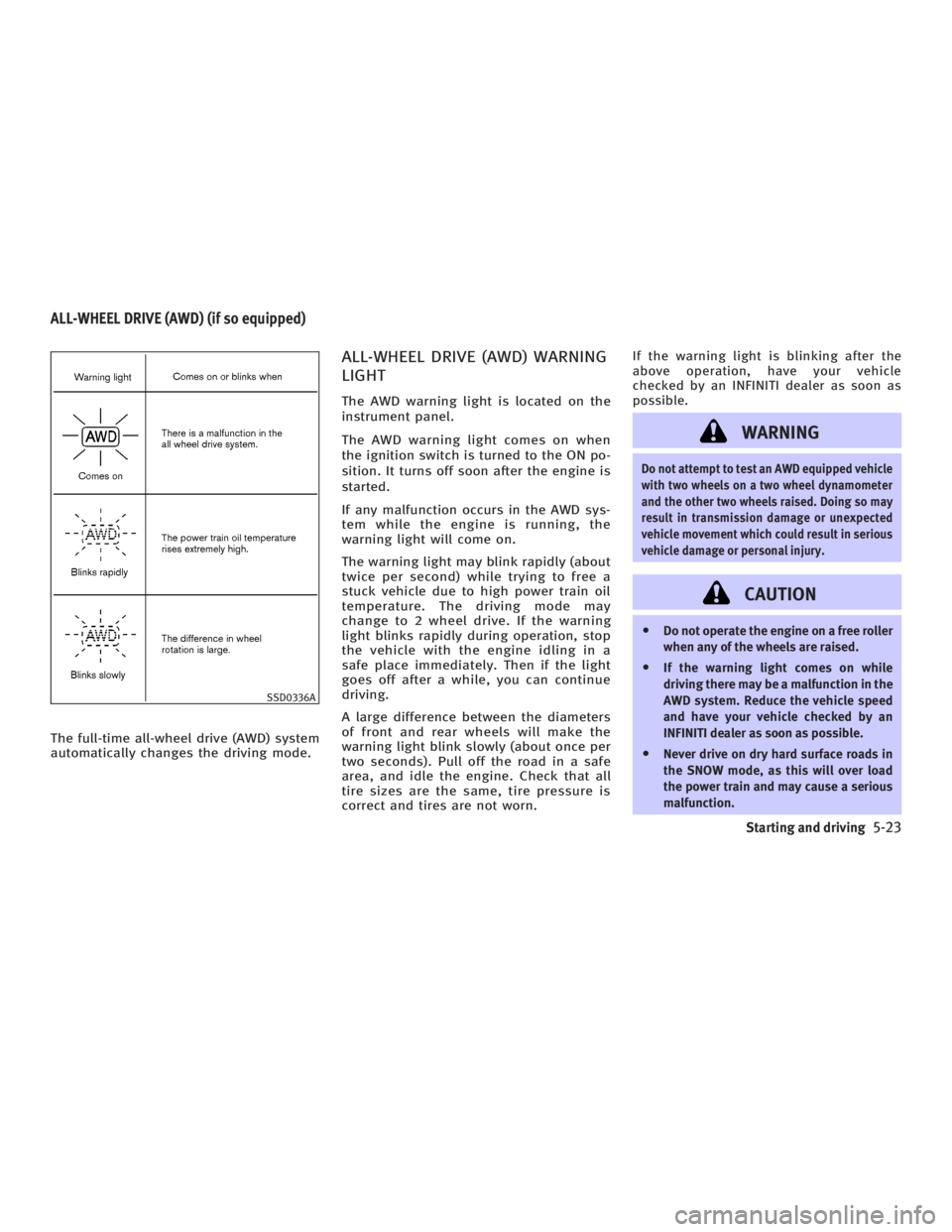
If any malfunction occurs in the AWD sys-
tem while the engine is running, the
warning light will come on.
The warning light may blink rapidly (about
twice per second) while trying to free a
stuck vehicle due to high power train oil
temperature. The driving mode may
change to 2 wheel drive. If the warning
light blinks rapidly during operation, stop
the vehicle with the engine idling in a
safe place immediately. Then if the light
goes off after a while, you can continue
driving.
A large difference between the diameters
of front and rear wheels will make the
warning light blink slowly (about once per
two seconds). Pull off the road in a safe
area, and idle the engine. Check that all
tire sizes are the same, tire pressure is
correct and tires are not worn. If the warning light is blinking after the
above operation, have your vehicle
checked by an INFINITI dealer as soon as
possible.
WARNING Do not attempt to test an AWD equipped vehicle
with two wheels on a two wheel dynamometer
and the other two wheels raised. Doing so may
result in transmission damage or unexpected
vehicle movement which could result in serious
vehicle damage or personal injury.
CAUTION O Do not operate the engine on a free roller
when any of the wheels are raised.
O If the warning light comes on while
driving there may be a malfunction in the
AWD system. Reduce the vehicle speed
and have your vehicle checked by an
INFINITI dealer as soon as possible.
O Never drive on dry hard surface roads in
the SNOW mode, as this will over load
the power train and may cause a serious
malfunction.SSD0336AALL-WHEEL DRIVE (AWD) (if so equipped)
Starting and driving
5-23
w 06.1.4/V35-D/V5.0
X
Page 228 of 344

O If the warning light remains on after the
above operation, have your vehicle
checked by an INFINITI dealer as soon as
possible.
O The power train may be damaged if you
continue driving with the warning light
blinking rapidly.
WARNING O Do not stop or park the vehicle over flam-
mable materials such as dry grass,
waste paper or rags. They may ignite and
cause a fire.
O Never leave the engine running while the
vehicle is unattended.
O Never leave children unattended inside
the vehicle. O Safe parking procedures require that
both the parking brake be set and the
transmission placed into P (Park).
Failure to do so could cause the vehicle
to move unexpectedly or roll away and
result in an accident.
O Make sure the shift lever has been
pushed as far forward as it can go and
cannot be moved without depressing the
button at the end of the lever. SD1006MA
PARKING/PARKING ON HILLS
5-24 Starting and driving
w 06.1.4/V35-D/V5.0
X
Page 230 of 344
BRAKING PRECAUTIONS The brake system has two separate hy-
draulic circuits. If one circuit malfunc-
tions, you will still have braking ability at
two wheels.
Vacuum assisted brake
The brake booster aids braking by using
engine vacuum. If the engine stops, you
can stop the vehicle by depressing the
brake pedal. However, greater foot pres-
sure on the brake pedal will be required
to stop the vehicle and the stopping dis-
tance will be longer.
Wet brakes
When the vehicle is washed or driven
through water, the brakes may get wet.
As a result, your braking distance will be
longer and the vehicle may pull to one
side during braking.
To dry brakes, drive the vehicle at a safe
speed while lightly tapping the brake
pedal to heat-up the brakes. Do this until
the brakes return to normal. Avoid driving
the vehicle at high speeds until the
brakes function correctly.
Parking brake break-in
Break-in the parking brake shoes when-
ever the stopping effect of the parking brake is weakened or whenever the park-
ing brake shoes and/or drums/rotors are
replaced, in order to assure the best
braking performance.
This procedure is described in the vehicle
service manual and can be performed by
your INFINITI dealer.
Using the brakes
Avoid resting your foot on the brake pedal
while driving. This will cause overheating
of the brakes, increases wear on the
brakes and pads, and reduces gas
mileage.
To help save the brakes and to prevent
the brakes from overheating, reduce
speed and downshift to a lower gear be-
fore going down a slope or long grade.
Overheated brakes may reduce braking
performance and could result in loss of
vehicle control.
WARNING O While driving on a slippery surface, be
careful when braking, accelerating or
downshifting. Abrupt braking or accel- erating could cause the wheels to skid
and result in an accident.
O If the engine is not running or is turned
off while driving, the power assist for the
brakes will not work. Braking will be
harder.
ANTI-LOCK BRAKE SYSTEM (ABS) The anti-lock brake system (ABS) controls
the brakes so the wheels will not lock when
braking abruptly or when braking on slip-
pery surfaces. The system detects the rota-
tion speed at each wheel and varies the
brake fluid pressure to prevent each wheel
from locking and sliding. By preventing
wheel lockup, the system helps the driver
maintain steering control and helps to mini-
mize swerving and spinning on slippery sur-
faces.
Using the system Depress the brake pedal and hold it
down.BRAKE SYSTEM
5-26 Starting and driving
w 06.1.4/V35-D/V5.0
X
Page 231 of 344

WARNINGDo not pump the brake pedal. Doing so may
result in increased stopping distances.
Normal operation The ABS will not operate at speeds below
3 to 6 MPH (5 to 10 km/h) to stop the ve-
hicle. (The speeds will vary according to
road conditions.) When the anti-lock
system senses that one or more wheels
are close to locking up, the actuator
(under the hood) rapidly applies and re-
leases hydraulic pressure (like pumping
the brakes very quickly). While the actua-
tor is working, you may feel a pulsation in
the brake pedal and hear a noise or vibra-
tion from the actuator under the hood.
This is normal and indicates that the ABS
is working properly. However, the ABS op-
eration may indicate that road conditions
are hazardous and extra care is required
while driving.
Self-test feature The anti-lock brake system consists of
electronic sensors, electric pumps, and
hydraulic solenoids controlled by a com- puter. The computer has a built-in diag-
nostic feature that tests the system each
time you start the engine and move the
vehicle at a low speed in forward or re-
verse. When the self-test occurs, you may
hear a clunk noise and/or feel a pulsation
in the brake pedal. This is normal and is
not an indication of any malfunction. If
the computer senses any malfunction, it
switches the ABS off and turns on the
ABS warning light in the instrument
panel. The brake system operates nor-
mally, but without anti-lock assistance.
If the light comes on during the self-test
or while driving, take the vehicle to an
INFINITI dealer for repair.
WARNING The anti-lock brake system is a sophisticated
device, but it cannot prevent accidents re-
sulting from careless or dangerous driving
techniques. It can help maintain vehicle con-
trol during braking on slippery surfaces, but
remember that the stopping distance on slip-
pery surfaces will be longer than on normal
surfaces even with the anti-lock brake system. Stopping distances may also be
longer on rough, gravel or snow covered
roads, or if you are using tire chains. Always
maintain a safe distance from the vehicle in
front of you. Ultimately, the responsibility
for safety of self and others rests in the
hands of the driver.
Tire type and condition of tires may also af-
fect braking effectiveness.
O When replacing tires, install the speci-
fied size of tires to the front and rear.
O When installing a spare tire, make sure it
is the proper size and type as specified
on the Tire and Loading Information
label. See ªVehicle identificationº in the
ª9. Technical and consumer informa-
tionº section for the Tire and Loading In-
formation label location.
Starting and driving
5-27
w 06.1.4/V35-D/V5.0
X