light INFINITI G35 2006 Manual PDF
[x] Cancel search | Manufacturer: INFINITI, Model Year: 2006, Model line: G35, Model: INFINITI G35 2006Pages: 344, PDF Size: 6.81 MB
Page 146 of 344
3. Turn the ignition switch to the START
position and start the engine.
4. After starting the engine, release the
switch.
When the engine is off, the steering wheel
lock cannot be unlocked.
For important safety information, see the
ª5. Starting and drivingº section.
Windows open/close with the
mechanical key See ªOpening and closing windowsº on
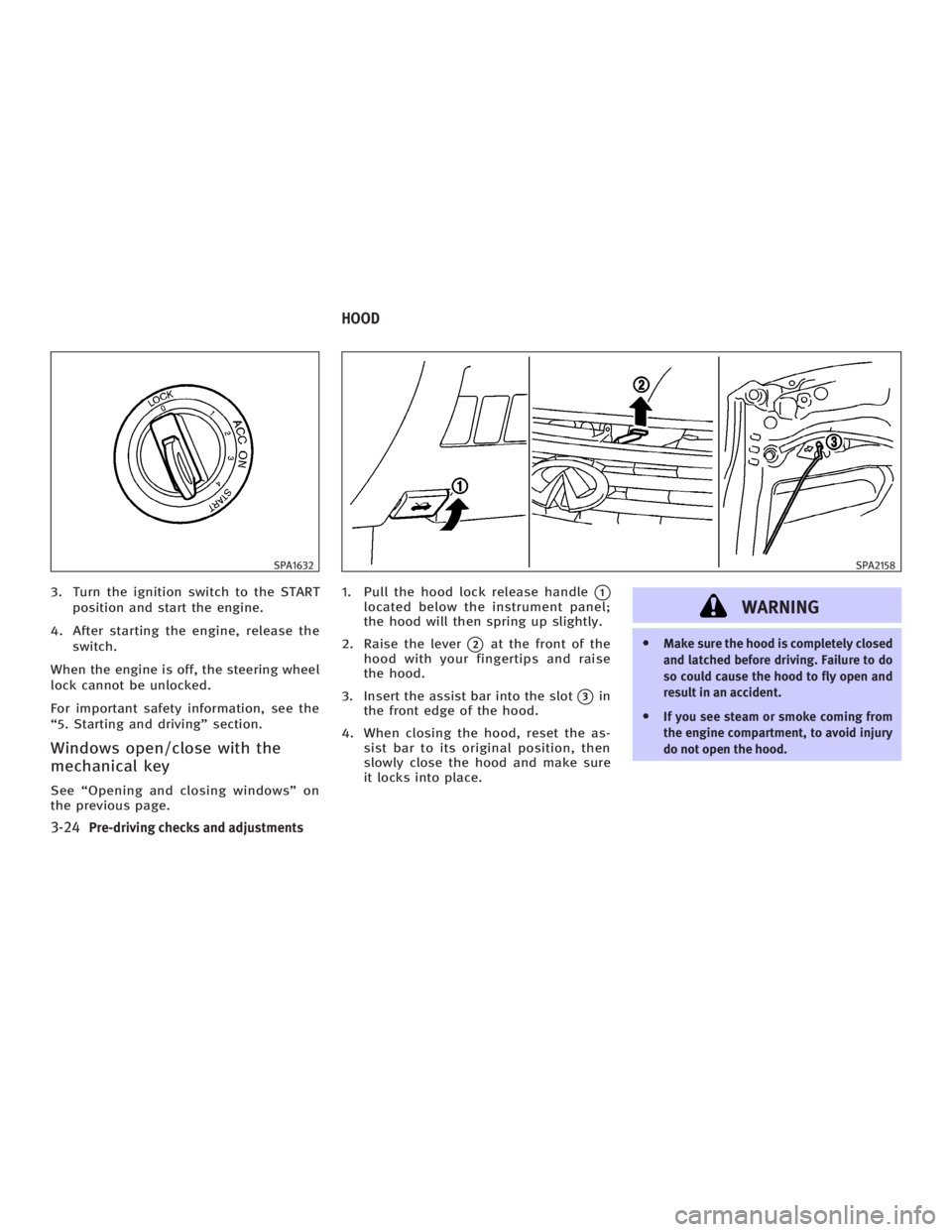
the previous page. 1. Pull the hood lock release handle
q 1
located below the instrument panel;
the hood will then spring up slightly.
2. Raise the lever
q 2
at the front of the
hood with your fingertips and raise
the hood.
3. Insert the assist bar into the slot
q 3
in
the front edge of the hood.
4. When closing the hood, reset the as-
sist bar to its original position, then
slowly close the hood and make sure
it locks into place.
WARNING O Make sure the hood is completely closed
and latched before driving. Failure to do
so could cause the hood to fly open and
result in an accident.
O If you see steam or smoke coming from
the engine compartment, to avoid injury
do not open the hood.SPA1632 SPA2158
HOOD
3-24 Pre-driving checks and adjustments
w 06.1.4/V35-D/V5.0
X
Page 149 of 344
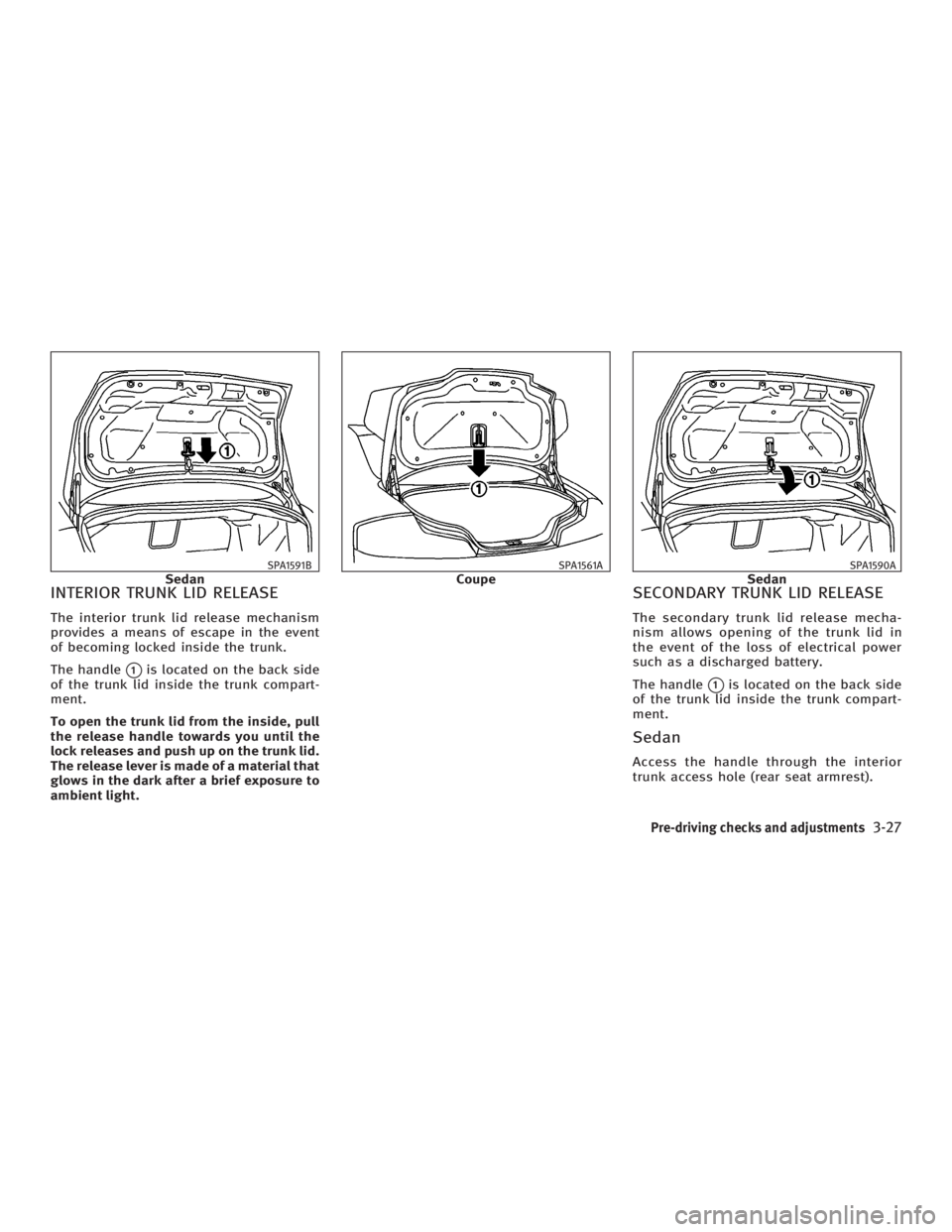
INTERIOR TRUNK LID RELEASE The interior trunk lid release mechanism
provides a means of escape in the event
of becoming locked inside the trunk.
The handle
q 1
is located on the back side
of the trunk lid inside the trunk compart-
ment.
To open the trunk lid from the inside, pull
the release handle towards you until the
lock releases and push up on the trunk lid.
The release lever is made of a material that
glows in the dark after a brief exposure to
ambient light. SECONDARY TRUNK LID RELEASE The secondary trunk lid release mecha-
nism allows opening of the trunk lid in
the event of the loss of electrical power
such as a discharged battery.
The handle
q 1
is located on the back side
of the trunk lid inside the trunk compart-
ment.
Sedan Access the handle through the interior
trunk access hole (rear seat armrest).SPA1591B
Sedan SPA1561A
Coupe SPA1590A
Sedan
Pre-driving checks and adjustments
3-27
w 06.1.4/V35-D/V5.0
X
Page 154 of 344
CAUTION O Do not store the main sun visor before
storing the extension sun visor.
O Do not pull the extension sun visor forc-
edly downward.
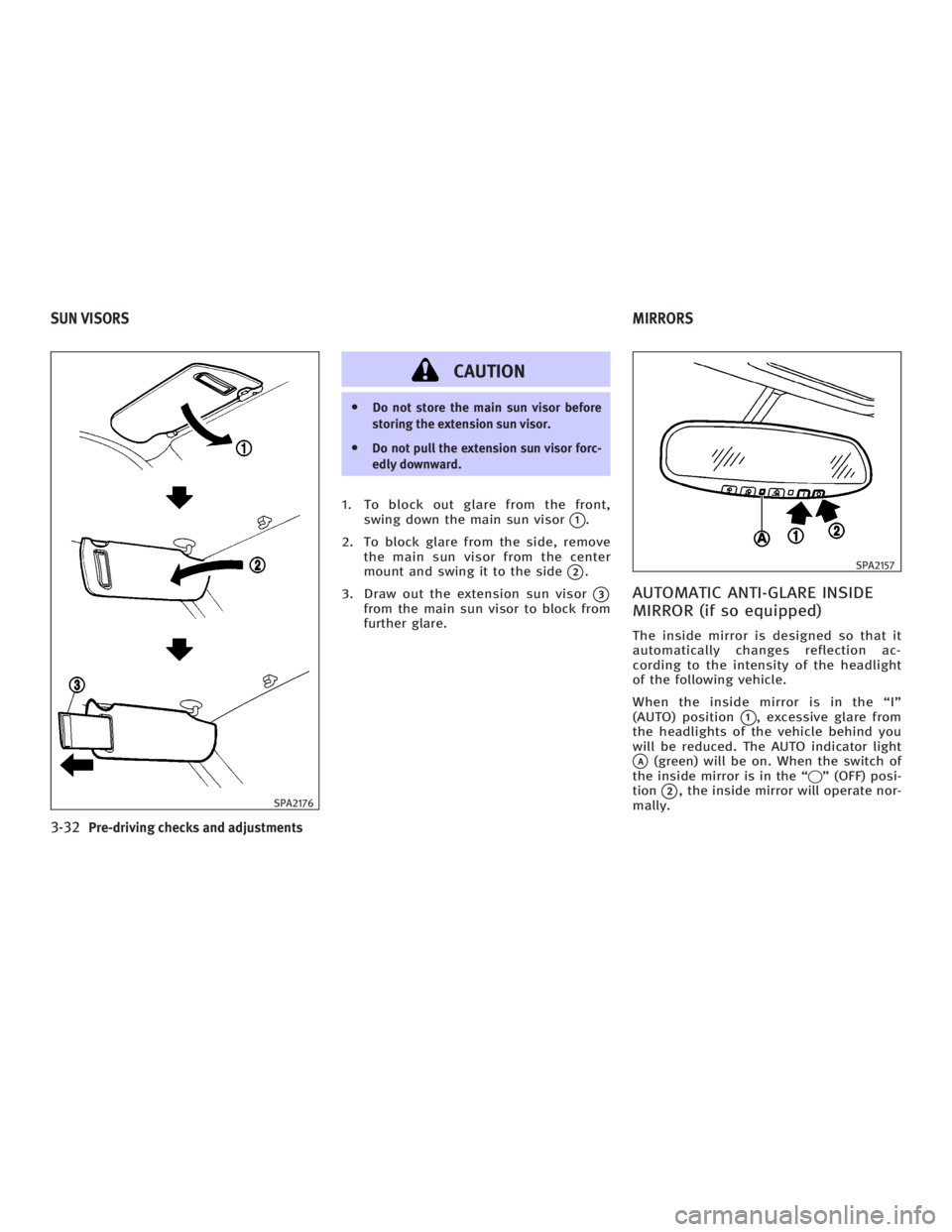
1. To block out glare from the front,
swing down the main sun visor
q 1
.
2. To block glare from the side, remove
the main sun visor from the center
mount and swing it to the side
q 2
.
3. Draw out the extension sun visor
q 3
from the main sun visor to block from
further glare.
AUTOMATIC ANTI-GLARE INSIDE
MIRROR (if so equipped) The inside mirror is designed so that it
automatically changes reflection ac-
cording to the intensity of the headlight
of the following vehicle.
When the inside mirror is in the ªIº
(AUTO) position
q 1
, excessive glare from
the headlights of the vehicle behind you
will be reduced. The AUTO indicator light
q A
(green) will be on. When the switch of
the inside mirror is in the ª q º (OFF) posi-
tion
q 2
, the inside mirror will operate nor-
mally.SPA2176 SPA2157
SUN VISORS MIRRORS
3-32 Pre-driving checks and adjustments
w 06.1.4/V35-D/V5.0
X
Page 156 of 344
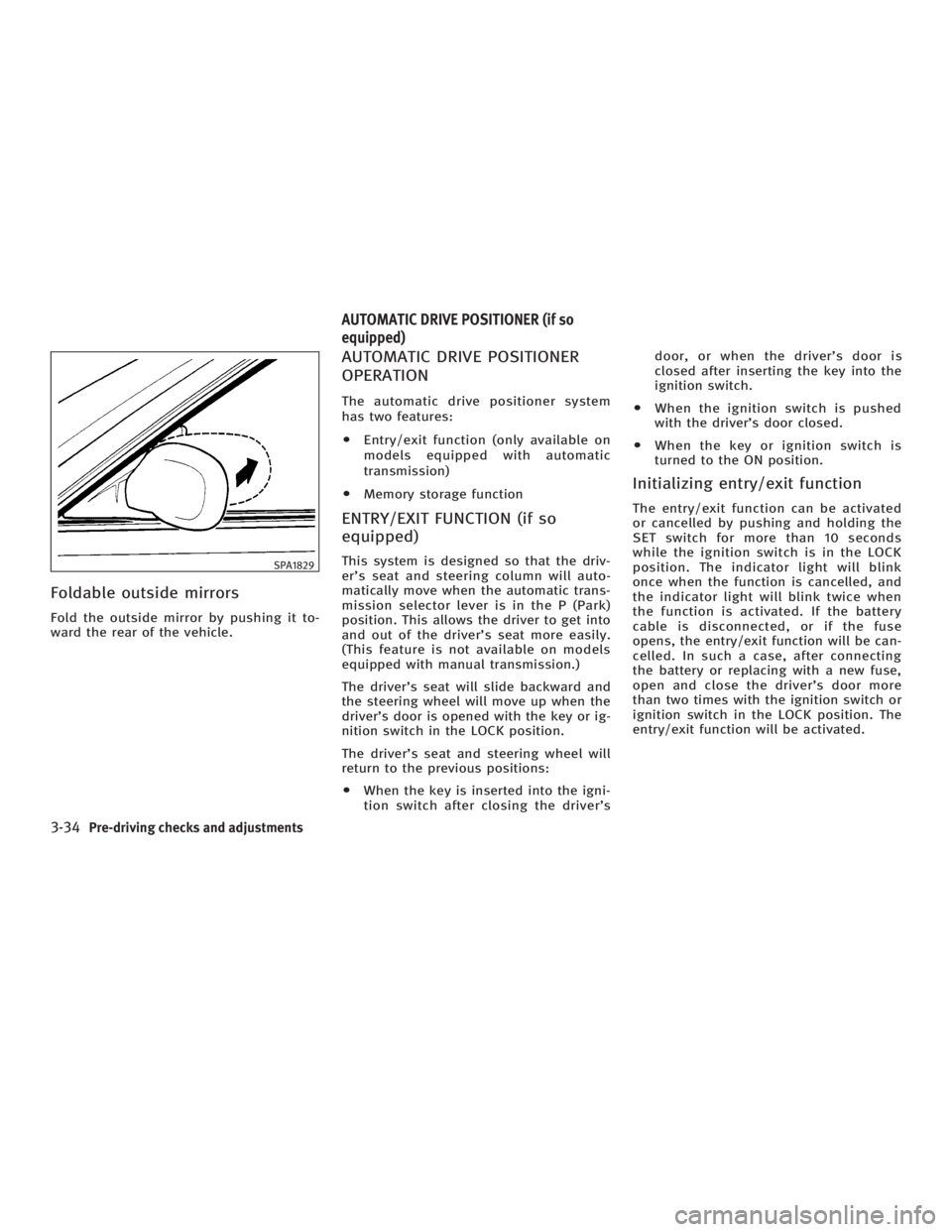
Foldable outside mirrors Fold the outside mirror by pushing it to-
ward the rear of the vehicle. AUTOMATIC DRIVE POSITIONER
OPERATION The automatic drive positioner system
has two features:
O Entry/exit function (only available on
models equipped with automatic
transmission)
O Memory storage function
ENTRY/EXIT FUNCTION (if so
equipped) This system is designed so that the driv-
er's seat and steering column will auto-
matically move when the automatic trans-
mission selector lever is in the P (Park)
position. This allows the driver to get into
and out of the driver's seat more easily.
(This feature is not available on models
equipped with manual transmission.)
The driver's seat will slide backward and
the steering wheel will move up when the
driver's door is opened with the key or ig-
nition switch in the LOCK position.
The driver's seat and steering wheel will
return to the previous positions:
O When the key is inserted into the igni-
tion switch after closing the driver's door, or when the driver's door is
closed after inserting the key into the
ignition switch.
O When the ignition switch is pushed
with the driver's door closed.
O When the key or ignition switch is
turned to the ON position.
Initializing entry/exit function The entry/exit function can be activated
or cancelled by pushing and holding the
SET switch for more than 10 seconds
while the ignition switch is in the LOCK
position. The indicator light will blink
once when the function is cancelled, and
the indicator light will blink twice when
the function is activated. If the battery
cable is disconnected, or if the fuse
opens, the entry/exit function will be can-
celled. In such a case, after connecting
the battery or replacing with a new fuse,
open and close the driver's door more
than two times with the ignition switch or
ignition switch in the LOCK position. The
entry/exit function will be activated.SPA1829
AUTOMATIC DRIVE POSITIONER (if so
equipped)
3-34 Pre-driving checks and adjustments
w 06.1.4/V35-D/V5.0
X
Page 157 of 344
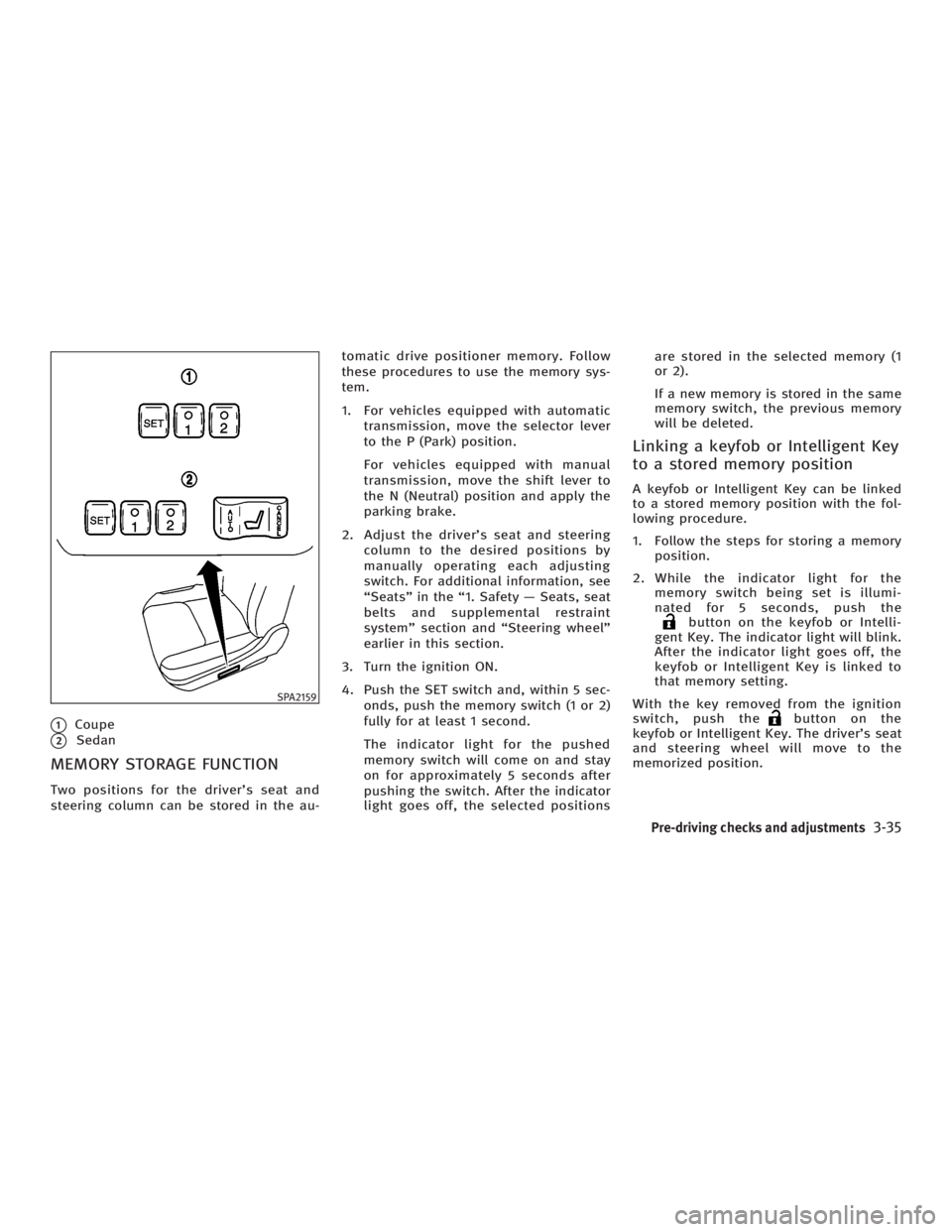
q 1
Coupe
q 2
Sedan
MEMORY STORAGE FUNCTION Two positions for the driver's seat and
steering column can be stored in the au- tomatic drive positioner memory. Follow
these procedures to use the memory sys-
tem.
1. For vehicles equipped with automatic
transmission, move the selector lever
to the P (Park) position.
For vehicles equipped with manual
transmission, move the shift lever to
the N (Neutral) position and apply the
parking brake.
2. Adjust the driver's seat and steering
column to the desired positions by
manually operating each adjusting
switch. For additional information, see
ªSeatsº in the ª1. Safety Ð Seats, seat
belts and supplemental restraint
systemº section and ªSteering wheelº
earlier in this section.
3. Turn the ignition ON.
4. Push the SET switch and, within 5 sec-
onds, push the memory switch (1 or 2)
fully for at least 1 second.
The indicator light for the pushed
memory switch will come on and stay
on for approximately 5 seconds after
pushing the switch. After the indicator
light goes off, the selected positions are stored in the selected memory (1
or 2).
If a new memory is stored in the same
memory switch, the previous memory
will be deleted.
Linking a keyfob or Intelligent Key
to a stored memory position A keyfob or Intelligent Key can be linked
to a stored memory position with the fol-
lowing procedure.
1. Follow the steps for storing a memory
position.
2. While the indicator light for the
memory switch being set is illumi-
nated for 5 seconds, push the
button on the keyfob or Intelli-
gent Key. The indicator light will blink.
After the indicator light goes off, the
keyfob or Intelligent Key is linked to
that memory setting.
With the key removed from the ignition
switch, push the button on the
keyfob or Intelligent Key. The driver's seat
and steering wheel will move to the
memorized position.SPA2159
Pre-driving checks and adjustments
3-35
w 06.1.4/V35-D/V5.0
X
Page 158 of 344
Confirming memory storage O Turn the ignition ON and push the SET
switch. If the main memory has not
been stored, the indicator light will
come on for approximately 0.5 sec-
onds. When the memory has stored in
position, the indicator light will stay
on for approximately 5 seconds.
O If the battery cable is disconnected, or
if the fuse opens, the memory will be
canceled.
Reset the desired position using the
previous procedure.
Selecting the memorized position 1. For vehicles equipped with automatic
transmission, move the selector lever
to the P (Park) position.
For vehicles equipped with manual
transmission, move the shift lever in
the N (Neutral) position and apply the
parking brake.
2. Use one of the following methods to
move the driver's seat and the
steering wheel.
O Turn the ignition switch to the ªONº
position and push the memory switch (1 or 2) fully for at least 1
second.
O Within 45 seconds of opening the
driver's door, push the memory
switch (1 or 2) fully for at least 1
second.
The driver's seat and steering column
will move to the memorized position
with the indicator light flashing, and
then the light will stay on for approxi-
mately 5 seconds.
SYSTEM OPERATION The automatic drive positioner system will
not work or will stop operating under the
following conditions:
O when the vehicle speed is above 4
MPH (7 km/h).
O when the adjusting switch for the driv-
er's seat and steering column is
turned on while the automatic drive
positioner is operating.
O when the cancel switch (if so
equipped) is pushed to the CANCEL
side. (However, it will not be cancelled
if the switch is pushed while the seat
and steering column are returning to the previous positions (entry/exit
function).)
O when the memory switch 1 or 2 is not
pushed and held for at least 1 second.
O when the seat has already been
moved to the memorized position.
O when no seat position is stored in the
memory switch.
O when the parking brake is not applied.
Ð MT models
O when the speed is above 4 MPH (7
km/h) while the parking brake is ap-
plied. Ð MT models
To restart the drive positioner system,
move the parking brake to off and on.
O when the front seat is folded for oper-
ating the walk-in mechanism (if so
equipped).
O when the engine is started while the
automatic drive positioner is operating.
O when the AT selector lever is moved
from the P position to any other posi-
tion. (However, it will not be cancelled
if the switch is pushed while the seat
and steering column are returning to
the previous positions (entry/exit
function).)
3-36 Pre-driving checks and adjustments
w 06.1.4/V35-D/V5.0
X
Page 164 of 344
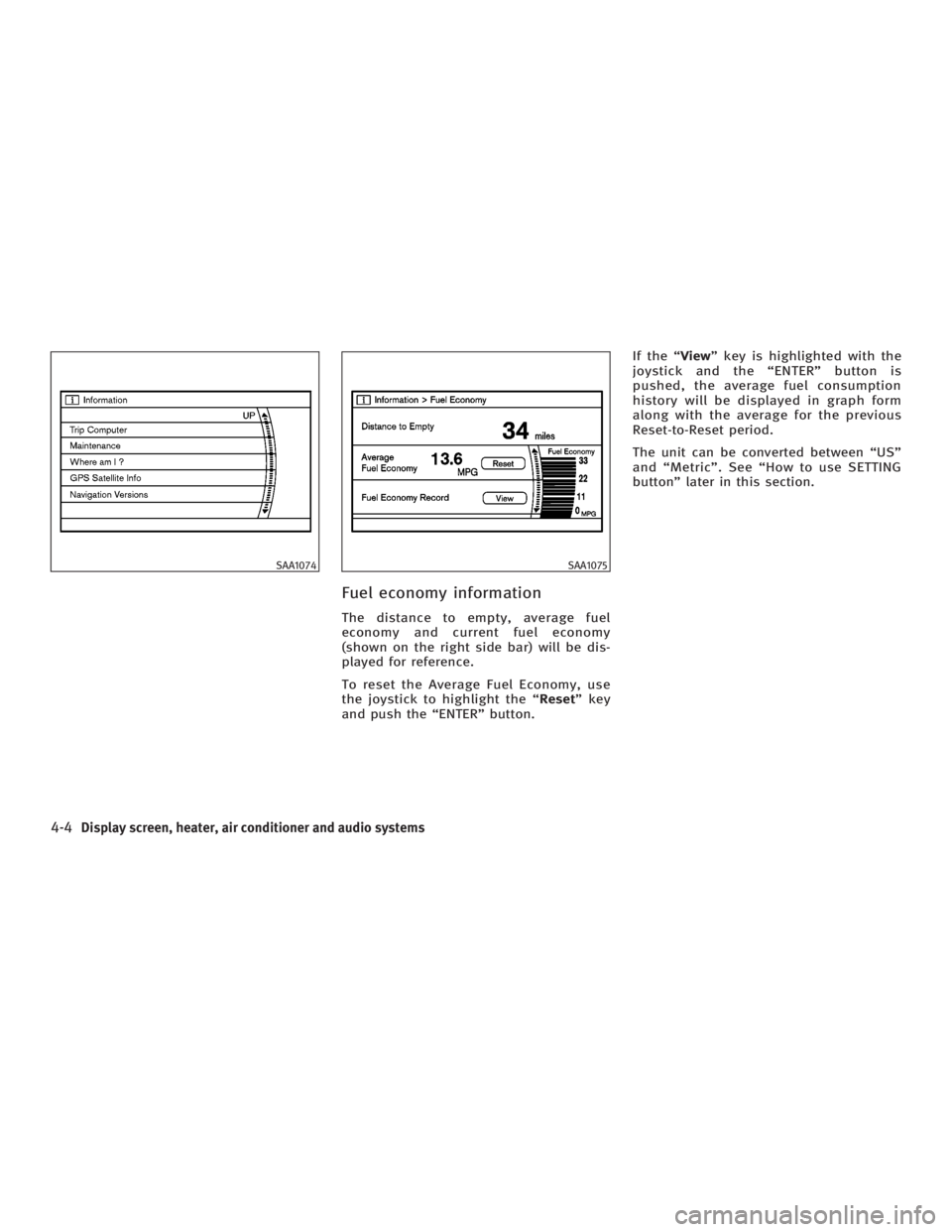
Fuel economy information The distance to empty, average fuel
economy and current fuel economy
(shown on the right side bar) will be dis-
played for reference.
To reset the Average Fuel Economy, use
the joystick to highlight the ª Reset º key
and push the ªENTERº button. If the ª View º key is highlighted with the
joystick and the ªENTERº button is
pushed, the average fuel consumption
history will be displayed in graph form
along with the average for the previous
Reset-to-Reset period.
The unit can be converted between ªUSº
and ªMetricº. See ªHow to use SETTING
buttonº later in this section.SAA1074 SAA1075
4-4 Display screen, heater, air conditioner and audio systems
w 06.1.4/V35-D/V5.0
X
Page 165 of 344
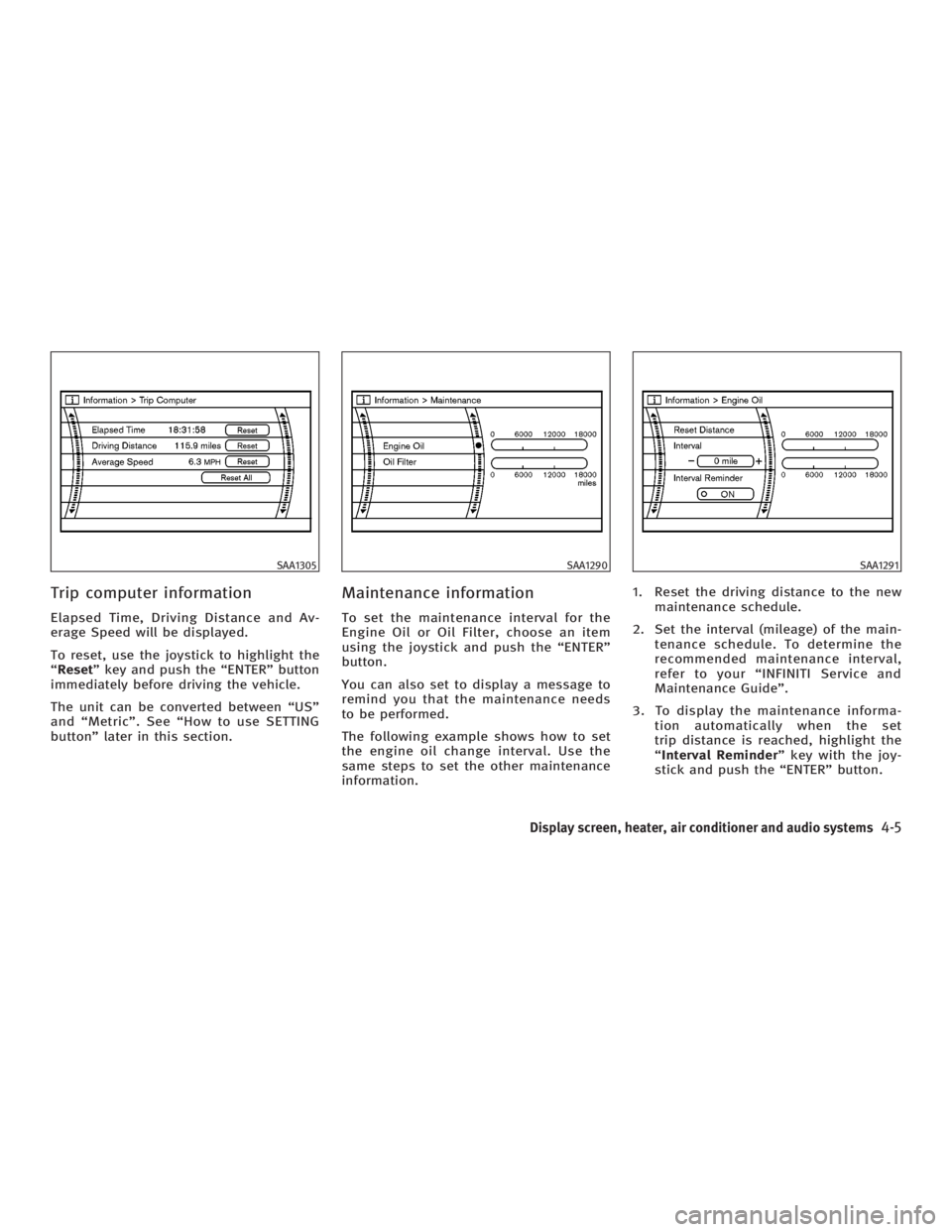
Trip computer information Elapsed Time, Driving Distance and Av-
erage Speed will be displayed.
To reset, use the joystick to highlight the
ª Reset º key and push the ªENTERº button
immediately before driving the vehicle.
The unit can be converted between ªUSº
and ªMetricº. See ªHow to use SETTING
buttonº later in this section. Maintenance information To set the maintenance interval for the
Engine Oil or Oil Filter, choose an item
using the joystick and push the ªENTERº
button.
You can also set to display a message to
remind you that the maintenance needs
to be performed.
The following example shows how to set
the engine oil change interval. Use the
same steps to set the other maintenance
information. 1. Reset the driving distance to the new
maintenance schedule.
2. Set the interval (mileage) of the main-
tenance schedule. To determine the
recommended maintenance interval,
refer to your ªINFINITI Service and
Maintenance Guideº.
3. To display the maintenance informa-
tion automatically when the set
trip distance is reached, highlight the
ª Interval Reminder º key with the joy-
stick and push the ªENTERº button.SAA1305 SAA1290 SAA1291
Display screen, heater, air conditioner and audio systems
4-5
w 06.1.4/V35-D/V5.0
X
Page 168 of 344

Clock settings The following display will appear when
pushing the ªSETTINGº button, selecting
the ª Clock º key and pushing the ªENTERº
button.
On-screen Clock:
When this item is turned to ON, a clock is
always displayed in the upper right corner
of the screen.
This clock will indicate the time almost
exactly because it is always adjusted by
the GPS system. Clock Format:
Choose either the 12-hour clock display or
the 24-hour clock display.
Offset Adjust:
Adjust the time by increasing or de-
creasing per minute.
Daylight Saving Time:
Turn this item to ON for daylight saving
time application.
Time Zone:
Choose the time zone from the following
O Pacific
O Mountain
O Central
O Eastern
O Atlantic
O Newfoundland
Language/Units settings The Language/Units setting screen will
appear when selecting the ª Language/
Units º key and pushing the ªENTERº
button.SAA1091 SAA1295
4-8 Display screen, heater, air conditioner and audio systems
w 06.1.4/V35-D/V5.0
X
Page 172 of 344
Dehumidified defrosting or
defogging 1. Push the front window defroster
button on. (The indicator light on
the button will come on.)
2. Turn the temperature control dial to
set the desired temperature.
O To quickly remove ice from the outside
of the windows, push the fan speed
control button + and set to the
maximum position.
O As soon as possible after the wind-
shield is clean, push the AUTO/ECON
button to return to the auto mode.
O When the front window defroster
button is pushed, the air condi-
tioner will automatically be turned on
at outside temperatures above 23ÉF
(þ5ÉC) to defog the windshield, and
the air recirculation mode will auto-
matically be turned off.
Outside air is drawn into the pas-
senger compartment to improve the
defogging performance. MANUAL OPERATION
Fan speed control Push the fan speed control button þ
or + to manually control the fan
speed.
Push the AUTO/ECON button to return to
automatic control of the fan speed.
Fresh air Push the outside air circulation button
to draw outside air into the passen-
ger compartment. The indicator light on
the button will come on.
Air recirculation Push the air recirculation button to
recirculate interior air inside the vehicle.
The indicator light on the button will
come on.
The air recirculation button will not be ac-
tivated when the air conditioner is in the
defroster mode. Air flow control (MODE) Pushing the MODE button selects the air
outlet to:
: Air flows from center and side
ventilators.
: Air flows from center and side
ventilators and foot outlets.
: Air flows mainly from foot outlets.
: Air flows from defroster and foot
outlets.
To turn the system off Push the OFF button.
DUAL BUTTON (if so equipped) You can set the temperature of the driver
and front passenger sides individually.
Pushing the DUAL button changes the set-
ting position as follows:
Driver/Passenger ! Driver ! Passenger
If selecting the Driver/Passenger position
again after the temperature is individually
set, the display will show the temperature
set for the driver side.
4-12 Display screen, heater, air conditioner and audio systems
w 06.1.4/V35-D/V5.0
X