wheel INFINITI G35 2006 User Guide
[x] Cancel search | Manufacturer: INFINITI, Model Year: 2006, Model line: G35, Model: INFINITI G35 2006Pages: 344, PDF Size: 6.81 MB
Page 85 of 344

O If the light illuminates while driving,
avoid sudden steering maneuvers or
abrupt braking, reduce vehicle speed,
pull off the road to a safe location and
stop the vehicle as soon as possible. Se-
rious vehicle damage could occur and
may lead to an accident and could result
in serious personal injury. Check the tire
pressure for all four tires. Adjust the tire
pressure to the recommended COLD tire
pressure shown on the Tire and Loading
Information label to turn the low tire
pressure warning light OFF. If the light
still comes on while driving after ad-
justing the tire pressure, a tire may be
flat. If you have a flat tire, replace it with
a spare tire as soon as possible.
O
When a spare tire is mounted or a wheel is
replaced, tire pressure will not be indicated,
the TPMS will not function and the low tire
pressure warning light will flash. Contact
your INFINITI dealer as soon as possible for
tire replacement and/or system resetting.
O Replacing tires with those not originally
specified by INFINITI could affect the
proper operation of the TPMS. CAUTION O The TPMS is not a substitute for the
regular tire pressure check. Be sure to
check the tire pressure regularly.
O If the vehicle is being driven at speeds of
less than 16 MPH (25 km/h), the TPMS
may not operate correctly.
O Be sure to install the specified size of
tires to the four wheels correctly.
Low washer fluid warning
light This light comes on when the washer tank
fluid is at a low level. Add washer fluid as
necessary. See ªWindow washer fluidº in
the ª8. Maintenance and do-it-yourselfº
section.
P position selecting warning
light (for Intelligent Key
system) The light blinks in red when the selector
lever is not in the P (Park) position and
you are outside the vehicle with the Intel-
ligent Key. When the warning light blinks, move the
selector lever to P position and return the
ignition switch to the LOCK position.
Rear Active Steer (RAS)
warning light (if so
equipped) If the light comes on while the engine is
running, it may indicate that there is a
malfunction with the Rear Active Steer
(RAS) portion of the steering system. Have
the system checked by an INFINITI dealer.
For further information about the RAS sys-
tem, see ªRear Active Steer (RAS) systemº
in the ª5. Starting and drivingº section.
If a malfunction occurs in the system, the
RAS function will cease but driving can be
continued.
If the light comes on while you are driving,
contact an INFINITI dealer for repair.
Seat belt warning light and
chime The light and chime remind you to fasten
the driver's seat belt. The light illuminates
whenever the ignition switch is pushed to
the ON position, and will remain illumi-
nated until the driver's seat belt is fas-
Instruments and controls
2-13
w 06.1.4/V35-D/V5.0
X
Page 98 of 344

To sound the horn, push on or near the
horn marks of the steering wheel.
WARNINGDo not disassemble the horn. Doing so could
affect proper operation of the supplemental
front air bag system. Tampering with the
supplemental front air bag system may re-
sult in serious personal injury. The front seats are warmed by built-in
heaters. The switches located on the cen-
ter console can be operated indepen-
dently (driver side seat
q A
and front pas-
senger seat
q B
) of each other.
1. Start the engine.
2. Select heat range.
q 1
For low heat, push the (Low)
side of the switch.
q 2
For high heat, push the
(High) side of the switch.
q 3
For no heat, the switch has a cen- ter OFF position between low and
high.
The indicator light in the switch
q C
will
illuminate when low or high is se-
lected.
The heater is controlled by a thermo-
stat, automatically turning the heater
on and off. The indicator light will re-
main on as long as the switch is on.
3. When the vehicle's interior is warmed,
or before you leave the vehicle, be
sure to turn the switch to the off posi-
tion (center)
q 3
.SIC1838 SIC2793
AT models SIC2672
MT modelsHORN HEATED SEATS
2-26 Instruments and controls
w 06.1.4/V35-D/V5.0
X
Page 99 of 344

CAUTIONO The battery could run down if the seat
heater is operated while the engine is
not running.
O Do not use the seat heater for extended
periods or when no one is using the seat.
O Do not put anything on the seat which in-
sulates heat, such as a blanket, cushion,
seat cover, etc. Otherwise, the seat may
become overheated.
O Do not place anything hard or heavy on
the seat or pierce it with a pin or similar
object. This may result in damage to the
heater.
O Any liquid spilled on the heated seat
should be removed immediately with a
dry cloth.
O When cleaning the seat, never use gaso-
line, benzine, thinner, or any similar
materials. O If any abnormalities are found or the
heated seat does not operate, turn the
switch off and have the system checked
by an INFINITI dealer.
For driving or starting the vehicle on
snowy roads or slippery areas, push the
SNOW mode switch to the ON position
and then the indicator light in the switch
and the SNOW indicator light in the in-
strument panel will illuminate.
When the SNOW mode is activated, en-
gine output is controlled to reduce wheel
spin. SIC2660
SNOW MODE SWITCH (if so equipped)
Instruments and controls
2-27
w 06.1.4/V35-D/V5.0
X
Page 100 of 344

CAUTIONWhen turning the vehicle in SNOW mode on
paved roads, you may feel a braking effect.
This is a normal condition of the AWD model.
The vehicle should be driven with the Ve-
hicle Dynamic Control (VDC) system on for
most driving conditions.
If the vehicle is stuck in mud or snow, the
VDC system reduces the engine output to
reduce wheel spin. The engine speed will
be reduced even if the accelerator is de-
pressed to the floor. If maximum engine
power is needed to free a stuck vehicle,
turn the VDC system off.
To turn off the Vehicle Dynamic Control
(VDC) system, push the VDC OFF switch (lo-
cated on the lower side of the instrument
panel). The indicator will come on. Push the VDC OFF switch again or restart
the engine to turn on the system. See
ªVehicle Dynamic Control (VDC) systemº
in the ª5. Starting and drivingº section.
SIC1881
VEHICLE DYNAMIC CONTROL (VDC) OFF
SWITCH
2-28 Instruments and controls
w 06.1.4/V35-D/V5.0
X
Page 123 of 344
3 Pre-driving checks and adjustments Keys ................................................................. 3-2
Infiniti vehicle immobilizer system keys ...... 3-2
Doors ............................................................... 3-3
Locking with key ......................................... 3-3
Locking with inside lock knob ..................... 3-4
Locking with power door lock switch........... 3-4
Child safety rear door lock (Sedan) ............. 3-5
Remote keyless entry system (models without
Intelligent Key system) ..................................... 3-5
How to use remote keyless entry system .... 3-6
Intelligent Key system (if so equipped) ............. 3-9
Door locks/unlocks precaution .................. 3-11
Intelligent Key operation ............................ 3-11
Opening and closing windows ................... 3-14
Operating the engine ................................. 3-14
Intelligent Key operating range ................. 3-16
Warning signals ......................................... 3-17
Trouble-shooting guide .............................. 3-19
Operation with intelligent remote keyless
entry system ............................................. 3-20
Operation with the mechanical key and
valet key ................................................... 3-23 Hood .............................................................. 3-24
Trunk lid ......................................................... 3-25
Opener operation ...................................... 3-25
Interior trunk lid release ............................ 3-27
Secondary trunk lid release ....................... 3-27
Fuel-filler door ................................................ 3-28
Opening the fuel-filler door ....................... 3-28
Fuel-filler cap ............................................ 3-29
Steering wheel ............................................... 3-30
Manual operation ...................................... 3-30
Electric operation (if so equipped) ............. 3-31
Sun visors ...................................................... 3-32
Mirrors............................................................ 3-32
Automatic anti-glare inside mirror (if so
equipped) .................................................. 3-32
Outside mirrors ......................................... 3-33
Automatic drive positioner (if so equipped) .... 3-34
Automatic drive positioner operation ......... 3-34
Entry/exit function (if so equipped) ........... 3-34
Memory storage function ........................... 3-35
System operation ...................................... 3-36
Cancel switch (if so equipped)................... 3-37
w 06.1.4/V35-D/V5.0
X
Page 138 of 344

O Slowly turn the ignition switch after
the Intelligent Key warning light
comes on in green. If it is turned
quickly, it may stick and be difficult to
turn.
O The engine may not start if the Intelli-
gent Key is placed:
Ð inside the glove box or the door
pocket
Ð on the instrument panel
Ð in the corner of interior compart-
ment.
O If it is difficult to turn the ignition
switch, perform the following:
Ð Push the ignition switch and turn it
to the left and then to the right.
Ð Turn the ignition switch while
gently turning the steering wheel to
the left or right.
Stopping the engine 1. Shift the selector lever to the P posi-
tion.
2. Turn the ignition switch to the ACC po-
sition. WARNING When you leave the vehicle, be sure to ob-
serve the following:
O Shift the selector lever to P. (In other po-
sitions, the ignition switch will not re-
turn to LOCK.)
O Securely return the ignition switch to
LOCK.
O Set the parking brake. Failure to do so
could result in unexpected vehicle move-
ment and could lead to severe injury.
INTELLIGENT KEY OPERATING
RANGE The Intelligent Key functions can be used
only when you carry the key with you and
operate as specified in the operating
range inside or outside the vehicle.
When the Intelligent Key battery runs
down or where there are strong radio
waves or noise, the operating range may
be narrower or the key may be inopera-
tive.
Operating range of the door or
trunk lock/unlock function The outside sensors are in the front out-
side door handles and the trunk. SPA1900
3-16 Pre-driving checks and adjustments
w 06.1.4/V35-D/V5.0
X
Page 142 of 344
Troubleshooting examples When it is difficult to turn the ignition
switch
O Push the ignition switch and turn it to
the left and then to the right.
O While gently turning the steering
wheel to the left or right, turn the igni-
tion switch.
OPERATION WITH INTELLIGENT
REMOTE KEYLESS ENTRY SYSTEM It is possible to lock/unlock all doors,
fuel-filler door, activate the panic alarm
and open the windows by pushing the
buttons on the Intelligent Key from out-
side the vehicle.
Before locking the doors, make sure the
key is not left in the vehicle.
The LOCK /UNLOCK button on
the Intelligent Key can operate at a dis-
tance of approximately 33 ft (10 m) from
the vehicle. (The effective distance de-
pends upon the conditions around the ve-
hicle.)
As many as 4 Intelligent Keys can be used
with one vehicle. For information concern-
ing the purchase and use of additional In-
telligent Key, contact an INFINITI dealer. The lock and unlock buttons on the Intel-
ligent Key will not operate when:
O the Intelligent Key is too far away from
the vehicle
O the Intelligent Key battery runs down
After locking with the Intelligent remote
keyless entry function, pull the door
handle to make sure the doors are se-
curely locked.
The operating range varies depending on
the environment. To securely operate the
lock and unlock buttons, approach the ve-
hicle to about 3 ft (1 m) from the door.
The panic alarm will not activate when the
mechanical key or the valet key is in the ig-
nition switch.
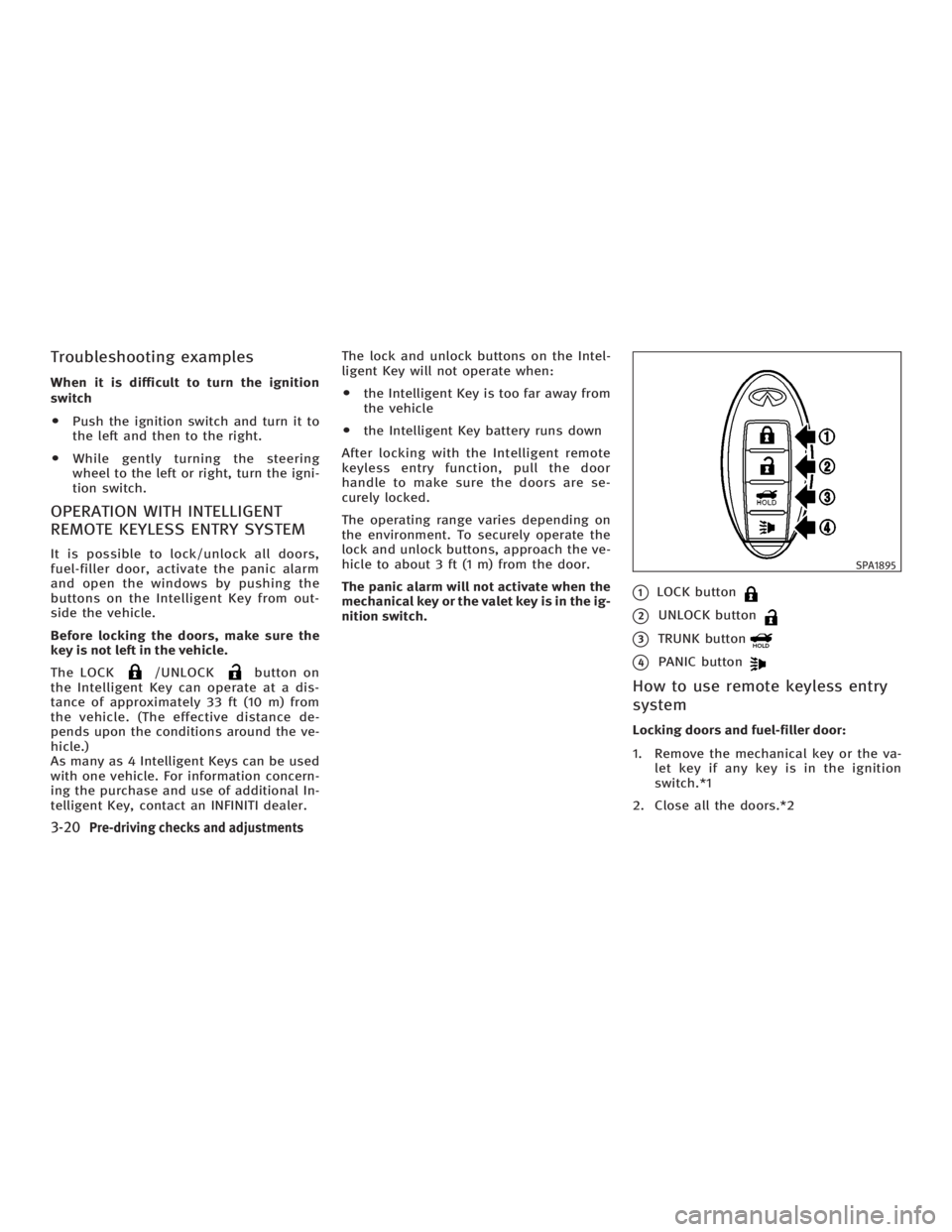
q 1
LOCK button
q 2
UNLOCK button
q 3
TRUNK button
q 4
PANIC button
How to use remote keyless entry
system Locking doors and fuel-filler door:
1. Remove the mechanical key or the va-
let key if any key is in the ignition
switch.*1
2. Close all the doors.*2 SPA1895
3-20 Pre-driving checks and adjustments
w 06.1.4/V35-D/V5.0
X
Page 146 of 344
3. Turn the ignition switch to the START
position and start the engine.
4. After starting the engine, release the
switch.
When the engine is off, the steering wheel
lock cannot be unlocked.
For important safety information, see the
ª5. Starting and drivingº section.
Windows open/close with the
mechanical key See ªOpening and closing windowsº on
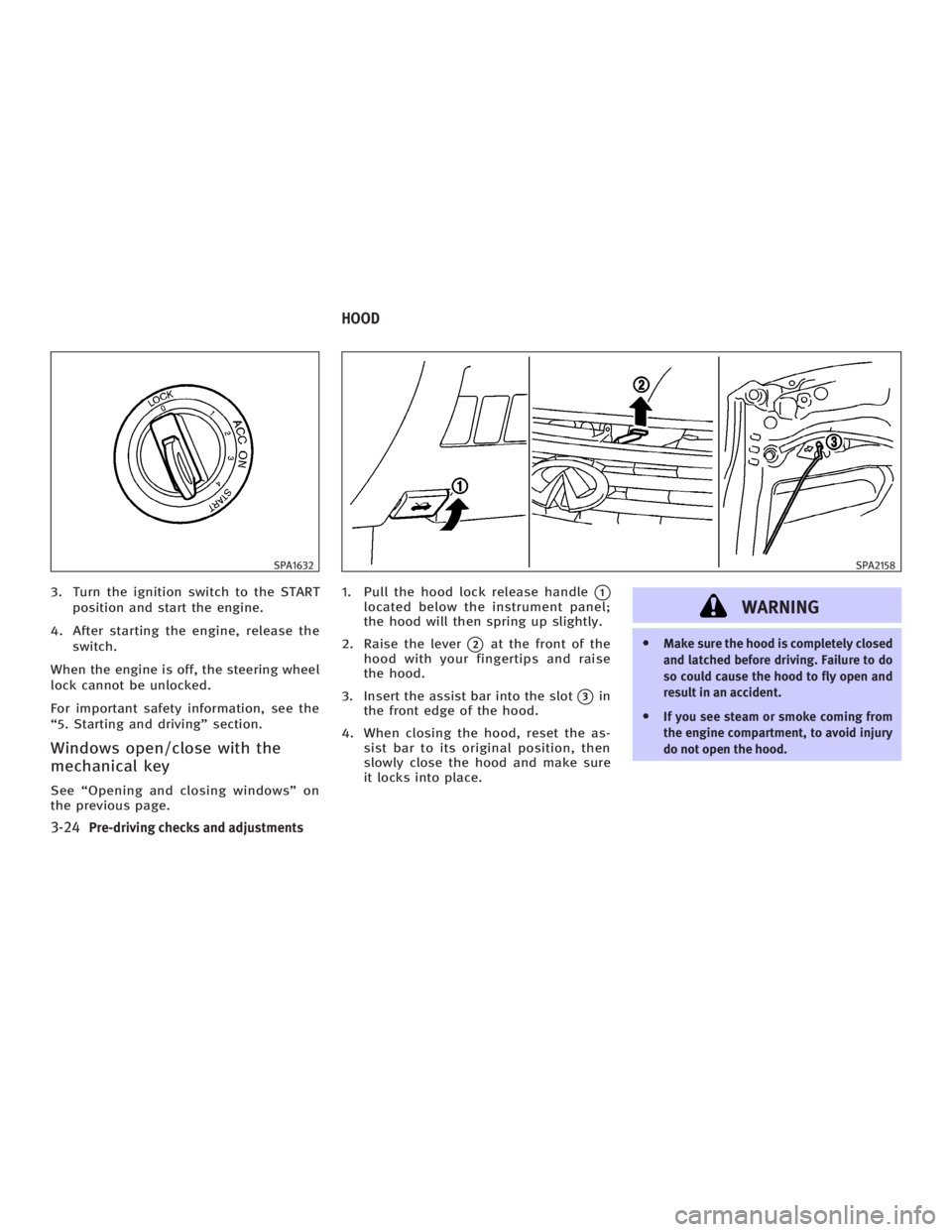
the previous page. 1. Pull the hood lock release handle
q 1
located below the instrument panel;
the hood will then spring up slightly.
2. Raise the lever
q 2
at the front of the
hood with your fingertips and raise
the hood.
3. Insert the assist bar into the slot
q 3
in
the front edge of the hood.
4. When closing the hood, reset the as-
sist bar to its original position, then
slowly close the hood and make sure
it locks into place.
WARNING O Make sure the hood is completely closed
and latched before driving. Failure to do
so could cause the hood to fly open and
result in an accident.
O If you see steam or smoke coming from
the engine compartment, to avoid injury
do not open the hood.SPA1632 SPA2158
HOOD
3-24 Pre-driving checks and adjustments
w 06.1.4/V35-D/V5.0
X
Page 152 of 344
cause fuel overflow, resulting in fuel-
spray and possibly a fire.
O Use only an original equipment type
fuel-filler cap as a replacement. It has a
built-in safety valve needed for proper
operation of the fuel system and emis-
sion control system. An incorrect cap can
result in a serious malfunction and pos-
sible injury. An incorrect cap could also
cause the
malfunction indicator
lamp to illuminate.
O Do not fill a portable fuel container in the
vehicle or trailer. Static electricity can
cause an explosion of flammable liquid,
vapor or gas in any vehicle or trailer. To
reduce the risk of serious injury or death
when filling portable fuel containers:
Ð Always place the container on the
ground when filling.
Ð Do not use electronic devices when
filling.
Ð Keep the pump nozzle in contact with
the container while you are filling it.
Ð Use only approved portable fuel con-
tainers for flammable liquid.
O Never pour fuel into the throttle body to
attempt to start your vehicle. CAUTION O If fuel is spilled on the vehicle body,
flush it away with water to avoid paint
damage.
O Tighten until the fuel-filler cap clicks.
Failure to tighten the fuel-filler cap prop-
erly may cause the
malfunction in-
dicator lamp (MIL) to illuminate. If the
lamp illuminates because the fuel-
filler cap is loose or missing, tighten or
install the cap and continue to drive the
vehicle. The
lamp should turn off
after a few driving trips. If the
lamp
does not turn off after a few driving trips,
have the vehicle inspected by an INFINITI
dealer.
O For additional information, see the ªMal-
function indicator lamp (MIL)º in the ª2.
Instruments and controlsº section.
MANUAL OPERATION
WARNING Do not adjust the steering wheel while
driving. You could lose control of your ve-
hicle and cause an accident.
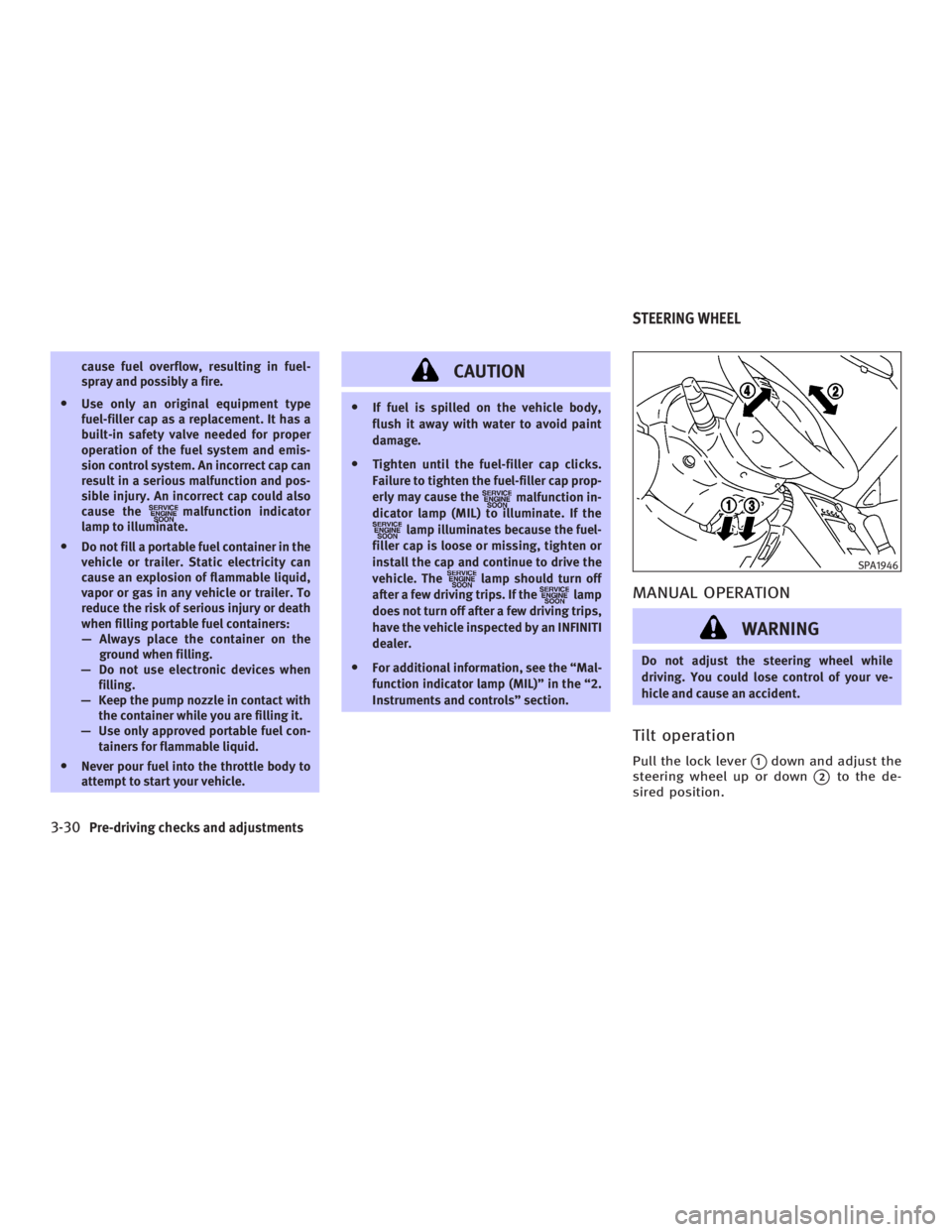
Tilt operation Pull the lock lever
q 1
down and adjust the
steering wheel up or down
q 2
to the de-
sired position. SPA1946
STEERING WHEEL
3-30 Pre-driving checks and adjustments
w 06.1.4/V35-D/V5.0
X
Page 153 of 344
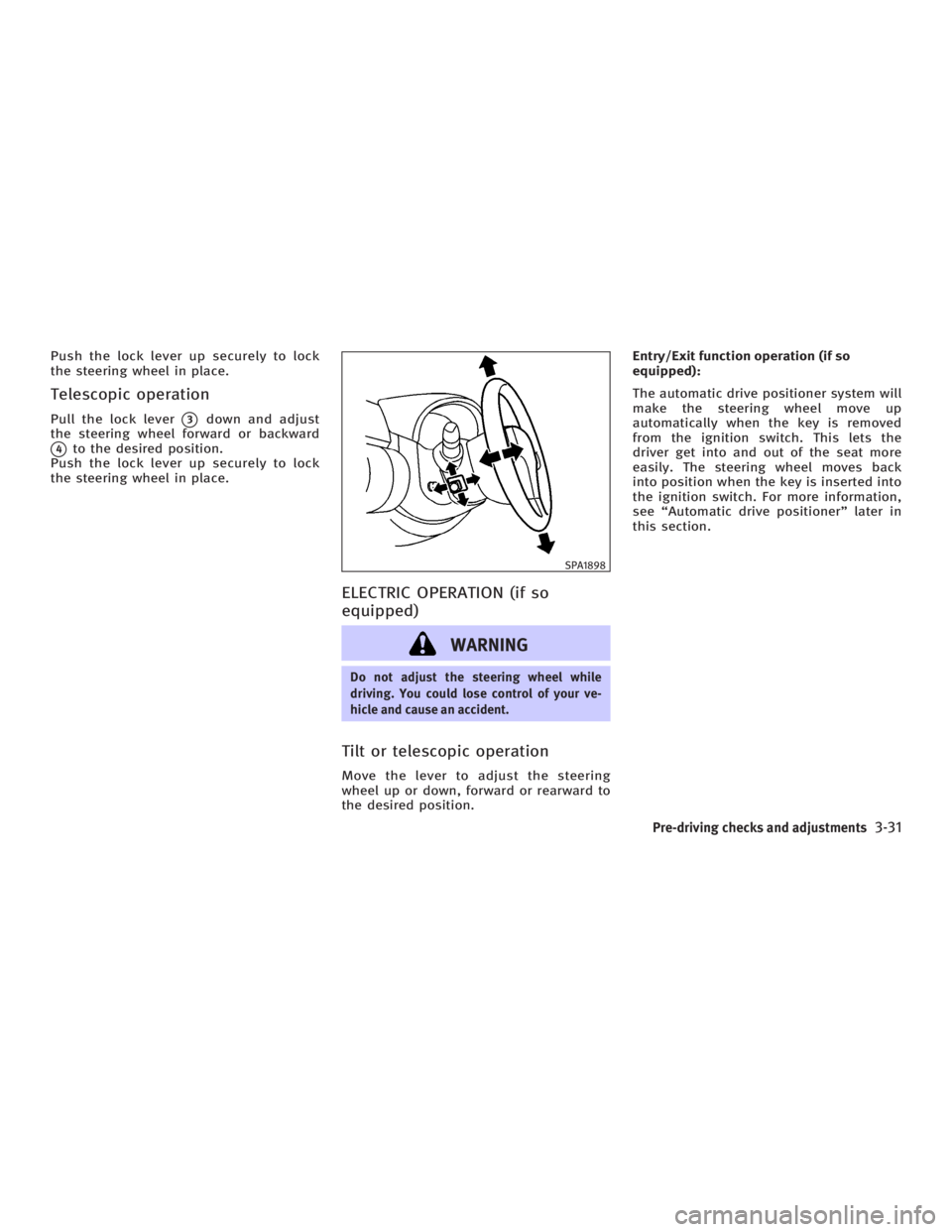
Push the lock lever up securely to lock
the steering wheel in place.
Telescopic operation Pull the lock lever
q 3
down and adjust
the steering wheel forward or backward
q 4
to the desired position.
Push the lock lever up securely to lock
the steering wheel in place.
ELECTRIC OPERATION (if so
equipped)
WARNING Do not adjust the steering wheel while
driving. You could lose control of your ve-
hicle and cause an accident.
Tilt or telescopic operation Move the lever to adjust the steering
wheel up or down, forward or rearward to
the desired position. Entry/Exit function operation (if so
equipped):
The automatic drive positioner system will
make the steering wheel move up
automatically when the key is removed
from the ignition switch. This lets the
driver get into and out of the seat more
easily. The steering wheel moves back
into position when the key is inserted into
the ignition switch. For more information,
see ªAutomatic drive positionerº later in
this section. SPA1898
Pre-driving checks and adjustments
3-31
w 06.1.4/V35-D/V5.0
X