REV light INFINITI G35 2006 Owner's Manual
[x] Cancel search | Manufacturer: INFINITI, Model Year: 2006, Model line: G35, Model: INFINITI G35 2006Pages: 344, PDF Size: 6.81 MB
Page 192 of 344
Ð Your vehicle is in an area where it
is difficult to receive radio waves;
such as in a tunnel, in an under-
ground parking garage, near a tall
building or in a mountainous area.
Ð Your cellular phone is locked to
prevent it from being dialed.
When the radio wave condition is not
ideal or ambient sound is too loud, it may
be difficult to hear the other person's
voice during a call.
Do not place the cellular phone in an area
surrounded by metal or far away from the
in-vehicle phone module to prevent tone
quality degradation and wireless connec-
tion disruption.
While a cellular phone is connected
through the Bluetooth wireless connec-
tion, the battery power of the cellular
phone may discharge quicker than usual.
If the Bluetooth Hands-Free Phone
System seems to be malfunctioning,
please refer to ªTroubleshooting guideº
later in this section. You can also visit
www.infiniti.com/bluetooth for trouble-
shooting help. Refer to the cellular phone Owner's
Manual regarding the telephone charges,
cellular phone antenna and body, etc.
This device complies with Part 15 of the
FCC Rules. Operation is subject to the fol-
lowing two conditions: (1) this device may
not cause harmful interference, and (2)
this device must accept any interference
received, including interference that may
cause undesired operation.
FCC Radiation Exposure Statement:
This equipment complies with FCC radia-
tion exposure limits set forth for an un-
controlled environment. This equipment
should be installed and operated with
minimum distance 8 inch (20 cm) be-
tween the radiator and your body. This
Transmitter must not be co-located or op-
erating in conjunction with any other an-
tenna or transmitter.
USING THE SYSTEM The INFINITI Voice Recognition system al-
lows hands-free operation of the
Bluetooth Hands-Free Phone System.
If the vehicle is in motion, some com-
mands may not be available so full atten-
tion may be given to vehicle operation. Initialization When the ignition switch is turned to the
ON position, INFINITI Voice Recognition is
initialized, which takes a few seconds.
When completed, the amber light on the
overhead console illuminates and the
system is ready to accept voice com-
mands. If the button is pushed be-
fore the initialization completes, the
system will announce ªHands-free phone
system not readyº and will not react to
voice commands.
Operating tips To get the best performance out of the
INFINITI Voice Recognition system, ob-
serve the following:
O Keep the interior of the vehicle as
quiet as possible. Close the windows
to eliminate surrounding noises
(traffic noises, vibration sounds, etc.),
which may prevent the system from
recognizing voice commands correctly.
O Wait until the tone sounds before
speaking a command. Otherwise, the
command will not be received properly.
O Start speaking a command within 5
seconds after the tone sounds.
4-32 Display screen, heater, air conditioner and audio systems
w 06.1.4/V35-D/V5.0
X
Page 193 of 344
O Speak in a natural voice without paus-
ing between words.
Giving voice commands To operate INFINITI Voice Recognition,
push and release the button located
on the steering wheel. The light on the
overhead console flashes to signal you
have entered a voice recognition (VR) ses-
sion. After the tone sounds, speak a com-
mand.
The command given is picked up by the
microphone, and voice feedback is given
when the command is accepted.
O If you need to hear the available com-
mands for the current menu again, say
ªHelpº and the system will repeat
them.
O If a command is not recognized, the
system announces, ªCommand not
recognized. Please try again.º Repeat
the command in a clear voice.
O If you want to go back to the previous
command, you can say ªGo backº or
ªCorrectionº anytime the system is
waiting for a response.
O You can cancel a command when the
system is waiting for a response by saying, ªCancelº or ªQuit.º The system
announces ªCancelº and ends the VR
session. You can also push the
button on the steering wheel at
any time. Whenever the VR session is
cancelled, a double beep is played to
indicate you have exited the system.
O If you want to adjust the volume of the
voice feedback, push the volume con-
trol switches (+ or -) on the steering
wheel while being provided with feed-
back. You can also use the radio
volume control knob.
How to say numbers
INFINITI Voice Recognition requires a cer-
tain way to speak numbers in voice com-
mands. Refer to the rules and examples
below.
O Either ªzeroº or ªohº can be used for
ª0º.
Example: 1-800-662-6200
Ð ªOne eight oh oh six six two six two
oh ohº, or
Ð ªOne eight zero zero six six two six
two oh ohº
O Words can be used for the first 4 dig-
its places only. Example: 1-800-662-6200
Ð ªOne eight hundred six six two six
two oh ohº,
Ð NOT ªOne eight hundred six six two
sixty two hundred, and
Ð NOT ªOne eight oh oh six six two
sixty two hundred.
O Numbers can be spoken in small
groups. The system will prompt you to
continuing entering digits, if desired.
Example: 1-800-662-6200
Ð ªOne eight oh ohº
The system repeats the numbers and
prompts you to enter more.
Ð ªsix six twoº
The system repeats the numbers and
prompts you to enter more.
Ð ªsix two oh ohº
O You can say ªStarº for * and ªPoundº
for # at anytime in any position of the
phone number.
Example: 1-555-1212 *123
Ð ªOne five five five one two one two
star one two threeº
Display screen, heater, air conditioner and audio systems
4-33
w 06.1.4/V35-D/V5.0
X
Page 208 of 344

Your vehicle has also been equipped with a
TPMS malfunction indicator to indicate
when the system is not operating properly.
The TPMS malfunction indicator is com-
bined with the low tire pressure telltale.
When the system detects a malfunction, the
telltale will flash for approximately one
minute and then remain continuously illu-
minated. This sequence will continue upon
subsequent vehicle start-ups as long as the
malfunction exists. When the malfunction
indicator is illuminated, the system may not
be able to detect or signal low tire pressure
as intended. TPMS malfunctions may occur
for a variety of reasons, including the in-
stallation of replacement or alternate tires
or wheels on the vehicle that prevent the
TPMS from functioning properly. Always
check the TPMS malfunction telltale after
replacing one or more tires or wheels on
your vehicle to ensure that the replacement
or alternate tires and wheels allow the
TPMS to continue to function properly.
Additional information
O The TPMS does not monitor the tire
pressure of the spare tire.
O The TPMS will activate only when the ve-
hicle is driven at speeds above 16 MPH
(25 km/h). Also, this system may not de- tect a sudden drop in tire pressure (for
example a flat tire while driving).
O Tire pressure rises and falls de-
pending on the heat caused by the ve-
hicle's operation and the outside tem-
perature. Low outside temperature can
lower the temperature of the air inside
the tire which can cause a lower tire
inflation pressure. This may cause the
low tire pressure warning light to illu-
minate. If the warning light illuminates
in low ambient temperature, check the
tire pressure for all four tires.
For additional information, see ªLow tire
pressure warning lightº in the ª2. Instru-
ments and controlsº section and ªTire
pressure monitoring system (TPMS)º in
the ª6. In case of emergencyº section.
WARNING O If the low tire pressure warning light illumi-
nates while driving, avoid sudden steering
maneuvers or abrupt braking, reduce ve-
hicle speed, pull off the road to a safe loca-
tion and stop the vehicle as soon as pos-
sible. Serious vehicle damage could occur and may lead to an accident and could re-
sult in serious personal injury. Check the
tire pressure for all four tires. Adjust the
tire pressure to the recommended COLD
tire pressure shown on the Tire and
Loading Information label to turn the low
tire pressure warning light OFF. If you have
a flat tire, replace it with a spare tire as
soon as possible. (See ªFlat tireº in the ª6.
In case of emergencyº section for changing
a flat tire.)
O When a spare tire is mounted or a wheel
is replaced, tire pressure will not be indi-
cated, the TPMS will not function and the
low tire pressure warning light will flash.
Contact your INFINITI dealer as soon as
possible for tire replacement and/or sys-
tem resetting.
O Replacing tires with those not originally
specified by INFINITI could affect the
proper operation of the TPMS.
O Do not inject any tire liquid or aerosol
tire sealant into the tires, as this may
cause a malfunction of the tire pressure
sensors.
5-4 Starting and driving
w 06.1.5/V35-D/V5.0
X
Page 211 of 344
When the key cannot be turned toward
the LOCK position, proceed as follows to
remove the key:
1. Move the selector lever into the P po-
sition.
2. Turn the ignition key slightly toward
the ON direction.
3. Turn the key to the LOCK position.
4. Remove the key.
If the key is removed from the ignition
switch, the selector lever cannot be
moved from the P position. The selector
lever can be moved if the ignition switch is
in the ON position and the foot brake pedal
is depressed.
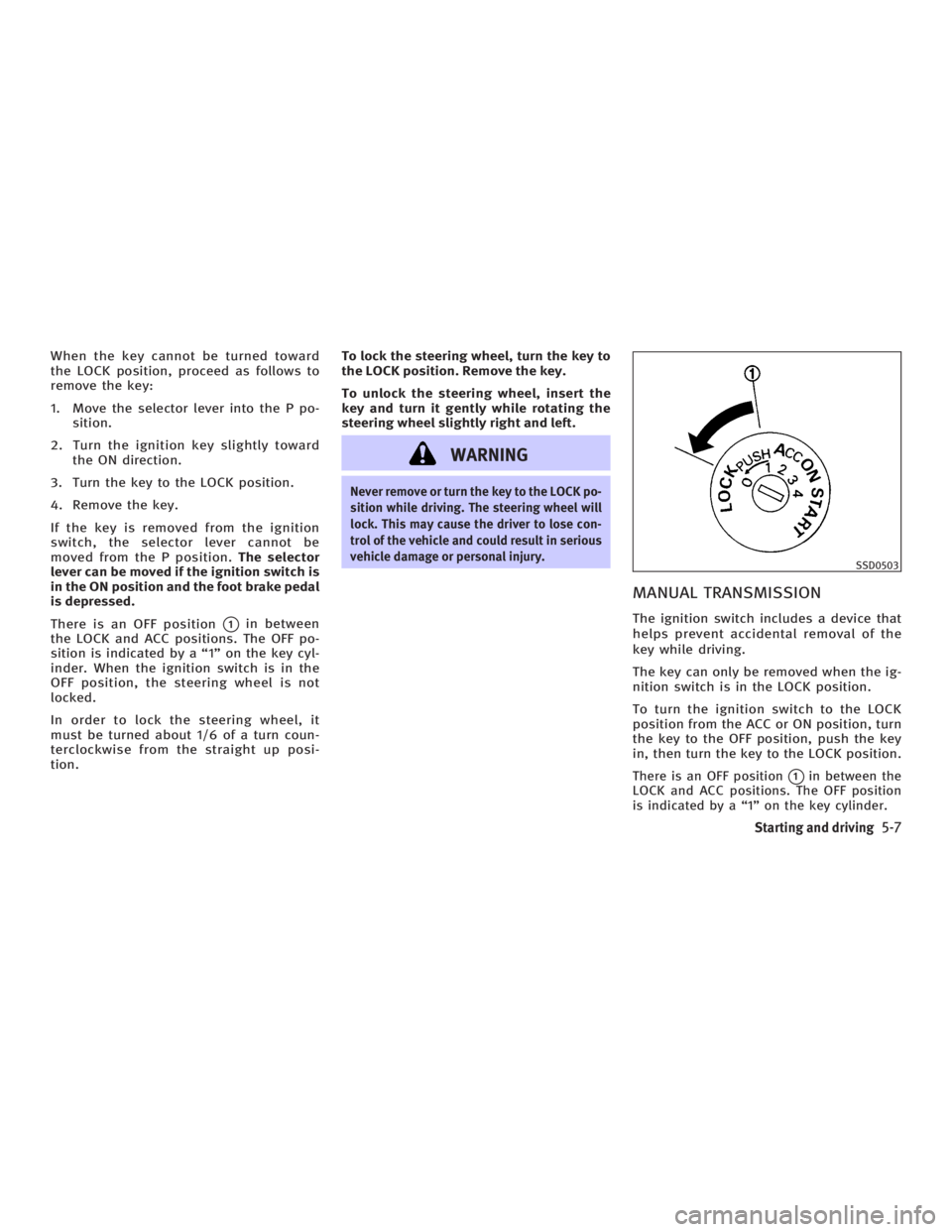
There is an OFF position
q 1
in between
the LOCK and ACC positions. The OFF po-
sition is indicated by a ª1º on the key cyl-
inder. When the ignition switch is in the
OFF position, the steering wheel is not
locked.
In order to lock the steering wheel, it
must be turned about 1/6 of a turn coun-
terclockwise from the straight up posi-
tion. To lock the steering wheel, turn the key to
the LOCK position. Remove the key.
To unlock the steering wheel, insert the
key and turn it gently while rotating the
steering wheel slightly right and left.
WARNING Never remove or turn the key to the LOCK po-
sition while driving. The steering wheel will
lock. This may cause the driver to lose con-
trol of the vehicle and could result in serious
vehicle damage or personal injury.
MANUAL TRANSMISSION The ignition switch includes a device that
helps prevent accidental removal of the
key while driving.
The key can only be removed when the ig-
nition switch is in the LOCK position.
To turn the ignition switch to the LOCK
position from the ACC or ON position, turn
the key to the OFF position, push the key
in, then turn the key to the LOCK position.
There is an OFF position
q 1
in between the
LOCK and ACC positions. The OFF position
is indicated by a ª1º on the key cylinder. SSD0503
Starting and driving
5-7
w 06.1.4/V35-D/V5.0
X
Page 220 of 344
MANUAL TRANSMISSION
Shifting To change gears, or when up shifting or
down shifting, fully depress the clutch
pedal, shift into the appropriate gear,
then slowly and smoothly release the
clutch.
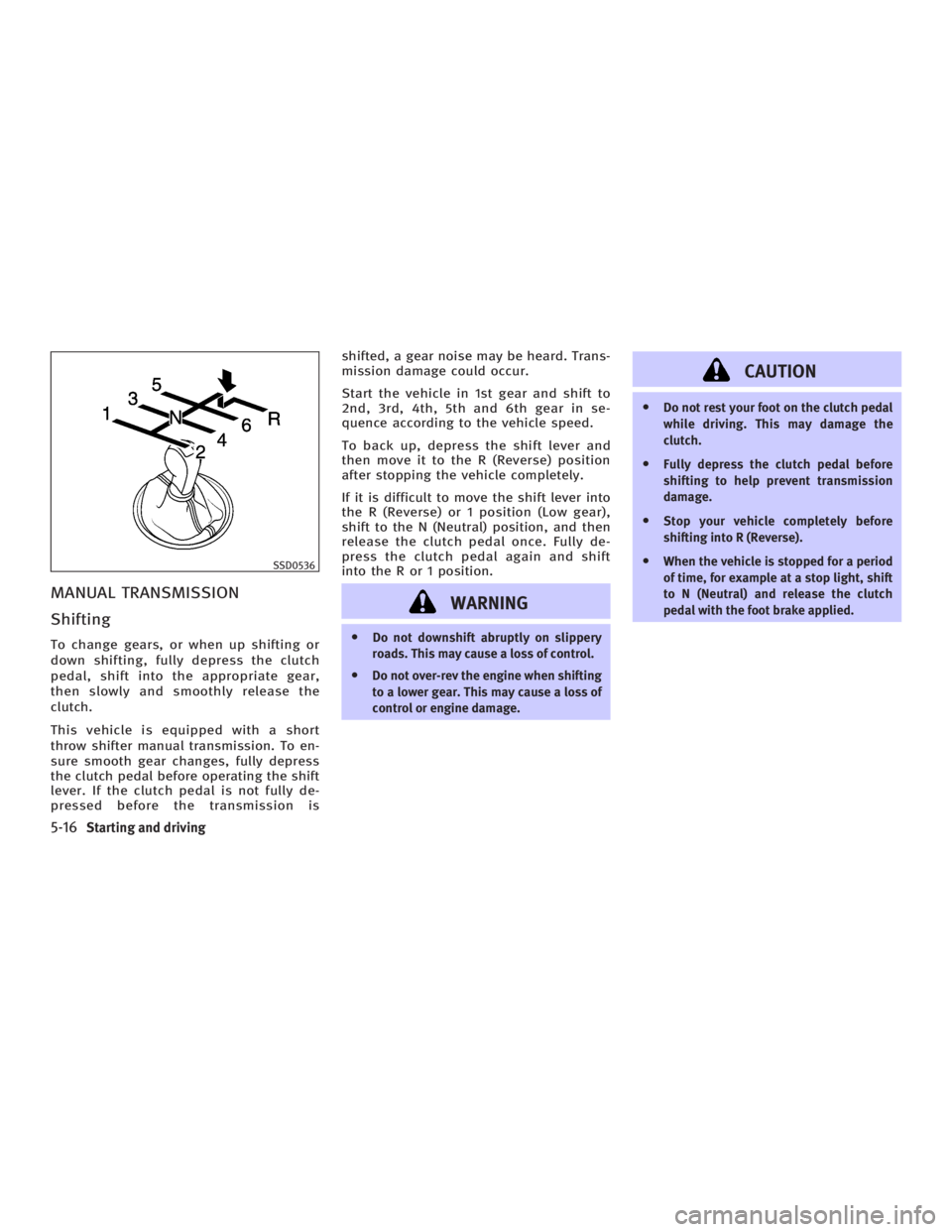
This vehicle is equipped with a short
throw shifter manual transmission. To en-
sure smooth gear changes, fully depress
the clutch pedal before operating the shift
lever. If the clutch pedal is not fully de-
pressed before the transmission is shifted, a gear noise may be heard. Trans-
mission damage could occur.
Start the vehicle in 1st gear and shift to
2nd, 3rd, 4th, 5th and 6th gear in se-
quence according to the vehicle speed.
To back up, depress the shift lever and
then move it to the R (Reverse) position
after stopping the vehicle completely.
If it is difficult to move the shift lever into
the R (Reverse) or 1 position (Low gear),
shift to the N (Neutral) position, and then
release the clutch pedal once. Fully de-
press the clutch pedal again and shift
into the R or 1 position.
WARNING O Do not downshift abruptly on slippery
roads. This may cause a loss of control.
O Do not over-rev the engine when shifting
to a lower gear. This may cause a loss of
control or engine damage. CAUTION O Do not rest your foot on the clutch pedal
while driving. This may damage the
clutch.
O Fully depress the clutch pedal before
shifting to help prevent transmission
damage.
O Stop your vehicle completely before
shifting into R (Reverse).
O When the vehicle is stopped for a period
of time, for example at a stop light, shift
to N (Neutral) and release the clutch
pedal with the foot brake applied.SSD0536
5-16 Starting and driving
w 06.1.4/V35-D/V5.0
X
Page 225 of 344
To set at cruising speed, accelerate your
vehicle to the desired speed, push the
SET/COAST switch and release it. (The
SET indicator light will come on.) Take
your foot off the accelerator pedal. Your
vehicle will maintain the set speed.
O To pass another vehicle, depress the
accelerator pedal. When you release
the pedal, the vehicle will return to
the previously set speed.
O The vehicle may not maintain the set
speed when going up or down steep
hills. If this happens, drive without the
cruise control.
To cancel the preset speed, follow either of
these three methods:
a) Push the CANCEL switch. The SET indi-
cator light will go out.
b) Tap the brake pedal. The SET indicator
light will go out.
c) Turn the MAIN switch off. Both the
CRUISE indicator and SET indicator
lights will go out.
O If you depress the brake pedal while
pushing the RESUME/ACCELERATE
switch and reset at the cruising speed,
turn the MAIN switch off once and
then turn it on again. O The cruise control will automatically
be cancelled if the vehicle slows down
below approximately 8 MPH (13 km/h).
O If you depress the clutch pedal
(manual transmission), or move the
selector lever to the N (Neutral) posi-
tion (automatic transmission), the
cruise control will be canceled.
To reset at a faster cruising speed, use one
of the following methods:
a) Depress the accelerator pedal. When
the vehicle reaches the desired speed,
push and release the SET/COAST
switch.
b) Push and hold the RESUME/
ACCELERATE switch. When the vehicle
reaches the speed you desire, release
the switch.
c) Push, then quickly release the
RESUME/ACCELERATE set switch. This
will increase the vehicle speed by
about 1 MPH (1.6 km/h). To reset at a slower cruising speed, use
one of the following methods:
a) Lightly tap the brake pedal. When the
vehicle reaches the desired speed,
push the SET/COAST switch and re-
lease it.
b) Push and hold the SET/COAST switch.
Release the switch when the vehicle
slows down to the desired speed.
c) Push, then quickly release the SET/
COAST switch. This will decrease the
vehicle speed by about 1 MPH (1.6
km/h).
To resume the preset speed, push and re-
lease the RESUME/ACCELERATE switch.
The vehicle will resume the last set cruis-
ing speed when the vehicle speed is over
25 MPH (40 km/h).
Starting and driving
5-21
w 06.1.4/V35-D/V5.0
X
Page 230 of 344
BRAKING PRECAUTIONS The brake system has two separate hy-
draulic circuits. If one circuit malfunc-
tions, you will still have braking ability at
two wheels.
Vacuum assisted brake
The brake booster aids braking by using
engine vacuum. If the engine stops, you
can stop the vehicle by depressing the
brake pedal. However, greater foot pres-
sure on the brake pedal will be required
to stop the vehicle and the stopping dis-
tance will be longer.
Wet brakes
When the vehicle is washed or driven
through water, the brakes may get wet.
As a result, your braking distance will be
longer and the vehicle may pull to one
side during braking.
To dry brakes, drive the vehicle at a safe
speed while lightly tapping the brake
pedal to heat-up the brakes. Do this until
the brakes return to normal. Avoid driving
the vehicle at high speeds until the
brakes function correctly.
Parking brake break-in
Break-in the parking brake shoes when-
ever the stopping effect of the parking brake is weakened or whenever the park-
ing brake shoes and/or drums/rotors are
replaced, in order to assure the best
braking performance.
This procedure is described in the vehicle
service manual and can be performed by
your INFINITI dealer.
Using the brakes
Avoid resting your foot on the brake pedal
while driving. This will cause overheating
of the brakes, increases wear on the
brakes and pads, and reduces gas
mileage.
To help save the brakes and to prevent
the brakes from overheating, reduce
speed and downshift to a lower gear be-
fore going down a slope or long grade.
Overheated brakes may reduce braking
performance and could result in loss of
vehicle control.
WARNING O While driving on a slippery surface, be
careful when braking, accelerating or
downshifting. Abrupt braking or accel- erating could cause the wheels to skid
and result in an accident.
O If the engine is not running or is turned
off while driving, the power assist for the
brakes will not work. Braking will be
harder.
ANTI-LOCK BRAKE SYSTEM (ABS) The anti-lock brake system (ABS) controls
the brakes so the wheels will not lock when
braking abruptly or when braking on slip-
pery surfaces. The system detects the rota-
tion speed at each wheel and varies the
brake fluid pressure to prevent each wheel
from locking and sliding. By preventing
wheel lockup, the system helps the driver
maintain steering control and helps to mini-
mize swerving and spinning on slippery sur-
faces.
Using the system Depress the brake pedal and hold it
down.BRAKE SYSTEM
5-26 Starting and driving
w 06.1.4/V35-D/V5.0
X
Page 231 of 344

WARNINGDo not pump the brake pedal. Doing so may
result in increased stopping distances.
Normal operation The ABS will not operate at speeds below
3 to 6 MPH (5 to 10 km/h) to stop the ve-
hicle. (The speeds will vary according to
road conditions.) When the anti-lock
system senses that one or more wheels
are close to locking up, the actuator
(under the hood) rapidly applies and re-
leases hydraulic pressure (like pumping
the brakes very quickly). While the actua-
tor is working, you may feel a pulsation in
the brake pedal and hear a noise or vibra-
tion from the actuator under the hood.
This is normal and indicates that the ABS
is working properly. However, the ABS op-
eration may indicate that road conditions
are hazardous and extra care is required
while driving.
Self-test feature The anti-lock brake system consists of
electronic sensors, electric pumps, and
hydraulic solenoids controlled by a com- puter. The computer has a built-in diag-
nostic feature that tests the system each
time you start the engine and move the
vehicle at a low speed in forward or re-
verse. When the self-test occurs, you may
hear a clunk noise and/or feel a pulsation
in the brake pedal. This is normal and is
not an indication of any malfunction. If
the computer senses any malfunction, it
switches the ABS off and turns on the
ABS warning light in the instrument
panel. The brake system operates nor-
mally, but without anti-lock assistance.
If the light comes on during the self-test
or while driving, take the vehicle to an
INFINITI dealer for repair.
WARNING The anti-lock brake system is a sophisticated
device, but it cannot prevent accidents re-
sulting from careless or dangerous driving
techniques. It can help maintain vehicle con-
trol during braking on slippery surfaces, but
remember that the stopping distance on slip-
pery surfaces will be longer than on normal
surfaces even with the anti-lock brake system. Stopping distances may also be
longer on rough, gravel or snow covered
roads, or if you are using tire chains. Always
maintain a safe distance from the vehicle in
front of you. Ultimately, the responsibility
for safety of self and others rests in the
hands of the driver.
Tire type and condition of tires may also af-
fect braking effectiveness.
O When replacing tires, install the speci-
fied size of tires to the front and rear.
O When installing a spare tire, make sure it
is the proper size and type as specified
on the Tire and Loading Information
label. See ªVehicle identificationº in the
ª9. Technical and consumer informa-
tionº section for the Tire and Loading In-
formation label location.
Starting and driving
5-27
w 06.1.4/V35-D/V5.0
X
Page 254 of 344
In order to maintain the appearance of
your vehicle, it is important to care for it
properly.
To protect the paint surfaces, please
wash your vehicle as soon as you can.
O After a rainfall to prevent possible
damage from acid rain.
O After driving in coastal areas to pre-
vent possible damage from sea salt.
O When foreign objects, such as soot,
bird droppings, tree sap, metal par-
ticles, or insects get on the paint sur-
faces.
O When dust or mud builds up on the
paint surfaces.
Whenever possible, store or park your ve-
hicle inside garage or in covered area.
When it is necessary to park outside, park
in a shady area or protect the vehicle with
a body cover.
Be careful not to scratch the paint surface
when putting on or removing the body
cover.
WASHING Wash dirt off the vehicle with a wet
sponge and plenty of water. Clean the ve- hicle thoroughly using a mild soap, spe-
cial vehicle soap or general purpose dish-
washing liquid mixed with clean, luke-
warm (never hot) water.
CAUTION O Do not use strong household soap,
strong chemical detergents, gasoline or
solvents.
O Do not wash the vehicle in direct sun-
light or while the vehicle body is hot, as
the surface may become water-spotted.
O Avoid using tight-napped or rough
cloths, such as washing mitts. Care must
be taken when removing caked-on dirt or
other foreign substances so the paint
surface is not scratched or damaged.
Rinse the vehicle again with plenty of
clean water.
Inside flanges, seams and folds on the
doors, hatches and hood are particularly
vulnerable to the effects of road salt.
Therefore, these areas must be regularly
cleaned. Make sure that the drain holes
in the lower edge of the door are open. Spray water under the body and in the
wheel wells to loosen the dirt and wash
away road salt.
Avoid leaving water spots on the paint
surface by using a damp chamois to dry
the vehicle.
WAXING Regular waxing protects the paint surface
and helps retain new vehicle appearance.
Polishing is recommended to remove
built-up wax residue and to avoid a
weathered appearance before re-applying
wax.
An INFINITI dealer can assist you in
choosing the proper product.
O Wax your vehicle only after a thorough
washing. Follow the instructions sup-
plied with the wax.
O Do not use a wax containing any abra-
sives, cutting compounds or cleaners
that may damage the vehicle finish.
Machine compounding or aggressive pol-
ishing on a base coat/clear coat paint fin-
ish may dull the finish or leave swirl
marks.CLEANING EXTERIOR
7-2 Appearance and care
w 06.1.4/V35-D/V5.0
X
Page 255 of 344
REMOVING SPOTS Remove tar and oil spots, industrial dust,
insects, and tree sap as quickly as pos-
sible from the surface of the paint to
avoid lasting damage or staining. Special
cleaning products are available at an
INFINITI dealer or any automotive acces-
sory store.
UNDERBODY In areas where road salt is used in winter,
the underbody must be cleaned regularly.
This will prevent dirt and salt from
building up and causing underbody and
suspension corrosion. Before the winter
period and again in the spring, the under-
seal must be checked and, if necessary,
re-treated.
GLASS Use glass cleaner to remove smoke and
dust film from the glass surfaces. It is
normal for glass to become coated with a
film after the vehicle is parked in the hot
sun. Glass cleaner and a soft cloth will
easily remove this film. CAUTION When cleaning the inside of the windows, do
not use sharp-edged tools, abrasive
cleaners or chlorine-based disinfectant
cleaners. They could damage the electrical
conductors, radio antenna elements or rear
window defroster elements.
ALUMINUM ALLOY WHEELS Wash regularly, especially during winter
months in areas where road salt is used.
Salt could discolor the wheel if not re-
moved.
CHROME PARTS Clean all chrome parts regularly with a
non-abrasive chrome polish to maintain
the finish.
TIRE DRESSING INFINITI does not recommend the use of
tire dressings. Tire manufacturers apply a
coating to the tires to help reduce discol-
oration of the rubber. If a tire dressing is
applied to the tires, it may react with the
coating and form a compound. This com- pound may come off the tire while driving
and stain the vehicle paint.
If you choose to use a tire dressing, take
the following precautions:
O Use a water-based tire dressing. The
coating on the tire dissolves more
easily with an oil-based tire dressing.
O Apply a light coat of tire dressing to
help prevent it from entering the tire
tread/grooves (where it would be diffi-
cult to remove).
O Wipe off excess tire dressing using a
dry towel. Make sure the tire dressing
is completely removed from the tire
tread/grooves.
O Allow the tire dressing to dry as rec-
ommended by tire dressing manufac-
turer.
Appearance and care
7-3
w 06.1.4/V35-D/V5.0
X