key fob INFINITI G35 2006 Owners Manual
[x] Cancel search | Manufacturer: INFINITI, Model Year: 2006, Model line: G35, Model: INFINITI G35 2006Pages: 344, PDF Size: 6.81 MB
Page 9 of 344
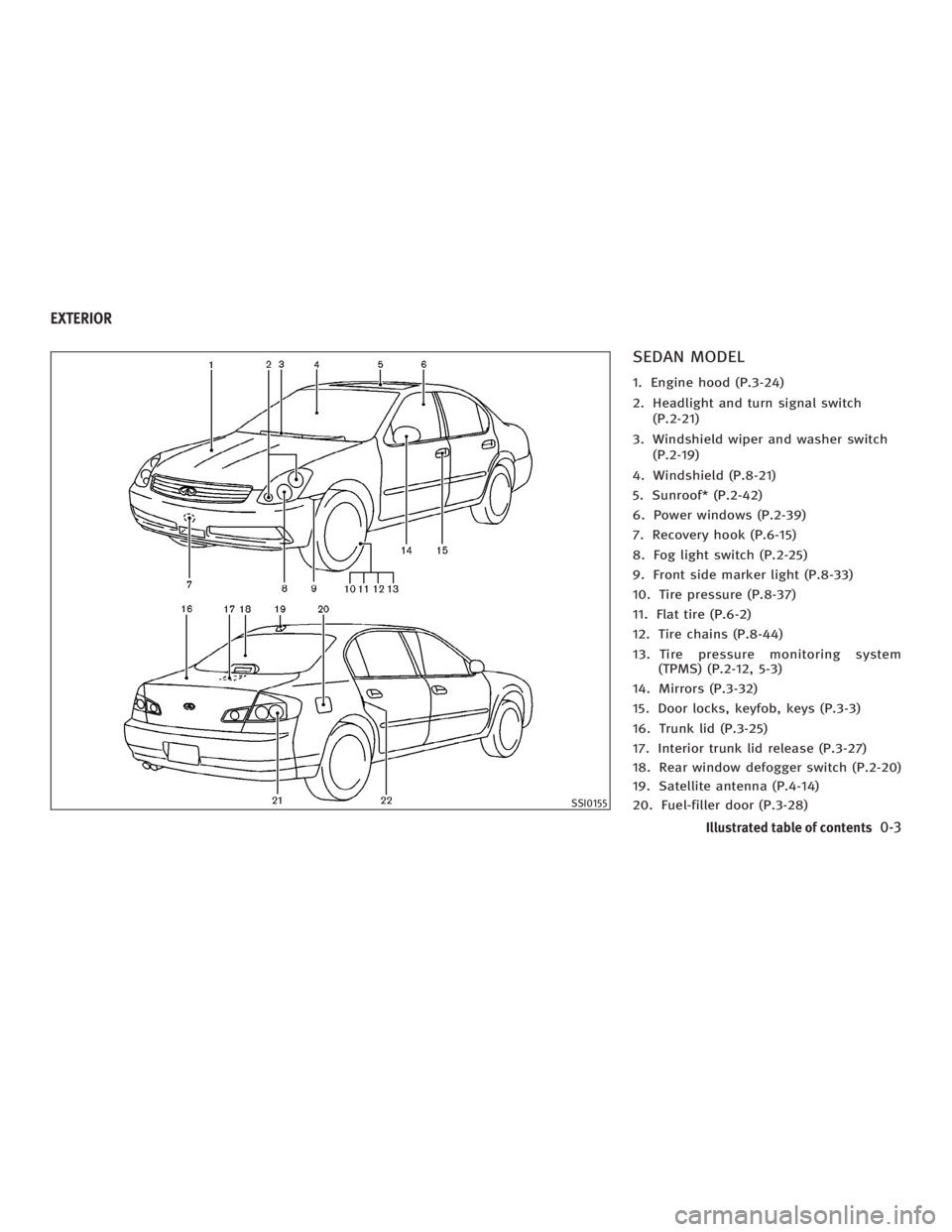
SEDAN MODEL 1. Engine hood (P.3-24)
2. Headlight and turn signal switch
(P.2-21)
3. Windshield wiper and washer switch
(P.2-19)
4. Windshield (P.8-21)
5. Sunroof* (P.2-42)
6. Power windows (P.2-39)
7. Recovery hook (P.6-15)
8. Fog light switch (P.2-25)
9. Front side marker light (P.8-33)
10. Tire pressure (P.8-37)
11. Flat tire (P.6-2)
12. Tire chains (P.8-44)
13. Tire pressure monitoring system
(TPMS) (P.2-12, 5-3)
14. Mirrors (P.3-32)
15. Door locks, keyfob, keys (P.3-3)
16. Trunk lid (P.3-25)
17. Interior trunk lid release (P.3-27)
18. Rear window defogger switch (P.2-20)
19. Satellite antenna (P.4-14)
20. Fuel-filler door (P.3-28) SSI0155EXTERIOR
Illustrated table of contents
0-3
w 06.1.4/V35-D/V5.0
X
Page 11 of 344
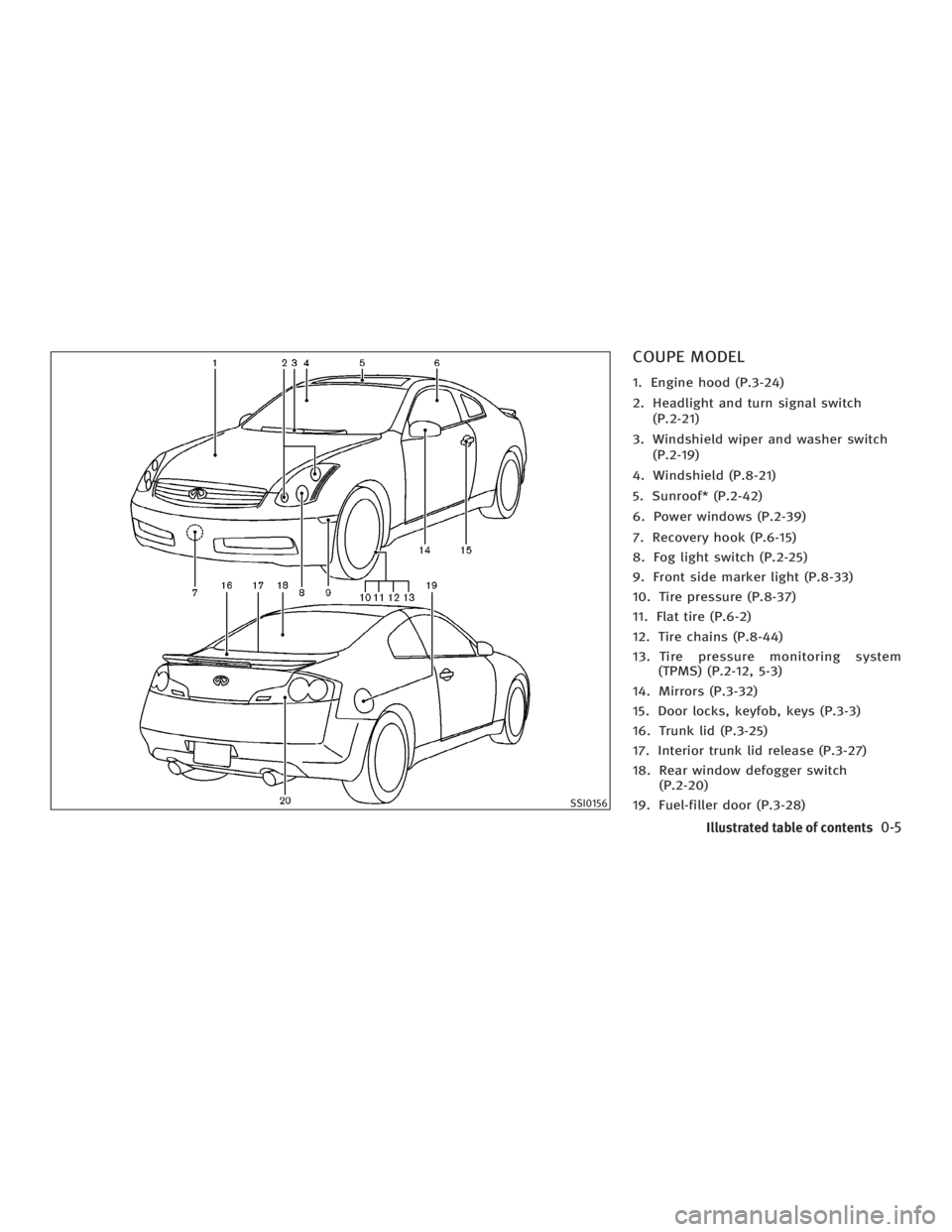
COUPE MODEL 1. Engine hood (P.3-24)
2. Headlight and turn signal switch
(P.2-21)
3. Windshield wiper and washer switch
(P.2-19)
4. Windshield (P.8-21)
5. Sunroof* (P.2-42)
6. Power windows (P.2-39)
7. Recovery hook (P.6-15)
8. Fog light switch (P.2-25)
9. Front side marker light (P.8-33)
10. Tire pressure (P.8-37)
11. Flat tire (P.6-2)
12. Tire chains (P.8-44)
13. Tire pressure monitoring system
(TPMS) (P.2-12, 5-3)
14. Mirrors (P.3-32)
15. Door locks, keyfob, keys (P.3-3)
16. Trunk lid (P.3-25)
17. Interior trunk lid release (P.3-27)
18. Rear window defogger switch
(P.2-20)
19. Fuel-filler door (P.3-28) SSI0156
Illustrated table of contents
0-5
w 06.1.4/V35-D/V5.0
X
Page 90 of 344

3. Close and lock all doors, hood and
trunk lid.
Lock all doors by pushing the LOCK
button on the keyfob, the Intelli-
gent Key or by pushing any front door
handle request switch or turning the
door key. When using the remote key-
less entry, the hazard indicators will
operate as shown in ªRemote keyless
entry systemº or ªIntelligent Key
systemº in the ª3. Pre-driving checks
and adjustmentsº section.
4. Confirm that the security indicator
light
q A
comes on. The security indica-
tor light glows for about 30 seconds
and then blinks. The system is now
armed. If, during this 30-second time
period, the door is unlocked by the
key, the remote keyless entry or the
front door request switch, or the igni-
tion switch is turned to the ACC or ON
position, the system will not be
armed.
Even when the driver and/or passengers
are in the vehicle, the system will be
armed with all doors, hood and trunk lid
locked and ignition switch off. Turn the ig-
nition switch to the ACC position to turn off
the system. Vehicle security system activation The security system will give the following
alarm:
O The headlights blink and the horn
sounds intermittently.
O The alarm automatically turns off after
approximately 50 seconds. However,
the alarm reactivates if the vehicle is
tampered with again. The alarm can
be shut off by unlocking a door with
the key, by pushing any front door
handle request switch or by pushing
the UNLOCK button on the keyfob
or Intelligent Key.
The alarm is activated by:
O Opening the door without using the
key or keyfob or Intelligent Key.
O Opening the trunk lid without using
the keyfob or Intelligent Key.
O Opening the hood.
How to stop an activated alarm The alarm will stop only by unlocking a
door with the key, by pushing any door
handle request switch or by pushing the
UNLOCK button on keyfob or Intelli-
gent Key. The alarm will not stop if the ig- nition switch is turned to the ACC or ON
position.
If the system does not operate as de-
scribed above, have it checked by an
INFINITI dealer.
INFINITI VEHICLE IMMOBILIZER
SYSTEM The INFINITI Vehicle Immobilizer System
will not allow the engine to start without
the use of the registered key.
If the engine fails to start using the regis-
tered key (for example, when interference
is caused by another registered key, an
automated toll road device or automated
payment device on the key ring), restart
the engine using the following proce-
dures:
1. Leave the ignition switch in the ON po-
sition for approximately 5 seconds.
2. Turn the ignition switch to the OFF or
LOCK position and wait approximately
10 seconds.
3. Repeat steps 1 and 2.
4. Restart the engine while holding the
device (which may have caused the in-
2-18 Instruments and controls
w 06.1.4/V35-D/V5.0
X
Page 116 of 344
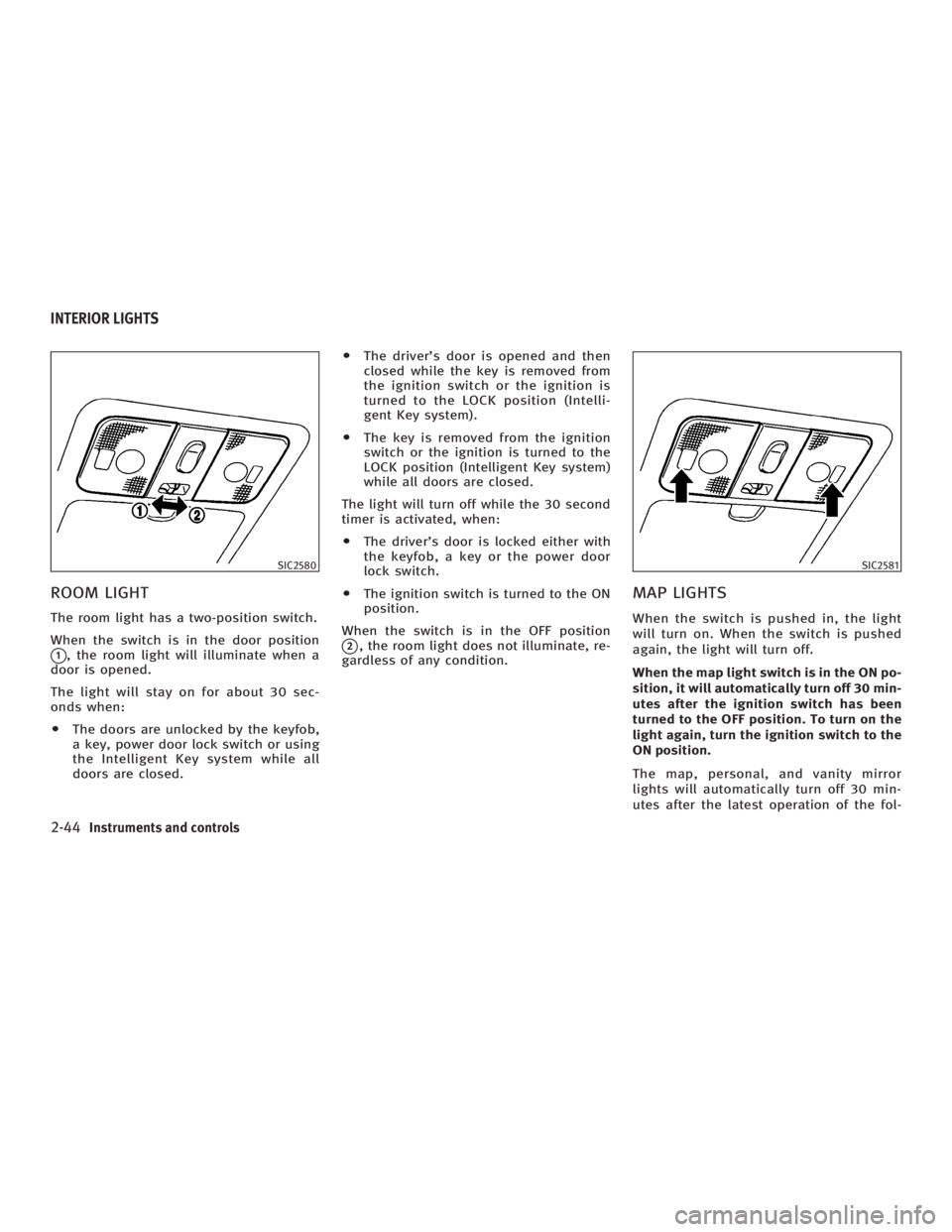
ROOM LIGHT The room light has a two-position switch.
When the switch is in the door position
q 1
, the room light will illuminate when a
door is opened.
The light will stay on for about 30 sec-
onds when:
O The doors are unlocked by the keyfob,
a key, power door lock switch or using
the Intelligent Key system while all
doors are closed. O The driver's door is opened and then
closed while the key is removed from
the ignition switch or the ignition is
turned to the LOCK position (Intelli-
gent Key system).
O The key is removed from the ignition
switch or the ignition is turned to the
LOCK position (Intelligent Key system)
while all doors are closed.
The light will turn off while the 30 second
timer is activated, when:
O The driver's door is locked either with
the keyfob, a key or the power door
lock switch.
O The ignition switch is turned to the ON
position.
When the switch is in the OFF position
q 2
, the room light does not illuminate, re-
gardless of any condition.
MAP LIGHTS When the switch is pushed in, the light
will turn on. When the switch is pushed
again, the light will turn off.
When the map light switch is in the ON po-
sition, it will automatically turn off 30 min-
utes after the ignition switch has been
turned to the OFF position. To turn on the
light again, turn the ignition switch to the
ON position.
The map, personal, and vanity mirror
lights will automatically turn off 30 min-
utes after the latest operation of the fol-SIC2580 SIC2581
INTERIOR LIGHTS
2-44 Instruments and controls
w 06.1.4/V35-D/V5.0
X
Page 117 of 344

lowing with the ignition switch in the ACC
or OFF position:
O Opening or closing any door
O Locking or unlocking with the keyfob,
a key, the power door lock switch or
the ignition is turned to the LOCK po-
sition (Intelligent Key system)
O Inserting or removing a key from the
ignition switch
These lights will turn on again when any
of the above operations is performed after
the lights have turned off automatically.
(The lights will turn off 30 minutes after
the latest operation of the above as well.)
CAUTIONO Turn off the map, personal and vanity
mirror lights when you leave the vehicle.
O Do not use for extended periods of time
with the engine stopped. This could re-
sult in a discharged battery. PERSONAL LIGHTS
Rear (Sedan)
q A
: Left-hand side
q B
: Right-hand side
The rear personal light has a three-
position switch.
When the switch is in the door position
q 2
, the light will illuminate when the rear
door is opened. When the rear personal light switch is in
the ON position
q 1
, the rear personal
lights illuminate, regardless of any condi-
tion.
When the switch is in the OFF
q 3
position,
the rear personal lights do not illuminate,
regardless of any condition.
When the personal light switch is in the
ON position, it will automatically turn off
30 minutes after the ignition switch has
been turned to the OFF position. To turn on
the light again, turn the ignition switch to
the ON position. SIC2582
Instruments and controls
2-45
w 06.1.4/V35-D/V5.0
X
Page 127 of 344
Lockout protection When the power door lock switch (driver
or front passenger) is moved to the LOCK
position with the key in the ignition and
any door open, all doors will lock and un-
lock automatically. This helps to prevent
the keys from being accidentally locked
inside the vehicle.
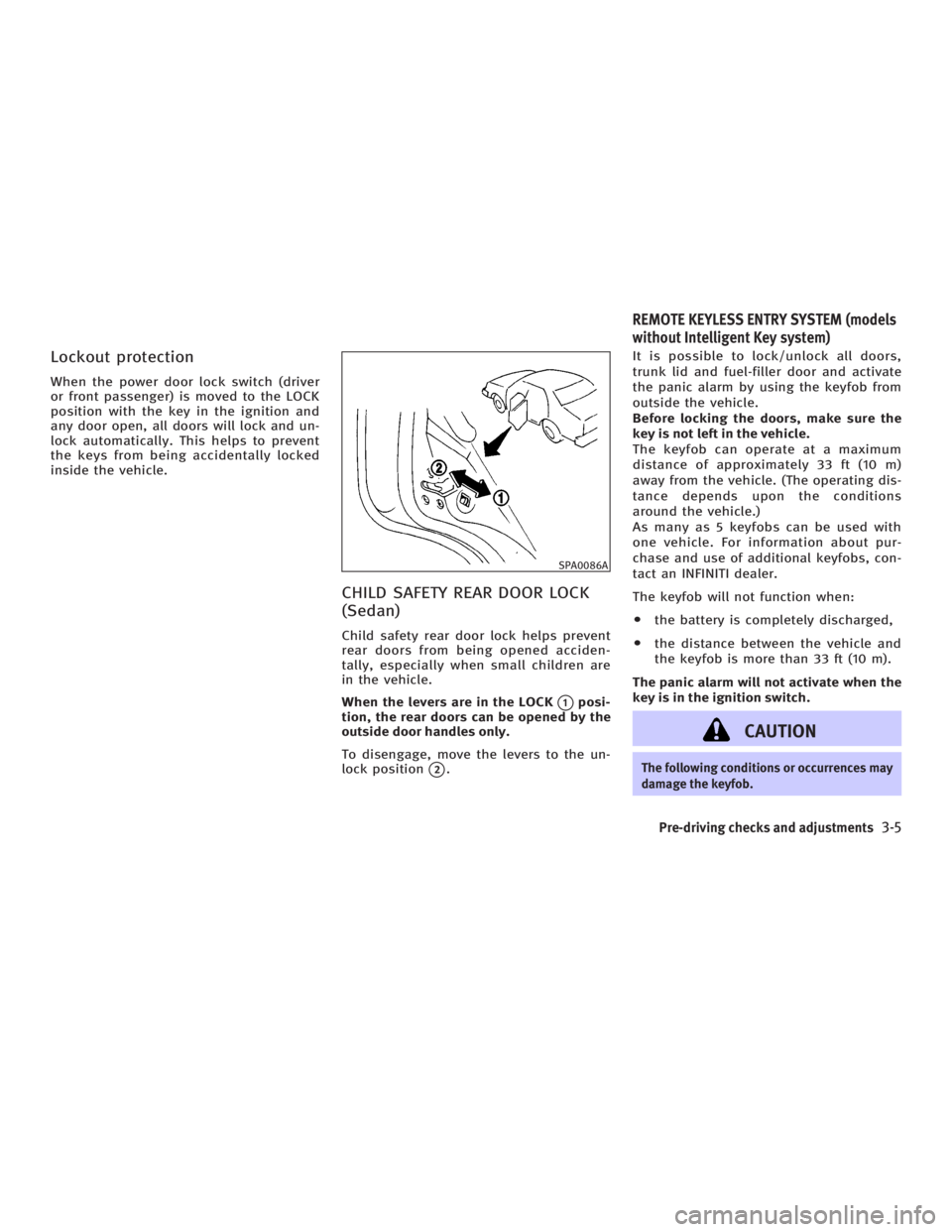
CHILD SAFETY REAR DOOR LOCK
(Sedan) Child safety rear door lock helps prevent
rear doors from being opened acciden-
tally, especially when small children are
in the vehicle.
When the levers are in the LOCK
q 1
posi-
tion, the rear doors can be opened by the
outside door handles only.
To disengage, move the levers to the un-
lock position
q 2
. It is possible to lock/unlock all doors,
trunk lid and fuel-filler door and activate
the panic alarm by using the keyfob from
outside the vehicle.
Before locking the doors, make sure the
key is not left in the vehicle.
The keyfob can operate at a maximum
distance of approximately 33 ft (10 m)
away from the vehicle. (The operating dis-
tance depends upon the conditions
around the vehicle.)
As many as 5 keyfobs can be used with
one vehicle. For information about pur-
chase and use of additional keyfobs, con-
tact an INFINITI dealer.
The keyfob will not function when:
O the battery is completely discharged,
O the distance between the vehicle and
the keyfob is more than 33 ft (10 m).
The panic alarm will not activate when the
key is in the ignition switch.
CAUTION The following conditions or occurrences may
damage the keyfob. SPA0086A
REMOTE KEYLESS ENTRY SYSTEM (models
without Intelligent Key system)
Pre-driving checks and adjustments
3-5
w 06.1.4/V35-D/V5.0
X
Page 128 of 344
O Do not allow the keyfob to become wet.
O Do not drop the keyfob.
O Do not strike the keyfob sharply against
another object.
O Do not place the keyfob for an extended
period in an area where temperatures ex-
ceed 140ÉF (60ÉC).
If a keyfob is lost or stolen, INFINITI recom-
mends erasing the ID code of that keyfob.
This will prevent the keyfob from unautho-
rized use to unlock the vehicle. For informa-
tion regarding the erasing procedure, please
contact an INFINITI dealer.
For information regarding the replacement
of a battery, see ªKeyfob battery replace-
mentº in the ª8. Maintenance and do-it-
yourselfº section.
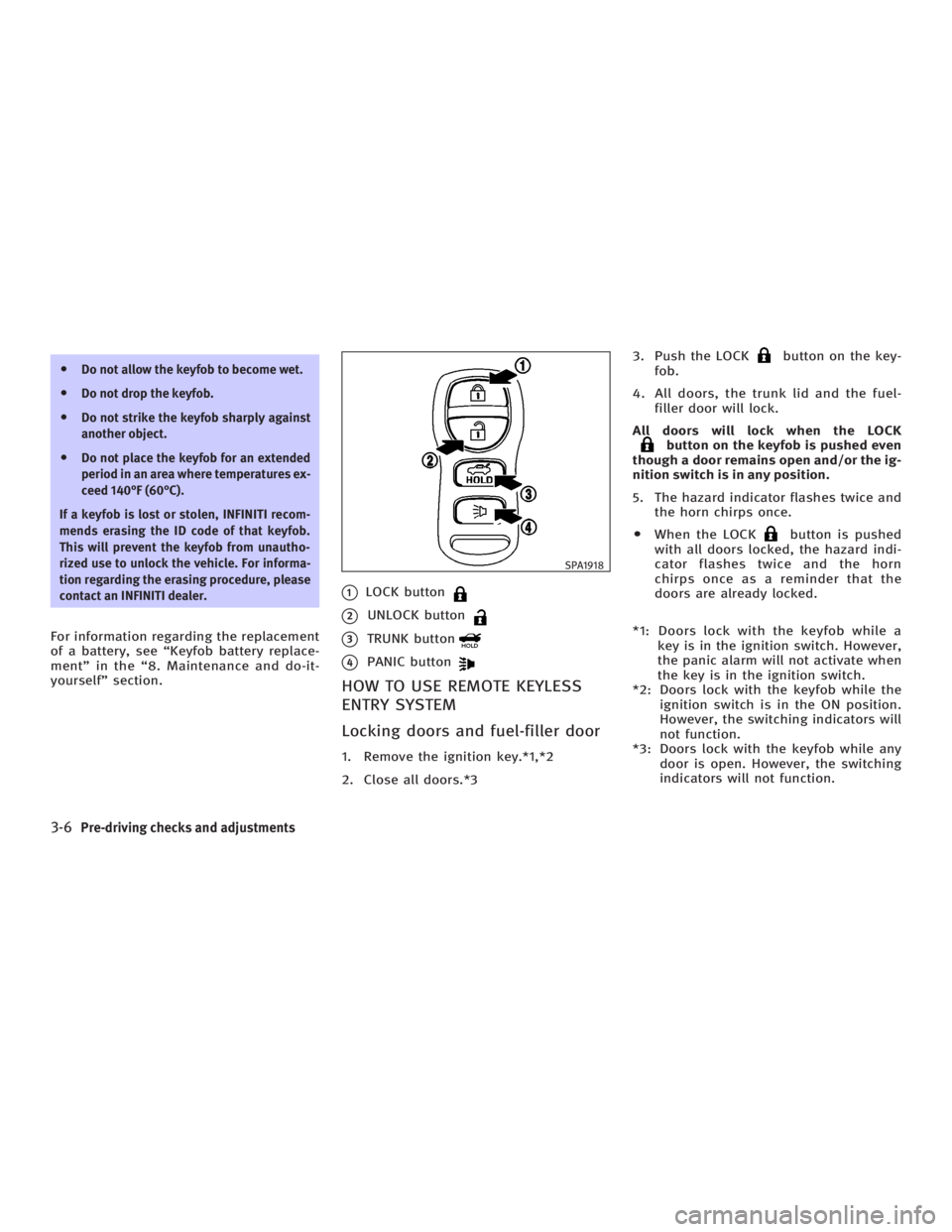
q 1
LOCK button
q 2
UNLOCK button
q 3
TRUNK button
q 4
PANIC button
HOW TO USE REMOTE KEYLESS
ENTRY SYSTEM
Locking doors and fuel-filler door 1. Remove the ignition key.*1,*2
2. Close all doors.*3 3. Push the LOCK button on the key-
fob.
4. All doors, the trunk lid and the fuel-
filler door will lock.
All doors will lock when the LOCK
button on the keyfob is pushed even
though a door remains open and/or the ig-
nition switch is in any position.
5. The hazard indicator flashes twice and
the horn chirps once.
O When the LOCK button is pushed
with all doors locked, the hazard indi-
cator flashes twice and the horn
chirps once as a reminder that the
doors are already locked.
*1: Doors lock with the keyfob while a
key is in the ignition switch. However,
the panic alarm will not activate when
the key is in the ignition switch.
*2: Doors lock with the keyfob while the
ignition switch is in the ON position.
However, the switching indicators will
not function.
*3: Doors lock with the keyfob while any
door is open. However, the switching
indicators will not function. SPA1918
3-6 Pre-driving checks and adjustments
w 06.1.4/V35-D/V5.0
X
Page 129 of 344

Unlocking doors and fuel-filler
door 1. Push the UNLOCK button on the
keyfob once.
O The driver's door and fuel-filler door
unlock
O The hazard indicator flashes once if all
doors are completely closed with the
ignition switch in any position except
in the ON position.
O The interior light timer activates and
the interior light comes on for 30 sec-
onds when the interior light switch is
at the DOOR position with the ignition
switch in any position except in the
ON position.
2. Push the UNLOCK button on the
keyfob again within 5 seconds.
O All doors and trunk lid unlock
O The hazard indicator flashes once if all
doors are completely closed.
All doors will be locked automatically un-
less one of the following operations is
performed within 1 minute of pushing the
UNLOCK button.
O opening any door. O opening trunk lid.
O turning the ignition switch to the ON
position
The interior light can be turned off
without waiting for 30 seconds by turning
the ignition switch to the ON position or
by locking the doors with the keyfob.
Opening the windows Push the UNLOCK button on the
keyfob.
The driver's door and fuel-filler door will
unlock.
Continue to push the UNLOCK button
for more than 3 seconds. The door win-
dows will start to lower.
Continue to push the UNLOCK button
until windows are fully open.
To stop the windows lowering operation,
release the UNLOCK button.
To start the windows lowering operation,
push the UNLOCK button again for
more than 3 seconds.
Releasing the trunk lid 1. Push the TRUNK button on the
keyfob for longer than 0.5 seconds when the ignition switch is in any po-
sition except the ON position.
2. The trunk lid opens.
The trunk lid cannot be opened by operat-
ing the keyfob when the ignition switch is
in the ON position.
Using the panic alarm If you are near your vehicle and feel
threatened, you may activate the alarm to
call attention as follows:
1. Push the PANIC button on the
keyfob for longer than 0.5 seconds
with the key removed from the ignition
switch.
2. The theft warning alarm and head-
lights will stay on for 25 seconds.
3. The panic alarm stops when:
O It has run for 25 seconds, or
O The LOCK button or the UNLOCK
button on keyfob is pushed, or
O The TRUNK button or the PANIC
button on the keyfob is pushed
for longer than 0.5 second.
Pre-driving checks and adjustments
3-7
w 06.1.4/V35-D/V5.0
X
Page 130 of 344
Setting hazard indicator and horn
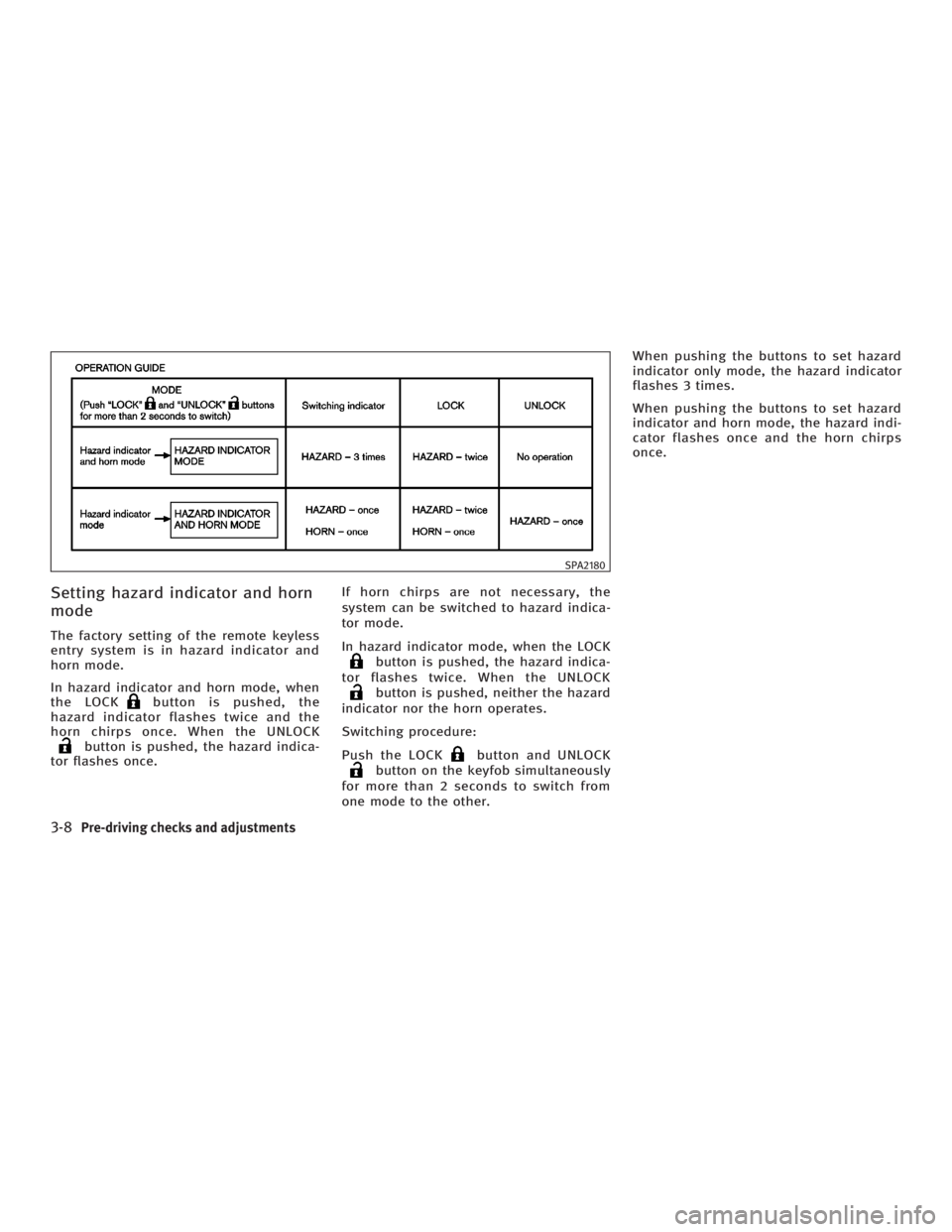
mode The factory setting of the remote keyless
entry system is in hazard indicator and
horn mode.
In hazard indicator and horn mode, when
the LOCK button is pushed, the
hazard indicator flashes twice and the
horn chirps once. When the UNLOCK
button is pushed, the hazard indica-
tor flashes once. If horn chirps are not necessary, the
system can be switched to hazard indica-
tor mode.
In hazard indicator mode, when the LOCK
button is pushed, the hazard indica-
tor flashes twice. When the UNLOCK
button is pushed, neither the hazard
indicator nor the horn operates.
Switching procedure:
Push the LOCK button and UNLOCK
button on the keyfob simultaneously
for more than 2 seconds to switch from
one mode to the other. When pushing the buttons to set hazard
indicator only mode, the hazard indicator
flashes 3 times.
When pushing the buttons to set hazard
indicator and horn mode, the hazard indi-
cator flashes once and the horn chirps
once. SPA2180
3-8 Pre-driving checks and adjustments
w 06.1.4/V35-D/V5.0
X
Page 131 of 344

The Intelligent Key uses coded radio sig-
nals to communicate with the vehicle.
When the Intelligent Key is near the ve-
hicle, such as in your pocket or purse, it
allows the vehicle to be locked, unlocked,
or started without inserting the ignition
key. It is also possible to use the remote
control entry function.
CAUTIONO Be sure to carry the Intelligent Key with
you.
O Do not leave the vehicle with the Intelli-
gent Key inside.
O The Intelligent Key may not function
correctly depending on the environ-
ment or operating conditions. It could
also malfunction if you do not use it
correctly.
O The Intelligent Key transmits faint
radio waves.
In the following situations, the Intelli-
gent Key and remote control entry func-
tions may not operate correctly, and
you may have to use the metal key (me-
chanical key, valet key or wallet key): Ð when there are strong signals
coming from a television tower,
power station or broadcasting sta-
tion.
Ð when you have wireless equipment
or a cellular phone with you.
Ð when the Intelligent Key is in con-
tact with or covered by a metallic
material.
Ð when radio wave-type remote con-
trol entry is used nearby.
Ð when the Intelligent Key is placed
near an electric appliance such as a
personal computer.
O The Intelligent Key continually con-
sumes battery power as the key re-
ceives a signal to communicate with
the vehicle. Battery life is about 2
years, although it varies depending on
the operating conditions. When the
battery of the Intelligent Key is low, the
green blinking key warning light goes
out about 30 seconds after the ignition
switch is turned to the ON position. If
the battery runs down, replace it with a
new one.
O If the Intelligent Key receives strong
signal over an extended period of time, the battery could quickly run down. Do
not place the Intelligent Key near an
electric appliance such as a television
set or personal computer.
O Because the ignition switch is elec-
tronically controlled, if the battery is
completely discharged when the igni-
tion switch is in the LOCK position, the
steering lock cannot be released and
the ignition switch cannot be turned
(including the mechanical key). Be
careful not to completely discharge the
battery.
O In case the battery is completely dis-
charged, make sure to recharge the
battery immediately.
For information regarding the replacement
of a battery, see ªKeyfob battery replace-
mentº in the ª8. Maintenance and do-it-
yourselfº section.INTELLIGENT KEY SYSTEM (if so equipped)
Pre-driving checks and adjustments
3-9
w 06.1.4/V35-D/V5.0
X