display INFINITI M 2010 Owners Manual
[x] Cancel search | Manufacturer: INFINITI, Model Year: 2010, Model line: M, Model: INFINITI M 2010Pages: 445, PDF Size: 6.15 MB
Page 281 of 445

Speaker adaptation function
The voice recognition system has a function to
learn the user's voice for better voice recogni-
tion performance. The system can memorize the
voices of up to three persons.
Having the system learn the user's voice:
1. Push theSETTINGbutton on the instru-
ment panel, highlight the ªOthersº key on
the display and then push the ENTER
button.
2. Highlight the ªVoice Recognitionº key and then push the ENTERbutton.
3. Highlight the ªSpeaker Adaptationº key and then push the ENTERbutton. 4. Select the user whose voice is memorized
by the system and push the ENTERbut-
ton. 5. Select a category to be learned by the
system from the following list and then
push the ENTERbutton.
cNavigation
c Phone
c Audio
c Information
c Climate
The voice commands in the category are
displayed.
6. Select a voice command and then push
the ENTER button.
The voice recognition system starts.
SAA1907SAA1918SAA2171
4-118Monitor, climate, audio, phone and voice recognition systems
wÐ
Ð
05/15/09Ðpattie
X
Page 282 of 445
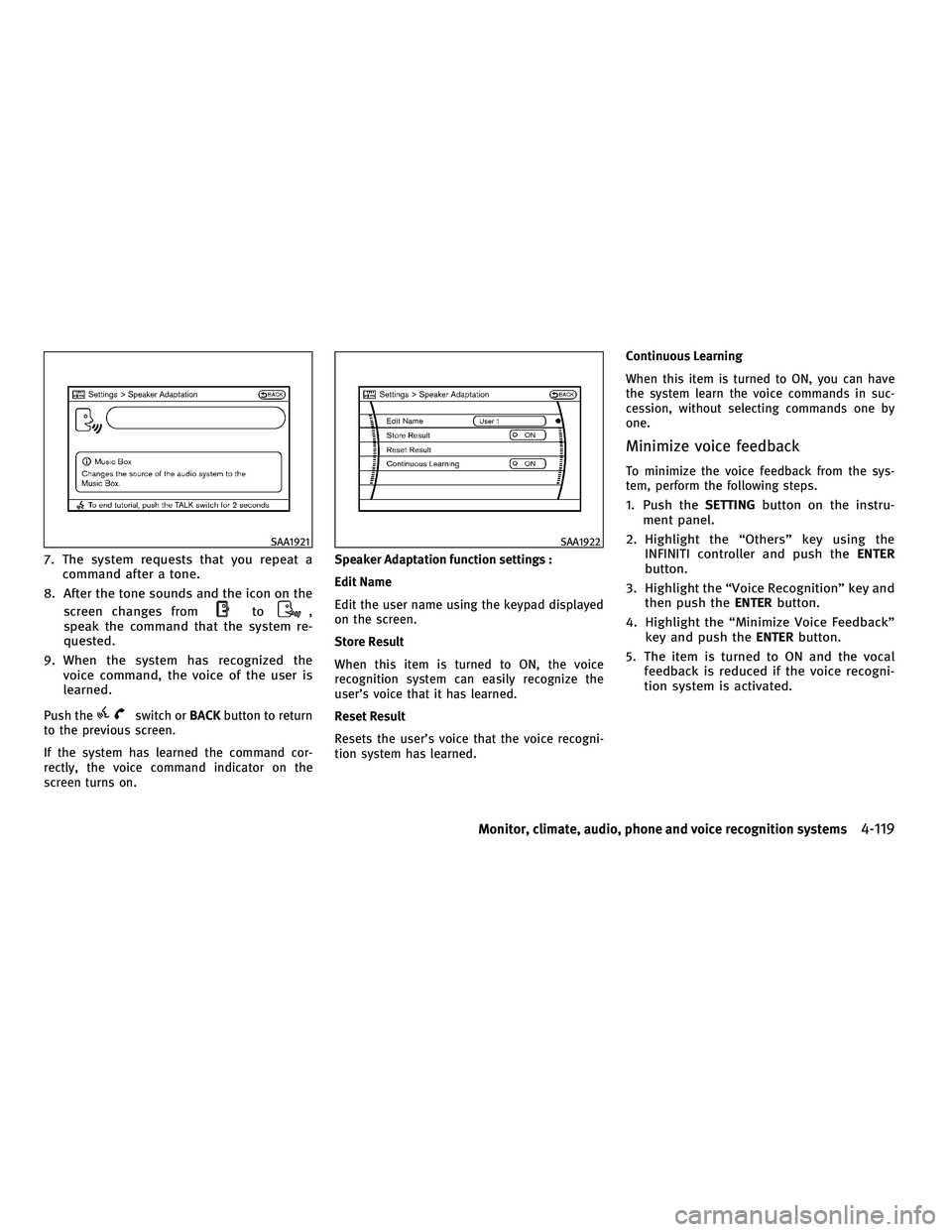
7. The system requests that you repeat acommand after a tone.
8. After the tone sounds and the icon on the screen changes from
to,
speak the command that the system re-
quested.
9. When the system has recognized the voice command, the voice of the user is
learned.
Push theswitch or BACKbutton to return
to the previous screen.
If the system has learned the command cor-
rectly, the voice command indicator on the
screen turns on. Speaker Adaptation function settings :
Edit Name
Edit the user name using the keypad displayed
on the screen.
Store Result
When this item is turned to ON, the voice
recognition system can easily recognize the
user's voice that it has learned.
Reset Result
Resets the user's voice that the voice recogni-
tion system has learned.Continuous Learning
When this item is turned to ON, you can have
the system learn the voice commands in suc-
cession, without selecting commands one by
one.
Minimize voice feedback
To minimize the voice feedback from the sys-
tem, perform the following steps.
1. Push the
SETTINGbutton on the instru-
ment panel.
2. Highlight the ªOthersº key using the INFINITI controller and push the ENTER
button.
3. Highlight the ªVoice Recognitionº key and then push the ENTERbutton.
4. Highlight the ªMinimize Voice Feedbackº key and push the ENTERbutton.
5. The item is turned to ON and the vocal feedback is reduced if the voice recogni-
tion system is activated.
SAA1921SAA1922
Monitor, climate, audio, phone and voice recognition systems4-119
wÐ
Ð
05/15/09Ðpattie
X
Page 283 of 445

TROUBLESHOOTING GUIDE
The system should respond correctly to all voice commands without difficulty. If problems are encountered, follow the solutions given in this guide for
the appropriate error.
Where the solutions are listed by number, try each solution in turn, starting with number one, until the problem is resolved.
Symptom/error messageSolution
Displays ªCOMMAND NOT RECOGNIZEDº or the
system fails to interpret the command correctly. 1. Ensure that the command format is valid, see ªCommand Listº earlier in this section.
2. Speak clearly without pausing between words and at a level appropriate to the ambient noise level.
3. Ensure that the ambient noise level is not excessive, for example, windows open or defrost on.
NOTE:
If it is too noisy to use the phone, it is likely that voice commands will not be recognized.
4. If optional words of the command have been omitted, then the command should be tried with these
in place.
The system consistently selects the wrong voic-
etag in the phonebook. 1. Ensure that the voicetag requested matches what was originally stored. (See ªBLUETOOTH
THANDS-
FREE PHONE SYSTEM WITH NAVIGATION SYSTEMº earlier in this section; page 4-74.)
2. Replace one of the voicetags being confused with a different voicetag.
4-120Monitor, climate, audio, phone and voice recognition systems
wÐ
Ð
05/15/09Ðpattie
X
Page 289 of 445

Additional information
cThe TPMS does not monitor the tire pressure
of the spare tire.
c The TPMS will activate only when the vehicle
is driven at speeds above 16 MPH (25 km/h).
Also, this system may not detect a sudden
drop in tire pressure (for example a flat tire
while driving).
c The low tire pressure warning light does not
automatically turn off when the tire pressure
is adjusted. After the tire is inflated to the
recommended pressure, the vehicle must be
driven at speeds above 16 MPH (25 km/h) to
activate the TPMS and turn off the low tire
pressure warning light. Use a tire pressure
gauge to check the tire pressure.
c Tire pressure rises and falls depending on
the heat caused by the vehicle's operation
and the outside temperature. Low outside
temperature can lower the temperature of
the air inside the tire which can cause a
lower tire inflation pressure. This may cause
the low tire pressure warning light to illumi-
nate. If the warning light illuminates in low
ambient temperature, check the tire pres-
sure for all four tires. c
You can also check the pressure of all tires
(except the spare tire) on the display. (See
ªHOW TO USE INFO BUTTONº in the ª4.
Monitor, climate, audio, phone and voice
recognition systemsº section.)
After tire rotation is performed, tire pressure
will not be displayed in the actual tire posi-
tion. Drive the vehicle at over 25 MPH (40
km/h) for approximately 10 minutes to reset
the display.
For additional information, see ªLow tire pres-
sure warning lightº in the ª2. Instruments and
controlsº section and ªTIRE PRESSURE MONI-
TORING SYSTEM (TPMS)º in the ª6. In case of
emergencyº section.
WARNING
c If the low tire pressure warning light illumi-
nates or LOW PRESSURE information is dis-
played on the monitor screen while driving,
avoid sudden steering maneuvers or abrupt
braking, reduce vehicle speed, pull off the
road to a safe location and stop the vehicle
as soon as possible. Driving with under-
inflated tires may permanently damage the
tires and increase the likelihood of tire fail-
ure. Serious vehicle damage could occur and
may lead to an accident and could result in
serious personal injury. Check the tire pres-
sure for all four tires. Adjust the tire pressure
to the recommended COLD tire pressure
shown on the Tire and Loading Information
label to turn the low tire pressure warning
light OFF. If you have a flat tire, replace it
with a spare tire as soon as possible. (See
ªFLAT TIREº in the ª6. In case of emergencyº
section for changing a flat tire.)
c When a spare tire is mounted or a wheel is
replaced, tire pressure will not be indicated,
the TPMS will not function and the low tire
pressure warning light will flash for approxi-
mately 1 minute. The light will remain on
after 1 minute. Contact your INFINITI retailer
as soon as possible for tire replacement
and/or system resetting.
5-4Starting and driving
wÐ
Ð
05/15/09Ðpattie
X
Page 294 of 445

When the ignition switch cannot be pushed
toward the LOCK position, proceed as follows:
1. Move the selector lever into the P (Park)position.
2. Push the ignition switch. The ignition switch position will change to the ON
position.
3. Push the ignition switch again to the LOCK position.
The selector lever can be moved from the P (Park)
position if the ignition switch is in the ON posi-
tion and the brake pedal is depressed.
In order for the steering wheel to be locked, it
must be turned about 1/8 of a right or left turn
from the straight up position.
To lock the steering wheel, push the ignition
switch to the LOCK position. To unlock the steer-
ing wheel, push the push-button ignition switch
again while lightly turning the steering wheel
right and left.
If the battery of the vehicle is discharged, the
push-button ignition switch cannot be turned
from the LOCK position.
Some indicators and warnings for operation are
displayed on the dot matrix liquid crystal dis-
play in the tachometer. (See ªDOT MATRIX LIQUID CRYSTAL DISPLAYº in the ª2. Instru-
ments and controlsº section.)
PUSH-BUTTON IGNITION SWITCH
POSITIONS
LOCK (Normal parking position)
The ignition switch can only be locked in this
position.
The ignition switch will be unlocked when it is
pushed to the ACC position while carrying the
Intelligent Key or with the Intelligent Key in-
serted in the port.
ACC (Accessories)
This position activates electrical accessories
such as the radio, when the engine is not
running.
ON (Normal operating position)
This position turns on the ignition system and
electrical accessories.
CAUTION
Do not leave the vehicle with the push-button
ignition switch in ACC or ON positions when the
engine is not running for an extended period.
This can discharge the battery.
INTELLIGENT KEY BATTERY DISCHARGE
If the battery of the Intelligent Key is almost
discharged, the guide light
sBof the Intelligent
Key port
sAblinks and the indicator appears on
the dot matrix liquid crystal display. (See ªDOT
MATRIX LIQUID CRYSTAL DISPLAYº in the ª2.
Instruments and controlsº section.)
In this case, inserting the Intelligent Key into
the port
s1allows you to start the engine. Make
sure that the key ring side faces backward as
illustrated. Insert the Intelligent Key in the port
until it is latched and secured.
SSD0512
Starting and driving5-9
wÐ
Ð
05/15/09Ðpattie
X
Page 295 of 445

To remove the Intelligent Key from the port,
push the ignition switch to the LOCK position
and push in the Intelligent Key
s2. Then the
Intelligent Key will be ejected from the port. Pull
the Intelligent Key out.
NOTE:
The Intelligent Key port does not charge the In-
telligent Key battery. If you see the low battery
indicator in the dot matrix liquid crystal display,
replace the battery as soon as possible. (See
ªBATTERY REPLACEMENTº in the ª8. Mainte-
nance and do-it-yourselfº section.)
CAUTION
c Never place anything except the Intelligent
Key in the Intelligent Key port. Doing so may
cause damage to the equipment.
c Make sure the Intelligent Key is in the cor-
rect direction when inserting it to the Intelli-
gent Key port. The engine may not start if it is
in the incorrect direction.
c Remove the Intelligent Key from the Intelli-
gent Key port after the ignition switch is
pushed to the LOCK position.
c Do not pull out the Intelligent Key from the
Intelligent Key port until the Intelligent Key
is ejected to the removal position. c
Make sure the area around the vehicle is
clear.
c Check fluid levels such as engine oil, cool-
ant, brake fluid and window washer fluid as
frequently as possible, or at least whenever
you refuel.
c Check that all windows and lights are clean.
c Visually inspect tires for their appearance
and condition. Also check tires for proper
inflation.
c Lock all doors.
c Position seat and adjust head restraints.
c Adjust inside and outside mirrors.
c Fasten seat belts and ask all passengers to
do likewise.
c Check the operation of warning lights when
the ignition switch is pushed to the ON
position. (See ªWARNING/INDICATOR LIGHTS
AND AUDIBLE REMINDERSº in the ª2. Instru-
ments and controlsº section.)
SSD0513
BEFORE STARTING THE ENGINE
5-10Starting and driving
wÐ
Ð
05/15/09Ðpattie
X
Page 298 of 445

WARNING
Apply the parking brake if the selector lever is
in any position while the engine is not running.
Failure to do so could cause the vehicle to move
unexpectedly or roll away and result in serious
personal injury or property damage.
CAUTION
To prevent automatic transmission damage,
move the selector lever to the P (Park) or R
(Reverse) position only when the vehicle is
completely stopped.
P (Park) position :
Use this selector position when the vehicle is
parked or when starting the engine. Make sure
the vehicle is completely stopped. The brake
pedal must be depressed and the selector lever
button pushed in to move the selector lever from
the N (Neutral) position or any drive position to
the P (Park) position. Apply the parking brake.
When parking on a hill, apply the parking brake
first, then move the selector lever to the P (Park)
position. R (Reverse) :
Use this position to back up. Always be sure the
vehicle is completely stopped before selecting
the R (Reverse) position.
The brake pedal must
be depressed and the selector lever button
pushed in to move the selector lever from the P
(Park) position, the N (Neutral) position or any
drive position to the R (Reverse) position.
N (Neutral) :
Neither forward nor reverse gear is engaged.
The engine can be started in this position. You
may shift to the N (Neutral) position and restart
a stalled engine while the vehicle is moving.
D (Drive) :
Use this position for all normal forward driving.
DS (Drive Sport) mode
When the selector lever is shifted from the D
(Drive) position to the manual shift gate, the
transmission enters the DS (Drive Sport) mode.
This mode is designed for performance-oriented
driving.
In this mode, the transmission automatically
shifts to allow smooth acceleration and engine
braking on a winding road or on a hilly road. When canceling the DS mode, return the selec-
tor lever to the D (Drive) position. The transmis-
sion returns to the normal driving mode.
Manual shift mode
When the selector lever is shifted from the D
(Drive) position to the manual shift gate with
the vehicle stopped or while driving, the trans-
mission enters the manual shift mode. Shift
ranges can be selected manually by moving the
selector lever up or down.
c
When shifting up, move the selector lever to
the + (up) side. The transmission shifts to
the higher range.
c When shifting down, move the selector lever
to the 2(down) side. The transmission
shifts to the lower range.
c When canceling the manual shift mode, re-
turn the selector lever to the D (Drive) posi-
tion. The transmission returns to the normal
driving mode.
In the manual shift mode, the shift range is
displayed on the position indicator in the meter.
Starting and driving5-13
wÐ
Ð
05/15/09Ðpattie
X
Page 308 of 445
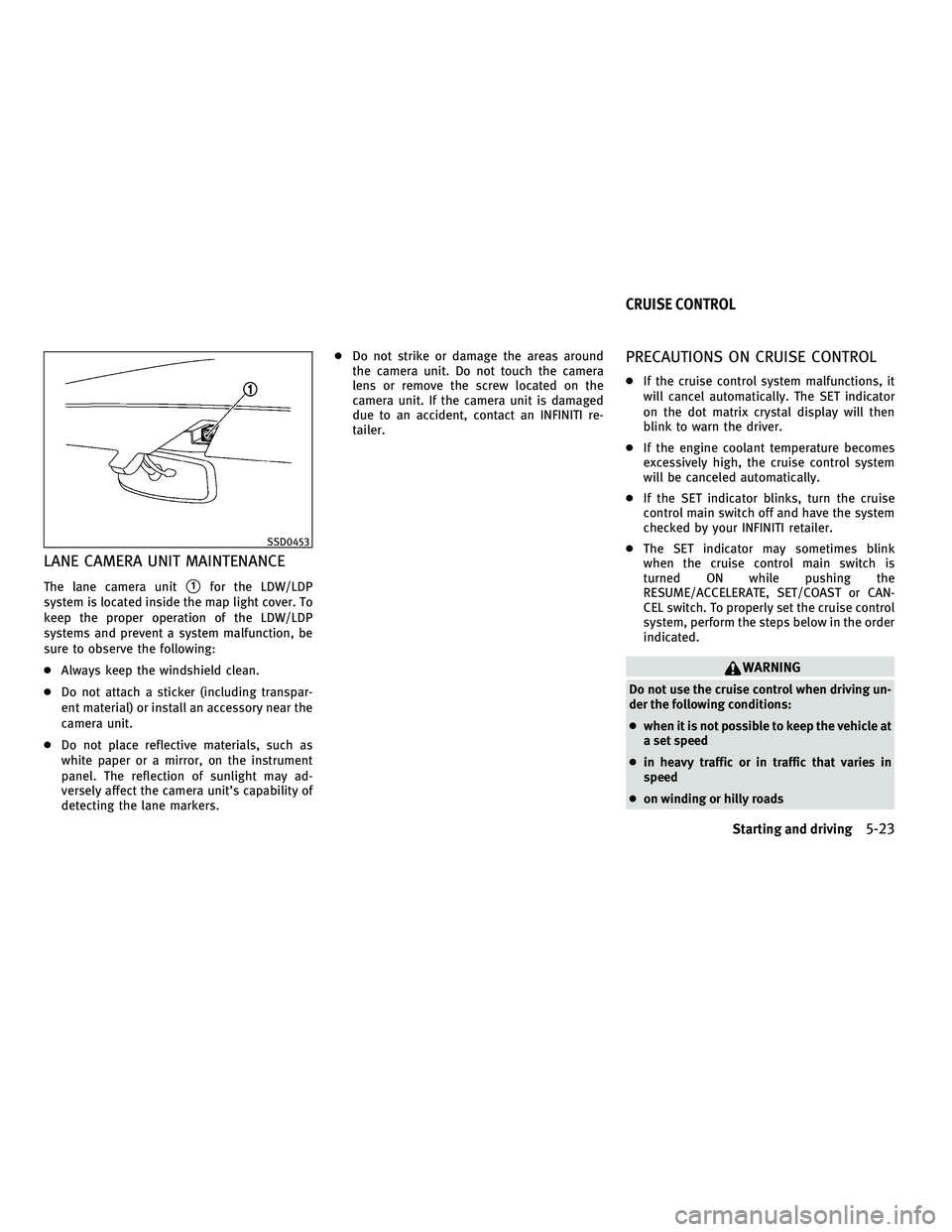
LANE CAMERA UNIT MAINTENANCE
The lane camera units1for the LDW/LDP
system is located inside the map light cover. To
keep the proper operation of the LDW/LDP
systems and prevent a system malfunction, be
sure to observe the following:
c Always keep the windshield clean.
c Do not attach a sticker (including transpar-
ent material) or install an accessory near the
camera unit.
c Do not place reflective materials, such as
white paper or a mirror, on the instrument
panel. The reflection of sunlight may ad-
versely affect the camera unit's capability of
detecting the lane markers. c
Do not strike or damage the areas around
the camera unit. Do not touch the camera
lens or remove the screw located on the
camera unit. If the camera unit is damaged
due to an accident, contact an INFINITI re-
tailer.
PRECAUTIONS ON CRUISE CONTROL
cIf the cruise control system malfunctions, it
will cancel automatically. The SET indicator
on the dot matrix crystal display will then
blink to warn the driver.
c If the engine coolant temperature becomes
excessively high, the cruise control system
will be canceled automatically.
c If the SET indicator blinks, turn the cruise
control main switch off and have the system
checked by your INFINITI retailer.
c The SET indicator may sometimes blink
when the cruise control main switch is
turned ON while pushing the
RESUME/ACCELERATE, SET/COAST or CAN-
CEL switch. To properly set the cruise control
system, perform the steps below in the order
indicated.
WARNING
Do not use the cruise control when driving un-
der the following conditions:
cwhen it is not possible to keep the vehicle at
a set speed
c in heavy traffic or in traffic that varies in
speed
c on winding or hilly roads
SSD0453
CRUISE CONTROL
Starting and driving5-23
wÐ
Ð
05/15/09Ðpattie
X
Page 311 of 445

cIn the conventional (fixed speed) cruise con-
trol mode, a warning chime will not sound to
warn you if you are too close to the vehicle
ahead. Pay special attention to the distance
between your vehicle and the vehicle ahead
of you or a collision could occur.
1. Vehicle-to-vehicle distance control mode
2. Conventional (fixed speed) cruise control
mode
Push the MAIN switchsAto choose the cruise
control mode between the vehicle-to-vehicle
distance control mode
s1and the conventional
(fixed speed) cruise control mode
s2.
Always confirm the setting in the Intelligent
Cruise Control system display.
For the vehicle-to-vehicle distance control
mode, see the following description. For the
conventional (fixed speed) cruise control mode,
see page 5-42.
SELECTING THE VEHICLE-TO-VEHICLE
DISTANCE CONTROL MODE
To choose the vehicle-to-vehicle distance con-
trol mode
s1, quickly push and release the
MAIN switch
sA.
Once a control mode is activated, it cannot be
changed to the other cruise control mode. To
change the mode, push the MAIN switch once to
turn the system off. Then push the MAIN switch
again to turn the system back on and select the
desired cruise control mode.
SSD0677
5-26Starting and driving
wÐ
Ð
05/19/09Ðtbrooks
X
Page 315 of 445

cWhen the snow or road spray from traveling
vehicles reduces the sensor's visibility
c When dense exhaust or other smoke (black
smoke) from vehicles reduces the sensor's
visibility
c When excessively heavy baggage is loaded
in the rear seat or the trunk of your vehicle
The ICC system is designed to automatically
check the sensor's operation within the limita-
tions of the system. When the sensor is covered
with dirt or obstructs, the system will automati-
cally be canceled. If the sensor is covered with
ice, a transparent or translucent vinyl bag, etc.,
the ICC system may not detect them. In these
instances, the vehicle-to-vehicle distance con-
trol mode may not cancel and may not be able
to maintain the selected following distance
from the vehicle ahead. Be sure to check and
clean the sensor regularly.
The vehicle-to-vehicle distance control mode is
designed to maintain a selected distance and
reduce the speed to match the slower vehicle
ahead; the system will decelerate the vehicle as
necessary. However, the ICC system can only
apply up to 25% of the vehicles total braking
power. This system should only be used when
traffic conditions allow vehicle speeds to re-
main fairly constant or when vehicle speeds
change gradually. If a vehicle moves into the traveling lane ahead or if a vehicle traveling
ahead rapidly decelerates, the distance be-
tween vehicles may become closer because the
ICC system cannot decelerate the vehicle
quickly enough. If this occurs, the ICC system
will sound a warning chime and blink the
system display to notify the driver to take
necessary action.
The system will cancel and a warning chime will
sound if the speed falls below approximately 20
MPH (32 km/h). The system will also disengage
below the 20 MPH (32 km/h) cut-off speed or
over the maximum set speed.
See ªApproach warningº later in this section.
The following items are controlled in the
vehicle-to-vehicle distance control mode:
c
When there are no vehicles traveling ahead,
the vehicle-to-vehicle distance control mode
maintains the speed set by the driver. The
set speed range is between approximately
25 and 90 MPH (40 and 144 km/h).
c When there is a vehicle traveling ahead, the
vehicle-to-vehicle distance control mode ad-
justs the speed to maintain the distance,
selected by driver, from the vehicle ahead.
The adjusting speed range is between ap-
proximately 20 MPH (32 km/h) and up to the
set speed. c
When the vehicle traveling ahead has moved
out from its lane of travel, the vehicle-to-
vehicle distance control mode accelerates
and maintains vehicle speed up to the set
speed.
The ICC system does not control vehicle speed
or warn you when you approach stationary and
slow moving vehicles. You must pay attention to
vehicle operation to maintain proper distance
from vehicles ahead when approaching toll
gates or traffic congestion.
5-30Starting and driving
wÐ
Ð
05/15/09Ðpattie
X