display INFINITI M 2010 Workshop Manual
[x] Cancel search | Manufacturer: INFINITI, Model Year: 2010, Model line: M, Model: INFINITI M 2010Pages: 445, PDF Size: 6.15 MB
Page 212 of 445
While connecting the iPodTto the vehicle, the
iPodT can only be operated by the vehicle audio
controls.
To disconnect the cable from the vehicle outlet,
fully depress the center connector button to
unlatch the connector and pull the connector
straight out of the outlet. To disconnect the
cable from the iPodT, fully depress the side
connector buttons and pull the iPod Tconnector
straight out of the iPodT.
* iPodT is a trademark of Apple Inc., registered
in the U.S. and other countries.
Compatibility
The following models are available:
c Third generation iPod T(Firmware version 2.3
or later) (Audiobook and Podcast are not
available)
c Fourth generation iPod T(Firmware version
3.1.1 or later)
c Fifth generation iPodT (Firmware version
1.1.2 or later)
c iPodT mini (Firmware version 1.41 or later)
c iPodT photo (Firmware version 1.2.1 or later)
c iPodT nano (Firmware version 1.2 or later)
Make sure that your iPod Tfirmware is updated.
Audio main operation
Push the ignition switch to the ACC or ON
position. Then, push the DISC´AUXbutton re-
peatedly to switch to the iPodT mode.
If the system has been turned off while the
iPodT was playing, pushing the ON´OFF/VOL
control knob will start the iPodT.
DISC´AUX button :
When the DISC´AUXbutton is pushed with the
system off and the iPod Tconnected, the system
will turn on. If another audio source is playing
and the iPod Tis connected, push the DISC´AUX
button repeatedly until the center display
changes to the iPodT mode.
Interface :
The interface for iPod Toperation shown on the
vehicle center display is similar to the iPod T
interface. Use the INFINITI controller and the
ENTER orBACK button to play the iPod Twith
your favorite settings.
The following items can be chosen from the
menu list screen. For further information about
each item, see the iPodT Owner's Manual.
c Playlists
c Artists
c Albums c
Songs
c Podcasts
c Genres
c Composers
c Audiobooks
The following touch-panel buttons shown on
the screen are also available:
c
: returns to the previous screen.
c
: plays/pauses the music selected.
FF (Fast Forward), REW (Rewind)/APS (Automatic
Program Search) FF, APS REW :
When the
orbutton is pushed for
more than 1.5 seconds while the iPod Tis play-
ing, the iPod Twill play while fast forwarding or
rewinding. When the button is released, the
iPodT will return to the normal play speed.
When the
orbutton is pushed for
less than 1.5 seconds while the iPod Tis play-
ing, the next track or the beginning of the
current track on the iPodT will be played.
The INFINITI controller can also be used to
select tracks when the iPodT is playing.
Monitor, climate, audio, phone and voice recognition systems4-49
wÐ
Ð
05/14/09Ðpattie
X
Page 214 of 445

NOTE:
cThe system starts playing and recording the
1st track on the CD when the ªRECº key is
selected.
c Individual tracks from a CD cannot be re-
corded to the Music Box hard-disk drive.
c The skip, fast forward and rewind features
are disabled while the CD is recording.
c The recording process can be stopped at any
time. All tracks that were played before the
CD was stopped are stored.
c Individual tracks can be deleted from the
hard-disk drive after the CD is recorded. If the title information of the track being re-
corded is stored either in the hard-disk drive or
in the CD, the title is automatically displayed on
the screen. For title acquisition from the hard-
disk drive, music recognition technology and
related data are provided by GracenoteT.
To view the details of the track, select the
Text
key by touching the screen or using the INFINITI
controller. The track name and album title are
displayed on the screen.
If a track is not recorded successfully due to
skipping sounds, the
mark is displayed
behind the track number. The ªMusic Boxº audio system cannot perform
recording under the following conditions.
c
There is not enough space in the hard disk
c The number of albums reaches the maximum
of 500.
c The number of tracks reaches the maximum
of 3,000.
Automatic recording :
If the ªAutomatic Recordingº function is turned
to ON, recording starts when a CD is inserted.
(See ªMusic Box settingsº later in this section.)
Stopping recording :
To stop the recording, select the STOPbutton
by touching the screen or using the INFINITI
controller.
If the CD is ejected, the audio system is turned
off or the ignition switch is pushed to the LOCK
position, the recording also stops.
SAA1614
Monitor, climate, audio, phone and voice recognition systems4-51
wÐ
Ð
05/19/09Ðtbrooks
X
Page 215 of 445
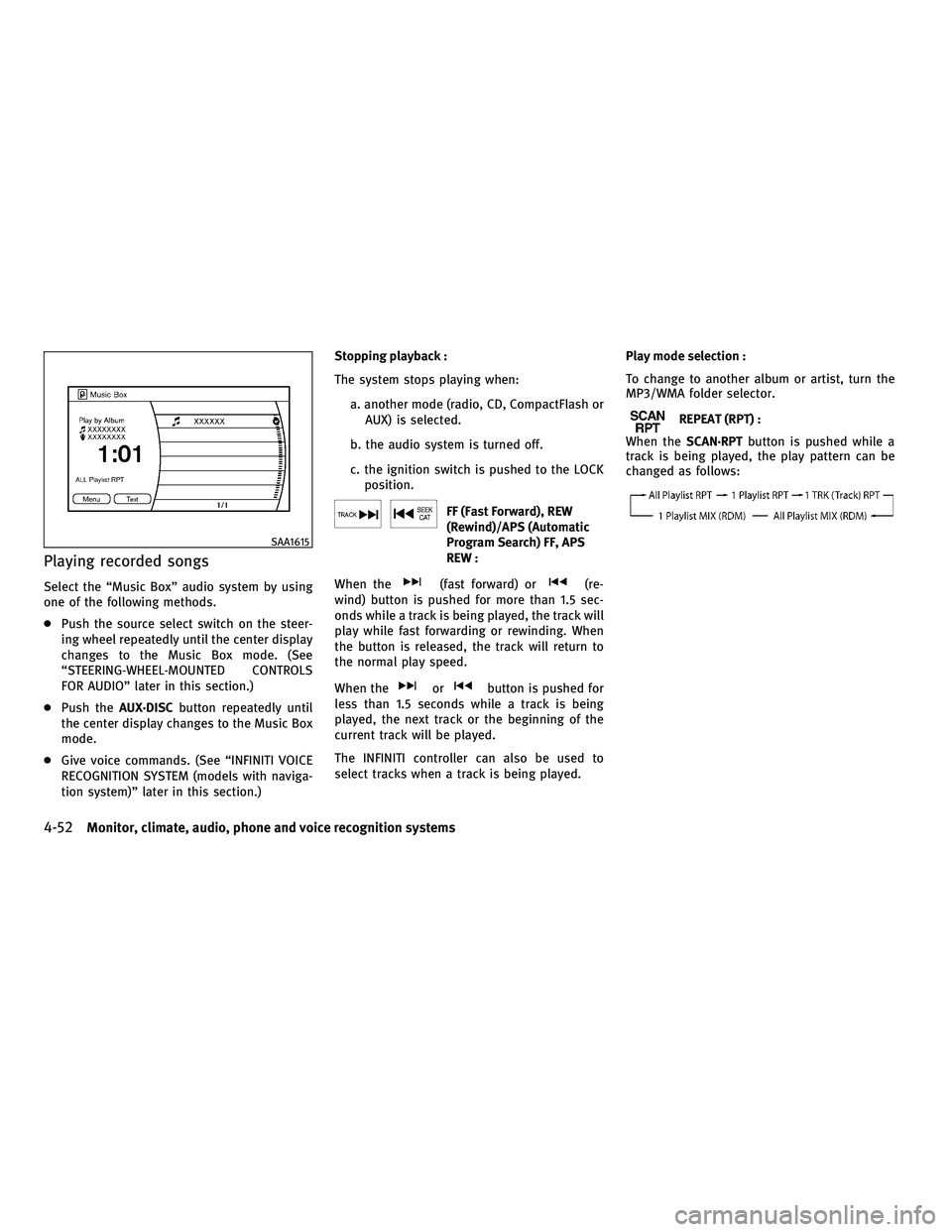
Playing recorded songs
Select the ªMusic Boxº audio system by using
one of the following methods.
cPush the source select switch on the steer-
ing wheel repeatedly until the center display
changes to the Music Box mode. (See
ªSTEERING-WHEEL-MOUNTED CONTROLS
FOR AUDIOº later in this section.)
c Push the AUX´DISC button repeatedly until
the center display changes to the Music Box
mode.
c Give voice commands. (See ªINFINITI VOICE
RECOGNITION SYSTEM (models with naviga-
tion system)º later in this section.) Stopping playback :
The system stops playing when:
a. another mode (radio, CD, CompactFlash orAUX) is selected.
b. the audio system is turned off.
c. the ignition switch is pushed to the LOCK position.
FF (Fast Forward), REW
(Rewind)/APS (Automatic
Program Search) FF, APS
REW :
When the
(fast forward) or(re-
wind) button is pushed for more than 1.5 sec-
onds while a track is being played, the track will
play while fast forwarding or rewinding. When
the button is released, the track will return to
the normal play speed.
When the
orbutton is pushed for
less than 1.5 seconds while a track is being
played, the next track or the beginning of the
current track will be played.
The INFINITI controller can also be used to
select tracks when a track is being played. Play mode selection :
To change to another album or artist, turn the
MP3/WMA folder selector.
REPEAT (RPT) :
When the SCAN´RPT button is pushed while a
track is being played, the play pattern can be
changed as follows:
SAA1615
4-52Monitor, climate, audio, phone and voice recognition systems
wÐ
Ð
05/14/09Ðpattie
X
Page 216 of 445
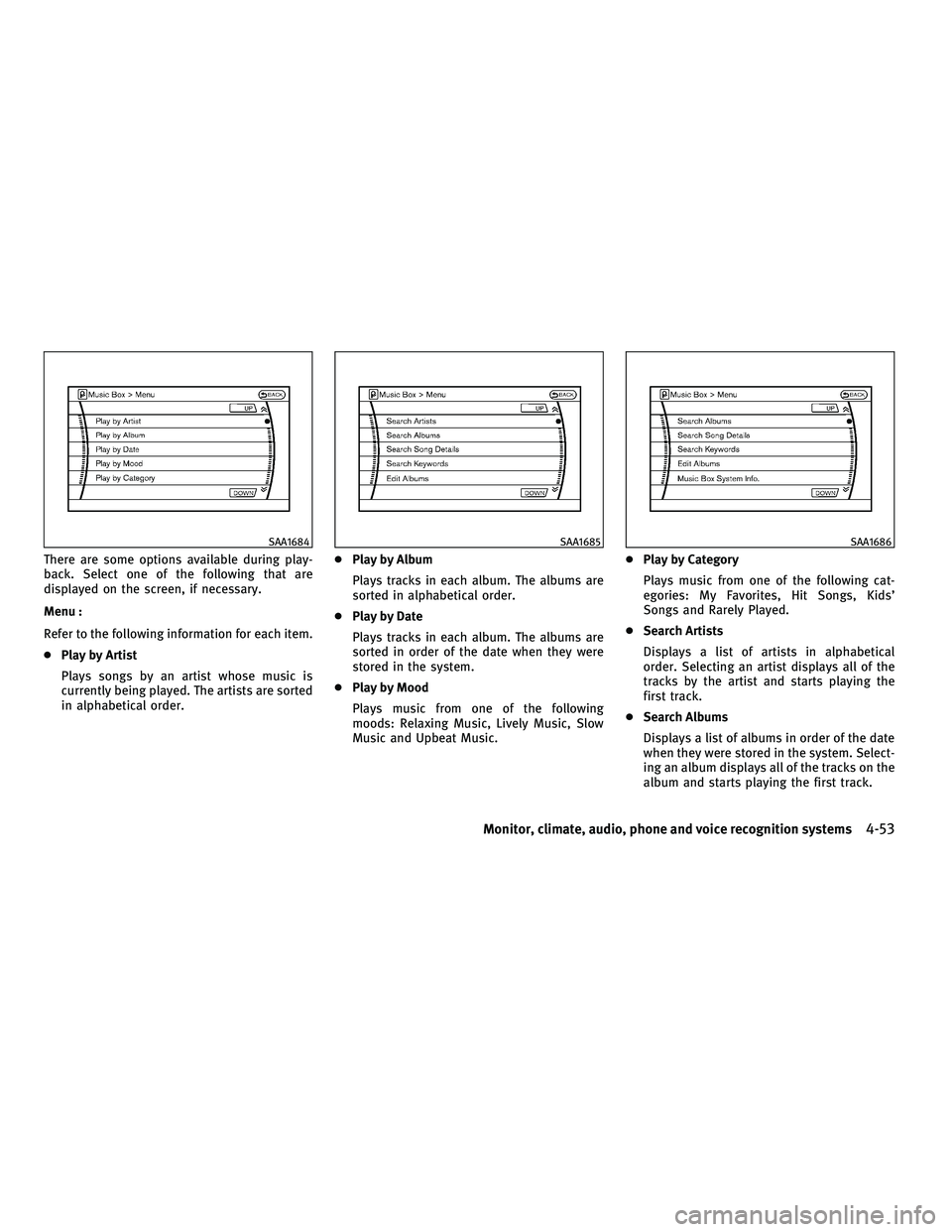
There are some options available during play-
back. Select one of the following that are
displayed on the screen, if necessary.
Menu :
Refer to the following information for each item.
cPlay by Artist
Plays songs by an artist whose music is
currently being played. The artists are sorted
in alphabetical order. c
Play by Album
Plays tracks in each album. The albums are
sorted in alphabetical order.
c Play by Date
Plays tracks in each album. The albums are
sorted in order of the date when they were
stored in the system.
c Play by Mood
Plays music from one of the following
moods: Relaxing Music, Lively Music, Slow
Music and Upbeat Music. c
Play by Category
Plays music from one of the following cat-
egories: My Favorites, Hit Songs, Kids'
Songs and Rarely Played.
c Search Artists
Displays a list of artists in alphabetical
order. Selecting an artist displays all of the
tracks by the artist and starts playing the
first track.
c Search Albums
Displays a list of albums in order of the date
when they were stored in the system. Select-
ing an album displays all of the tracks on the
album and starts playing the first track.
SAA1684SAA1685SAA1686
Monitor, climate, audio, phone and voice recognition systems4-53
wÐ
Ð
05/19/09Ðtbrooks
X
Page 217 of 445

Select the ªSortº key to re-sort albums in
one of the following order: Rec. (Recorded)
Date, Name, Release Year, Artist.
c Search Song Details
Set the conditions and select the ªStart
Song Search º key to search for a desired
song that is stored in the system. The con-
ditions are as follows:
Music Tempo (All, Slow, Normal and Fast)
Decade (All, '70s, '80s, '90s, '00s and '10s
and After)
Group (All, Male Artist, Female Artist, Group
and Duo)
Category (Rock, Pop, Latin, Jazz, R&B, Hip
Hop, Club/Dance, Punk, Reggae, Folk, Blues,
Country, Metal, Easy Listening, New Age,
Soundtrack, Gospel & Religious, World,
Classical, Children's and Other)
c Search Keywords
Input a search keyword using the keypad
displayed on the screen. (See ªHOW TO USE
TOUCH SCREEN (models with navigation sys-
tem)º earlier in this section.) c
Edit Albums
Select a category (Rec. (Recorded) Date,
Name, Released Year and Artist) and edit the
details using the keypad displayed on the
screen. (See ªHOW TO USE TOUCH SCREEN
(models with navigation system)º earlier in
this section.)
c Music Box System Info.
Displays the following information about the
ªMusic Boxº audio system:
a. Music Box Used / Free Space (Information
about ªSaved Albumº, ªSaved Trackº and
ªRemaining Timeº is displayed.)
b. Mood Categories (Number of saved tracks and their categories (Relaxing Music,
Lively Music, Slow Music, Upbeat Music
and Others) are displayed.)
c. Deleted Items (Information about the de- leted tracks is displayed.) d. Search Missing Titles
If titles are not displayed for CDs that have
been recorded, titles can be acquired using
one of the following methods:
Ð Retrieve from HDD
Searches the title using the database in
the hard disk.
Ð Retrieve from CF Searches the title from the information
acquired on the Internet. Visit
www.InfinitiUSA.com/music-update for
details.
Ð Transfer Missing Titles to CF Transfers the information of the album
recorded without titles to a CompactFlash
card. Visit
www.InfinitiUSA.com/music-update for
details.
e. Music Box Settings (See ªMusic Box set- tingsº later in this section.)
f. CDDB Version (the version of the built-in Gracenote Database is displayed.)
4-54Monitor, climate, audio, phone and voice recognition systems
wÐ
Ð
05/19/09Ðtbrooks
X
Page 218 of 445
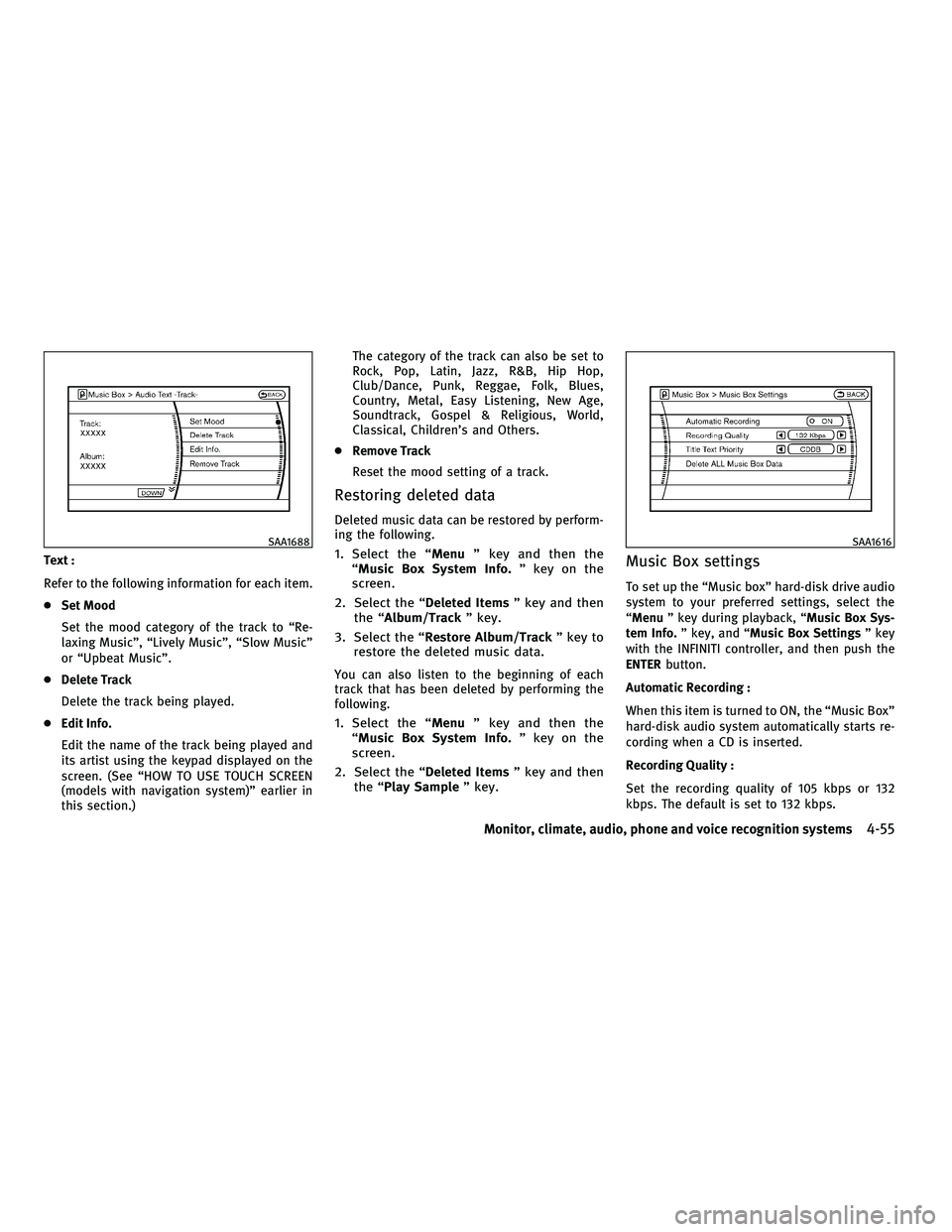
Text :
Refer to the following information for each item.
cSet Mood
Set the mood category of the track to ªRe-
laxing Musicº, ªLively Musicº, ªSlow Musicº
or ªUpbeat Musicº.
c Delete Track
Delete the track being played.
c Edit Info.
Edit the name of the track being played and
its artist using the keypad displayed on the
screen. (See ªHOW TO USE TOUCH SCREEN
(models with navigation system)º earlier in
this section.) The category of the track can also be set to
Rock, Pop, Latin, Jazz, R&B, Hip Hop,
Club/Dance, Punk, Reggae, Folk, Blues,
Country, Metal, Easy Listening, New Age,
Soundtrack, Gospel & Religious, World,
Classical, Children's and Others.
c Remove Track
Reset the mood setting of a track.
Restoring deleted data
Deleted music data can be restored by perform-
ing the following.
1. Select the ª Menuº key and then the
ªMusic Box System Info. º key on the
screen.
2. Select the ª Deleted Itemsº key and then
the ªAlbum/Track º key.
3. Select the ªRestore Album/Track º key to
restore the deleted music data.
You can also listen to the beginning of each
track that has been deleted by performing the
following.
1. Select the ª Menuº key and then the
ªMusic Box System Info. º key on the
screen.
2. Select the ª Deleted Itemsº key and then
the ª Play Sample º key.
Music Box settings
To set up the ªMusic boxº hard-disk drive audio
system to your preferred settings, select the
ªMenuº key during playback, ª Music Box Sys-
tem Info. º key, and ª Music Box Settings º key
with the INFINITI controller, and then push the
ENTER button.
Automatic Recording :
When this item is turned to ON, the ªMusic Boxº
hard-disk audio system automatically starts re-
cording when a CD is inserted.
Recording Quality :
Set the recording quality of 105 kbps or 132
kbps. The default is set to 132 kbps.
SAA1688SAA1616
Monitor, climate, audio, phone and voice recognition systems4-55
wÐ
Ð
05/14/09Ðpattie
X
Page 221 of 445
cA new disc may be rough on the inner and
outer edges. Remove the rough edges by
rubbing the inner and outer edges with the
side of a pen or pencil as illustrated.
CF cards
cNever touch the terminal portion of the
CompactFlash cards. Do not bend the cards.
c Always place the cards in the storage case
when they are not being used.
c Do not place heavy objects on the cards.
c Do not store the cards in highly humid
locations.
c Do not expose the cards to direct sunlight.
c Do not spill any liquids on the cards.
Refer to the CompactFlash card Owner's Manual
for the details.
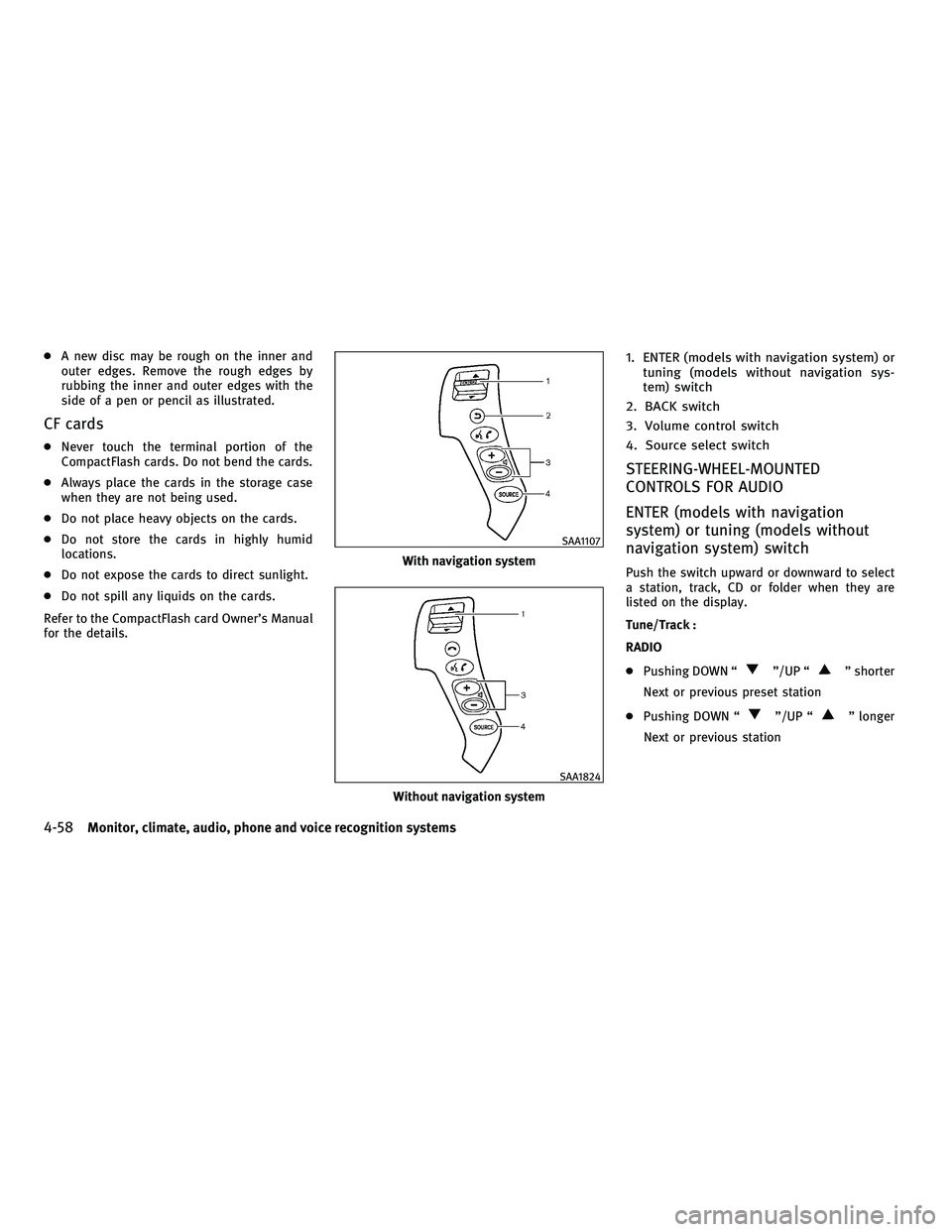
1. ENTER (models with navigation system) or tuning (models without navigation sys-
tem) switch
2. BACK switch
3. Volume control switch
4. Source select switch
STEERING-WHEEL-MOUNTED
CONTROLS FOR AUDIO
ENTER (models with navigation
system) or tuning (models without
navigation system) switch
Push the switch upward or downward to select
a station, track, CD or folder when they are
listed on the display.
Tune/Track :
RADIO
c Pushing DOWN ª
º/UP ªº shorter
Next or previous preset station
c Pushing DOWN ª
º/UP ªº longer
Next or previous station
With navigation system
SAA1107
Without navigation system
SAA1824
4-58Monitor, climate, audio, phone and voice recognition systems
wÐ
Ð
05/19/09Ðtbrooks
X
Page 222 of 445
CD
cPushing DOWN ª
º/UP ªº shorter
Next track or the beginning of the current
track
c Pushing DOWN ª
º/UP ªº longer
(CD changer - if so equipped)
Disc change (When only one disc is loaded,
the 1st track of the disc will be selected.)
CD/CF (if so equipped) with MP3/WMA
c Pushing DOWN ª
º/UP ªº shorter
Next track or the beginning of the current
track
c Pushing DOWN ª
º/UP ªº longer
Folder change (When the last folder on a disc
is playing, the next disc will be selected.)
DVD (if so equipped)
c Pushing DOWN ª
º/UP ªº shorter
Next track/chapter or the beginning of the
current track/chapter
c Pushing DOWN ª
º/UP ªº longer
Next group/title or the beginning of the
current group/title iPodT
(if so equipped)
c Pushing DOWN ª
º/UP ªº shorter
Previous or next track (Start/Pause or Menu
can be selected when the ENTER button is
pushed.)
c Pushing DOWN ª
º/UP ªº longer
Rewind or fast forward search
ªMusic Boxº hard-disk drive audio system (if so
equipped)
c Pushing DOWN ª
º/UP ªº shorter
Next track or the beginning of the current
track
c Pushing DOWN ª
º/UP ªº longer
Playlist change (When the last playlist is
playing, the next playlist will be selected.)
ENTER switch operation :
You can also use the ENTER switch to select the
items on the usual setting menu screen.
After selecting an MP3 folder using the up and
down switch, push the ENTER switch to com-
plete the selection.
While the display is in the NAVI, STATUS or
Audio setting screen, some audio functions can
also be controlled using the ENTER switch. The function varies depending on if you push the
switch shorter (less than 1.5 seconds) or longer
(more than 1.5 seconds).
BACK switch
Push this switch to go back to the previous
screen or cancel the selection if it is not com-
pleted.
Volume control switches
Push the upper (+) or lower (2) side switch to
increase or decrease the volume.
SOURCE select switch
Push the source select switch to change the
mode, Preset A, Preset B, Preset C, ªMusic Boxº
(if so equipped), CD, CompactFlash (if so
equipped), DVD (if so equipped), AUX and iPodT
(if equipped).
Monitor, climate, audio, phone and voice recognition systems4-59
wÐ
Ð
05/14/09Ðpattie
X
Page 223 of 445
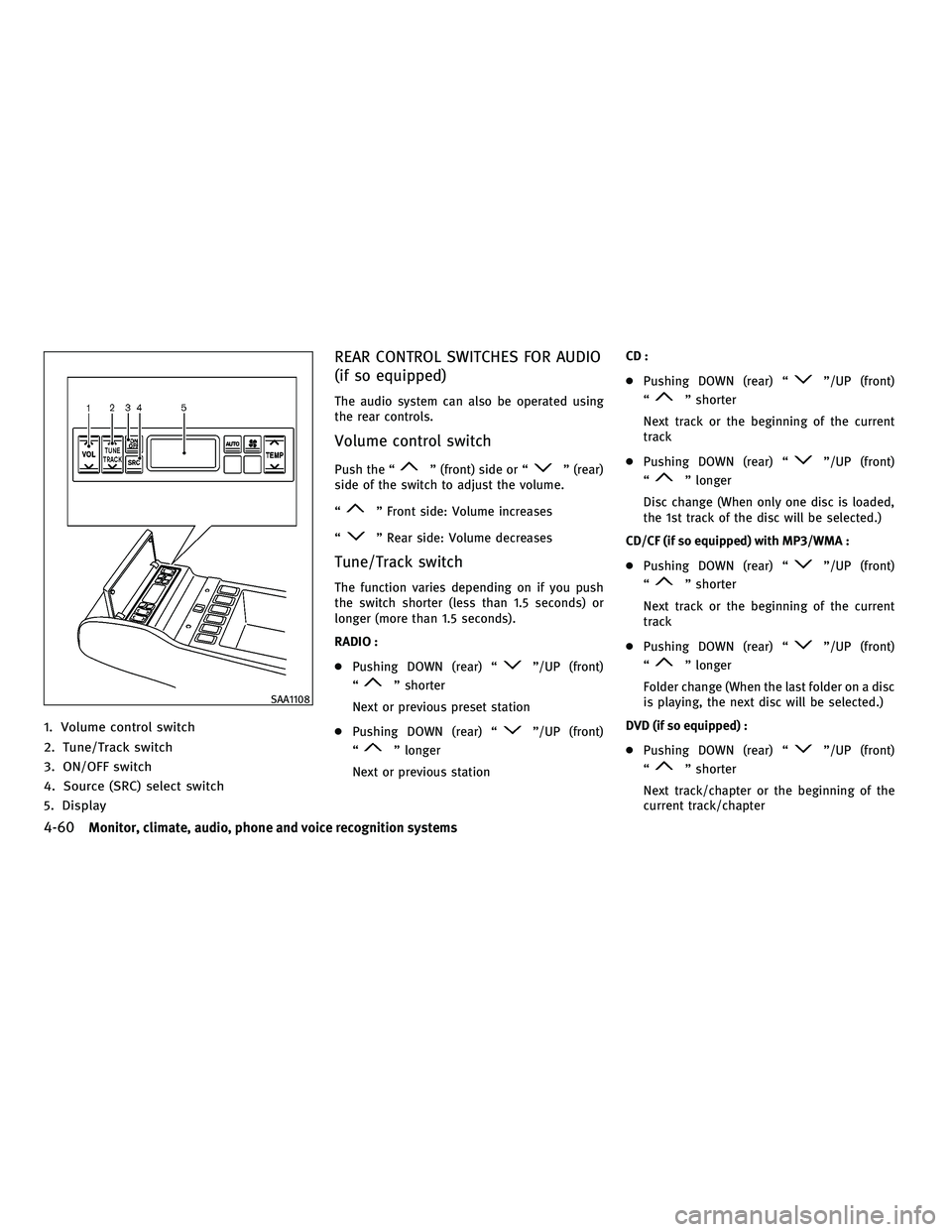
1. Volume control switch
2. Tune/Track switch
3. ON/OFF switch
4. Source (SRC) select switch
5. Display
REAR CONTROL SWITCHES FOR AUDIO
(if so equipped)
The audio system can also be operated using
the rear controls.
Volume control switch
Push the ªº (front) side or ªº (rear)
side of the switch to adjust the volume.
ª
º Front side: Volume increases
ª
º Rear side: Volume decreases
Tune/Track switch
The function varies depending on if you push
the switch shorter (less than 1.5 seconds) or
longer (more than 1.5 seconds).
RADIO :
c Pushing DOWN (rear) ª
º/UP (front)
ª
º shorter
Next or previous preset station
c Pushing DOWN (rear) ª
º/UP (front)
ª
º longer
Next or previous station CD :
c
Pushing DOWN (rear) ª
º/UP (front)
ª
º shorter
Next track or the beginning of the current
track
c Pushing DOWN (rear) ª
º/UP (front)
ª
º longer
Disc change (When only one disc is loaded,
the 1st track of the disc will be selected.)
CD/CF (if so equipped) with MP3/WMA :
c Pushing DOWN (rear) ª
º/UP (front)
ª
º shorter
Next track or the beginning of the current
track
c Pushing DOWN (rear) ª
º/UP (front)
ª
º longer
Folder change (When the last folder on a disc
is playing, the next disc will be selected.)
DVD (if so equipped) :
c Pushing DOWN (rear) ª
º/UP (front)
ª
º shorter
Next track/chapter or the beginning of the
current track/chapter
SAA1108
4-60Monitor, climate, audio, phone and voice recognition systems
wÐ
Ð
05/14/09Ðpattie
X
Page 225 of 445
This vehicle is equipped with the mobile enter-
tainment system, which enables you to play a
Digital Versatile Disc (DVD), providing the im-
ages and sounds both in the front and rear
display screens.
WARNING
cThe driver must not attempt to operate or
view the Mobile Entertainment System
(MES) while the vehicle is in motion so that
full attention may be given to vehicle
operation.
c Do not attempt to modify the system to dis-
play a movie on the front screen while the
vehicle is being driven. Doing so may dis-
tract the driver and may cause a collision and
serious personal injury or death.
CAUTION
cThe glass screen on the liquid crystal display
may break if hit with a hard or sharp object. If
the glass breaks, do not touch the liquid
crystalline material, which contains a small
amount of mercury. In case of contact with
skin, wash immediately with soap and
water. c
Use a damp, soft cloth when cleaning the
Mobile Entertainment System components.
Do not use solvents or cleaning solutions.
c Do not attempt to use the system in extreme
temperature conditions [below 24ÉF
(220ÉC) or above 158ÉF (70ÉC)].
c To avoid discharging the vehicle battery, do
not operate the system more than 15 min-
utes without starting the engine.
Movies will not be shown on the front display
while the vehicle is in any drive position to
reduce driver distraction. Audio is available
when a movie is played. To view movies in the
front display, stop the vehicle in a safe location,
move the selector lever to the P (Park) position
and apply the parking brake.
DIGITAL VERSATILE DISC (DVD)
SYSTEM COMPONENTS
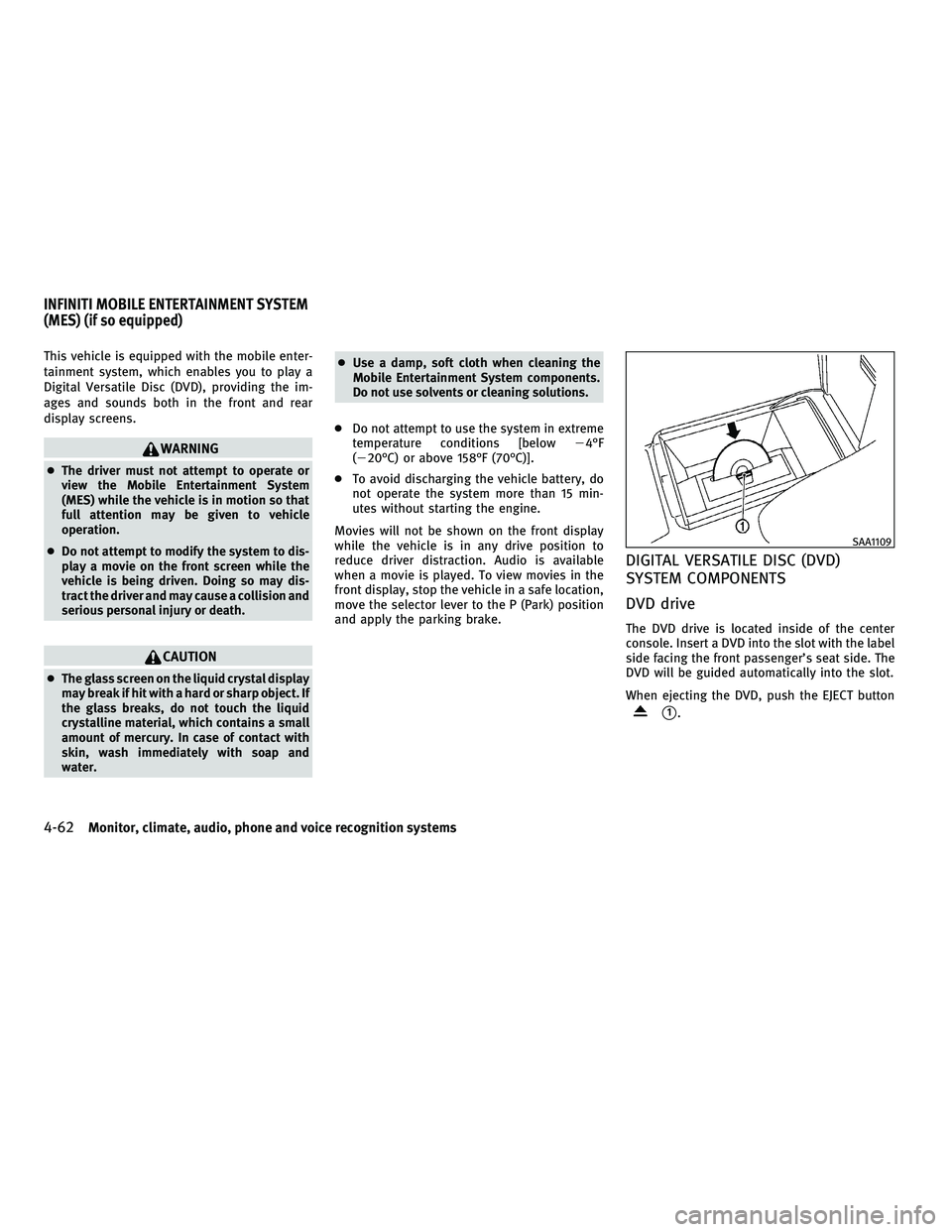
DVD drive
The DVD drive is located inside of the center
console. Insert a DVD into the slot with the label
side facing the front passenger's seat side. The
DVD will be guided automatically into the slot.
When ejecting the DVD, push the EJECT button
s1.
SAA1109
INFINITI MOBILE ENTERTAINMENT SYSTEM
(MES) (if so equipped)
4-62Monitor, climate, audio, phone and voice recognition systems
wÐ
Ð
05/14/09Ðpattie
X