display INFINITI M 2010 Manual PDF
[x] Cancel search | Manufacturer: INFINITI, Model Year: 2010, Model line: M, Model: INFINITI M 2010Pages: 445, PDF Size: 6.15 MB
Page 240 of 445
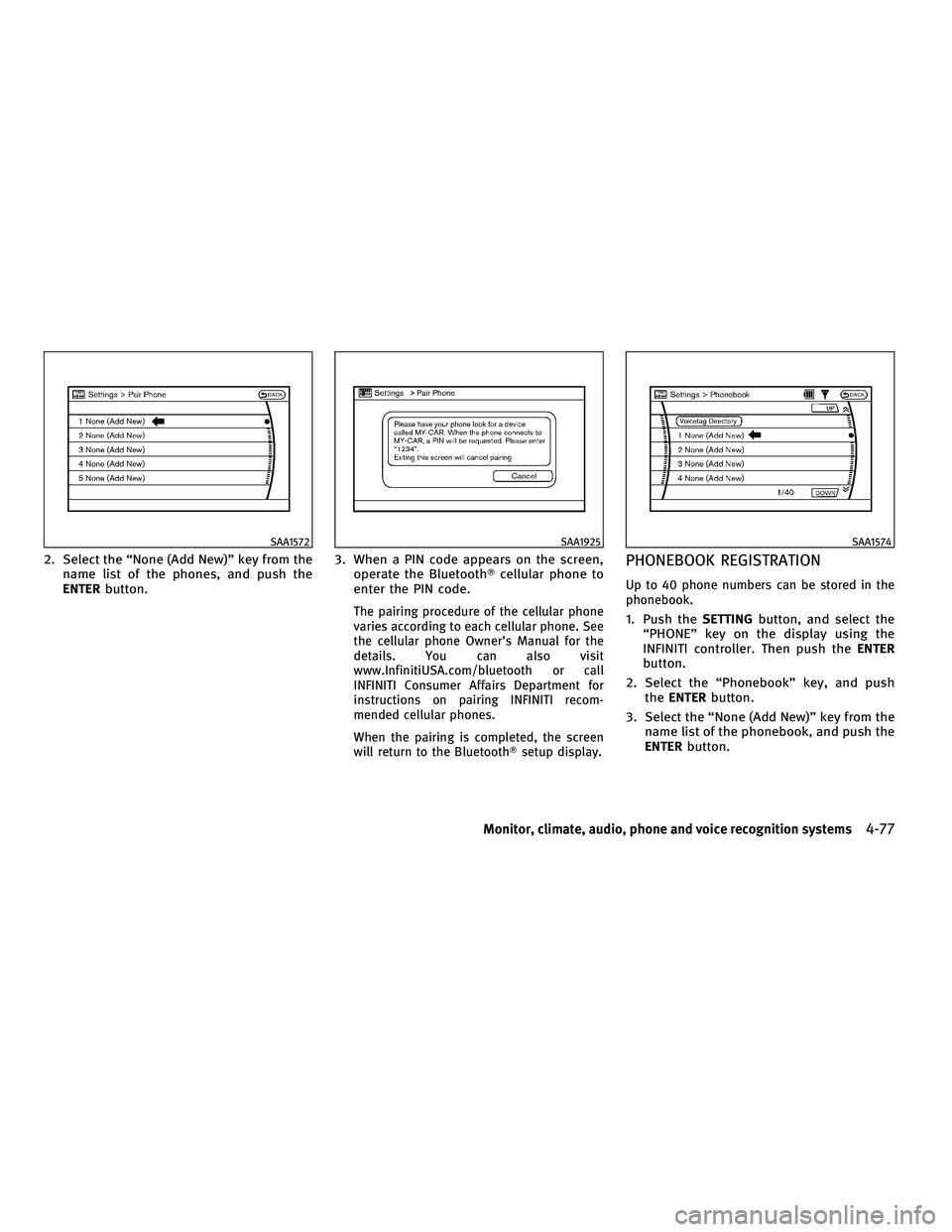
2. Select the ªNone (Add New)º key from thename list of the phones, and push the
ENTER button. 3. When a PIN code appears on the screen,
operate the Bluetooth Tcellular phone to
enter the PIN code.
The pairing procedure of the cellular phone
varies according to each cellular phone. See
the cellular phone Owner's Manual for the
details. You can also visit
www.InfinitiUSA.com/bluetooth or call
INFINITI Consumer Affairs Department for
instructions on pairing INFINITI recom-
mended cellular phones.
When the pairing is completed, the screen
will return to the BluetoothT setup display.
PHONEBOOK REGISTRATION
Up to 40 phone numbers can be stored in the
phonebook.
1. Push theSETTINGbutton, and select the
ªPHONEº key on the display using the
INFINITI controller. Then push the ENTER
button.
2. Select the ªPhonebookº key, and push the ENTER button.
3. Select the ªNone (Add New)º key from the name list of the phonebook, and push the
ENTER button.
SAA1572SAA1925SAA1574
Monitor, climate, audio, phone and voice recognition systems4-77
wÐ
Ð
05/14/09Ðpattie
X
Page 241 of 445
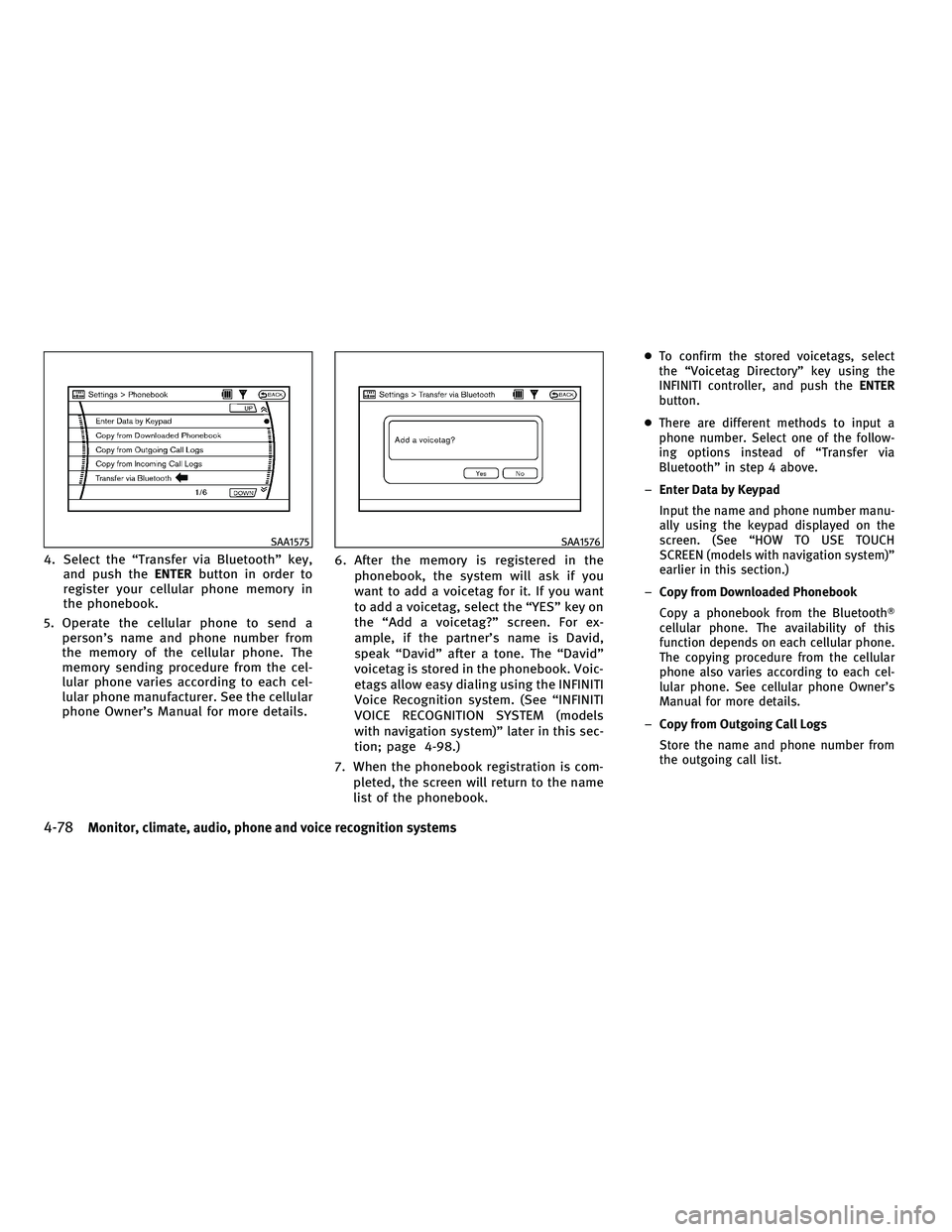
4. Select the ªTransfer via Bluetoothº key,and push the ENTERbutton in order to
register your cellular phone memory in
the phonebook.
5. Operate the cellular phone to send a person's name and phone number from
the memory of the cellular phone. The
memory sending procedure from the cel-
lular phone varies according to each cel-
lular phone manufacturer. See the cellular
phone Owner's Manual for more details. 6. After the memory is registered in the
phonebook, the system will ask if you
want to add a voicetag for it. If you want
to add a voicetag, select the ªYESº key on
the ªAdd a voicetag?º screen. For ex-
ample, if the partner's name is David,
speak ªDavidº after a tone. The ªDavidº
voicetag is stored in the phonebook. Voic-
etags allow easy dialing using the INFINITI
Voice Recognition system. (See ªINFINITI
VOICE RECOGNITION SYSTEM (models
with navigation system)º later in this sec-
tion; page 4-98.)
7. When the phonebook registration is com- pleted, the screen will return to the name
list of the phonebook.
cTo confirm the stored voicetags, select
the ªVoicetag Directoryº key using the
INFINITI controller, and push the ENTER
button.
c There are different methods to input a
phone number. Select one of the follow-
ing options instead of ªTransfer via
Bluetoothº in step 4 above.
± Enter Data by Keypad
Input the name and phone number manu-
ally using the keypad displayed on the
screen. (See ªHOW TO USE TOUCH
SCREEN (models with navigation system)º
earlier in this section.)
± Copy from Downloaded Phonebook
Copy a phonebook from the Bluetooth T
cellular phone. The availability of this
function depends on each cellular phone.
The copying procedure from the cellular
phone also varies according to each cel-
lular phone. See cellular phone Owner's
Manual for more details.
± Copy from Outgoing Call Logs
Store the name and phone number from
the outgoing call list.
SAA1575SAA1576
4-78Monitor, climate, audio, phone and voice recognition systems
wÐ
Ð
05/19/09Ðtbrooks
X
Page 242 of 445

±Copy from Incoming Call Logs
Store the name and phone number from
the incoming call list.
± Delete
Delete a contact that is registered in the
phonebook.
MAKING A CALL
To make a call, follow the procedures below.
1. Push the PHONEbutton on the instrument
panel or push and hold the
button
on the steering wheel. The ªPHONEº
screen will appear on the display.
2. Select the ªCall (Phonebook)º key on the ªPHONEº menu, and push the ENTERbut-
ton.
3. Select the registered person's name from the list, and push the ENTERbutton. Dial-
ing will start and the screen will change to
the call-in-progress screen. 4. After the call is over, perform one of the
following to finish the call.
a. Select the ªHang upº key and push theENTER button.
b. Push the
button on the steering
wheel.
c. Push the PHONEbutton on the instrument
panel.
There are different methods to make a call.
Select one of the following options instead of
ªCall (Phonebook)º in step 2 above.
c Redial
Dial the previously dialed number again.
c Call (Call Logs)
Select the name or phone number from the
incoming or outgoing call logs.
c Call (Downloaded)
Select the name or phone number from the
downloaded list.
c Dial (Keypad)
Input the phone number manually using the
keypad displayed on the screen. (See ªHOW
TO USE TOUCH SCREEN (models with naviga-
tion system)º earlier in this section.)
SAA1895
Monitor, climate, audio, phone and voice recognition systems4-79
wÐ
Ð
05/19/09Ðtbrooks
X
Page 243 of 445

RECEIVING A CALL
When you hear a phone ring, the display will
change to the incoming call mode. To receive a
call, perform one of the following procedures
listed below.
a) Select the ªAnswerº key on the displayand push the ENTERbutton.
b) Push the PHONEbutton on the instrument
panel.
c) Push the
button on the steering
wheel.
There are some options available when receiv-
ing a call. Select one of the following displayed
on the screen. c
Answer
Accept an incoming call to talk.
c On Hold
Put an incoming call on hold.
c Reject Call
Reject an incoming call.
To finish the call, perform one of the follow-
ing procedures listed below.
a) Select the ªHang upº key on the display
and push the ENTERbutton.
b) Push the PHONEbutton on the instrument
panel.
c) Push the
button on the steering
wheel.
DURING A CALL
There are some options available during a call.
Select one of the following displayed on the
screen if necessary.
c Hang up
Finish the call.
c Use Handset
Transfer the call to the cellular phone.
c Mute
Mute your voice to the person.
c Keypad
Send a dial tone to the caller for using
network services such as voice mail.
SAA1578SAA1579
4-80Monitor, climate, audio, phone and voice recognition systems
wÐ
Ð
05/14/09Ðpattie
X
Page 244 of 445

cCancel Mute
This will appear after ªMuteº is selected.
Mute will be canceled.
To adjust the person's voice to be louder or
quieter, push the volume control switch (+ or 2)
on the steering wheel or turn the volume control
knob on the instrument panel while talking on
the phone. This adjustment is also available in
the SETTING mode.
PHONE SETTING
To set up the Bluetooth THands-Free Phone
System to your preferred settings, push the
SETTING button on the instrument panel and
select the ªPHONEº key on the display, and
then push the ENTERbutton.
Phonebook
See ªPHONEBOOK REGISTRATIONº earlier in
this section for adding, editing and deleting a
contact.
Downloaded Phonebook
Refer to the following information for each item.
cDownload All
Download all of the contacts registered in
the BluetoothT cellular phone. Availability of
this function depends on each cellular
phone. The memory downloading procedure
from the cellular phone also varies accord-
ing to each cellular phone. See cellular
phone Owner's Manual for more details.
c Delete Downloaded Phonebook
Delete a downloaded phonebook.
SAA1580SAA1581
Monitor, climate, audio, phone and voice recognition systems4-81
wÐ
Ð
05/14/09Ðpattie
X
Page 245 of 445
cDelete an Entry of Downloaded Phonebook
Delete an entry from the downloaded phone-
book.
Automatic Hold
If this item is turned on, an incoming call will be
placed on hold automatically after several
rings.
Use Vehicle Ringtone
If this item is turned on, a specific ringtone that
is different from the cellular phone's will sound
when receiving a call.
Delete Call Logs
Delete all of the incoming or outgoing call logs
from the list.
Bluetooth Setup
See the following information for each item.
cBluetooth
If this setting is turned off, the connection
between the cellular phone and the in-
vehicle phone module will be canceled.
c Bluetooth Info
Check information about the device name,
device PIN and connection status. c
Pair Phone
See ªPAIRING PROCEDUREº later in this sec-
tion.
c Priority Change
Use this command to change the priority
level of the active phone.
The priority level determines which phone
will be connected to the system when more
than one paired BluetoothT phone is in the
vehicle.
The system states the priority level of the
active phone and asks for a new priority
level (1, 2, 3, 4, 5).
If the new priority level is already being used
for another phone, the two phones will swap
priority levels.
For example, if the current priority levels are:
Priority Level 1 = Phone A
Priority Level 2 = Phone B
Priority Level 3 = Phone C
and you change the priority level of Phone C
to Level 1, then:
Priority Level 1 = Phone C
Priority Level 2 = Phone B
Priority Level 3 = Phone A c
Remove Paired Phone
Delete a registered cellular phone from the
paired list.
c Paired Phone List
Up to 5 registered cellular phones are shown
on the list. If you select a cellular phone that
is different from the one currently being
connected, the newly selected phone will be
connected to the system.
c Edit Phone Name
Rename the registered cellular phones using
the keypad displayed on the screen. (See
ªHOW TO USE TOUCH SCREEN (models with
navigation system)º earlier in this section.)
4-82Monitor, climate, audio, phone and voice recognition systems
wÐ
Ð
05/14/09Ðpattie
X
Page 248 of 445
cSome cellular phones or other devices may
cause interference or a buzzing noise to
come from the audio system speakers. Stor-
ing the device in a different location may
reduce or eliminate the noise.
c Refer to the cellular phone Owner's Manual
regarding the telephone pairing procedure
specific to your phone, battery charging,
cellular phone antenna, etc.
c The antenna display on the monitor will not
coincide with the antenna display of some
cellular phones.
c Keep the interior of the vehicle as quiet as
possible to hear the caller's voice clearly as
well as to minimize its echoes.
c If reception between callers is unclear, ad-
justing the incoming or outgoing call volume
may improve the clarity.
REGULATORY INFORMATION
FCC Regulatory information
± CAUTION: To maintain compliance with FCC's
RF exposure guidelines, use only the sup-
plied antenna. Unauthorized antenna, modi-
fication, or attachments could damage the
transmitter and may violate FCC regulations. ± Operation is subject to the following two
conditions:
1. this device may not cause interference and
2. this device must accept any interference, including interference that may cause
undesired operation of the device
IC Regulatory information
± Operation is subject to the following twoconditions: (1) this device may not cause
interference, and (2) this device must accept
any interference, including interference that
may cause undesired operation of the device.
± This Class B digital apparatus meets all requirements of the Canadian Interference-
Causing Equipment Regulations.
Bluetooth trademark:
BLUETOOTHT is a trade-
mark owned by Bluetooth
SIG, Inc., U.S.A.
INITIALIZATION
When the ignition switch is pushed to the ON
position, INFINITI Voice Recognition is initial-
ized, which takes a few seconds. If the
button is pushed before the initialization com-
pletes, the system will announce ªHands-free
phone system not readyº and will not react to
voice commands.
OPERATING TIPS
To get the best performance out of the INFINITI
Voice Recognition system, observe the follow-
ing:
c Keep the interior of the vehicle as quiet as
possible. Close the windows to eliminate
surrounding noises (traffic noises, vibration
sounds, etc.), which may prevent the system
from recognizing voice commands correctly.
c Wait until the tone sounds before speaking a
command. Otherwise, the command will not
be received properly.
c Start speaking a command within 5 seconds
after the tone sounds.
c Speak in a natural voice without pausing
between words.
Monitor, climate, audio, phone and voice recognition systems4-85
wÐ
Ð
05/19/09Ðtbrooks
X
Page 261 of 445
INFINITI Voice Recognition allows hands-free
operation of the systems equipped on this
vehicle in one of two modes, Standard Mode or
Alternate Command Mode.
In Standard Mode, commands that are available
are always shown on the display and an-
nounced by the system. You can complete your
desired operation by simply following the
prompts given by the system. (See ªINFINITI
VOICE RECOGNITION STANDARD MODEº later in
this section for details.) In this mode, hands-
free operation of Audio, Climate Control and
Display is not available through INFINITI Voice
Recognition.
For advanced operation, you can use the Alter-
nate Command Mode that enables the opera-
tion of the display, audio, and climate control
through INFINITI Voice Recognition. (See
ªINFINITI VOICE RECOGNITION ALTERNATE COM-
MAND MODEº later in this section for details.)
When this mode is active, an expanded list of
commands can be spoken after pushing the
TALK
switch, and the voice command
menu prompts are turned off. Note that in this
mode the recognition success rate may be
affected as the number of available commands
and the ways of speaking each command are
increased. For U.S. customers, the Standard Mode is se-
lected by default. For Canadian customers, the
Alternate Command Mode is the default mode.
To switch one mode to another, see each mode
description later in this section.
To improve the recognition success rate when
Alternate Command Mode is active, try using
the Speaker Adaptation Function available in
that mode. Otherwise, it is recommended that
Alternate Command Mode be turned off and
Standard Mode be used for the best recognition
performance.
For the voice commands for the navigation
system, refer to the Navigation System Owner's
Manual of your vehicle.
INFINITI VOICE RECOGNITION
STANDARD MODE
The following section is applicable when the
Standard Mode is activated. (This mode is
selected by default for U.S. customers.)
The Standard Mode enables you to complete
the desired operation by simply following the
prompts that appear on the display and also are
announced by the system. Hands-free operation
of Audio, Climate Control and Display systems
is not available in this mode.
INFINITI VOICE RECOGNITION SYSTEM
(models with navigation system)
4-98Monitor, climate, audio, phone and voice recognition systems
wÐ
Ð
05/14/09Ðpattie
X
Page 262 of 445
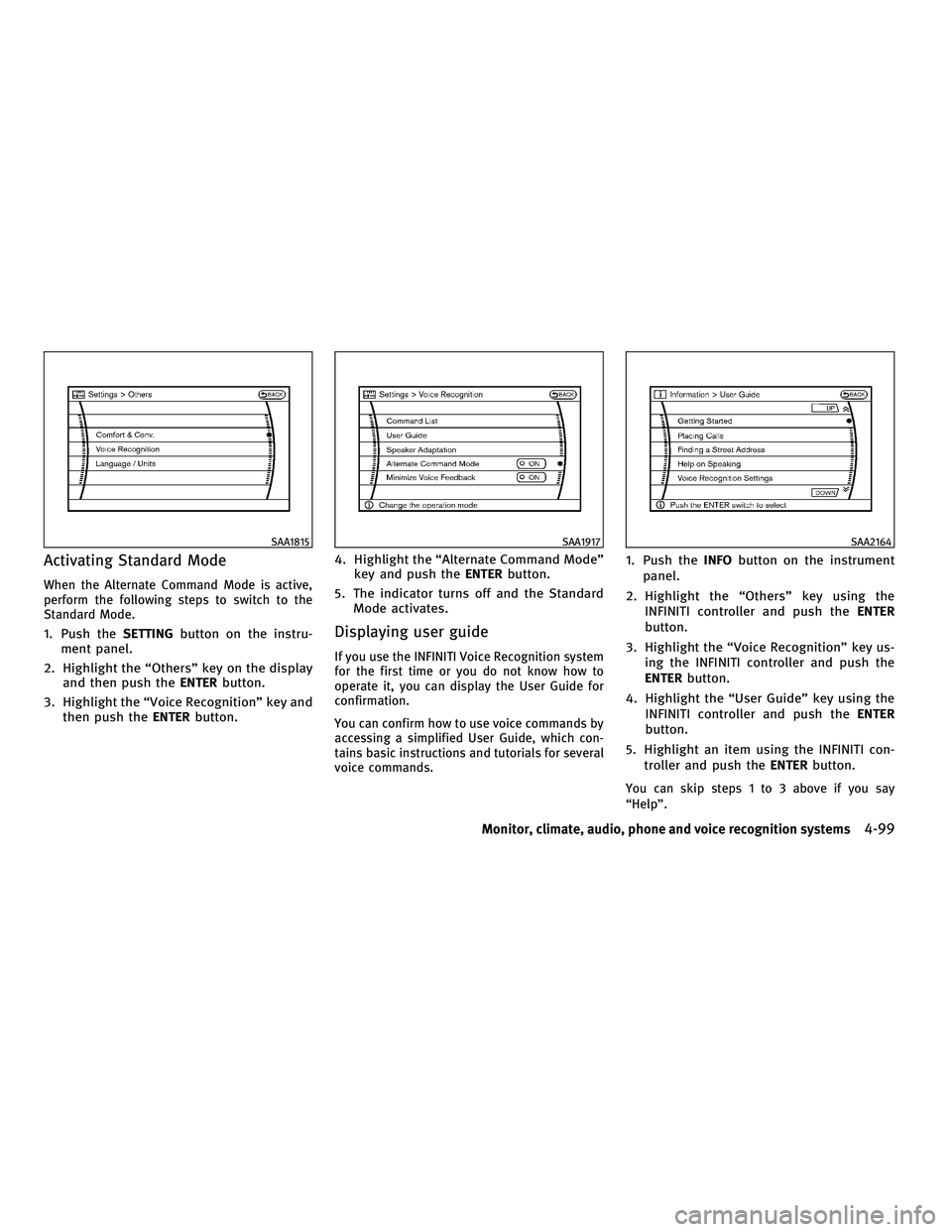
Activating Standard Mode
When the Alternate Command Mode is active,
perform the following steps to switch to the
Standard Mode.
1. Push theSETTINGbutton on the instru-
ment panel.
2. Highlight the ªOthersº key on the display and then push the ENTERbutton.
3. Highlight the ªVoice Recognitionº key and then push the ENTERbutton. 4. Highlight the ªAlternate Command Modeº
key and push the ENTERbutton.
5. The indicator turns off and the Standard Mode activates.Displaying user guide
If you use the INFINITI Voice Recognition system
for the first time or you do not know how to
operate it, you can display the User Guide for
confirmation.
You can confirm how to use voice commands by
accessing a simplified User Guide, which con-
tains basic instructions and tutorials for several
voice commands.
1. Push the INFObutton on the instrument
panel.
2. Highlight the ªOthersº key using the INFINITI controller and push the ENTER
button.
3. Highlight the ªVoice Recognitionº key us- ing the INFINITI controller and push the
ENTER button.
4. Highlight the ªUser Guideº key using the INFINITI controller and push the ENTER
button.
5. Highlight an item using the INFINITI con- troller and push the ENTERbutton.
You can skip steps 1 to 3 above if you say
ªHelpº.
SAA1815SAA1917SAA2164
Monitor, climate, audio, phone and voice recognition systems4-99
wÐ
Ð
05/14/09Ðpattie
X
Page 263 of 445

Available items :
cGetting Started
Describes the basics of how to operate the
INFINITI Voice Recognition system.
c Placing Calls
Tutorial for making a phone call by voice
command operation.
c Finding a Street Address
Tutorial for entering a destination by street
address.
c Help on Speaking
Displays useful tips of speaking for correct
command recognition by the system.
c Voice Recognition Settings
Describes the available voice recognition
settings.
Note that the Command List feature is only
available when Alternate Command Mode is
active.
Getting Started
Before using the INFINITI Voice Recognition
system for the first time, you can confirm how to
use commands by viewing the Getting Started
section of the User Guide.
1. Highlight ªGetting Startedº and push the ENTER button.
2. You can confirm the page by scrolling the screen using the INFINITI controller.
Tutorials on the operation of the INFINITI Voice
Recognition system
If you choose ªFinding a Street Addressº or
ªPlacing Callsº, you can view tutorials on how
to perform these operations using INFINITI
Voice Recognition.
Useful tips for correct operation
You can display useful speaking tips to help the
system recognize your voice commands cor-
rectly.
Highlight ªHelp on Speakingº and push the
ENTER button.
SAA1904SAA2165
4-100Monitor, climate, audio, phone and voice recognition systems
wÐ
Ð
05/14/09Ðpattie
X