display INFINITI M 2010 Owners Manual
[x] Cancel search | Manufacturer: INFINITI, Model Year: 2010, Model line: M, Model: INFINITI M 2010Pages: 445, PDF Size: 6.15 MB
Page 318 of 445

Intelligent cruise control switch
The system is operated by a MAIN switch and
four control switches, all mounted on the steer-
ing wheel.
1) RESUME/ACCELERATE switch:Resumes set speed or increases speed
incrementally.
2) SET/COAST switch: Sets desired cruise speed, reduces speed
incrementally.
3) CANCEL switch: Deactivates the system without erasing
the set speed. 4) DISTANCE switch:
Changes the vehicle's following distance:
cLong
c Middle
c Short
5) MAIN switch:
Master switch to activate the system
Intelligent cruise control system
display and indicators
The display is located under the tachometer.
1) Set vehicle speed indicator:
Indicates the set vehicle speed.
For Canadian models, the speed is dis-
played in km/h.
2) Vehicle ahead detection indicator: Indicates whether it detects a vehicle in
front of you.
3) MAIN switch indicator light (green): Indicates that the MAIN switch is ON.
4) Indicates your vehicle
SSD0675SSD0457
Starting and driving5-33
wÐ
Ð
05/19/09Ðtbrooks
X
Page 319 of 445

5) Set distance indicator:Displays the selected distance between
vehicles set with the DISTANCE switch.
6) Intelligent Cruise Control system warning light (orange):
The light comes on if there is a malfunc-
tion in the ICC system.
When the ignition switch is pushed to the ON
position, the indicators come on as illustrated
to check for a burned-out bulb, and it turns off
when the engine is started.Operating vehicle-to-vehicle distance
control mode
To turn on the cruise control, quickly push and
release the MAIN switch
sAon. The cruise
indicator light, set distance indicator and set
vehicle speed indicator come on and in a
standby state for setting.
SSD0458SSD0678
5-34Starting and driving
wÐ
Ð
05/19/09Ðtbrooks
X
Page 321 of 445

cWhen the VDC system is off (To use the ICC
system, turn on the VDC system. Push the
MAIN switch to turn off the ICC system and
reset the ICC switch by pushing the MAIN
switch again.)
For details about the VDC system, see ªVE-
HICLE DYNAMIC CONTROL (VDC) SYSTEMº
later in this section.
c When ABS or VDC (including the traction
control system) is operating
c When driving into a strong light (i.e., sun-
light)
c When a wheel is slipping (To use the ICC
system, make sure the wheels are no longer
slipping. Push the MAIN switch to turn off
the ICC, and reset the ICC system by pushing
the MAIN switch again.)
1. System set display with vehicle ahead
2. System set display without vehicle aheadSystem operation
WARNING
Normally when controlling the distance to a
vehicle ahead, this system automatically accel-
erates or decelerates your vehicle according to
the speed of the vehicle ahead. Depress the
accelerator to properly accelerate your vehicle
when acceleration is required for a lane
change. Depress the brake pedal when decel-
eration is required to maintain a safe distance
to the vehicle ahead due to its sudden braking
or if a vehicle cuts in. Always stay alert when
using the ICC system.
SSD0461
5-36Starting and driving
wÐ
Ð
05/19/09Ðtbrooks
X
Page 322 of 445

The driver sets the desired vehicle speed based
on the road conditions. The ICC system main-
tains the set vehicle speed, similar to standard
cruise control, as long as no vehicle is detected
in the lane ahead.
The ICC system displays the set speed.
Vehicle detected ahead :
When a vehicle is detected in the lane ahead,
the ICC system decelerates the vehicle by con-
trolling the throttle and applying the brakes to
match the speed of a slower vehicle ahead. The
system then controls the vehicle speed based
on the speed of the vehicle ahead to maintain
the driver selected distance.
The stop lights of the vehicle come on stop lights
when braking is performed by the ICC system.
When the brake operates, a noise may be heard.
This is not a malfunction.
When a vehicle ahead is detected, the vehicle
ahead detection indicator comes on. The ICC
system will also display the set speed and
selected distance.Vehicle ahead not detected :
When a vehicle is no longer detected ahead, the
ICC system gradually accelerates your vehicle to
resume the previously set vehicle speed. The
ICC system then maintains the set speed.
When a vehicle is no longer detected the vehicle
ahead detection indicator turns off.
If a vehicle ahead appears during acceleration
to the set vehicle speed or any time the ICC
system is in operation, the system controls the
distance to that vehicle.
When passing another vehicle,the set speed
indicator will flash when the vehicle speed
exceeds the set speed. The vehicle detect indi-
cator will turn off when the area ahead of the
vehicle is open. When the pedal is released, the
vehicle will return to the previously set speed.
Even though your vehicle speed is set in the ICC
system, you can depress the accelerator pedal
when it is necessary to accelerate your vehicle
rapidly.
SSD0462
Starting and driving5-37
wÐ
Ð
05/15/09Ðpattie
X
Page 325 of 445
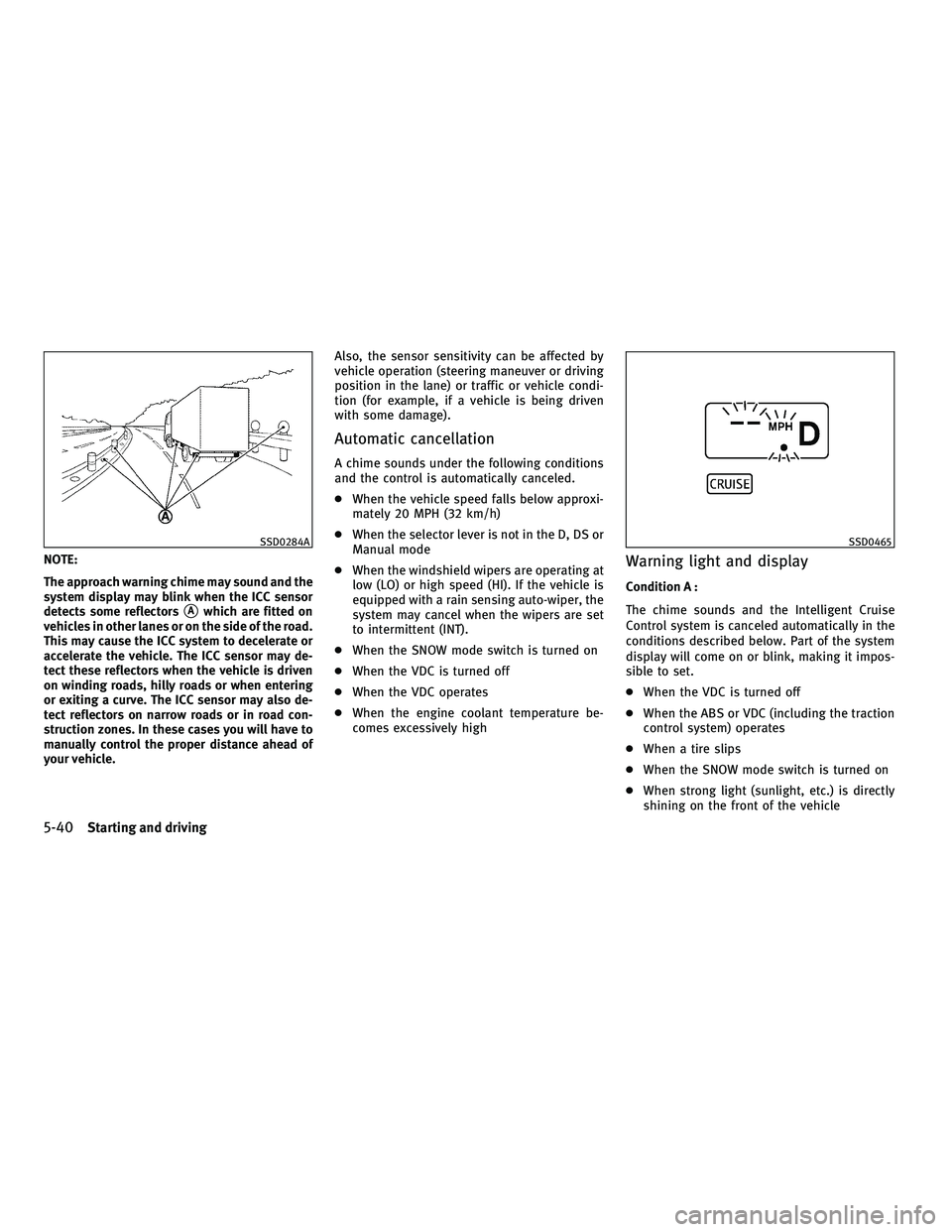
NOTE:
The approach warning chime may sound and the
system display may blink when the ICC sensor
detects some reflectors
sAwhich are fitted on
vehicles in other lanes or on the side of the road.
This may cause the ICC system to decelerate or
accelerate the vehicle. The ICC sensor may de-
tect these reflectors when the vehicle is driven
on winding roads, hilly roads or when entering
or exiting a curve. The ICC sensor may also de-
tect reflectors on narrow roads or in road con-
struction zones. In these cases you will have to
manually control the proper distance ahead of
your vehicle. Also, the sensor sensitivity can be affected by
vehicle operation (steering maneuver or driving
position in the lane) or traffic or vehicle condi-
tion (for example, if a vehicle is being driven
with some damage).
Automatic cancellation
A chime sounds under the following conditions
and the control is automatically canceled.
c
When the vehicle speed falls below approxi-
mately 20 MPH (32 km/h)
c When the selector lever is not in the D, DS or
Manual mode
c When the windshield wipers are operating at
low (LO) or high speed (HI). If the vehicle is
equipped with a rain sensing auto-wiper, the
system may cancel when the wipers are set
to intermittent (INT).
c When the SNOW mode switch is turned on
c When the VDC is turned off
c When the VDC operates
c When the engine coolant temperature be-
comes excessively high
Warning light and display
Condition A :
The chime sounds and the Intelligent Cruise
Control system is canceled automatically in the
conditions described below. Part of the system
display will come on or blink, making it impos-
sible to set.
cWhen the VDC is turned off
c When the ABS or VDC (including the traction
control system) operates
c When a tire slips
c When the SNOW mode switch is turned on
c When strong light (sunlight, etc.) is directly
shining on the front of the vehicle
SSD0284ASSD0465
5-40Starting and driving
wÐ
Ð
05/19/09Ðtbrooks
X
Page 327 of 445

Sensor maintenance
The sensor for the ICC systemsAis located
below the front bumper.
To keep the ICC system operating properly, be
sure to observe the following:
c Always keep the sensor clean. Wipe with a
soft cloth carefully so as not to damage the
sensor.
c Do not strike or damage the areas around
the sensor. Do not touch or remove the
screw located on the sensor. Doing so could
cause failure or malfunction. If the sensor is
damaged due to an accident, contact an
INFINITI retailer.
c Do not attach a sticker (including transpar-
ent material) or install an accessory near the
sensor. This could cause failure or malfunc-
tion.
CONVENTIONAL (FIXED SPEED) CRUISE
CONTROL MODE
This mode allows driving at a speed between 25
to 89 MPH (40 to 144 km/h) without keeping
your foot on the accelerator pedal.
WARNING
cIn the conventional (fixed speed) cruise con-
trol mode, a warning chime does not sound
to warn you if you are too close to the vehicle
ahead, as neither the presence of the vehicle
ahead nor the vehicle-to-vehicle distance is
detected.
c Pay special attention to the distance be-
tween your vehicle and the vehicle ahead of
you or a collision could occur.
c Always confirm the setting in the Intelligent
Cruise Control system display.
c Do not use the conventional (fixed speed)
cruise control mode when driving under the
following conditions:
± when it is not possible to keep the vehicle at a set speed
± in heavy traffic or in traffic that varies in speed
± on winding or hilly roads
± on slippery roads (rain, snow, ice, etc.)
± in very windy areas
c Doing so could cause a loss of vehicle control
and result in an accident.
Type A
SSD0676
Type B
SSD0695
5-42Starting and driving
wÐ
Ð
05/15/09Ðpattie
X
Page 328 of 445

Conventional (fixed speed) cruise
control switch
1) RESUME/ACCELERATE switch:Resumes set speed or increases speed
incrementally.
2) SET/COAST switch:
Sets the desired cruise speed, reduces
speed incrementally.
3) CANCEL switch:
Deactivates the system without erasing
the set speed.
4) MAIN switch:
Master switch to activate the system.
Conventional (fixed speed) cruise
control mode display and indicators
The display is located under the tachometer.
1) Cruise set switch indicator:Displays while the vehicle speed is con-
trolled by the conventional (fixed speed)
cruise control mode of the ICC system.
2) MAIN switch indicator light:
Indicates that the MAIN switch is ON.
3) Cruise control system warning light:
Comes on if there is a malfunction in the
cruise control system.
Operating conventional (fixed speed)
cruise control mode
To turn on the conventional (fixed speed) cruise
control mode, push and hold the MAIN switch
sAfor longer than about 1.5 seconds.
When pushing the MAIN switch on, the Intelli-
gent Cruise Control system display and the
CRUISE indicator light (green) in the instrument
cluster illuminate. After you hold the MAIN
switch on for longer than about 1.5 seconds, the
Intelligent Cruise Control system display turns
off. The CRUISE indicator light stays lit. You can
now set your desired cruising speed. Pushing
the MAIN switch again will turn the system
completely off.
SSD0681SSD0468SSD0682
Starting and driving5-43
wÐ
Ð
05/19/09Ðtbrooks
X
Page 329 of 445

When the ignition switch is pushed to the LOCK
position, the system is also automatically
turned off. To use the Intelligent Cruise Control
again, quickly push and release the MAIN
switch (vehicle-to-vehicle distance control
mode) or push and hold it (conventional cruise
control mode) again to turn it on.
CAUTION
To avoid accidentally engaging cruise control,
make sure to turn the MAIN switch off when not
using the Intelligent Cruise Control system.To set cruising speed,accelerate your vehicle to
the desired speed, push the SET/COAST switch
and release it. (The CRUISE SET indicator will
come on in the display.) Take your foot off the
accelerator pedal. Your vehicle will maintain the
set speed.
c To pass another vehicle, depress the accel-
erator pedal. When you release the pedal,
the vehicle will return to the previously set
speed.
c The vehicle may not maintain the set speed
when going up or down steep hills. If this
happens, manually maintain vehicle speed.
To cancel the preset speed, use one of the
following methods:
a) Push the CANCEL button. The CRUISE SET indicator will turn off.
b) Tap the brake pedal. The CRUISE SET indicator will turn off.
c) Turn the MAIN switch off. Both the CRUISE indicator light and CRUISE SET indicator
will turn off.
To reset at a faster cruising speed, use one of
the following three methods:
a) Depress the accelerator pedal. When the vehicle attains the desired speed, push
and release the SET/COAST switch.
b) Push and hold the RESUME/ACCELERATE set switch. When the vehicle attains the
desired speed, release the switch.
c) Push, then quickly release the RESUME/ACCELERATE switch. Each time
you do this, the set speed will increase by
about 1 MPH (1.6 km/h).
To reset at a slower cruising speed, use one of
the following three methods:
a) Lightly tap the brake pedal. When the vehicle attains the desired speed, push
the SET/COAST switch and release it.
b) Push and hold the SET/COAST switch. Release the switch when the vehicle
slows down to the desired speed.
SSD0683
5-44Starting and driving
wÐ
Ð
05/15/09Ðpattie
X
Page 337 of 445

cWhen the Preview Function operates, the
brake pedal may move slightly and may
make a small noise. This is not a system
malfunction.
Warning light and display
When the Preview Function is not operating
properly, the buzzer sounds and the system
warning light (orange) will come on.
Action to take :
If the warning light comes on, park the vehicle
in a safe place. Turn the engine off, restart the
engine and resume driving.
If the indicator stays on, it may indicate that the
Preview Function is malfunctioning (the brake is
operative). Although the Vehicle is still drive-
able under normal conditions, have the vehicle
checked at an INFINITI retailer.
How to handle the sensor
The sensor for the Preview Function is common
with Intelligent Cruise Control and is located
below the front bumper.
To keep the Preview Function operating prop-
erly, be sure to observe the following:
c Always keep the sensor clean. Wipe with a
soft cloth carefully so as not to damage the
sensor.
c Do not strike or damage the areas around
the sensor. Do not touch or remove the
screw located on the sensor. Doing so could
cause failure or malfunction. If the sensor is
damaged due to an accident, contact an
INFINITI retailer.
c Do not attach a sticker (including transpar-
ent material) or install an accessory near the
sensor. This could cause failure or malfunc-
tion.
SSD0471
5-52Starting and driving
wÐ
Ð
05/15/09Ðpattie
X
Page 345 of 445

Every new INFINITI comes with a 4 year, unlim-
ited mileage Roadside Assistance plan. In the
event of a roadside emergency, Roadside Assis-
tance Service is available to you. Please refer to
your Warranty Information Booklet (U.S.) or
Warranty & Roadside Assistance Information
Booklet (Canada) for details. Both the Warranty
Information Booklet and Roadside Assistance
Calling Card in your Owner's Literature Portfolio
provide the Toll-Free Number to call for assis-
tance. Roadside Assistance is provided 24
hours a day, 365 days a year, for 4 years from
the date sold to give emergency roadside help,
in the event of mechanical or nonmechanical
trouble(s) such as flat tires, out-of-gas, dead
battery, lost keys, mechanical breakdown, acci-
dent, etc.TIRE PRESSURE MONITORING SYSTEM
(TPMS)
This vehicle is equipped with the Tire Pressure
Monitoring System (TPMS). It monitors tire
pressure of all tires except the spare. When the
low tire pressure warning light is lit, one or
more of your tires is significantly under-
inflated. If the vehicle is being driven with low
tire pressure, the TPMS will activate and warn
you of it by the low tire pressure warning light
(in the instrument panel) or the LOW PRESSURE
information screen (on the display). This system
will activate only when the vehicle is driven at
speeds above 16 MPH (25 km/h). For more
details, see ªWARNING/INDICATOR LIGHTS AND
AUDIBLE REMINDERSº in the ª2. Instruments
and controlsº section and ªTIRE PRESSURE
MONITORING SYSTEM (TPMS)º in the ª5. Start-
ing and drivingº section.
For information about the tire pressure informa-
tion display, see ªHOW TO USE INFO BUTTONº
in the ª4. Monitor, climate, audio, phone and
voice recognition systemsº section.
WARNING
cIf the low tire pressure warning light illumi-
nates or LOW PRESSURE information is dis-
played on the monitor screen while driving,
avoid sudden steering maneuvers or abrupt
braking, reduce vehicle speed, pull off the
road to a safe location and stop the vehicle
as soon as possible. Driving with under-
inflated tires may permanently damage the
tires and increase the likelihood of tire fail-
ure. Serious vehicle damage could occur and
may lead to an accident and could result in
serious personal injury. Check the tire pres-
sure for all four tires. Adjust the tire pressure
to the recommended COLD tire pressure
shown on the Tire and Loading Information
label to turn the low tire pressure warning
light OFF. If the light still illuminates while
driving after adjusting the tire pressure, a
tire may be flat. If you have a flat tire, replace
it with a spare tire as soon as possible.
c When a spare tire is mounted or a wheel is
replaced, tire pressure will not be indicated,
the TPMS will not function and the low tire
pressure warning light will flash for approxi-
mately 1 minute. The light will remain on
after 1 minute. Contact your INFINITI retailer
as soon as possible for tire replacement
and/or system resetting.
ROADSIDE ASSISTANCE PROGRAM FLAT TIRE
6-2In case of emergency
wÐ
Ð
05/15/09Ðpattie
X