fuel INFINITI M 2010 User Guide
[x] Cancel search | Manufacturer: INFINITI, Model Year: 2010, Model line: M, Model: INFINITI M 2010Pages: 445, PDF Size: 6.15 MB
Page 96 of 445

Intelligent Cruise Control
(ICC) system MAIN switch
indicator light (green; if so
equipped)
The light comes on when the Intelligent Cruise
Control (ICC) system MAIN switch is pushed.
The light goes out when the MAIN switch is
pushed again. While the MAIN switch indicator
light comes on, the ICC system is operational.
Lane Departure Prevention
(LDP) ON indicator light
(green; if so equipped)
The light comes on in green when the Lane
Departure Prevention (LDP) system is turned on.
The light turns off when the system is turned
off.
NOTE:
This light is common with the lane departure
warning light (orange). (See ªLane departure
warning lightº earlier in this section.)
For more details, see ªLANE DEPARTURE WARN-
ING (LDW) SYSTEM/LANE DEPARTURE PREVEN-
TION (LDP) SYSTEMº in the ª5. Starting and
drivingº section.
Malfunction Indicator Light
(MIL)
If the malfunction indicator light comes on
steady or blinks while the engine is running, it
may indicate a potential emission control mal-
function.
The malfunction indicator light may also come
on steady if the fuel-filler cap is loose or
missing, or if the vehicle runs out of fuel. Check
to make sure the fuel-filler cap is installed and
closed tightly, and that the vehicle has at least
3 US gallons (14 liters) of fuel in the fuel tank.
After a few driving trips, the
light should
turn off if no other potential emission control
system malfunction exists.
If this indicator light remains on for 20 seconds
and then blinks for 10 seconds when the engine
is not running, it indicates that the vehicle is
not ready for an emission control system
inspection/maintenance test. (See ªREADINESS
FOR INSPECTION/MAINTENANCE (I/M) TESTº in
the ª9. Technical and consumer informationº
section.)
Operation :
The malfunction indicator light will come on in
one of two ways: c
Malfunction indicator light on steady Ð An
emission control system malfunction has
been detected. Check the fuel-filler cap. If
the fuel-filler cap is loose or missing, tighten
or install the cap and continue to drive the
vehicle. The
light should turn off after
a few driving trips. If the
light does
not turn off after a few driving trips, have the
vehicle inspected by an INFINITI retailer. You
do not need to have your vehicle towed to
the retailer.
c Malfunction indicator light blinking Ð An
engine misfire has been detected which may
damage the emission control system.
To reduce or avoid emission control system
damage:
a) Do not drive at speeds above 45 MPH (72 km/h).
b) Avoid hard acceleration or deceleration.
c) Avoid steep uphill grades.
d) If possible, reduce the amount of cargo being hauled or towed.
The malfunction indicator light may stop
blinking and remain on.
Have the vehicle inspected by an INFINITI
retailer. You do not need to have your vehicle
towed to the retailer.
Instruments and controls2-19
wÐ
Ð
05/19/09Ðtbrooks
X
Page 97 of 445
CAUTION
Continued vehicle operation without having
the emission control system checked and re-
paired as necessary could lead to poor drive-
ability, reduced fuel economy, and possible
damage to the emission control system.
Slip indicator light
This light will blink when the Vehicle Dynamic
Control (VDC) system is operating, thus alerting
the driver to the fact that the road surface is
slippery and the vehicle is nearing its traction
limits.
Small light indicator
light
The light comes on when the front park, side
marker, tail and license plate lights are on.
Turn signal/hazard indicator
lights
The light flashes when the turn signal switch
lever or hazard switch is turned on.
Vehicle Dynamic Control
(VDC) off indicator light
The light comes on when the Vehicle Dynamic
Control (VDC) off switch is pushed to OFF. This
indicates that the VDC system is not operating.
When the VDC off indicator light and slip indi-
cator light come on with the VDC system turned
on, this light alerts the driver to the fact that the
VDC system's fail-safe mode is operating, for
example the VDC system may not be function-
ing properly. Have the system checked by an
INFINITI retailer. If a malfunction occurs in the
system, the VDC system function will be can-
celed but the vehicle is still driveable. For
additional information, see ªVEHICLE DYNAMIC
CONTROL (VDC) SYSTEMº in the ª5. Starting and
drivingº section of this manual.
AUDIBLE REMINDERS
Key reminder chime
A chime will sound if the driver side door is
opened while the ignition switch is pushed to
the ACC or LOCK position with the Intelligent
Key left in the Intelligent Key port. Make sure
the ignition switch is pushed to the LOCK
position, and take the Intelligent Key with you
when leaving the vehicle.
Light reminder chime
A chime will sound when the driver side door is
opened with the light switch in the
or
position, and the ignition switch is
pushed to the ACC position.
Turn the light switch off when you leave the
vehicle.
Parking brake reminder chime
The chime will sound if the vehicle is driven at
more than 4 MPH (7 km/h) with the parking
brake applied. Stop the vehicle and release the
parking brake.
Seat belt warning chime
The chime will sound for about 6 seconds
unless the driver's seat belt is securely fas-
tened.
Brake pad wear warning
The disc brake pads have audible wear warn-
ings. When a brake pad requires replacement, it
will make a high pitched scraping sound when
the vehicle is in motion. This scraping sound
will first occur only when the brake pedal is
depressed. After more wear of the brake pad,
the sound will always be heard even if the brake
2-20Instruments and controls
wÐ
Ð
05/14/09Ðpattie
X
Page 132 of 445
3 Pre-driving checks and adjustments
Keys............................................. 3-2
Intelligent Key ................................. 3-2
Valet hand-off .................................. 3-3
Doors ............................................ 3-4
Locking with mechanical key .................... 3-4
Opening and closing windows with the
mechanical key ................................ 3-4
Locking with inside lock knob ................... 3-5
Locking with power door lock switch ............. 3-5
Automatic door locks ........................... 3-5
Child safety rear door lock ...................... 3-6
Intelligent Key system ............................. 3-6
Intelligent Key operating range .................. 3-8
Door locks/unlocks precaution .................. 3-9
Intelligent Key operation ........................ 3-9
Battery saver system ........................... 3-11
Warning signals ................................ 3-11
Troubleshooting guide ......................... 3-12
How to use remote keyless entry function .......3-14
Hood ............................................. 3-17Trunk lid
......................................... 3-17
Trunk lid release switch ........................ 3-18
Trunk open request switch .....................3-18
Opening with key ............................. 3-18
Trunk open button ............................ 3-18
Trunk release power cancel switch ..............3-19
Interior trunk lid release ....................... 3-19
Fuel-filler door ................................... 3-20
Opening the fuel-filler door ....................3-20
Fuel-filler cap ................................. 3-21
Tilt/telescopic steering ........................... 3-22
Tilt or telescopic operation .....................3-22
Sun visors ....................................... 3-22
Mirrors .......................................... 3-23
Inside mirror .................................. 3-23
Outside mirrors ............................... 3-24
Automatic drive positioner ........................3-26
Entry/exit function ............................ 3-26
Memory storage ............................... 3-27
System operation ............................. 3-29
wÐ
Ð
05/14/09Ðpattie
X
Page 136 of 445

LOCKING WITH INSIDE LOCK KNOB
To lock the door individually, move the inside
lock knob to the lock position
s1then close the
door.
To unlock, move the inside lock knob to the
unlock position
s2.
When locking the door without an Intelligent
Key, be sure not to leave the Intelligent Key
inside the vehicle.
LOCKING WITH POWER DOOR LOCK
SWITCH
Operating the power door lock switch will lock
or unlock all the doors. The switches are lo-
cated on the driver's and front passenger's door
armrests.
To lock the doors, push the power door lock
switch to the lock position
s1with the driver's
or front passenger's door open, then close the
door.
When locking the door this way, be certain not to
leave the Intelligent Key inside the vehicle.
To unlock the doors including the fuel-filler
door, push the power door lock switch to the
unlock position
s2.
Lockout protection
When the power door lock switch (driver or front
passenger) is moved to the lock position with
the Intelligent Key in the port and any door
open, all doors will lock and unlock automati-
cally. With the Intelligent Key left in the vehicle
(not in the Intelligent Key port) and any door
open, all doors will unlock automatically and a
chime will sound after the door is closed.
These functions help to prevent the Intelligent
Key from being accidentally locked inside the
vehicle.
AUTOMATIC DOOR LOCKS
c All doors will be locked automatically when
the vehicle speed reaches 15 MPH (24 km/h).
c All doors will be unlocked automatically
when the ignition switch is pushed to the
OFF position.
The automatic lock and unlock functions can be
deactivated or activated independently of each
other.
To deactivate or activate the automatic lock or
unlock system, perform the following proce-
dure:
1. Close all doors.
2. Push the ignition switch to the ªONº position.
SPA2000SPA2300
Pre-driving checks and adjustments3-5
wÐ
Ð
05/14/09Ðpattie
X
Page 141 of 445

When you carry the Intelligent Key with you, you
can lock or unlock all doors by pushing the door
handle request switch
sAwithin the range of
operation.
When you lock or unlock the doors or the trunk
lid, the hazard indicator will flash and the horn
(or the outside chime) will sound as a confirma-
tion. For details, see ªSetting hazard indicator
and horn modeº later in this section.
Locking doors and fuel-filler door
1. Move the selector lever to the P (Park) position, push the ignition switch to the
LOCK position and make sure you carry
the Intelligent Key with you.*1
2. Close all the doors.*2 3. Push the driver's or front passenger's
door handle request switch while carrying
the Intelligent Key with you.*3
4. All the doors and fuel-filler door will lock.
5. The hazard indicator flashes twice and the outside chime sounds twice.
*1: Doors will lock with door handle request switch while the ignition switch is in the ACC
or ON position.
*2: Doors will not lock with the door handle request switch while any door is open.
*3: Doors will not lock with the door handle request switch when the Intelligent Key is
left inside the vehicle.
However, when an Intelligent Key is inside
the vehicle, doors can be locked with an-
other registered Intelligent Key.
Unlocking doors and fuel-filler door
1. Push the driver's or front passenger'sdoor handle request switch once while
carrying the Intelligent Key with you.
2. The hazard indicator flashes once and outside chime sounds once. The corre-
sponding door and the fuel-filler door will
unlock.
3. Push the door handle request switch again within 1 minute.
4. The hazard indicator flashes once and outside chime sounds once again. All the
doors will unlock.
All doors will be locked automatically unless
one of the following operations is performed
within 1 minute after pushing the request switch
while the doors are locked.
cOpening any doors.
c Pushing the ignition switch.
c Inserting the Intelligent Key into the Intelli-
gent Key port.
SPA2425
3-10Pre-driving checks and adjustments
wÐ
Ð
05/14/09Ðpattie
X
Page 145 of 445

HOW TO USE REMOTE KEYLESS ENTRY
FUNCTION
The remote keyless entry function can operate
all door locks and open the trunk lid using the
remote keyless function of the Intelligent Key.
The remote keyless function can operate at a
distance of approximately 33 ft (10 m) from the
vehicle. (The operating distance depends upon
the conditions around the vehicle.)
The remote keyless function will not operate
when:
cthe distance between the Intelligent Key and
the vehicle is over 33 ft (10 m).
c the Intelligent Key battery is discharged.
The LOCK/UNLOCK operating range varies de-
pending on the environment. To securely oper-
ate the lock and unlock buttons, approach the
vehicle to about 3 ft (1 m) from the door. When you lock or unlock the doors or the trunk
lid, the hazard indicator will flash and the horn
(or the outside chime) will sound as a confirma-
tion. For details, see ªSetting hazard indicator
and horn modeº later in this section.
Locking doors and fuel-filler door
1. Move the selector lever to the P (Park)
position and push the ignition switch to
the LOCK position.
2. Carry the Intelligent Key with you.*1
3. Close all the doors.*2
4. Push the LOCK
buttons1on the
Intelligent Key. 5. All the doors and fuel-filler door will lock.
6. The hazard indicator flashes twice and
the horn chirps once.
*1: Doors will lock with the Intelligent Key while the ignition switch is in the ACC or ON
position.
*2: Doors will not lock with the Intelligent Key while any door is open.
Unlocking doors and fuel-filler door
1. Push the UNLOCKbuttons2on the
Intelligent Key.
2. The hazard indicator flashes once. The driver's door and fuel-filler door will un-
lock.
3. Push the UNLOCK
button again
within 1 minute.
4. The hazard indicator flashes once. All the doors will unlock.
All doors will be locked automatically unless
one of the following operations is performed
within 1 minute after pushing the UNLOCK
button while the doors are locked.
c Opening any doors.
c Pushing the ignition switch.
SPA2100
3-14Pre-driving checks and adjustments
wÐ
Ð
05/14/09Ðpattie
X
Page 151 of 445
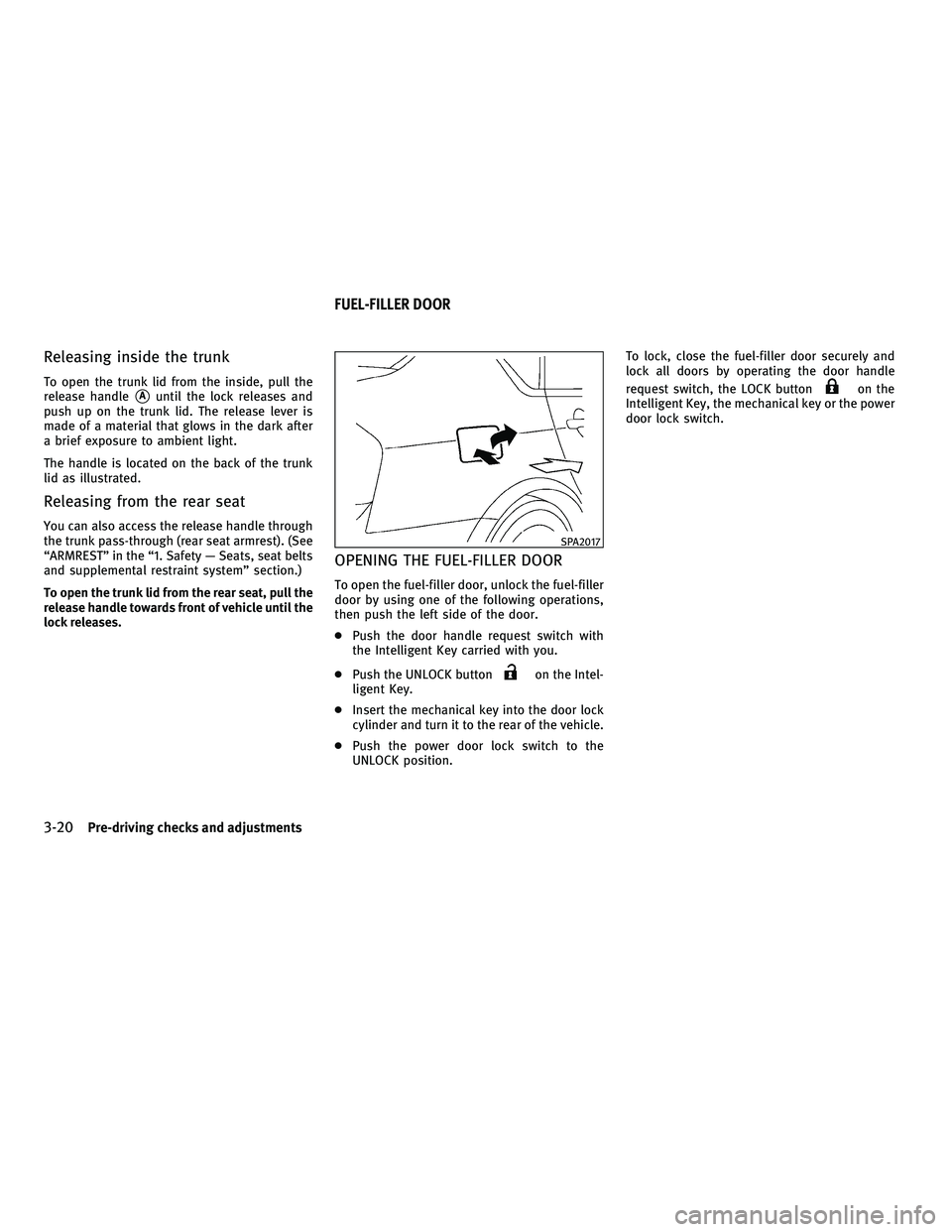
Releasing inside the trunk
To open the trunk lid from the inside, pull the
release handle
sAuntil the lock releases and
push up on the trunk lid. The release lever is
made of a material that glows in the dark after
a brief exposure to ambient light.
The handle is located on the back of the trunk
lid as illustrated.
Releasing from the rear seat
You can also access the release handle through
the trunk pass-through (rear seat armrest). (See
ªARMRESTº in the ª1. Safety Ð Seats, seat belts
and supplemental restraint systemº section.)
To open the trunk lid from the rear seat, pull the
release handle towards front of vehicle until the
lock releases.
OPENING THE FUEL-FILLER DOOR
To open the fuel-filler door, unlock the fuel-filler
door by using one of the following operations,
then push the left side of the door.
c Push the door handle request switch with
the Intelligent Key carried with you.
c Push the UNLOCK button
on the Intel-
ligent Key.
c Insert the mechanical key into the door lock
cylinder and turn it to the rear of the vehicle.
c Push the power door lock switch to the
UNLOCK position. To lock, close the fuel-filler door securely and
lock all doors by operating the door handle
request switch, the LOCK button
on the
Intelligent Key, the mechanical key or the power
door lock switch.
SPA2017
FUEL-FILLER DOOR
3-20Pre-driving checks and adjustments
wÐ
Ð
05/14/09Ðpattie
X
Page 152 of 445
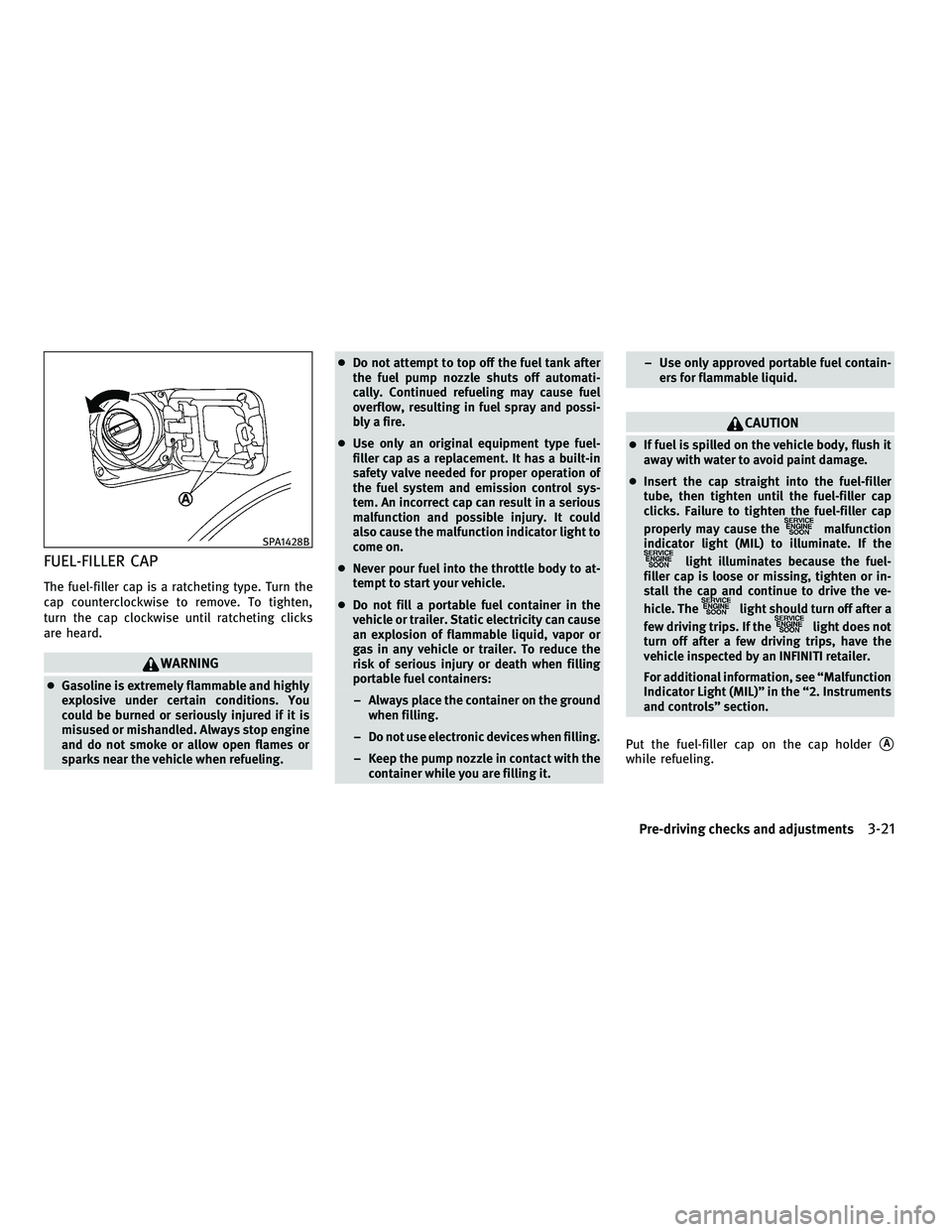
FUEL-FILLER CAP
The fuel-filler cap is a ratcheting type. Turn the
cap counterclockwise to remove. To tighten,
turn the cap clockwise until ratcheting clicks
are heard.
WARNING
cGasoline is extremely flammable and highly
explosive under certain conditions. You
could be burned or seriously injured if it is
misused or mishandled. Always stop engine
and do not smoke or allow open flames or
sparks near the vehicle when refueling. c
Do not attempt to top off the fuel tank after
the fuel pump nozzle shuts off automati-
cally. Continued refueling may cause fuel
overflow, resulting in fuel spray and possi-
bly a fire.
c Use only an original equipment type fuel-
filler cap as a replacement. It has a built-in
safety valve needed for proper operation of
the fuel system and emission control sys-
tem. An incorrect cap can result in a serious
malfunction and possible injury. It could
also cause the malfunction indicator light to
come on.
c Never pour fuel into the throttle body to at-
tempt to start your vehicle.
c Do not fill a portable fuel container in the
vehicle or trailer. Static electricity can cause
an explosion of flammable liquid, vapor or
gas in any vehicle or trailer. To reduce the
risk of serious injury or death when filling
portable fuel containers:
± Always place the container on the ground when filling.
± Do not use electronic devices when filling.
± Keep the pump nozzle in contact with the container while you are filling it. ± Use only approved portable fuel contain-
ers for flammable liquid.
CAUTION
cIf fuel is spilled on the vehicle body, flush it
away with water to avoid paint damage.
c Insert the cap straight into the fuel-filler
tube, then tighten until the fuel-filler cap
clicks. Failure to tighten the fuel-filler cap
properly may cause the
malfunction
indicator light (MIL) to illuminate. If the
light illuminates because the fuel-
filler cap is loose or missing, tighten or in-
stall the cap and continue to drive the ve-
hicle. The
light should turn off after a
few driving trips. If the
light does not
turn off after a few driving trips, have the
vehicle inspected by an INFINITI retailer.
For additional information, see ªMalfunction
Indicator Light (MIL)º in the ª2. Instruments
and controlsº section.
Put the fuel-filler cap on the cap holder
sA
while refueling.
SPA1428B
Pre-driving checks and adjustments3-21
wÐ
Ð
05/14/09Ðpattie
X
Page 162 of 445
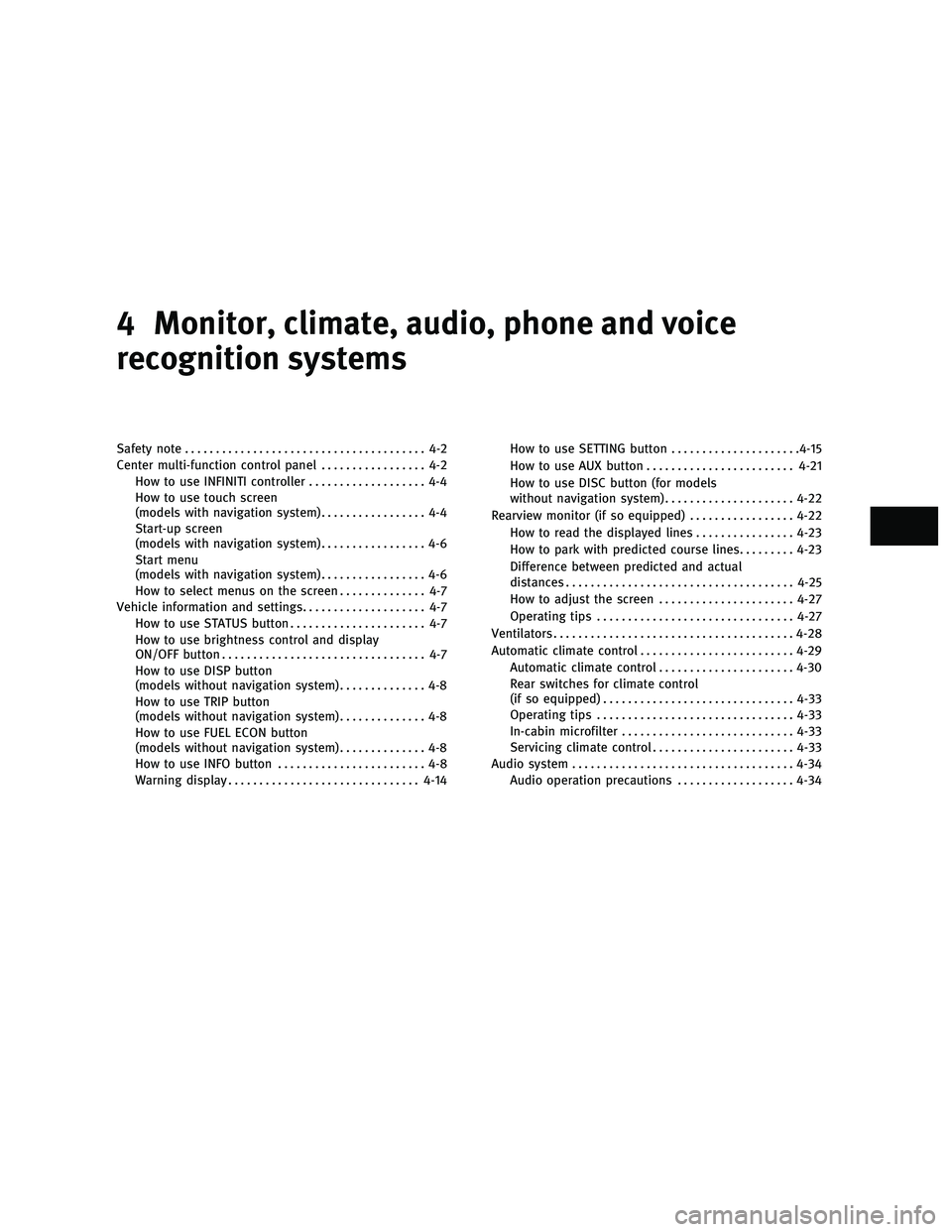
4 Monitor, climate, audio, phone and voice
recognition systems
Safety note....................................... 4-2
Center multi-function control panel ................. 4-2
How to use INFINITI controller ................... 4-4
How to use touch screen
(models with navigation system) ................. 4-4
Start-up screen
(models with navigation system) ................. 4-6
Start menu
(models with navigation system) ................. 4-6
How to select menus on the screen .............. 4-7
Vehicle information and settings .................... 4-7
How to use STATUS button ...................... 4-7
How to use brightness control and display
ON/OFF button ................................. 4-7
How to use DISP button
(models without navigation system) .............. 4-8
How to use TRIP button
(models without navigation system) .............. 4-8
How to use FUEL ECON button
(models without navigation system) .............. 4-8
How to use INFO button ........................ 4-8
Warning display ............................... 4-14How to use SETTING button
.....................4-15
How to use AUX button ........................ 4-21
How to use DISC button (for models
without navigation system) .....................4-22
Rearview monitor (if so equipped) .................4-22
How to read the displayed lines ................4-23
How to park with predicted course lines .........4-23
Difference between predicted and actual
distances ..................................... 4-25
How to adjust the screen ......................4-27
Operating tips ................................ 4-27
Ventilators ....................................... 4-28
Automatic climate control ......................... 4-29
Automatic climate control ......................4-30
Rear switches for climate control
(if so equipped) ............................... 4-33
Operating tips ................................ 4-33
In-cabin microfilter ............................ 4-33
Servicing climate control ....................... 4-33
Audio system .................................... 4-34
Audio operation precautions ...................4-34
wÐ
Ð
05/19/09Ðtbrooks
X
Page 166 of 445
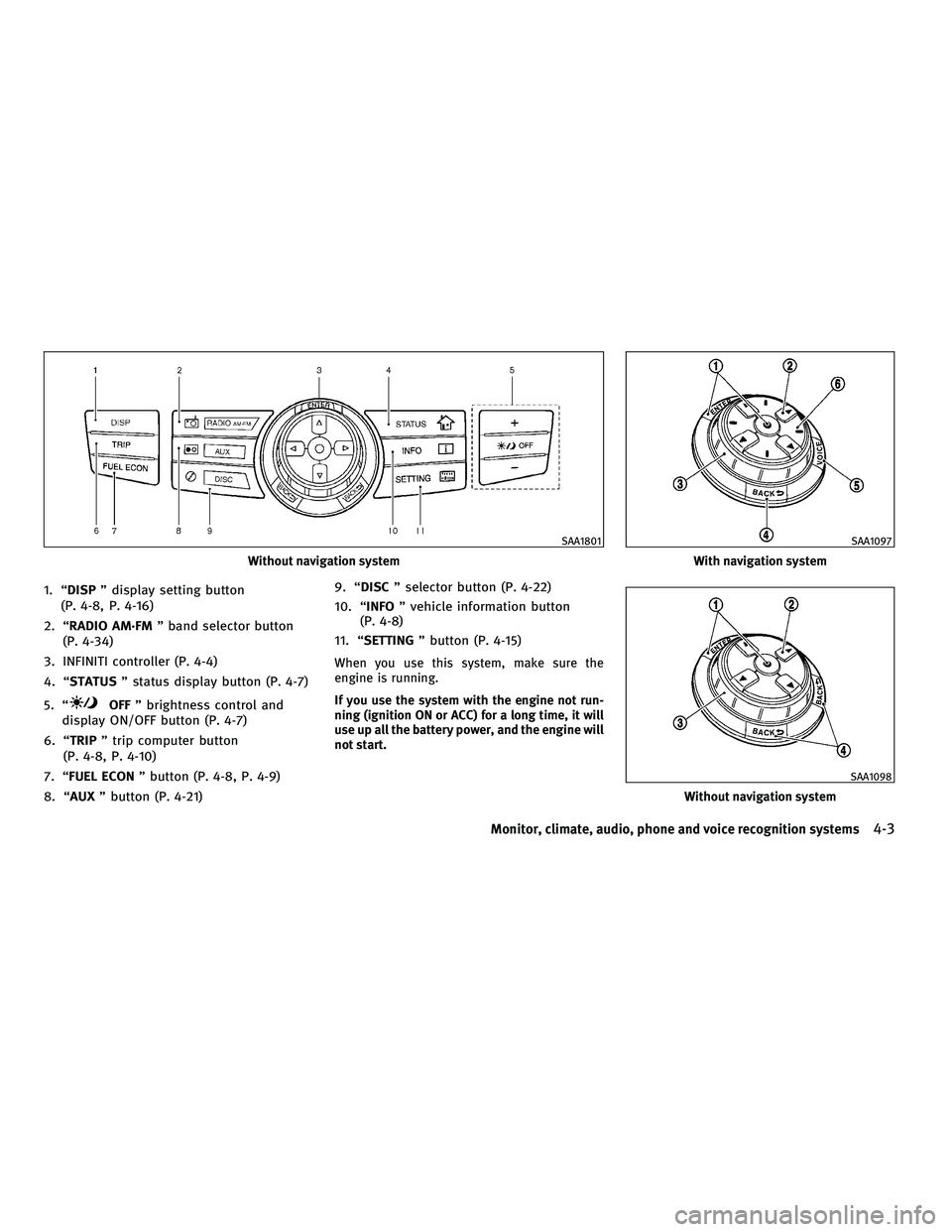
1. ªDISPº display setting button
(P. 4-8, P. 4-16)
2. ªRADIO AM´FM º band selector button
(P. 4-34)
3. INFINITI controller (P. 4-4)
4. ªSTATUS º status display button (P. 4-7)
5. ª
OFF º brightness control and
display ON/OFF button (P. 4-7)
6. ªTRIP º trip computer button
(P. 4-8, P. 4-10)
7. ªFUEL ECON º button (P. 4-8, P. 4-9)
8. ªAUX º button (P. 4-21) 9. ªDISC
º selector button (P. 4-22)
10. ª INFO º vehicle information button
(P. 4-8)
11. ª SETTING º button (P. 4-15)
When you use this system, make sure the
engine is running.
If you use the system with the engine not run-
ning (ignition ON or ACC) for a long time, it will
use up all the battery power, and the engine will
not start.
Without navigation system
SAA1801
With navigation system
SAA1097
Without navigation system
SAA1098
Monitor, climate, audio, phone and voice recognition systems4-3
wÐ
Ð
05/14/09Ðpattie
X