fuel INFINITI M 2010 Owner's Manual
[x] Cancel search | Manufacturer: INFINITI, Model Year: 2010, Model line: M, Model: INFINITI M 2010Pages: 445, PDF Size: 6.15 MB
Page 170 of 445
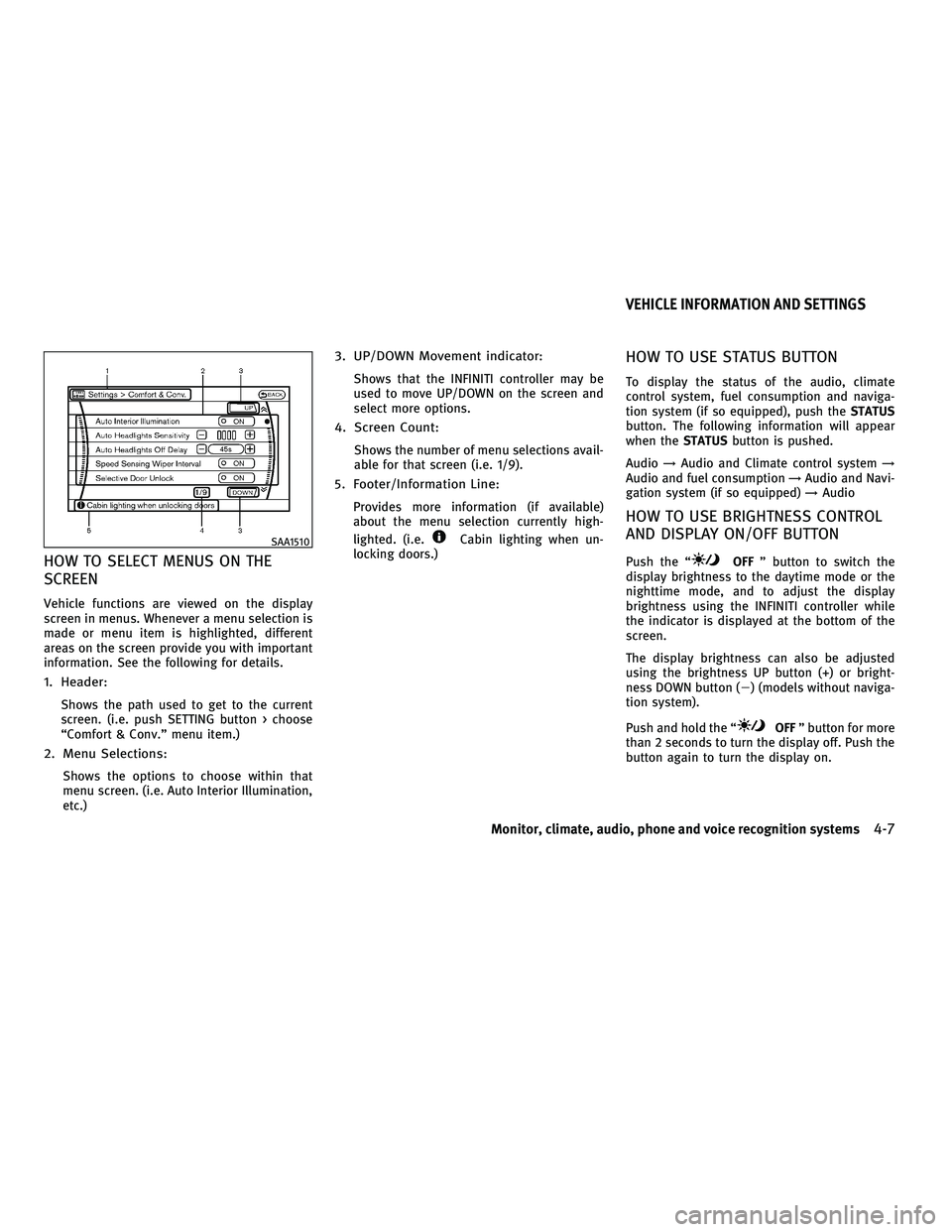
HOW TO SELECT MENUS ON THE
SCREEN
Vehicle functions are viewed on the display
screen in menus. Whenever a menu selection is
made or menu item is highlighted, different
areas on the screen provide you with important
information. See the following for details.
1. Header:
Shows the path used to get to the current
screen. (i.e. push SETTING button > choose
ªComfort & Conv.º menu item.)
2. Menu Selections:
Shows the options to choose within that
menu screen. (i.e. Auto Interior Illumination,
etc.)
3. UP/DOWN Movement indicator:
Shows that the INFINITI controller may be
used to move UP/DOWN on the screen and
select more options.
4. Screen Count:
Shows the number of menu selections avail-
able for that screen (i.e. 1/9).
5. Footer/Information Line:
Provides more information (if available)
about the menu selection currently high-
lighted. (i.e.
Cabin lighting when un-
locking doors.)
HOW TO USE STATUS BUTTON
To display the status of the audio, climate
control system, fuel consumption and naviga-
tion system (if so equipped), push the STATUS
button. The following information will appear
when the STATUSbutton is pushed.
Audio !Audio and Climate control system !
Audio and fuel consumption !Audio and Navi-
gation system (if so equipped) !Audio
HOW TO USE BRIGHTNESS CONTROL
AND DISPLAY ON/OFF BUTTON
Push the ªOFF º button to switch the
display brightness to the daytime mode or the
nighttime mode, and to adjust the display
brightness using the INFINITI controller while
the indicator is displayed at the bottom of the
screen.
The display brightness can also be adjusted
using the brightness UP button (+) or bright-
ness DOWN button (2) (models without naviga-
tion system).
Push and hold the ª
OFF º button for more
than 2 seconds to turn the display off. Push the
button again to turn the display on.
SAA1510
VEHICLE INFORMATION AND SETTINGS
Monitor, climate, audio, phone and voice recognition systems4-7
wÐ
Ð
05/14/09Ðpattie
X
Page 171 of 445

HOW TO USE DISP BUTTON (models
without navigation system)
Push theDISPbutton to show the display
setting screen. (See ªDisplay settingsº later in
this section.)
HOW TO USE TRIP BUTTON (models
without navigation system)
Push the TRIPbutton to show the trip computer
display. (See ªTrip Computer informationº later
in this section.)
HOW TO USE FUEL ECON BUTTON
(models without navigation system)
Push the FUEL ECON button to show the fuel
economy information. (See ªFuel Economy infor-
mationº later in this section.)
HOW TO USE INFO BUTTON
The display screen shows vehicle and naviga-
tion (if so equipped) information for your con-
venience.
The information shown on the screen should be
a guide to determine the condition of the ve-
hicle. See the following for details.
Vehicle information display
1. Push the INFObutton on the control panel.
2. Choose an item using the INFINITI control- ler and push the ENTERbutton.
3. After viewing or adjusting the information on the following screens, push the BACK
button to return to the INFORMATION
menu.
See the separate Navigation System Owner's
Manual for the following items:
c Traffic Info.
c Where am I?
c GPS Satellite Info.
With navigation system
SAA1803
Without navigation system
SAA1805
4-8Monitor, climate, audio, phone and voice recognition systems
wÐ
Ð
05/14/09Ðpattie
X
Page 172 of 445
Fuel Economy information
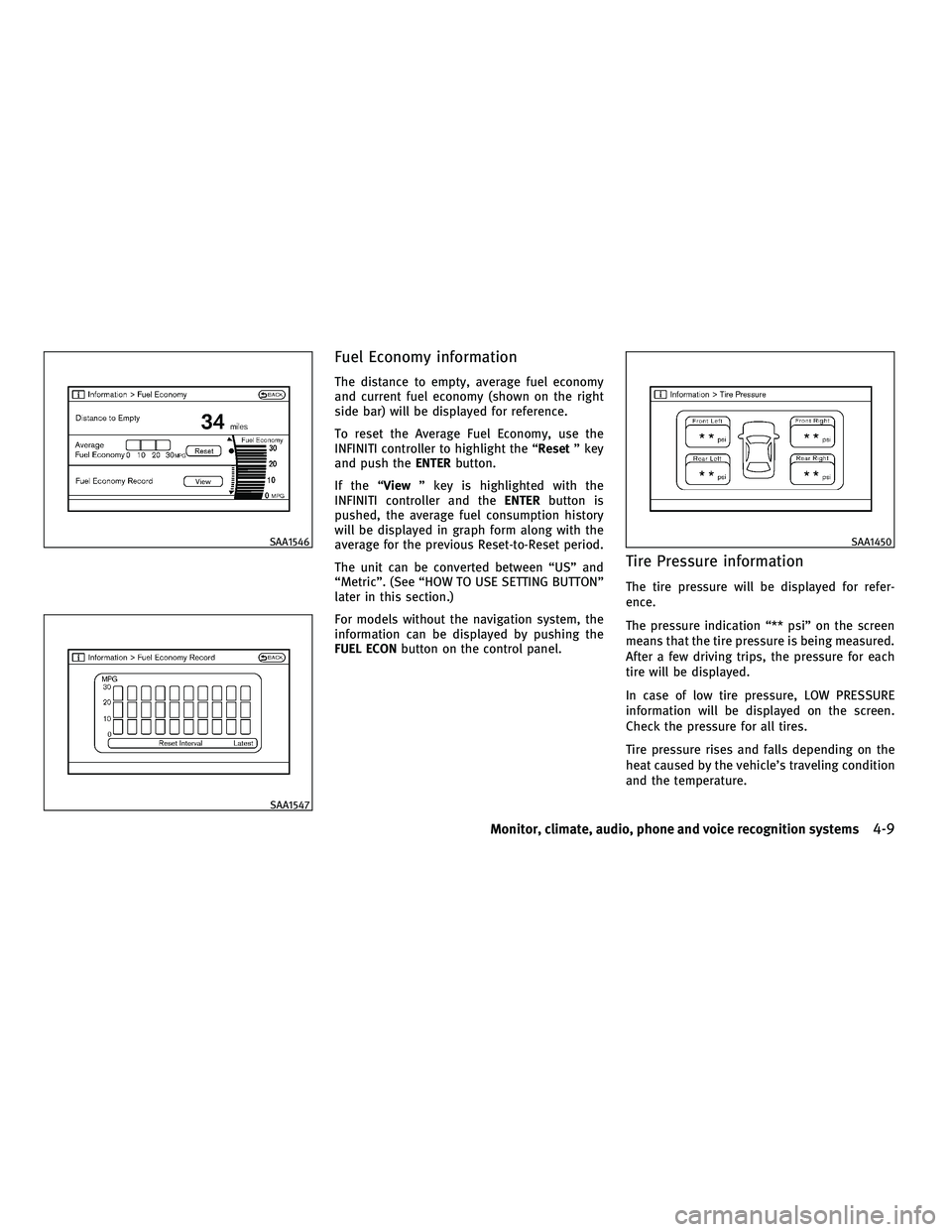
The distance to empty, average fuel economy
and current fuel economy (shown on the right
side bar) will be displayed for reference.
To reset the Average Fuel Economy, use the
INFINITI controller to highlight the ªResetº key
and push the ENTERbutton.
If the ª Viewº key is highlighted with the
INFINITI controller and the ENTERbutton is
pushed, the average fuel consumption history
will be displayed in graph form along with the
average for the previous Reset-to-Reset period.
The unit can be converted between ªUSº and
ªMetricº. (See ªHOW TO USE SETTING BUTTONº
later in this section.)
For models without the navigation system, the
information can be displayed by pushing the
FUEL ECON button on the control panel.
Tire Pressure information
The tire pressure will be displayed for refer-
ence.
The pressure indication ª** psiº on the screen
means that the tire pressure is being measured.
After a few driving trips, the pressure for each
tire will be displayed.
In case of low tire pressure, LOW PRESSURE
information will be displayed on the screen.
Check the pressure for all tires.
Tire pressure rises and falls depending on the
heat caused by the vehicle's traveling condition
and the temperature.
SAA1546
SAA1547
SAA1450
Monitor, climate, audio, phone and voice recognition systems4-9
wÐ
Ð
05/14/09Ðpattie
X
Page 186 of 445
HOW TO READ THE DISPLAYED LINES
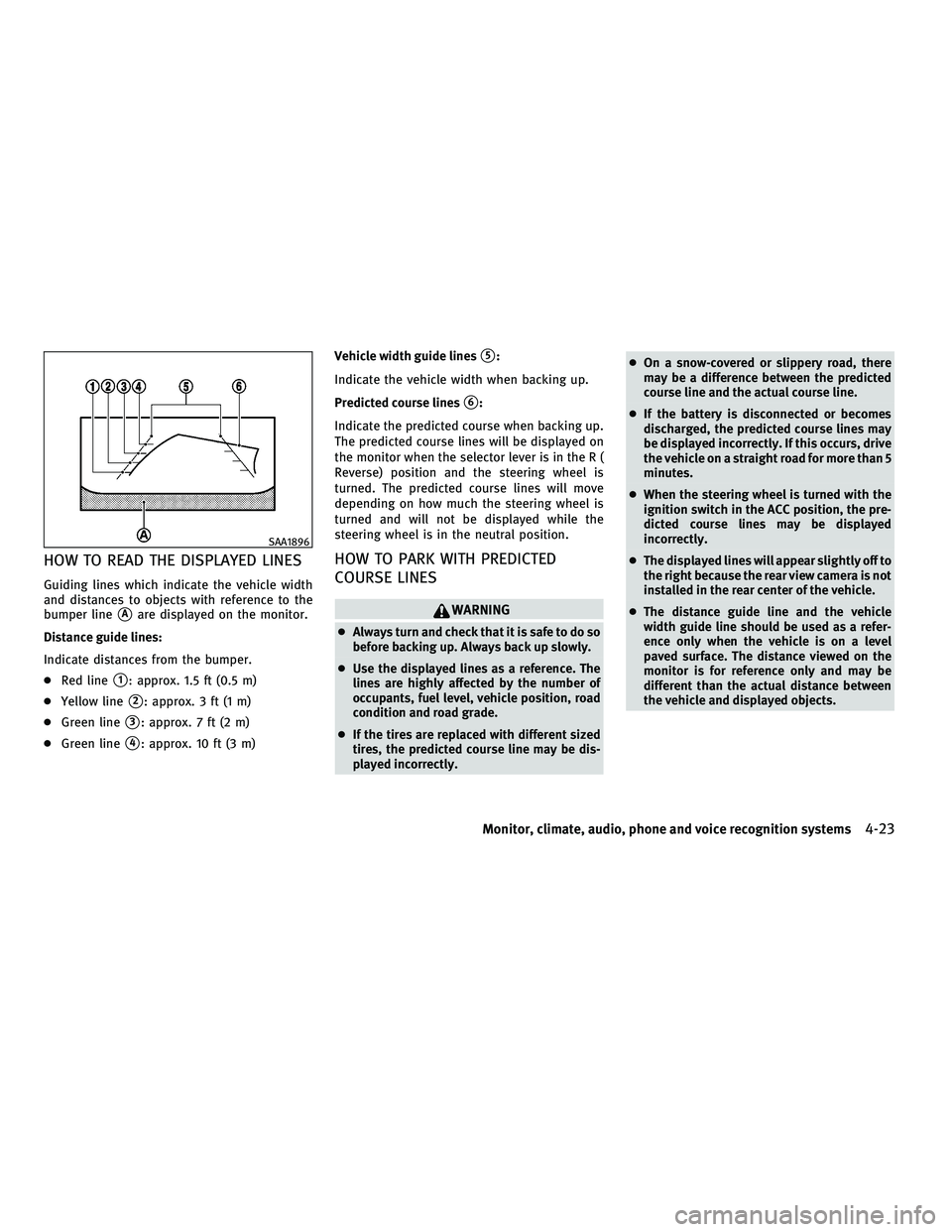
Guiding lines which indicate the vehicle width
and distances to objects with reference to the
bumper line
sAare displayed on the monitor.
Distance guide lines:
Indicate distances from the bumper.
c Red line
s1: approx. 1.5 ft (0.5 m)
c Yellow line
s2: approx. 3 ft (1 m)
c Green line
s3: approx. 7 ft (2 m)
c Green line
s4: approx. 10 ft (3 m) Vehicle width guide lines
s5:
Indicate the vehicle width when backing up.
Predicted course lines
s6:
Indicate the predicted course when backing up.
The predicted course lines will be displayed on
the monitor when the selector lever is in the R (
Reverse) position and the steering wheel is
turned. The predicted course lines will move
depending on how much the steering wheel is
turned and will not be displayed while the
steering wheel is in the neutral position.
HOW TO PARK WITH PREDICTED
COURSE LINES
WARNING
c Always turn and check that it is safe to do so
before backing up. Always back up slowly.
c Use the displayed lines as a reference. The
lines are highly affected by the number of
occupants, fuel level, vehicle position, road
condition and road grade.
c If the tires are replaced with different sized
tires, the predicted course line may be dis-
played incorrectly. c
On a snow-covered or slippery road, there
may be a difference between the predicted
course line and the actual course line.
c If the battery is disconnected or becomes
discharged, the predicted course lines may
be displayed incorrectly. If this occurs, drive
the vehicle on a straight road for more than 5
minutes.
c When the steering wheel is turned with the
ignition switch in the ACC position, the pre-
dicted course lines may be displayed
incorrectly.
c The displayed lines will appear slightly off to
the right because the rear view camera is not
installed in the rear center of the vehicle.
c The distance guide line and the vehicle
width guide line should be used as a refer-
ence only when the vehicle is on a level
paved surface. The distance viewed on the
monitor is for reference only and may be
different than the actual distance between
the vehicle and displayed objects.
SAA1896
Monitor, climate, audio, phone and voice recognition systems4-23
wÐ
Ð
05/14/09Ðpattie
X
Page 196 of 445
REAR SWITCHES FOR CLIMATE
CONTROL (if so equipped)
The rear seat passengers can adjust the climate
control system using the climate controls in the
rear armrest panel.
ªAUTOº button: automatic climate control
mode on
ª
º button: Fan speed control up (Max fan
speed !return to Low fan speed)
ª
º button: Temperature control up/down
OPERATING TIPS
When the engine coolant temperature and out-
side air temperature are low, the air flow from
the foot outlets may not operate for a maximum
of 150 seconds. This is not a malfunction. After
the coolant temperature warms up, air will flow
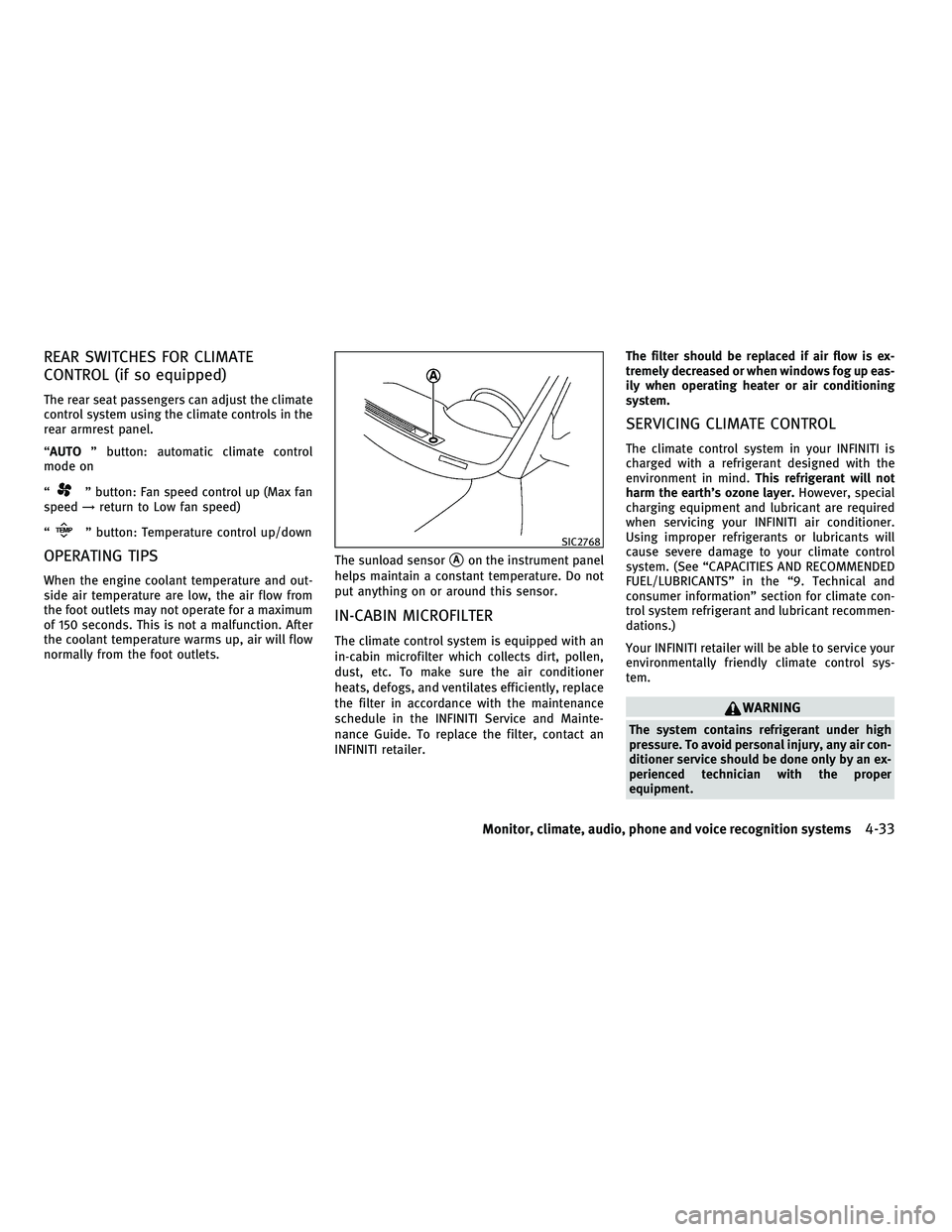
normally from the foot outlets. The sunload sensor
sAon the instrument panel
helps maintain a constant temperature. Do not
put anything on or around this sensor.
IN-CABIN MICROFILTER
The climate control system is equipped with an
in-cabin microfilter which collects dirt, pollen,
dust, etc. To make sure the air conditioner
heats, defogs, and ventilates efficiently, replace
the filter in accordance with the maintenance
schedule in the INFINITI Service and Mainte-
nance Guide. To replace the filter, contact an
INFINITI retailer. The filter should be replaced if air flow is ex-
tremely decreased or when windows fog up eas-
ily when operating heater or air conditioning
system.
SERVICING CLIMATE CONTROL
The climate control system in your INFINITI is
charged with a refrigerant designed with the
environment in mind.
This refrigerant will not
harm the earth's ozone layer. However, special
charging equipment and lubricant are required
when servicing your INFINITI air conditioner.
Using improper refrigerants or lubricants will
cause severe damage to your climate control
system. (See ªCAPACITIES AND RECOMMENDED
FUEL/LUBRICANTSº in the ª9. Technical and
consumer informationº section for climate con-
trol system refrigerant and lubricant recommen-
dations.)
Your INFINITI retailer will be able to service your
environmentally friendly climate control sys-
tem.
WARNING
The system contains refrigerant under high
pressure. To avoid personal injury, any air con-
ditioner service should be done only by an ex-
perienced technician with the proper
equipment.
SIC2768
Monitor, climate, audio, phone and voice recognition systems4-33
wÐ
Ð
05/14/09Ðpattie
X
Page 267 of 445

cInformation Command:
Command Action
Fuel Economy Displays fuel economy information.
Trip Computer Displays trip information.
Maintenance Displays maintenance information.
Traffic Info. Turns the traffic information system ON and OFF.
4-104Monitor, climate, audio, phone and voice recognition systems
wÐ
Ð
05/14/09Ðpattie
X
Page 276 of 445

cSatellite
COMMAND ACTION
Satellite Radio Turns the SAT radio on, selecting the station and band last played.
cCD
COMMAND ACTION
CD Starts to play a CD.
cAudio
COMMAND ACTION
Audio OFF Turns the audio system off.
ciPodT
COMMAND ACTION
iPodT Turns the iPodTsystem on.
Vehicle Information Commands:
COMMAND ACTION
Traffic Info. Turns the traffic information system ON and OFF.
Fuel Economy Displays the Fuel Economy screen.
Trip Computer Displays the Trip Computer screen.
Maintenance Displays the Maintenance screen.
Tire Pressure Displays the Tire Pressure screen.
Monitor, climate, audio, phone and voice recognition systems4-113
wÐ
Ð
05/15/09Ðpattie
X
Page 285 of 445

5 Starting and driving
Precautions when starting and driving.............. 5-2
Exhaust gas (carbon monoxide) .................. 5-2
Three-way catalyst ............................. 5-2
Tire Pressure Monitoring System (TPMS) ......... 5-3
Avoiding collision and rollover ................... 5-5
Off-road recovery ............................... 5-5
Rapid air pressure loss ......................... 5-6
Drinking alcohol/drugs and driving .............. 5-7
All-Wheel Drive (AWD) driving safety
precautions (for AWD models) ................... 5-7
Push-button ignition switch ........................ 5-8
Operating range for engine start function......... 5-8
Push-button ignition switch positions ............ 5-9
Intelligent Key battery discharge ................. 5-9
Before starting the engine ........................5-10
Starting the engine ................................ 5-11
Driving the vehicle ................................ 5-11
Automatic transmission ......................... 5-11
Parking brake .................................... 5-16
Lane Departure Warning (LDW) system/Lane
Departure Prevention (LDP) system
(if so equipped) .................................. 5-16
Lane Departure Warning (LDW) system ...........5-17 Lane Departure Prevention (LDP) system
..........5-19
Lane camera unit maintenance .................5-23
Cruise control .................................... 5-23
Precautions on cruise control ...................5-23
Cruise control operations ......................5-24
Intelligent Cruise Control (ICC) system
(if so equipped) .................................. 5-25
Selecting the vehicle-to-vehicle distance
control mode ................................. 5-26
Vehicle-to-vehicle distance control mode ........5-27
Precautions on vehicle-to-vehicle distance
control mode ................................. 5-27
Vehicle-to-vehicle distance control mode
operation ..................................... 5-29
Conventional (FIXED SPEED) cruise control
mode ........................................ 5-42
Preview function (for Intelligent Cruise
Control system equipped models) ..............5-45
Break-in schedule ................................ 5-46
Increasing fuel economy .......................... 5-46
All-Wheel Drive (AWD) (if so equipped) .............5-47
Parking/parking on hills .......................... 5-48
Power steering ................................... 5-49
wÐ
Ð
05/19/09Ðtbrooks
X
Page 288 of 445

cKeep your engine tuned up. Malfunctions in
the ignition, fuel injection, or electrical sys-
tems can cause overrich fuel flow into the
three-way catalyst, causing it to overheat.
Do not keep driving if the engine misfires, or
if noticeable loss of performance or other
unusual operating conditions are detected.
Have the vehicle inspected promptly by an
INFINITI retailer.
c Avoid driving with an extremely low fuel
level. Running out of fuel could cause the
engine to misfire, damaging the three-way
catalyst.
c Do not race the engine while warming it up.
c Do not push or tow your vehicle to start the
engine.TIRE PRESSURE MONITORING SYSTEM
(TPMS)
Each tire, including the spare (if provided),
should be checked monthly when cold and
inflated to the inflation pressure recommended
by the vehicle manufacturer on the vehicle
placard or tire inflation pressure label. (If your
vehicle has tires of a different size than the size
indicated on the vehicle placard or tire inflation
pressure label, you should determine the
proper tire inflation pressure for those tires.)
As an added safety feature, your vehicle has
been equipped with a Tire Pressure Monitoring
System (TPMS) that illuminates a low tire pres-
sure telltale when one or more of your tires is
significantly under-inflated. Accordingly, when
the low tire pressure telltale illuminates, you
should stop and check your tires as soon as
possible, and inflate them to the proper pres-
sure. Driving on a significantly under-inflated
tire causes the tire to overheat and can lead to
tire failure. Under-inflation also reduces fuel
efficiency and tire tread life, and may affect the
vehicle's handling and stopping ability.
Please note that the TPMS is not a substitute for
proper tire maintenance, and it is the driver's
responsibility to maintain correct tire pressure, even if under-inflation has not reached the level
to trigger illumination of the TPMS low tire
pressure telltale.
Your vehicle has also been equipped with a
TPMS malfunction indicator to indicate when
the system is not operating properly. The TPMS
malfunction indicator is combined with the low
tire pressure telltale. When the system detects
a malfunction, the telltale will flash for approxi-
mately one minute and then remain continu-
ously illuminated. This sequence will continue
upon subsequent vehicle start-ups as long as
the malfunction exists. When the malfunction
indicator is illuminated, the system may not be
able to detect or signal low tire pressure as
intended. TPMS malfunctions may occur for a
variety of reasons, including the installation of
replacement or alternate tires or wheels on the
vehicle that prevent the TPMS from functioning
properly. Always check the TPMS malfunction
telltale after replacing one or more tires or
wheels on your vehicle to ensure that the
replacement or alternate tires and wheels allow
the TPMS to continue to function properly.
Starting and driving5-3
wÐ
Ð
05/15/09Ðpattie
X
Page 295 of 445

To remove the Intelligent Key from the port,
push the ignition switch to the LOCK position
and push in the Intelligent Key
s2. Then the
Intelligent Key will be ejected from the port. Pull
the Intelligent Key out.
NOTE:
The Intelligent Key port does not charge the In-
telligent Key battery. If you see the low battery
indicator in the dot matrix liquid crystal display,
replace the battery as soon as possible. (See
ªBATTERY REPLACEMENTº in the ª8. Mainte-
nance and do-it-yourselfº section.)
CAUTION
c Never place anything except the Intelligent
Key in the Intelligent Key port. Doing so may
cause damage to the equipment.
c Make sure the Intelligent Key is in the cor-
rect direction when inserting it to the Intelli-
gent Key port. The engine may not start if it is
in the incorrect direction.
c Remove the Intelligent Key from the Intelli-
gent Key port after the ignition switch is
pushed to the LOCK position.
c Do not pull out the Intelligent Key from the
Intelligent Key port until the Intelligent Key
is ejected to the removal position. c
Make sure the area around the vehicle is
clear.
c Check fluid levels such as engine oil, cool-
ant, brake fluid and window washer fluid as
frequently as possible, or at least whenever
you refuel.
c Check that all windows and lights are clean.
c Visually inspect tires for their appearance
and condition. Also check tires for proper
inflation.
c Lock all doors.
c Position seat and adjust head restraints.
c Adjust inside and outside mirrors.
c Fasten seat belts and ask all passengers to
do likewise.
c Check the operation of warning lights when
the ignition switch is pushed to the ON
position. (See ªWARNING/INDICATOR LIGHTS
AND AUDIBLE REMINDERSº in the ª2. Instru-
ments and controlsº section.)
SSD0513
BEFORE STARTING THE ENGINE
5-10Starting and driving
wÐ
Ð
05/15/09Ðpattie
X