instrument panel INFINITI M 2010 Owner's Manual
[x] Cancel search | Manufacturer: INFINITI, Model Year: 2010, Model line: M, Model: INFINITI M 2010Pages: 445, PDF Size: 6.15 MB
Page 244 of 445

cCancel Mute
This will appear after ªMuteº is selected.
Mute will be canceled.
To adjust the person's voice to be louder or
quieter, push the volume control switch (+ or 2)
on the steering wheel or turn the volume control
knob on the instrument panel while talking on
the phone. This adjustment is also available in
the SETTING mode.
PHONE SETTING
To set up the Bluetooth THands-Free Phone
System to your preferred settings, push the
SETTING button on the instrument panel and
select the ªPHONEº key on the display, and
then push the ENTERbutton.
Phonebook
See ªPHONEBOOK REGISTRATIONº earlier in
this section for adding, editing and deleting a
contact.
Downloaded Phonebook
Refer to the following information for each item.
cDownload All
Download all of the contacts registered in
the BluetoothT cellular phone. Availability of
this function depends on each cellular
phone. The memory downloading procedure
from the cellular phone also varies accord-
ing to each cellular phone. See cellular
phone Owner's Manual for more details.
c Delete Downloaded Phonebook
Delete a downloaded phonebook.
SAA1580SAA1581
Monitor, climate, audio, phone and voice recognition systems4-81
wÐ
Ð
05/14/09Ðpattie
X
Page 262 of 445
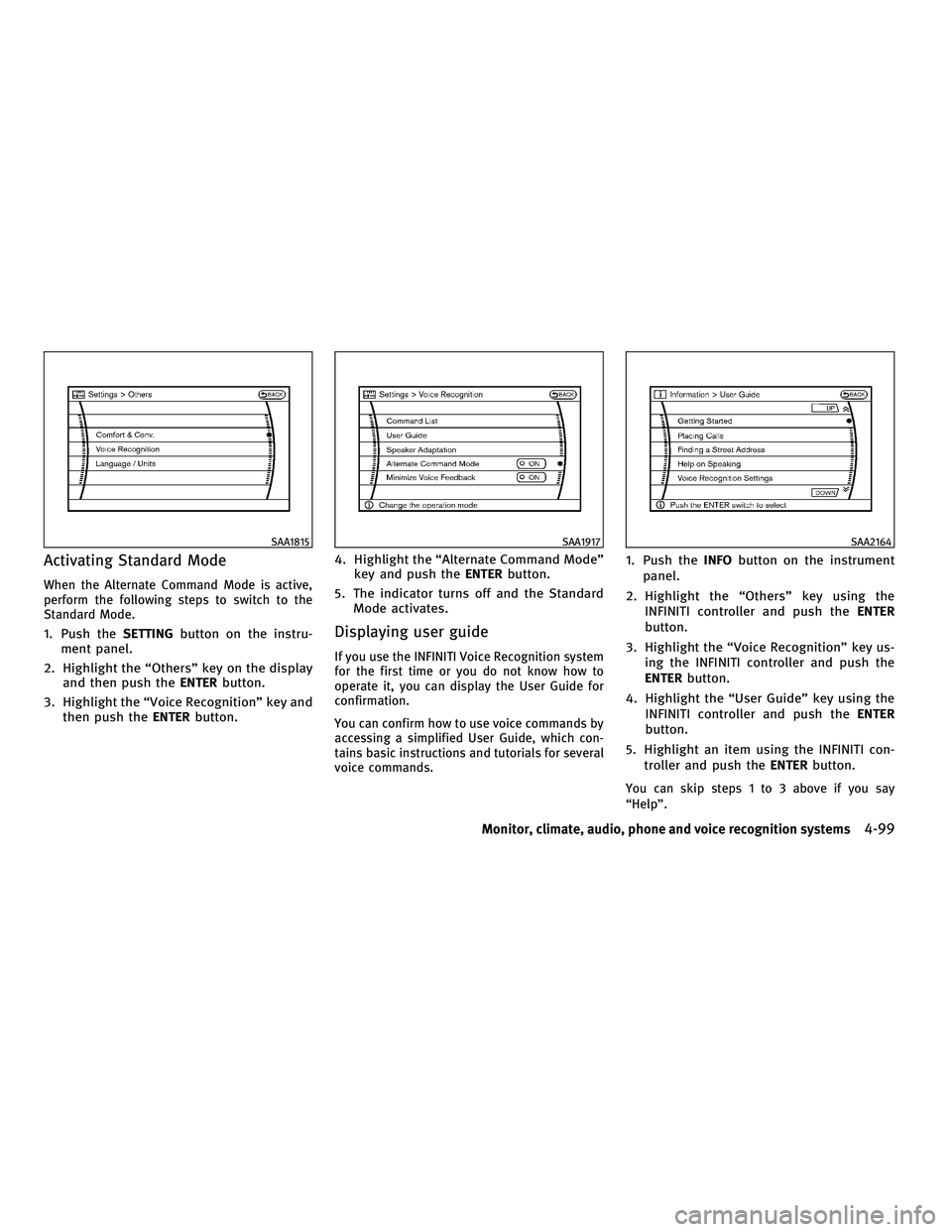
Activating Standard Mode
When the Alternate Command Mode is active,
perform the following steps to switch to the
Standard Mode.
1. Push theSETTINGbutton on the instru-
ment panel.
2. Highlight the ªOthersº key on the display and then push the ENTERbutton.
3. Highlight the ªVoice Recognitionº key and then push the ENTERbutton. 4. Highlight the ªAlternate Command Modeº
key and push the ENTERbutton.
5. The indicator turns off and the Standard Mode activates.Displaying user guide
If you use the INFINITI Voice Recognition system
for the first time or you do not know how to
operate it, you can display the User Guide for
confirmation.
You can confirm how to use voice commands by
accessing a simplified User Guide, which con-
tains basic instructions and tutorials for several
voice commands.
1. Push the INFObutton on the instrument
panel.
2. Highlight the ªOthersº key using the INFINITI controller and push the ENTER
button.
3. Highlight the ªVoice Recognitionº key us- ing the INFINITI controller and push the
ENTER button.
4. Highlight the ªUser Guideº key using the INFINITI controller and push the ENTER
button.
5. Highlight an item using the INFINITI con- troller and push the ENTERbutton.
You can skip steps 1 to 3 above if you say
ªHelpº.
SAA1815SAA1917SAA2164
Monitor, climate, audio, phone and voice recognition systems4-99
wÐ
Ð
05/14/09Ðpattie
X
Page 273 of 445

Activating Alternate Command Mode
When the Standard Mode is active, perform the
following steps to switch to the Alternate Com-
mand Mode.
1. Push theSETTINGbutton on the instru-
ment panel.
2. Highlight the ªOthersº key on the display and then push the ENTERbutton.
3. Highlight the ªVoice Recognitionº key and then push the ENTERbutton. 4. Highlight the ªAlternate Command Modeº
key and push the ENTERbutton.
5. The confirmation message is displayed on the screen. Push the ªOKº key to activate
the Alternate Command Mode.Displaying command list
If you are controlling the system by voice
commands for the first time or do not know the
appropriate voice command, perform the fol-
lowing procedure for displaying the voice com-
mand list (available only in Alternate Command
Mode).
1. Push the INFObutton on the instrument
panel.
2. Highlight the ªOthersº key using the INFINITI controller and push the ENTER
button.
3. Highlight the ªVoice Recognitionº key us- ing the INFINITI controller and push the
ENTER button.
You can skip steps 1 to 3 above if you say
ªHelpº.
4. Highlight the ªCommand Listº key using
the INFINITI controller and push the ENTER
button.
SAA1916SAA2168SAA1803
4-110Monitor, climate, audio, phone and voice recognition systems
wÐ
Ð
05/14/09Ðpattie
X
Page 278 of 445

Displaying user guide
You can confirm how to use voice commands by
accessing a simplified User Guide, which con-
tains basic instructions and tutorials for several
voice commands.
1. Push theINFObutton on the instrument
panel.
2. Highlight the ªOthersº key using the INFINITI controller and push the ENTER
button. 3. Highlight the ªVoice Recognitionº key us-
ing the INFINITI controller and push the
ENTER button.
You can skip steps 1 to 3 above if you say
ªHelpº.
4. Highlight the ªUser Guideº key using the
INFINITI controller and push the ENTER
button.
5. Highlight an item using the INFINITI con-troller and push the ENTERbutton.
Available items :
cGetting Started
Describe the basics of how to operate the
INFINITI Voice Recognition system.
c Using the Address Book
Refer to Navigation System Owner's Manual.
c Finding a Street Address (if so equipped)
Refer to Navigation System Owner's Manual.
c Placing Calls
Tutorial for making a phone call by voice
command operation.
SAA1783SAA2170
Monitor, climate, audio, phone and voice recognition systems4-115
wÐ
Ð
05/15/09Ðpattie
X
Page 293 of 445

WARNING
Do not operate the push-button ignition switch
while driving the vehicle except in an emer-
gency. (The engine will stop when the ignition
switch is pushed 3 consecutive times or the
ignition switch is pushed and held for more
than 2 seconds.) If the engine stops while the
vehicle is being driven, this could lead to a
crash and serious injury.
Before operating the push-button ignition
switch, be sure to move the selector lever to the
P (Park) position.
OPERATING RANGE FOR ENGINE
START FUNCTION
The operating range for starting the engine
inside the vehicle
s1is shown in the illustra-
tion.
c The trunk area is not included in the operat-
ing range of the engine start function.
c If the Intelligent Key is on the instrument
panel, rear parcel shelf, inside the glove box
or door pocket, it may not be possible to
start the engine.
c If the Intelligent Key is near the door or door
glass outside the vehicle, it may be possible
to start the engine. When the ignition switch is pushed without
depressing the brake pedal, the ignition switch
position will change as follows:
c
Push the center once to change to ACC.
c Push the center two times to change to ON.
c Push the center three times to return to
LOCK.
The ignition switch is equipped with an anti-
theft steering lock device.
The ignition lock is designed so that the ignition
switch position cannot be switched to LOCK
until the selector lever is moved to the P (Park)
position.
SSD0659SSD0684
PUSH-BUTTON IGNITION SWITCH
5-8Starting and driving
wÐ
Ð
05/15/09Ðpattie
X
Page 302 of 445

The LDW and LDP systems monitor the lane
markers on the traveling lane using the camera
unit
s1located inside the front map light cover.
When the camera unit detects that the vehicle is
traveling close to either the left or the right of
the traveling lane, the lane departure warning
light
s2on the instrument panel blinks in
orange and a warning chime sounds. When the
LDP system is on, it will automatically apply the
brakes for a short period of time, using the
function of the Vehicle Dynamic Control (VDC)
system.
To turn on the LDW system, push the LDW
switch
s3. The LDW ON indicator lights4on the
switch will illuminate.
To turn on the LDP system, push the LDP switch
s5. The LDP ON indicator lights2will illumi-
nate in green.
LANE DEPARTURE WARNING (LDW)
SYSTEM
Precautions on LDW system
WARNING
c This system is only a warning device to in-
form the driver of a potential unintended
lane departure. It will not steer the vehicle or
prevent loss of control. It is the driver's re-
sponsibility to stay alert, drive safely, keep
the vehicle in the traveling lane, and be in
control of the vehicle at all times.
c The system will not operate at speeds below
approximately 45 MPH (72 km/h) or if it can-
not detect lane markers.
c If the LDW system malfunctions, it will can-
cel automatically, and the lane departure
warning light (orange) will illuminate.
c If the lane departure warning light (orange)
illuminates, pull off the road to a safe loca-
tion and stop the vehicle. Turn the engine off
and restart the engine. If the lane departure
warning light (orange) continues to illumi-
nate, have the system checked by an INFINITI
retailer.
SSD0670
SSD0674
Starting and driving5-17
wÐ
Ð
05/15/09Ðpattie
X
Page 304 of 445

LDW system operation
The LDW system provides a lane departure
warning function when the vehicle is driven at
speeds of approximately 45 MPH (72 km/h) and
above. When the vehicle approaches either the
left or the right side of the traveling lane, a
warning chime will sound and the lane depar-
ture warning light (orange) on the instrument
panel will blink to alert the driver.
The warning function will stop when the vehicle
returns inside of the lane markers.
When you operate the lane change signal and
change traveling lanes in the direction of the
signal, the LDW system temporarily suspends
operation. It will become operable again ap-
proximately 2 seconds after the lane change
signal is turned off.
When the vehicle speed lowers to less than
approximately 45 MPH (72 km/h), the LDW
system will not provide a warning.
The LDW system has an automatic setting mode
and a manual setting mode. The setting mode
can be changed. In the automatic setting mode,
the LDW system is automatically turned on
when the ignition switch is pushed to the ON
position. When the LDW system is on, the LDW
ON indicator
s1on the LDW switch illuminates.
To cancel the LDW system, push the LDW switch. The LDW ON indicator will turn off. To
turn on the system, push the LDW switch again.
In the manual setting mode, you need to push
the LDW switch to turn on the system after the
ignition switch is pushed to the ON position.
The setting mode can be changed using the
LDW switch. To change the setting mode, push
and hold the LDW switch for more than 4
seconds when the LDW ON indicator is off.
When the mode is changed, a chime sounds
and the LDW ON indicator flashes.
Temporary disabled status at high
temperature
If the vehicle is parked in direct sunlight under
high temperature conditions (over approxi-
mately 104ÉF (40ÉC) and then started, the LDW
system may be deactivated automatically. The
LDW ON indicator on the switch will flash.
When the interior temperature is reduced, the
LDW system will resume operating automati-
cally and the LDW ON indicator will stop flash-
ing.
LANE DEPARTURE PREVENTION (LDP)
SYSTEM
Precautions on LDP system
WARNING
c
The LDP system will not steer the vehicle or
prevent loss of control. It is the driver's re-
sponsibility to stay alert, drive safely, keep
the vehicle in the traveling lane, and be in
control of vehicle at all times.
c The LDP system is primarily intended for use
on well-developed freeways or highways. It
may not detect the lane markers in certain
roads, weather or driving conditions.
c Using the LDP system under some condi-
tions of road, lane marker or weather, or
when you change lanes without using the
lane change signal could lead to an unex-
pected system operation. In such condi-
tions, you need to correct the vehicle's direc-
tion with your steering operation to avoid
accidents.
c When the LDP system is operating, avoid
excessive or sudden steering maneuvers.
Otherwise, you could lose control of the
vehicle.
Starting and driving5-19
wÐ
Ð
05/15/09Ðpattie
X
Page 305 of 445

cThe LDP system will not operate at speeds
below approximately 45 MPH 72 km/h) or if it
cannot detect lane markers.
c The LDP system may not function properly
under the following conditions, and do not
use the LDP system:
± During bad weather (rain, fog, snow, wind, etc.).
± When driving on slippery roads, such as on ice or snow, etc.
± When driving on winding or uneven roads.
± When there is a lane closure due to road repairs.
± When driving in a makeshift lane.
± When driving on roads where the lane width is too narrow.
± When driving without normal tire condi- tions (for example, tire wear, low tire
pressure, installation of spare tire, tire
chains, non-standard wheels).
± When the vehicle is equipped with non- original brake parts or suspension parts. c
If the LDP system malfunctions, it will cancel
automatically. The lane departure warning
light (orange) on the instrument panel will
illuminate.
c If the lane departure warning light (orange)
illuminates, pull off the road to a safe loca-
tion and stop the vehicle. Turn the engine off
and restart the engine. If the warning light
(orange) continues to illuminate, have the
LDP system checked by an INFINITI retailer.
c Excessive noise will interfere with the warn-
ing chime sound, and the chime may not be
heard.
The functions of the LDP system (warning and
brake control assist) may or may not operate
properly under the following conditions:
c On roads where there are multiple parallel
lane markers; lane markers that are faded or
not painted clearly; yellow painted lane
markers; non-standard lane markers; or lane
markers covered with water, dirt, snow, etc.
c On roads where discontinued lane markers
are still detectable.
c On roads where there are sharp curves.
c On roads where there are sharply contrast-
ing objects, such as shadows, snow, water, wheel ruts, seams or lines remaining after
road repairs. (The LDP system could detect
these items as lane markers.)
c On roads where the traveling lane merges or
separates.
c When the vehicle's traveling direction does
not align with the lane marker.
c When traveling close to the vehicle in front
of you, which obstructs the lane camera unit
detection range.
c When rain, snow or dirt adheres to the
windshield in front of the lane camera unit.
c When the headlights are not bright due to
dirt on the lens or if the aiming is not
adjusted properly.
c When strong light enters the lane camera
unit. (For example, the light directly shines
on the front of the vehicle at sunrise or
sunset.)
c When a sudden change in brightness occurs.
(For example, when the vehicle enters or
exits a tunnel or under a bridge.)
While the LDP system is operating, you may
hear a sound of brake operation. This is normal
and indicates that the LDP system is operating
properly.
5-20Starting and driving
wÐ
Ð
05/15/09Ðpattie
X
Page 306 of 445

LDP system operation
The LDP system provides a lane departure warn-
ing and brake control assistance when the
vehicle is driven at speeds of approximately 45
MPH (72 km/h) and above. When the vehicle
approaches either the left or the right side of
the traveling lane, a warning chime will sound
and the lane departure warning light (orange)
on the instrument panel will blink to alert the
driver. Then, the LDP system will automatically
apply the brakes for a short period of time to
help assist the driver to return the vehicle to the
center of the traveling lane.The warning and assist functions will stop when
the vehicle returns to a position inside of the
lane marker.
To turn on the LDP system, push the LDP switch
on the steering wheel after starting the engine.
The LDP ON indicator light (green) on the instru-
ment panel will illuminate. Push the LDP switch
again to turn off the LDP system. The LDP ON
indicator light will turn off.
LDP ON indicator light (green)/ Warning light (orange)
SSD0672
LDP switch
SSD0673
Starting and driving5-21
wÐ
Ð
05/15/09Ðpattie
X
Page 308 of 445
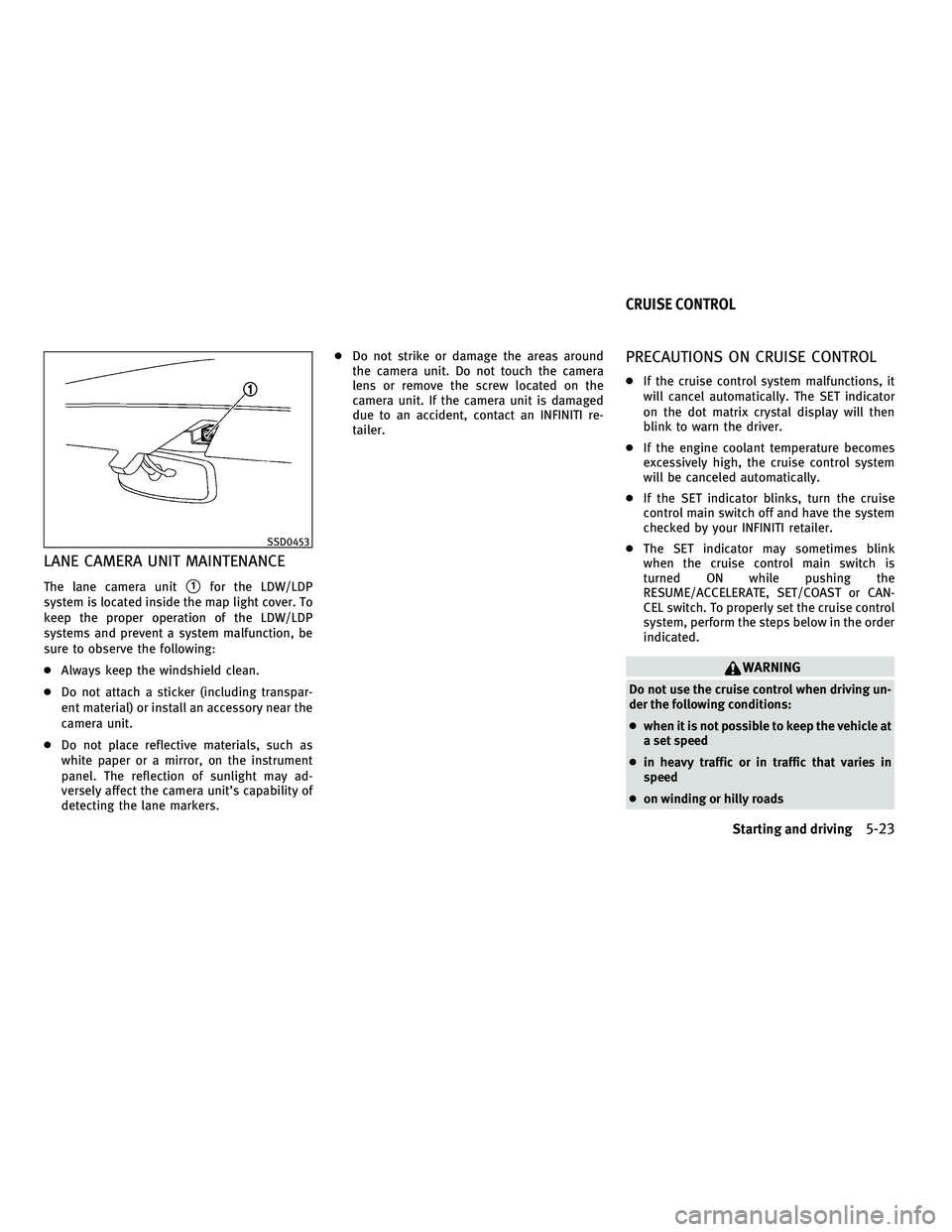
LANE CAMERA UNIT MAINTENANCE
The lane camera units1for the LDW/LDP
system is located inside the map light cover. To
keep the proper operation of the LDW/LDP
systems and prevent a system malfunction, be
sure to observe the following:
c Always keep the windshield clean.
c Do not attach a sticker (including transpar-
ent material) or install an accessory near the
camera unit.
c Do not place reflective materials, such as
white paper or a mirror, on the instrument
panel. The reflection of sunlight may ad-
versely affect the camera unit's capability of
detecting the lane markers. c
Do not strike or damage the areas around
the camera unit. Do not touch the camera
lens or remove the screw located on the
camera unit. If the camera unit is damaged
due to an accident, contact an INFINITI re-
tailer.
PRECAUTIONS ON CRUISE CONTROL
cIf the cruise control system malfunctions, it
will cancel automatically. The SET indicator
on the dot matrix crystal display will then
blink to warn the driver.
c If the engine coolant temperature becomes
excessively high, the cruise control system
will be canceled automatically.
c If the SET indicator blinks, turn the cruise
control main switch off and have the system
checked by your INFINITI retailer.
c The SET indicator may sometimes blink
when the cruise control main switch is
turned ON while pushing the
RESUME/ACCELERATE, SET/COAST or CAN-
CEL switch. To properly set the cruise control
system, perform the steps below in the order
indicated.
WARNING
Do not use the cruise control when driving un-
der the following conditions:
cwhen it is not possible to keep the vehicle at
a set speed
c in heavy traffic or in traffic that varies in
speed
c on winding or hilly roads
SSD0453
CRUISE CONTROL
Starting and driving5-23
wÐ
Ð
05/15/09Ðpattie
X