audio INFINITI M 2010 Repair Manual
[x] Cancel search | Manufacturer: INFINITI, Model Year: 2010, Model line: M, Model: INFINITI M 2010Pages: 445, PDF Size: 6.15 MB
Page 204 of 445

Troubleshooting guide :
SymptomCause and Countermeasure
Cannot play Check if the CD/CF was inserted correctly.
Check if the CD/CF is scratched or dirty.
Check if there is condensation inside the player, and if there is, wait until the condensation is gone (about 1 hour)
before using the player.
If there is a temperature increase error, the player will play correctly after it returns to the normal temperature.
If there is a mixture of music CD files (CD-DA data) and MP3/WMA files on a CD, only the music CD files (CD-DA
data) will be played.
Files with extensions other than ª.MP3º, ª.WMAº, ª.mp3º or ª.wmaº cannot be played. In addition, the character
codes and number of characters for folder names and file names should be in compliance with the specifications.
Check if the disc or the file is generated in an irregular format. This may occur depending on the variation or the
setting of MP3/WMA writing applications or other text editing applications.
Check if the finalization process, such as session close and disc close, is done for the disc.
Check if the CD/CF is protected by copyright.
Poor sound quality Check if the CD/CF is scratched or dirty.
It takes a relatively long time before
the music starts playing. If there are many folder or file levels on the MP3/WMA CD/CF, or if it is a multisession disc, some time may be
required before the music starts playing.
Music cuts off or skips The writing software and hardware combination might not match, or the writing speed, writing depth, writing
width, etc., might not match the specifications. Try using the slowest writing speed.
Skipping with high bit rate files Skipping may occur with large quantities of data, such as for high bit rate data.
Move immediately to the next song
when playing. When a non-MP3/WMA file has been given an extension of ª.MP3º, ª.WMAº, ª.mp3º or ª.wmaº, or when play is
prohibited by copyright protection, the player will skip to the next song.
The songs do not play back in the
desired order. The playback order is the order in which the files were written by the writing software, so the files might not play
in the desired order.
Monitor, climate, audio, phone and voice recognition systems4-41
wÐ
Ð
05/14/09Ðpattie
X
Page 205 of 445

1. ON´OFF/VOLUME control knob
2. Radio station preset and CD selectorbuttons
3. Radio tuning / MP3/WMA folder selector / AUDIO control knob
4. CD LOAD button (if so equipped) 5. Radio PRESET A-B-C selector button
6. Radio SCAN (tuning)/CD RPT (repeat) play
button
7. Radio CAT (category)/REW (rewind) button for SEEK/TRACK
8. FF (fast forward) button for SEEK/TRACK 9. CD EJECT button
10. CompactFlash (CF) card slot (located un-
der the audio unit) (if so equipped)
No satellite radio reception is available unless
there is an active XMT satellite radio service
subscription.
The audio control buttons are also located on
the center multi-function control panel.
SAA1818
4-42Monitor, climate, audio, phone and voice recognition systems
wÐ
Ð
05/19/09Ðtbrooks
X
Page 206 of 445

1. AM´FM´SAT band select button
2. DISC´AUX button1. RADIO AM´FM band select button
2. AUX button
3. DISC button
FM-AM-SAT RADIO WITH COMPACT
DISC (CD) PLAYER/CHANGER
For all operation precautions, see ªAUDIO OP-
ERATION PRECAUTIONSº earlier in this section.
The satellite radio mode requires an active XM
T
satellite radio service subscription. Satellite
radio is not available in Alaska, Hawaii and
Guam. It may take some time to receive the activation
signal after subscribing to the XM
Tsatellite
radio. After receiving the activation signal, an
available station list will be automatically up-
dated in the radio. Push the ignition switch from
LOCK to ACC to update the station list.
Audio main operation
Head unit :
The radio has an FM diversity reception system,
which employs two antennas printed on the
rear window. This system automatically
switches to the antenna which is receiving less
interference.
The auto loudness circuit enhances the low and
high frequency ranges automatically in both
radio reception and CD playback.
ON´OFF/Volume control :
Push the ignition switch to the ACC or ON
position, and then push the ON´OFF/VOLUME
control knob while the system is off to call up
the audio mode which was playing immediately
before the system was turned off. While the
system is on, pushing the ON´OFF/VOLUME
control knob turns the system off.
Turn the ON´OFF/VOLUME control knob to ad-
just the volume.
With navigation system
SAA1819
Without navigation system
SAA1820
Monitor, climate, audio, phone and voice recognition systems4-43
wÐ
Ð
05/14/09Ðpattie
X
Page 207 of 445

Adjusting tone quality and speaker balance :
To adjust Bass, Treble, Balance and Fade, push
the Audio control knob. When the display
shows the setting you want to change (Bass,
Treble, Balance and Fade), rotate the Audio
control knob to set the desired setting. For the
other setting methods, see ªHOW TO USE SET-
TING BUTTONº earlier in this section.
This vehicle has some sound effect functions as
follows (if so equipped):
cBOSET CenterpointT
c BOSET AudioPilotT
c Precision Phased Audio
c Speed Sensitive Volume
For more details, see ªVEHICLE INFORMATION
AND SETTINGSº earlier in this section.
FM-AM-SAT radio operation
orRadio (FM/AM/SAT) band select :
Pushing the radio band select button will
change the band as follows:
AM !FM !XM !AM When the radio band select button is pushed
while the ignition switch is in the ACC or ON
position, the radio will come on at the station
last played.
The last station played will also come on when
the ON´OFF/VOL control knob is pushed to ON.
The satellite radio mode requires an active XM
T
satellite radio service subscription. Satellite
radio is not available in Alaska, Hawaii and
Guam.
If another audio source is playing when the
radio band select button is turned to ON, the
audio source will automatically be turned off
and the last radio station played will come on.
When the stereo broadcast signal is weak, the
radio will automatically change from stereo to
monaural reception.
TUNE (Tuning) :
c For AM and FM radio
Turn the TUNE/FOLDER knob for manual tun-
ing.
c For satellite radio
Turn the TUNE/FOLDER knob to seek stations
from all of the categories when any CAT is
not selected.
SEEK tuning/CATEGORY
(CAT) :
c For AM and FM radio
Push the SEEK´CAT or TRACK button
orto tune from low to high or high to
low frequencies and to stop at the next
broadcasting station.
c For satellite radio
Push the SEEK´CAT or TRACK button
orto tune to the first station of the
next or previous category.
During satellite radio reception, the following
notices will be displayed under certain condi-
tions.
c NO SIGNAL (No signal is received while the
SAT tuner is connected.)
c OFF AIR (Broadcasting signed off)
c ANTENNA ERROR (Antenna connection error)
c LOADING (When the initial setting is per-
formed)
c UPDATING (When the satellite radio sub-
scription is not active)
c INVALID CH (Invalid station is received.)
4-44Monitor, climate, audio, phone and voice recognition systems
wÐ
Ð
05/14/09Ðpattie
X
Page 208 of 445

SCAN tuning :
Push the SCAN tuning button to tune from low
to high frequencies and stop at each broadcast-
ing station for 5 seconds. Pushing the button
again during this 5-second period will stop
SCAN tuning and the radio will remain tuned to
that station.
If the SCAN tuning button is not pushed within
5 seconds, SCAN tuning moves to the next
station.
PRESET select :
Push the PRESET select button to go to the next
PRESET. After choosing from the PRESET A, B or
C, you can select the desired station using the
INFINITI controller or pushing the station preset
buttons
to.
toStation memory operations :
6 stations can be set for PRESET A, B and C. The
PRESET A, B and C function allows you to store
a combination of FM, AM and SAT stations for
easy access.
1. Choose preset station A, B or C using the preset select button.
2. Tune to the desired station using the SEEK, SCAN or TUNE button. 3. Select the desired station and push and
hold the desired station preset button
tountil a beep sound is
heard. (The radio mutes when the select
button is pushed.)
4. The station indicator will then come on and the sound will resume. Memorizing is
now complete.
5. Other buttons can be set in the same manner.
If the battery cable is disconnected, or if the
fuse opens, the radio memory will be erased. In
that case, reset the desired stations.
Text :
When the ªText º key is selected with the
INFINITI controller on the display and then the
ENTER button is pushed while the satellite radio
is being played, the text information will be
displayed on the screen.
c CH Name
c Category
c Name
c Title
c Other
If your vehicle is equipped with the AUDIO TEXT
ª
º button on the center multi-function control panel, push this button while the satel-
lite programming is selected to show the text
information.
Compact Disc (CD) player/changer
operation
Push the ignition switch to the ACC or ON
position, push the LOAD button (if so equipped)
and insert the Compact Disc (CD) into the slot
with the label side facing up. The CD will be
guided automatically into the slot and start
playing.
After loading the CD, the number of tracks on
the CD and the play time will appear on the
display.
If the radio is already operating, it will automati-
cally turn off and the CD will play.
If the system has been turned off while the CD
was playing, pushing the ON´OFF/VOL control
knob will start the CD.
Do not use 3.1 in (8 cm) discs.
CD LOAD (if so equipped) :
To insert a CD in the CD changer, push the LOAD
button for less than 1.5 seconds. Select the
Monitor, climate, audio, phone and voice recognition systems4-45
wÐ
Ð
05/14/09Ðpattie
X
Page 209 of 445

loading position by pushing the CD insert select
button
s1tos6, then insert the CD.
To insert 6 CDs to the CD changer in succession,
push the LOAD button for more than 1.5 sec-
onds.
The inserted slot numbers will illuminate on the
display.
orCD PLAY :
When the DISC (CD play) button is pushed with
the system off and the CD loaded, the system
will turn on and the CD will start to play.
When the DISC button is pushed with the CD
loaded and the radio playing, the radio will
automatically be turned off and the CD will start
to play.
When the DISC button is pushed while a CD is
loaded and a medium is played using the
auxiliary input jacks, you can toggle back and
forth between CD and medium.
Text :
When the ª Textº key is selected in the screen
using the INFINITI controller and then the ENTER
button is pushed while the CD is being played,
the music information below will be displayed
on the screen. CD:
c
Disc title
c Track title
CD with MP3 or WMA:
c Folder title
c File title
c Song title
c Album title
c Artist
If your vehicle is equipped with the AUDIO TEXT
ª
º button on the center multi-function
control panel, push this button while the CD is
being played to show the music information.
FF (Fast Forward), REW
(Rewind)/APS (Automatic
Program Search) FF, APS
REW :
When the
(fast forward) or(rewind)
button is pushed for more than 1.5 seconds
while the CD is being played, the CD will play
while fast forwarding or rewinding. When the
button is released, the CD will return to normal
play speed.
When the
orbutton is pushed for
less than 1.5 seconds while the CD is being played, the next track or the beginning of the
current track on the CD will be played.
The INFINITI controller can also be used to
select tracks when a CD is being played.
CD PLAY selection (CD changer only) :
To change to another CD already loaded into the
player, push the CD play select buttons
toor choose a disc displayed on the
screen using the INFINITI controller.
REPEAT (RPT) :
When the SCAN´RPT button is pushed while the
CD is played, the play pattern can be changed
as follows:
(CD)
(CD with MP3 or WMA)
ªALL DISC RPTº and ªALL DISC MIXº are avail-
able for CD changer model.
4-46Monitor, climate, audio, phone and voice recognition systems
wÐ
Ð
05/14/09Ðpattie
X
Page 210 of 445

CD EJECT :
When the CD EJECT button is pushed with the
CD loaded, the CD will be ejected.
To eject the discs selected by the CD select
button, push the EJECT button for less than 1.5
seconds.
To eject all the discs (if so equipped), push the
EJECT button for more than 1.5 seconds.
When this button is pushed while the CD is
being played, the CD will come out and the
system will turn off.
If the CD comes out and is not removed, it will be
pulled back into the slot to protect it.
COMPACTFLASH (CF) PLAYER
OPERATION (if so equipped)
Audio main operation
Push the ignition switch to the ACC or ON
position, remove the cover
s1and insert a CF
card
s2into the slot. Then, push thebutton repeatedly to switch to the Compact-
Flash mode.
If the system has been turned off while the
CompactFlash card was playing, pushing the
ON´OFF/VOL control knob will start the Com-
pactFlash card.
PLAY :
When the DISC´AUXbutton is pushed with the
system off and the CF card inserted, the system
will turn on.
If another audio source is playing and a CF card
is inserted, push the DISC´AUXbutton repeat-
edly until the center display changes to the
CompactFlash mode.
Text :
When the ªTextº key is selected on the screen
using the INFINITI controller and then the ENTER
button is pushed while the CF is being played,
the music information below will be displayed
on the screen.
c Folder title
c Song title
c Track title
c Album Title
c Artist
FF (Fast Forward), REW
(Rewind)/APS (Automatic
Program Search) FF, APS
REW :
When the
(fast forward) or(re-
wind) button is pushed for more than 1.5 sec-
SAA1822
Monitor, climate, audio, phone and voice recognition systems4-47
wÐ
Ð
05/14/09Ðpattie
X
Page 211 of 445

onds while the CompactFlash (CF) card is being
played, the CF card will play while fast forward-
ing or rewinding. When the button is released,
the CF card will return to the normal play speed.
When the
orbutton is pushed for
less than 1.5 seconds while the CF card is being
played, the next track or the beginning of the
current track on the CF will be played.
The INFINITI controller can also be used to
select tracks when the CF card is being played.
Folder selection :
To change to another folder in the CF card, turn
the MP3/WMA folder selector or choose a folder
displayed on the screen using the INFINITI
controller.
REPEAT (RPT) :
When the RPT button is pushed while the CF
card is played, the play pattern can be changed
as follows:
CF EJECT :
When the knob next to the CF slot is pushed
with the CF card inserted, the CF card will be
ejected. Messages :
The following messages will be displayed under
certain conditions.
c
Reading Compact Flash (The system is read-
ing the CF card inserted in the slot.)
c No Compact Flash card (A CF card is not
inserted in the slot.)
c Compact Flash read error (The system can-
not read a CF card.)
c Unplayable file (The system cannot play a
music file.)
c No audio file (The CF card inserted in the slot
or its folder does not contain any music
files.)
Compatibility with other media :
If a commercially available CF adapter is in-
serted into the slot, your memory media can
also be used.
IPODT PLAYER OPERATION (if so
equipped)
Connecting iPodT
Open the console lid and connect the cables1
as illustrated, and then connect the other end of
the cable to your iPod T
s2. Your vehicle is
equipped with the specialized cable for con-
necting the iPod Tto your vehicle audio unit.
The battery of your iPod Tis charged while it is
connected to the vehicle if the iPodT supports
charging via a FireWireT connection.
The display on the iPod Tshows an INFINITI
screen when the connection is completed.
SAA1823
4-48Monitor, climate, audio, phone and voice recognition systems
wÐ
Ð
05/14/09Ðpattie
X
Page 212 of 445
While connecting the iPodTto the vehicle, the
iPodT can only be operated by the vehicle audio
controls.
To disconnect the cable from the vehicle outlet,
fully depress the center connector button to
unlatch the connector and pull the connector
straight out of the outlet. To disconnect the
cable from the iPodT, fully depress the side
connector buttons and pull the iPod Tconnector
straight out of the iPodT.
* iPodT is a trademark of Apple Inc., registered
in the U.S. and other countries.
Compatibility
The following models are available:
c Third generation iPod T(Firmware version 2.3
or later) (Audiobook and Podcast are not
available)
c Fourth generation iPod T(Firmware version
3.1.1 or later)
c Fifth generation iPodT (Firmware version
1.1.2 or later)
c iPodT mini (Firmware version 1.41 or later)
c iPodT photo (Firmware version 1.2.1 or later)
c iPodT nano (Firmware version 1.2 or later)
Make sure that your iPod Tfirmware is updated.
Audio main operation
Push the ignition switch to the ACC or ON
position. Then, push the DISC´AUXbutton re-
peatedly to switch to the iPodT mode.
If the system has been turned off while the
iPodT was playing, pushing the ON´OFF/VOL
control knob will start the iPodT.
DISC´AUX button :
When the DISC´AUXbutton is pushed with the
system off and the iPod Tconnected, the system
will turn on. If another audio source is playing
and the iPod Tis connected, push the DISC´AUX
button repeatedly until the center display
changes to the iPodT mode.
Interface :
The interface for iPod Toperation shown on the
vehicle center display is similar to the iPod T
interface. Use the INFINITI controller and the
ENTER orBACK button to play the iPod Twith
your favorite settings.
The following items can be chosen from the
menu list screen. For further information about
each item, see the iPodT Owner's Manual.
c Playlists
c Artists
c Albums c
Songs
c Podcasts
c Genres
c Composers
c Audiobooks
The following touch-panel buttons shown on
the screen are also available:
c
: returns to the previous screen.
c
: plays/pauses the music selected.
FF (Fast Forward), REW (Rewind)/APS (Automatic
Program Search) FF, APS REW :
When the
orbutton is pushed for
more than 1.5 seconds while the iPod Tis play-
ing, the iPod Twill play while fast forwarding or
rewinding. When the button is released, the
iPodT will return to the normal play speed.
When the
orbutton is pushed for
less than 1.5 seconds while the iPod Tis play-
ing, the next track or the beginning of the
current track on the iPodT will be played.
The INFINITI controller can also be used to
select tracks when the iPodT is playing.
Monitor, climate, audio, phone and voice recognition systems4-49
wÐ
Ð
05/14/09Ðpattie
X
Page 213 of 445
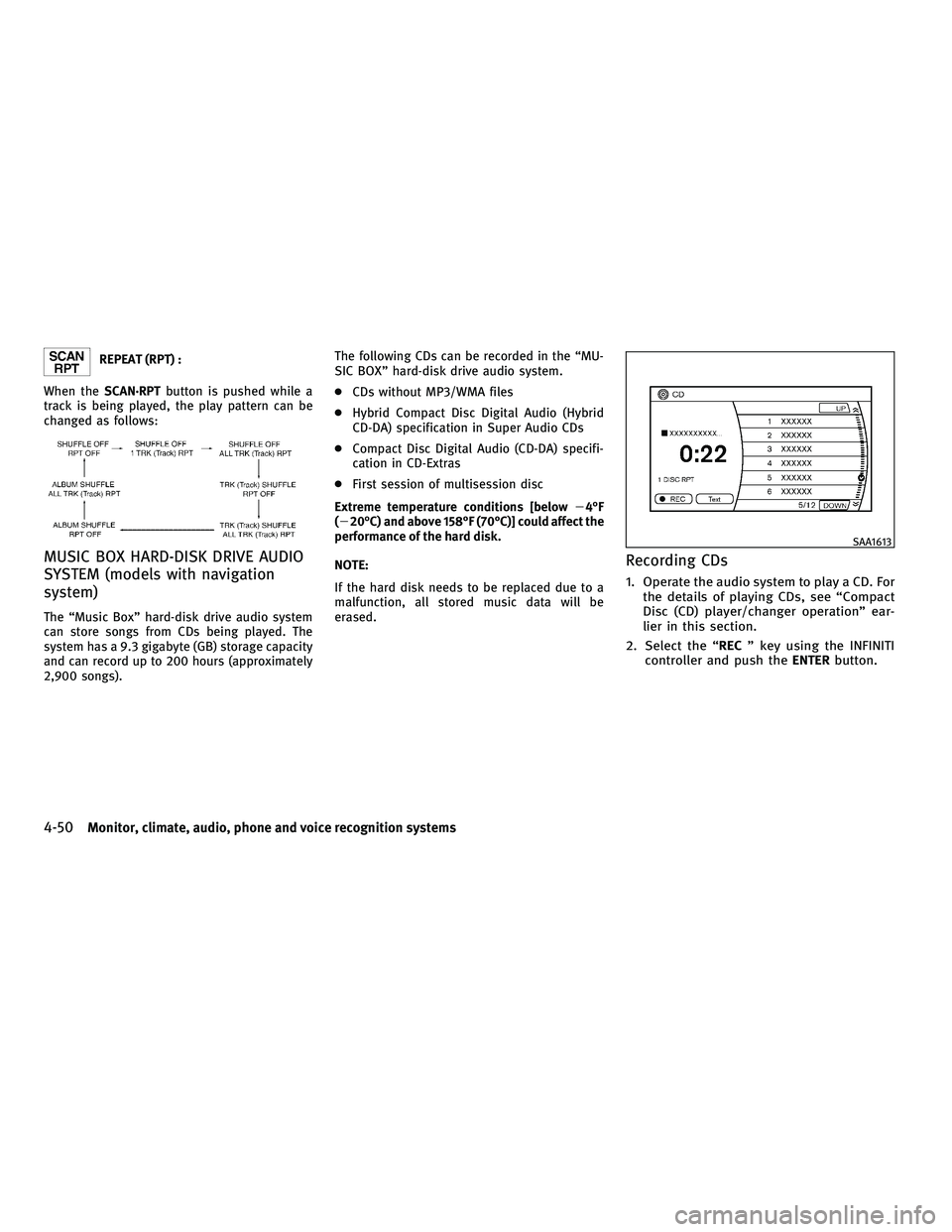
REPEAT (RPT) :
When the SCAN´RPT button is pushed while a
track is being played, the play pattern can be
changed as follows:
MUSIC BOX HARD-DISK DRIVE AUDIO
SYSTEM (models with navigation
system)
The ªMusic Boxº hard-disk drive audio system
can store songs from CDs being played. The
system has a 9.3 gigabyte (GB) storage capacity
and can record up to 200 hours (approximately
2,900 songs). The following CDs can be recorded in the ªMU-
SIC BOXº hard-disk drive audio system.
c
CDs without MP3/WMA files
c Hybrid Compact Disc Digital Audio (Hybrid
CD-DA) specification in Super Audio CDs
c Compact Disc Digital Audio (CD-DA) specifi-
cation in CD-Extras
c First session of multisession disc
Extreme temperature conditions [below 24ÉF
(220ÉC) and above 158ÉF (70ÉC)] could affect the
performance of the hard disk.
NOTE:
If the hard disk needs to be replaced due to a
malfunction, all stored music data will be
erased.
Recording CDs
1. Operate the audio system to play a CD. For the details of playing CDs, see ªCompact
Disc (CD) player/changer operationº ear-
lier in this section.
2. Select the ª RECº key using the INFINITI
controller and push the ENTERbutton.
SAA1613
4-50Monitor, climate, audio, phone and voice recognition systems
wÐ
Ð
05/14/09Ðpattie
X