audio INFINITI M 2010 Owners Manual
[x] Cancel search | Manufacturer: INFINITI, Model Year: 2010, Model line: M, Model: INFINITI M 2010Pages: 445, PDF Size: 6.15 MB
Page 234 of 445
10 Key Search* (DVD-VIDEO, DVD-AUDIO, VIDEO-
CD, CD-DA) :
Select the ª10 Key Searchº key and push the
ENTER button to open the number entry screen.
Input the number you want to search for and
select the ª OKº key with the INFINITI controller.
Then push the ENTERbutton. The specified
Title/Chapter or Group/Track will be played.
Title Search* (DVD-VIDEO) :
The scene with the specified title will be dis-
played the number of times the ª+º side or ª 2º
side is selected.
Group Search* (DVD-AUDIO) :
The scene with the specified group will be
displayed the number of times the ª+º or ª 2º
side is selected.
Select No.* (VIDEO-CD) :
Select the ª Select No.º key and push the ENTER
button to open the number entry screen.
Input the number you wish to search for and
select the ªOK º key with the INFINITI controller,
and then push the ENTERbutton. The specified
scene will be played. Menu Skip (DVD-VIDEO, DVD-AUDIO) :
DVD menus are automatically configured and
the contents will be played directly when the
ªMenu Skip
º key is turned on. Note that some
discs may not be played directly even if this
item is turned on.
DVD Language (DVD-VIDEO, DVD-AUDIO, VIDEO-
CD) :
Select the ª DVD Language º key and push the
ENTER button to open the number entry screen.
Input the number corresponding to the pre-
ferred language and select the ª OKº key with
the INFINITI controller. Then push the ENTER
button. The DVD top menu language will be
changed to the one specified.
DRC (DVD-VIDEO, DVD-AUDIO) :
DRC (Dynamic Range Compression) allows you
to tune the dynamic range of the sound re-
corded in the Dolby Digital format.
DOWN MIX (DVD-VIDEO, DVD-AUDIO) :
Convert a multi-channel recording to a tradi-
tional two-channel (stereo) recording.
Remote controller operation
Use the remote controller to adjust the follow-
ing items. Rear display open/close :
To open or close the flip-down rear display,
push the ª
º button.
Joystick :
Use the joystick ª
º to select the items
displayed on the rear screen.
ENTER button :
Push the ENTER ª
º button to make the
selected item complete on the rear screen.
BACK button :
Push to go back to the previous screen or cancel
the selection.
Display tilt :
Adjust the display angle by pushing the DIS-
PLAY TILT button ª
º.
DVD mode :
To select the DVD mode, push the DVD button.
AUX mode :
To select the AUX (auxiliary input jacks), mode,
push the AUX button.
Monitor, climate, audio, phone and voice recognition systems4-71
wÐ
Ð
05/14/09Ðpattie
X
Page 235 of 445
Volume :
To control the volume level, push the VOL
button ª
º.
Display :
To adjust the rear display screen (brightness,
tint, contrast, etc.), push the DISP button.
Aspect :
To change the display size, push the ASPECT
button. Each time the button is pushed, the
display size will change to ªCinemaº, ªWideº,
ªFullº or ªNormalº.
Sound :
To change the language, push the SOUND but-
ton. Each time the button is pushed, the lan-
guage will change to each language stored in
the DVD.
Headphones :
The DVD sound can be heard through the
headphones.
Push the headphones ª
º button. Each
time the button is pushed, the headphones
mode will switch to ON or OFF.
To control the volume of sound from the head-
phones, use the volume control knob attached
to the headphones. Track/Channel :
To skip to the previous or next DVD scene
selection, push the TRACK CH button
ª
º.
Keypad :
: PLAY/PAUSE button
: STOP button
: FORWARD button
: REWIND button
: FORWARD button for still images (for DVD-AUDIO)
: REWIND button for still images (forDVD-AUDIO)
CARE AND MAINTENANCE
Use a lightly dampened, lint free cloth to clean
the surfaces of your Mobile Entertainment Sys-
tem. (DVD player face, screen, remote control-
ler, etc.)
c Do not attempt to operate the system in
extreme temperature conditions [below
24ÉF (220ÉC) and above 158ÉF (70ÉC)]. c
Do not attempt to operate the system in
extreme humidity conditions (less than 10%
or more than 75%).
CAUTION
cDo not use any solvents or cleaning solu-
tions when cleaning the video system.
c Do not use excessive force on the monitor
screen.
c Avoid touching or scratching the monitor
screen as it may become dirty or damaged.
4-72Monitor, climate, audio, phone and voice recognition systems
wÐ
Ð
05/14/09Ðpattie
X
Page 236 of 445
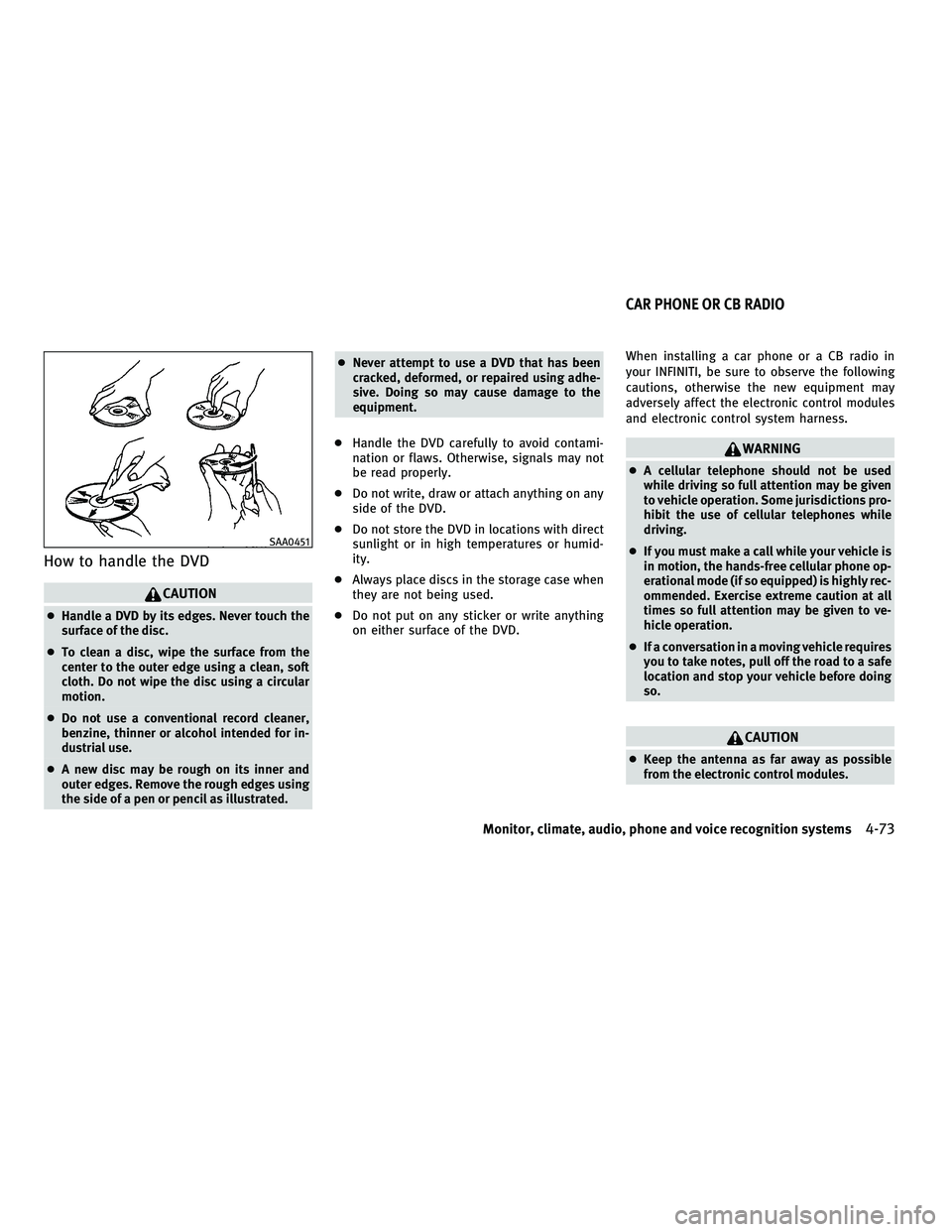
How to handle the DVD
CAUTION
cHandle a DVD by its edges. Never touch the
surface of the disc.
c To clean a disc, wipe the surface from the
center to the outer edge using a clean, soft
cloth. Do not wipe the disc using a circular
motion.
c Do not use a conventional record cleaner,
benzine, thinner or alcohol intended for in-
dustrial use.
c A new disc may be rough on its inner and
outer edges. Remove the rough edges using
the side of a pen or pencil as illustrated. c
Never attempt to use a DVD that has been
cracked, deformed, or repaired using adhe-
sive. Doing so may cause damage to the
equipment.
c Handle the DVD carefully to avoid contami-
nation or flaws. Otherwise, signals may not
be read properly.
c Do not write, draw or attach anything on any
side of the DVD.
c Do not store the DVD in locations with direct
sunlight or in high temperatures or humid-
ity.
c Always place discs in the storage case when
they are not being used.
c Do not put on any sticker or write anything
on either surface of the DVD. When installing a car phone or a CB radio in
your INFINITI, be sure to observe the following
cautions, otherwise the new equipment may
adversely affect the electronic control modules
and electronic control system harness.
WARNING
c
A cellular telephone should not be used
while driving so full attention may be given
to vehicle operation. Some jurisdictions pro-
hibit the use of cellular telephones while
driving.
c If you must make a call while your vehicle is
in motion, the hands-free cellular phone op-
erational mode (if so equipped) is highly rec-
ommended. Exercise extreme caution at all
times so full attention may be given to ve-
hicle operation.
c If a conversation in a moving vehicle requires
you to take notes, pull off the road to a safe
location and stop your vehicle before doing
so.
CAUTION
cKeep the antenna as far away as possible
from the electronic control modules.
SAA0451
CAR PHONE OR CB RADIO
Monitor, climate, audio, phone and voice recognition systems4-73
wÐ
Ð
05/14/09Ðpattie
X
Page 237 of 445
cKeep the antenna wire more than 8 in (20 cm)
away from the electronic control system har-
ness. Do not route the antenna wire next to
any harness.
c Adjust the antenna standing-wave ratio as
recommended by the manufacturer.
c Connect the ground wire from the CB radio
chassis to the body.
c For details, consult an INFINITI retailer.WARNING
cUse a phone after stopping your vehicle in a
safe location. If you have to use a phone
while driving, exercise extreme caution at all
times so full attention may be given to ve-
hicle operation.
c If you find yourself unable to devote full at-
tention to vehicle operation while talking on
the phone, pull off the road to a safe location
and stop your vehicle before doing so.
CAUTION
To avoid draining the vehicle battery, use a
phone after starting the engine.
Your INFINITI is equipped with Bluetooth T
Hands-Free Phone System. If you are an owner
of a compatible Bluetooth Tenabled cellular
phone, you can set up the wireless connection
between your cellular phone and the in-vehicle
phone module. With BluetoothT wireless tech-
nology, you can make or receive a telephone
call with your cellular phone in your pocket.
Once your cellular phone is paired to the in-
vehicle phone module, no phone connecting
procedure is required anymore. Your phone is
automatically connected with the in-vehicle phone module when the ignition switch is
pushed to the ON position with the registered
cellular phone turned on and carried in the
vehicle.
You can register up to 5 different BluetoothT
cellular phones in the in-vehicle phone module.
However, you can talk on only one cellular
phone at a time.
The INFINITI Voice Recognition system supports
the phone commands, so dialing a phone num-
ber using your voice is possible. For more
details, see ªINFINITI VOICE RECOGNITION SYS-
TEM (models with navigation system)º later in
this section; page 4-98.
Before using the Bluetooth
THands-Free Phone
System, refer to the following notes.
c Set up the wireless connection between a
compatible cellular phone and the in-vehicle
phone module before using the BluetoothT
Hands-Free Phone System.
c Some Bluetooth Tenabled cellular phones
may not be recognized by the in-vehicle
phone module. Please visit
www.InfinitiUSA.com/bluetooth for a recom-
mended phone list.
BLUETOOTHT HANDS-FREE PHONE SYSTEM
WITH NAVIGATION SYSTEM
4-74Monitor, climate, audio, phone and voice recognition systems
wÐ
Ð
05/19/09Ðtbrooks
X
Page 238 of 445
cYou will not be able to use a hands-free
phone under the following conditions:
± Your vehicle is outside of the telephone service area.
± Your vehicle is in an area where it is difficult to receive radio waves; such as in
a tunnel, in an underground parking ga-
rage, behind a tall building or in a moun-
tainous area.
± Your cellular phone is locked in order not to be dialed.
c
When the radio wave condition is not ideal or
ambient sound is too loud, it may be difficult
to hear the other person's voice during a call.
cImmediately after the ignition switch is pushed
to the ON position, it may be impossible to
receive a call for a short period of time.
c Do not place the cellular phone in an area
surrounded by metal or far away from the
in-vehicle phone module to prevent tone
quality degradation and wireless connection
disruption.
c While a cellular phone is connected through
the BluetoothT wireless connection, the bat-
tery power of the cellular phone may dis-
charge quicker than usual.
c If the Bluetooth THands-Free Phone System
seems to be malfunctioning, please visit www.InfinitiUSA.com/bluetooth for trouble-
shooting help.
c Some cellular phones or other devices may
cause interference or a buzzing noise to
come from the audio system speakers. Stor-
ing the device in a different location may
reduce or eliminate the noise.
c Refer to the cellular phone Owner's Manual
regarding the telephone pairing procedure
specific to your phone, battery charging,
cellular phone antenna, etc.
c The antenna display on the monitor will not
coincide with the antenna display of some
cellular phones.
c Keep the interior of the vehicle as quiet as
possible to hear the caller's voice clearly as
well as to minimize its echoes.
c If reception between callers is unclear, ad-
justing the incoming or outgoing call volume
may improve the clarity.
REGULATORY INFORMATION
FCC Regulatory information
± CAUTION: To maintain compliance with FCC's
RF exposure guidelines, use only the sup-
plied antenna. Unauthorized antenna, modi-
fication, or attachments could damage the
transmitter and may violate FCC regulations. ± Operation is subject to the following two
conditions:
1. this device may not cause interference and
2. this device must accept any interference, including interference that may cause
undesired operation of the device
IC Regulatory information
± Operation is subject to the following twoconditions: (1) this device may not cause
interference, and (2) this device must accept
any interference, including interference that
may cause undesired operation of the device.
± This Class B digital apparatus meets all requirements of the Canadian Interference-
Causing Equipment Regulations.
Bluetooth trademark:
BLUETOOTHT is a trade-
mark owned by Bluetooth
SIG, Inc., U.S.A.
Monitor, climate, audio, phone and voice recognition systems4-75
wÐ
Ð
05/19/09Ðtbrooks
X
Page 239 of 445
VOICE COMMANDS
You can use voice commands to operate various
BluetoothTHands-Free Phone System features
using the INFINITI Voice Recognition system.
For more details, see ªINFINITI VOICE RECOGNI-
TION SYSTEM (models with navigation system)º
later in this section; page 4-98.
CONTROL BUTTONS
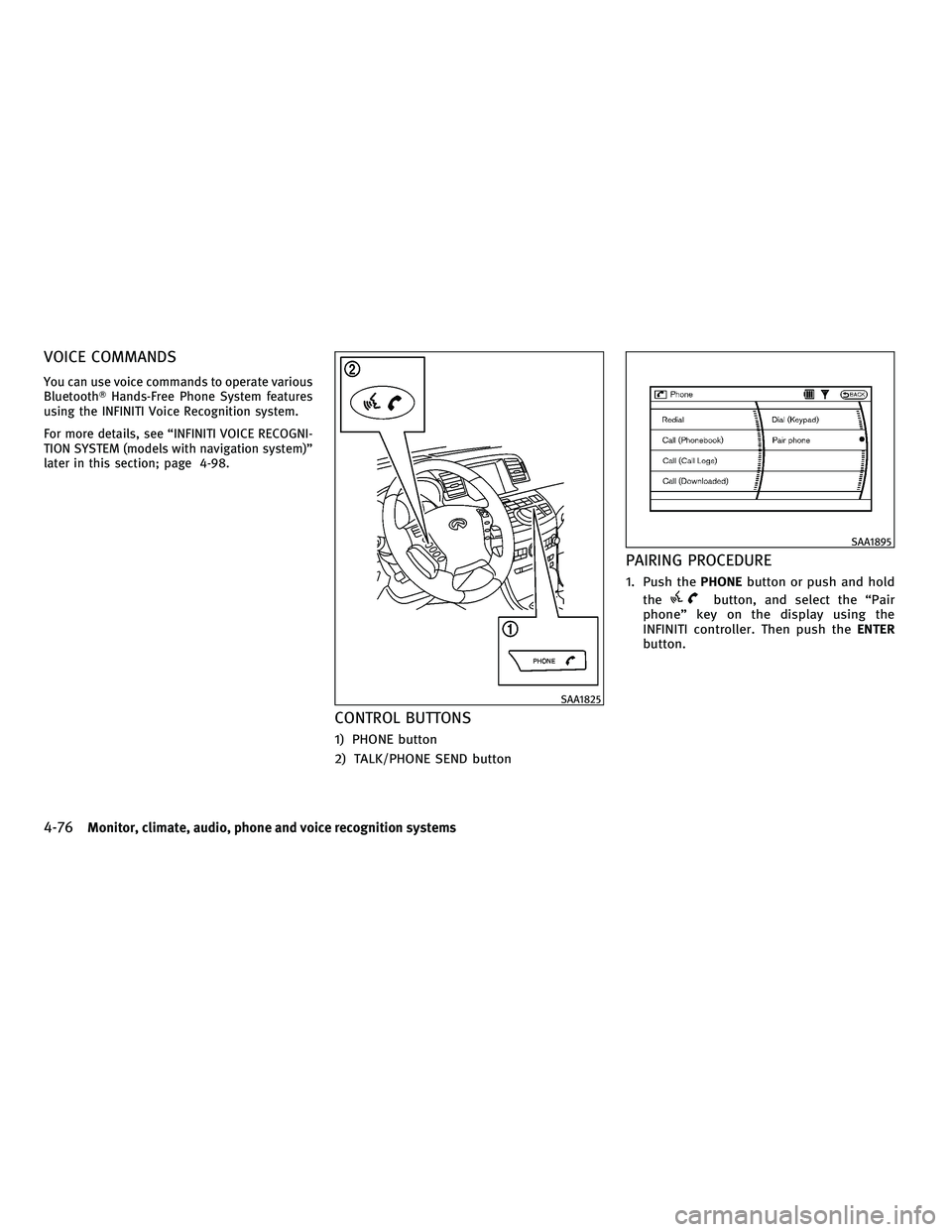
1) PHONE button
2) TALK/PHONE SEND button
PAIRING PROCEDURE
1. Push the PHONEbutton or push and hold
the
button, and select the ªPair
phoneº key on the display using the
INFINITI controller. Then push the ENTER
button.
SAA1825
SAA1895
4-76Monitor, climate, audio, phone and voice recognition systems
wÐ
Ð
05/14/09Ðpattie
X
Page 240 of 445
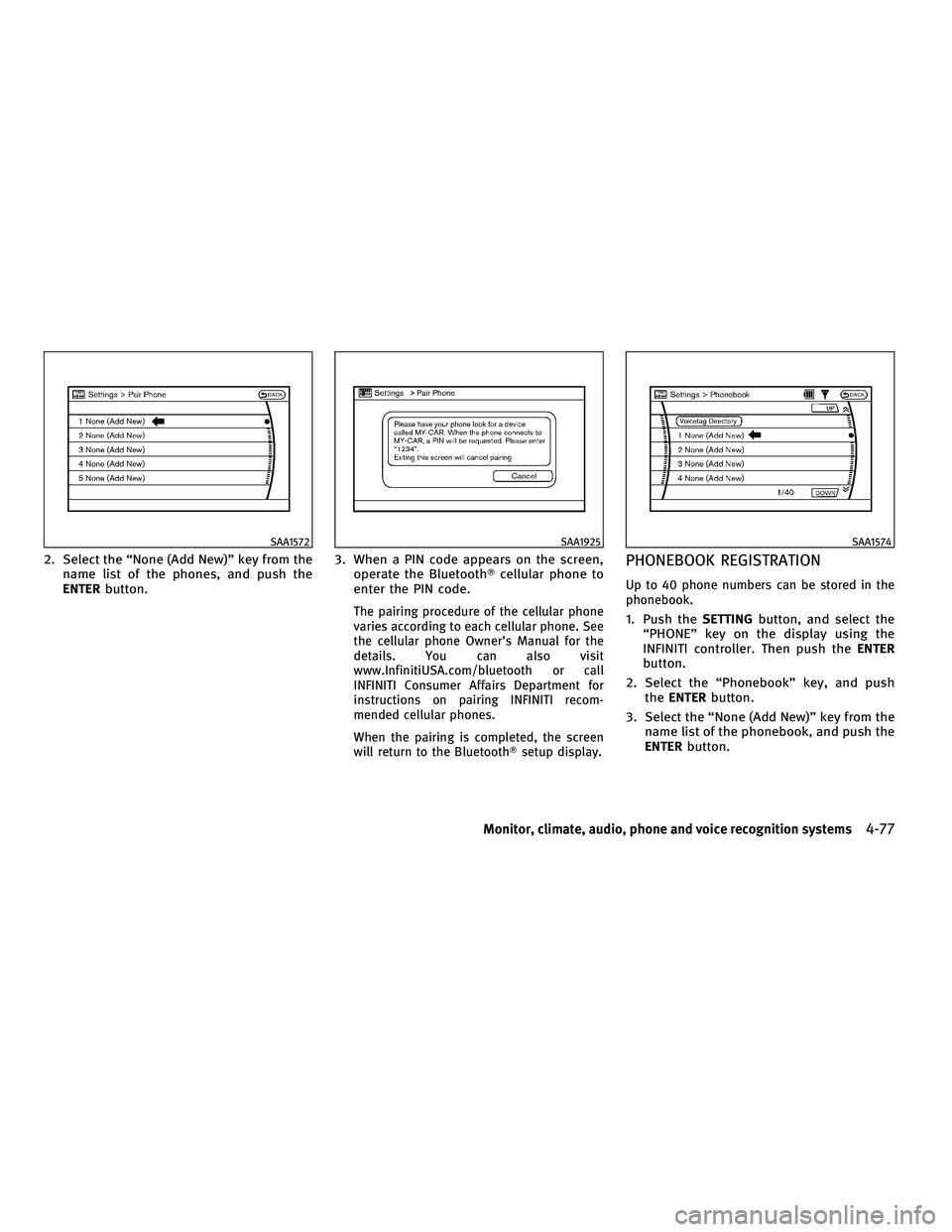
2. Select the ªNone (Add New)º key from thename list of the phones, and push the
ENTER button. 3. When a PIN code appears on the screen,
operate the Bluetooth Tcellular phone to
enter the PIN code.
The pairing procedure of the cellular phone
varies according to each cellular phone. See
the cellular phone Owner's Manual for the
details. You can also visit
www.InfinitiUSA.com/bluetooth or call
INFINITI Consumer Affairs Department for
instructions on pairing INFINITI recom-
mended cellular phones.
When the pairing is completed, the screen
will return to the BluetoothT setup display.
PHONEBOOK REGISTRATION
Up to 40 phone numbers can be stored in the
phonebook.
1. Push theSETTINGbutton, and select the
ªPHONEº key on the display using the
INFINITI controller. Then push the ENTER
button.
2. Select the ªPhonebookº key, and push the ENTER button.
3. Select the ªNone (Add New)º key from the name list of the phonebook, and push the
ENTER button.
SAA1572SAA1925SAA1574
Monitor, climate, audio, phone and voice recognition systems4-77
wÐ
Ð
05/14/09Ðpattie
X
Page 241 of 445
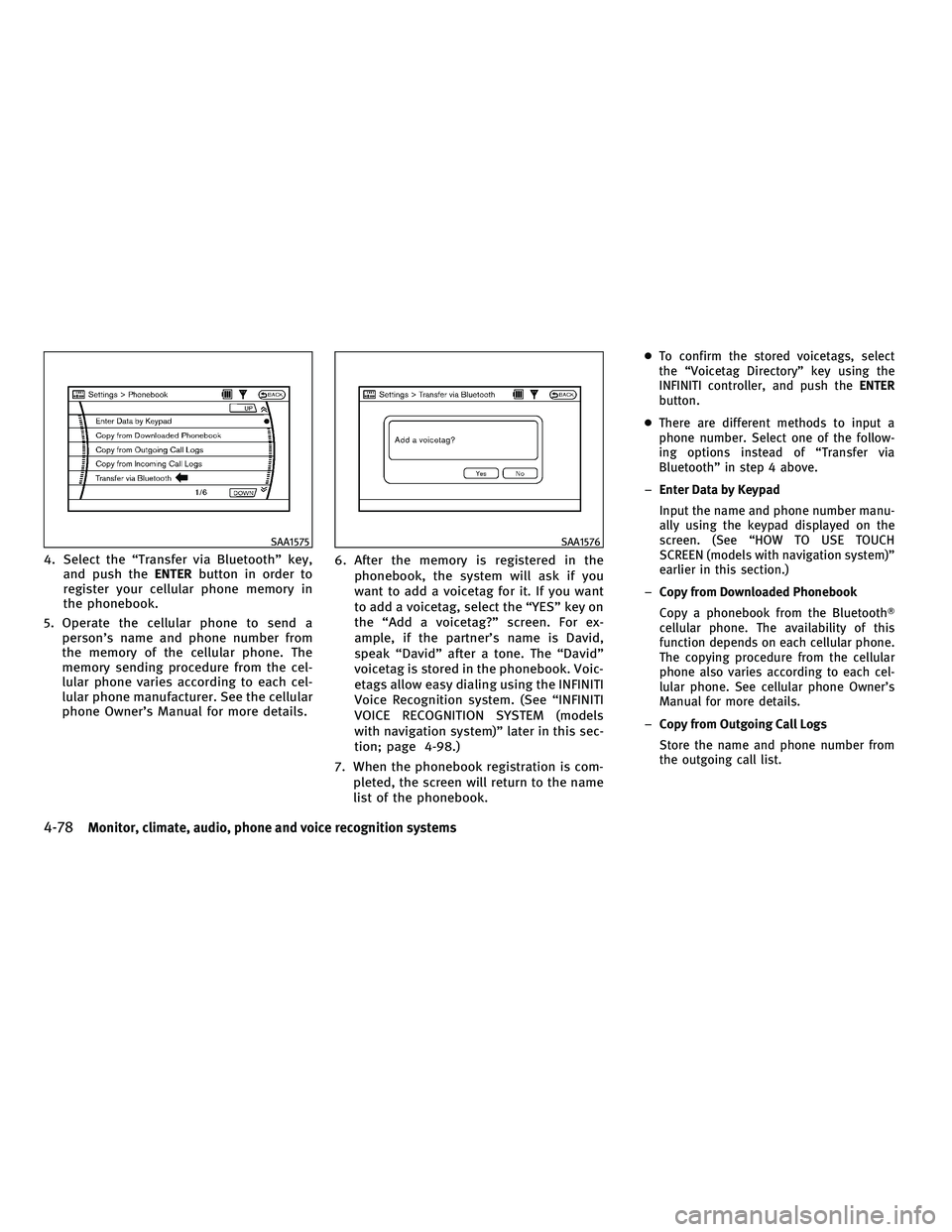
4. Select the ªTransfer via Bluetoothº key,and push the ENTERbutton in order to
register your cellular phone memory in
the phonebook.
5. Operate the cellular phone to send a person's name and phone number from
the memory of the cellular phone. The
memory sending procedure from the cel-
lular phone varies according to each cel-
lular phone manufacturer. See the cellular
phone Owner's Manual for more details. 6. After the memory is registered in the
phonebook, the system will ask if you
want to add a voicetag for it. If you want
to add a voicetag, select the ªYESº key on
the ªAdd a voicetag?º screen. For ex-
ample, if the partner's name is David,
speak ªDavidº after a tone. The ªDavidº
voicetag is stored in the phonebook. Voic-
etags allow easy dialing using the INFINITI
Voice Recognition system. (See ªINFINITI
VOICE RECOGNITION SYSTEM (models
with navigation system)º later in this sec-
tion; page 4-98.)
7. When the phonebook registration is com- pleted, the screen will return to the name
list of the phonebook.
cTo confirm the stored voicetags, select
the ªVoicetag Directoryº key using the
INFINITI controller, and push the ENTER
button.
c There are different methods to input a
phone number. Select one of the follow-
ing options instead of ªTransfer via
Bluetoothº in step 4 above.
± Enter Data by Keypad
Input the name and phone number manu-
ally using the keypad displayed on the
screen. (See ªHOW TO USE TOUCH
SCREEN (models with navigation system)º
earlier in this section.)
± Copy from Downloaded Phonebook
Copy a phonebook from the Bluetooth T
cellular phone. The availability of this
function depends on each cellular phone.
The copying procedure from the cellular
phone also varies according to each cel-
lular phone. See cellular phone Owner's
Manual for more details.
± Copy from Outgoing Call Logs
Store the name and phone number from
the outgoing call list.
SAA1575SAA1576
4-78Monitor, climate, audio, phone and voice recognition systems
wÐ
Ð
05/19/09Ðtbrooks
X
Page 242 of 445

±Copy from Incoming Call Logs
Store the name and phone number from
the incoming call list.
± Delete
Delete a contact that is registered in the
phonebook.
MAKING A CALL
To make a call, follow the procedures below.
1. Push the PHONEbutton on the instrument
panel or push and hold the
button
on the steering wheel. The ªPHONEº
screen will appear on the display.
2. Select the ªCall (Phonebook)º key on the ªPHONEº menu, and push the ENTERbut-
ton.
3. Select the registered person's name from the list, and push the ENTERbutton. Dial-
ing will start and the screen will change to
the call-in-progress screen. 4. After the call is over, perform one of the
following to finish the call.
a. Select the ªHang upº key and push theENTER button.
b. Push the
button on the steering
wheel.
c. Push the PHONEbutton on the instrument
panel.
There are different methods to make a call.
Select one of the following options instead of
ªCall (Phonebook)º in step 2 above.
c Redial
Dial the previously dialed number again.
c Call (Call Logs)
Select the name or phone number from the
incoming or outgoing call logs.
c Call (Downloaded)
Select the name or phone number from the
downloaded list.
c Dial (Keypad)
Input the phone number manually using the
keypad displayed on the screen. (See ªHOW
TO USE TOUCH SCREEN (models with naviga-
tion system)º earlier in this section.)
SAA1895
Monitor, climate, audio, phone and voice recognition systems4-79
wÐ
Ð
05/19/09Ðtbrooks
X
Page 243 of 445

RECEIVING A CALL
When you hear a phone ring, the display will
change to the incoming call mode. To receive a
call, perform one of the following procedures
listed below.
a) Select the ªAnswerº key on the displayand push the ENTERbutton.
b) Push the PHONEbutton on the instrument
panel.
c) Push the
button on the steering
wheel.
There are some options available when receiv-
ing a call. Select one of the following displayed
on the screen. c
Answer
Accept an incoming call to talk.
c On Hold
Put an incoming call on hold.
c Reject Call
Reject an incoming call.
To finish the call, perform one of the follow-
ing procedures listed below.
a) Select the ªHang upº key on the display
and push the ENTERbutton.
b) Push the PHONEbutton on the instrument
panel.
c) Push the
button on the steering
wheel.
DURING A CALL
There are some options available during a call.
Select one of the following displayed on the
screen if necessary.
c Hang up
Finish the call.
c Use Handset
Transfer the call to the cellular phone.
c Mute
Mute your voice to the person.
c Keypad
Send a dial tone to the caller for using
network services such as voice mail.
SAA1578SAA1579
4-80Monitor, climate, audio, phone and voice recognition systems
wÐ
Ð
05/14/09Ðpattie
X