lock INFINITI M 2010 Manual Online
[x] Cancel search | Manufacturer: INFINITI, Model Year: 2010, Model line: M, Model: INFINITI M 2010Pages: 445, PDF Size: 6.15 MB
Page 206 of 445

1. AM´FM´SAT band select button
2. DISC´AUX button1. RADIO AM´FM band select button
2. AUX button
3. DISC button
FM-AM-SAT RADIO WITH COMPACT
DISC (CD) PLAYER/CHANGER
For all operation precautions, see ªAUDIO OP-
ERATION PRECAUTIONSº earlier in this section.
The satellite radio mode requires an active XM
T
satellite radio service subscription. Satellite
radio is not available in Alaska, Hawaii and
Guam. It may take some time to receive the activation
signal after subscribing to the XM
Tsatellite
radio. After receiving the activation signal, an
available station list will be automatically up-
dated in the radio. Push the ignition switch from
LOCK to ACC to update the station list.
Audio main operation
Head unit :
The radio has an FM diversity reception system,
which employs two antennas printed on the
rear window. This system automatically
switches to the antenna which is receiving less
interference.
The auto loudness circuit enhances the low and
high frequency ranges automatically in both
radio reception and CD playback.
ON´OFF/Volume control :
Push the ignition switch to the ACC or ON
position, and then push the ON´OFF/VOLUME
control knob while the system is off to call up
the audio mode which was playing immediately
before the system was turned off. While the
system is on, pushing the ON´OFF/VOLUME
control knob turns the system off.
Turn the ON´OFF/VOLUME control knob to ad-
just the volume.
With navigation system
SAA1819
Without navigation system
SAA1820
Monitor, climate, audio, phone and voice recognition systems4-43
wÐ
Ð
05/14/09Ðpattie
X
Page 214 of 445

NOTE:
cThe system starts playing and recording the
1st track on the CD when the ªRECº key is
selected.
c Individual tracks from a CD cannot be re-
corded to the Music Box hard-disk drive.
c The skip, fast forward and rewind features
are disabled while the CD is recording.
c The recording process can be stopped at any
time. All tracks that were played before the
CD was stopped are stored.
c Individual tracks can be deleted from the
hard-disk drive after the CD is recorded. If the title information of the track being re-
corded is stored either in the hard-disk drive or
in the CD, the title is automatically displayed on
the screen. For title acquisition from the hard-
disk drive, music recognition technology and
related data are provided by GracenoteT.
To view the details of the track, select the
Text
key by touching the screen or using the INFINITI
controller. The track name and album title are
displayed on the screen.
If a track is not recorded successfully due to
skipping sounds, the
mark is displayed
behind the track number. The ªMusic Boxº audio system cannot perform
recording under the following conditions.
c
There is not enough space in the hard disk
c The number of albums reaches the maximum
of 500.
c The number of tracks reaches the maximum
of 3,000.
Automatic recording :
If the ªAutomatic Recordingº function is turned
to ON, recording starts when a CD is inserted.
(See ªMusic Box settingsº later in this section.)
Stopping recording :
To stop the recording, select the STOPbutton
by touching the screen or using the INFINITI
controller.
If the CD is ejected, the audio system is turned
off or the ignition switch is pushed to the LOCK
position, the recording also stops.
SAA1614
Monitor, climate, audio, phone and voice recognition systems4-51
wÐ
Ð
05/19/09Ðtbrooks
X
Page 215 of 445
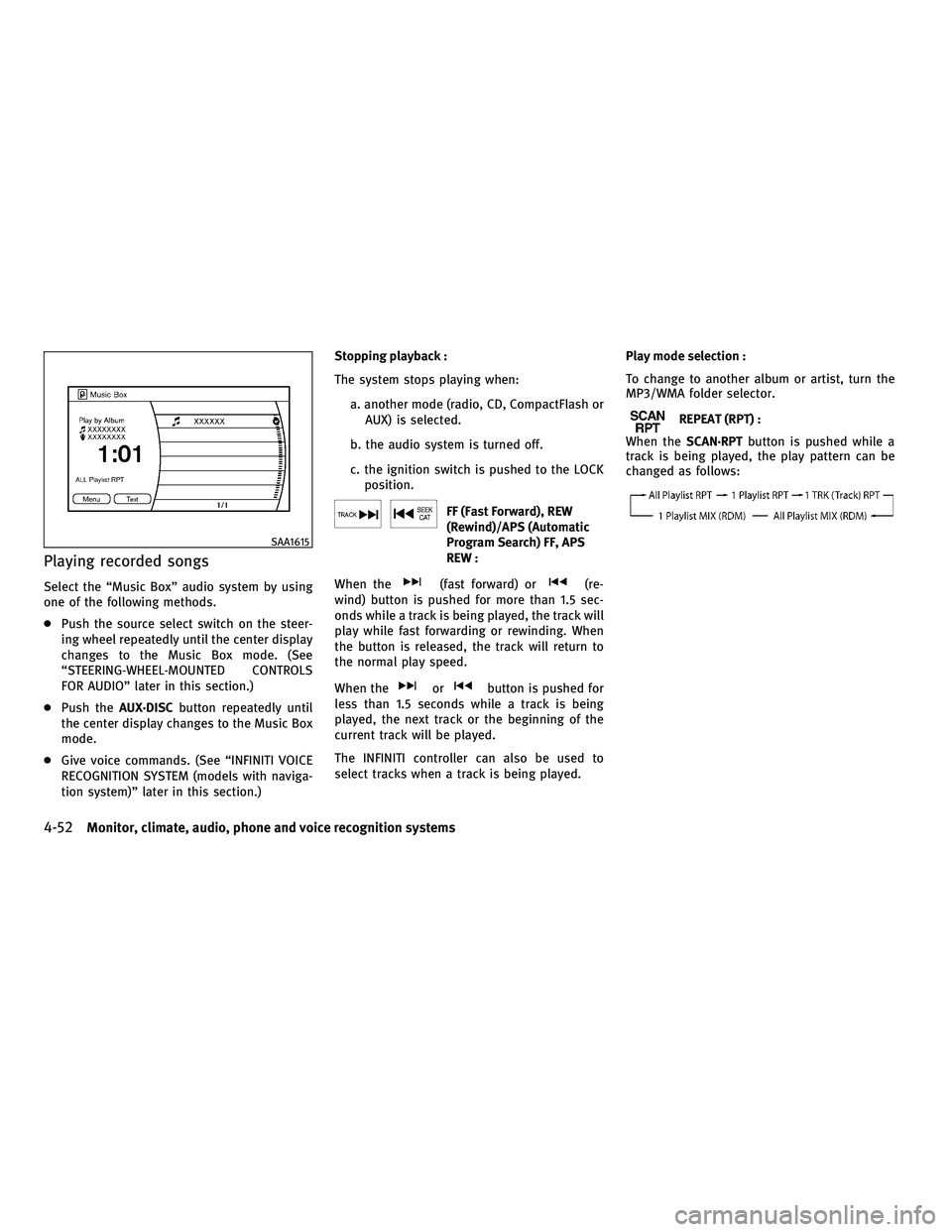
Playing recorded songs
Select the ªMusic Boxº audio system by using
one of the following methods.
cPush the source select switch on the steer-
ing wheel repeatedly until the center display
changes to the Music Box mode. (See
ªSTEERING-WHEEL-MOUNTED CONTROLS
FOR AUDIOº later in this section.)
c Push the AUX´DISC button repeatedly until
the center display changes to the Music Box
mode.
c Give voice commands. (See ªINFINITI VOICE
RECOGNITION SYSTEM (models with naviga-
tion system)º later in this section.) Stopping playback :
The system stops playing when:
a. another mode (radio, CD, CompactFlash orAUX) is selected.
b. the audio system is turned off.
c. the ignition switch is pushed to the LOCK position.
FF (Fast Forward), REW
(Rewind)/APS (Automatic
Program Search) FF, APS
REW :
When the
(fast forward) or(re-
wind) button is pushed for more than 1.5 sec-
onds while a track is being played, the track will
play while fast forwarding or rewinding. When
the button is released, the track will return to
the normal play speed.
When the
orbutton is pushed for
less than 1.5 seconds while a track is being
played, the next track or the beginning of the
current track will be played.
The INFINITI controller can also be used to
select tracks when a track is being played. Play mode selection :
To change to another album or artist, turn the
MP3/WMA folder selector.
REPEAT (RPT) :
When the SCAN´RPT button is pushed while a
track is being played, the play pattern can be
changed as follows:
SAA1615
4-52Monitor, climate, audio, phone and voice recognition systems
wÐ
Ð
05/14/09Ðpattie
X
Page 226 of 445
CAUTION
cDo not force a DVD into the slot. This could
cause damage the player.
c Do not use 8 cm (3.1 in) discs.
Displays
WARNING
Park the vehicle in a safe location and apply the
parking brake to view the images on the front
center display screen using the DVD drive or
other devices connected to the auxiliary input
jacks.
CAUTION
cThe glass screen on the liquid crystal display
may break if hit with a hard or sharp object. If
the glass breaks, do not touch the liquid
crystalline material, which contains a small
amount of mercury. In case of contact with
skin, wash immediately with soap and
water.
c Use soft, damp cloth when cleaning the Mo-
bile Entertainment System components. Do
not use solvents or cleaning solutions.
c Be sure to stow the rear display when it is not
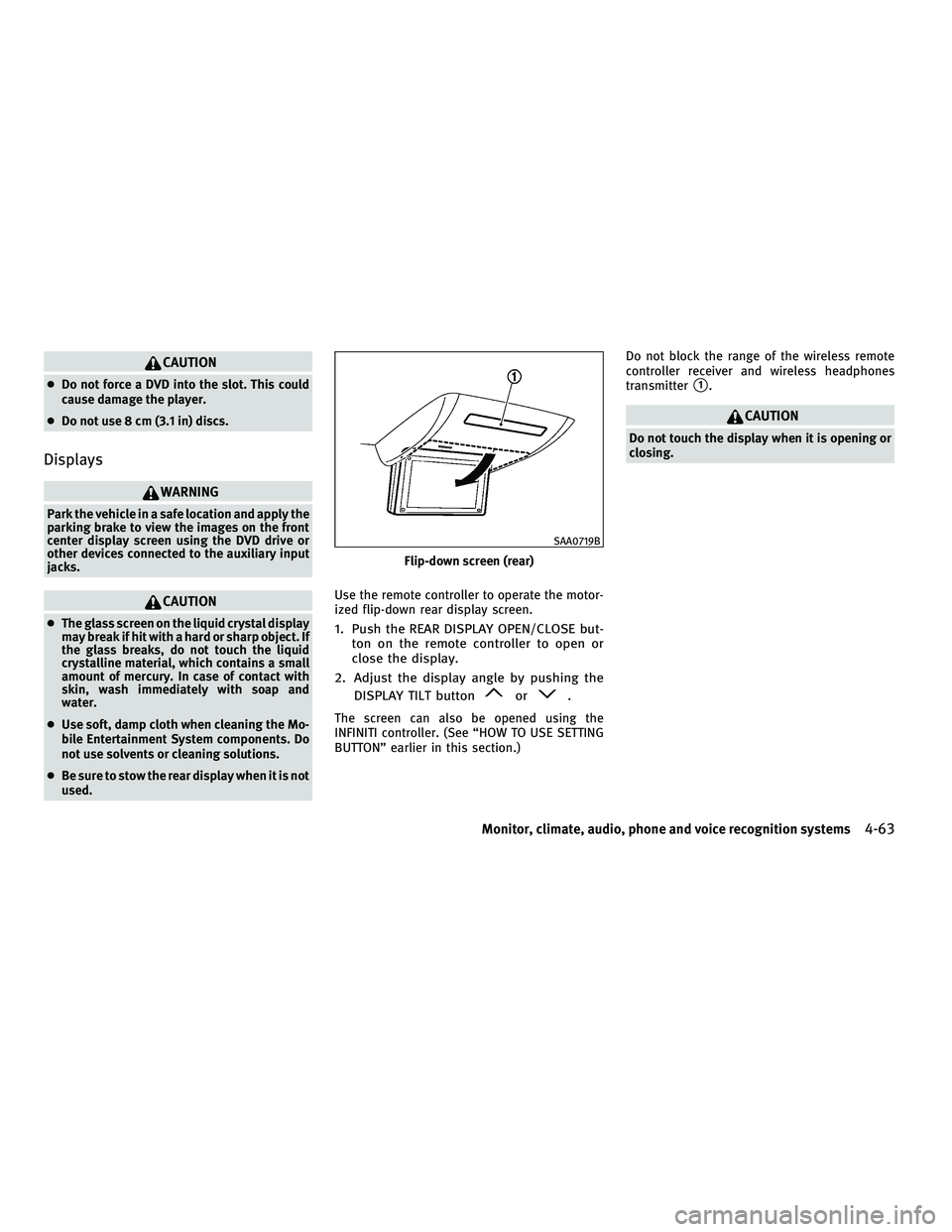
used. Use the remote controller to operate the motor-
ized flip-down rear display screen.1. Push the REAR DISPLAY OPEN/CLOSE but-
ton on the remote controller to open or
close the display.
2. Adjust the display angle by pushing the DISPLAY TILT button
or.
The screen can also be opened using the
INFINITI controller. (See ªHOW TO USE SETTING
BUTTONº earlier in this section.) Do not block the range of the wireless remote
controller receiver and wireless headphones
transmitter
s1.
CAUTION
Do not touch the display when it is opening or
closing.
Flip-down screen (rear)
SAA0719B
Monitor, climate, audio, phone and voice recognition systems4-63
wÐ
Ð
05/14/09Ðpattie
X
Page 238 of 445
cYou will not be able to use a hands-free
phone under the following conditions:
± Your vehicle is outside of the telephone service area.
± Your vehicle is in an area where it is difficult to receive radio waves; such as in
a tunnel, in an underground parking ga-
rage, behind a tall building or in a moun-
tainous area.
± Your cellular phone is locked in order not to be dialed.
c
When the radio wave condition is not ideal or
ambient sound is too loud, it may be difficult
to hear the other person's voice during a call.
cImmediately after the ignition switch is pushed
to the ON position, it may be impossible to
receive a call for a short period of time.
c Do not place the cellular phone in an area
surrounded by metal or far away from the
in-vehicle phone module to prevent tone
quality degradation and wireless connection
disruption.
c While a cellular phone is connected through
the BluetoothT wireless connection, the bat-
tery power of the cellular phone may dis-
charge quicker than usual.
c If the Bluetooth THands-Free Phone System
seems to be malfunctioning, please visit www.InfinitiUSA.com/bluetooth for trouble-
shooting help.
c Some cellular phones or other devices may
cause interference or a buzzing noise to
come from the audio system speakers. Stor-
ing the device in a different location may
reduce or eliminate the noise.
c Refer to the cellular phone Owner's Manual
regarding the telephone pairing procedure
specific to your phone, battery charging,
cellular phone antenna, etc.
c The antenna display on the monitor will not
coincide with the antenna display of some
cellular phones.
c Keep the interior of the vehicle as quiet as
possible to hear the caller's voice clearly as
well as to minimize its echoes.
c If reception between callers is unclear, ad-
justing the incoming or outgoing call volume
may improve the clarity.
REGULATORY INFORMATION
FCC Regulatory information
± CAUTION: To maintain compliance with FCC's
RF exposure guidelines, use only the sup-
plied antenna. Unauthorized antenna, modi-
fication, or attachments could damage the
transmitter and may violate FCC regulations. ± Operation is subject to the following two
conditions:
1. this device may not cause interference and
2. this device must accept any interference, including interference that may cause
undesired operation of the device
IC Regulatory information
± Operation is subject to the following twoconditions: (1) this device may not cause
interference, and (2) this device must accept
any interference, including interference that
may cause undesired operation of the device.
± This Class B digital apparatus meets all requirements of the Canadian Interference-
Causing Equipment Regulations.
Bluetooth trademark:
BLUETOOTHT is a trade-
mark owned by Bluetooth
SIG, Inc., U.S.A.
Monitor, climate, audio, phone and voice recognition systems4-75
wÐ
Ð
05/19/09Ðtbrooks
X
Page 247 of 445
WARNING
cUse a phone after stopping your vehicle in a
safe location. If you have to use a phone
while driving, exercise extreme caution at all
times so full attention may be given to ve-
hicle operation.
c If you find yourself unable to devote full at-
tention to vehicle operation while talking on
the phone, pull off the road to a safe location
and stop your vehicle before doing so.
CAUTION
To avoid draining the vehicle battery, use a
phone after starting the engine.
Your INFINITI is equipped with Bluetooth T
Hands-Free Phone System. If you are an owner
of a compatible Bluetooth Tenabled cellular
phone, you can set up the wireless connection
between your cellular phone and the in-vehicle
phone module. With BluetoothT wireless tech-
nology, you can make or receive a telephone
call with your cellular phone in your pocket.
Once your cellular phone is paired to the in-
vehicle phone module, no phone connecting
procedure is required anymore. Your phone is
automatically connected with the in-vehicle phone module when the ignition switch is
pushed to the ON position with the registered
cellular phone turned on and carried in the
vehicle.
You can register up to 5 different BluetoothT
cellular phones in the in-vehicle phone module.
However, you can talk on only one cellular
phone at a time.
The INFINITI Voice Recognition system supports
the phone commands, so dialing a phone num-
ber using your voice is possible.
Before using the Bluetooth
THands-Free Phone
System, refer to the following notes.
c Set up the wireless connection between a
compatible cellular phone and the in-vehicle
phone module before using the BluetoothT
Hands-Free Phone System.
c Some Bluetooth Tenabled cellular phones
may not be recognized by the in-vehicle
phone module. Please visit
www.InfinitiUSA.com/bluetooth for a recom-
mended phone list.
c You will not be able to use a hands-free
phone under the following conditions:
± Your vehicle is outside of the telephone service area. ± Your vehicle is in an area where it is
difficult to receive radio waves; such as in
a tunnel, in an underground parking ga-
rage, behind a tall building or in a moun-
tainous area.
± Your cellular phone is locked in order not to be dialed.
c When the radio wave condition is not ideal
or ambient sound is too loud, it may be
difficult to hear the other person's voice
during a call.
c Immediately after the ignition switch is
pushed to the ON position, it may be impos-
sible to receive a call for a short period of
time.
c Do not place the cellular phone in an area
surrounded by metal or far away from the
in-vehicle phone module to prevent tone
quality degradation and wireless connection
disruption.
c While a cellular phone is connected through
the BluetoothT wireless connection, the bat-
tery power of the cellular phone may dis-
charge quicker than usual.
c If the Bluetooth THands-Free Phone System
seems to be malfunctioning, please visit
www.InfinitiUSA.com/bluetooth for trouble-
shooting help.
BLUETOOTHT HANDS-FREE PHONE SYSTEM
WITHOUT NAVIGATION SYSTEM
4-84Monitor, climate, audio, phone and voice recognition systems
wÐ
Ð
05/14/09Ðpattie
X
Page 257 of 445
Up to 5 phones can be paired. If you try to pair
a sixth phone, the system announces that you
must first delete one phone or replace an
existing phone.
If you try to pair a phone that has already been
paired to your vehicle's system, the system
announces the name the phone is already us-
ing. The pairing procedure will then be can-
celed.
When prompted by the system, choose from the
following commands:
cªNew phoneº Ð see ªPAIRING PROCEDUREº
earlier in this section.
c ªReplace phoneº Ð The system announces
the names of the phones already paired and
asks which you would like to replace.
Once you say the name of the phone you
wish to replace, the paring procedure will
begin. (See ªPAIRING PROCEDUREº earlier in
this section.)
c ªList phoneº Ð See the description below.
ªList Phonesº
Use the List Phone command to hear the names
of the phones currently paired. If no phones are
paired, the system announces, ªNo paired
phones to list.º The system then ends the VR
session. ªSelect Phoneº
Use the Select Phone command to select a
phone of lesser priority when two or more
phones paired with Bluetooth
THands-Free
Phone System are in the vehicle at the same
time.
The system asks you to name the phone and
confirm the selection.
Once the selection is confirmed, the selected
phone remains active until the ignition switch is
pushed to the LOCK position or you select a new
phone.
ªChange Priorityº
Use the Change Priority command to change the
priority level of the active phone.
The priority level determines which phone is
active when more than one paired Bluetooth T
phone is in the vehicle.
The system states the priority level of the active
phone and asks for a new priority level (1, 2, 3,
4, 5).
If the new priority level is already being used for
another phone, the two phones will swap prior-
ity levels. For example, if the current priority levels are:
Priority Level 1 = Phone A
Priority Level 2 = Phone B
Priority Level 3 = Phone C
and you change the priority level of Phone C to
Level 1, then: Priority Level 1 = Phone C
Priority Level 2 = Phone B
Priority Level 3 = Phone A
ªDelete Phoneº
Use the Delete Phone command to delete a
specific phone or all phones from the
BluetoothT Hands-Free Phone System.
The system announces the names of the phones
already paired with the system and their priority
level. The system then gives you the option to
delete a specific phone, all phones or listen to
the list again.
Once you chose to delete a phone or all phones,
the system asks you to confirm this action.
NOTE:
When you delete a phone, the associated phone-
book for that phone will also be deleted.
4-94Monitor, climate, audio, phone and voice recognition systems
wÐ
Ð
05/19/09Ðtbrooks
X
Page 258 of 445
SPEAKER ADAPTATION (SA) MODE
Speaker Adaptation allows up to two out-of
dialect users to train the system to improve
recognition accuracy. By repeating a number of
commands, the users can create a voice model
of their own voice that is stored in the system.
The system is capable of storing a different
speaker adaptation model for memory A and
memory B.
If memory A is available, the system will use
memory A to store the model. If memory A is in
use and memory B is available, the system will
use memory B to store the model. If both of the
memory locations are in use, the system will
ask the user to select which memory location
should be overwritten.
Training procedure
The procedure for training a voice is as follows.
1. Position the vehicle in a reasonably quietoutdoor location.
2. Sit in the driver's seat with the engine running, the parking brake on, and the
transmission in Park.
3. Press and hold the
button for more
than 5 seconds. 4. The system announces: ªPress the PHONE
SEND (
) button for the hands-free
phone system to enter the speaker adap-
tation mode.º
5. Press the
button.
6. Voice memory A or memory B is selected automatically. If both memory locations
are already in use, the system will prompt
you to overwrite one. Follow the instruc-
tions provided by the system.
7. When preparation is complete and you are ready to begin, the press the
but-
ton.
8. The SA mode will be explained. Follow the instructions provided by the system.
9. When training is finished, the system will tell you an adequate number of phrases
have been recorded.
10. The system will ask you to say your name. Follow the instructions to register
your name.
11. The system will announce that speaker adaptation has been completed and the
system is ready.
The SA mode will stop if:
cThe
button is pressed for more than 5
seconds in SA mode.
c The vehicle is driven during SA mode.
c The ignition switch is pushed to the LOCK
position.
Training phrases
During the SA mode, the system instructs you to
say the following phrases.
(The system will prompt you for each phrase.)
cphonebook new entry
c dial three oh four two nine
c delete call back number
c setup pair phone
c memo pad play
c eight pause nine three two pause seven
c delete all entries
c call seven two four zero nine
c phonebook delete entry
c memo pad record
c dial star two one seven oh
c Yes
Monitor, climate, audio, phone and voice recognition systems4-95
wÐ
Ð
05/15/09Ðpattie
X
Page 286 of 445
Brake system.................................... 5-49
Braking precautions ........................... 5-49
Parking brake break-in ......................... 5-50
Brake assist ..................................... 5-50
Brake assist .................................. 5-50
Preview function (for Intelligent Cruise
Control (ICC) system equipped models) ..........5-50
Anti-lock Braking System (ABS) .................5-53
Vehicle Dynamic Control (VDC) system .............5-54
Rear active steer system (if so equipped) ...........5-55Cold weather driving
............................. 5-56
Freeing a frozen door lock .....................5-56
Anti-freeze .................................... 5-56
Battery ....................................... 5-56
Draining of coolant water ......................5-56
Tire equipment ................................ 5-56
Special winter equipment ......................5-56
Driving on snow or ice ......................... 5-56
Engine block heater (if so equipped) ............5-57
wÐ
Ð
05/15/09Ðpattie
X
Page 287 of 445

WARNING
cDo not leave children or adults who would
normally require the support of others alone
in your vehicle. Pets should not be left alone
either. They could accidentally injure them-
selves or others through inadvertent opera-
tion of the vehicle. Also, on hot, sunny days,
temperatures in a closed vehicle could
quickly become high enough to cause severe
or possibly fatal injuries to people or
animals.
c Closely supervise children when they are
around cars to prevent them from playing
and becoming locked in the trunk where they
could be seriously injured. Keep the car
locked, with the rear seatback and trunk lid
securely latched when not in use, and pre-
vent children's access to car keys.
EXHAUST GAS (carbon monoxide)
WARNING
cDo not breathe exhaust gases; they contain
colorless and odorless carbon monoxide.
Carbon monoxide is dangerous. It can cause
unconsciousness or death. c
If you suspect that exhaust fumes are enter-
ing the vehicle, drive with all windows fully
open, and have the vehicle inspected
immediately.
c Do not run the engine in closed spaces such
as a garage.
c Do not park the vehicle with the engine run-
ning for any extended length of time.
c Keep the trunk lid closed while driving, oth-
erwise exhaust gases could be drawn into
the passenger compartment. If you must
drive with the trunk lid open, follow these
precautions:
1. Open all the windows.
2. Set the
air recirculation to off and
the fan control to high to circulate the air.
c The exhaust system and body should be in-
spected by a qualified mechanic whenever:
± The vehicle is raised for service.
± You suspect that exhaust fumes are en- tering into the passenger compartment.
± You notice a change in the sound of the exhaust system. ± You have had an accident involving dam-
age to the exhaust system, underbody, or
rear of the vehicle.
THREE-WAY CATALYST
The three-way catalyst is an emission control
device installed in the exhaust system. Exhaust
gases in the three-way catalyst are burned at
high temperatures to help reduce pollutants.
WARNING
cThe exhaust gas and the exhaust system are
very hot. Keep people, animals or flammable
materials away from the exhaust system
components.
c Do not stop or park the vehicle over flam-
mable materials such as dry grass, waste
paper or rags. They may ignite and cause a
fire.
CAUTION
cDo not use leaded gasoline. Deposits from
leaded gasoline will seriously reduce the
three-way catalyst's ability to help reduce
exhaust pollutants.
PRECAUTIONS WHEN STARTING AND
DRIVING
5-2Starting and driving
wÐ
Ð
05/15/09Ðpattie
X