radio INFINITI M 2010 Owners Manual
[x] Cancel search | Manufacturer: INFINITI, Model Year: 2010, Model line: M, Model: INFINITI M 2010Pages: 445, PDF Size: 6.15 MB
Page 4 of 445
Arrows in an illustration that are similar to
those above call attention to an item in the
illustration.
CALIFORNIA PROPOSITION 65
WARNING
WARNING
Engine exhaust, some of its constituents, and
certain vehicle components contain or emit
chemicals known to the State of California to
cause cancer and birth defects or other repro-
ductive harm. In addition, certain fluids con-
tained in vehicles and certain products of com-
ponent wear contain or emit chemicals known
to the State of California to cause cancer and
birth defects or other reproductive harm.
CALIFORNIA PERCHLORATE ADVISORY
Some vehicle parts, such as lithium batteries,
may contain perchlorate material. The following
advisory is provided: ªPerchlorate Material -
special handling may apply,
See www.dtsc.ca.gov/
hazardouswaste/perchlorate.º
BLUETOOTHTis a trade-
mark owned by Bluetooth
SIG, Inc., U.S.A.
GracenoteT is a registered
trademark of Gracenote,
Inc. The Gracenote logo
and logo type, and the
ªPowered by Gracenoteº
logo are trademarks of
Gracenote.
XM RadioT requires
subscription, sold sepa-
rately after first 90 days.
Not available in Alaska,
Hawaii or Guam. For more
information, visit www.
xmradio.com.
2009 NISSAN MOTOR CO., LTD.
All rights reserved. No part of this Owner's Manual
may be reproduced or stored in a retrieval system,
or transmitted in any form, or by any means,
electronic, mechanical, photocopying, recording or
otherwise, without the prior written permission of
Nissan Motor Co., Ltd.
wÐ
Ð
05/14/09Ðpattie
X
Page 11 of 445

1. TrunkÐ Trunk lid (P. 3-17)
Ð Intelligent Key system (P. 3-6)
2. High-mounted stop light Ð Bulb replacement (P. 8-30)
3. Rear window defroster (P. 2-28) 4. Satellite radio antenna (if so equipped)
(P. 4-35)
5. Fuel-filler door Ð Operation (P. 3-20)
Ð Fuel recommendation (P. 9-4) 6. Rear view camera (if so equipped)
(P. 4-22)
7. Back-up lights Ð Bulb replacement (P. 8-30)
8. Rear combination lights Ð Bulb replacement (P. 8-30)
9. Child safety rear door locks (P. 3-6)
SSI0370
EXTERIOR REAR
0-4Illustrated table of contents
wÐ
Ð
05/19/09Ðtbrooks
X
Page 128 of 445

The light illuminates when the trunk lid is
opened. When the trunk lid is closed, the light
will turn off.
The light will turn off after 30 minutes when the
light remains illuminated to prevent the battery
from becoming discharged.HomeLinkT
Universal Transceiver provides a
convenient way to consolidate the functions of
up to three individual hand-held transmitters
into one built-in device.
HomeLinkT Universal Transceiver:
c Will operate most Radio Frequency (RF) de-
vices such as garage doors, gates, home and
office lighting, entry door locks and security
systems.
c Is powered by your vehicle's battery. No
separate batteries are required. If the vehi-
cle's battery is discharged or is discon-
nected, HomeLink Twill retain all program-
ming.
Once HomeLinkT Universal Transceiver is pro-
grammed, retain the original transmitter for fu-
ture programming procedures (Example: new ve-
hicle purchases). Upon sale of the vehicle, the
programmed HomeLinkT Universal Transceiver
buttons should be erased for security purposes.
For additional information, see ªPROGRAMMING
HomeLinkTº later in this section.WARNING
c Do not use HomeLinkT Universal Transceiver
with any garage door opener that lacks
safety stop and reverse features as required
by federal safety standards. (These stan-
dards became effective for opener models
manufactured after April 1, 1982.) A garage
door opener which cannot detect an object in
the path of a closing garage door and then
automatically stop and reverse, does not
meet current federal safety standards. Using
a garage door opener without these features
increases the risk of serious injury or death.
c During programming procedure, your garage
door or security gate may open or close.
Make sure that people and objects are clear
of the garage door, gate, etc. that you are
programming.
c Your vehicle's engine should be turned off
while programming HomeLinkT Universal
Transceiver.
PROGRAMMING HOMELINKT
To program your HomeLink TTransceiver to op-
erate a garage door, gate, or entry door opener,
home or office lighting, you need to be at the
same location as the device. Note: Garage door
openers (manufactured after 1996) have ªrolling
TRUNK LIGHT HOMELINKTUNIVERSAL TRANSCEIVER
Instruments and controls2-51
wÐ
Ð
05/14/09Ðpattie
X
Page 137 of 445

3. Do one of the following within 20 secondsof performing step 2:
cTo change AUTO UNLOCK settings: push
and hold the power door lock switch to
the
position (UNLOCK) for more
than 5 seconds.
c To change AUTO LOCK settings: push and
hold the power door lock switch to the
position (LOCK) for more than 5
seconds.
4. When activated, the hazard indicator will flash twice. When deactivated, the hazard
indicator will flash once.
5. The ignition must be placed in the OFF and ON position again between each setting
change.
CHILD SAFETY REAR DOOR LOCK
The child safety rear door lock helps prevent
doors from being opened accidentally, espe-
cially when small children are in the vehicle.
When the levers are in the lock position
s1, the
rear doors can be opened only from the outside.
To disengage, move the levers to the unlock
position
s2.
WARNING
c Radio waves could adversely affect electric
medical equipment. Those who use a pace-
maker should contact the electric medical
equipment manufacturer for the possible in-
fluences before use.
c The Intelligent Key transmits radio waves
when the buttons are pushed. The FAA ad-
vises that the radio waves may affect aircraft
navigation and communication systems. Do
not operate the Intelligent Key while on an
airplane. Make sure the buttons are not op-
erated unintentionally when the unit is
stored during a flight.
The Intelligent Key system can operate all the
door locks using the remote controller function
or pushing the request switch on the vehicle
without taking the key out from a pocket or
purse. The operating environment and/or con-
ditions may affect the Intelligent Key system
operation.
Be sure to read the following before using the
Intelligent Key system.
CAUTION
c Be sure to carry the Intelligent Key with you
when operating the vehicle.
SPA2423
INTELLIGENT KEY SYSTEM
3-6Pre-driving checks and adjustments
wÐ
Ð
05/19/09Ðtbrooks
X
Page 138 of 445

cNever leave the Intelligent Key in the vehicle
when you leave the vehicle.
The Intelligent Key is always communicating
with the vehicle as it receives radio waves. The
Intelligent Key system transmits weak radio
waves. Environmental conditions may interfere
with the operation of the Intelligent Key system
under the following operating conditions.
c When operating near a location where strong
radio waves are transmitted, such as a TV
tower, power station and broadcasting sta-
tion.
c When in possession of wireless equipment,
such as a cellular telephone, transceiver,
and CB radio.
c When the Intelligent Key is in contact with or
covered by metallic materials.
c When any type of radio wave remote control
is used nearby.
c When the Intelligent Key is placed near an
electric appliance such as a personal com-
puter.
c When the vehicle is parked near a parking
meter. In such cases, correct the operating conditions
before using the Intelligent Key function or use
the mechanical key.
Although the life of the battery varies depend-
ing on the operating conditions, the battery's
life is approximately 2 years. If the battery is
discharged, replace it with a new one.
Since the Intelligent Key is continuously receiv-
ing radio waves, if the key is left near equip-
ment which transmits strong radio waves, such
as signals from a TV and personal computer, the
battery life may become shorter.
For information regarding replacement of a
battery, see ªBATTERY REPLACEMENTº in the
ª8. Maintenance and do-it-yourselfº section.
Because the steering wheel is locked electri-
cally, unlocking the steering wheel with the
ignition switch in the LOCK position is impos-
sible when the vehicle battery is completely
discharged. Pay special attention that the ve-
hicle battery is not completely discharged.
As many as 4 Intelligent Keys can be registered
and used with one vehicle. For information
about the purchase and use of additional Intel-
ligent Keys, contact an INFINITI retailer.CAUTION
c
Do not allow the Intelligent Key, which con-
tains electrical components, to come into
contact with water or salt water. This could
affect the system function.
c Do not drop the Intelligent Key.
c Do not strike the Intelligent Key sharply
against another object.
c Do not change or modify the Intelligent Key.
c Wetting may damage the Intelligent Key. If
the Intelligent Key gets wet, immediately
wipe until it is completely dry.
c Do not place the Intelligent Key for an ex-
tended period in an area where tempera-
tures exceed 140ÉF (60ÉC).
c Do not attach the Intelligent Key with a key
holder that contains a magnet.
c Do not place the Intelligent Key near equip-
ment that produces a magnetic field, such as
a TV, audio equipment, personal computers
or cellular phones.
Pre-driving checks and adjustments3-7
wÐ
Ð
05/19/09Ðtbrooks
X
Page 139 of 445

If an Intelligent Key is lost or stolen, INFINITI
recommends erasing the ID code of that Intelli-
gent Key from the vehicle. This may prevent the
unauthorized use of the Intelligent Key to oper-
ate the vehicle. For information regarding the
erasing procedure, contact an INFINITI retailer.INTELLIGENT KEY OPERATING RANGE
The Intelligent Key functions can only be used
when the Intelligent Key is within the specified
operating range from the request switch.
When the Intelligent Key battery is discharged
or strong radio waves are present near the
operating location, the Intelligent Key system's
operating range becomes narrower, and the
Intelligent Key may not function properly.
The operating range is within 31.50 in (80 cm)
from each request switch.
If the Intelligent Key is too close to the door
glass, handle or rear bumper the request
switches may not function.
When the Intelligent Key is within the operating
range, it is possible for anyone who does not
carry the Intelligent Key to push the request
switch to lock/unlock the doors.
SPA2341A
3-8Pre-driving checks and adjustments
wÐ
Ð
05/14/09Ðpattie
X
Page 163 of 445
FM-AM-SAT radio with Compact Disc (CD)
player/changer................................ 4-43
CompactFlash (CF) player operation
(if so equipped) ............................... 4-47
iPodT player operation (if so equipped) .........4-48
Music box hard-disk drive audio system
(models with navigation system) ................4-50
CD/CF (CompactFlash) care and cleaning ........4-57
Steering-wheel-mounted controls for audio ......4-58
Rear control switches for audio
(if so equipped) ............................... 4-60
Antenna ...................................... 4-61
Auxiliary input jacks ........................... 4-61
INFINITI Mobile Entertainment System (MES)
(if so equipped) .................................. 4-62
Digital Versatile Disc (DVD) system
components .................................. 4-62
Before operating the DVD mobile
entertainment system .......................... 4-66
Playing a DVD ................................. 4-68
Care and maintenance ......................... 4-72
Car phone or CB radio ............................ 4-73BluetoothT
Hands-Free Phone System with
navigation system ................................ 4-74
Regulatory information ......................... 4-75
Voice commands .............................. 4-76
Control buttons ............................... 4-76
Pairing procedure ............................. 4-76
Phonebook registration ........................ 4-77
Making a call ................................. 4-79
Receiving a call ............................... 4-80
During a call .................................. 4-80
Phone setting ................................. 4-81
Troubleshooting guide ......................... 4-83
BluetoothT Hands-Free Phone System without
navigation system ................................ 4-84
Regulatory information ......................... 4-85
Initialization .................................. 4-85
Operating tips ................................ 4-85
Giving voice commands ........................ 4-86
Control buttons ............................... 4-87
Getting started ................................ 4-87
Choosing a language .......................... 4-87
wÐ
Ð
05/19/09Ðtbrooks
X
Page 166 of 445
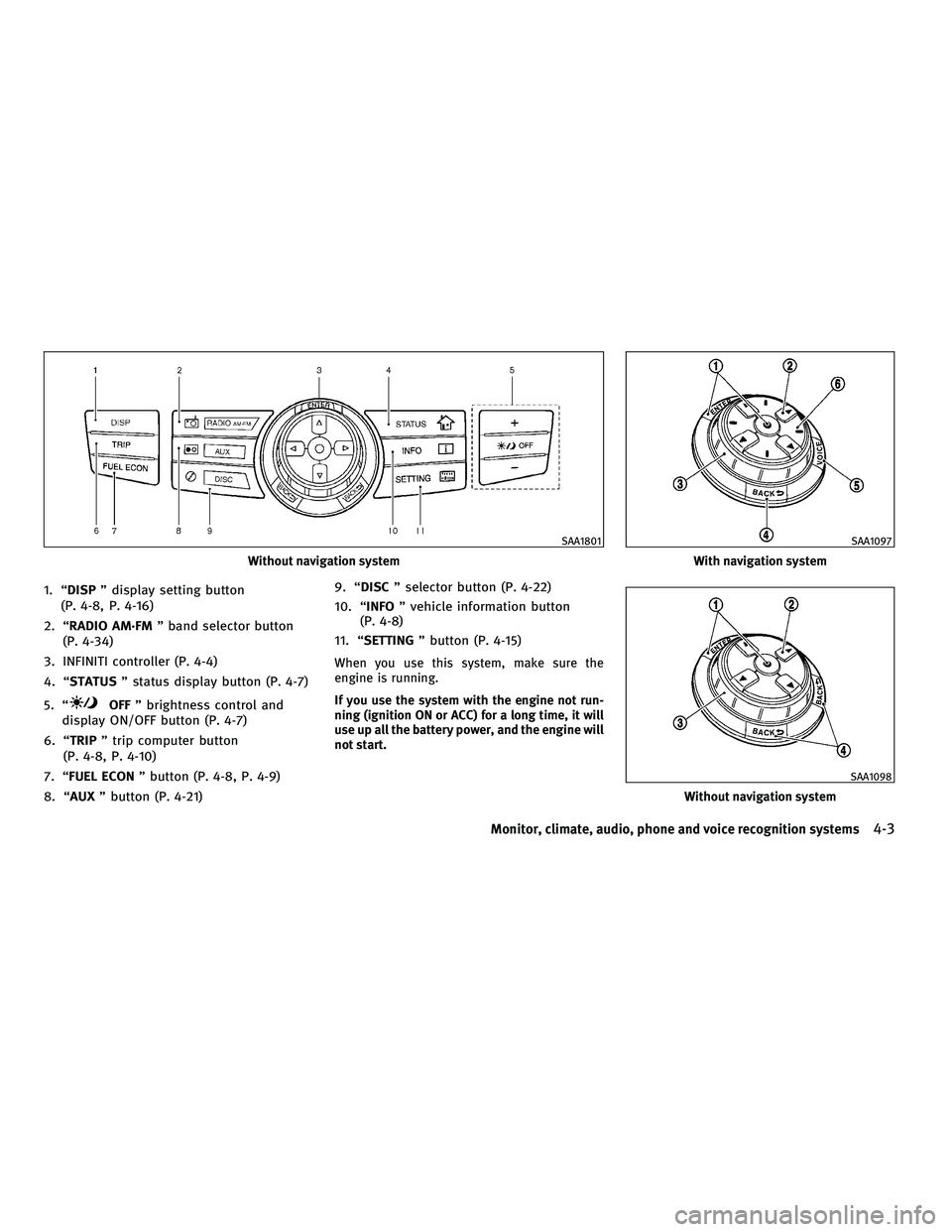
1. ªDISPº display setting button
(P. 4-8, P. 4-16)
2. ªRADIO AM´FM º band selector button
(P. 4-34)
3. INFINITI controller (P. 4-4)
4. ªSTATUS º status display button (P. 4-7)
5. ª
OFF º brightness control and
display ON/OFF button (P. 4-7)
6. ªTRIP º trip computer button
(P. 4-8, P. 4-10)
7. ªFUEL ECON º button (P. 4-8, P. 4-9)
8. ªAUX º button (P. 4-21) 9. ªDISC
º selector button (P. 4-22)
10. ª INFO º vehicle information button
(P. 4-8)
11. ª SETTING º button (P. 4-15)
When you use this system, make sure the
engine is running.
If you use the system with the engine not run-
ning (ignition ON or ACC) for a long time, it will
use up all the battery power, and the engine will
not start.
Without navigation system
SAA1801
With navigation system
SAA1097
Without navigation system
SAA1098
Monitor, climate, audio, phone and voice recognition systems4-3
wÐ
Ð
05/14/09Ðpattie
X
Page 190 of 445
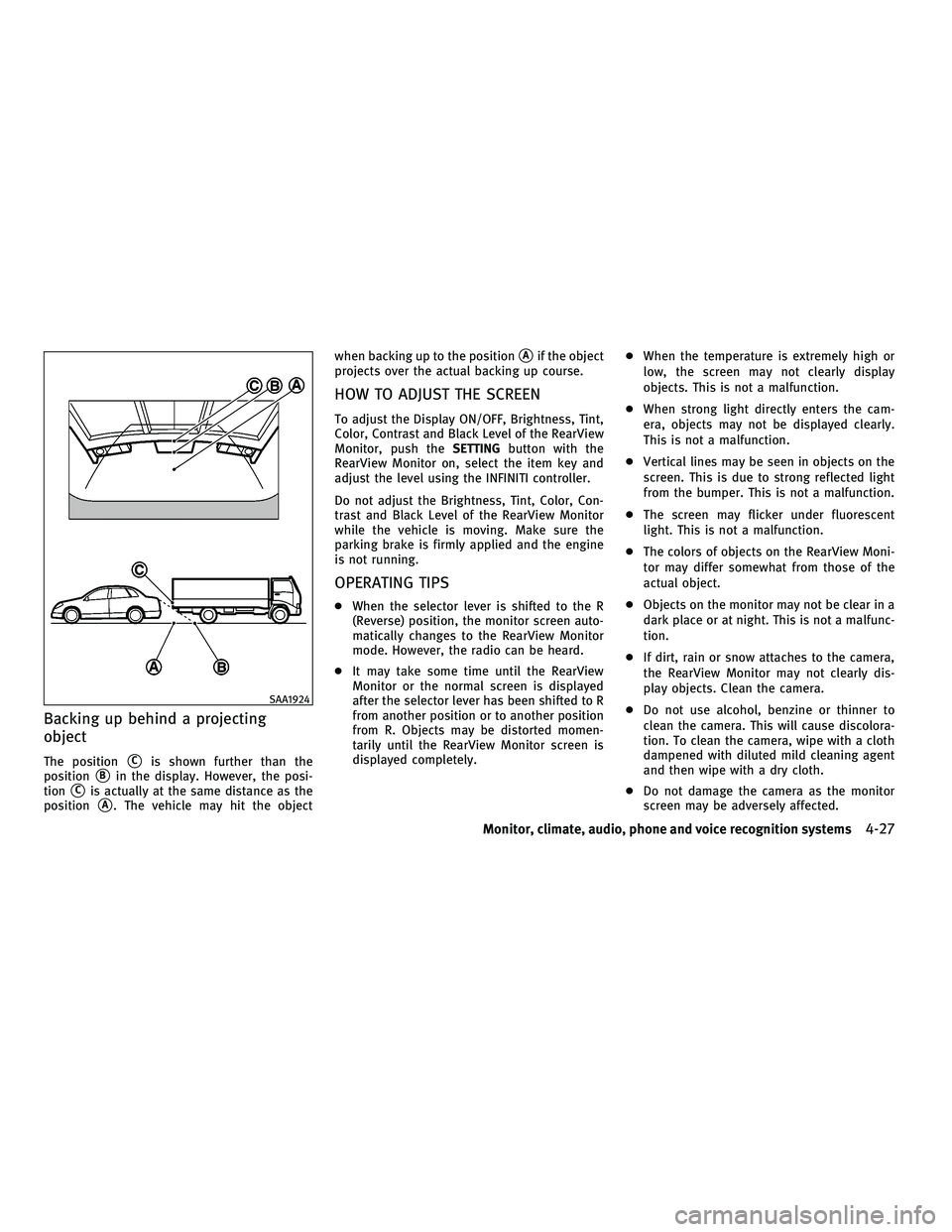
Backing up behind a projecting
object
The positionsCis shown further than the
position
sBin the display. However, the posi-
tion
sCis actually at the same distance as the
position
sA. The vehicle may hit the object when backing up to the position
sAif the object
projects over the actual backing up course.
HOW TO ADJUST THE SCREEN
To adjust the Display ON/OFF, Brightness, Tint,
Color, Contrast and Black Level of the RearView
Monitor, push the SETTINGbutton with the
RearView Monitor on, select the item key and
adjust the level using the INFINITI controller.
Do not adjust the Brightness, Tint, Color, Con-
trast and Black Level of the RearView Monitor
while the vehicle is moving. Make sure the
parking brake is firmly applied and the engine
is not running.
OPERATING TIPS
c When the selector lever is shifted to the R
(Reverse) position, the monitor screen auto-
matically changes to the RearView Monitor
mode. However, the radio can be heard.
c It may take some time until the RearView
Monitor or the normal screen is displayed
after the selector lever has been shifted to R
from another position or to another position
from R. Objects may be distorted momen-
tarily until the RearView Monitor screen is
displayed completely. c
When the temperature is extremely high or
low, the screen may not clearly display
objects. This is not a malfunction.
c When strong light directly enters the cam-
era, objects may not be displayed clearly.
This is not a malfunction.
c Vertical lines may be seen in objects on the
screen. This is due to strong reflected light
from the bumper. This is not a malfunction.
c The screen may flicker under fluorescent
light. This is not a malfunction.
c The colors of objects on the RearView Moni-
tor may differ somewhat from those of the
actual object.
c Objects on the monitor may not be clear in a
dark place or at night. This is not a malfunc-
tion.
c If dirt, rain or snow attaches to the camera,
the RearView Monitor may not clearly dis-
play objects. Clean the camera.
c Do not use alcohol, benzine or thinner to
clean the camera. This will cause discolora-
tion. To clean the camera, wipe with a cloth
dampened with diluted mild cleaning agent
and then wipe with a dry cloth.
c Do not damage the camera as the monitor
screen may be adversely affected.
SAA1924
Monitor, climate, audio, phone and voice recognition systems4-27
wÐ
Ð
05/14/09Ðpattie
X
Page 197 of 445

AUDIO OPERATION PRECAUTIONS
Radio
Push the ignition switch to the ACC or ON
position and push the radio band select button
to turn on the radio. If you listen to the radio
with the engine not running, the ignition switch
should be pushed to the ACC position.
Radio reception is affected by station signal
strength, distance from radio transmitter, build-
ings, bridges, mountains and other external
influences. Intermittent changes in reception
quality normally are caused by these external
influences.
Using a cellular phone in or near the vehicle may
influence radio reception quality.
Radio reception :
Your INFINITI radio system is equipped with
state-of-the-art electronic circuits to enhance
radio reception. These circuits are designed to
extend reception range, and to enhance the
quality of that reception.
However there are some general characteristics
of both FM and AM radio signals that can affect
radio reception quality in a moving vehicle,
even when the finest equipment is used. These
characteristics are completely normal in a givenreception area, and do not indicate any mal-
function in your INFINITI radio system.
Reception conditions will constantly change
because of vehicle movement. Buildings, ter-
rain, signal distance and interference from
other vehicles can work against ideal reception.
Described below are some of the factors that
can affect your radio reception.
Some cellular phones or other devices may
cause interference or a buzzing noise to come
from the audio system speakers. Storing the
device in a different location may reduce or
eliminate the noise.
FM radio reception :
Range: FM range is normally limited to 25 to 30
miles (40 to 48 km), with monaural (single
channel) FM having slightly more range than
stereo FM. External influences may sometimes
interfere with FM station reception even if the
FM station is within 25 miles (40 km). The
strength of the FM signal is directly related to
the distance between the transmitter and re-
ceiver. FM signals follow a line-of-sight path,
exhibiting many of the same characteristics as
light. For example they will reflect off objects.
Fade and drift: As your vehicle moves away from
a station transmitter, the signals will tend to
fade and/or drift.
SAA0306
AUDIO SYSTEM
4-34Monitor, climate, audio, phone and voice recognition systems
wÐ
Ð
05/14/09Ðpattie
X