ignition INFINITI M 2012 Owners Manual
[x] Cancel search | Manufacturer: INFINITI, Model Year: 2012, Model line: M, Model: INFINITI M 2012Pages: 522, PDF Size: 3.8 MB
Page 346 of 522

ways rely on your own steering and
braking operation to avoid accidents.
. The BSW and BSI systems may not
provide a warning or brake control for
vehicles that pass through the detection
zone quickly.
SSD1028
BSW/BSI indicator light
BSW SYSTEM OPERATION
If the radar sensors detect vehicles in the
detection zone, the BSW/BSI indicator
light located inside the outside mirrors
illuminates. If the turn signal is then
activated, the BSW/BSI indicator light
flashes and a chime sounds twice. The
indicator light continues to flash until the
detected vehicles leave the detection zone.
The BSW/BSI indicator lights illuminate for
a few seconds when the ignition switch is
pushed to the ON position.
The brightness of the BSW/BSI indicator lights is adjusted automatically depending
on the brightness of the ambient light.
A chime sounds if the radar sensors have
already detected vehicles when the driver
activates the turn signal. If a vehicle comes
into the detection zone after the driver
activates the turn signal, then only the
BSW/BSI indicator light flashes and no
chime sounds. (See
“BSW/BSI driving
situations ”later in this section.)
Starting and driving5-33
Page 368 of 522
4. Indicates your vehicle
5. Set vehicle speed indicator:Indicates the set vehicle speed.
For Canadian models, the speed is
displayed in km/h.
6. Intelligent Cruise Control system warn- ing light (orange):
The light comes on if there is a
malfunction in the ICC system.
SSD0979
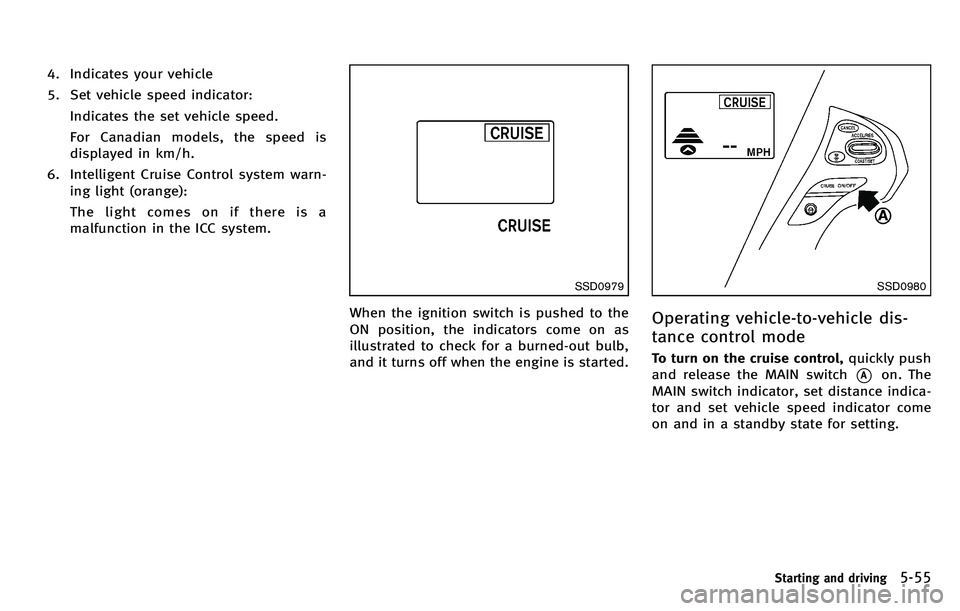
When the ignition switch is pushed to the
ON position, the indicators come on as
illustrated to check for a burned-out bulb,
and it turns off when the engine is started.
SSD0980
Operating vehicle-to-vehicle dis-
tance control mode
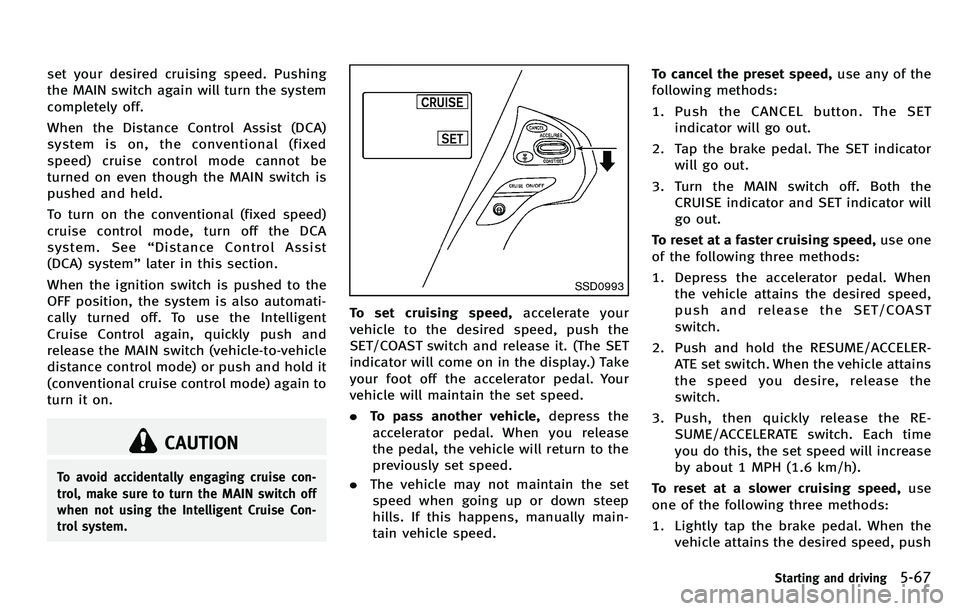
To turn on the cruise control, quickly push
and release the MAIN switch
*Aon. The
MAIN switch indicator, set distance indica-
tor and set vehicle speed indicator come
on and in a standby state for setting.
Starting and driving5-55
Page 380 of 522
set your desired cruising speed. Pushing
the MAIN switch again will turn the system
completely off.
When the Distance Control Assist (DCA)
system is on, the conventional (fixed
speed) cruise control mode cannot be
turned on even though the MAIN switch is
pushed and held.
To turn on the conventional (fixed speed)
cruise control mode, turn off the DCA
system. See“Distance Control Assist
(DCA) system ”later in this section.
When the ignition switch is pushed to the
OFF position, the system is also automati-
cally turned off. To use the Intelligent
Cruise Control again, quickly push and
release the MAIN switch (vehicle-to-vehicle
distance control mode) or push and hold it
(conventional cruise control mode) again to
turn it on.
CAUTION
To avoid accidentally engaging cruise con-
trol, make sure to turn the MAIN switch off
when not using the Intelligent Cruise Con-
trol system.
SSD0993
To set cruising speed, accelerate your
vehicle to the desired speed, push the
SET/COAST switch and release it. (The SET
indicator will come on in the display.) Take
your foot off the accelerator pedal. Your
vehicle will maintain the set speed.
. To pass another vehicle, depress the
accelerator pedal. When you release
the pedal, the vehicle will return to the
previously set speed.
. The vehicle may not maintain the set
speed when going up or down steep
hills. If this happens, manually main-
tain vehicle speed. To cancel the preset speed,
use any of the
following methods:
1. Push the CANCEL button. The SET indicator will go out.
2. Tap the brake pedal. The SET indicator will go out.
3. Turn the MAIN switch off. Both the CRUISE indicator and SET indicator will
go out.
To reset at a faster cruising speed, use one
of the following three methods:
1. Depress the accelerator pedal. When the vehicle attains the desired speed,
push and release the SET/COAST
switch.
2. Push and hold the RESUME/ACCELER- ATE set switch. When the vehicle attains
the speed you desire, release the
switch.
3. Push, then quickly release the RE- SUME/ACCELERATE switch. Each time
you do this, the set speed will increase
by about 1 MPH (1.6 km/h).
To reset at a slower cruising speed, use
one of the following three methods:
1. Lightly tap the brake pedal. When the vehicle attains the desired speed, push
Starting and driving5-67
Page 403 of 522
5-90Starting and driving
CAUTION
During the first 1,200 miles (2,000 km),
follow these recommendations to obtain
maximum engine performance and ensure
the future reliability and economy of your
new vehicle.
Failure to follow these recommendations
may result in shortened engine life and
reduced engine performance.
.Avoid driving for long periods at con-
stant speed, either fast or slow. Do not
run the engine over 4,000 rpm.
. Do not accelerate at full throttle in any
gear.
. Avoid quick starts.
. Avoid hard braking as much as possi-
ble. .
Accelerate slowly and smoothly. Main-
tain cruising speeds with a constant
accelerator position.
. Drive at moderate speeds on the high-
way.
. Avoid unnecessary stopping and brak-
ing. Keep a safe distance behind other
vehicles.
. Select a gear range suitable to road
conditions.
. Avoid unnecessary prolonged engine
idling.
. Keep your engine tuned up.
. Follow the recommended periodic main-
tenance schedule.
. Keep the tires inflated at the correct
pressure. Improper tire pressure will
increase wear and waste fuel.
. Make sure the front wheels are properly
aligned. Improper alignment will cause
premature tire wear and lower fuel
economy.
. Climate control operation lowers fuel
economy. Use the air conditioner only
when necessary.
. When cruising at highway speeds, it is
more economical to use the air condi-
tioner and leave the windows closed to
reduce drag.
SSD0336
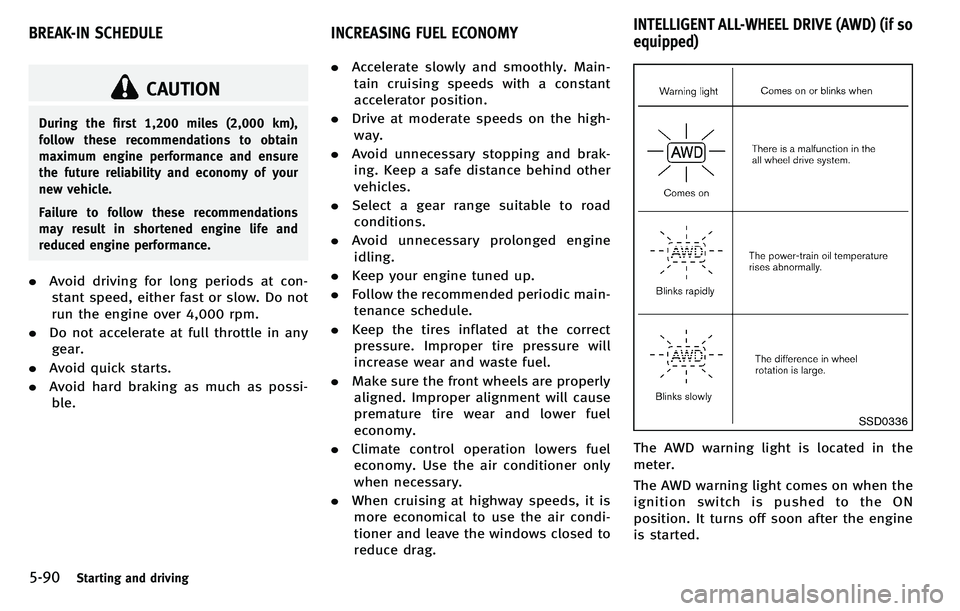
The AWD warning light is located in the
meter.
The AWD warning light comes on when the
ignition switch is pushed to the ON
position. It turns off soon after the engine
is started.
BREAK-IN SCHEDULE INCREASING FUEL ECONOMYINTELLIGENT ALL-WHEEL DRIVE (AWD) (if so
equipped)
Page 405 of 522
5-92Starting and driving
SD1006MA
WARNING
.Do not stop or park the vehicle over
flammable materials such as dry grass,
waste paper or rags. They may ignite and
cause a fire.
. Never leave the engine running while the
vehicle is unattended.
. Do not leave children unattended inside
the vehicle. They could unknowingly
activate switches or controls. Unat-
tended children could become involved
in serious accidents. .
Safe parking procedures require that
both the parking brake be applied and
the transmission placed into P (Park).
Failure to do so could cause the vehicle
to move unexpectedly or roll away and
result in an accident.
. Make sure the automatic transmission
selector lever has been pushed as far
forward as it can go and cannot be
moved without depressing the foot
brake pedal.
1. Firmly apply the parking brake. 2. Move the selector lever to the P (Park)
position.
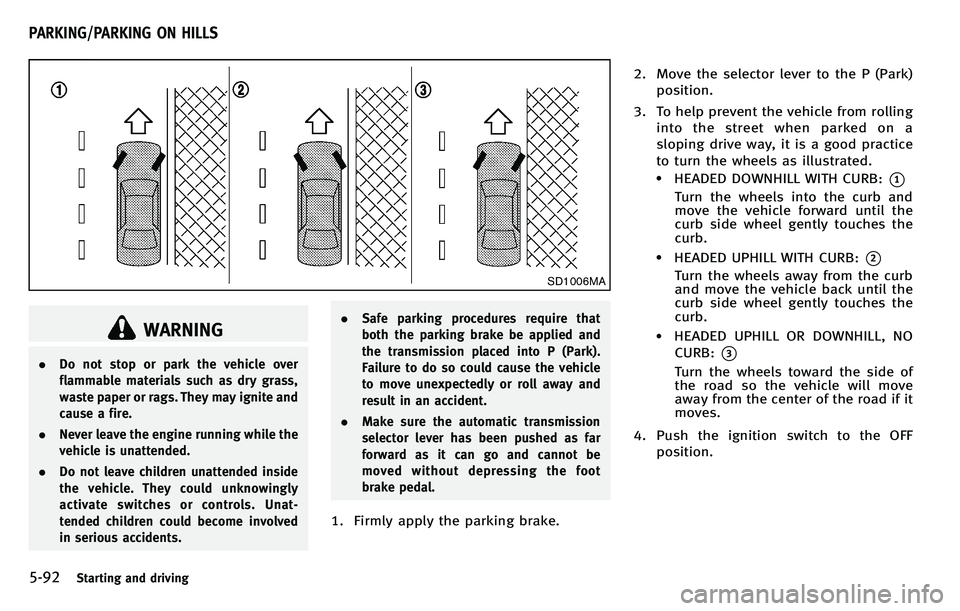
3. To help prevent the vehicle from rolling into the street when parked on a
sloping drive way, it is a good practice
to turn the wheels as illustrated.
.HEADED DOWNHILL WITH CURB:*1
Turn the wheels into the curb and
move the vehicle forward until the
curb side wheel gently touches the
curb.
.HEADED UPHILL WITH CURB:*2
Turn the wheels away from the curb
and move the vehicle back until the
curb side wheel gently touches the
curb.
.HEADED UPHILL OR DOWNHILL, NOCURB:
*3
Turn the wheels toward the side of
the road so the vehicle will move
away from the center of the road if it
moves.
4. Push the ignition switch to the OFF position.
PARKING/PARKING ON HILLS
Page 411 of 522

5-98Starting and driving
The Vehicle Dynamic Control (VDC) system
uses various sensors to monitor driver
inputs and vehicle motion. Under certain
driving conditions, the VDC system helps
to perform the following functions.
.Controls brake pressure to reduce
wheel slip on one slipping drive wheel
so power is transferred to a non
slipping drive wheel on the same axle.
. Controls brake pressure and engine
output to reduce drive wheel slip based
on vehicle speed (traction control func-
tion).
. Controls brake pressure at individual
wheels and engine output to help the
driver maintain control of the vehicle in
the following conditions:
— understeer (vehicle tends to not
follow the steered path despite
increased steering input)
— oversteer (vehicle tends to spin due
to certain road or driving condi-
tions).
The VDC system can help the driver to
maintain control of the vehicle, but it
cannot prevent loss of vehicle control in
all driving situations.
When the VDC system operates, the VDC
warning light
in the instrument panel flashes so note the following:
.
The road may be slippery or the system
may determine some action is required
to help keep the vehicle on the steered
path.
. You may feel a pulsation in the brake
pedal and hear a noise or vibration
from under the hood. This is normal
and indicates that the VDC system is
working properly.
. Adjust your speed and driving to the
road conditions.
See “Vehicle Dynamic Control (VDC) warn-
ing light” in the“2. Instruments and
controls ”section.
If a malfunction occurs in the system, the
VDC warning light
illuminates in the
instrument panel. The VDC system auto-
matically turns off.
The VDC OFF switch is used to turn off the
VDC system. The VDC off indicator
illuminates to indicate the VDC system is
off. When the VDC switch is used to turn off
the system, the VDC system still operates
to prevent one drive wheel from slipping by
transferring power to a non slipping drive
wheel. The VDC warning light
flashes if
this occurs. All other VDC functions are off,
except for rise-up and build-up and brake force distribution, and the VDC warning
light
will not flash. The VDC system is
automatically reset to on when the ignition
switch is placed in the off position then
back to the on position.
See “Vehicle Dynamic Control (VDC) warn-
ing light” in the“2. Instruments and
controls ”section and “Vehicle Dynamic
Control (VDC) off indicator light” in the“2.
Instruments and controls ”section.
The computer has a built-in diagnostic
feature that tests the system each time you
start the engine and move the vehicle
forward or in reverse at a slow speed.
When the self-test occurs, you may hear a
“ clunk ”noise and/or feel a pulsation in the
brake pedal. This is normal and is not an
indication of a malfunction.
ACTIVE TRACE CONTROL (if so
equipped)
This system senses driving based on the
driver ’s steering and acceleration/braking
patterns, and controls brake pressure at
individual wheels and engine output to
help smooth vehicle response.
When the drive mode selector switch is set
to the “SPORT ”mode, the amount of brake
control provided by active trace control is
VEHICLE DYNAMIC CONTROL (VDC) SYSTEM
Page 419 of 522

6-2In case of emergency
In the event of a roadside emergency,
Roadside Assistance Service is available to
you. Please refer to your Warranty Informa-
tion Booklet (U.S.) or Warranty & Roadside
Assistance Information Booklet (Canada)
for details.To shut off the engine in an emergency
situation, while driving perform the follow-
ing procedure:
.
Rapidly push the push-button ignition
switch 3 consecutive times, or
. Push and hold the push-button ignition
switch for more than 2 seconds.TIRE PRESSURE MONITORING SYS-
TEM (TPMS)
This vehicle is equipped with the Tire
Pressure Monitoring System (TPMS). It
monitors tire pressure of all tires except
the spare. When the low tire pressure
warning light is lit and the CHECK TIRE
PRESSURE warning appears in the dot
matrix liquid crystal display, one or more
of your tires is significantly under-inflated.
If the vehicle is being driven with low tire
pressure, the TPMS will activate and warn
you of it by the low tire pressure warning
light. This system will activate only when
the vehicle is driven at speeds above 16
MPH (25 km/h). For more details, see
“ Warning/indicator lights and audible re-
minders ”in the “2. Instruments and
controls ”section and “Tire Pressure Mon-
itoring System (TPMS) ”in the “5. Starting
and driving ”section.
WARNING
. If the low tire pressure warning light
illuminates or LOW PRESSURE informa-
tion is displayed on the monitor screen
while driving, avoid sudden steering
maneuvers or abrupt braking, reduce
ROADSIDE ASSISTANCE PROGRAM EMERGENCY ENGINE SHUT OFF FLAT TIRE
Page 426 of 522
SCE0886
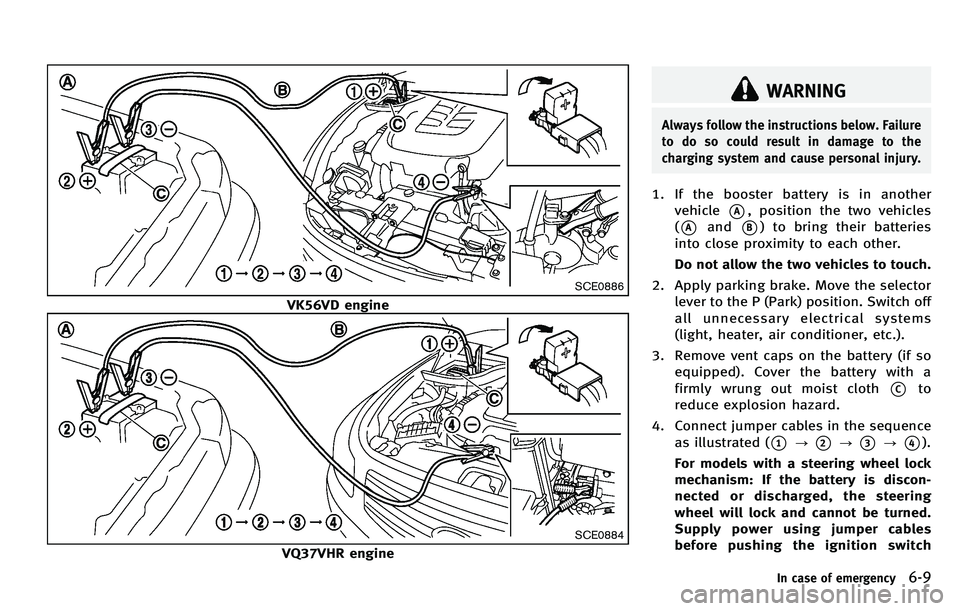
VK56VD engine
SCE0884
VQ37VHR engine
WARNING
Always follow the instructions below. Failure
to do so could result in damage to the
charging system and cause personal injury.
1. If the booster battery is in anothervehicle
*A, position the two vehicles
(
*Aand*B) to bring their batteries
into close proximity to each other.
Do not allow the two vehicles to touch.
2. Apply parking brake. Move the selector lever to the P (Park) position. Switch off
all unnecessary electrical systems
(light, heater, air conditioner, etc.).
3. Remove vent caps on the battery (if so equipped). Cover the battery with a
firmly wrung out moist cloth
*Cto
reduce explosion hazard.
4. Connect jumper cables in the sequence as illustrated (
*1?*2?*3?*4).
For models with a steering wheel lock
mechanism: If the battery is discon-
nected or discharged, the steering
wheel will lock and cannot be turned.
Supply power using jumper cables
before pushing the ignition switch
In case of emergency6-9
Page 427 of 522
6-10In case of emergency
and disengaging the steering lock.
CAUTION
.Always connect positive (+) to positive
(+) and negative ( −) to body ground (as
illustrated) −not to the battery.
. Make sure the jumper cables do not
touch moving parts in the engine com-
partment and that clamps do not contact
any other metal.
5. Start the engine of the booster vehicle
*Aand let it run for a few minutes.
6. Keep the engine speed of the booster vehicle
*Aat about 2,000 rpm, and
start the engine of the vehicle being
jump started
*B.
CAUTION
Do not keep the starter motor engaged for
more than 10 seconds. If the engine does
not start right away, push the ignition
switch to the OFF position and wait 10
seconds before trying again.
7. After starting your engine, carefully disconnect the negative cable and then
the positive cable (
*4?*3?*2?
*1).
8. Replace the vent caps (if so equipped). Be sure to dispose of the cloth used to
cover the vent holes as it may be
contaminated with corrosive acid.
9. Put the battery cover on. Do not attempt to start the engine by
pushing.CAUTION
.
Automatic transmission models cannot
be push-started or tow-started. Attempt-
ing to do so may cause transmission
damage.
. Three way catalyst equipped models
should not be started by pushing since
the three way catalyst may be damaged.
. Never try to start the vehicle by towing
it; when the engine starts, the forward
surge could cause the vehicle to collide
with the tow vehicle.
If needed, Roadside Assistance is avail-
able. Please see your Warranty Information
Booklet or Roadside Assistance I.D. Card
for the toll-free number to call (U.S.) or
Warranty & Roadside Assistance Informa-
tion Booklet (Canada).
PUSH STARTING
Page 430 of 522
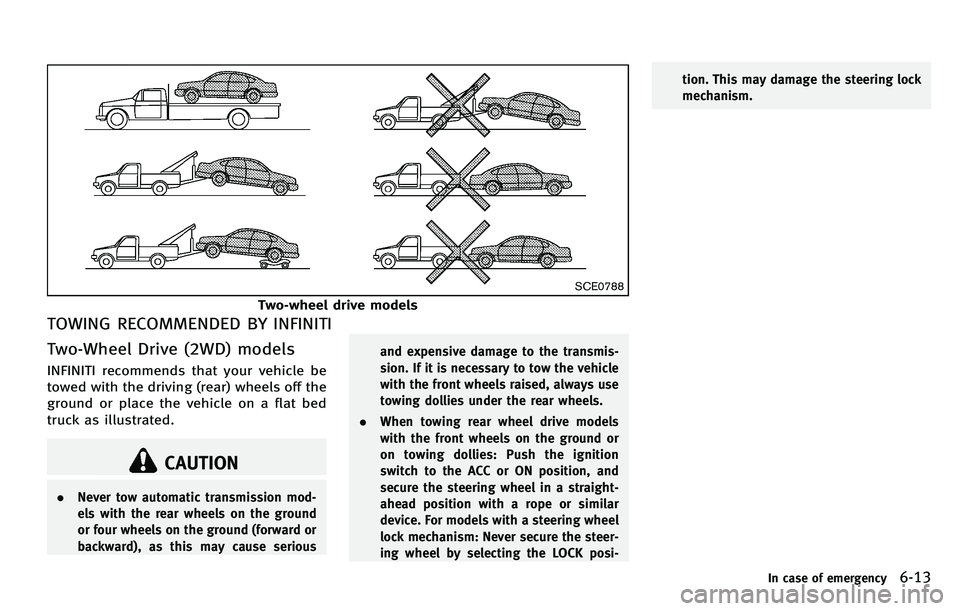
SCE0788
Two-wheel drive models
TOWING RECOMMENDED BY INFINITI
Two-Wheel Drive (2WD) models
INFINITI recommends that your vehicle be
towed with the driving (rear) wheels off the
ground or place the vehicle on a flat bed
truck as illustrated.
CAUTION
.Never tow automatic transmission mod-
els with the rear wheels on the ground
or four wheels on the ground (forward or
backward), as this may cause serious and expensive damage to the transmis-
sion. If it is necessary to tow the vehicle
with the front wheels raised, always use
towing dollies under the rear wheels.
. When towing rear wheel drive models
with the front wheels on the ground or
on towing dollies: Push the ignition
switch to the ACC or ON position, and
secure the steering wheel in a straight-
ahead position with a rope or similar
device. For models with a steering wheel
lock mechanism: Never secure the steer-
ing wheel by selecting the LOCK posi- tion. This may damage the steering lock
mechanism.
In case of emergency6-13