ignition INFINITI M 2012 Manual PDF
[x] Cancel search | Manufacturer: INFINITI, Model Year: 2012, Model line: M, Model: INFINITI M 2012Pages: 522, PDF Size: 3.8 MB
Page 249 of 522

4-78Monitor, climate, audio, phone and voice recognition systems
SAA2964
iPod®PLAYER OPERATION
Connecting iPod
®
Open the console lid and connect the
iPod®cable to the USB connector. If
compatible, the battery of the iPod®is
charged while the connection to the
vehicle.
Depending on the version of the iPod
®, the
display on the iPod®shows an INFINITI or
Accessory Attached screen when the con-
nection is completed. When the iPod
®is
connected to the vehicle, the iPod®music
library can only be operated by the vehicle
audio controls. * iPod
®is a trademark of Apple Inc.,
registered in the U.S. and other
countries.
Compatibility
The following models are available:
Models with navigation system:
. Fifth generation iPod
®(version 1.2.3 or
later)
. iPod Classic
®(version 1.1.1 or later)
. First generation iPod touch®(version
2.0.0 or later)
. Second generation iPod touch
®(firm-
ware version 1.2.3 or later)
. First generation iPod nano
®(firmware
version 1.3.1 or later)
. Second generation iPod nano
®(firm-
ware version 1.1.3 or later)
. Third generation iPod nano
®(firmware
version 1.1 or later)
. Fourth generation iPod nano
®(firmware
version 1.0.2 or later)
Models without navigation system:
. Fifth generation iPod
®(firmware ver-
sion 1.3) .
First generation iPod Classic
®(firmware
version 1.1.2 PC)
. Second generation iPod Classic
®(firm-
ware version 2.0 PC)
. First generation iPod touch
®(firmware
version 2.1)
. Second generation iPod touch
®(firm-
ware version 2.1.1)
. First generation iPod nano
®(firmware
version 1.3.1)
. Second generation iPod nano
®(firm-
ware version 1.1.3)
. Third generation iPod nano
®(firmware
version 1.1 PC)
. Third generation iPhone
®(firmware
version 2.1)
Make sure that the iPod
®version is
updated.
Audio main operation
Push the ignition switch to the ACC or ON
position. Then, push the DISC·AUX button
repeatedly to switch to the iPod
®mode.
If the system has been turned off while the
iPod
®was playing, pushing the ON·OFF
button will start the iPod®.
Page 252 of 522

SAA2514
If the title information of the track being
recorded is stored either in the hard drive
or in the CD, the title is automatically
displayed on the screen. For title acquisi-
tion from the hard drive, music recognition
technology and related data are provided
by Gracenote
®.
If a track is not recorded successfully due
to skipping sounds, the
mark is
displayed behind the track number.
The Music Box hard drive cannot perform
recording under the following conditions.
. There is not enough space in the hard
drive. .
The number of albums reaches the
maximum of 500.
. The number of tracks reaches the
maximum of 3,000.
Automatic recording:
If the “Automatic Recording ”function is
turned to ON, recording starts when a CD is
inserted. (See “Music Box settings ”later in
this section.)
Stopping recording:
To stop the recording, select the “Stop
REC ”key button by touching the screen or
using the INFINITI controller.
If the CD is ejected, the audio system is
turned off or the ignition switch is pushed
to the OFF position, the recording also
stops.
SAA2515
Playing recorded songs
Select the Music Box audio system by
using one of the following methods.
. Push the audio source switch on the
steering wheel r epeatedly until the
center display changes to the Music
Box mode. (See “Steering-wheel-
mounted controls for audio ”later in
this section.)
. Push the DISC·AUX button repeatedly
until the center display changes to the
Music Box mode.
. Give voice commands. (See “INFINITI
Voice Recognition system (models with
Monitor, climate, audio, phone and voice recognition systems4-81
Page 253 of 522
4-82Monitor, climate, audio, phone and voice recognition systems
navigation system)”later in this sec-
tion.)
Stopping playback:
The system stops playing when:
1. another mode (radio, CD, DVD, USB memory or iPod) is selected.
2. the audio system is turned off.
3. the ignition switch is pushed to the LOCK position.
Next/Previous Track and Fast For-
ward/Rewind:
When the
orbutton is pushed for
more than 1.5 seconds while a track is
being played, the track will play while fast
forwarding or rewinding. When the button
is released, the track will return to the
normal play speed.
When the
orbutton is pushed for
less than 1.5 seconds while a track is
being played, the next track or the begin-
ning of the current track will be played.
The INFINITI controller can also be used to
select tracks when a track is being played.
Play mode selection:
The TUNE/FOLDER knob will skip from
album to album unless it is playing “All Songs
”from the Music Library menu. When
playing “All Songs ”, the knob will change
the track instead of the album. The upper
right corner of the main screen will indicate
if the TUNE knob is changing by track or
album.
RANDOM (RDM), REPEAT (RPT):
When the RPT·RDM button is pushed while
a track is being played, the play pattern
can be changed as follows:
(Normal) ?1 Album Repeat ?1 Track
Repeat ?1 Album Random ?All Random
? (Normal)
Tag Track:
Select “Tag Track ”key on the screen when
a track is being played. A menu will show
the 5 available playlists. Select one of the
playlists to add the current song to that
playlist. If a playlist is not selectable (text
is grayed out), it means the song already
exists in that playlist.
SAA2516
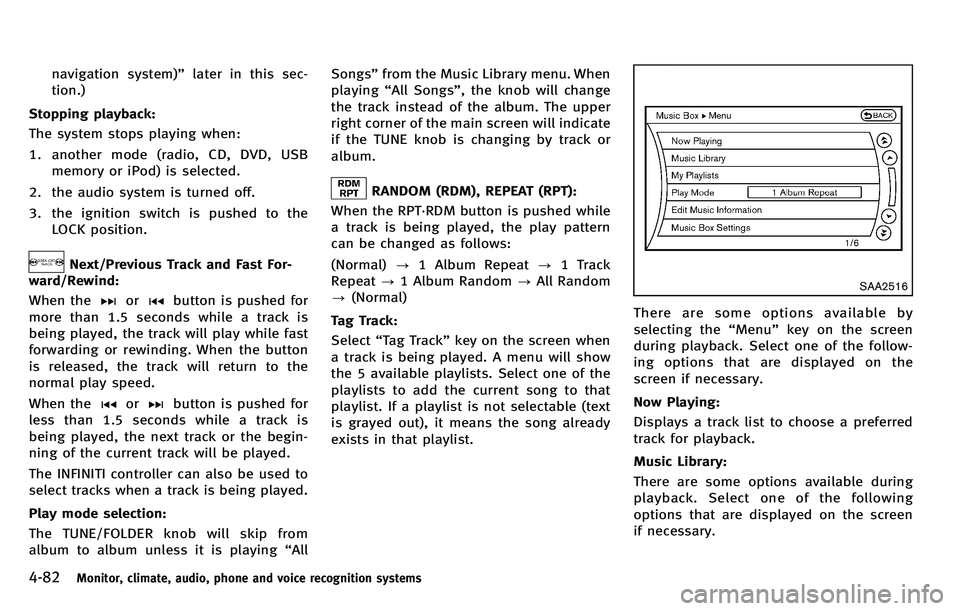
There are some options available by
selecting the “Menu ”key on the screen
during playback. Select one of the follow-
ing options that are displayed on the
screen if necessary.
Now Playing:
Displays a track list to choose a preferred
track for playback.
Music Library:
There are some options available during
playback. Select one of the following
options that are displayed on the screen
if necessary.
Page 261 of 522
4-90Monitor, climate, audio, phone and voice recognition systems
Once a cellular phone is connected to the
in-vehicle phone module, no phone con-
necting procedure is required anymore.
Your phone is automatically connected
with the in-vehicle phone module when
the ignition switch is pushed to the ON
position with the registered cellular phone
turned on and carried in the vehicle.
You can register up to 5 different Blue-
tooth
®cellular phones in the in-vehicle
phone module. However, you can talk on
only one cellular phone at a time.
The INFINITI Voice Recognition system
supports the phone commands, so dialing
a phone number using your voice is
possible. For more details, see “INFINITI
Voice Recognition system (models with
navigation system) ”later in this section;
page 4-114.
Before using the Bluetooth
®Hands-Free
Phone System, refer to the following notes.
. Set up the wireless connection between
a compatible cellular phone and the in-
vehicle phone module before using the
Bluetooth
®Hands-Free Phone System.
. Some Bluetooth®enabled cellular
phones may not be recognized by the
in-vehicle phone module. Please visit www.InfinitiUSA.com/bluetooth for a
recommended phone list.
. You will not be able to use a hands-free
phone under the following conditions:
— Your vehicle is outside of the tele-
phone service area.
— Your vehicle is in an area where it is
difficult to receive radio waves; such
as in a tunnel, in an underground
parking garage, behind a tall build-
ing or in a mountainous area.
— Your cellular phone is locked in
order not to be dialed.
. When the radio wave condition is not
ideal or ambient sound is too loud, it
may be difficult to hear the other
person ’s voice during a call.
. Immediately after the ignition switch is
pushed to the ON position, it may be
impossible to receive a call for a short
period of time.
. Do not place the cellular phone in an
area surrounded by metal or far away
from the in-vehicle phone module to
prevent tone quality degradation and
wireless connection disruption.
. While a cellular phone is connected
through the Bluetooth
®wireless con-
nection, the battery power of the cellular phone may discharge quicker
than usual.
. If the Bluetooth
®Hands-Free Phone
System seems to be malfunctioning,
please visit www.InfinitiUSA.com/blue-
tooth for troubleshooting help.
. Some cellular phones or other devices
may cause interference or a buzzing
noise to come from the audio system
speakers. Storing the device in a
different location may reduce or elim-
inate the noise.
. Refer to the cellular phone Owner ’s
Manual regarding the telephone pairing
procedure specific to your phone,
battery charging, cellular phone anten-
na, etc.
. The antenna display on the monitor will
not coincide with the antenna display
of some cellular phones.
. Keep the interior of the vehicle as quiet
as possible to hear the caller ’s voice
clearlyaswellastominimizeits
echoes.
. If reception between callers is unclear,
adjusting the incoming or outgoing call
volume may improve the clarity.
Page 271 of 522

4-100Monitor, climate, audio, phone and voice recognition systems
WARNING
.Use a phone after stopping your vehicle
in a safe location. If you have to use a
phone while driving, exercise extreme
caution at all times so full attention may
be given to vehicle operation.
. If you find yourself unable to devote full
attention to vehicle operation while
talking on the phone, pull off the road
to a safe location and stop your vehicle
before doing so.
CAUTION
To avoid draining the vehicle battery, use a
phone after starting the engine.
Your vehicle is equipped with Bluetooth®
Hands-Free Phone System. If you are an
owner of a Bluetooth®enabled cellular
phone, you can set up the wireless
connection between your cellular phone
and the in-vehicle phone module. With
Bluetooth
®wireless technology, you can
make or receive a telephone call with your
cellular phone in your pocket. Once your cellular phone is paired to the
in-vehicle phone module, no phone con-
necting procedure is required. Your phone
is automatically connected with the in-
vehicle phone module when the ignition
switch is pushed to the
“ON ”position with
the registered cellular phone turned on
and carried in the vehicle.
You can register up to 5 different Blue-
tooth
®cellular phones in the in-vehicle
phone module. However, you can talk on
only one cellular phone at a time.
When a call is active, the audio system and
microphone (located in the ceiling in front
of the rearview mirror) are used for the
handsfree communications.
If the audio system is being used at the
time, the audio mode will mute and will
stay muted until the active call is ended.
The INFINITI Voice Recognition system
supports the phone commands, so dialing
a phone number using your voice is
possible.
Before using the Bluetooth
®Hands-Free
Phone System, refer to the following notes.
. Set up the wireless connection between
a cellular phone and the in-vehicle
phone module before using the Blue- tooth
®Hands-Free Phone System.
. Some Bluetooth®enabled cellular
phones may not be recognized by the
in-vehicle phone module.
. You will not be able to use a hands-free
phone under the following conditions:
— Your vehicle is outside of the tele-
phone service area.
— Your vehicle is in an area where it is
difficult to receive radio waves; such
as in a tunnel, in an underground
parking garage, behind a tall build-
ing or in a mountainous area.
— Your cellular phone is locked in
order not to be dialed.
. When the radio wave condition is not
ideal or ambient sound is too loud, it
may be difficult to hear the other
person ’s voice during a call.
. Immediately after the ignition switch is
pushed to the “ON ”position, it may be
impossible to receive a call for a short
period of time.
. Do not place the cellular phone in an
area surrounded by metal or far away
from the in-vehicle phone module to
prevent tone quality degradation and
wireless connection disruption.
BLUETOOTH®HANDS-FREE PHONE SYSTEM
(models without navigation system)
Page 273 of 522

4-102Monitor, climate, audio, phone and voice recognition systems
SAA2969
CONTROL BUTTONS
1. PHONE SENDbutton
Push the button to initiate a VR
session or answer an incoming call.
You can also use the button to skip
through system feedback and to enter
commands during a call.
2. PHONE END
button
Push the button to cancel a VR
session or end a call.
VOICE RECOGNITION SYSTEM
You can also use the Bluetooth®hands-
free phone system with Voice Recognition
System.
INFO
. The available voice commands are only
applicable to the relevant language set
in the LANGUAGE setting screen. (See
“ How to use SETTING button ”earlier in
this section.)
. If the vehicle is in motion, some
commands may not be available so full
attention may be given to vehicle
operation.
Using system
Initialization:
When the ignition switch is pushed to the
ON position, Voice Recognition System is
initialized, which may take up to one
minute. When completed, the system is
ready to accept voice commands. If the
switch on the steering wheel is pushed
before the initialization completes, the
system will not accept any command.
Before starting:
To get the best performance out of the
Voice Recognition System, observe the following:
.
Keep the interior of the vehicle as quiet
as possible. Close the windows to
eliminate the surrounding noises (traf-
fic noises, vibration sounds, etc.),
which may prevent the system from
recognizing the voice commands cor-
rectly.
. Wait until a tone sounds before speak-
ing a command.
. Speak a voice command within 5
seconds after the beep sound. If no
voice command is given, the system
will ask you for a number. If no further
command is given, the session ends.
. Speak in a natural voice without paus-
ing between words.
Page 284 of 522

existing phone. If the user tries to
connect a phone that has already been
connected to the vehicle system, the
system announces the name that the
phone is already using. The connecting
procedure will then be cancelled.
The Add Phone command is not avail-
able when the vehicle is moving.
. Select Phone
Use the Select Phone command to
select a phone of lesser priority when
two or more phones connected with
Bluetooth
®Hands-Free Phone System
are in the vehicle at the same time.
The system asks the user to name the
phone and confirm the selection.
Once the selection is confirmed, the
selected phone remains active until the
ignition switch is turned OFF or a new
phone is selected.
. Delete Phone
Use the Delete Phone command to
delete a specific phone or all phones
from Bluetooth
®Hands-Free Phone
System. The system announces the
names of the phones already paired
with the system and their priority level.
The system then gives the option to
delete a specific phone, all phones or listen to the list again. Once the user
chooses to delete a phone or all
phones, the system asks the user to
confirm.
NOTE:
When the user deletes a phone, the
associated phone book for that phone will
also be deleted.
. Replace Phone
Use the Replace Phone command to
change the priority level of the active
phone.
The priority level determines which
phone is active when more than one
paired Bluetooth
®phone is in the
vehicle.
The system states the priority level of
the active phone and asks for a new
priority level (1, 2, 3, 4, 5).
If the new priority level is already being
used for another phone, the two
phones will swap priority levels.
For example, if the current priority
levels are:
Priority Level 1 = Phone A
Priority Level 2 = Phone B
Priority Level 3 = Phone C and you change the priority level of
Phone C to Level 1, then:
Priority Level 1 = Phone C
Priority Level 2 = Phone B
Priority Level 3 = Phone A
. Bluetooth
®On/Off
Use the Bluetooth®On/Off command
to turn on/off Bluetooth®Hands-Free
Phone System.
. Help
The system announces the available
commands.
VOICE ADAPTATION MODE
The Voice Adaptation mode allows up to
two users with different dialects to train
the system to improve recognition accu-
racy. By repeating a number of commands,
the users can create a voice model of their
own voice that is stored in the system. The
system is capable of storing a different
voice adaptation model for each connected
phone.
Training procedure
1. Position the vehicle in a reasonably quiet outdoor location.
2. Sit in the driver ’s seat with the engine
running, the parking brake on, and the
Monitor, climate, audio, phone and voice recognition systems4-113
Page 285 of 522
4-114Monitor, climate, audio, phone and voice recognition systems
transmission in Park.
3. Press the
button.
4. Speak: “Help ”. The system acknowl-
edges the command and announces
the next set of available commands.
5. Speak: "Voice Adaptation". The system acknowledges the command and dis-
plays the voice adaptation mode
screen.
6. Voice memory A or memory B is selected automatically. If both memory
locations are already in use, the system
will prompt you to overwrite one.
Follow the instructions provided by
the system.
7. When preparation is complete and you are ready to begin, press the
button.
8. The voice adaptation mode will be explained. Follow the instructions pro-
vided by the system.
9. When training is finished, the system will tell you an adequate number of
phrases have been recorded.
10. The system will ask you to say your name. Follow the instructions to regis-
ter your name. 11. The system will announce that voice
adaptation has been completed and
the system is ready.
The voice adaptation mode will stop if:
. The
button is pressed in voice
adaptation mode.
. The vehicle is driven during voice
adaptation mode.
. The ignition switch is turned to the OFF
or LOCK position. INFINITI Voice Recognition allows hands-
free operation of the Phone, Navigation,
Information and Audio systems in one of
two modes, Standard Mode or Alternate
Command Mode.
In Standard Mode, commands that are
available are always shown on the display
and announced by the system. You can
complete your desired operation by simply
following the prompts given by the system.
(See
“INFINITI Voice Recognition standard
mode ”later in this section for details.)
For advanced operation, you can use the
Alternate Command Mode. (See “INFINITI
Voice Recognition alternate command
mode ”later in this section for details.)
When this mode is active, an expanded list
of commands can be spoken after pushing
the TALK
switch, and the voice
command menu prompts are turned off.
Review the expanded command list, which
is available when this mode is active. Note
that in this mode the recognition success
rate may be affected as the number of
available commands and the ways of
speaking each command are increased.
To switch one mode to another, see each
mode description later in this section.
To improve the recognition success rate
INFINITI VOICE RECOGNITION SYSTEM
(models with navigation system)
Page 289 of 522
4-118Monitor, climate, audio, phone and voice recognition systems
USING THE SYSTEM
Initialization
When the ignition switch is pushed to the
ON position, INFINITI Voice Recognition is
initialized, which can take up to one
minute. When completed, the system is
ready to accept voice commands. If the
TALK
switch is pushed before the
initialization completes, the display will
show the message: “System not ready. ”or
a beep sounds.
Before starting
To get the best recognition performance
from INFINITI Voice Recognition, observe
the following:
. The interior of the vehicle should be as
quiet as possible. Close the windows to
eliminate the surrounding noises (traf-
fic noise and vibration sounds, etc.),
which may prevent the system from
correctly recognizing the voice com-
mands.
. Wait until the tone sounds before
speaking a command.
. Speak in a natural conversational voice
without pausing between words. .
If the air conditioner is set to “Auto ”,
the fan speed is automatically lowered
so that your commands can be recog-
nized more easily.
SAA3001
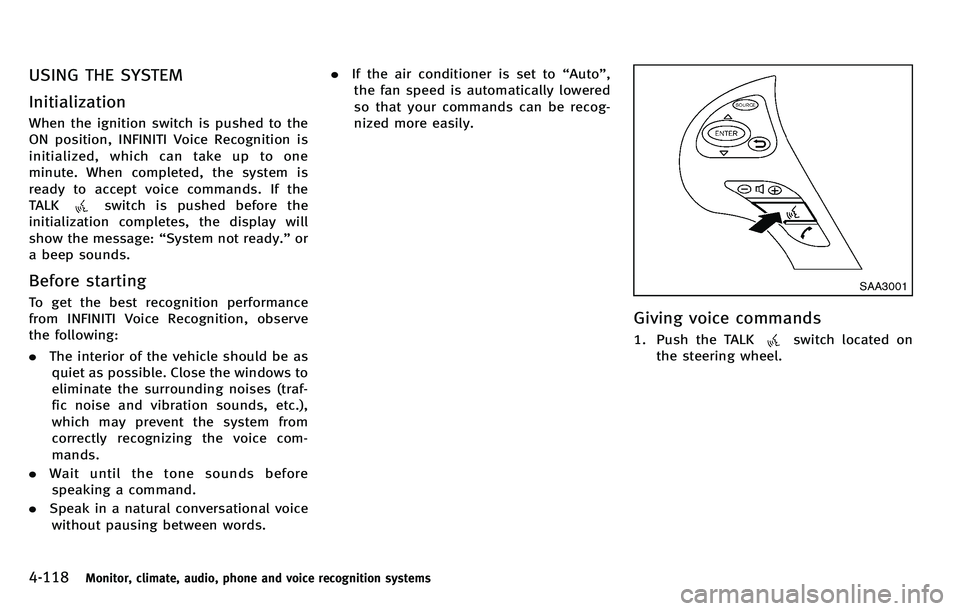
Giving voice commands
1. Push the TALKswitch located on
the steering wheel.
Page 307 of 522
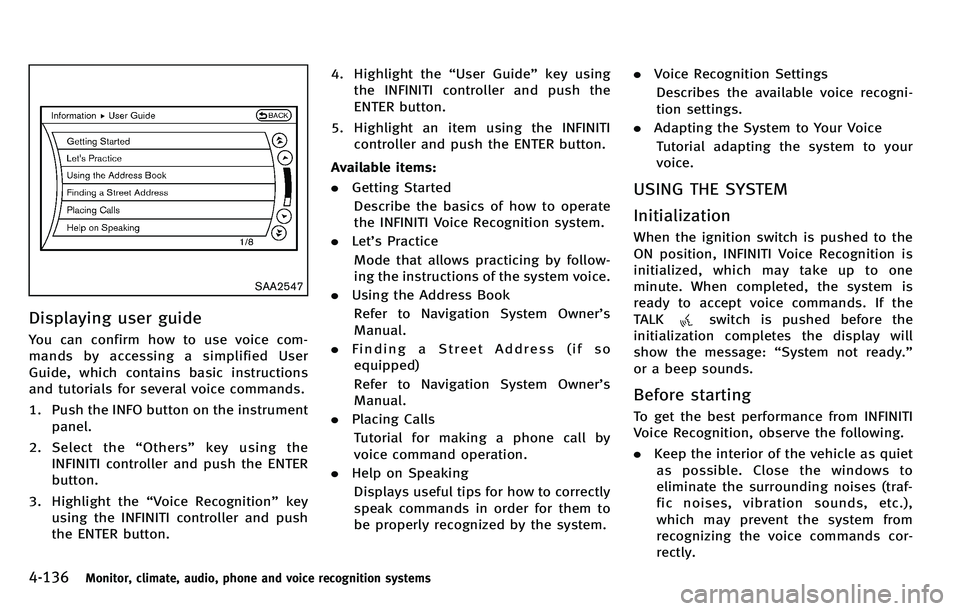
4-136Monitor, climate, audio, phone and voice recognition systems
SAA2547
Displaying user guide
You can confirm how to use voice com-
mands by accessing a simplified User
Guide, which contains basic instructions
and tutorials for several voice commands.
1. Push the INFO button on the instrumentpanel.
2. Select the “Others ”key using the
INFINITI controller and push the ENTER
button.
3. Highlight the “Voice Recognition ”key
using the INFINITI controller and push
the ENTER button. 4. Highlight the
“User Guide ”key using
the INFINITI controller and push the
ENTER button.
5. Highlight an item using the INFINITI controller and push the ENTER button.
Available items:
. Getting Started
Describe the basics of how to operate
the INFINITI Voice Recognition system.
. Let’s Practice
Mode that allows practicing by follow-
ing the instructions of the system voice.
. Using the Address Book
Refer to Navigation System Owner ’s
Manual.
. Finding a Street Address (if so
equipped)
Refer to Navigation System Owner ’s
Manual.
. Placing Calls
Tutorial for making a phone call by
voice command operation.
. Help on Speaking
Displays useful tips for how to correctly
speak commands in order for them to
be properly recognized by the system. .
Voice Recognition Settings
Describes the available voice recogni-
tion settings.
. Adapting the System to Your Voice
Tutorial adapting the system to your
voice.
USING THE SYSTEM
Initialization
When the ignition switch is pushed to the
ON position, INFINITI Voice Recognition is
initialized, which may take up to one
minute. When completed, the system is
ready to accept voice commands. If the
TALK
switch is pushed before the
initialization completes the display will
show the message: “System not ready. ”
or a beep sounds.
Before starting
To get the best performance from INFINITI
Voice Recognition, observe the following.
. Keep the interior of the vehicle as quiet
as possible. Close the windows to
eliminate the surrounding noises (traf-
fic noises, vibration sounds, etc.),
which may prevent the system from
recognizing the voice commands cor-
rectly.