instrument panel INFINITI M 2012 User Guide
[x] Cancel search | Manufacturer: INFINITI, Model Year: 2012, Model line: M, Model: INFINITI M 2012Pages: 522, PDF Size: 3.8 MB
Page 78 of 522
SSI0690
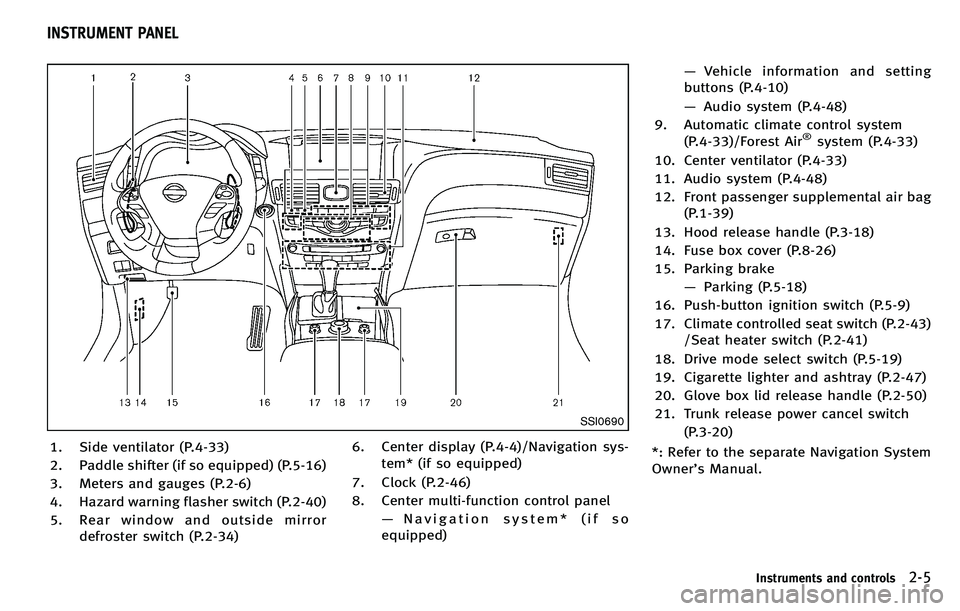
1. Side ventilator (P.4-33)
2. Paddle shifter (if so equipped) (P.5-16)
3. Meters and gauges (P.2-6)
4. Hazard warning flasher switch (P.2-40)
5. Rear window and outside mirrordefroster switch (P.2-34) 6. Center display (P.4-4)/Navigation sys-
tem* (if so equipped)
7. Clock (P.2-46)
8. Center multi-function control panel —Navigation system* (if so
equipped) —
Vehicle information and setting
buttons (P.4-10)
— Audio system (P.4-48)
9. Automatic climate control system (P.4-33)/Forest Air
®system (P.4-33)
10. Center ventilator (P.4-33)
11. Audio system (P.4-48)
12. Front passenger supplemental air bag (P.1-39)
13. Hood release handle (P.3-18)
14. Fuse box cover (P.8-26)
15. Parking brake —Parking (P.5-18)
16. Push-button ignition switch (P.5-9)
17. Climate controlled seat switch (P.2-43) /Seat heater switch (P.2-41)
18. Drive mode select switch (P.5-19)
19. Cigarette lighter and ashtray (P.2-47)
20. Glove box lid release handle (P.2-50)
21. Trunk release power cancel switch (P.3-20)
*: Refer to the separate Navigation System
Owner ’s Manual.
Instruments and controls2-5
INSTRUMENT PANEL
Page 80 of 522

SIC4319
Odometer/twin trip odometer
Odometer/twin trip odometer
The odometer*1and twin trip odometer
*2are displayed on the dot matrix crystal
display when the ignition switch is in the
ON position.
The odometer records the total distance
the vehicle has been driven.
The twin trip odometer records the dis-
tance of individual trips.
Changing the display:
Pushing the TRIP RESET switch
*3on the
right of the combination meter panel
changes the display as follows: TRIP A
?TRIP B ?TRIP A
Resetting the trip odometer:
Pushing the TRIP RESET switch
*3for more
than 1 second resets the trip odometer to
zero.
Average fuel economy and distance to
empty information is also available. (See
“ Dot matrix liquid crystal display ”later in
this section and “How to use STATUS
button ”in the “4. Monitor, climate, audio,
phone and voice recognition systems ”
section.)
SIC4320
TACHOMETER
The tachometer indicates engine speed in
revolutions per minute (RPM). Do not rev
the engine into the red zone
*1.
The scale length and the red zone vary with
the engine model.
CAUTION
When engine speed approaches the red
zone, shift to a higher gear or reduce engine
speed. Operating the engine in the red zone
may cause serious engine damage.
Instruments and controls2-7
Page 99 of 522

2-26Instruments and controls
SIC4326
SIC4327
TRIP COMPUTER
Switches for the trip computer are located
on the right side of the combination meter
panel. To operate the trip computer, push
the side or front of the switches as shown
above.
*Aswitch
*Bswitch
When the ignition switch is pushed to the
ON position, modes of the trip computer
can be selected by pushing the
switch
*A.
Each time the
switch*Ais pushed, the
display will change as follows:
Page 104 of 522
SIC2045
Security indicator light
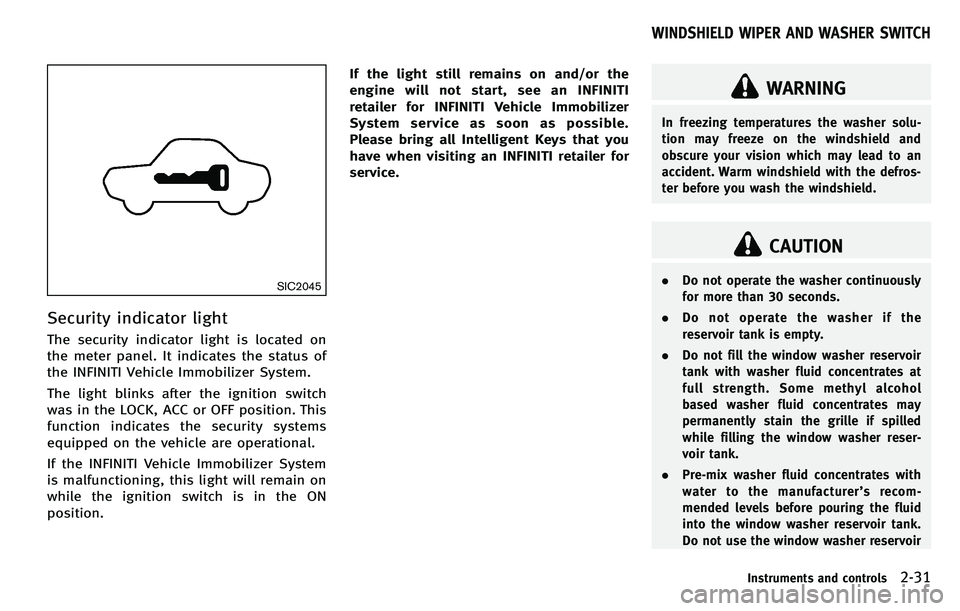
The security indicator light is located on
the meter panel. It indicates the status of
the INFINITI Vehicle Immobilizer System.
The light blinks after the ignition switch
was in the LOCK, ACC or OFF position. This
function indicates the security systems
equipped on the vehicle are operational.
If the INFINITI Vehicle Immobilizer System
is malfunctioning, this light will remain on
while the ignition switch is in the ON
position.If the light still remains on and/or the
engine will not start, see an INFINITI
retailer for INFINITI Vehicle Immobilizer
System service as soon as possible.
Please bring all Intelligent Keys that you
have when visiting an INFINITI retailer for
service.
WARNING
In freezing temperatures the washer solu-
tion may freeze on the windshield and
obscure your vision which may lead to an
accident. Warm windshield with the defros-
ter before you wash the windshield.
CAUTION
.
Do not operate the washer continuously
for more than 30 seconds.
. Do not operate the washer if the
reservoir tank is empty.
. Do not fill the window washer reservoir
tank with washer fluid concentrates at
full strength. Some methyl alcohol
based washer fluid concentrates may
permanently stain the grille if spilled
while filling the window washer reser-
voir tank.
. Pre-mix washer fluid concentrates with
water to the manufacturer ’srecom-
mended levels before pouring the fluid
into the window washer reservoir tank.
Do not use the window washer reservoir
Instruments and controls2-31
WINDSHIELD WIPER AND WASHER SWITCH
Page 109 of 522
2-36Instruments and controls
SAA0642A
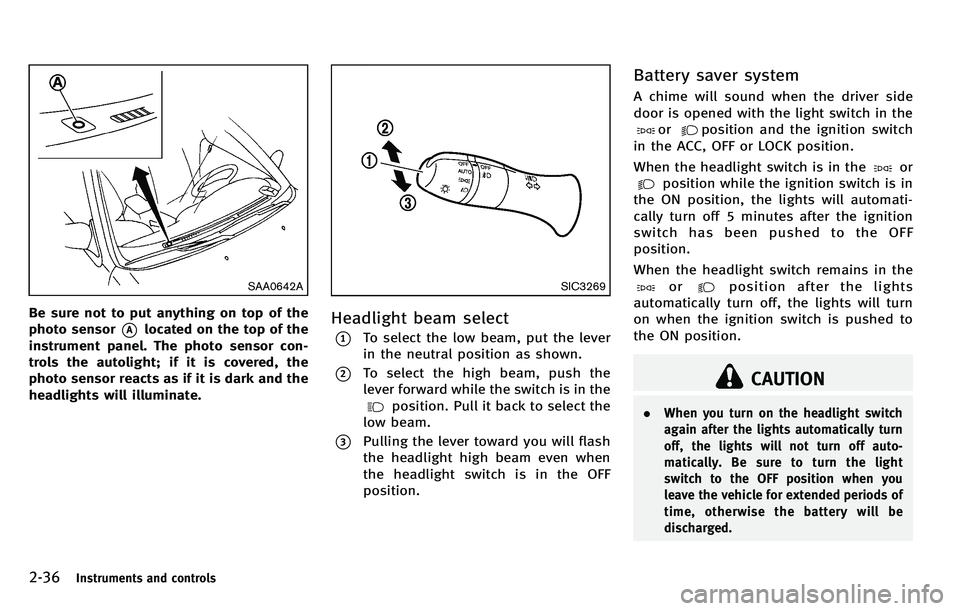
Be sure not to put anything on top of the
photo sensor
*Alocated on the top of the
instrument panel. The photo sensor con-
trols the autolight; if it is covered, the
photo sensor reacts as if it is dark and the
headlights will illuminate.
SIC3269
Headlight beam select
*1To select the low beam, put the lever
in the neutral position as shown.
*2To select the high beam, push the
lever forward while the switch is in the
position. Pull it back to select the
low beam.
*3Pulling the lever toward you will flash
the headlight high beam even when
the headlight switch is in the OFF
position.
Battery saver system
A chime will sound when the driver side
door is opened with the light switch in the
orposition and the ignition switch
in the ACC, OFF or LOCK position.
When the headlight switch is in the
or
position while the ignition switch is in
the ON position, the lights will automati-
cally turn off 5 minutes after the ignition
switch has been pushed to the OFF
position.
When the headlight switch remains in the
orposition after the lights
automatically turn off, the lights will turn
on when the ignition switch is pushed to
the ON position.
CAUTION
. When you turn on the headlight switch
again after the lights automatically turn
off, the lights will not turn off auto-
matically. Be sure to turn the light
switch to the OFF position when you
leave the vehicle for extended periods of
time, otherwise the battery will be
discharged.
Page 112 of 522
Instrument brightness control
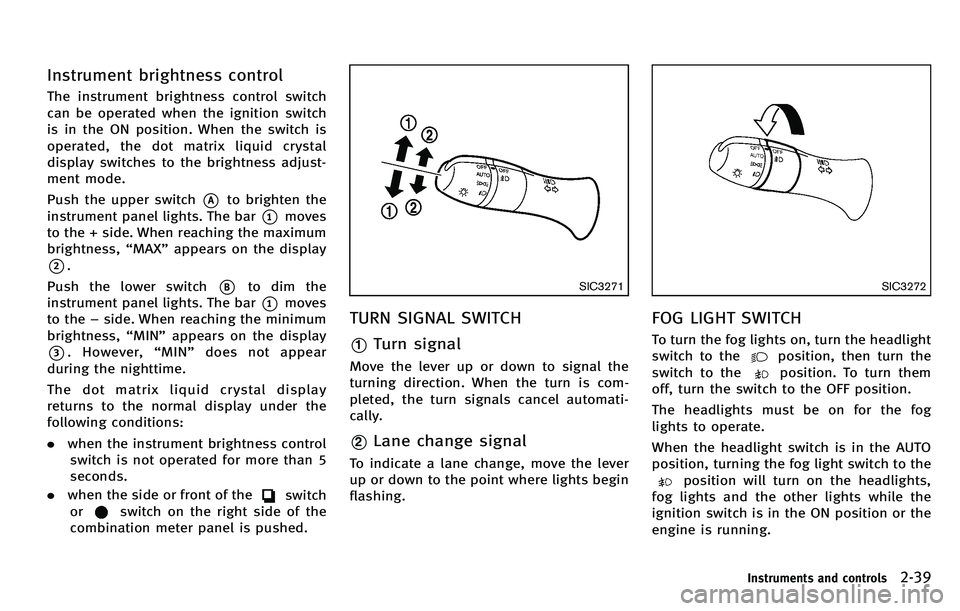
The instrument brightness control switch
can be operated when the ignition switch
is in the ON position. When the switch is
operated, the dot matrix liquid crystal
display switches to the brightness adjust-
ment mode.
Push the upper switch
*Ato brighten the
instrument panel lights. The bar
*1moves
to the + side. When reaching the maximum
brightness, “MAX ”appears on the display
*2.
Push the lower switch
*Bto dim the
instrument panel lights. The bar
*1moves
to the −side. When reaching the minimum
brightness, “MIN ”appears on the display
*3. However, “MIN ”does not appear
during the nighttime.
The dot matrix liquid crystal display
returns to the normal display under the
following conditions:
. when the instrument brightness control
switch is not operated for more than 5
seconds.
. when the side or front of the
switch
or
switch on the right side of the
combination meter panel is pushed.
SIC3271
TURN SIGNAL SWITCH
*1Turn signal
Move the lever up or down to signal the
turning direction. When the turn is com-
pleted, the turn signals cancel automati-
cally.
*2Lane change signal
To indicate a lane change, move the lever
up or down to the point where lights begin
flashing.
SIC3272
FOG LIGHT SWITCH
To turn the fog lights on, turn the headlight
switch to the
position, then turn the
switch to the
position. To turn them
off, turn the switch to the OFF position.
The headlights must be on for the fog
lights to operate.
When the headlight switch is in the AUTO
position, turning the fog light switch to the
position will turn on the headlights,
fog lights and the other lights while the
ignition switch is in the ON position or the
engine is running.
Instruments and controls2-39
Page 130 of 522
after performing the procedure above, have
your vehicle checked by an INFINITI retailer.
CAUTION
.To avoid personal injury, keep your
hands, fingers and head away from the
sunshade arm, arm rail and sunshade
inlet port.
. Do not allow children near the rear
sunshade system. They could be injured.
. Do not place objects on or near the rear
sunshade. This could cause improper
operation or damage it.
. Do not pull or push the rear sunshade.
This could cause improper operation or
damage it.
SIC4349
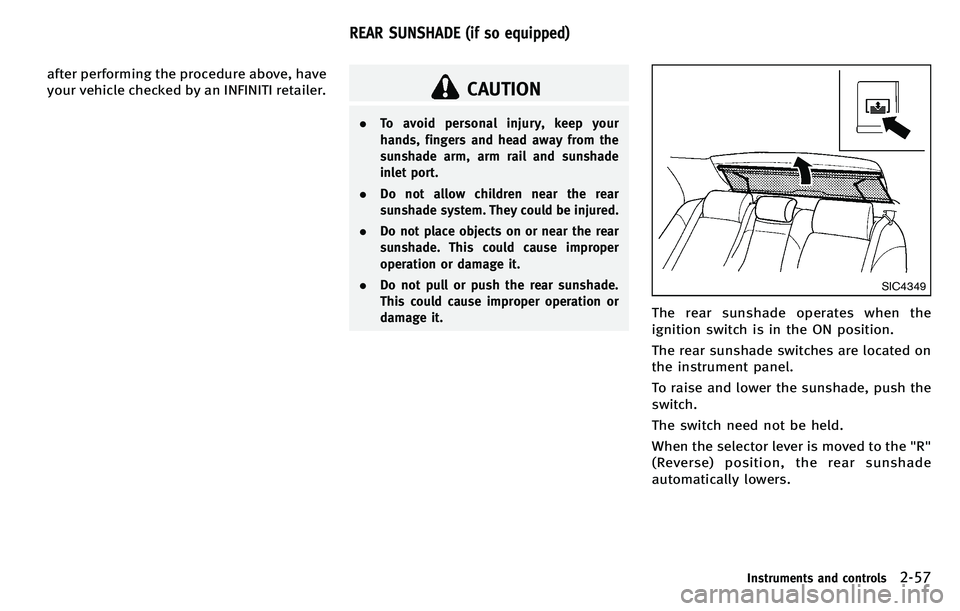
The rear sunshade operates when the
ignition switch is in the ON position.
The rear sunshade switches are located on
the instrument panel.
To raise and lower the sunshade, push the
switch.
The switch need not be held.
When the selector lever is moved to the "R"
(Reverse) position, the rear sunshade
automatically lowers.
Instruments and controls2-57
REAR SUNSHADE (if so equipped)
Page 157 of 522

3-18Pre-driving checks and adjustments
SPA2733
1. Pull the hood lock release handle*1
located below the instrument panel;
the hood will then spring up slightly.
2. Pull the lever
*2up at the front of the
hood with your fingertips and raise the
hood.
3. When closing the hood, slowly close the hood down to latch both the right
and left locks. Push the hood down to
lock the hood securely into place.
WARNING
. Make sure the hood is completely closed
and latched before driving. Failure to do
so could cause the hood to fly open and
result in an accident.
. If you see steam or smoke coming from
the engine compartment, to avoid injury
do not open the hood.
WARNING
.Do not drive with the trunk lid open. This
could allow dangerous exhaust gases to
be drawn into the vehicle. See “Exhaust
gas (carbon monoxide) ”in the “5.
Starting and driving ”section of this
manual.
. Closely supervise children when they are
around cars to prevent them from play-
ing and becoming locked in the trunk
where they could be seriously injured.
Keep the car locked, with the trunk
closed, when not in use, and prevent
children ’s access to Intelligent Keys.
HOOD TRUNK LID
Page 158 of 522

SPA2734
TRUNK LID RELEASE SWITCH
The trunk lid release switch*Ais located
on the instrument panel.
To open the trunk lid, push the release
switch. To close, push the trunk lid down.
You can open the trunk lid with Intelligent
Key. (See “Intelligent Key system” earlier in
this section or “Remote keyless entry
system” earlier in this section.)
SPA2732
TRUNK OPEN REQUEST SWITCH
The trunk lid can be opened by pushing the
trunk open request switch
*Awhen the
Intelligent Key is within the operating
range of the trunk lock/unlock function
regardless of the inside lock knob position.
(See “Intelligent Key system” earlier in this
section.)
SPA2766
OPENING WITH KEY
To open the trunk lid, insert the mechanical
key to the trunk key cylinder and turn the
key to the right side of the vehicle. To
close, remove the key and push the trunk
lid down.
TRUNK OPEN BUTTON
The trunk lid can be opened by pushing the
TRUNK OPEN button
on the Intelligent
Key for more than 1 second.
Pre-driving checks and adjustments3-19
Page 209 of 522
4-38Monitor, climate, audio, phone and voice recognition systems
CLIMATE setting screen
Climate control settings can be changed on
the screen.
Push the CLIMATE button on the instrument
panel and turn the display to the Climate
mode.
Heating (A/C OFF):
The air conditioner does not activate in this
mode. When you need to heat only, use
this mode.
1. Push the“CLIMATE” button to on.
2. If the “A/C ”indicator on the screen
illuminates, select the “A/C ”key. (The
“ A/C ”indicator will turn off.)
3. Push the temperature control button to set the desired temperature.
. The temperature of the passenger
compartment will be maintained auto-
matically. Air flow distribution and fan
speed are also controlled automati-
cally.
. Do not set the temperature lower than
the outside air temperature. Otherwise
the system may not work properly.
. Not recommended if windows fog up.
When the outside temperature decreases
to approximately −23 8F(0 8C), the A/C function does not activate even if the
“
A/C ”indicator light illuminates.
Dual control mode setting:
You can individually set the driver and front
passenger side temperature and air flow
mode using each temperature control
button or manual air flow control button.
1. Push the “CLIMATE” button to on.
2. By selecting the “DUAL ”key, or when
the passenger side temperature control
button or manual air control button is
pushed, the “DUAL ”indicator on the
screen will illuminate.
3. To turn off the passenger side tempera- ture control, select the “DUAL ”key and
the “DUAL ”indicator will turn off.
. The Dual control mode cannot be
activated when the air conditioner is
in the front defrosting mode “
”.
Automatic upper ventilator system:
In this mode, air from the center ventilators
flows both straight and upward in order to
control the cabin temperature without
blowing air directly on the occupants.
1. Push the “CLIMATE” button to on.
2. Select the “Upper Vent ”key, and the
indicator on the screen will illuminate. The air flow against the driver
’sor
passenger ’s upper body becomes gen-
tle.
. Distribution between straight and up-
ward flows is determined automatically
by the climate control system. If you
prefer strong air flow against your
upper body, select the “Upper Vent ”
key to turn the indicator light off.
. When the outside temperature de-
creases to approximately 14 8F
( − 10 8C), the “Upper Vent ”function
does not activate. The “Upper Vent ”
function reactivates automatically when
ambient temperature is 14 8F( −10 8C) or
more.