instrument panel INFINITI M 2012 Owner's Guide
[x] Cancel search | Manufacturer: INFINITI, Model Year: 2012, Model line: M, Model: INFINITI M 2012Pages: 522, PDF Size: 3.8 MB
Page 340 of 522

chains, non-standard wheels).
—When the vehicle is equipped withnonoriginal brake parts or suspen-
sion parts.
. If the LDP system malfunctions, it will
cancel automatically. The lane departure
warning light (orange) on the instrument
panel will illuminate.
. If the lane departure warning light
(orange) illuminates, pull off the road
to a safe location and stop the vehicle.
Turn the engine off and restart the
engine. If the warning light (orange)
continues to illuminate, have the LDP
system checked by an INFINITI retailer.
. Excessive noise will interfere with the
warning chime sound, and the chime
may not be heard.
The functions of the LDP system (warning
and brake control assist) may or may not
operate properly under the following con-
ditions:
.On roads where there are multiple
parallel lane markers; lane markers
that are faded or not painted clearly;
yellow painted lane markers; non-stan-
dard lane markers; lane markers cov- ered with water, dirt, snow, etc.
. On roads where discontinued lane
markers are still detectable.
. On roads where there are sharp curves.
. On roads where there are sharply
contrasting objects, such as shadows,
snow, water, wheel ruts, seams or lines
remaining after road repairs. (The LDP
system could detect these items as
lane markers.)
. On roads where the traveling lane
merges or separates.
. When the vehicle ’s traveling direction
does not align with the lane marker.
. When traveling close to the vehicle in
front of you, which obstructs the lane
camera unit detection range.
. When rain, snow or dirt adheres to the
windshield in front of the lane camera
unit.
. When the headlights are not bright due
to dirt on the lens or if the aiming is not
adjusted properly.
. When strong light enters the lane
camera unit. (For example, the light
directly shines on the front of the
vehicle at sunrise or sunset.) .
When a sudden change in brightness
occurs. (For example, when the vehicle
enters or exits a tunnel or under a
bridge.)
While the LDP system is operating, you
may hear a sound of brake operation. This
is normal and indicates that the LDP
system is operating properly.
Starting and driving5-27
Page 341 of 522
5-28Starting and driving
SSD0672
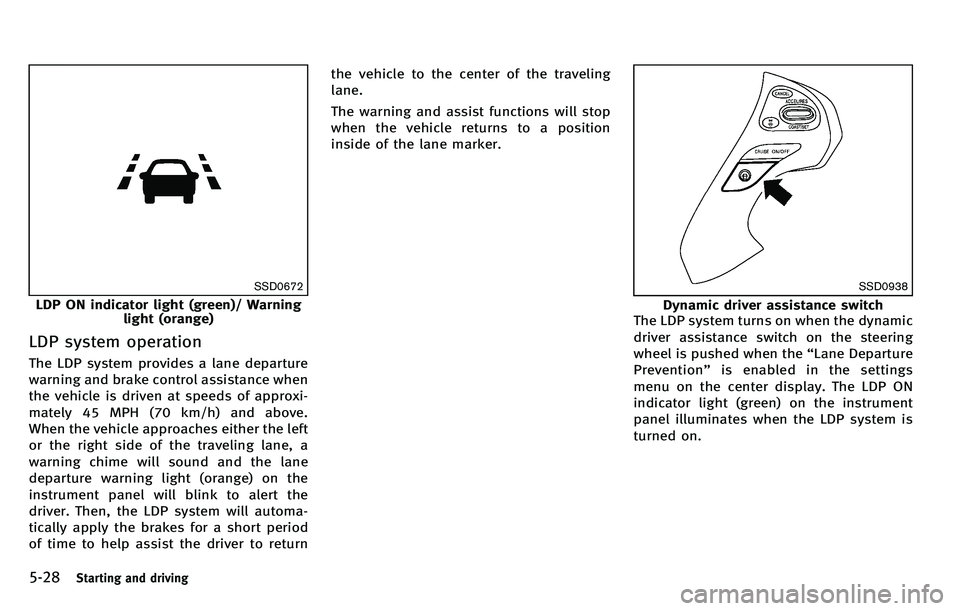
LDP ON indicator light (green)/ Warninglight (orange)
LDP system operation
The LDP system provides a lane departure
warning and brake control assistance when
the vehicle is driven at speeds of approxi-
mately 45 MPH (70 km/h) and above.
When the vehicle approaches either the left
or the right side of the traveling lane, a
warning chime will sound and the lane
departure warning light (orange) on the
instrument panel will blink to alert the
driver. Then, the LDP system will automa-
tically apply the brakes for a short period
of time to help assist the driver to return the vehicle to the center of the traveling
lane.
The warning and assist functions will stop
when the vehicle returns to a position
inside of the lane marker.
SSD0938
Dynamic driver assistance switch
The LDP system turns on when the dynamic
driver assistance switch on the steering
wheel is pushed when the “Lane Departure
Prevention ”is enabled in the settings
menu on the center display. The LDP ON
indicator light (green) on the instrument
panel illuminates when the LDP system is
turned on.
Page 344 of 522
SSD0453
LANE CAMERA UNIT MAINTENANCE
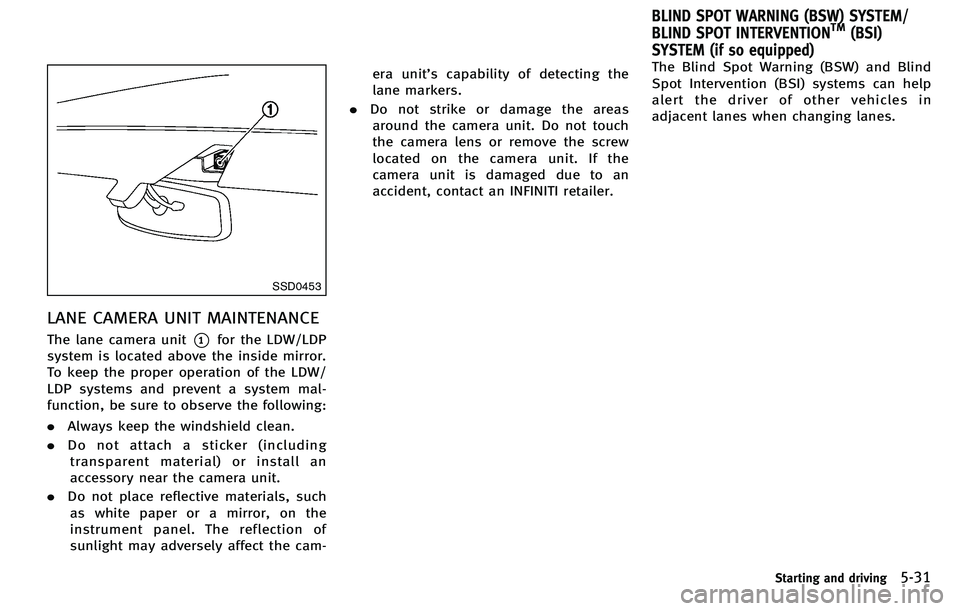
The lane camera unit*1for the LDW/LDP
system is located above the inside mirror.
To keep the proper operation of the LDW/
LDP systems and prevent a system mal-
function, be sure to observe the following:
. Always keep the windshield clean.
. Do not attach a sticker (including
transparent material) or install an
accessory near the camera unit.
. Do not place reflective materials, such
as white paper or a mirror, on the
instrument panel. The reflection of
sunlight may adversely affect the cam- era unit
’s capability of detecting the
lane markers.
. Do not strike or damage the areas
around the camera unit. Do not touch
the camera lens or remove the screw
located on the camera unit. If the
camera unit is damaged due to an
accident, contact an INFINITI retailer. The Blind Spot Warning (BSW) and Blind
Spot Intervention (BSI) systems can help
alert the driver of other vehicles in
adjacent lanes when changing lanes.
Starting and driving5-31
BLIND SPOT WARNING (BSW) SYSTEM/
BLIND SPOT INTERVENTIONTM(BSI)
SYSTEM (if so equipped)
Page 349 of 522
5-36Starting and driving
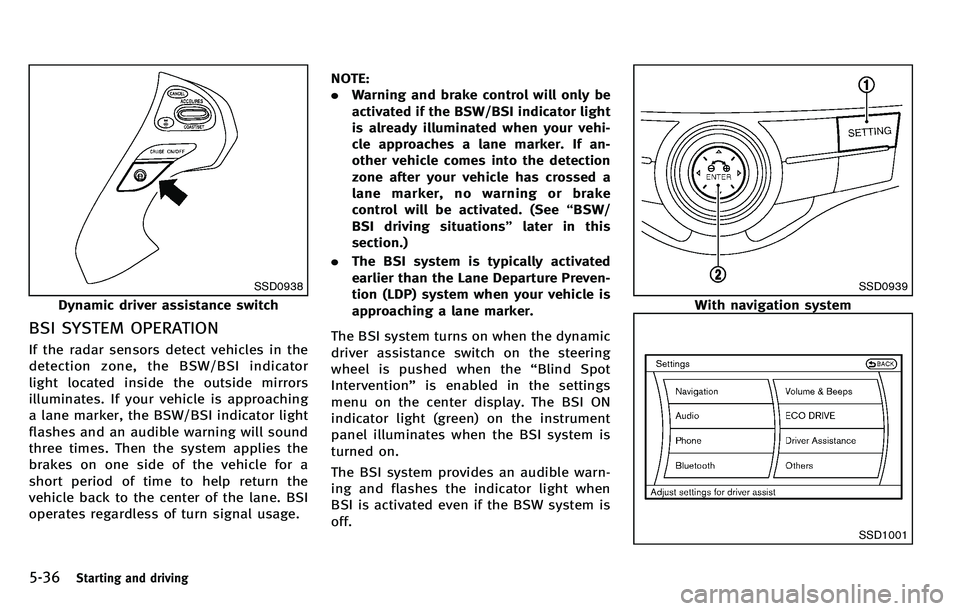
SSD0938
Dynamic driver assistance switch
BSI SYSTEM OPERATION
If the radar sensors detect vehicles in the
detection zone, the BSW/BSI indicator
light located inside the outside mirrors
illuminates. If your vehicle is approaching
a lane marker, the BSW/BSI indicator light
flashes and an audible warning will sound
three times. Then the system applies the
brakes on one side of the vehicle for a
short period of time to help return the
vehicle back to the center of the lane. BSI
operates regardless of turn signal usage.NOTE:
.
Warning and brake control will only be
activated if the BSW/BSI indicator light
is already illuminated when your vehi-
cle approaches a lane marker. If an-
other vehicle comes into the detection
zone after your vehicle has crossed a
lane marker, no warning or brake
control will be activated. (See “BSW/
BSI driving situations ”later in this
section.)
. The BSI system is typically activated
earlier than the Lane Departure Preven-
tion (LDP) system when your vehicle is
approaching a lane marker.
The BSI system turns on when the dynamic
driver assistance switch on the steering
wheel is pushed when the “Blind Spot
Intervention” is enabled in the settings
menu on the center display. The BSI ON
indicator light (green) on the instrument
panel illuminates when the BSI system is
turned on.
The BSI system provides an audible warn-
ing and flashes the indicator light when
BSI is activated even if the BSW system is
off.
SSD0939
With navigation system
SSD1001
Page 359 of 522
5-46Starting and driving
SET/COAST switch and release it. (The
CRUISE SET indicator will come on in the
instrument panel.) Take your foot off the
accelerator pedal. Your vehicle will main-
tain the set speed.
.To pass another vehicle, depress the
accelerator pedal. When you release
the pedal, the vehicle will return to the
previously set speed.
. The vehicle may not maintain the set
speed on winding or hilly roads. If this
happens, drive without the cruise con-
trol.
To cancel the preset speed, follow any of
these methods:
1. Push the CANCEL button. The SET indicator will go out.
2. Tap the brake pedal. The SET indicator will go out.
3. Move the selector lever to the N (Neutral) position. The SET indicator
will go out.
4. Turn the MAIN switch off. Both the CRUISE indicator and SET indicator will
go out.
. If you depress the brake pedal while
pushing the RESUME/ACCELERATE or
SET/COAST switch and reset at the cruising speed, the cruise control will
disengage. Turn the MAIN switch off
once and then turn it on again.
. The cruise control will automatically
cancel if the vehicle slows more than
7 MPH (12 km/h) below the set speed.
. If you move the selector lever to N
(Neutral) position, the cruise control
will be canceled.
To reset at a faster cruising speed, use one
of the following methods:
. Depress the accelerator pedal. When
the vehicle attains the desired speed,
push and release the SET/COAST
switch.
. Push and hold the RESUME/ACCELER-
ATE switch. When the vehicle attains
the speed you desire, release the
switch.
. Push, then quickly release the RESUME/
ACCELERATE switch. Each time you do
this, the set speed will increase by
about 1 MPH (1.6 km/h).
To reset at a slower cruising speed, use
one of the following methods:
. Lightly tap the brake pedal. When the
vehicle attains the desired speed, push
the SET/COAST switch and release it. .
Push and hold the SET/COAST switch.
Release the switch when the vehicle
slows down to the desired speed.
. Push, then quickly release the SET/
COAST switch. Each time you do this,
the set speed will decrease by about 1
MPH (1.6 km/h).
To resume the preset speed, push and
release the RESUME/ACCELERATE switch.
The vehicle will resume the last set
cruising speed when the vehicle speed is
over 25 MPH (40 km/h).
Page 396 of 522
The FCW system uses the distance sensor
*Alocated below the front bumper to
measure the distance to the vehicle ahead.
When the system judges that your vehicle
is getting close to the vehicle ahead in the
travel lane, the vehicle ahead detection
indicator light on the instrument panel
blinks and a warning chime sounds.
PRECAUTIONS ON FCW SYSTEM
WARNING
. The FCW system is intended to warn you
before a collision but will not avoid a
collision. It is the driver ’s responsibility
to stay alert, drive safely and be in
control of the vehicle at all times.
. As there is a performance limit, the
system may not provide a warning in
certain conditions.
. The system will not detect the following
objects:
—Pedestrians, animals or obstacles in
the roadway
—Oncoming vehicles in the same lane
. The system will not detect another
vehicle under the following conditions:
—When the sensor gets dirty and it is
impossible to detect the distance
from the vehicle ahead.
—When driving into a strong light(i.e., sunlight)
. The sensor generally detects the signals
returned from the reflectors on a vehicle
ahead. Therefore, the system may not
function properly under the following
conditions:
—When the reflectors of the vehicle
ahead are positioned high or close
to each other (including a small
vehicle such as motorcycles).
—When the sensor gets dirty or it isimpossible to detect the distance
from the vehicle ahead.
—When the reflectors on the vehicle
ahead are missing, damaged or
covered.
—When the reflectors of the vehicleahead are covered with dirt, snow or
road spray.
—When visibility is low (such as rain,fog, snow, etc.).
—When snow or road spray from
traveling vehicles is splashed.
—When dense exhaust or other smoke (black smoke) from vehicles reduces
the visibility of the sensor.
—When excessively heavy baggage is
loaded in the rear seat or the
luggage room of your vehicle.
—When abruptly accelerating or de-celerating.
—On a steep downhill slope or onroads with sharp curves.
—When there is a highly reflectiveobject near the vehicle ahead (i.e.,
being very close to another vehicle,
signboard, etc.)
. Depending on certain road conditions
(curved or beginning of a curve), vehicle
conditions (steering position or vehicle
position), or the preceding vehicle’ s
conditions (position in lane, etc.), the
system may not function properly. The
system may detect highly reflective
objects such as reflectors, signs, white
markers, and other stationary objects on
the road or near the traveling lane and
provide unnecessary warning.
Starting and driving5-83
Page 400 of 522
The IBA system uses a distance sensor*A
located below the front bumper to measure
the distance to the vehicle ahead. When
the system judges that your vehicle is
getting close to the vehicle ahead in the
traveling lane, the vehicle ahead detection
indicator light on the instrument panel
blinks and a warning chime sounds.
The IBA system will be turned on/off by
pushing the IBA OFF switch. The IBA OFF
indicator light display will illuminate when
the system is turned off.
PRECAUTIONS ON IBA SYSTEM
WARNING
.The IBA system is not a collision
avoidance system. It is the driver ’s
responsibility to stay alert, drive safely
and be in control of the vehicle at all
times.
. As there is a performance limit, the
system may not provide a warning or
braking in certain conditions.
. The system will not detect the following
objects:
—Pedestrians, animals or obstacles in the roadway
—Oncoming vehicles in the same lane
. The system will not detect another
vehicle under the following conditions:
—When the sensor gets dirty and it is
impossible to detect the distance
from the vehicle ahead.
—When driving into a strong light(i.e., sunlight)
. The sensor generally detects the signals
returned from the reflectors on a vehicle
ahead. Therefore, the system may not
function properly under the following
conditions:
—When the reflectors of the vehicle
ahead are positioned high or close
to each other (including a small
vehicle such as motorcycles).
—When the sensor gets dirty and it isimpossible to detect the distance
from the vehicle ahead.
—When the reflectors on the vehicle
ahead are missing, damaged or
covered.
—When the reflectors of the vehicleahead are covered with dirt, snow or road spray.
—When visibility is low (such as rain,
fog, snow, etc.).
—When snow or road spray from
traveling vehicles is splashed.
—When dense exhaust or other smoke(black smoke) from vehicles reduces
the visibility of the sensor.
—When excessively heavy baggage isloaded in the rear seat or the
luggage room of your vehicle.
—When abruptly accelerating or de-celerating.
—On a steep downhill slope or on
roads with sharp curves.
—When there is a highly reflectiveobject near the vehicle ahead (i.e.,
being very close to another vehicle,
signboard, etc.)
. Depending on certain road conditions
(curved or beginning of a curve), vehicle
conditions (steering position or vehicle
position), or the preceding vehicle’ s
conditions (position in lane, etc.), the
system may not function properly. The
system may detect highly reflective
Starting and driving5-87
Page 410 of 522
and loading information label”in
the “9. Technical and consumer
information ”section of this manual.
—For detailed information, see
“ Wheels and tires ”in the “8. Main-
tenance and do-it-yourself” section
of this manual.
The Anti-lock Braking System (ABS) con-
trols the brakes so the wheels do not lock
during hard braking or when braking on
slippery surfaces. The system detects the
rotation speed at each wheel and varies
the brake fluid pressure to prevent each
wheel from locking and sliding. By pre-
venting each wheel from locking, the
system helps the driver maintain steering
control and helps to minimize swerving
and spinning on slippery surfaces.
Using the system
Depress the brake pedal and hold it down.
Depress the brake pedal with firm steady
pressure, but do not pump the brakes. The
ABS will operate to prevent the wheels
from locking up. Steer the vehicle to avoid
obstacles.
WARNING
Do not pump the brake pedal. Doing so may
result in increased stopping distances.
Self-test feature
The ABS includes electronic sensors, elec-
tric pumps, hydraulic solenoids and a
computer. The computer has a built-in
diagnostic feature that tests the system
each time you start the engine and move
the vehicle at a low speed in forward or
reverse. When the self-test occurs, you may
hear a “clunk ”noise and/or feel a pulsa-
tion in the brake pedal. This is normal and
does not indicate a malfunction. If the
computer senses a malfunction, it switches
the ABS off and illuminates the ABS
warning light on the instrument panel.
The brake system then operates normally,
but without anti-lock assistance.
If the ABS warning light illuminates during
the self-test or while driving, have the
vehicle checked by an INFINITI retailer.
Normal operation
The ABS operates at speeds above 3 to 6
MPH (5 to 10 km/h).
When the ABS senses that one or more
wheels are close to locking up, the actuator
rapidly applies and releases hydraulic
pressure. This action is similar to pumping
the brakes very quickly. You may feel a
pulsation in the brake pedal and hear a
noise from under the hood or feel a
vibration from the actuator when it is
operating. This is normal and indicates
that the ABS is operating properly. How-
ever, the pulsation may indicate that road
conditions are hazardous and extra care is
required while driving.
Starting and driving5-97
Page 411 of 522

5-98Starting and driving
The Vehicle Dynamic Control (VDC) system
uses various sensors to monitor driver
inputs and vehicle motion. Under certain
driving conditions, the VDC system helps
to perform the following functions.
.Controls brake pressure to reduce
wheel slip on one slipping drive wheel
so power is transferred to a non
slipping drive wheel on the same axle.
. Controls brake pressure and engine
output to reduce drive wheel slip based
on vehicle speed (traction control func-
tion).
. Controls brake pressure at individual
wheels and engine output to help the
driver maintain control of the vehicle in
the following conditions:
— understeer (vehicle tends to not
follow the steered path despite
increased steering input)
— oversteer (vehicle tends to spin due
to certain road or driving condi-
tions).
The VDC system can help the driver to
maintain control of the vehicle, but it
cannot prevent loss of vehicle control in
all driving situations.
When the VDC system operates, the VDC
warning light
in the instrument panel flashes so note the following:
.
The road may be slippery or the system
may determine some action is required
to help keep the vehicle on the steered
path.
. You may feel a pulsation in the brake
pedal and hear a noise or vibration
from under the hood. This is normal
and indicates that the VDC system is
working properly.
. Adjust your speed and driving to the
road conditions.
See “Vehicle Dynamic Control (VDC) warn-
ing light” in the“2. Instruments and
controls ”section.
If a malfunction occurs in the system, the
VDC warning light
illuminates in the
instrument panel. The VDC system auto-
matically turns off.
The VDC OFF switch is used to turn off the
VDC system. The VDC off indicator
illuminates to indicate the VDC system is
off. When the VDC switch is used to turn off
the system, the VDC system still operates
to prevent one drive wheel from slipping by
transferring power to a non slipping drive
wheel. The VDC warning light
flashes if
this occurs. All other VDC functions are off,
except for rise-up and build-up and brake force distribution, and the VDC warning
light
will not flash. The VDC system is
automatically reset to on when the ignition
switch is placed in the off position then
back to the on position.
See “Vehicle Dynamic Control (VDC) warn-
ing light” in the“2. Instruments and
controls ”section and “Vehicle Dynamic
Control (VDC) off indicator light” in the“2.
Instruments and controls ”section.
The computer has a built-in diagnostic
feature that tests the system each time you
start the engine and move the vehicle
forward or in reverse at a slow speed.
When the self-test occurs, you may hear a
“ clunk ”noise and/or feel a pulsation in the
brake pedal. This is normal and is not an
indication of a malfunction.
ACTIVE TRACE CONTROL (if so
equipped)
This system senses driving based on the
driver ’s steering and acceleration/braking
patterns, and controls brake pressure at
individual wheels and engine output to
help smooth vehicle response.
When the drive mode selector switch is set
to the “SPORT ”mode, the amount of brake
control provided by active trace control is
VEHICLE DYNAMIC CONTROL (VDC) SYSTEM
Page 412 of 522
reduced.
When the VDC OFF switch is used to turn off
the VDC system, the active trace control
system is also turned off.
If the active trace control is not functioning
properly, the IBA OFF indicator light illumi-
nates in the instrument panel.
RISE-UP AND BUILD-UP
The system gradually adjusts braking
power during normal braking to help
provide an enhanced brake feel.
BRAKE FORCE DISTRIBUTION
During braking while driving through turns,
the system optimizes the distribution of
force to each of the four wheels depending
on the radius of the turn.
WARNING
.The VDC system is designed to help the
driver maintain stability but does not
prevent accidents due to abrupt steering
operation at high speeds or by careless
or dangerous driving techniques. Reduce
vehicle speed and be especially careful
when driving and cornering on slippery
surfaces and always drive carefully. .
The active trace control (if so equipped),
rise-up and build-up and brake force
distribution systems may not be effec-
tive depending on the driving condition.
Always drive carefully and attentively.
. Do not modify the vehicle ’s suspension.
If suspension parts such as shock
absorbers, struts, springs, stabilizer
bars, bushings and wheels are not
INFINITI recommended for your vehicle
or are extremely deteriorated, the VDC
system may not operate properly. This
could adversely affect vehicle handling
performance, and the VDC warning light
may illuminate.
. If brake related parts such as brake
pads, rotors and calipers are not INFINITI
recommended or are extremely deterio-
rated, the VDC system may not operate
properly and the VDC warning light
may illuminate.
. If engine control related parts are not
INFINITI recommended or are extremely
deteriorated, the VDC warning light
may illuminate.
. When driving on extremely inclined
surfaces such as higher banked corners,
the VDC system may not operate prop- erly and the VDC warning light
may
illuminate. Do not drive on these types
of roads.
. When driving on an unstable surface
such as a turntable, ferry, elevator or
ramp, the VDC warning light
may
illuminate. This is not a malfunction.
Restart the engine after driving onto a
stable surface.
. If wheels or tires other than the INFINITI
recommended ones are used, the VDC
system may not operate properly and
the VDC warning light
may illumi-
nate.
. The VDC system is not a substitute for
winter tires or tire chains on a snow
covered road.
Starting and driving5-99