instrument panel INFINITI M 2012 Owner's Manual
[x] Cancel search | Manufacturer: INFINITI, Model Year: 2012, Model line: M, Model: INFINITI M 2012Pages: 522, PDF Size: 3.8 MB
Page 215 of 522
4-44Monitor, climate, audio, phone and voice recognition systems
Auto humidity control:
The sensor installed on the upper side of
the windshield detects the temperature
and humidity of the passenger compart-
ment and the surface of the windshield,
and controls the humidity of the passenger
compartment to not be over-dry or moist
enough to fog the windows. Moreover, it
detects potential fog before formation on
the windows and operates to remove it.
.Push the “AUTO” or“
”Forest button
(The “AUTO” or“
”indicator light on
the button will illuminate and “AUTO
DEF ”will appear on the display.)
. The “Auto humidity control ”function
will not operate if the fan speed or a
vent outlet is manually adjusted.
( “ AUTO DEF ”will disappear from the
display.)
. When auto humidity control is turned
off while the Forest Air
®system is on,
turn off and on the Forest Air®system,
the auto humidity control will activate
again.
SAA2961
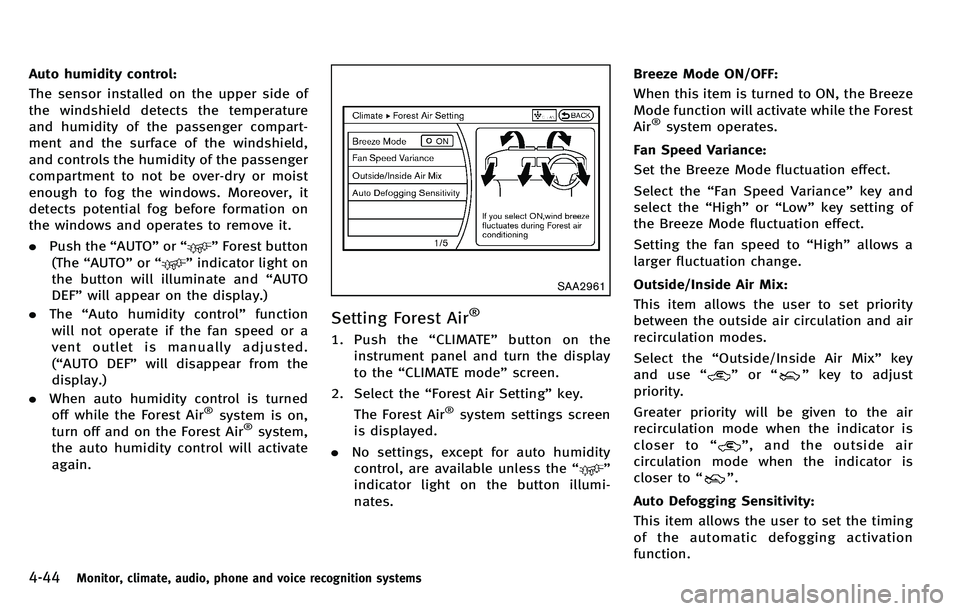
Setting Forest Air®
1. Push the “CLIMATE ”button on the
instrument panel and turn the display
to the “CLIMATE mode ”screen.
2. Select the “Forest Air Setting ”key.
The Forest Air
®system settings screen
is displayed.
. No settings, except for auto humidity
control, are available unless the “
”
indicator light on the button illumi-
nates. Breeze Mode ON/OFF:
When this item is turned to ON, the Breeze
Mode function will activate while the Forest
Air
®system operates.
Fan Speed Variance:
Set the Breeze Mode fluctuation effect.
Select the “Fan Speed Variance ”key and
select the “High ”or “Low ”key setting of
the Breeze Mode fluctuation effect.
Setting the fan speed to “High ”allows a
larger fluctuation change.
Outside/Inside Air Mix:
This item allows the user to set priority
between the outside air circulation and air
recirculation modes.
Select the “Outside/Inside Air Mix ”key
and use “
”or “”key to adjust
priority.
Greater priority will be given to the air
recirculation mode when the indicator is
closer to “
”,andtheoutsideair
circulation mode when the indicator is
closer to “
”.
Auto Defogging Sensitivity:
This item allows the user to set the timing
of the automatic defogging activation
function.
Page 218 of 522
The sensors*Aand*Bon the instrument
panel helps maintain a constant tempera-
ture. Do not put anything on or around this
sensor.
LINKING INTELLIGENT KEY
The Climate control system settings can be
memorized for each Intelligent Key. For
more details, see “Setting memory func-
tion ”in the “3. Pre-driving checks and
adjustments ”section.
IN-CABIN MICROFILTER
Without Forest Air
®system
The climate control system is equipped
with an in-cabin microfilter which collects
dirt, pollen, dust, allergen (such as pollen,
tick shell), etc. To make sure that the air
conditioner heats, defogs, and ventilates
efficiently, replace the filter in accordance
with the maintenance schedule in the
INFINITI Service and Maintenance Guide.
To replace the filter, contact an INFINITI
retailer.
The filter should be replaced if the air flow
decreases significantly or if windows fog
up easily when operating the heater or air
conditioner.
With Forest Air®system
The climate control system is equipped
with a natural grape seed polyphenol filter
which collects and neutralizes dirt, pollen,
dust, etc. To make sure that the air
conditioner heats, defogs and ventilates
efficiently, replace the filter in accordance
with the maintenance schedule in the
INFINITI Service and Maintenance Guide.
To replace the filter, contact an INFINITI
retailer.
The filter should be replaced if the air flow
decreases significantly or if windows fog
up easily when operating the heater or air
conditioner.
SERVICING CLIMATE CONTROL
The climate control system in your INFINITI
is charged with a refrigerant designed with
the environment in mind. This refrigerant
will not harm the earth ’s ozone layer.
However, special charging equipment and
lubricant are required when servicing your
INFINITI air conditioner. Using improper
refrigerants or lubricants will cause severe
damage to your climate control system.
(See “Capacities and recommended fuel/
lubricants ”in the “9. Technical and con-
sumer information ”section for climate control system refrigerant and lubricant
recommendations.)
Your INFINITI retailer will be able to service
your environmentally friendly climate con-
trol system.
WARNING
The system contains refrigerant under high
pressure. To avoid personal injury, any air
conditioner service should be done only by
an experienced technician with the proper
equipment.
Monitor, climate, audio, phone and voice recognition systems4-47
Page 237 of 522

4-66Monitor, climate, audio, phone and voice recognition systems
CAUTION
.Only operate the DVD while the vehicle
engine is running. Operating the DVD for
extended periods of time with the
engine OFF can discharge the vehicle
battery.
. Do not allow the system to get wet.
Excessive moisture such as spilled
liquids may cause the system to mal-
function.
. While playing VIDEO-CD media, this DVD
player does not guarantee complete
functionality of all VIDEO-CD formats.
Display settings
To adjust the front display mode, push the
SETTING button while the DVD is being
played, select the “Others ”key and then
select the “Display ”key.
To adjust the display ON/OFF, brightness,
tint, color and contrast, select the “Display
Adjustment ”key and then select each key.
Then you can adjust each item using the
INFINITI controller. After changes have
been made push the BACK button to save
the setting.
SAA2497
Playing a DVD
DISC·AUX button:
Park the vehicle in a safe location for the
front seat occupants to operate the DVD
drive while watching the images.
Push the DISC·AUX button on the instru-
ment panel and turn the display to the DVD
mode.
When a DVD is loaded, it will be replayed
automatically.
The operation screen will be turned on
when the DISC·AUX button located on the
instrument panel is pushed while a DVD is being played, and it will turn off auto-
matically after a period of time. To turn it
on again, push the DISC·AUX button again.
DVD operation keys:
When the DVD is playing without the
operation screen being shown, you may
use the touch screen to select items from
the displayed video. You may also use the
INFINITI controller to select an item from
the displayed video. When the operation
screen is being shown, use the INFINITI
controller or touch screen to select an item
from the displayed menus.
PAUSE:
Select the “
”key to pause the DVD. To
resume playing the DVD, use the “PLAY ”
key.
PLAY:
Select the “
”key to start playing the
DVD, for example, after pausing the DVD.
STOP:
Select the “
”key to stop playing the
DVD.
Page 268 of 522
SAA3587
DURING A CALL
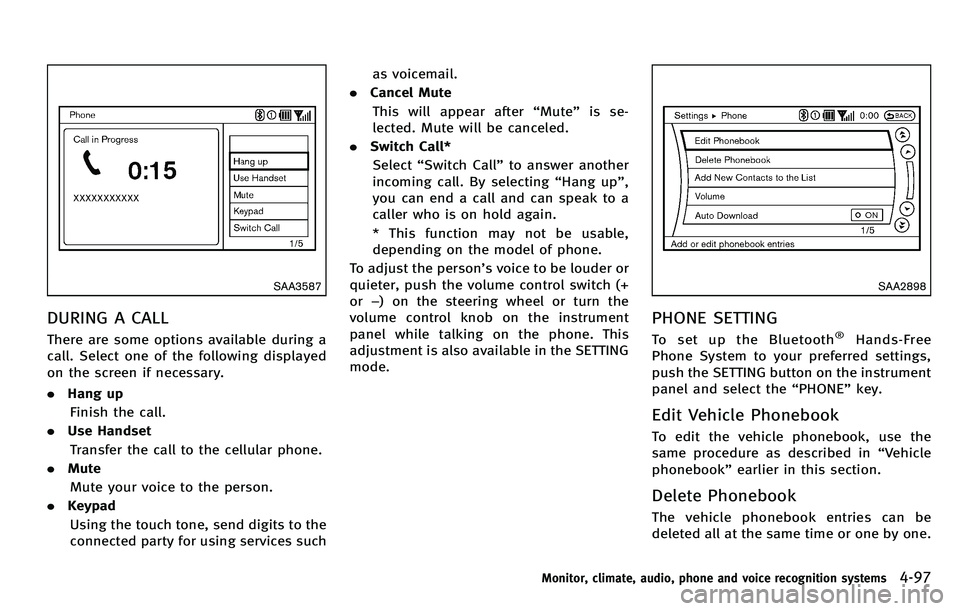
There are some options available during a
call. Select one of the following displayed
on the screen if necessary.
.Hang up
Finish the call.
. Use Handset
Transfer the call to the cellular phone.
. Mute
Mute your voice to the person.
. Keypad
Using the touch tone, send digits to the
connected party for using services such as voicemail.
. Cancel Mute
This will appear after “Mute” is se-
lected. Mute will be canceled.
. Switch Call*
Select “Switch Call ”to answer another
incoming call. By selecting “Hang up ”,
you can end a call and can speak to a
caller who is on hold again.
* This function may not be usable,
depending on the model of phone.
To adjust the person ’s voice to be louder or
quieter, push the volume control switch (+
or −) on the steering wheel or turn the
volume control knob on the instrument
panel while talking on the phone. This
adjustment is also available in the SETTING
mode.
SAA2898
PHONE SETTING
To set up the Bluetooth®Hands-Free
Phone System to your preferred settings,
push the SETTING button on the instrument
panel and select the “PHONE ”key.
Edit Vehicle Phonebook
To edit the vehicle phonebook, use the
same procedure as described in “Vehicle
phonebook ”earlier in this section.
Delete Phonebook
The vehicle phonebook entries can be
deleted all at the same time or one by one.
Monitor, climate, audio, phone and voice recognition systems4-97
Page 287 of 522
4-116Monitor, climate, audio, phone and voice recognition systems
SAA2531
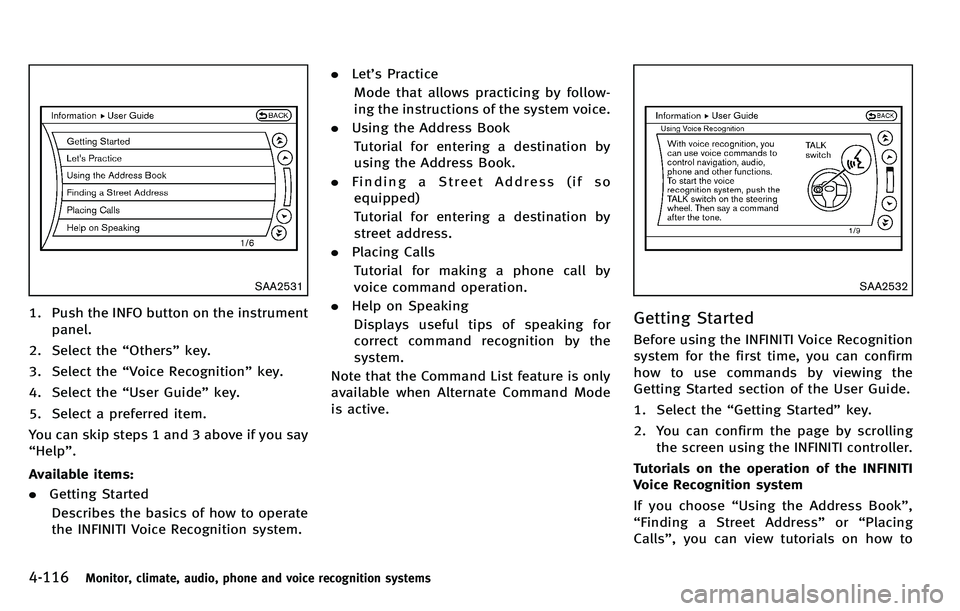
1. Push the INFO button on the instrumentpanel.
2. Select the “Others ”key.
3. Select the “Voice Recognition ”key.
4. Select the “User Guide ”key.
5. Select a preferred item.
You can skip steps 1 and 3 above if you say
“ Help ”.
Available items:
. Getting Started
Describes the basics of how to operate
the INFINITI Voice Recognition system. .
Let’s Practice
Mode that allows practicing by follow-
ing the instructions of the system voice.
. Using the Address Book
Tutorial for entering a destination by
using the Address Book.
. Finding a Street Address (if so
equipped)
Tutorial for entering a destination by
street address.
. Placing Calls
Tutorial for making a phone call by
voice command operation.
. Help on Speaking
Displays useful tips of speaking for
correct command recognition by the
system.
Note that the Command List feature is only
available when Alternate Command Mode
is active.
SAA2532
Getting Started
Before using the INFINITI Voice Recognition
system for the first time, you can confirm
how to use commands by viewing the
Getting Started section of the User Guide.
1. Select the “Getting Started ”key.
2. You can confirm the page by scrolling the screen using the INFINITI controller.
Tutorials on the operation of the INFINITI
Voice Recognition system
If you choose “Using the Address Book ”,
“ Finding a Street Address ”or “Placing
Calls” , you can view tutorials on how to
Page 299 of 522
4-128Monitor, climate, audio, phone and voice recognition systems
SAA2529
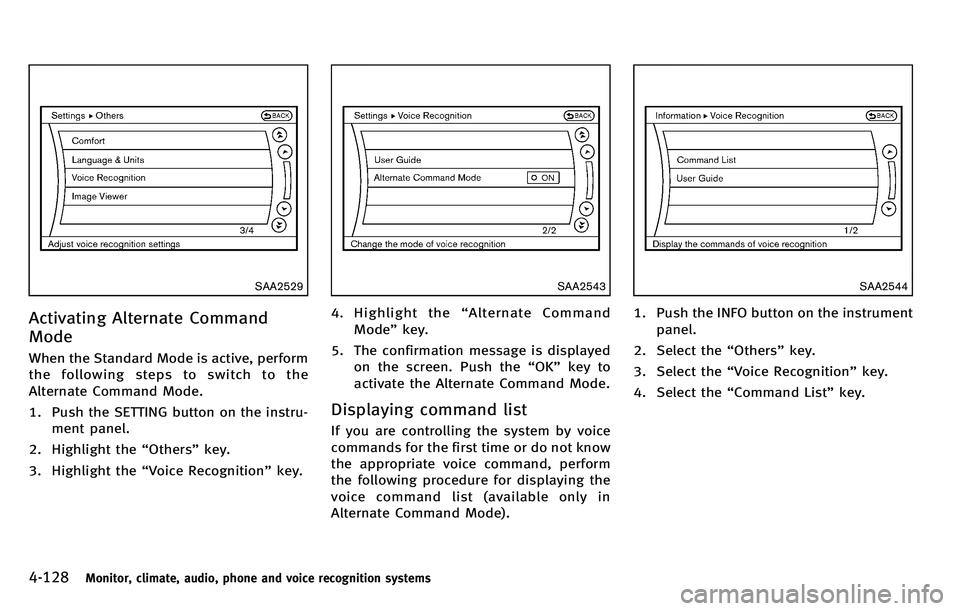
Activating Alternate Command
Mode
When the Standard Mode is active, perform
the following steps to switch to the
Alternate Command Mode.
1. Push the SETTING button on the instru-ment panel.
2. Highlight the “Others ”key.
3. Highlight the “Voice Recognition ”key.
SAA2543
4. Highlight the “Alternate Command
Mode ”key.
5. The confirmation message is displayed on the screen. Push the “OK ”key to
activate the Alternate Command Mode.
Displaying command list
If you are controlling the system by voice
commands for the first time or do not know
the appropriate voice command, perform
the following procedure for displaying the
voice command list (available only in
Alternate Command Mode).
SAA2544
1. Push the INFO button on the instrument
panel.
2. Select the “Others ”key.
3. Select the “Voice Recognition ”key.
4. Select the “Command List ”key.
Page 307 of 522
4-136Monitor, climate, audio, phone and voice recognition systems
SAA2547
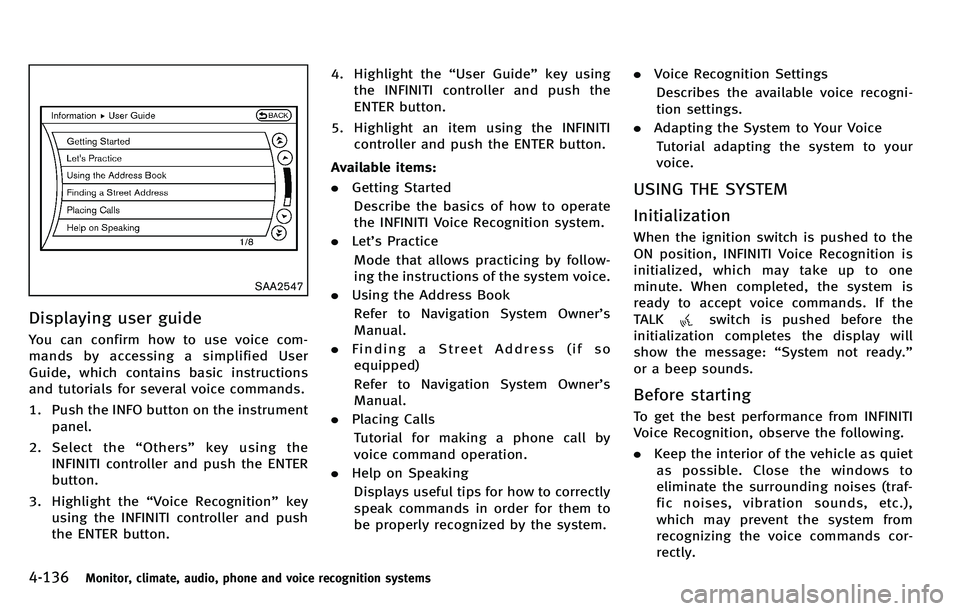
Displaying user guide
You can confirm how to use voice com-
mands by accessing a simplified User
Guide, which contains basic instructions
and tutorials for several voice commands.
1. Push the INFO button on the instrumentpanel.
2. Select the “Others ”key using the
INFINITI controller and push the ENTER
button.
3. Highlight the “Voice Recognition ”key
using the INFINITI controller and push
the ENTER button. 4. Highlight the
“User Guide ”key using
the INFINITI controller and push the
ENTER button.
5. Highlight an item using the INFINITI controller and push the ENTER button.
Available items:
. Getting Started
Describe the basics of how to operate
the INFINITI Voice Recognition system.
. Let’s Practice
Mode that allows practicing by follow-
ing the instructions of the system voice.
. Using the Address Book
Refer to Navigation System Owner ’s
Manual.
. Finding a Street Address (if so
equipped)
Refer to Navigation System Owner ’s
Manual.
. Placing Calls
Tutorial for making a phone call by
voice command operation.
. Help on Speaking
Displays useful tips for how to correctly
speak commands in order for them to
be properly recognized by the system. .
Voice Recognition Settings
Describes the available voice recogni-
tion settings.
. Adapting the System to Your Voice
Tutorial adapting the system to your
voice.
USING THE SYSTEM
Initialization
When the ignition switch is pushed to the
ON position, INFINITI Voice Recognition is
initialized, which may take up to one
minute. When completed, the system is
ready to accept voice commands. If the
TALK
switch is pushed before the
initialization completes the display will
show the message: “System not ready. ”
or a beep sounds.
Before starting
To get the best performance from INFINITI
Voice Recognition, observe the following.
. Keep the interior of the vehicle as quiet
as possible. Close the windows to
eliminate the surrounding noises (traf-
fic noises, vibration sounds, etc.),
which may prevent the system from
recognizing the voice commands cor-
rectly.
Page 323 of 522

5-10Starting and driving
SSD0659
OPERATING RANGE FOR ENGINE
START FUNCTION
The Intelligent Key can only be used for
starting the engine when the Intelligent
Key is within the specified operating range.
When the Intelligent Key battery is almost
discharged or strong radio waves are
present near the operating location, the
Intelligent Key system’s operating range
becomes narrower and may not function
properly.
If the Intelligent Key is within the operating
range, it is possible for anyone, even
someone who does not carry the Intelligent Key, to push the ignition switch to start the
engine.
.
The trunk area is not included in the
operating range but the Intelligent Key
may function.
. If the Intelligent Key is placed on the
instrument panel, rear parcel shelf,
inside the glove box or door pocket,
the Intelligent Key may not function.
. If the Intelligent Key is placed near the
door or window outside the vehicle, the
Intelligent Key may function.
SSD1021
PUSH-BUTTON IGNITION SWITCH
OPERATION
When the ignition switch is pushed without
depressing the brake pedal, the ignition
switch position will change as follows:
. Push center once to change to ACC.
. Push center two times to change to ON.
. Push center three times to change to
OFF. (No position illuminates.)
. Push center four times to return to ACC.
. Open or close any door to return to
LOCK during the OFF position.
Page 333 of 522
5-20Starting and driving
SNOW MODE
Used on snowy roads or slippery areas.
When the SNOW mode is activated, engine
output is controlled to avoid wheel spin.
Turn the SNOW mode off for normal
driving. Turn the drive mode select switch
to the SNOW position.“SNOW” appears in
the vehicle information display for 2
seconds.
ECO MODE
Adjusts engine and transmission points to
enhance fuel economy.
NOTE:
Selecting this drive mode will not neces-
sarily improve fuel economy as many
driving factors influence its effectiveness.
Operation
Turn the drive mode select switch to the
ECO position. “ECO ”appears in the vehicle
information display for 2 seconds and the
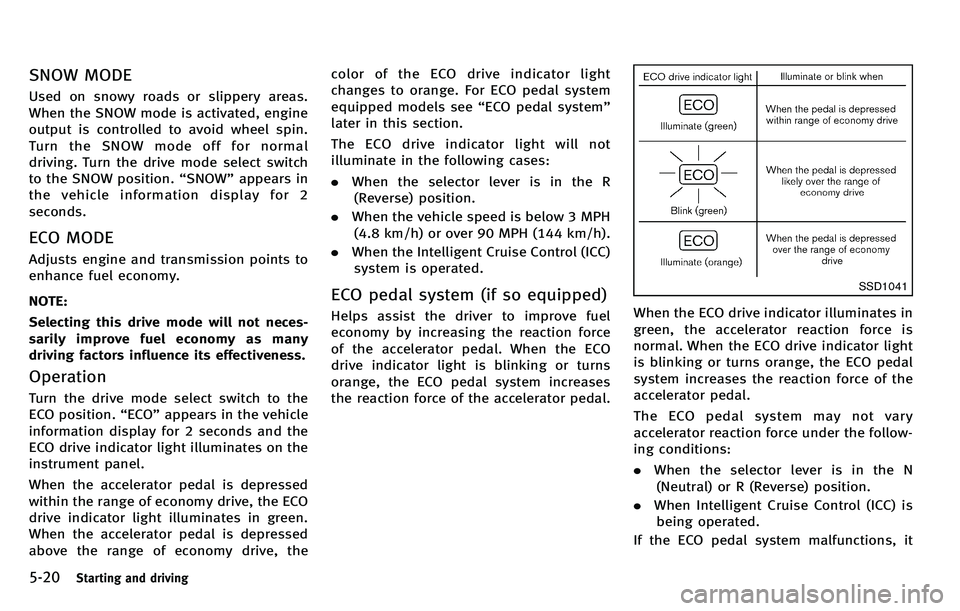
ECO drive indicator light illuminates on the
instrument panel.
When the accelerator pedal is depressed
within the range of economy drive, the ECO
drive indicator light illuminates in green.
When the accelerator pedal is depressed
above the range of economy drive, the color of the ECO drive indicator light
changes to orange. For ECO pedal system
equipped models see
“ECO pedal system ”
later in this section.
The ECO drive indicator light will not
illuminate in the following cases:
. When the selector lever is in the R
(Reverse) position.
. When the vehicle speed is below 3 MPH
(4.8 km/h) or over 90 MPH (144 km/h).
. When the Intelligent Cruise Control (ICC)
system is operated.
ECO pedal system (if so equipped)
Helps assist the driver to improve fuel
economy by increasing the reaction force
of the accelerator pedal. When the ECO
drive indicator light is blinking or turns
orange, the ECO pedal system increases
the reaction force of the accelerator pedal.
SSD1041
When the ECO drive indicator illuminates in
green, the accelerator reaction force is
normal. When the ECO drive indicator light
is blinking or turns orange, the ECO pedal
system increases the reaction force of the
accelerator pedal.
The ECO pedal system may not vary
accelerator reaction force under the follow-
ing conditions:
. When the selector lever is in the N
(Neutral) or R (Reverse) position.
. When Intelligent Cruise Control (ICC) is
being operated.
If the ECO pedal system malfunctions, it
Page 337 of 522

5-24Starting and driving
SSD0672
Lane departure warning light (orange)
LDW system operation
The LDW system provides a lane departure
warning function when the vehicle is driven
at speeds of approximately 45 MPH (70
km/h) and above. When the vehicle
approaches either the left or the right side
of the traveling lane, a warning chime will
sound and the lane departure warning light
(orange) on the instrument panel will blink
to alert the driver.
The warning function will stop when the
vehicle returns inside of the lane markers.
The LDW system is not designed to warnunder the following conditions.
.
When you operate the lane change
signal and change traveling lanes in
the direction of the signal. (The LDW
system will become operable again
approximately 2 seconds after the lane
change signal is turned off.)
. When the vehicle speed lowers to less
than approximately 45 MPH (70 km/h).
. When the Blind Spot Intervention (BSI)
system activates an audible warning or
brake control.
After the above conditions have finished
and the necessary operating conditions are
satisfied, the LDW functions will resume.
SIC4335
Warning systems switch
The warning systems switch is used to turn
on and off the LDW system when it is
activated using the settings menu on the
center display. See “How to enable/disable
the LDW system using the settings menu ”
later in this section.
When the warning systems switch is turned
off, the indicator
*1on the switch is off.
The indicator will also be off if the LDW, the
Blind Spot Warning (BSW) and the Forward
Collision Warning (FCW) systems are deac-
tivated.
For the BSW and FCW systems, see “Blind
Spot Warning (BSW) system/Blind Spot