sensor INFINITI M35 2006 Factory Service Manual
[x] Cancel search | Manufacturer: INFINITI, Model Year: 2006, Model line: M35, Model: INFINITI M35 2006Pages: 5621, PDF Size: 65.56 MB
Page 1021 of 5621
![INFINITI M35 2006 Factory Service Manual BL-82
INTELLIGENT KEY SYSTEM
Revision: 2006 January2006 M35/M45
CAUTION:
When CAN COMM 1 [U1000] and CAN COMM 2 [U1010] are displayed, give priority to performing trouble diagnosis.
DATA MONITOR
INTEL](/img/42/57023/w960_57023-1020.png "INFINITI M35 2006 Factory Service Manual BL-82
INTELLIGENT KEY SYSTEM
Revision: 2006 January2006 M35/M45
CAUTION:
When CAN COMM 1 [U1000] and CAN COMM 2 [U1010] are displayed, give priority to performing trouble diagnosis.
DATA MONITOR
INTEL")
BL-82
INTELLIGENT KEY SYSTEM
Revision: 2006 January2006 M35/M45
CAUTION:
When CAN COMM 1 [U1000] and CAN COMM 2 [U1010] are displayed, give priority to performing trouble diagnosis.
DATA MONITOR
INTELLIGENT KEY
[B2552]Internal malfunction is detected in Intelligent Key unitReplace Intelligent Key
unit.BL-163
IGN POWER CIRCUIT
[B2553]It continues for 2 seconds or more that ON power sup-
ply input to Intelligent Key unit is excessively low when
the power supply position is in ON positionCheck Intelligent Key
unit ON power supply
inputBL-163
ACC POWER CIRCUIT
[B2554]It continues for 2 seconds or more that ACC power
supply input to Intelligent Key unit is excessively low
when the power supply position is in ACC or ON posi-
tionCheck Intelligent Key
unit ACC power supply
inputBL-164
STOP LAMP CIRCUIT
[B2555]5V or less is detected at both the stop lamp switch sig-
nal input circuit that is input to Intelligent Key unit and
the monitor input before stop lamp switchCheck stop lamp switchBL-167
ENG START SW
[B2556]Condition that push-button ignition switch is pushed is
detected continuously for 100 seconds or moreCheck push-button igni-
tion switchBL-168
VEHICLE SPEED
[B2557]Some differences occur on one or more vehicle speed
inputs of Intelligent Key unitCheck vehicle speed sig-
nalBL-169
SHIFT POSITION
[B2558]
There is a difference between the shift position input
via CAN communication and the P position input by
detent switch
Vehicle speed (5 km/h or more) is detected continu-
ously for 10 seconds or more even if the shift posi-
tion is detected in P position when the power supply
position is in ON positionCheck shift position inputBL-172
PDU
[B2559]Internal malfunction is detected in PDU Replace PDUBL-174
START POW SUP CIRC
[B2560]Though the engine start operation is not performed,
starter relay in IPDM E/R is ONCheck starter power sup-
plyBL-174
LOW VOLTAGE
[B2562]Battery power supply input to Intelligent Key unit (8.8V
or less) is detected continuously for 1.5 seconds or
moreCheck battery low volt-
ageBL-177
HI VOLTAGE
[B2563]Battery power supply input to Intelligent Key unit (18V
or more) is detected continuously for 90 seconds or
moreCheck for battery high
voltageBL-178
NATS MALFUNCTION
[B2590]Malfunction is detected in immobilizer systemCheck (IVIS) NATS trou-
ble diagnosis procedureBL-248
Suspect Systems
[DTC]Diagnostic item is detected when... Repair work Reference page
Monitor item Content
DR REQ SW Indicates [ON/OFF] condition of door request switch (driver side).
AS REQ SW Indicates [ON/OFF] condition of door request switch (passenger side).
BD/TR REQ SW Indicates [ON/OFF] condition of trunk opener request switch.
ON POS Indicates [ON/OFF] condition of ignition switch in ON position.
ACC POS Indicates [ON/OFF] condition of ignition switch in ACC position.
DOOR STAT SW Indicates [ON/OFF] condition of door unlock sensor.
STOP LAMP SW Indicates [ON/OFF] condition of stop lamp switch.
P RANGE SW Indicates [ON/OFF] condition of park position switch.
TR CANCEL SW* Indicates [ON/OFF] condition of trunk cancel switch.
DOOR LOCK SIG* Indicates [ON/OFF] condition of door lock signal from Intelligent Key remote controller button.
DOOR UNLOCK SIG* Indicates [ON/OFF] condition of door unlock signal from Intelligent Key remote controller button.
KEYLESS TRUNK* Indicates [ON/OFF] condition of trunk open signal from Intelligent Key remote controller button.
Page 1026 of 5621

INTELLIGENT KEY SYSTEM
BL-87
C
D
E
F
G
H
J
K
L
MA
B
BL
Revision: 2006 January2006 M35/M45
REMOTE KEYLESS ENTRY FUNCTION MALFUNCTION
NOTE:
Before performing the diagnosis in the following table, check “Trouble Diagnosis Procedure”. Refer to BL-
78, "Trouble Diagnosis Procedure" .
Make sure that vehicle is under the condition shown in “Conditions of vehicle” before starting diagnosis,
and check each symptom.
If the following “symptoms” are detected, check systems shown in the “Diagnosis/service procedure” col-
umn in this order.
Conditions of Vehicle (Operating Conditions)
Intelligent Key is out of key slot.
Ignition switch is not ON position.
All doors are closed.
Selective unlock function does not operate by
door request switch (passenger side) (other
door lock function operate).1.Check “SELECT UNLOCK FUNCTION” setting in
“WORK SUPPORT”.BL-83
2. Replace Intelligent Key unit.BL-125
Auto lock function does not operate.1.Check “AUTO RELOCK TIMER” setting in “WORK
SUPPORT”.BL-832. Check door switch.BL-96
3. Check key slot.BL-94
4. Replace BCM.BCS-17
Key reminder function does not operate.1.Check “ANTI KEY LOCK IN FUNCTION” setting in
“WORK SUPPORT”.BL-83
2. Check door switch.BL-96
3. Check inside key antenna.BL-112
4. Check unlock sensor.BL-105
5. Check Intelligent Key battery inspection.BL-126
6. Replace Intelligent Key unit.BL-125
Symptom Diagnosis/service procedure Reference page
Symptom Diagnosis/service procedureReference
page
All of the remote keyless entry functions
do not operate.1. Check Intelligent Key battery inspection.BL-126
2. Replace Intelligent Key unit.BL-125
Selective unlock function does not operate
by Intelligent Key.1.Check “SELECT UNLOCK FUNCTION” setting in “WORK SUP-
PORT”.BL-83
2. Check Intelligent Key battery inspection.BL-126
3. Replace Intelligent Key unit.BL-125
Auto lock function does not operate prop-
erly.1. Check “AUTO RELOCK TIMER” setting in “WORK SUPPORT”.BL-832. Check door switch.BL-96
3. Check key slot.BL-94
4. Replace BCM.BCS-17
Key reminder function does not operate.1.Check “ANTI KEY LOCK IN FUNCTION” setting in “WORK SUP-
PORT”.BL-83
2. Check door switch.BL-96
3. Check inside key antenna.BL-112
4. Check unlock sensor.BL-105
5. Check Intelligent Key battery inspection.BL-126
6. Replace Intelligent Key unit.BL-125
Page 1044 of 5621

INTELLIGENT KEY SYSTEM
BL-105
C
D
E
F
G
H
J
K
L
MA
B
BL
Revision: 2006 January2006 M35/M45
5. CHECK INTELLIGENT KEY UNIT OUTPUT SIGNAL
1. Connect Intelligent Key unit connector.
2. Check voltage between Intelligent Key unit connector and ground.
OK or NG
OK >> Check the condition of harness and connector.
NG >> Replace Intelligent Key unit.
Check Unlock SensorNIS001XS
1. CHECK UNLOCK SENSOR POWER SUPPLY
With CONSULT-II
Check unlock sensor (“DOOR STAT SW”) in “DATA MONITOR” mode.
Without CONSULT-II
Check voltage between Intelligent Key unit connector and ground.
OK or NG
OK >> Unlock sensor is OK.
NG >> GO TO 2.
Terminals
Voltage (V)
(Approx.) (+)
(–)
Intelligent Key unit
connectorTerminal
M32 25 Ground 5
PIIB6334E
Monitor item Condition
DOOR STAT SWFront door lock (driver side) LOCK : ON
Front door lock (driver side) UNLOCK : OFF
PIIB6399E
Terminals
Front door
lock
(driver side )
conditionVoltage (V)
(Approx.) (+)
(–)
Intelligent Key
unit connectorTerminal
M32 26 GroundLocked Battery voltage
Unlocked 0
PIIB6338E
Page 1045 of 5621

BL-106
INTELLIGENT KEY SYSTEM
Revision: 2006 January2006 M35/M45
2. CHECK UNLOCK SENSOR CIRCUIT
1. Turn ignition switch OFF.
2. Disconnect Intelligent Key unit and front door lock assembly (driver side) connector.
3. Check continuity between Intelligent Key unit connector and front door lock assembly (driver side) con-
nector.
4. Check continuity between Intelligent Key unit connector and
ground.
OK or NG
OK >> GO TO 3.
NG >> Repair or replace harness between Intelligent Key unit and front door lock assembly (driver side).
3. CHECK UNLOCK SENSOR GROUND CIRCUIT
Check continuity between front door lock assembly (driver side) connector and ground.
OK or NG
OK >> GO TO 4.
NG >> Repair or replace harness.
4. CHECK INTELLIGENT KEY UNIT OUTPUT SIGNAL
1. Connect Intelligent Key unit harness connector.
2. Check voltage between Intelligent Key unit connector and ground.
OK or NG
OK >> Replace front door lock assembly (driver side).
NG >> Replace Intelligent Key unit.
AB
Continuity
Intelligent Key
unit connectorTe r m i n a l Front door lock
assembly (driver
side) connectorTerminal
M32 26 D14 3 Yes
A
GroundContinuity
Intelligent Key unit
connectorTerminal
M32 26 No
PIIB6339E
Front door lock
assembly (driver side)
connectorTerminal
GroundContinuity
D14 4 Yes
PIIB6340E
Terminals
Voltage (V)
(Approx.) (+)
(–)
Intelligent Key unit
connectorTerminal
M32 26 Ground Battery voltage
PIIB6338E
Page 1060 of 5621

INTELLIGENT KEY SYSTEM
BL-121
C
D
E
F
G
H
J
K
L
MA
B
BL
Revision: 2006 January2006 M35/M45
Check Trunk Lid Opener Cancel SwitchNIS001Y0
1. CHECK TRUNK LID OPENER CANCEL SWITCH
With CONSULT-II
Check trunk lid opener cancel sensor (“TR CANCEL SW”) in “DATA MONITOR” mode.
Without CONSULT-II
1. Turn ignition switch OFF.
2. Check voltage between Intelligent Key unit connector and ground.
OK or NG
OK >> Trunk lid opener cancel switch is OK.
NG >> GO TO 2.
2. CHECK TRUNK LID OPENER CANCEL SWITCH CIRCUIT
1. Disconnect Intelligent Key unit and trunk lid opener cancel switch connector.
2. Check continuity between Intelligent Key unit connector and trunk lid opener cancel switch connector.
3. Check continuity between Intelligent Key unit connector and
ground.
OK or NG
OK >> GO TO 3.
NG >> Repair or replace harness between Intelligent Key unit and trunk lid opener cancel switch.
Monitor item Condition
TR CANCEL SWTrunk lid opener cancel switch ON : ON
Trunk lid opener cancel switch OFF : OFF
PIIB6400E
Terminals
Trunk lid
opener cancel
switch condi-
tionVoltage (V)
(Approx.) (+)
(–)
Intelligent Key
unit connectorTerminal
M32 23 GroundON 0
OFF (Cancel) 5
PIIB6390E
AB
Continuity
Intelligent Key
unit connectorTe r m i n a l Trunk lid opener
cancel switch
connectorTerminal
M32 23 M99 1 Yes
A
GroundContinuity
Intelligent Key unit
connectorTerminal
M32 23 No
PIIB6393E
Page 1092 of 5621
![INFINITI M35 2006 Factory Service Manual INTELLIGENT KEY SYSTEM/ENGINE START FUNCTION
BL-153
C
D
E
F
G
H
J
K
L
MA
B
BL
Revision: 2006 January2006 M35/M45
CAUTION:
When CAN COMM 1 [U1000] and CAN COMM 2 [U1010] are displayed, give priority to](/img/42/57023/w960_57023-1091.png "INFINITI M35 2006 Factory Service Manual INTELLIGENT KEY SYSTEM/ENGINE START FUNCTION
BL-153
C
D
E
F
G
H
J
K
L
MA
B
BL
Revision: 2006 January2006 M35/M45
CAUTION:
When CAN COMM 1 [U1000] and CAN COMM 2 [U1010] are displayed, give priority to")
INTELLIGENT KEY SYSTEM/ENGINE START FUNCTION
BL-153
C
D
E
F
G
H
J
K
L
MA
B
BL
Revision: 2006 January2006 M35/M45
CAUTION:
When CAN COMM 1 [U1000] and CAN COMM 2 [U1010] are displayed, give priority to performing trouble diagnosis.
DATA MONITOR
ENG START SW
[B2556]Condition that push-button ignition switch is pushed is
detected continuously for 100 seconds or moreCheck push-button igni-
tion switchBL-168
VEHICLE SPEED
[B2557]Some differences occur on one or more vehicle speed
inputs of Intelligent Key unitCheck vehicle speed sig-
nalBL-169
SHIFT POSITION
[B2558]
There is a difference between the shift position input
via CAN communication and the P position input by
detent switch
Vehicle speed (5 km/h or more) is detected continu-
ously for 10 seconds or more even if the shift posi-
tion is detected in P position when the power supply
position is in ON positionCheck shift position inputBL-172
PDU
[B2559]Internal malfunction is detected in PDU Replace PDUBL-174
START POW SUP CIRC
[B2560]Though the engine start operation is not performed,
starter relay in IPDM E/R is ONCheck starter power sup-
plyBL-174
LOW VOLTAGE
[B2562]Battery power supply input to Intelligent Key unit (8.8V
or less) is detected continuously for 1.5 seconds or
moreCheck battery low volt-
ageBL-177
HI VOLTAGE
[B2563]Battery power supply input to Intelligent Key unit (18V
or more) is detected continuously for 90 seconds or
moreCheck for battery high
voltageBL-178
NATS MALFUNCTION
[B2590]Malfunction is detected in immobilizer systemCheck (IVIS) NATS trou-
ble diagnosis procedureBL-268
Suspect Systems
[DTC]Diagnostic item is detected when... Repair work Reference page
Monitor item Content
DR REQ SW Indicates [ON/OFF] condition of door request switch (driver side).
AS REQ SW Indicates [ON/OFF] condition of door request switch (passenger side).
BD/TR REQ SW Indicates [ON/OFF] condition of trunk opener request switch.
ON POS Indicates [ON/OFF] condition of ignition switch in ON position.
ACC POS Indicates [ON/OFF] condition of ignition switch in ACC position.
DOOR STAT SW Indicates [ON/OFF] condition of door unlock sensor.
STOP LAMP SW Indicates [ON/OFF] condition of stop lamp switch.
P RANGE SW Indicates [ON/OFF] condition of park position switch.
TR CANCEL SW* Indicates [ON/OFF] condition of trunk cancel switch.
DOOR LOCK SIG* Indicates [ON/OFF] condition of door lock signal from Intelligent Key remote controller button.
DOOR UNLOCK SIG* Indicates [ON/OFF] condition of door unlock signal from Intelligent Key remote controller button.
KEYLESS TRUNK* Indicates [ON/OFF] condition of trunk open signal from Intelligent Key remote controller button.
KEYLESS PANIC* Indicates [ON/OFF] condition of panic alarm signal from Intelligent Key remote controller button.
DOOR SW DR*Indicates [OPEN/CLOSE] condition of front door switch driver side from BCM via CAN communica-
tion line.
DOOR SW AS*Indicates [OPEN/CLOSE] condition of front door switch passenger side from BCM via CAN commu-
nication line.
DOOR SW RR* Indicates [OPEN/CLOSE] condition of rear door switch LH from BCM via CAN communication line.
DOOR SW RL* Indicates [OPEN/CLOSE] condition of rear door switch RH from BCM via CAN communication line.
DOOR BK SW* Indicates [OPEN/CLOSE] condition of back door switch from BCM via CAN communication line.
Page 1283 of 5621
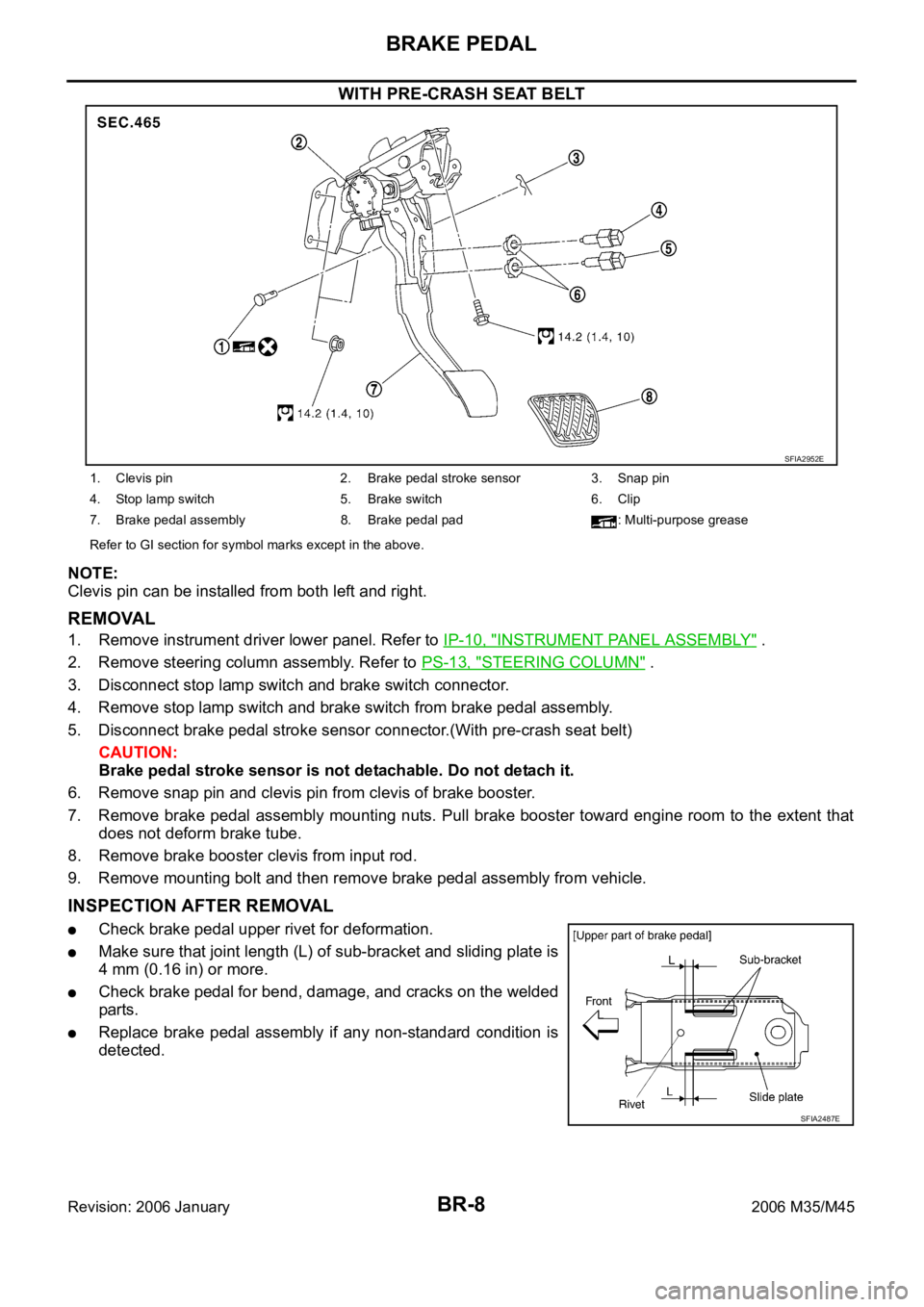
BR-8
BRAKE PEDAL
Revision: 2006 January2006 M35/M45
WITH PRE-CRASH SEAT BELT
NOTE:
Clevis pin can be installed from both left and right.
REMOVAL
1. Remove instrument driver lower panel. Refer to IP-10, "INSTRUMENT PANEL ASSEMBLY" .
2. Remove steering column assembly. Refer to PS-13, "
STEERING COLUMN" .
3. Disconnect stop lamp switch and brake switch connector.
4. Remove stop lamp switch and brake switch from brake pedal assembly.
5. Disconnect brake pedal stroke sensor connector.(With pre-crash seat belt)
CAUTION:
Brake pedal stroke sensor is not detachable. Do not detach it.
6. Remove snap pin and clevis pin from clevis of brake booster.
7. Remove brake pedal assembly mounting nuts. Pull brake booster toward engine room to the extent that
does not deform brake tube.
8. Remove brake booster clevis from input rod.
9. Remove mounting bolt and then remove brake pedal assembly from vehicle.
INSPECTION AFTER REMOVAL
Check brake pedal upper rivet for deformation.
Make sure that joint length (L) of sub-bracket and sliding plate is
4 mm (0.16 in) or more.
Check brake pedal for bend, damage, and cracks on the welded
parts.
Replace brake pedal assembly if any non-standard condition is
detected.
SFIA2952E
1. Clevis pin 2. Brake pedal stroke sensor 3. Snap pin
4. Stop lamp switch 5. Brake switch 6. Clip
7. Brake pedal assembly 8. Brake pedal pad : Multi-purpose grease
Refer to GI section for symbol marks except in the above.
SFIA2487E
Page 1298 of 5621
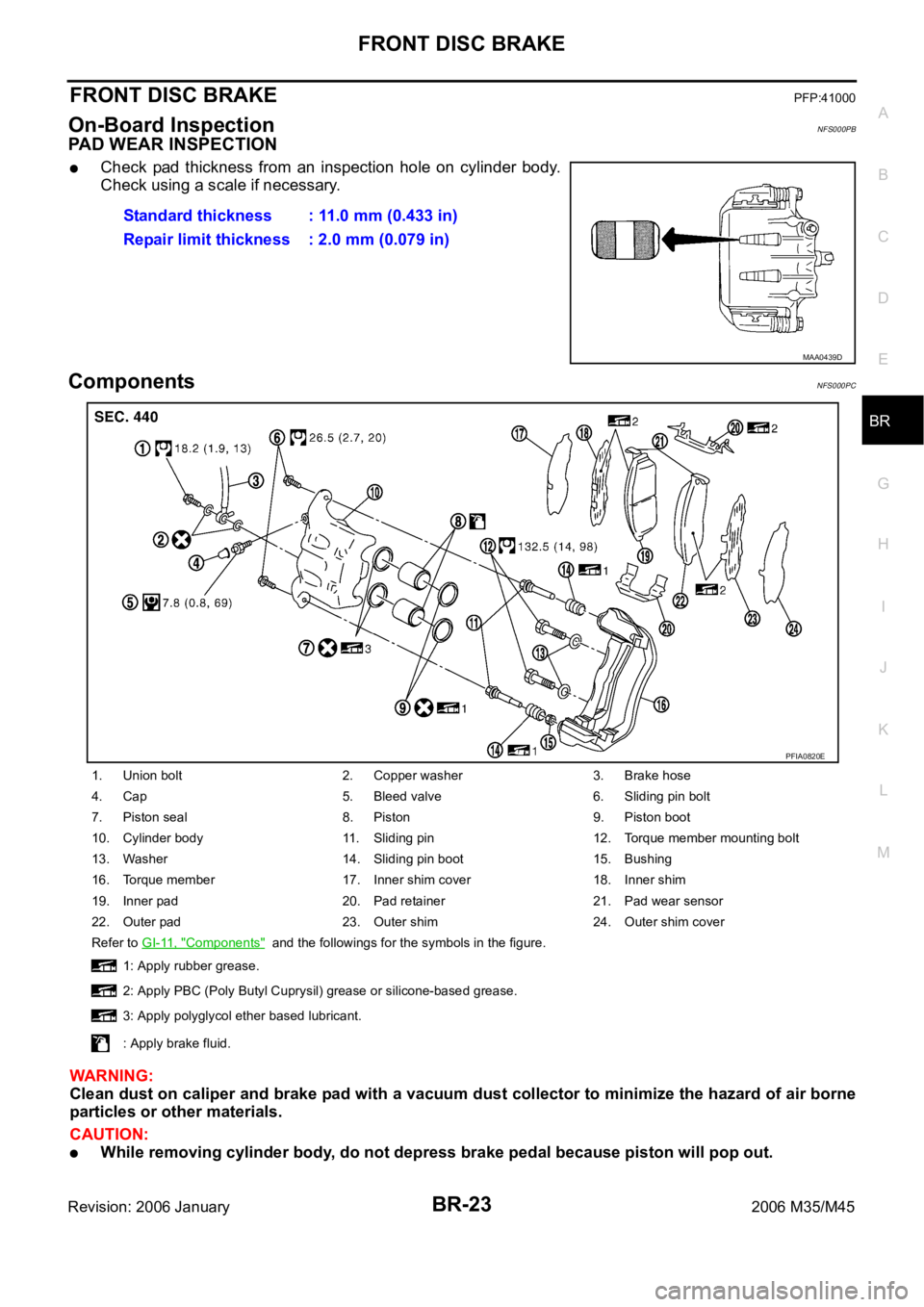
FRONT DISC BRAKE
BR-23
C
D
E
G
H
I
J
K
L
MA
B
BR
Revision: 2006 January2006 M35/M45
FRONT DISC BRAKEPFP:41000
On-Board InspectionNFS000PB
PAD WEAR INSPECTION
Check pad thickness from an inspection hole on cylinder body.
Check using a scale if necessary.
ComponentsNFS000PC
WAR NING :
Clean dust on caliper and brake pad with a vacuum dust collector to minimize the hazard of air borne
particles or other materials.
CAUTION:
While removing cylinder body, do not depress brake pedal because piston will pop out. Standard thickness : 11.0 mm (0.433 in)
Repair limit thickness : 2.0 mm (0.079 in)
MAA0439D
1. Union bolt 2. Copper washer 3. Brake hose
4. Cap 5. Bleed valve 6. Sliding pin bolt
7. Piston seal 8. Piston 9. Piston boot
10. Cylinder body 11. Sliding pin 12. Torque member mounting bolt
13. Washer 14. Sliding pin boot 15. Bushing
16. Torque member 17. Inner shim cover 18. Inner shim
19. Inner pad 20. Pad retainer 21. Pad wear sensor
22. Outer pad 23. Outer shim 24. Outer shim cover
Refer to GI-11, "
Components" and the followings for the symbols in the figure.
1: Apply rubber grease.
2: Apply PBC (Poly Butyl Cuprysil) grease or silicone-based grease.
3: Apply polyglycol ether based lubricant.
: Apply brake fluid.
PFIA0820E
Page 1299 of 5621
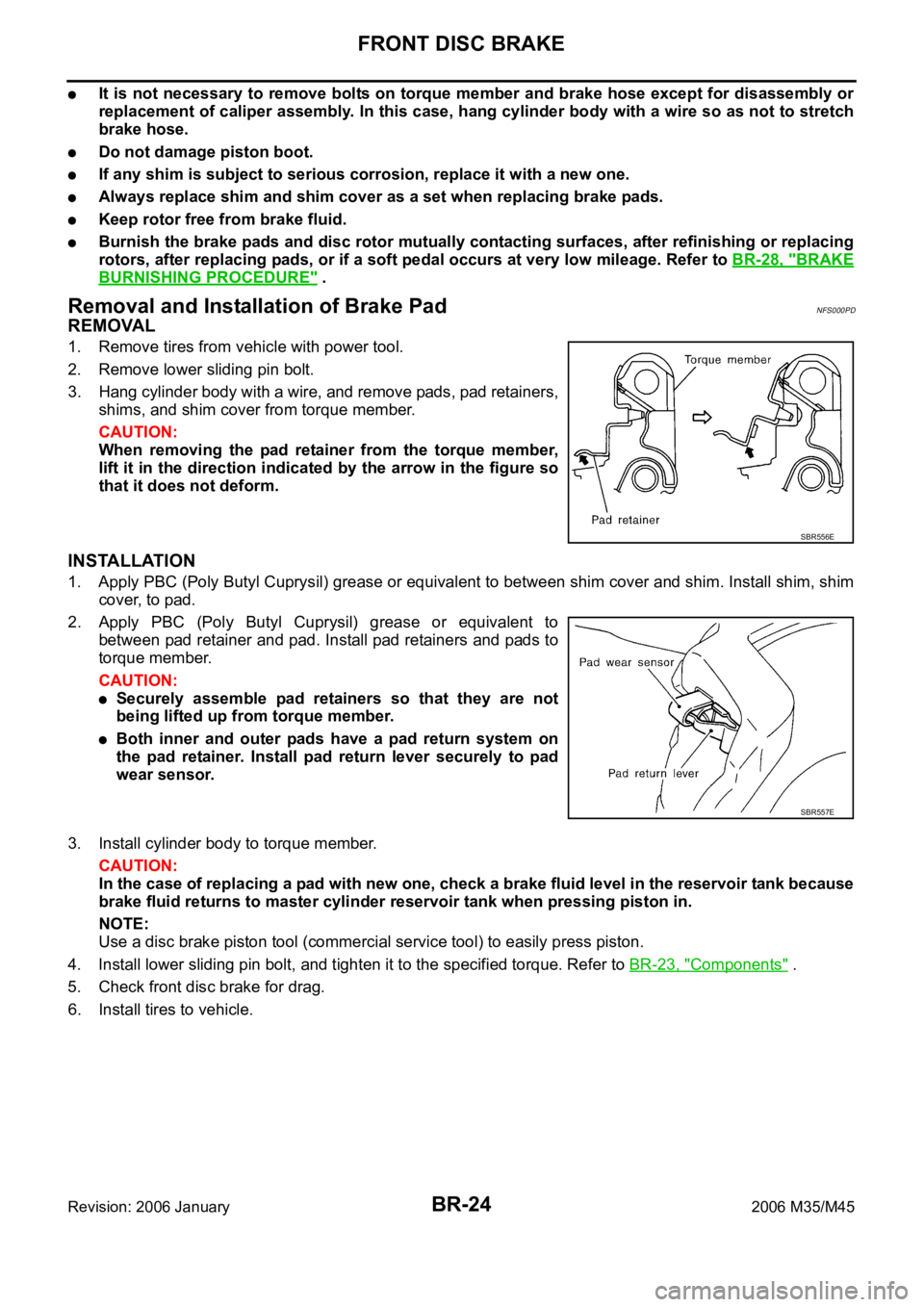
BR-24
FRONT DISC BRAKE
Revision: 2006 January2006 M35/M45
It is not necessary to remove bolts on torque member and brake hose except for disassembly or
replacement of caliper assembly. In this case, hang cylinder body with a wire so as not to stretch
brake hose.
Do not damage piston boot.
If any shim is subject to serious corrosion, replace it with a new one.
Always replace shim and shim cover as a set when replacing brake pads.
Keep rotor free from brake fluid.
Burnish the brake pads and disc rotor mutually contacting surfaces, after refinishing or replacing
rotors, after replacing pads, or if a soft pedal occurs at very low mileage. Refer to BR-28, "
BRAKE
BURNISHING PROCEDURE" .
Removal and Installation of Brake PadNFS000PD
REMOVAL
1. Remove tires from vehicle with power tool.
2. Remove lower sliding pin bolt.
3. Hang cylinder body with a wire, and remove pads, pad retainers,
shims, and shim cover from torque member.
CAUTION:
When removing the pad retainer from the torque member,
lift it in the direction indicated by the arrow in the figure so
that it does not deform.
INSTALLATION
1. Apply PBC (Poly Butyl Cuprysil) grease or equivalent to between shim cover and shim. Install shim, shim
cover, to pad.
2. Apply PBC (Poly Butyl Cuprysil) grease or equivalent to
between pad retainer and pad. Install pad retainers and pads to
torque member.
CAUTION:
Securely assemble pad retainers so that they are not
being lifted up from torque member.
Both inner and outer pads have a pad return system on
the pad retainer. Install pad return lever securely to pad
wear sensor.
3. Install cylinder body to torque member.
CAUTION:
In the case of replacing a pad with new one, check a brake fluid level in the reservoir tank because
brake fluid returns to master cylinder reservoir tank when pressing piston in.
NOTE:
Use a disc brake piston tool (commercial service tool) to easily press piston.
4. Install lower sliding pin bolt, and tighten it to the specified torque. Refer to BR-23, "
Components" .
5. Check front disc brake for drag.
6. Install tires to vehicle.
SBR556E
SBR557E
Page 1304 of 5621

REAR DISC BRAKE
BR-29
C
D
E
G
H
I
J
K
L
MA
B
BR
Revision: 2006 January2006 M35/M45
REAR DISC BRAKEPFP:44000
On-Board InspectionNFS000PG
PAD WEAR INSPECTION
Check pad thickness from an inspection hole on cylinder body.
Check using a scale if necessary.
ComponentsNFS000PH
Standard
Standard thickness : 8.5 mm (0.335 in)
Repair limit thickness : 2.0 mm (0.079 in)
BRA0010D
1. Union bolt 2. Brake hose 3. Copper washer
4. Cap 5. Bleed valve 6. Sliding pin bolt
7. Cylinder body 8. Piston seal 9. Piston
10. Piston boot 11. Retaining ring 12. Inner shim cover
13. Inner shim 14. Inner pad 15. Pad retainer
16. Outer pad 17. Outer shim 18. Sliding pin boot
19. Bushing 20. Torque member mounting bolt 21. Washer
22. Torque member 23. Pad wear sensor 24. Inner pad (RH)
Refer to GI-11, "
Components" and the followings for the symbols in the figure.
1: Apply rubber grease.
2: Apply PBC (Poly Butyl Cuprysil) grease or silicone-based grease.
PFIA0705J