sensor INFINITI M35 2006 Factory Service Manual
[x] Cancel search | Manufacturer: INFINITI, Model Year: 2006, Model line: M35, Model: INFINITI M35 2006Pages: 5621, PDF Size: 65.56 MB
Page 613 of 5621
ATC-166
REFRIGERANT LINES
Revision: 2006 January2006 M35/M45
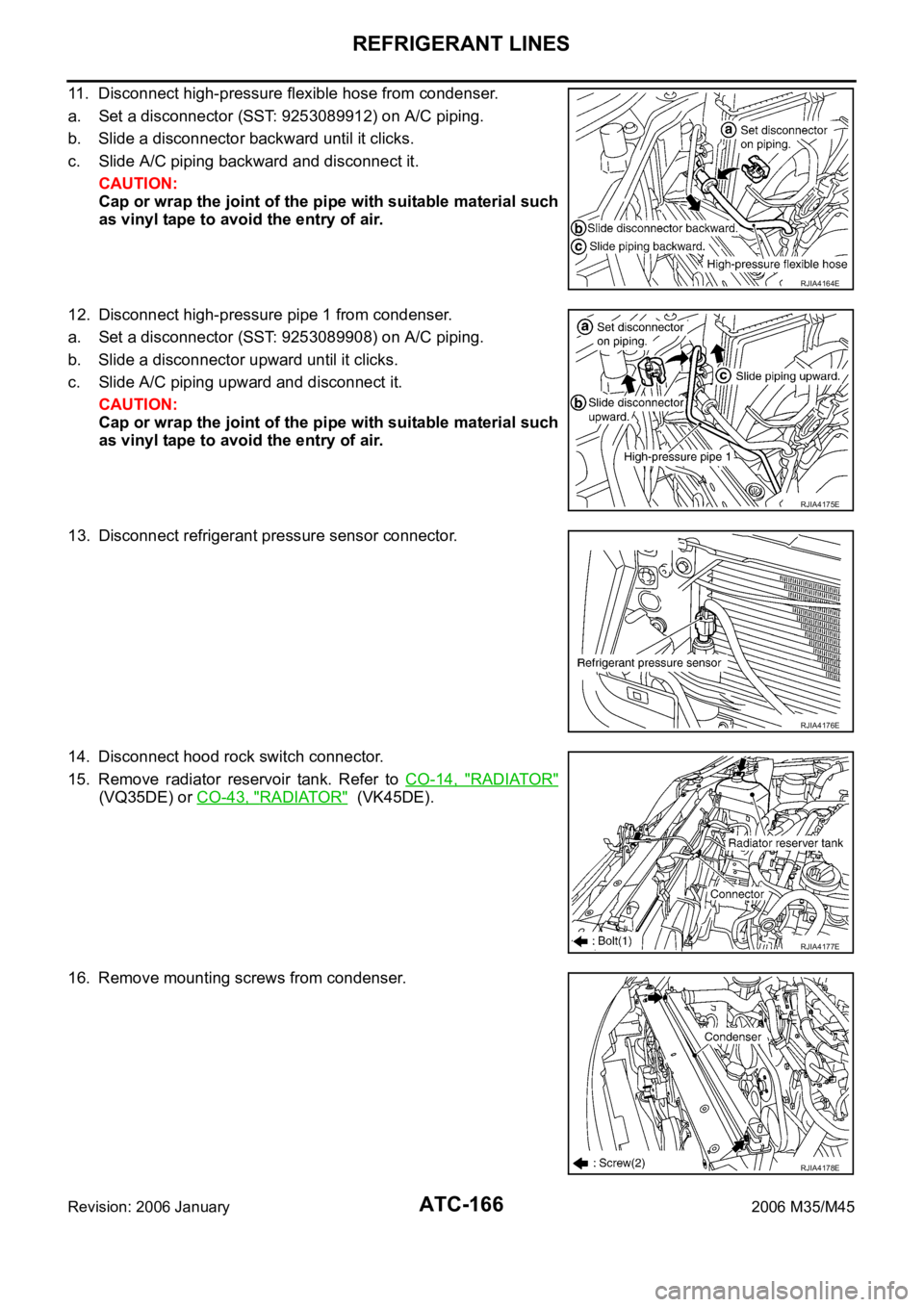
11. Disconnect high-pressure flexible hose from condenser.
a. Set a disconnector (SST: 9253089912) on A/C piping.
b. Slide a disconnector backward until it clicks.
c. Slide A/C piping backward and disconnect it.
CAUTION:
Cap or wrap the joint of the pipe with suitable material such
as vinyl tape to avoid the entry of air.
12. Disconnect high-pressure pipe 1 from condenser.
a. Set a disconnector (SST: 9253089908) on A/C piping.
b. Slide a disconnector upward until it clicks.
c. Slide A/C piping upward and disconnect it.
CAUTION:
Cap or wrap the joint of the pipe with suitable material such
as vinyl tape to avoid the entry of air.
13. Disconnect refrigerant pressure sensor connector.
14. Disconnect hood rock switch connector.
15. Remove radiator reservoir tank. Refer to CO-14, "
RADIATOR"
(VQ35DE) or CO-43, "RADIATOR" (VK45DE).
16. Remove mounting screws from condenser.
RJIA4164E
RJIA4175E
RJIA4176E
RJIA4177E
RJIA4178E
Page 614 of 5621
REFRIGERANT LINES
ATC-167
C
D
E
F
G
H
I
K
L
MA
B
AT C
Revision: 2006 January2006 M35/M45
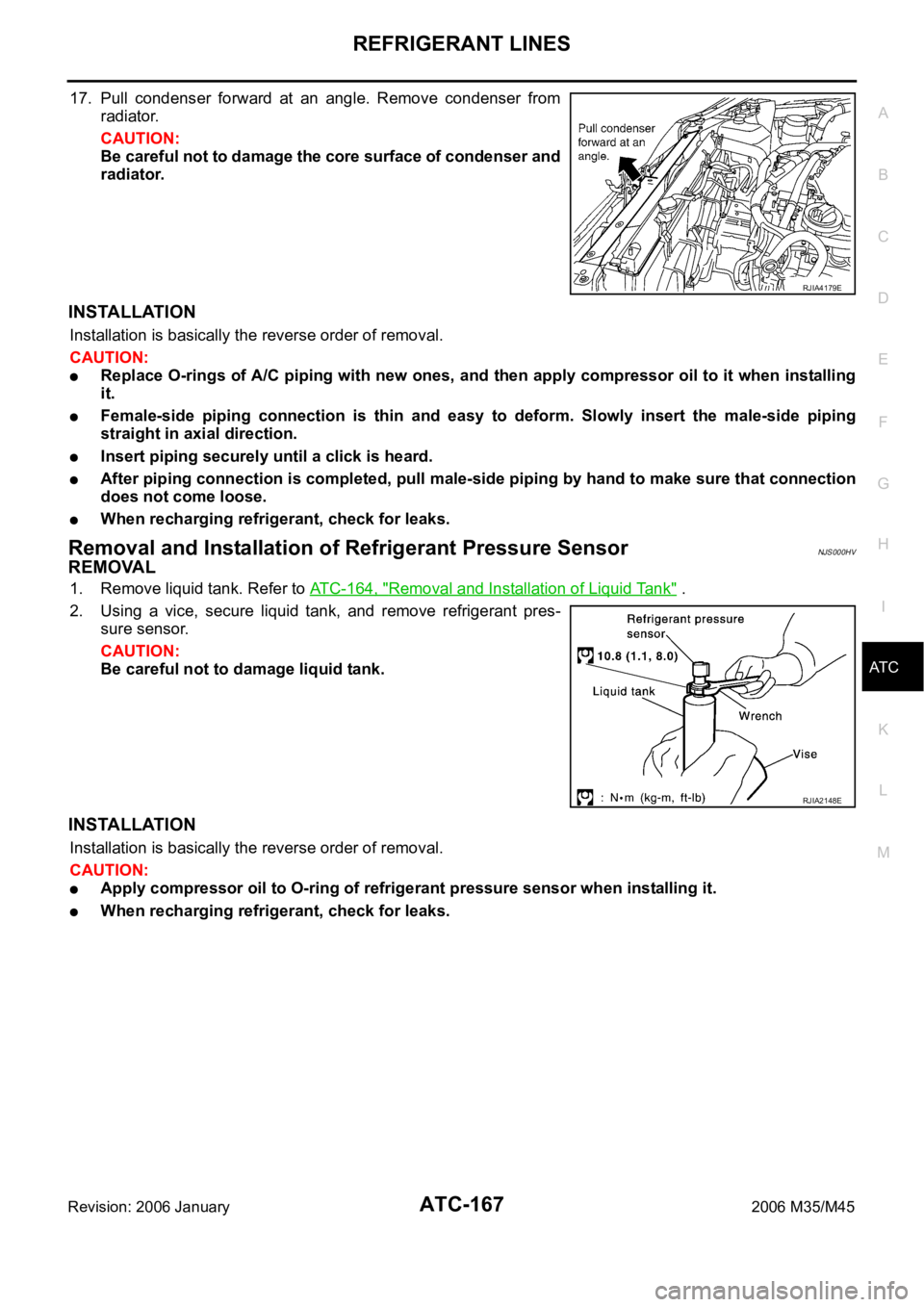
17. Pull condenser forward at an angle. Remove condenser from
radiator.
CAUTION:
Be careful not to damage the core surface of condenser and
radiator.
INSTALLATION
Installation is basically the reverse order of removal.
CAUTION:
Replace O-rings of A/C piping with new ones, and then apply compressor oil to it when installing
it.
Female-side piping connection is thin and easy to deform. Slowly insert the male-side piping
straight in axial direction.
Insert piping securely until a click is heard.
After piping connection is completed, pull male-side piping by hand to make sure that connection
does not come loose.
When recharging refrigerant, check for leaks.
Removal and Installation of Refrigerant Pressure SensorNJS000HV
REMOVAL
1. Remove liquid tank. Refer to ATC-164, "Removal and Installation of Liquid Tank" .
2. Using a vice, secure liquid tank, and remove refrigerant pres-
sure sensor.
CAUTION:
Be careful not to damage liquid tank.
INSTALLATION
Installation is basically the reverse order of removal.
CAUTION:
Apply compressor oil to O-ring of refrigerant pressure sensor when installing it.
When recharging refrigerant, check for leaks.
RJIA4179E
RJIA2148E
Page 615 of 5621
ATC-168
REFRIGERANT LINES
Revision: 2006 January2006 M35/M45
Removal and Installation of EvaporatorNJS000HW
REMOVAL
1. Remove low-pressure pipe 1 and high-pressure pipe 2. Refer to ATC-162, "Removal and Installation of
Low-Pressure Pipe 1 and High-Pressure Pipe 2" .
CAUTION:
Cap or wrap the joint of the pipe with suitable material such as vinyl tape to avoid the entry of air.
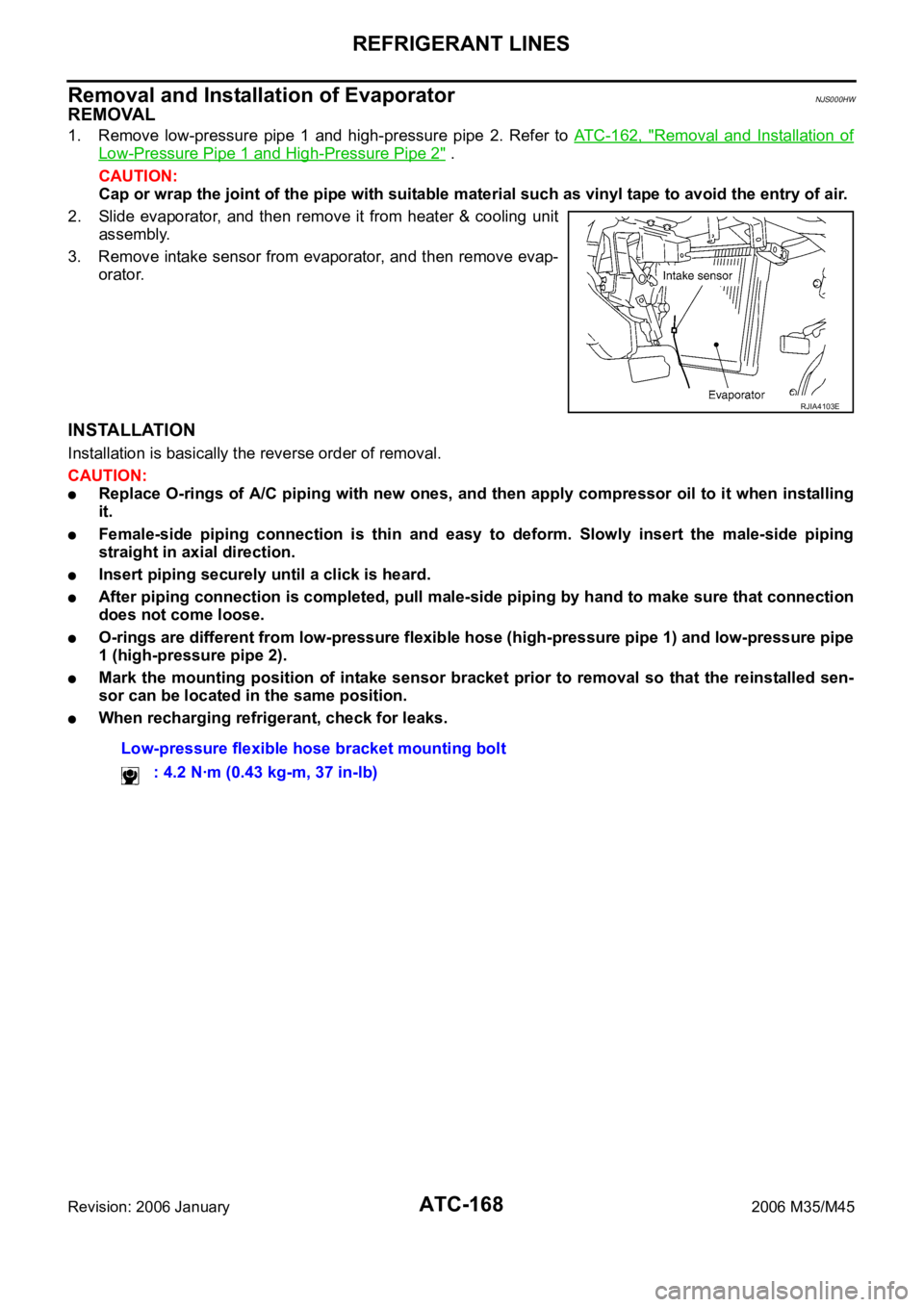
2. Slide evaporator, and then remove it from heater & cooling unit
assembly.
3. Remove intake sensor from evaporator, and then remove evap-
orator.
INSTALLATION
Installation is basically the reverse order of removal.
CAUTION:
Replace O-rings of A/C piping with new ones, and then apply compressor oil to it when installing
it.
Female-side piping connection is thin and easy to deform. Slowly insert the male-side piping
straight in axial direction.
Insert piping securely until a click is heard.
After piping connection is completed, pull male-side piping by hand to make sure that connection
does not come loose.
O-rings are different from low-pressure flexible hose (high-pressure pipe 1) and low-pressure pipe
1 (high-pressure pipe 2).
Mark the mounting position of intake sensor bracket prior to removal so that the reinstalled sen-
sor can be located in the same position.
When recharging refrigerant, check for leaks.
RJIA4103E
Low-pressure flexible hose bracket mounting bolt
: 4.2 Nꞏm (0.43 kg-m, 37 in-lb)
Page 617 of 5621

ATC-170
REFRIGERANT LINES
Revision: 2006 January2006 M35/M45
Checking for Refrigerant LeaksNJS000HY
Perform a visual inspection of all refrigeration parts, fittings, hoses and components for signs of A/C lubricant
leakage, damage and corrosion. A/C lubricant leakage may indicate an area of refrigerant leakage. Allow
extra inspection time in these areas when using either an electrical leak detector or fluorescent dye leak
detector (SST: J-42220).
If dye is observed, confirm the leak with an electrical leak detector. It is possible a prior leak was repaired and
not properly cleaned.
When searching for leaks, do not stop when one leak is found but continue to check for additional leaks at all
system components and connections.
When searching for refrigerant leaks using an electrical leak detector, move the probe along the suspected
leak area at 1 to 2 inches per second and no further than 1/4 inch from the component.
CAUTION:
Moving the electrical leak detector probe slower and closer to the suspected leak area will improve the
chances of finding a leak.
Checking System for Leaks Using the Fluorescent Leak DetectorNJS000HZ
1. Check A/C system for leaks using the UV lamp and safety goggles (SST: J-42220) in a low sunlight area
(area without windows preferable). Illuminate all components, fittings and lines. The dye will appear as a
bright green/yellow area at the point of leakage. Fluorescent dye observed at the evaporator drain open-
ing indicates an evaporator core assembly (tubes, core or expansion valve) leak.
2. If the suspected area is difficult to see, use an adjustable mirror or wipe the area with a clean shop rag or
cloth, with the UV lamp for dye residue.
3. After the leak is repaired, remove any residual dye using dye cleaner (SST: J-43872) to prevent future
misdiagnosis.
4. Perform a system performance check and verify the leak repair with an approved electrical leak detector.
NOTE:
Other gases in the work area or substances on the A/C components, for example, anti-freeze, windshield
washer fluid, solvents and lubricants, may falsely trigger the leak detector. Make sure the surfaces to be
checked are clean.
Clean with a dry cloth or blow off with shop air.
Do not allow the sensor tip of the detector to contact with any substance. This can also cause false readings
and may damage the detector.
Dye InjectionNJS000I0
(This procedure is only necessary when recharging the system or when the compressor has seized and was
replaced.)
1. Check A/C system static (at rest) pressure. Pressure must be at least 345 kPa (3.52 kg/cm
2 , 50 psi).
2. Pour one bottle (1/4 ounce / 7.4 cc) of the A/C refrigerant dye into the injector tool (SST: J-41459).
3. Connect the injector tool to the A/C low-pressure side service valve.
4. Start engine and switch A/C ON.
5. When the A/C operating (compressor running), inject one bottle (1/4 ounce / 7.4 cc) of fluorescent dye
through the low-pressure service valve using dye injector tool (SST: J-41459) (refer to the manufacture’s
operating instructions).
6. With the engine still running, disconnect the injector tool from the service valve.
CAUTION:
Be careful the A/C system or replacing a component, pour the dye directly into the open system
connection and proceed with the service procedures.
7. Operate the A/C system for a minimum of 20 minutes to mix the dye with the system oil. Depending on the
leak size, operating conditions and location of the leak, it may take from minutes to days for the dye to
penetrate a leak and become visible.
8. Attach a blue label as necessary.
Page 619 of 5621
ATC-172
REFRIGERANT LINES
Revision: 2006 January2006 M35/M45
CHECKING PROCEDURE
To prevent inaccurate or false readings, make sure there is no refrigerant vapor, shop chemicals, or cigarette
smoke in the vicinity of the vehicle. Perform the leak test in calm area (low air/wind movement) so that the
leaking refrigerant is not dispersed.
1. Stop engine.
2. Connect a suitable A/C manifold gauge set (SST: J-39183)to the A/C service valves.
3. Check if the A/C refrigerant pressure is at least 345 kPa (3.52 kg/cm
2 , 50 psi) above 16C (61F). If less
than specification, recover/evacuate and recharge the system with the specified amount of refrigerant.
NOTE:
At temperatures below 16
C (61F), leaks may not be detected since the system may not reach 345 kPa
(3.52 kg/cm
2 , 50 psi).
4. Perform the leak test from the high-pressure side (compressor discharge a to evaporator inlet h) to the
low-pressure side [evaporator drain hose i to shaft seal m(VQ35DE) or n(VK45DE)]. Refer to ATC-153,
"Components" . Perform a leak check for the following areas carefully. Clean the component to be
checked and move the leak detected probe completely around the connection/component.
Compressor
Check the fitting of high- and low-pressure flexible hoses, relief valve and shaft seal.
Condenser
Check the fitting of high-pressure flexible hose and pipe.
Liquid tank
Check the fitting of refrigerant pressure sensor.
Service valves
Check all around the service valves. Ensure service valve caps are secured on the service valves (to pre-
vent leaks).
NOTE:
After removing A/C manifold gauge set from service valves, wipe any residue from valves to prevent any
false readings by leak detector.
Cooling unit (Evaporator)
With engine OFF, turn blower fan on “High” for at least 15 seconds to dissipate any refrigerant trace in the
cooling unit. Wait a minimum of 10 minutes accumulation time (refer to the manufacturer’s recommended
procedure for actual wait time) before inserting the leak detector probe into the drain hose.
Keep the probe inserted for at least 10 seconds. Use caution not to contaminate the probe tip with water
or dirt that may be in the drain hose.
5. If a leak detector detects a leak, verify at least once by blowing compressed air into area of suspected
leak, then repeat check as outlined above.
6. Do not stop when one leak is found. Continue to check for additional leaks at all system components.
If no leaks are found, perform steps 7 - 10.
7. Start the engine.
8. Set the A/C control as follows;
a. A/C switch: ON
b. MODE door position: VENT (Ventilation)
c. Intake door position: Recirculation
d. Temperature setting: Max. cold
e. Fan speed: High
9. Run engine at 1,500 rpm for at least 2 minutes.
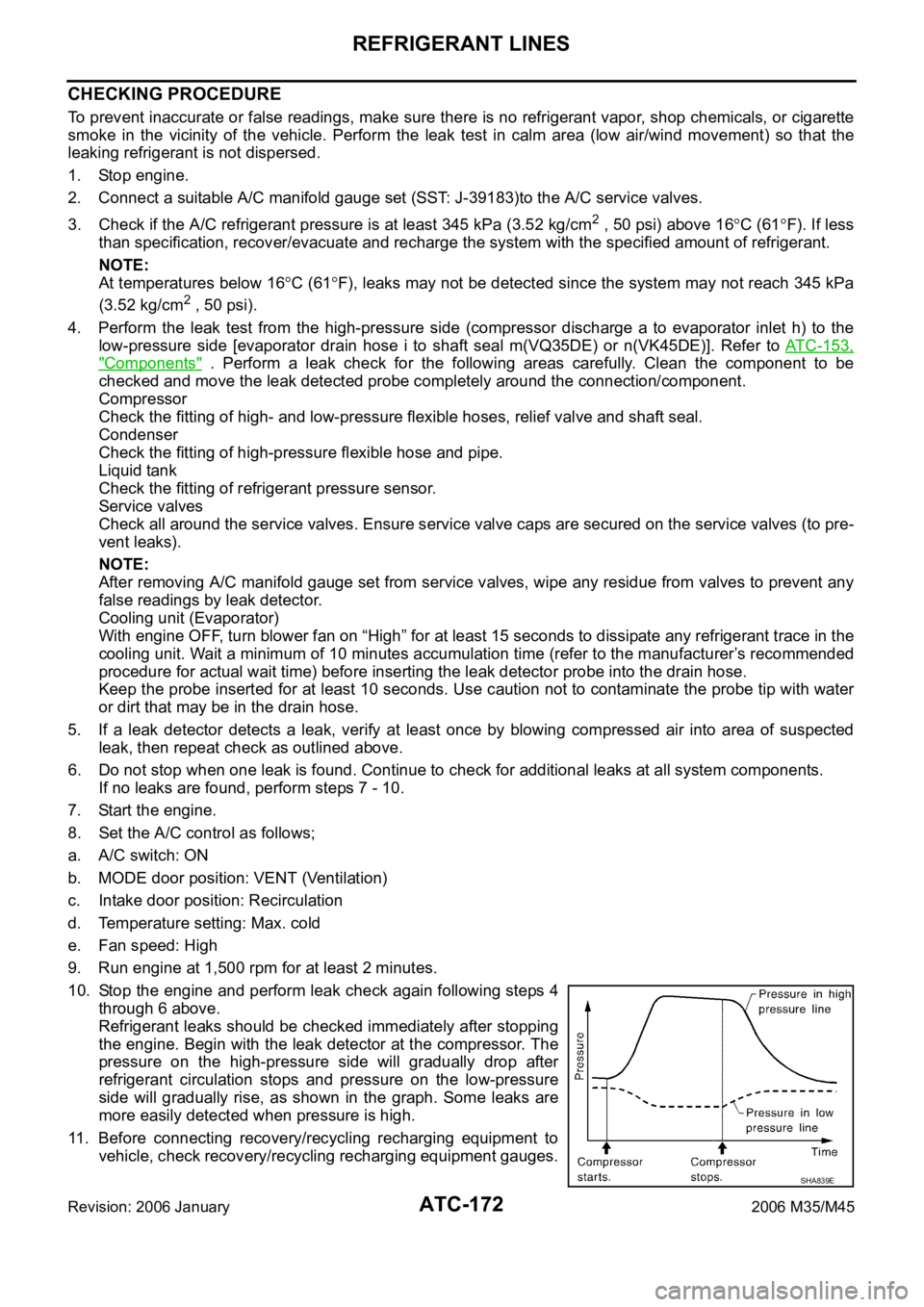
10. Stop the engine and perform leak check again following steps 4
through 6 above.
Refrigerant leaks should be checked immediately after stopping
the engine. Begin with the leak detector at the compressor. The
pressure on the high-pressure side will gradually drop after
refrigerant circulation stops and pressure on the low-pressure
side will gradually rise, as shown in the graph. Some leaks are
more easily detected when pressure is high.
11. Before connecting recovery/recycling recharging equipment to
vehicle, check recovery/recycling recharging equipment gauges.
SHA839E
Page 624 of 5621

AV-3
C
D
E
F
G
H
I
J
L
MA
B
AV
Revision: 2006 January2006 M35/M45 Front Display Unit (Base System) ........................136
REMOVAL ........................................................
.136
INSTALLATION .................................................136
Front Display Unit (BOSE System) ......................137
REMOVAL ........................................................
.137
INSTALLATION .................................................137
Multifunction Switch .............................................137
REMOVAL ........................................................
.137
INSTALLATION .................................................137
Preset Switch .......................................................137
REMOVAL ........................................................
.137
INSTALLATION .................................................138
Steering Switch ....................................................138
REMOVAL ........................................................
.138
INSTALLATION .................................................138
DVD Player ..........................................................138
REMOVAL ........................................................
.138
INSTALLATION .................................................139
Auxiliary Input Jacks ............................................140
REMOVAL ........................................................
.140
INSTALLATION .................................................140
Microphone ..........................................................140
REMOVAL ........................................................
.140
INSTALLATION .................................................140
GPS Antenna .......................................................140
REMOVAL ........................................................
.140
INSTALLATION .................................................141
Camera Control Unit ............................................142
REMOVAL ........................................................
.142
INSTALLATION .................................................142
Rear View Camera ...............................................142
REMOVAL ........................................................
.142
INSTALLATION .................................................142
Steering Angle Sensor .........................................142
REMOVAL ........................................................
.142
INSTALLATION .................................................143
WITH MOBILE ENTERTAINMENT SYSTEM
PRECAUTION ........................................................144
Precautions for Supplemental Restraint System
(SRS) “AIR BAG” and “SEAT BELT PRE-TEN-
SIONER” ..............................................................144
Precautions for Trouble Diagnosis .......................144
AV COMMUNICATION SYSTEM ......................144
Precautions for Harness Repair ...........................144
AV COMMUNICATION SYSTEM ......................144
PREPARATION .......................................................145
Commercial Service Tools ....................................145
SYSTEM DESCRIPTION ........................................146
System Functions .................................................146
AUDIO ...............................................................146
VEHICLE INFORMATION SYSTEM .................146
NAVIGATION SYSTEM .....................................146
MOBILE ENTERTAINMENT SYSTEM ..............148
HANDS-FREE PHONE .....................................148
REAR VIEW MONITOR ....................................148Component Description ........................................149
AUDIO UNIT ..................................................... .149
BOSE AMP ........................................................149
SATELLITE TUNER ..........................................150
AV CONTROL UNIT (WITHOUT NAVI) .............150
NAVI CONTROL UNIT (WITH NAVI) .................150
FRONT DISPLAY UNIT .....................................150
REAR DISPLAY UNIT .......................................151
VIDEO DISTRIBUTOR ......................................151
DVD PLAYER ....................................................151
CAMERA CONTROL UNIT ...............................151
CAN Communication System Description ............152
CAN Communication Unit .....................................152
Schematic — BOSE Audio 2ch System — ...........153
W i r i n g D i a g r a m — A V — / B O S E A u d i o 2 c h S y s t e m .156
Schematic — BOSE Surround Audio 5.1ch System
— ..........................................................................175
Wiring Diagram — AV — / BOSE Surround Audio
5.1ch System ........................................................178
Component Parts Location ...................................202
Location of Antenna ..............................................203
TERMINALS AND REFERENCE VALUE FOR CON-
TROL UNIT .............................................................204
Audio Unit .............................................................204
BOSE Amp ...........................................................206
Satellite Radio Tuner ............................................210
AV (NAVI) Control Unit .........................................211
Video Distributor ...................................................214
Front Display Unit ................................................
.219
Rear Display Unit ..................................................221
DVD Player ...........................................................223
Headphone Amp ...................................................226
Camera Control Unit ............................................ .227
DIAGNOSIS SYSTEM .............................................230
Multifunction Switch Self-Diagnosis Function .......230
SELF-DIAGNOSIS MODE ................................230
FINISHING SELF-DIAGNOSIS MODE .............230
Multi AV System Diagnosis Functions ..................230
On Board Diagnosis .............................................230
DESCRIPTION ..................................................230
STARTING PROCEDURE .................................231
Self Diagnosis .......................................................232
DIAGNOSIS RESULTS .....................................233
Confirmation/Adjustment Mode ............................235
DISPLAY DIAGNOSIS .......................................235
VEHICLE SIGNALS ..........................................236
SPEAKER TEST ...............................................236
CLIMATE CONTROL .........................................236
NAVIGATION .....................................................237
ERROR HISTORY .............................................237
VEHICLE CAN DIAGNOSIS .............................241
AV COMM DIAGNOSIS .....................................241
HANDSFREE PHONE ......................................242
REAR DISPLAY .................................................242
CAMERA CONT. ...............................................243
BLUETOOTH .....................................................244
DELETE UNIT CONNECTION LOG .................244
Page 626 of 5621

AV-5
C
D
E
F
G
H
I
J
L
MA
B
AV
Revision: 2006 January2006 M35/M45 REMOVAL ........................................................
.288
INSTALLATION .................................................289
Antenna Amp .......................................................289
REMOVAL ........................................................
.289
INSTALLATION .................................................289
Satellite Radio Antenna ........................................289
REMOVAL ........................................................
.289
INSTALLATION .................................................290
Splitter ..................................................................290
REMOVAL ........................................................
.290
INSTALLATION .................................................290
AV (NAVI) Control Unit .........................................290
REMOVAL ........................................................
.290
INSTALLATION .................................................291
Front Display Unit .................................................291
REMOVAL ........................................................
.291
INSTALLATION .................................................291
Rear Display Unit .................................................292
REMOVAL ........................................................
.292
INSTALLATION .................................................292
Multifunction Switch .............................................292
REMOVAL ........................................................
.292
INSTALLATION .................................................292
Preset Switch .......................................................292
REMOVAL ........................................................
.292
INSTALLATION .................................................293
Steering Switch ....................................................293
REMOVAL ........................................................
.293
INSTALLATION .................................................293
Rear Control Switch ............................................ .294REMOVAL ........................................................
.294
INSTALLATION .................................................294
Video Distributor ...................................................294
REMOVAL ........................................................
.294
INSTALLATION .................................................295
DVD Player ...........................................................295
REMOVAL ........................................................
.295
INSTALLATION .................................................295
Auxiliary Input Jacks .............................................296
REMOVAL ........................................................
.296
INSTALLATION .................................................296
Headphone Amp ...................................................296
REMOVAL ........................................................
.296
INSTALLATION .................................................296
Microphone ...........................................................296
REMOVAL ........................................................
.296
INSTALLATION .................................................297
GPS Antenna ........................................................297
REMOVAL ........................................................
.297
INSTALLATION .................................................297
Camera Control Unit ............................................ .298
REMOVAL ........................................................
.298
INSTALLATION .................................................298
Rear View Camera ...............................................298
REMOVAL ........................................................
.298
INSTALLATION .................................................298
Steering Angle Sensor ..........................................299
REMOVAL ........................................................
.299
INSTALLATION .................................................299
Page 629 of 5621
![INFINITI M35 2006 Factory Service Manual AV-8
[WITHOUT MOBILE ENTERTAINMENT SYSTEM]
SYSTEM DESCRIPTION
Revision: 2006 January2006 M35/M45
SYSTEM DESCRIPTIONPFP:00000
System FunctionsNKS00489
Here is an example of functions. For details, refe](/img/42/57023/w960_57023-628.png "INFINITI M35 2006 Factory Service Manual AV-8
[WITHOUT MOBILE ENTERTAINMENT SYSTEM]
SYSTEM DESCRIPTION
Revision: 2006 January2006 M35/M45
SYSTEM DESCRIPTIONPFP:00000
System FunctionsNKS00489
Here is an example of functions. For details, refe")
AV-8
[WITHOUT MOBILE ENTERTAINMENT SYSTEM]
SYSTEM DESCRIPTION
Revision: 2006 January2006 M35/M45
SYSTEM DESCRIPTIONPFP:00000
System FunctionsNKS00489
Here is an example of functions. For details, refer to the owner's manual or navigation system owner's manual.
AUDIO
Speed Sensitive Volume (for BASE System)
Volume level of this system gone up and down automatically in proportion to the vehicle speed. And the
control level can be selected by the customer.
The audio unit inputs the vehicle signal that is sent from unified meter and A/C amp via CAN communica-
tion through AV (NAVI) control unit.
Precision Phased Audio (for BASE System)
It plays back the sound using the woofer (ultra-low bass and clear midrange sound) and reproduces the
sound with presence.
When the conventional BASS/TREBLE adjustment is a maximum, the sounds might be unclear because
the volume of midrange sound also rises together with the bass and treble. The precision phased audio
can emphasize ultra-low bass and ultra-high treble without changing the midrange sound by digital pro-
cessing using DSP.
NOTE:
When the radio is played, the noise may increase more than the presence due to the characteristics of
broadcasting waves. Therefore, the amplification rate while playing the radio is controlled lower than the
rate while playing CD.
AudioPilot® (for BOSE System)
AudioPilot® is the sound improving system that picks up any noises and the sound of music coming into the
vehicle by a microphone under the steering, and that the BOSE amp revises the frequency feature of music at
real time in response to the frequency feature of the noise while driving and listening to music.
If low frequency area noise from vehicle is loud, it adjusts low frequency element of music to be bigger
than vehicle noise.
If high frequency area noise from vehicle is loud, it adjusts all frequency element of music to be bigger
than vehicle noise.
Centerpoint® (for BOSE Surround 5.1ch System)
CD and 2.0ch DVD stereo sound played at audio unit and DVD player are subjected to signal processing in
BOSE amp. It can play the surround sound with presence.
VEHICLE INFORMATION SYSTEM
The status of audio, climate control system, fuel consumption, and navigation system (if equipped) are
displayed.
AV (NAVI) control unit receives the data signal from ECM, unified meter and A/C amp and low tire pres-
sure warning control unit via CAN communication. It calculates the values of fuel economy, tire pressure,
and trip computer from the received information and displays them.
NAVIGATION SYSTEM
Location Detection Principle
The navigation system periodically calculates the vehicle's current
position according to the following three signals:
Travel distance of the vehicle as determined by the vehicle
speed sensor
Turning angle of the vehicle as determined by the gyroscope
(angular velocity sensor)
Direction of vehicle travel as determined by the GPS antenna
(GPS information)
The current position of the vehicle is then identified by comparing the
calculated vehicle position with map data read from the map DVD-
ROM, which is stored in the DVD-ROM drive (map-matching), and
SKIB1058E
Page 630 of 5621
![INFINITI M35 2006 Factory Service Manual SYSTEM DESCRIPTION
AV-9
[WITHOUT MOBILE ENTERTAINMENT SYSTEM]
C
D
E
F
G
H
I
J
L
MA
B
AV
Revision: 2006 January2006 M35/M45
indicated on the screen as a vehicle mark. More accurate data is judged and u](/img/42/57023/w960_57023-629.png "INFINITI M35 2006 Factory Service Manual SYSTEM DESCRIPTION
AV-9
[WITHOUT MOBILE ENTERTAINMENT SYSTEM]
C
D
E
F
G
H
I
J
L
MA
B
AV
Revision: 2006 January2006 M35/M45
indicated on the screen as a vehicle mark. More accurate data is judged and u")
SYSTEM DESCRIPTION
AV-9
[WITHOUT MOBILE ENTERTAINMENT SYSTEM]
C
D
E
F
G
H
I
J
L
MA
B
AV
Revision: 2006 January2006 M35/M45
indicated on the screen as a vehicle mark. More accurate data is judged and used by comparing vehicle posi-
tion detection results found by the GPS with the result by map-matching.
The current vehicle position will be calculated by detecting the dis-
tance the vehicle moved from the previous calculation point and its
direction.
Travel distance
Travel distance calculations are based on the vehicle speed
sensor input signal. Therefore, the calculation may become
incorrect as the tires wear down. To prevent this, an automatic
distance correction function has been adopted.
Travel direction
Change in the travel direction of the vehicle is calculated by a
gyroscope (angular velocity sensor) and a GPS antenna (GPS
information). They have both advantages and disadvantages.
More accurate traveling direction is detected because priorities are set for the signals from these two
devices according to the situation.
Map-Matching
Map-matching compares a current location detected by the method
in the “Location Detection Principle” with a road map data from Map
DVD-ROM stored in DVD-ROM drive.
NOTE:
The road map data is based on data stored in the map DVD-ROM.
The vehicle position may not be corrected under the following circumstances and after driving for a certain
time when GPS information is difficult to receive. In this case, the vehicle mark on the display must be cor-
rected manually.
In map-matching, alternative routes to reach the destination will
be shown and prioritized, after the road on which the vehicle is
currently driven has been judged and the vehicle mark has been
repositioned.
If there is an error in distance and/or direction, alternative routes
will be shown in different order of priority, and the incorrect road
can be avoided.
If two roads are running in parallel, they are of the same priority.
Therefore, the vehicle mark may appear on either of them alter-
nately, depending on maneuvering of the steering wheel and
configuration of the road.
SEL684V
Type Advantage Disadvantage
Gyroscope
(angular velocity sensor)Can detect the vehicle's turning angle quite
accurately.Direction errors may accumulate when vehicle is
driven for long distances without stopping.
GPS antenna
(GPS information)Can detect the vehicle's travel direction
(North/South/East/West).Correct direction cannot be detected when vehi-
cle speed is low.
SEL685V
SEL686V
Page 633 of 5621
![INFINITI M35 2006 Factory Service Manual AV-12
[WITHOUT MOBILE ENTERTAINMENT SYSTEM]
SYSTEM DESCRIPTION
Revision: 2006 January2006 M35/M45
BOSE Surround 5.1ch System
It amplifies the sound signal from the audio unit and the DVD](/img/42/57023/w960_57023-632.png "INFINITI M35 2006 Factory Service Manual AV-12
[WITHOUT MOBILE ENTERTAINMENT SYSTEM]
SYSTEM DESCRIPTION
Revision: 2006 January2006 M35/M45
BOSE Surround 5.1ch System
It amplifies the sound signal from the audio unit and the DVD")
AV-12
[WITHOUT MOBILE ENTERTAINMENT SYSTEM]
SYSTEM DESCRIPTION
Revision: 2006 January2006 M35/M45
BOSE Surround 5.1ch System
It amplifies the sound signal from the audio unit and the DVD
sound signal from DVD player, and then output them to each
speaker.
It receives the voice guidance signal from AV (NAVI) control unit
and output it to the front speaker.
It controls sound volume of each speaker when outputting TEL
voice and voice guidance.
It subjects to AudioPilot® processing when receiving sound sig-
nal from microphone for AudioPilot
® .
It subjects to Centerpoint® processing.
SATELLITE TUNER
The satellite tuner is connected with the audio unit via communi-
cation line.
It sends the received sound signal from the satellite radio
antenna to the audio unit.
AV CONTROL UNIT (WITHOUT NAVI)
It controls each unit of the system by the operation signal from
the multifunction switch and sends the image signal of operating
condition or vehicle information, etc. to the front display unit.
It receives the TEL input voice or the input voice at voice control
from the microphone. It receives the received TEL voice, and
then sends it to the audio unit.
It sends the voice guidance signal to BOSE amp (BOSE system)
and audio unit (BASE system).
NAVI CONTROL UNIT (WITH NAVI)
It controls each unit of the system by the operation signal from
the multifunction switch and sends the image signal of operating
condition or vehicle information, etc. to the front display unit.
It receives the TEL input voice or the input voice at voice control
from the microphone. It receives the received TEL voice, and
then sends it to the audio unit.
It sends the voice guidance signal to BOSE amp (BOSE system)
and audio unit (BASE system).
Signals are received from the gyro, the vehicle speed sensor,
and the GPS antenna. Vehicle location is determined by com-
bining this data with the data contained in the DVD-ROM map.
Location information is shown on liquid crystal display panel.
SKIB3887E
SKIB3894E
SKIB3891E
SKIB3892E