phone INFINITI Q50 HYBRID 2014 Infiniti Intouch
[x] Cancel search | Manufacturer: INFINITI, Model Year: 2014, Model line: Q50 HYBRID, Model: INFINITI Q50 HYBRID 2014Pages: 274, PDF Size: 1.43 MB
Page 27 of 274

2. Getting Started
2-18
VOLUME SETTINGS
This turns on and off, as well as adjusts, the volume for various functions including audio, phone (ringer, incoming, and outgoing
volumes), navigation voice guidance (if so equipped), as well as system beeps.
*: For models with navigation system.
Step Setting item Action
1. Push
Page 30 of 274

CONNECTING BLUETOOTH®DEVICE
Your vehicle is equipped with the Blue-
tooth®Hands-Free Phone System and
Bluetooth®audio device. If you are the
owner of a compatible Bluetooth®enabled
cellular phone or Bluetooth®audio device,
you can set up the wireless connection
between your cellular phone and the in-
vehicle phone module or Bluetooth
®audio
and in-vehicle audio module. With Blue-
tooth
®wireless technology, you can make
or receive a telephone call with your
cellular phone in your pocket and listen
to Bluetooth
®audio.
Connecting cellular phone/audio
device
1. Push
Page 31 of 274
![INFINITI Q50 HYBRID 2014 Infiniti Intouch 2. Getting Started
2-22
.[Connect Device ]
Touch this item to connect to the
Bluetooth
®device. Also, you can delete
a registered device and display infor-
mation of registered device.
. [Select Phon](/img/42/34966/w960_34966-30.png "INFINITI Q50 HYBRID 2014 Infiniti Intouch 2. Getting Started
2-22
.[Connect Device ]
Touch this item to connect to the
Bluetooth
®device. Also, you can delete
a registered device and display infor-
mation of registered device.
. [Select Phon")
2. Getting Started
2-22
.[Connect Device ]
Touch this item to connect to the
Bluetooth
®device. Also, you can delete
a registered device and display infor-
mation of registered device.
. [Select Phone]
Registered Bluetooth
®Hands-Free
Phones are shown on the list. Select a
device from the list to disconnect or
connect a Bluetooth
®device.
. [Select Audio Device]
Registered Bluetooth
®audio players
are shown on the list. Select a device
from the list to disconnect or connect a
Bluetooth
®device.
. [Vehicle Bluetooth Device Info.]
The registered device name and the PIN
code can be changed.
Page 45 of 274

4. Audio system
4-2
AUDIO OPERATION PRECAUTIONS
RADIO
Push the ignition switch to the“ACC”or
“ON” position before turning on the radio.
If you listen to the radio with the engine or
the hybrid system not running, the ignition
switch should be pushed to the “ACC”
position.
Radio reception is affected by station
signal strength, distance from radio trans-
mitter, buildings, bridges, mountains and
other external influences. Intermittent
changes in reception quality normally are
caused by these external influences.
Using a cellular phone in or near the
vehicle may influence radio reception
quality.
Radio reception
Your radio system is equipped with state-
of-the-art electronic circuits to enhance
radio reception. These circuits are de-
signed to extend reception range, and to
enhance the quality of that reception.
However there are some general character-
istics of both FM and AM radio signals that
can affect radio reception quality in a moving vehicle, even when the finest
equipment is used. These characteristics
are completely normal in a given reception
area, and do not indicate any malfunction
in your radio system.
Reception conditions will constantly
change because of vehicle movement.
Buildings, terrain, signal distance and
interference from other vehicles can work
against ideal reception. Described below
are some of the factors that can affect your
radio reception.
Some cellular phones or other devices may
cause interference or a buzzing noise to
come from the audio system speakers.
Storing the device in a different location
may reduce or eliminate the noise.
FM radio reception
Range: the FM range is normally limited to
25 to 30 miles (40 to 48 km), with
monaural (single station) FM having
slightly more range than stereo FM. Ex-
ternal influences may sometimes interfere
with FM station reception even if the FM
station is within 25 miles (40 km). The
strength of the FM signal is directly related
to the distance between the transmitter
and receiver. FM signals follow a line-of-
sight path, exhibiting many of the same
characteristics as light. For example they
will reflect off objects.
Page 52 of 274

Displayable character codes*301: SHIFT-JIS, ASCII, ISO-8859-1, UTF-8, UTF-16 BOM, UTF-16 Big Endian, UTF-16 Little Endian,
02: UNICODE, 03: UTF-16
*1 Files created with a combination of 48 kHz sampling frequency and 64 kbps bit rate cannot be played.
*2 Protected WMA files (DRM) cannot be played.
*3 Available codes depend on what kind of media, versions and information are going to be displayed.
*4 Made by iTunes.
Windows Media Player
This product is protected by certain in-
tellectual property right of Microsoft. Use
or distribution of such technology outside
of this product is prohibited without a
license from Microsoft.
BLUETOOTH®STREAMING AUDIO
.
Some Bluetooth®audio devices may
not be recognized by the in-vehicle
audio system.
. It is necessary to set up the wireless
connection between a compatible Blue-
tooth
®audio device and the in-vehicle
Bluetooth®module before using the
Bluetooth®streaming audio.
. The Bluetooth
®streaming audio may
be stopped under the following condi- tions:
—
Receiving a hands-free call.
—Checking the connection to the hands-
free phone.
—Connecting the hands-free phone or theaudio device.
—Downloading the phonebook memoryfrom the connected cellular phone.
. Do not place a Bluetooth®audio device
in an area surrounded by metal or far
away from the in-vehicle Bluetooth
®
module to prevent tone quality degra-
dation and wireless connection disrup-
tion.
. While an audio device is connected
through a Bluetooth
®wireless connec-
tion, the battery of the device may discharge quicker than usual.
. This system supports the Bluetooth
®
Advanced Audio Distribution Profile
(A2DP) and Audio/Video Remote Con-
trol Profile (AVRCP).
. Wireless LAN (Wi-Fi) and the Bluetooth
®
functions share the same frequency
band (2.4 GHz). Using the Bluetooth®
and the wireless LAN functions at the
same time may slow down or discon-
nect the communication and cause
undesired noise. It is recommended
that you turn off the wireless LAN (Wi-
Fi) when using the Bluetooth
®func-
tions.
4. Audio system
4-9
Page 66 of 274
iPod PLAYER
Connecting iPod
WARNING!
Do not connect, disconnect or operate the
USB device while driving. Doing so can be a
distraction. If distracted you could lose
control of your vehicle and cause an accident
or serious injury.
CAUTION!
.Do not force the USB device into the USB
port. Inserting the USB device tilted or
up-side-down into the port may damage
the port. Make sure that the USB device
is connected correctly into the USB port.
. Do not grab the USB port cover (if
equipped) when pulling the USB device
out of the port. This could damage the
port and the cover.
. Do not leave the USB cable in a place
where it can be pulled unintentionally.
Pulling the cable may damage the port.
Refer to your device manufacture’s owner information regarding the proper use and
care of the device.
Two USB connectors are located in the
center console box.
“Media Hub”
(page 2-6)
The battery of the iPod will be charged
while the device is connected to the vehicle
if the iPod supports charging via a USB
connection.
Depending on the model and firmware
version of the iPod, the display on the iPod
shows an INFINITI or Accessory Attached
screen when the connection is completed.
When the iPod is connected to the vehicle,
the iPod music library can only be operated
by the vehicle audio controls.
Compatibility:
Made for . iPod touch (5th generation)
. iPod touch (4th generation)
. iPod touch (3rd generation)
. iPod touch (2nd generation)
. iPod touch (1st generation) .
iPod touch
. iPod with video
. iPod classic
. iPod nano (7th generation)
. iPod nano (6th generation)
. iPod nano (5th generation)
. iPod nano (4th generation)
. iPod nano (3rd generation)
. iPod nano (2nd generation)
. iPod nano (1st generation)
. iPhone 5
. iPhone 4S
. iPhone 4
. iPhone 3GS
. iPhone 3G
. iPhone
. iPad mini
INFO:
.
Make sure that the iPod firmware is
updated.
4. Audio system
4-23
Page 67 of 274
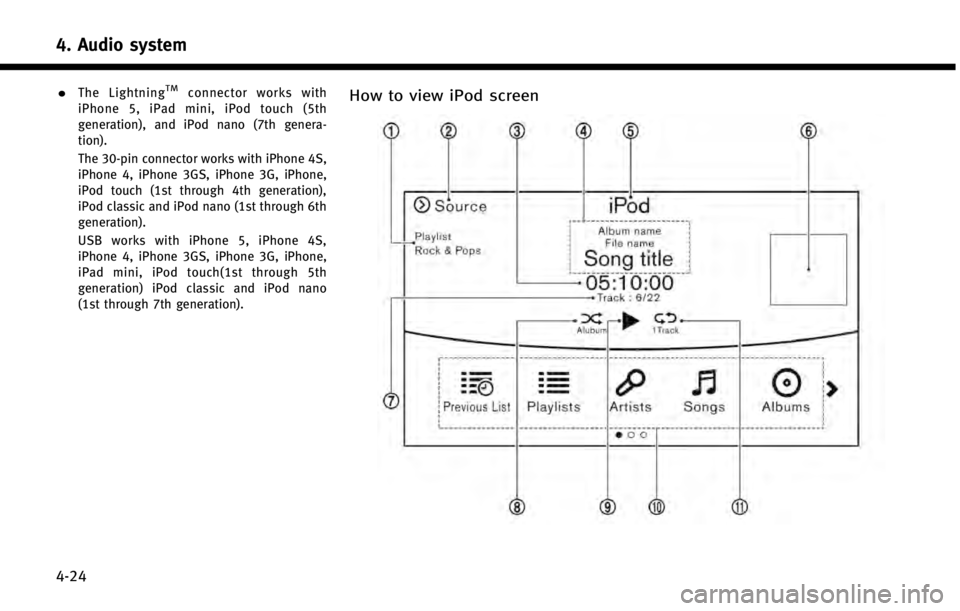
4. Audio system
4-24
.The LightningTMconnector works with
iPhone 5, iPad mini, iPod touch (5th
generation), and iPod nano (7th genera-
tion).
The 30-pin connector works with iPhone 4S,
iPhone 4, iPhone 3GS, iPhone 3G, iPhone,
iPod touch (1st through 4th generation),
iPod classic and iPod nano (1st through 6th
generation).
USB works with iPhone 5, iPhone 4S,
iPhone 4, iPhone 3GS, iPhone 3G, iPhone,
iPad mini, iPod touch(1st through 5th
generation) iPod classic and iPod nano
(1st through 7th generation).How to view iPod screen
Page 69 of 274
![INFINITI Q50 HYBRID 2014 Infiniti Intouch 4. Audio system
4-26
Changing play mode:
Touch [Shuffle] or [Repeat] from the iPod
menu to select the play mode.
Skipping songs:
Push<SEEK·CAT·TRACK> or tilt up/down
<
/OK> briefly to skip to the ne](/img/42/34966/w960_34966-68.png "INFINITI Q50 HYBRID 2014 Infiniti Intouch 4. Audio system
4-26
Changing play mode:
Touch [Shuffle] or [Repeat] from the iPod
menu to select the play mode.
Skipping songs:
Push<SEEK·CAT·TRACK> or tilt up/down
<
/OK> briefly to skip to the ne")
4. Audio system
4-26
Changing play mode:
Touch [Shuffle] or [Repeat] from the iPod
menu to select the play mode.
Skipping songs:
Push
<
/OK> briefly to skip to the next or the
previous song.
INFO:
.
Even when iPods or iPhones are inserted
into both of the two USB connectors, the
system recognizes only one of the con-
nected iPods or iPhones at a time.
.Only one the two connected USB devices
can be operated by the voice recognition
system.
BLUETOOTH®STREAMING AUDIO
Your vehicle is equipped with Bluetooth®
Streaming Audio.
If you have a compatible Bluetooth®device
with streaming audio (A2DP profile), you
can set up a wireless connection between
your Bluetooth
®device and the in-vehicle
audio system. This connection allows you
to listen to the audio from the Bluetooth
®
device using your vehicle speakers. It also may allow basic control of the device for
playing and skipping audio files using the
AVRCP Bluetooth
®profile. Not all Blue-
tooth®devices have the same level of
controls for AVRCP. Please consult the
manual for your Bluetooth
®device for
more details.
Wireless LAN (Wi-Fi) and the Bluetooth
®
functions share the same frequency band
(2.4 GHz). Using the Bluetooth®and the
wireless LAN functions at the same time
may slow down or disconnect the commu-
nication and cause undesired noise. It is
recommended that you turn off the wire-
less LAN (Wi-Fi) when using the Bluetooth
®
functions.
Regulatory information
FCC Regulatory information:
FCC ID: HYQDNNS085
NOTE
This device compiles with part 15 of the
FCC Rules. Operation is subject to the
following two conditions: (1) This device
may not cause harmful interference, and
(2) this device must accept any interference
received, including interference that may
cause undesired operation. FCC WARNING
Changes or modifications not expressly
approved by the party responsible for
compliance could void the user’s authority
to operate the equipment.
CAUTION:
Radio Frequency Radiation Ex-
posure
This equipment complies with FCC radia-
tion exposure limits set forth for uncon-
trolled environment and meets the FCC
radio frequency (RF) Exposure Guidelines
in Supplement C to OET65. This equipment
has very low levels of RF energy that it
deemed to comply without maximum
permissive exposure evaluation (MPE).
But it is desirable that it should be
installed and operated with at least 20
cm and more between the radiator and
person’ s body (excluding extremities:
hands, wrists, feet and ankles).
Co-location: This transmitter must not be
co-located or operated in conjunction with
any other antenna or transmitter.
IC Regulatory information:
The antenna cannot be removed (and
changed) by user.
This device complies with Industry Canada
Page 74 of 274
![INFINITI Q50 HYBRID 2014 Infiniti Intouch AUDIO SETTINGS
Audio settings can be adjusted or audio
related functions can be turned on/off with
the following procedure.
1. Touch<MENU>.
2. Touch [Settings].
3. Touch [Audio].
Setting items Action](/img/42/34966/w960_34966-73.png "INFINITI Q50 HYBRID 2014 Infiniti Intouch AUDIO SETTINGS
Audio settings can be adjusted or audio
related functions can be turned on/off with
the following procedure.
1. Touch<MENU>.
2. Touch [Settings].
3. Touch [Audio].
Setting items Action")
AUDIO SETTINGS
Audio settings can be adjusted or audio
related functions can be turned on/off with
the following procedure.
1. Touch
Page 80 of 274

5 Hands-Free Phone
Bluetooth®Hands-Free Phone System ................. 5-2
Phone ............................................................. 5-3
Hands-free text messaging assistant ............... 5-6 Phone and text message assistant settings ... 5-9
Bluetooth®information................................ 5-13