change time INFINITI Q60 2018 User Guide
[x] Cancel search | Manufacturer: INFINITI, Model Year: 2018, Model line: Q60, Model: INFINITI Q60 2018Pages: 466, PDF Size: 2.47 MB
Page 183 of 466
5-4Starting and driving
WARNING
.Do not leave children or adults who
would normally require the support
of others alone in your vehicle. Pets
should not be left alone either. They
could accidentally injure themselves
or others through inadvertent opera-
tion of the vehicle. Also, on hot,
sunny days, temperatures in a closed
vehicle could quickly become high
enough to cause severe or possibly
fatal injuries to people or animals.
.Closely supervise children when they
are around cars to prevent them from
playing and becoming locked in the
trunk where they could be seriously
injured. Keep the car locked, with the
rear seatback and trunk lid securely
latched when not in use, and prevent
children’s access to car keys.
EXHAUST GAS (carbon monoxide)
WARNING
.Do not breathe exhaust gases; they
contain colorless and odorless carbon
monoxide. Carbon monoxide is dan-
gerous. It can cause unconsciousness
or death.
.If you suspect that exhaust fumes are
entering the vehicle, drive with all
windows fully open, and have the
vehicle inspected immediately.
.Do not run the engine in closed spaces
such as a garage.
.Do not park the vehicle with the
engine running for any extended
length of time.
.Keep the trunk lid closed while driv-
ing, otherwise exhaust gases could be
drawn into the passenger compart-
ment. If you must drive with the
trunk lid open, follow these precau-
tions:
1) Open all the windows.
2) Set the air recirculation to off and
the fan control to high to circulate
the air..If electrical wiring or other cable
connections must pass to a trailer
through the seal on the trunk lid or
the body, follow the manufacturer’s
recommendation to prevent carbon
monoxide entry into the vehicle.
.The exhaust system and body should
be inspected by a qualified mechanic
whenever:
— The vehicle is raised for service.
— You suspect that exhaust fumes
are entering into the passenger
compartment.
— You notice a change in the sound
of the exhaust system.
— You have had an accident invol-
ving damage to the exhaust sys-
tem, underbody, or rear of the
vehicle.
PRECAUTIONS WHEN STARTING
AND DRIVING
Page 187 of 466
5-8Starting and driving
CAUTION
.The TPMS may not function properly
when the wheels are equipped with
tire chains or the wheels are buried in
snow.
.Do not place metalized film or any
metal parts (antenna, etc.) on the
windows. This may cause poor recep-
tion of the signals from the tire
pressure sensors, and the TPMS will
not function properly.
Some devices and transmitters may tem-
porarily interfere with the operation of the
TPMS and cause the low tire pressure
warning light to illuminate. Some examples
are:
.Facilities or electric devices using similar
radio frequencies are near the vehicle.
.If a transmitter set to similar frequencies
is being used in or near the vehicle.
.If a computer (or similar equipment) or a
DC/AC converter is being used in or near
the vehicle.
Low tire pressure warning light may illumi-
nate in the following cases.
.If the vehicle is equipped with a wheel
and tire without TPMS..If the TPMS has been replaced and the ID
has not been registered.
.If the wheel is not originally specified by
INFINITI.
FCC Notice:
For USA:
This device complies with Part 15 of the
FCC Rules. Operation is subject to the
following two conditions: (1) This device
may not cause harmful interference, and (2)
this device must accept any interference
received, including interference that may
cause undesired operation.
NOTE:
Changes or modifications not expressly
approved by the party responsible for
compliance could void the user’s authority
to operate the equipment.
For Canada:
This device complies with Industry Canada
licence-exempt RSS standard(s). Operation
is subject to the following two conditions:
1.This device may not cause interference,
and
2.This device must accept any interfer-
ence, include interference that may
cause undesired operation of the device.
TPMS with Tire Inflation Indicator
When adding air to an under-inflated tire,
the TPMS with Tire Inflation Indicator
provides visual and audible signals outside
the vehicle to help you inflate the tires to the
recommended COLD tire pressure.
Vehicle set-up:
1. Park the vehicle in a safe and level place.
2. Apply the parking brake and place the
shift lever in the P (Park) position.
3. Place the ignition switch in the ON
position. Do not start the engine.
Operation:
1. Add air to the tire.
2. After a few seconds, the hazard indica-
tors will start flashing.
3. When the designated pressure is
reached, the horn beeps once and the
hazard indicators stop flashing.
4. Perform the above steps for each tire.
.If the tire is over-inflated more than
approximately 4 psi (30 kPa), the horn
beeps and the hazard indicators flash 3
times. To correct the pressure, push the
core of the valve stem on the tire briefly
to release pressure. When the pressure
reaches the designated pressure, the
horn beeps once.
Page 189 of 466
5-10Starting and driving
.If you decide that it is not safe to
return the vehicle to the road surface
based on vehicle, road or traffic
conditions, gradually slow the vehicle
to a stop in a safe place off the road.
RAPID AIR PRESSURE LOSS
Rapid air pressure loss or a “blow-out” can
occur if the tire is punctured or is damaged
due to hitting a curb or pothole. Rapid air
pressure loss can also be caused by driving
on under-inflated tires.
Rapid air pressure loss can affect the
handling and stability of the vehicle, espe-
cially at highway speeds.
Help prevent rapid air pressure loss by
maintaining the correct air pressure and
visually inspect the tires for wear and
damage. See “Wheels and tires” (P.8-32) of
this manual.
If a tire rapidly loses air pressure or “blows-
out” while driving maintain control of the
vehicle by following the procedure below.
Please note that this procedure is only a
general guide. The vehicle must be driven as
appropriate based on the conditions of the
vehicle, road and traffic.
WARNING
The following actions can increase the
chance of losing control of the vehicle if
there is a sudden loss of tire air pressure.
Losing control of the vehicle may cause a
collision and result in personal injury.
.The vehicle generally moves or pulls
in the direction of the flat tire.
.Do not rapidly apply the brakes.
.Do not rapidly release the accelerator
pedal.
.Do not rapidly turn the steering
wheel.
1. Remain calm and do not overreact.
2. Maintain a firm grip on the steering
wheel with both hands and try to hold
a straight course.
3. When appropriate, slowly release the
accelerator pedal to gradually slow the
vehicle.
4. Gradually steer the vehicle to a safe
location off the road and away from
traffic if possible.
5. Lightly apply the brake pedal to gradu-
ally stop the vehicle.6. Turn on the hazard warning flashers and
either contact a roadside emergency
service to change the tire or see “Chan-
ging a flat tire” (P.6-5) of this Owner’s
Manual.
DRINKING ALCOHOL/DRUGS
AND DRIVING
WARNING
Never drive under the influence of alco-
hol or drugs. Alcohol in the bloodstream
reduces coordination, delays reaction
time and impairs judgement. Driving
after drinking alcohol increases the like-
lihood of being involved in an accident
injuring yourself and others. Addition-
ally, if you are injured in an accident,
alcohol can increase the severity of the
injury.
INFINITI is committed to safe driving. How-
ever, you must choose not to drive under the
influence of alcohol. Every year thousands of
people are injured or killed in alcohol-related
accidents. Although the local laws vary on
what is considered to be legally intoxicated,
the fact is that alcohol affects all people
differently and most people underestimate
the effects of alcohol.
Page 191 of 466
5-12Starting and driving
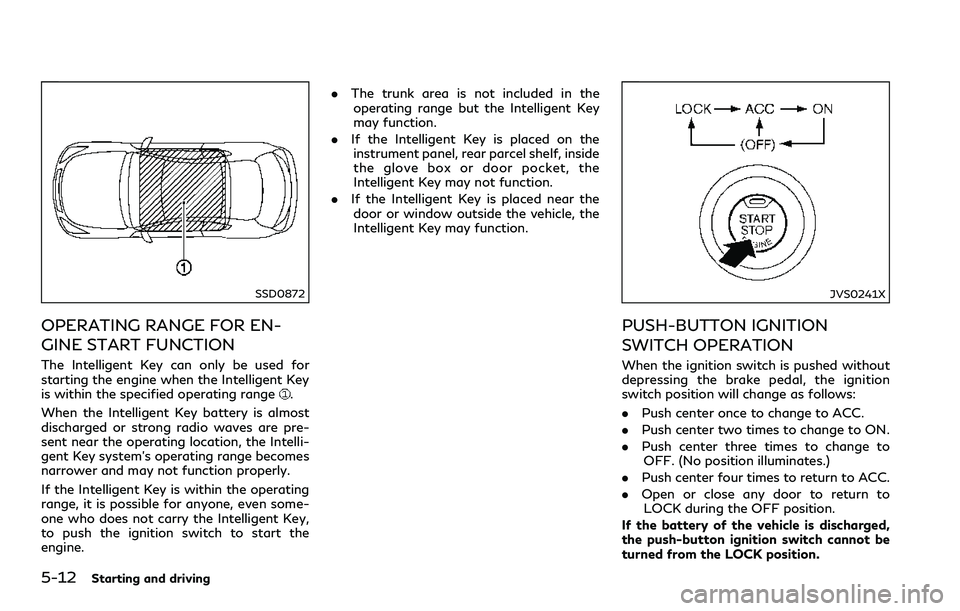
SSD0872
OPERATING RANGE FOR EN-
GINE START FUNCTION
The Intelligent Key can only be used for
starting the engine when the Intelligent Key
is within the specified operating range
.
When the Intelligent Key battery is almost
discharged or strong radio waves are pre-
sent near the operating location, the Intelli-
gent Key system’s operating range becomes
narrower and may not function properly.
If the Intelligent Key is within the operating
range, it is possible for anyone, even some-
one who does not carry the Intelligent Key,
to push the ignition switch to start the
engine..The trunk area is not included in the
operating range but the Intelligent Key
may function.
.If the Intelligent Key is placed on the
instrument panel, rear parcel shelf, inside
the glove box or door pocket, the
Intelligent Key may not function.
.If the Intelligent Key is placed near the
door or window outside the vehicle, the
Intelligent Key may function.
JVS0241X
PUSH-BUTTON IGNITION
SWITCH OPERATION
When the ignition switch is pushed without
depressing the brake pedal, the ignition
switch position will change as follows:
.Push center once to change to ACC.
.Push center two times to change to ON.
.Push center three times to change to
OFF. (No position illuminates.)
.Push center four times to return to ACC.
.Open or close any door to return to
LOCK during the OFF position.
If the battery of the vehicle is discharged,
the push-button ignition switch cannot be
turned from the LOCK position.
Page 192 of 466
Some indicators and warnings for operation
are displayed in the vehicle information
display between the speedometer and tach-
ometer. (See “Vehicle information display”
(P.2-21).)
The ignition lock is designed so that the
ignition switch position cannot be switched
to LOCK until the shift lever is moved to the
P (Park) position.
When the ignition switch cannot be pushed
toward the LOCK position, proceed as
follows:
1. Move the shift lever into the P (Park)
position.
2. Push the ignition switch to the OFF
position. The ignition switch position
indicator will not illuminate.
3. Open the door. The ignition switch will
change to the LOCK position.
The shift lever can be moved from the P
(Park) position if the ignition switch is in the
ON position and the brake pedal is de-
pressed.PUSH-BUTTON IGNITION
SWITCH POSITIONS
LOCK (Normal parking position)
The ignition switch can only be locked in this
position.
The ignition switch will be unlocked when it
is pushed to the ACC position while carrying
the Intelligent Key.
ACC (Accessories)
This position activates electrical accessories
such as the radio, when the engine is not
running.
ON (Normal operating position)
This position turns on the ignition system
and electrical accessories.
OFF
The engine can be turned off in this position.
The ignition lock is designed so that the
ignition switch cannot be switched to the
LOCK position until the shift lever is moved
to the P (Park) position.
CAUTION
Do not leave the vehicle with the push-
button ignition switch in ACC or ON
positions when the engine is not running
for an extended period. This can dis-
charge the battery.
EMERGENCY ENGINE SHUT OFF
To shut off the engine in an emergency
situation while driving, perform the follow-
ing procedure:
.Rapidly push the push-button ignition
switch 3 consecutive times in less than
1.5 seconds, or
.Push and hold the push-button ignition
switch for more than 2 seconds.
Starting and driving5-13
Page 201 of 466
5-22Starting and driving
SPA2331
To apply:Fully depress the parking brake
pedal.
To release:
1. Firmly apply the foot brake
.
2. Depress the parking brake pedal
and
the parking brake will be released.
3. Before driving, be sure the brake warning
light goes out.
JVS0189X
INFINITI Drive Mode Selector
JVS0191M
Six, five or four driving modes can be
selected by using the INFINITI Drive Mode
Selector (PERSONAL, SPORT+ (if so
equipped), SPORT, STANDARD, ECO (if so
equipped) and SNOW).
NOTE:
When the INFINITI Drive Mode Selector
selects a mode, the mode may not switch
immediately. This is not a malfunction.
The current mode is displayed in the vehicle
information display.
To change the mode, push the INFINITI
Drive Mode Selector up or down. The mode
list will appear on the upper display and you
can select the mode.
PERSONALœSPORT+ (if so equipped)œ
SPORTœSTANDARDœECO (if so
equipped)œSNOW
NOTE:
The mode list will be turned off in approxi-
mately 5 seconds after the mode is selected.
STANDARD MODE
Allows for optimum driving according to the
driving conditions.
This mode will be selected first each time the
engine is started.
INFINITI DRIVE MODE SELECTOR
Page 213 of 466
5-34Starting and driving
WARNING
Failure to follow the warnings and
instructions for proper use of the LDW
and LDP systems could result in serious
personal injury or death.
.The LDW and LDP systems will not
prevent loss of control. It is the
driver’s responsibility to stay alert,
drive safely, keep the vehicle in the
traveling lane, and be in control of
the vehicle at all times.
.The LDP system may activate if you
change lanes without first activating
your turn signal or, for example, if a
construction zone directs traffic to
cross an existing lane marker. If this
occurs, you may need to apply cor-
rective steering to complete your lane
change.
.Because the LDP system may not
activate under the road, weather,
and lane marker conditions described
in this section, it may not activate
every time your vehicle begins to
leave its lane and you will need to
apply corrective steering..Lane Departure Warning (LDW) system
— warns the driver with an indicator in
the vehicle information display and
vibrations of the steering wheel that
the vehicle is beginning to leave the
driving lane.
.Lane Departure Prevention (LDP) system
— warns the driver with an indicator in
the vehicle information display and
vibrations of the steering wheel, and
helps the driver to return the vehicle
to the center of the traveling lane.
JVS0823X
The LDW and LDP systems use a camerainstalled behind the windshield to monitor
the lane markers of your traveling lane.
LANE DEPARTURE WARNING
(LDW) SYSTEM/LANE DEPARTURE
PREVENTION (LDP) (if so equipped)
Page 260 of 466
Vehicle ahead not detected:
When a vehicle is no longer detected ahead,
the ICC system gradually accelerates your
vehicle to resume the previously set vehicle
speed. The ICC system then maintains the
set speed.
When a vehicle is no longer detected the
vehicle ahead detection indicator turns off.
If a vehicle ahead appears during accelera-
tion to the set vehicle speed or any time the
ICC system is in operation, the system
controls the distance to that vehicle.
When a vehicle is no longer detected under
approximately 15 MPH (24 km/h), the
system will be canceled.
JVS0211X
When passing another vehicle,the set speed
indicator will flash when the vehicle speed
exceeds the set speed. The vehicle detect
indicator will turn off when the area ahead
of the vehicle is open. When the pedal is
released, the vehicle will return to the
previously set speed.
Even though your vehicle speed is set in the
ICC system, you can depress the accelerator
pedal when it is necessary to accelerate your
vehicle rapidly.
How to change the set vehicle
speed
To cancel the preset speed,use any of these
methods:
.Push the CANCEL switch. The set vehicle
speed indicator will go out.
.Tap the brake pedal. The set vehicle
speed indicator will go out.
.Turn the MAIN switch off. Both the
Intelligent Cruise Control system set
indicator (green) and set vehicle speed
indicator will go out.
To reset at a faster cruising speed,use one
of the following methods:
.Depress the accelerator pedal. When the
vehicle attains the desired speed, push
and release the SET/COAST (-) switch.
.Push and hold the RESUME/ACCELER-
ATE (+) switch. The set vehicle speed will
increase by approximately 5 MPH (5
km/h for Canada).
.Push, then quickly release the RESUME/
ACCELERATE (+) switch. Each time you
do this, the set speed will increase by
approximately 1 MPH (1 km/h for Ca-
nada).
To reset at a slower cruising speed,use one
of the following methods:
.Lightly tap the brake pedal. When the
vehicle attains the desired speed, push
Starting and driving5-81
Page 261 of 466
5-82Starting and driving
the SET/COAST (-) switch and release it.
.Push and hold the SET/COAST (-)
switch. The set vehicle speed will de-
crease by approximately 5 MPH (5 km/h
for Canada).
.Push, then quickly release the SET/
COAST (-) switch. Each time you do this,
the set speed will decrease by approxi-
mately 1 MPH (1 km/h for Canada).
To resume the preset speed,push and
release the RESUME/ACCELERATE (+)
switch. The vehicle will resume the last set
cruising speed when the vehicle speed is over
20 MPH (32 km/h).
JVS0839X
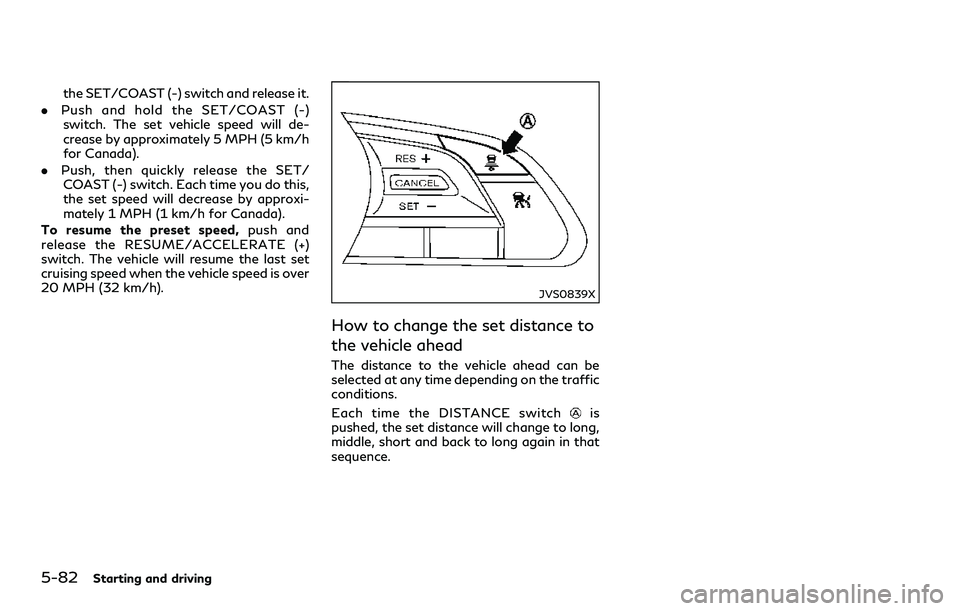
How to change the set distance to
the vehicle ahead
The distance to the vehicle ahead can be
selected at any time depending on the traffic
conditions.
Each time the DISTANCE switch
is
pushed, the set distance will change to long,
middle, short and back to long again in that
sequence.
Page 262 of 466
JVS0250M
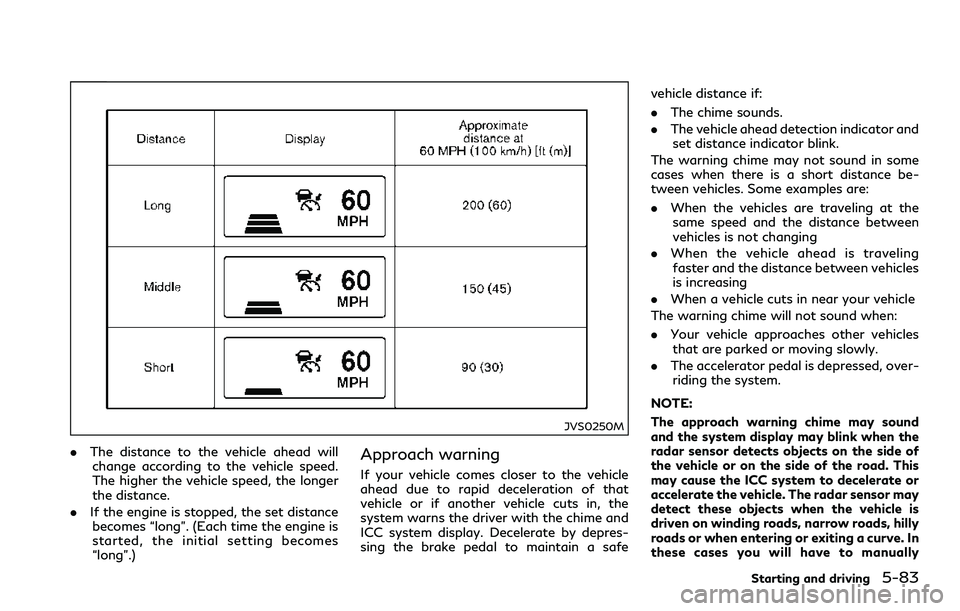
.The distance to the vehicle ahead will
change according to the vehicle speed.
The higher the vehicle speed, the longer
the distance.
.If the engine is stopped, the set distance
becomes “long”. (Each time the engine is
started, the initial setting becomes
“long”.)Approach warning
If your vehicle comes closer to the vehicle
ahead due to rapid deceleration of that
vehicle or if another vehicle cuts in, the
system warns the driver with the chime and
ICC system display. Decelerate by depres-
sing the brake pedal to maintain a safevehicle distance if:
.The chime sounds.
.The vehicle ahead detection indicator and
set distance indicator blink.
The warning chime may not sound in some
cases when there is a short distance be-
tween vehicles. Some examples are:
.When the vehicles are traveling at the
same speed and the distance between
vehicles is not changing
.When the vehicle ahead is traveling
faster and the distance between vehicles
is increasing
.When a vehicle cuts in near your vehicle
The warning chime will not sound when:
.Your vehicle approaches other vehicles
that are parked or moving slowly.
.The accelerator pedal is depressed, over-
riding the system.
NOTE:
The approach warning chime may sound
and the system display may blink when the
radar sensor detects objects on the side of
the vehicle or on the side of the road. This
may cause the ICC system to decelerate or
accelerate the vehicle. The radar sensor may
detect these objects when the vehicle is
driven on winding roads, narrow roads, hilly
roads or when entering or exiting a curve. In
these cases you will have to manually
Starting and driving5-83