ignition INFINITI QX60 2023 Workshop Manual
[x] Cancel search | Manufacturer: INFINITI, Model Year: 2023, Model line: QX60, Model: INFINITI QX60 2023Pages: 636, PDF Size: 7.28 MB
Page 189 of 636

•When cleaning the seat, never use gaso-
line, benzine, thinner, or any similar
materials.
• If any malfunctions are found or the
heated seat does not operate, turn the
switch off and have the system checked.
It is recommended that you visit an
INFINITI retailer for this service.
The 2nd row captain’s seats are warmed by
built-in heaters. The switches are located on
the rear of the front center console and can
be operated independently of each other.
1. Start the engine.
2. Push the switch, as desired. The indicatorlight in the switch will illuminate.
The heater is controlled by a thermostat,
automatically turning the heater on and
off. The indicator light will remain on as
long as the switch is on.
3. When the seat is warmed or before you leave the vehicle, be sure to turn the
switch off. Push the heated steering wheel switch to
warm the steering wheel after the ignition
switch is placed in the ON position. The
switch color will change from white to or-
ange as the feature turns from OFF to ON.
If the surface temperature of the steering
wheel is below 68°F (20°C), the system will
heat the steering wheel and cycle off and on
to maintain a temperature above 68°F
(20°C). The indicator light will remain on as
long as the system is on (approximately 30
minutes).
LIC4697LIC4816
HEATED STEERING WHEEL SWITCH
(if so equipped)
Instruments and controls2-87
Page 196 of 636

12V OUTLETS
The power outlets are for powering electrical
accessories such as cellular telephones. They
are rated at 12 volt, 120W (10A) maximum.
The console power outlets are powered only
when the ignition switch is in the ACC or ON
position.
The power outlet in the cargo area is pow-
ered directly by the vehicle’s battery.
CAUTION
• The outlet and plug may be hot during or
immediately after use.
• Only certain power outlets are designed
for use with a cigarette lighter unit. Do
not use any other power outlet for an
accessory lighter. It is recommended
that you visit an INFINITI retailer for ad-
ditional information.
• Do not use with accessories that exceed
a 12 volt, 120W (10A) power draw.
• Do not use double adapters or more than
one electrical accessory. •
Use power outlets with the engine run-
ning to avoid discharging the vehicle
battery.
• Avoid using power outlets when the air
conditioner, headlights or rear window
defroster is on.
• Before inserting or disconnecting a plug,
be sure the electrical accessory being
used is turned OFF.
• Push the plug in as far as it will go. If good
contact is not made, the plug may over-
heat or the internal temperature fuse
may open.
LIC4823
Center Console
LIC4811
2nd Row (if so equipped)
LIC4705
Cargo Area
POWER OUTLETS
2-94Instruments and controls
Page 199 of 636

The wireless charger is located on the front
of the center console. Lay the smartphone on
the pad of the wireless charger. Charging will
start automatically. The smartphone will be
charged continuously while the ignition
switch is in the ON position.
WARNING
• Never put metallic materials between
the wireless charger and a smartphone. •
Those who use a pacemaker or other medi-
cal equipment should contact the electric
medical equipment manufacturer for the
possible influences before use.
• Never put cloth over the smartphone
during charging process.
• Never charge a smartphone when it is
wet.
• Never put metallic materials or small
goods such as a cigarette lighter, Intelli-
gent Key or memory drive.
CAUTION
• Do not put an RFID/NFC/credit card
between the wireless charger and a
smartphone. This could cause data cor-
ruption in the card.
• Do not use the wireless charger with dust
accumulated or dirt on the pad.
• Do not hit the surface of the wireless
charger.
• Do not spill liquid (water, drinks, etc.) on
the charging pad.
• Do not use grease, oil or alcohol for
cleaning charging pad.LIC5032
3rd row
LIC4868
1. Indicator
2. Charging pad
WIRELESS CHARGER
Instruments and controls2-97
Page 210 of 636

The service load capacity for the roof side
rails is 165 lbs. (74 kg.), however do not ex-
ceed the crossbars load capacity.
Be careful that your vehicle does not exceed
the Gross Vehicle Weight Rating (GVWR) or
its Gross Axle Weight Rating (GAWR front
and rear).
For additional information regarding GVWR
and GAWR, refer to:
• F.M.V.S.S. or C.M.V.S.S. certification label(located on the driver’s door pillar).POWER WINDOWS
WARNING
• Make sure that all passengers have their
hands, etc., inside the vehicle while it is in
motion and before closing the windows.
Use the window lock switch to prevent
unexpected use of the power windows.
• To help avoid risk of injury or death
through unintended operation of the ve-
hicle and/or its systems, including en-
trapment in windows or inadvertent
door lock activation, do not leave chil-
dren, people who require the assistance
of others or pets unattended in your ve-
hicle. Additionally, the temperature in-
side a closed vehicle on a warm day can
quickly become high enough to cause a
significant risk of injury or death to
people and pets.
The power windows operate when the igni-
tion switch is placed in the ON position or for
a period of time after the ignition switch is
placed in the OFF position. If the driver's or
passenger's door is opened during this period
of time, the power to the windows is
canceled.
Driver's side power window switch
The driver's side control panel is equipped
with switches to open or close all of the
windows.
LIC4727
1. Window lock button
2. Left rear passenger side switch
3. Driver’s side switch
4. Power door lock/unlock switch
5. Front passenger side switch
6. Right rear passenger side switch
WINDOWS
2-108Instruments and controls
Page 212 of 636

Automatic operation
To fully open a window equipped with auto-
matic operation, push the window switch
down to the second detent and release it; it
need not be held. The window automatically
opens all the way. To stop the window, lift
the switch up while the window is opening.
Auto-reverse function
The auto-reverse function can be activated
when a window is closed by automatic
operation.Depending on the environment or driving
conditions, the auto-reverse function may
be activated if an impact or load similar to
something being caught in the window
occurs.
WARNING
There are some small distances immedi-
ately before the closed position which can-
not be detected. Make sure that all passen-
gers have their hands, etc., inside the
vehicle before closing the window.
If the vehicle's battery is disconnected, re-
placed, or jump started, the power window
auto-reverse function may not operate prop-
erly. If this occurs, please contact the retailer
to re-initialize the power window auto-
reverse system.
If the control unit detects something caught
in a window equipped with automatic opera-
tion, as it is closing, the window will be imme-
diately lowered.
When power window switch does
not operate
If the power window automatic function
(closing only) does not operate properly, per-
form the following procedure to initialize the
power window system:
1. Place the ignition switch in the ON position.
2. Open the window more than halfway by operating the power window switch.
3. Pull the power window switch and hold it to close the window, and then hold the
switch more than 3 seconds after the win-
dow is closed.
4. Release the power window switch. Oper- ate the window by the automatic function
to confirm the initialization is complete.
The power window automatically opens
or closes depending on if the automatic
down or up function is selected.
5. Perform steps 2 through 4 above for other windows.
If the power window function does not oper-
ate properly after performing the above pro-
cedure have the system checked and re-
paired. It is recommended that you visit an
INFINITI retailer for this service.
LIC4730
2-110Instruments and controls
Page 215 of 636

If the moonroof switch does not operate
If the moonroof and sunshade do not operate
properly, perform the following procedure to
initialize the operation system.
1. If the moonroof and sunshade are open,close them fully by repeatedly pushing the
moonroof switch to the CLOSE
O2and
O4position.
2. Push and hold the moonroof switch to the CLOSE
O4position for 10 seconds.
3. After the moonroof and sunshade move slightly to the closed position and then
move back a little, release the moonroof
switch.
4. Push and hold the moonroof switch to the CLOSE
O4position, and the glass and
shade will move.
5. Release the moonroof switch. Then the moonroof and sunshade will fully open
and then fully close.
6. Check if the moonroof switch operates normally.
WARNING
The driver is always responsible for oper-
ating the moonroof properly, including the
operation by all passengers. Failure to fol-
low the warnings and instructions for
proper use of the moonroof could result in
serious injury or death.
• Do not allow children to operate the
moonroof. Improper operation by chil-
dren may cause an accident. If children or
others get caught in the moonroof, it
could cause serious injury.
• To help avoid risk of injury or death
through unintended operation of the
moonroof, place the ignition switch in
the OFF position when leaving the ve-
hicle, and do not leave children and the
Intelligent Key inside the vehicle.
• Do not activate the auto-reverse func-
tion intentionally. If hands or face, etc.
get caught in the moonroof, it could
cause serious injury.CAUTION
• Do not place objects (such as newspa-
pers, handkerchiefs, etc.) on the sun-
shade when it is extending or retracting
causing improper operation or damage
to the sunshade.
• Do not push the sunshade arm with your
hands, etc., as this may deform it. Im-
proper operation or damage to the sun-
shade may result.
• Do not put any object into the sunshade
inlet port as this may result in improper
operation or damage the sunshade.
• Do not hang any object on the arm rail as
this may result in improper operation or
damage the sunshade.
• Do not forcefully pull the sunshade. Do-
ing so may elongate the sunshade. Im-
proper operation or damage to the sun-
shade may result.
If the moonroof does not operate properly
after performing the procedure above, have
your vehicle checked by an INFINITI retailer.
Instruments and controls2-113
Page 216 of 636

The interior lights will automatically turn on
and stay on for a period of time when:
• The doors are unlocked by the IntelligentKey, a key or the request switch while all
doors are closed and the ignition switch is
in the OFF position.
• The doors and/or liftgate is opened.
• The switch is individually pushed.
When the on switch
O1is pushed, the interior
lights illuminate.
When the door/off switch
O2is pushed, the
interior lights do not illuminate unless indi-
vidually pushed.
NOTE:
The footwell lights and step lights illuminate
when the driver and passenger doors are
open regardless of the interior light switch
position. These lights will turn off automati-
cally after a period of time while doors are
open to prevent the battery from becoming
discharged.
CAUTION
Do not use for extended periods of time
with the engine stopped. This could result
in a discharged battery.
CONSOLE LIGHT
The console lightO1will turn on in the follow-
ing conditions:
• The Intelligent Key approaches the vehicle.
• The ignition is placed in the OFF position.
The console light
O1will turn off or decrease
in brightness in the following conditions:
• The ignition switch is in the ON position and the door is closed.
• The doors are locked.
The console light brightness can be adjusted
with the illumination brightness control in the
vehicle information display.
LIC3841LIC4966
INTERIOR LIGHTS
2-114Instruments and controls
Page 217 of 636
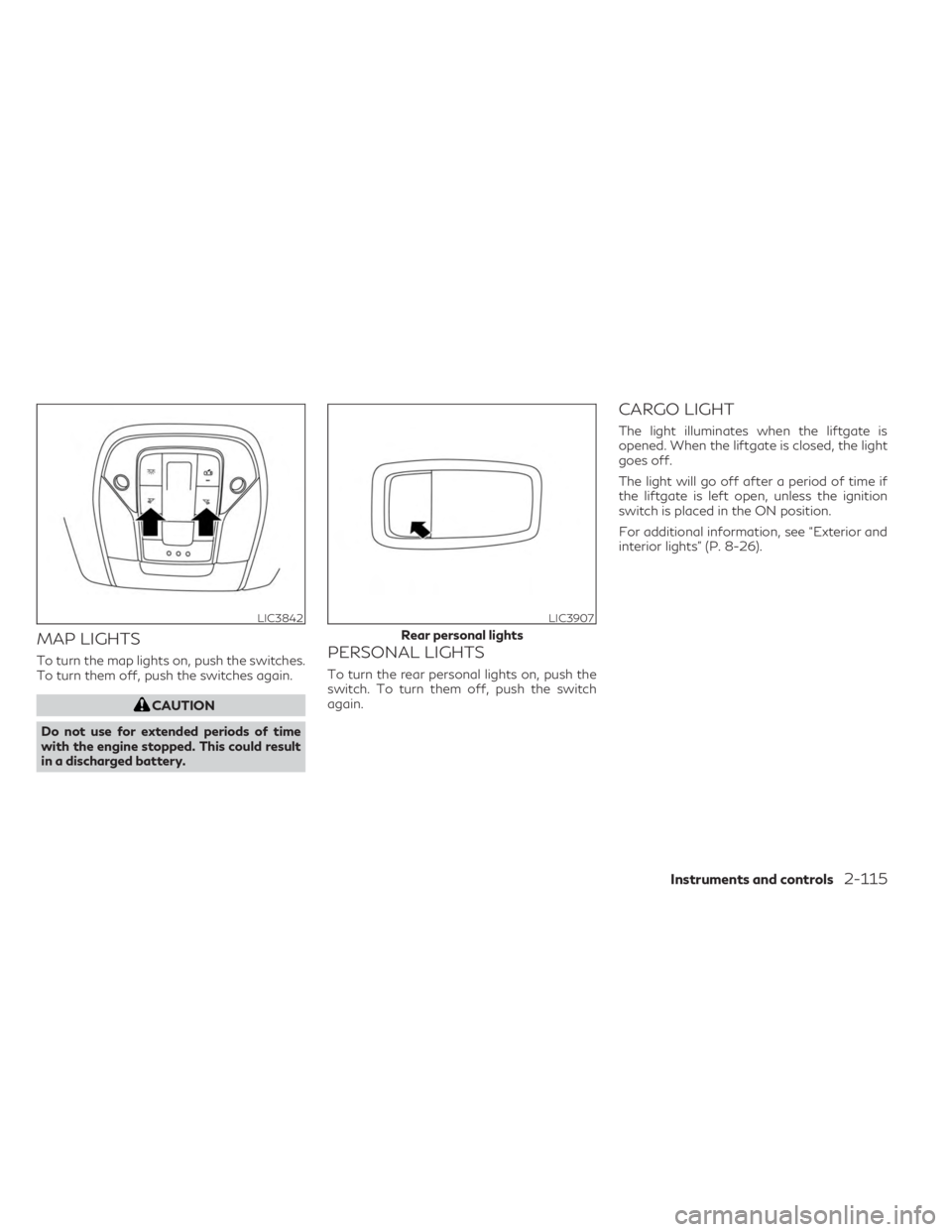
MAP LIGHTS
To turn the map lights on, push the switches.
To turn them off, push the switches again.
CAUTION
Do not use for extended periods of time
with the engine stopped. This could result
in a discharged battery.
PERSONAL LIGHTS
To turn the rear personal lights on, push the
switch. To turn them off, push the switch
again.
CARGO LIGHT
The light illuminates when the liftgate is
opened. When the liftgate is closed, the light
goes off.
The light will go off after a period of time if
the liftgate is left open, unless the ignition
switch is placed in the ON position.
For additional information, see “Exterior and
interior lights” (P. 8-26).
LIC3842LIC3907
Rear personal lights
Instruments and controls2-115
Page 232 of 636
Lockout protection
When the power door lock switch is moved to
the lock position and any door is open, all
doors will lock. With the Intelligent Key left in
the vehicle and any door open, all doors will
unlock automatically and chime will sound
after the door is closed.
These functions help prevent the Intelligent
Key from being accidentally locked inside the
vehicle.
AUTOMATIC DOOR LOCKS
• All doors lock automatically when the ve-hicle speed reaches 15 mph (24 km/h).
• All doors unlock automatically when the transmission is placed in the P (Park) posi-
tion or when the ignition switch is placed in
the OFF position, depending on the option
selected in the “Vehicle Settings” menu.
NOTE:The Auto Door Unlock function can be
changed using “Vehicle Settings” of the ve-
hicle information display. For additional in-
formation, see “Vehicle information display
7 inch (18 cm) Type A” (P. 2-22) or “Vehicle
information display 12.3 inch (21 cm) Type
B” (P. 2-44).
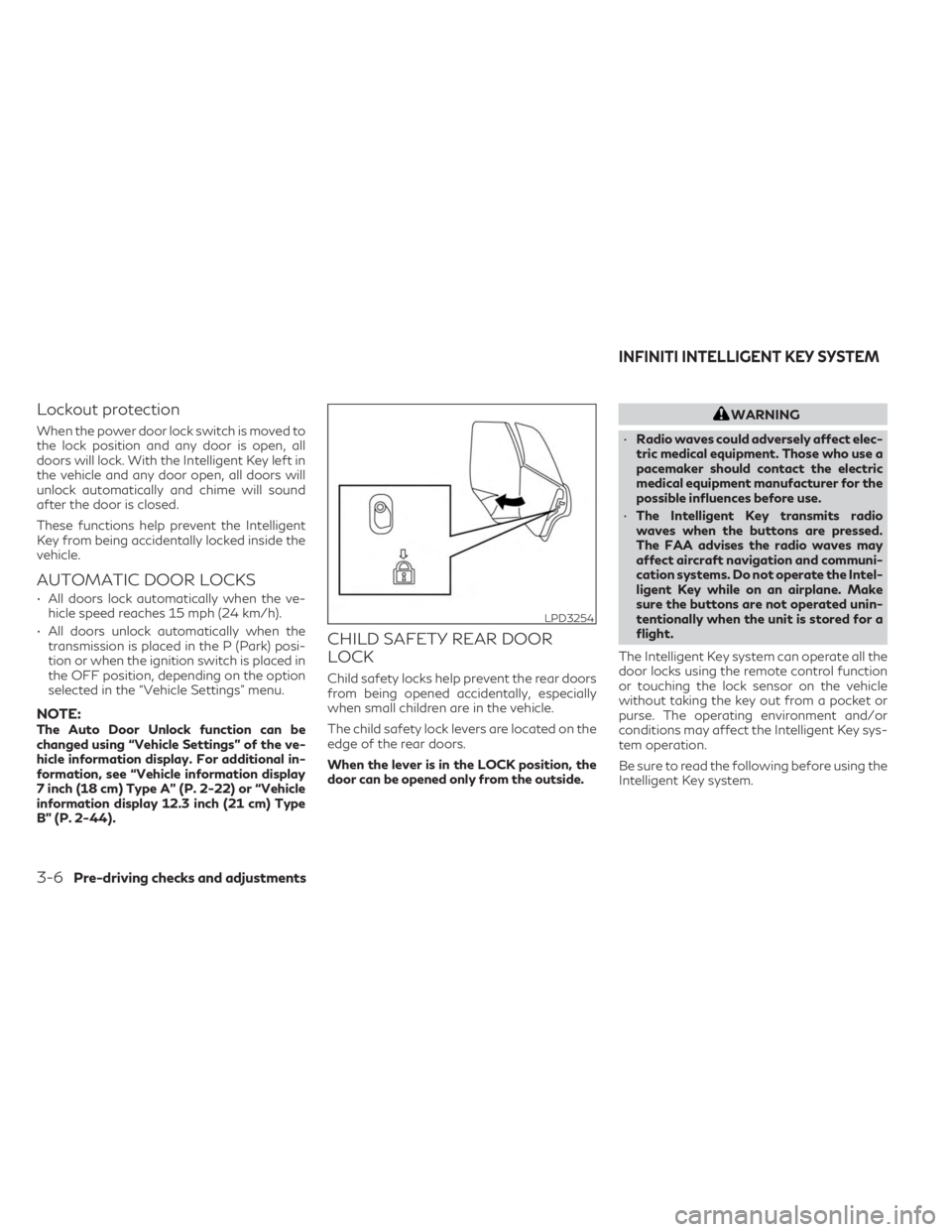
CHILD SAFETY REAR DOOR
LOCK
Child safety locks help prevent the rear doors
from being opened accidentally, especially
when small children are in the vehicle.
The child safety lock levers are located on the
edge of the rear doors.
When the lever is in the LOCK position, the
door can be opened only from the outside.
WARNING
• Radio waves could adversely affect elec-
tric medical equipment. Those who use a
pacemaker should contact the electric
medical equipment manufacturer for the
possible influences before use.
• The Intelligent Key transmits radio
waves when the buttons are pressed.
The FAA advises the radio waves may
affect aircraft navigation and communi-
cation systems. Do not operate the Intel-
ligent Key while on an airplane. Make
sure the buttons are not operated unin-
tentionally when the unit is stored for a
flight.
The Intelligent Key system can operate all the
door locks using the remote control function
or touching the lock sensor on the vehicle
without taking the key out from a pocket or
purse. The operating environment and/or
conditions may affect the Intelligent Key sys-
tem operation.
Be sure to read the following before using the
Intelligent Key system.
LPD3254
INFINITI INTELLIGENT KEY SYSTEM
3-6Pre-driving checks and adjustments
Page 236 of 636

Locking doors
1. Push the P (Park) button, place the igni-tion switch in the LOCK position and make
sure you carry the Intelligent Key with you.
2. Close all doors
3. Push any door handle lock sensor while carrying the Intelligent Key with you.
4. All doors and the rear liftgate will lock.
5. The hazard warning lights flash twice and the outside chime sounds once.
NOTE:
•Lock sensors for all doors and liftgate can be
deactivated when the Ext. Door Switch fea-
ture is switched to OFF using the “Vehicle
Settings” menu on the vehicle information
display. For additional information, see
“Vehicle information display 7 inch (18 cm)
Type A” (P. 2-22) or “Vehicle information
display 12.3 inch (21 cm) Type B” (P. 2-44).
• Doors do not lock with the door handlelock sensor while the ignition switch is not
in the LOCK position.
• Doors do not lock by pushing the door handle lock sensor while the driver’s door
is open. • Doors do not lock with the door handle
lock sensor with the Intelligent Key inside
the vehicle and a beep sounds to warn you.
However, when an Intelligent Key is inside
the vehicle, doors can be locked with an-
other Intelligent Key.
• The lock sensor may not react immediately when the door handle is wet from rain, etc.
Keep touching the lock senor until the
doors lock, or touch the lock sensor after
grasping the door handle.
• Touching the door lock sensor while wear- ing gloves may delay or prevent lock op-
eration. Remove the gloves and touch the
lock sensor again.
• If the door handle becomes wet while the electronic key is within the effective
range, the door may lock and unlock re-
peatedly. In this case, follow the following
correction procedures to wash the vehicle:
– Place the electronic key in a location 6 ft. (2 m) or more away from the ve-
hicle. (Take care to ensure that the key is
not stolen.)
– If the electronic key is inside the vehicle and a door handle becomes wet during a
car wash, a buzzer will sound outside
the vehicle. To turn off the alarm, re-
move the key from the inside vehicle.
LPD3222LPD3255
3-10Pre-driving checks and adjustments