ignition INFINITI QX60 2023 Manual PDF
[x] Cancel search | Manufacturer: INFINITI, Model Year: 2023, Model line: QX60, Model: INFINITI QX60 2023Pages: 636, PDF Size: 7.28 MB
Page 262 of 636

For additional information on HomeLink®
Universal Transceiver (if so equipped) opera-
tion, see “HomeLink® Universal Transceiver”
(P. 2-116).How to change the mode:
The mode can be switched when the ignition
switch is in the ON position.
• Pull the mode select lever
OAto switch to
the Smart Rear View Mirror mode (camera
view mode).
• Push the mode select lever
OBto switch to
the conventional rearview mirror mode. How to make settings of Smart Rear View
Mirror:
You can choose display settings of the Smart
Rear View Mirror such as brightness, camera
angle, textual indication ON or OFF and lan-
guage. When the Smart Rear View Mirror
mode is on, setting menu can be selected by
pushing the MENU buttonO1. Each time the
MENU button
O1is pushed, the setting menu
will change as follows:
MENU (initial screen) →BRIGHTNESS →
DOWN/UP →LEFT/RIGHT →ROTATION
→ INDICATION →DIMMING MIRROR →
LANGUAGE →MENU (initial screen)
LPD3205LPD3206
3-36Pre-driving checks and adjustments
Page 267 of 636

OUTSIDE MIRRORS
The outside mirror remote control will oper-
ate only when the ignition switch is in the
ACC or ON position.
Push the switch
O1orO2to select the left or
right mirror. Adjust each mirror to the desired
position using the large switch
O3. Push the
switch
O1orO2and make sure that the cor-
responding light is off, to prevent accidentally
moving the mirror.
WARNING
• Objects viewed in the outside mirror on
the passenger side are closer than they
appear. Be careful when moving to the
right. Using only this mirror could cause
an accident. Use the inside mirror or
glance over your shoulder to properly
judge distances to other objects.
• Do not adjust the mirrors while driving.
You could lose control of your vehicle and
cause an accident.
Power folding outside mirrors
CAUTION
• Do not touch the mirrors while they are
moving. Your hand may be pinched, and
the mirror may malfunction.
• Do not drive with the mirrors stored. You
will be unable to see behind the vehicle.
Push the switch
O1to close the mirrors. Push
the switch again to open the mirrors.
LPD3277LPD3186
Pre-driving checks and adjustments3-41
Page 268 of 636

If one of the mirrors are manually operated or
bumped, the mirror body can become loose
at the pivot point. To correct electronic mirror
operation, cycle the mirrors by pushing the
switch
O1until completely closed, then push
the switch again until the mirrors are in the
open position
Automatic anti-glare outside mirror
(if so equipped)
The outside mirror will automatically dim dur-
ing nighttime conditions to reduce the glare
from the headlights of trailing vehicles. The
automatic anti-glare feature operates only
when the ignition switch is placed in the ON
position.
The automatic anti-glare feature will be on
when starting the vehicle. The indicator light
on the automatic anti-glare rearview mirror
will illuminate when the automatic anti-glare
feature is operating.
For additional information, see “Automatic
anti-glare rearview mirror” (P. 3-33).
Heated mirrors
The electric control type outside mirrors can
be heated to defrost, defog, or de-ice for
improved visibility. For additional informa-
tion, see “Rear window and outside mirror (if
so equipped) defroster switch” (P. 4-32).
Reverse tilt-down feature
The reverse tilt-down feature will turn the
selected left or right mirror surface down-
ward to provide better rear visibility close to
the vehicle. The mirror control switch must be
in either the L or R position.
The mirror automatically returns to the origi-
nal position when you shift out of R (Reverse).
The outside mirror surface will return to the
original position when one of the following
conditions has occurred:
• The shift lever is moved to any position other than R (Reverse).
• The outside mirror control switch is set to the neutral or center position.
• The ignition switch is placed in the OFF position. The reverse tilt position can be changed.
While in R (Reverse), adjust the glass position
to the desired location. The next time the
vehicle is shifted into R (Reverse), the glass
position will go to the newly set position.
Additionally, the changed reverse tilt position
can be saved to a memory seat position. After
the reverse tilt glass position has been
changed, vehicle is shifted back into park and
glass has returned to the original position,
push the Set switch and press the desired
memory switch (1 or 2) to assign the new
reverse tilt position memory.
NOTE:
If the outside mirror control switch is in the
center position, the mirror surface will NOT
turn downward when the shift lever is
moved to R (Reverse).
For additional information, see “Memory
seat” (P. 3-43).
3-42Pre-driving checks and adjustments
Page 269 of 636
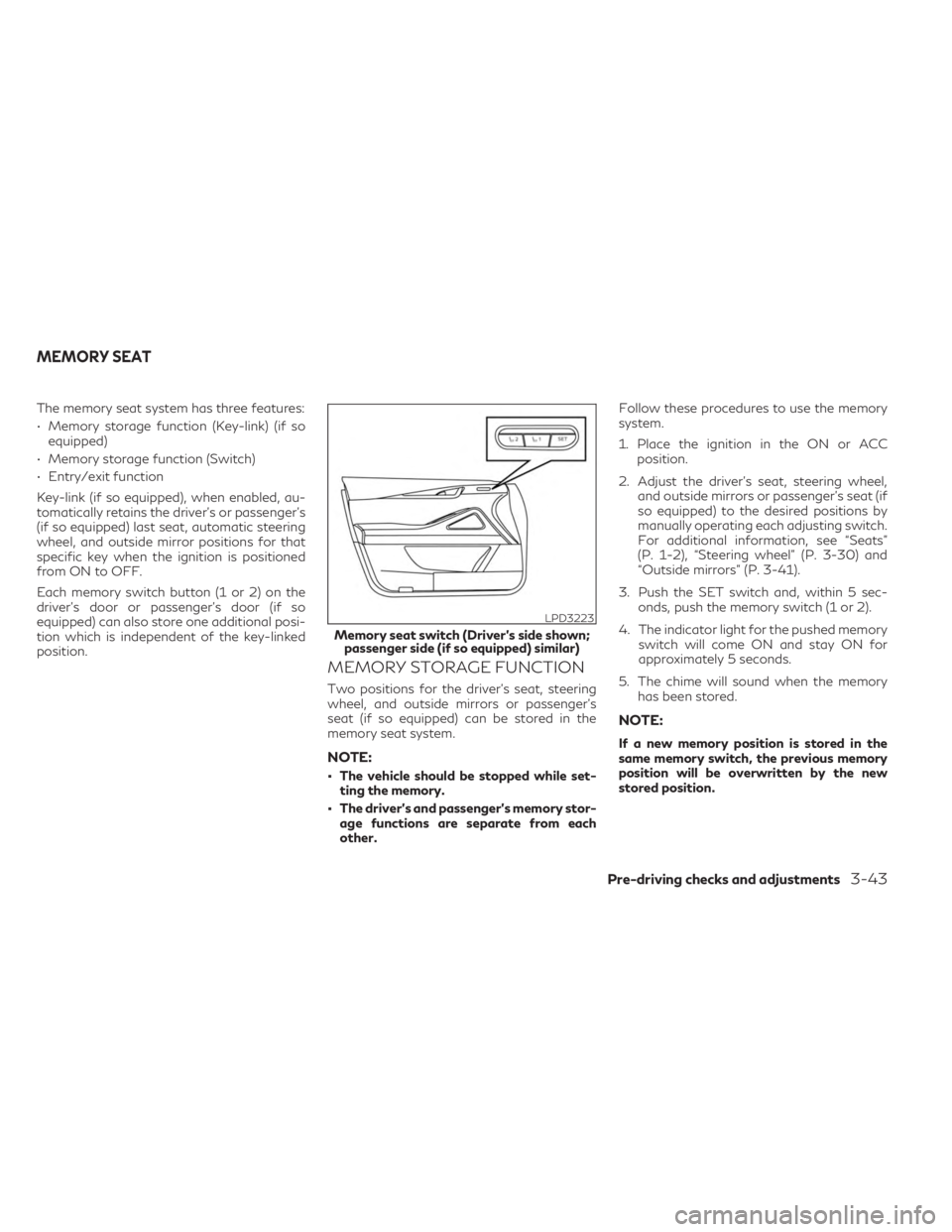
The memory seat system has three features:
• Memory storage function (Key-link) (if soequipped)
• Memory storage function (Switch)
• Entry/exit function
Key-link (if so equipped), when enabled, au-
tomatically retains the driver’s or passenger’s
(if so equipped) last seat, automatic steering
wheel, and outside mirror positions for that
specific key when the ignition is positioned
from ON to OFF.
Each memory switch button (1 or 2) on the
driver’s door or passenger’s door (if so
equipped) can also store one additional posi-
tion which is independent of the key-linked
position.
MEMORY STORAGE FUNCTION
Two positions for the driver's seat, steering
wheel, and outside mirrors or passenger’s
seat (if so equipped) can be stored in the
memory seat system.
NOTE:
• The vehicle should be stopped while set- ting the memory.
• The driver’s and passenger’s memory stor- age functions are separate from each
other. Follow these procedures to use the memory
system.
1. Place the ignition in the ON or ACC
position.
2. Adjust the driver's seat, steering wheel, and outside mirrors or passenger’s seat (if
so equipped) to the desired positions by
manually operating each adjusting switch.
For additional information, see “Seats”
(P. 1-2), “Steering wheel” (P. 3-30) and
“Outside mirrors” (P. 3-41).
3. Push the SET switch and, within 5 sec- onds, push the memory switch (1 or 2).
4. The indicator light for the pushed memory switch will come ON and stay ON for
approximately 5 seconds.
5. The chime will sound when the memory has been stored.
NOTE:
If a new memory position is stored in the
same memory switch, the previous memory
position will be overwritten by the new
stored position.
LPD3223
Memory seat switch (Driver’s side shown;passenger side (if so equipped) similar)
MEMORY SEAT
Pre-driving checks and adjustments3-43
Page 270 of 636
Confirming memory storage
• Push the SET switch.
• If a memory position has been stored in theswitch (1 or 2) then the indicator light for
the respective switch will stay on for ap-
proximately 5 seconds.
ENTRY/EXIT FUNCTION
This system is designed so that the driver's
seat and automatic operation steering wheel
will automatically move. This allows the
driver to get into and out of the driver’s seat
more easily.
The driver’s seat will slide backward and the
steering wheel will move up:
• When the driver’s door is opened with theignition switch placed in the OFF position.
• When the ignition switch is changed from ACC to OFF with the driver’s door open.
The driver’s seat and steering wheel will re-
turn to the previous position:
• When the ignition switch is changed from ACC or ON while the shift position is in the
P (Park) position. The entry/exit function can be adjusted or
canceled through “Vehicle Settings” in the ve-
hicle information display by performing the
following:
• Switch the Exit Seat Slide from “On” to
“Off”.
• Switch the Exit Steering Up from “On” to “Off”.SETTING MEMORY FUNCTION
The position of the following settings can be
linked to the Intelligent Key and the memo-
rized settings can be available for each Intel-
ligent Key.
To use the memory function, set the climate,
navigation and audio systems to the driver's
preferred settings. Lock the doors with the
Intelligent Key. Each Intelligent Key may be
set with the driver's individual preferences.
When a new Intelligent Key is used, “Connec-
tion with the key has been done” will be dis-
played on the vehicle information display and
the memorized settings are available.
To engage the memorized settings, perform
the following:
1. Carry the Intelligent Key that is linked to the memorized settings. 2. Unlock the doors by wrapping hand
around the capacitive door handle or the
button on the Intelligent Key.
3. Place the ignition switch in the ON posi- tion. The settings linked to the Intelligent
Key will start. .
For additional information, see “INFINITI In-
Touch™ Owner’s Manual” (P. 4-2) and
“Heater and air conditioner (automatic)”
(P. 4-29).
SYSTEM OPERATION
The memory seat system will not work or will
stop operating under the following
conditions:
• When the vehicle speed is above 4 mph (7 km/h).
• When any of the memory switches are pushed while the memory seat is operating.
• When the switch for the driver’s seat, steering wheel or passenger’s seat (if so
equipped) is pushed while the memory seat
is operating.
• When the seat has already been moved to the memorized position.
• When no seat position is stored in the memory switch.
• When the shift position is moved from P (Park) to any other position.
3-44Pre-driving checks and adjustments
Page 274 of 636
•The system is designed as an aid to the
driver in showing large stationary ob-
jects directly behind the vehicle, to help
avoid damaging the vehicle.
• The distance guide line and the vehicle
width line should be used as a reference
only when the vehicle is on a level paved
surface. The distance viewed on the
monitor is for reference only and may be
different than the actual distance be-
tween the vehicle and displayed objects.
CAUTION
Do not scratch the camera lens when clean-
ing dirt or snow from the front of the
camera.
The RearView Monitor system automatically
shows a rear view of the vehicle when the
shift lever is shifted into the R (Reverse) posi-
tion. When activating the RearView Monitor,
the guide lines, the icons and the messages
may not be displayed immediately. The radio
can still be heard while the RearView Monitor
is active. To display the rear view, the RearView Moni-
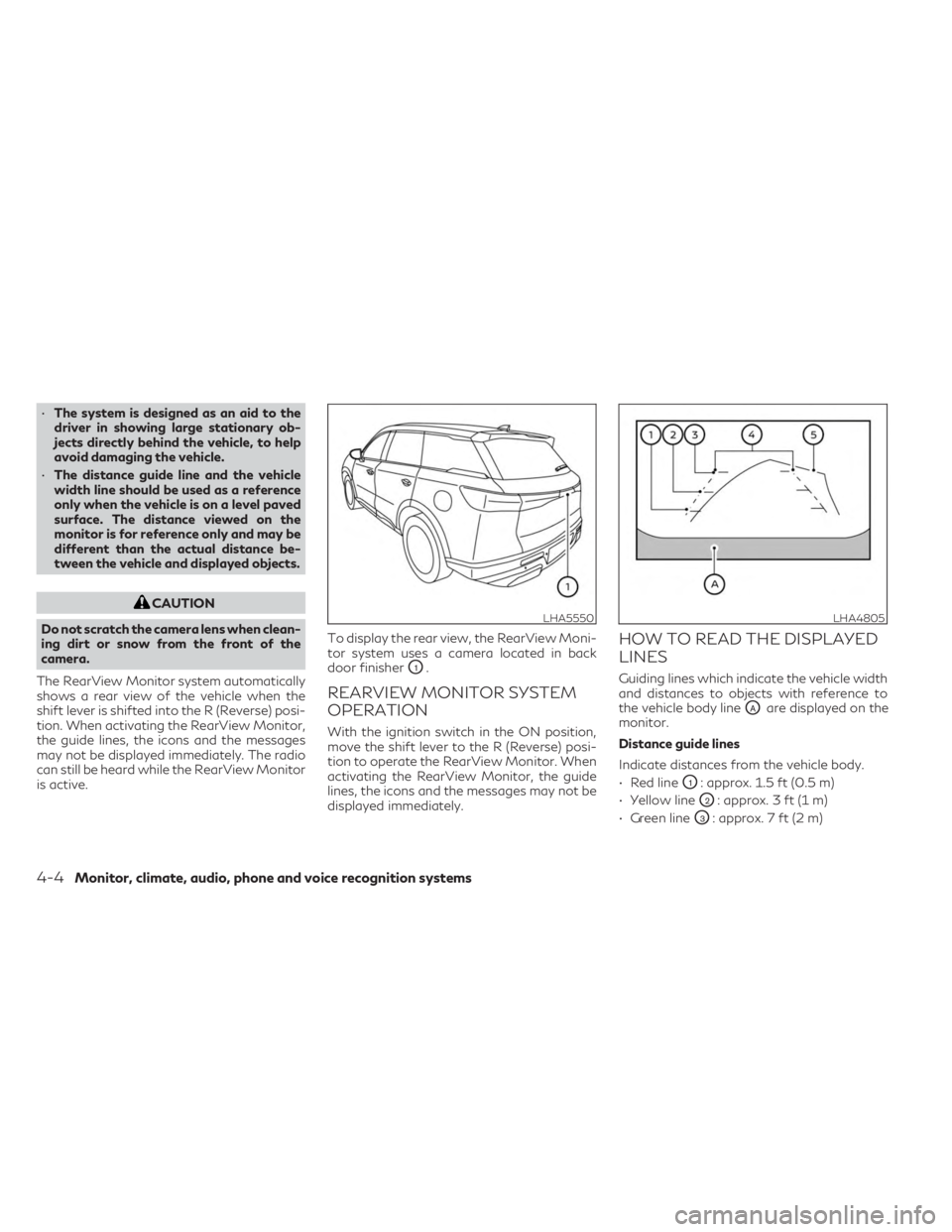
tor system uses a camera located in back
door finisher
O1.
REARVIEW MONITOR SYSTEM
OPERATION
With the ignition switch in the ON position,
move the shift lever to the R (Reverse) posi-
tion to operate the RearView Monitor. When
activating the RearView Monitor, the guide
lines, the icons and the messages may not be
displayed immediately.
HOW TO READ THE DISPLAYED
LINES
Guiding lines which indicate the vehicle width
and distances to objects with reference to
the vehicle body line
OAare displayed on the
monitor.
Distance guide lines
Indicate distances from the vehicle body.
• Red line
O1: approx. 1.5 ft (0.5 m)
• Yellow line
O2: approx. 3 ft (1 m)
• Green line
O3: approx. 7 ft (2 m)
LHA5550LHA4805
4-4Monitor, climate, audio, phone and voice recognition systems
Page 276 of 636
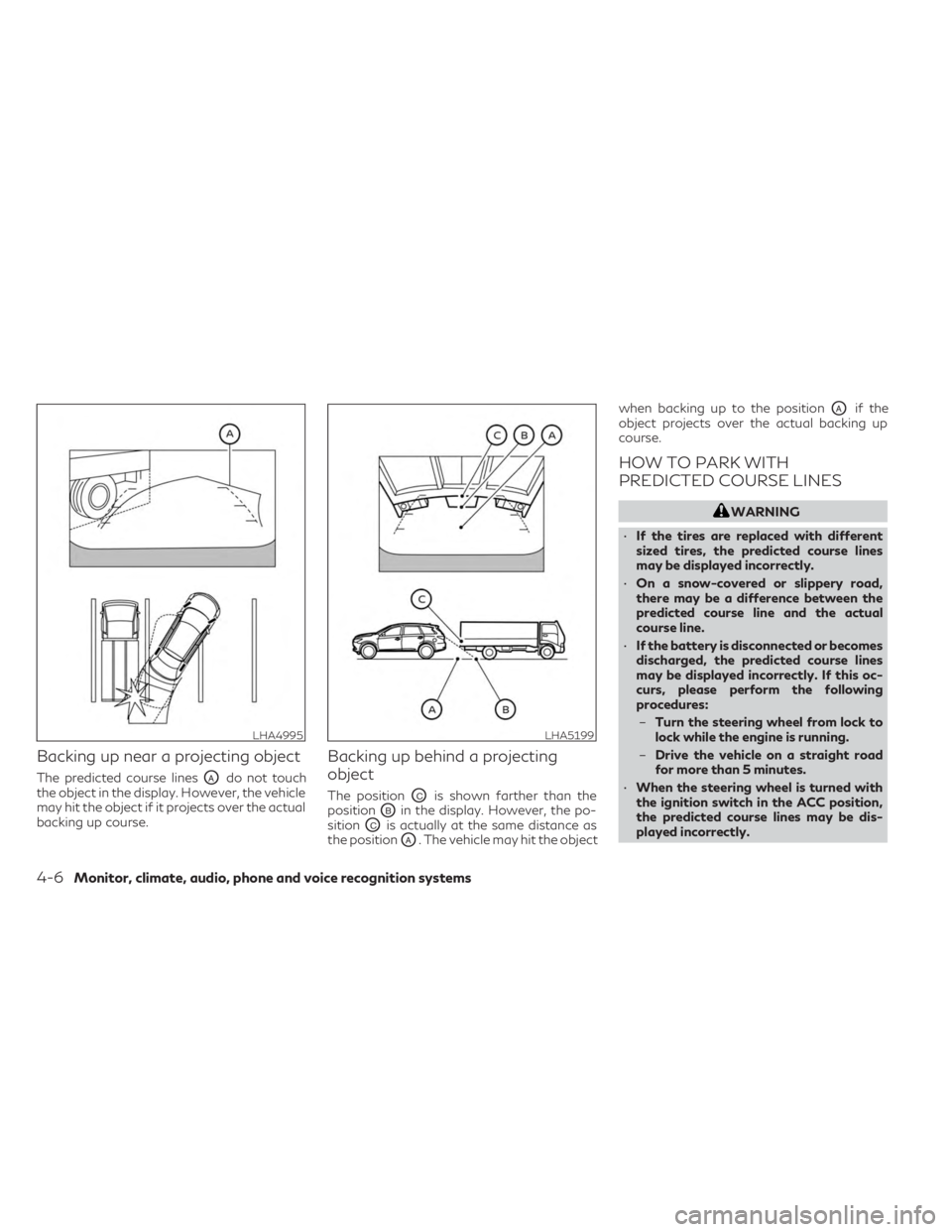
Backing up near a projecting object
The predicted course linesOAdo not touch
the object in the display. However, the vehicle
may hit the object if it projects over the actual
backing up course.
Backing up behind a projecting
object
The positionOCis shown farther than the
position
OBin the display. However, the po-
sition
OCis actually at the same distance as
the position
OA. The vehicle may hit the object when backing up to the position
OAif the
object projects over the actual backing up
course.
HOW TO PARK WITH
PREDICTED COURSE LINES
WARNING
• If the tires are replaced with different
sized tires, the predicted course lines
may be displayed incorrectly.
• On a snow-covered or slippery road,
there may be a difference between the
predicted course line and the actual
course line.
• If the battery is disconnected or becomes
discharged, the predicted course lines
may be displayed incorrectly. If this oc-
curs, please perform the following
procedures:
– Turn the steering wheel from lock to
lock while the engine is running.
– Drive the vehicle on a straight road
for more than 5 minutes.
• When the steering wheel is turned with
the ignition switch in the ACC position,
the predicted course lines may be dis-
played incorrectly.
LHA4995LHA5199
4-6Monitor, climate, audio, phone and voice recognition systems
Page 281 of 636

WARNING
• Failure to follow the warnings and in-
structions for the proper use of the
Around View® Monitor system could re-
sult in serious injury or death.
• The Around View® Monitor is a conve-
nience feature and is not a substitute for
proper vehicle operation because it has
areas where objects cannot be viewed.
The four corners of the vehicle in particu-
lar, are areas where objects do not al-
ways appear in the bird’s-eye, front, or
rear views. Always check your surround-
ings to be sure that it is safe to move
before operating the vehicle. Always op-
erate the vehicle slowly.
• The driver is always responsible for
safety during parking and other
maneuvers.
CAUTION
Do not scratch the camera lens when clean-
ing dirt or snow from the front of the
camera. The Around View® Monitor system is de-
signed as an aid to the driver in situations
such as slot parking or parallel parking.
The monitor displays various views of the
position of the vehicle in a split screen format.
Not all views are available at all times.
Available views:
• Front View
An approximately 150–degree view of the
front of the vehicle.
• Rear View An approximately 150–degree view of the
rear of the vehicle.
• Bird's-Eye View The surrounding views of the vehicle from
above.
• Front-Side View The view around and ahead of the front
passenger's side wheel.
• Front-Wide View An approximately 180–degree view of the
front the vehicle.
• Rear-Wide View An approximately 180–degree view of the
rear of the vehicle. To display the multiple views, the Around
View® Monitor system uses cameras located
in the front grille, on the vehicle’s outside
mirrors and one located in back door finisher
O1.
AROUND VIEW® MONITOR
SYSTEM OPERATION
With the ignition switch in the ON position,
move the shift lever to the R (Reverse) posi-
tion or press the CAMERA button to operate
the Around View® Monitor. When activating
the Around View® Monitor, the guide lines,
the icons and the messages may not be dis-
played immediately.
LHA5508
Monitor, climate, audio, phone and voice recognition systems4-11
Page 284 of 636

The non-viewable areaO2is highlighted in
yellow for several seconds after the bird’s-
eye view is displayed. It will be shown only the
first time after the ignition switch is placed in
the ON position.
The driver can check the approximate direc-
tion and angle of the tire on the display by the
tire icon
O3when driving the vehicle forward
or backward. Predicted course lines
O4indicate the pre-
dicted course when operating the vehicle.
The predicted course lines will be displayed
on the monitor when the steering wheel is
turned. The predicted course lines will move
depending on how much the steering wheel is
turned and will not be displayed while the
steering wheel is in the neutral position.
When the monitor displays the front view and
the steering wheel turns about 90 degrees or
less from the neutral position, the two green
predicted course lines are shown in front of
the vehicle.
When the steering wheel turns about 90 de-
grees or more, one green predicted course
line is shown in front of the vehicle and the
other predicted course line is shown at the
side of the vehicle.
When the monitor displays the rear view, the
predicted course lines are shown at the back
of the vehicle.WARNING
• Objects in the bird's-eye view will appear
further than the actual distance.
• Tall objects, such as a curb or vehicle,
may be misaligned or not displayed at
the seam of the views.
• Objects that are above the camera can-
not be displayed.
• The view of the bird's-eye view may be
misaligned when the camera position
alters.
• A line on the ground may be misaligned
and is not seen as being straight at the
seam of the views. The misalignment will
increase as the line proceeds away from
the vehicle.
• Tire angle display does not indicate the
actual tire angle.
LHA4547
Rear view
4-14Monitor, climate, audio, phone and voice recognition systems
Page 287 of 636
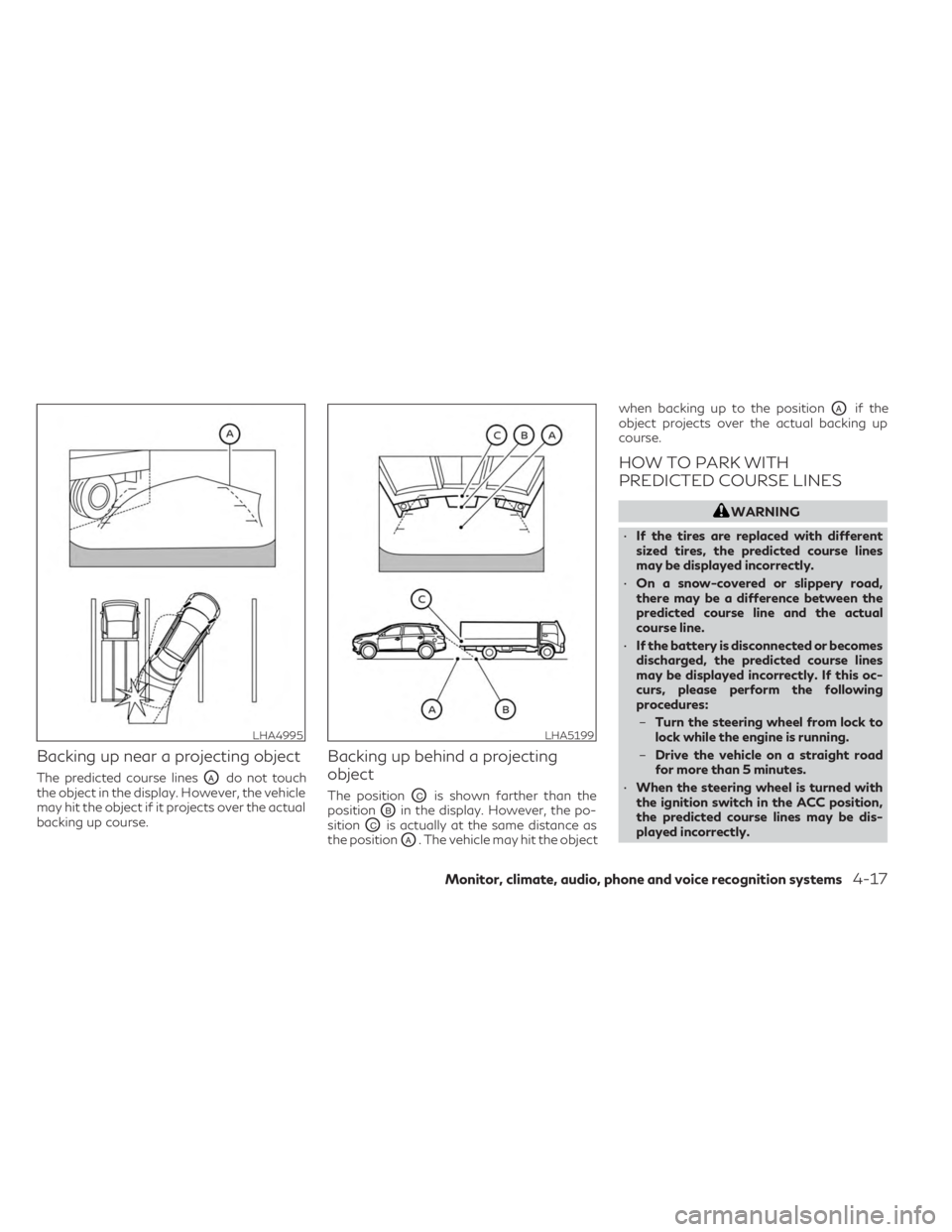
Backing up near a projecting object
The predicted course linesOAdo not touch
the object in the display. However, the vehicle
may hit the object if it projects over the actual
backing up course.
Backing up behind a projecting
object
The positionOCis shown farther than the
position
OBin the display. However, the po-
sition
OCis actually at the same distance as
the position
OA. The vehicle may hit the object when backing up to the position
OAif the
object projects over the actual backing up
course.
HOW TO PARK WITH
PREDICTED COURSE LINES
WARNING
• If the tires are replaced with different
sized tires, the predicted course lines
may be displayed incorrectly.
• On a snow-covered or slippery road,
there may be a difference between the
predicted course line and the actual
course line.
• If the battery is disconnected or becomes
discharged, the predicted course lines
may be displayed incorrectly. If this oc-
curs, please perform the following
procedures:
– Turn the steering wheel from lock to
lock while the engine is running.
– Drive the vehicle on a straight road
for more than 5 minutes.
• When the steering wheel is turned with
the ignition switch in the ACC position,
the predicted course lines may be dis-
played incorrectly.
LHA4995LHA5199
Monitor, climate, audio, phone and voice recognition systems4-17