tire type INFINITI QX60 2023 Owners Manual
[x] Cancel search | Manufacturer: INFINITI, Model Year: 2023, Model line: QX60, Model: INFINITI QX60 2023Pages: 636, PDF Size: 7.28 MB
Page 53 of 636

LARGER CHILDREN
Children should remain in a forward-facing
child restraint with a harness until they reach
the maximum height or weight limit allowed
by the child restraint manufacturer.
Once a child outgrows the height or weight
limit of the harness-equipped forward-facing
child restraint, INFINITI recommends that
the child be placed in a commercially available
booster seat to obtain proper seat belt fit. For
a seat belt to fit properly, the booster seat
should raise the child so that the shoulder belt
is properly positioned across the chest and
the top, middle portion of the shoulder. The
shoulder belt should not cross the neck or
face and should not fall off the shoulder. The
lap belt should lie snugly across the lower hips
or upper thighs, not the abdomen. A booster
seat can only be used in seating positions that
have a three-point type seat belt. The
booster seat should fit the vehicle seat and
have a label certifying that it complies with
Federal Motor Vehicle Safety Standards or
Canadian Motor Vehicle Safety Standards.
Once the child has grown so the shoulder belt
is no longer on or near the face and neck and
the lap belt can be positioned properly across
the lower hips or upper thighs, use the seat
belt without the booster seat.A booster seat should be used until the child
can pass the seat belt fit test below:
• Are the child’s back and hips against the
vehicle seatback?
• Is the child able to sit without slouching?
• Do the child’s knees bend easily over the front edge of the seat with feet flat on the
floor?
• Can the child safely wear the seat belt (lap belt low and snug across the hips and
shoulder belt across mid-chest and
shoulder)?
• Is the child able to use the properly adjusted head restraint/headrest?
• Will the child be able to stay in position for the entire ride? If you answered no to any of these questions,
the child should remain in a booster seat us-
ing a three-point type seat belt.
NOTE:
Laws in some communities may follow dif-
ferent guidelines. Check local and state
regulations to confirm your child is using the
correct restraint system before traveling.
LRS2690
Safety-Seats, seat belts and supplemental restraint system1-27
Page 120 of 636

Forward Collision Warning (PFCW) system is
set to OFF in the vehicle information display.
If the light illuminates when the FEB with
Pedestrian Detection system is on, it may
indicate that the system is unavailable. For
additional information, see “Forward Emer-
gency Braking (FEB) with Pedestrian Detec-
tion system” (P. 5-128) and “Predictive For-
ward Collision Warning (PFCW)” (P. 5-140).
Front passenger air bag
status light
The front passenger air bag status light will
be lit and the passenger front air bag will be
off depending on how the front passenger
seat is being used.
For additional information, see “Front pas-
senger air bag and status light” (P. 1-65).
Low tire pressure warning
light (if so equipped)
Your vehicle is equipped with a Tire Pressure
Monitoring System (TPMS) that monitors the
tire pressure of all tires except the spare.
The low tire pressure warning light warns of
low tire pressure or indicates that the TPMS
is not functioning properly.After the ignition switch is placed in the ON
position, this light illuminates for about 1 sec-
ond and turns off.
Low tire pressure warning
If the vehicle is being driven with low tire
pressure, the warning light will illuminate. A
“Tire Pressure Low - Add Air” warning also
appears in the vehicle information display.
When the low tire pressure warning light il-
luminates, you should stop and adjust the
tire pressure of all four tires to the recom-
mended COLD tire pressure shown on the
Tire and Loading Information label located in
the driver's door opening. The low tire pres-
sure warning light does not automatically
turn off when the tire pressure is adjusted.
After the tire is inflated to the recommended
pressure, the vehicle must be driven at
speeds above 16 mph (25 km/h) to activate
the TPMS and turn off the low tire pressure
warning light. Use a tire pressure gauge to
check the tire pressure.
The “Tire Pressure Low - Add Air” warning
appears each time the ignition switch is
placed in the ON position as long as the
low tire pressure warning light remains
illuminated.
For additional information, see “Vehicle in-
formation display–7 inch (18 cm) Type A”
(P. 2-22) or “Vehicle information display—
12.3 inch (31 cm) Type B” (P. 2-44), “Tire
Pressure Monitoring System (TPMS)” (P. 5-5)
or (P. 6-3).
TPMS malfunction
If the TPMS is not functioning properly, the
low tire pressure warning light will flash for
approximately 1 minute when the ignition
switch is placed in the ON position. The light
will remain on after 1 minute. Have the sys-
tem checked. It is recommended that you visit
an INFINITI retailer for this service. The "Tire
Pressure Low — Add Air" warning does not
appear if the low tire pressure warning light
illuminates to indicate a TPMS malfunction.
For additional information, see “Tire Pressure
Monitoring System (TPMS)” (P. 5-5) and “Tire
pressure” (P. 8-28).
WARNING
• Radio waves could adversely affect elec-
tric medical equipment. Those who use a
pacemaker should contact the electric
medical equipment manufacturer for the
possible influences before use.
2-18Instruments and controls
Page 124 of 636

AUDIBLE REMINDERS
Brake pad wear warning
The disc brake pads have audible wear warn-
ings. When a disc brake pad requires replace-
ment, it makes a high pitched scraping sound
when the vehicle is in motion, whether or not
the brake pedal is depressed. Have the brakes
checked as soon as possible if the warning
sound is heard.
Lane Departure Warning (LDW)
and Lane Departure Prevention
(LDP) warning chime (if so
equipped)
When the LDW or LDP system is on, the
chime sounds if the vehicle is traveling close
to either the left or the right of a traveling
lane with detectable lane markers.
For additional information, see “Lane Depar-
ture Warning (LDW) system” (P. 5-36) or
“Lane Departure Prevention (LDP) system”
(P. 5-43).
Light reminder chime
With the ignition switch placed in the OFF
position, a chime sounds when the driver's
door is opened if the headlights or parking
lights are on.
Turn the headlight control switch off before
leaving the vehicle.
Door lock warning chime
When the chime sounds, be sure to check
both the vehicle and the Intelligent Key.
For additional information, see “Trouble-
shooting guide” (P. 3-16).The vehicle information display is located to
the left of the speedometer. It displays such
items as:
• Vehicle settings
• Indicators and warnings
• Information/warning messages
• Tire pressure information
• Drive computer information
• Cruise control system information
• Driving Aids (if so equipped)
• ProPILOT Assist (if so equipped)
• INFINITI Intelligent Key operationinformation
LIC3224
VEHICLE INFORMATION DISPLAY 7
INCH (18 cm) TYPE A (if so equipped)
2-22Instruments and controls
Page 146 of 636
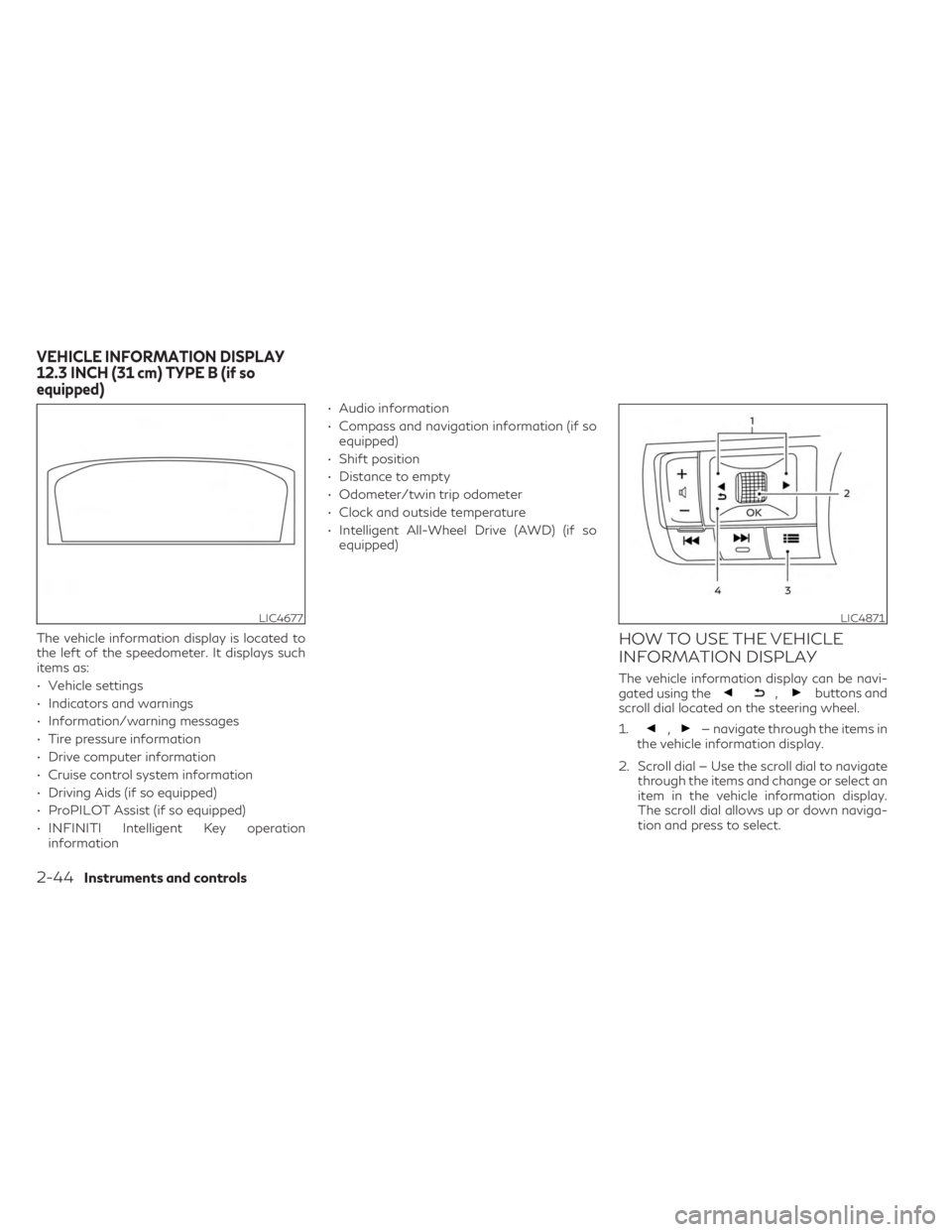
The vehicle information display is located to
the left of the speedometer. It displays such
items as:
• Vehicle settings
• Indicators and warnings
• Information/warning messages
• Tire pressure information
• Drive computer information
• Cruise control system information
• Driving Aids (if so equipped)
• ProPILOT Assist (if so equipped)
• INFINITI Intelligent Key operationinformation • Audio information
• Compass and navigation information (if so
equipped)
• Shift position
• Distance to empty
• Odometer/twin trip odometer
• Clock and outside temperature
• Intelligent All-Wheel Drive (AWD) (if so equipped)HOW TO USE THE VEHICLE
INFORMATION DISPLAY
The vehicle information display can be navi-
gated using the,buttons and
scroll dial located on the steering wheel.
1.
,— navigate through the items in
the vehicle information display.
2. Scroll dial — Use the scroll dial to navigate through the items and change or select an
item in the vehicle information display.
The scroll dial allows up or down naviga-
tion and press to select.
LIC4677LIC4871
VEHICLE INFORMATION DISPLAY
12.3 INCH (31 cm) TYPE B (if so
equipped)
2-44Instruments and controls
Page 165 of 636

Low tire pressure warning
If the vehicle is being driven with low tire
pressure, the warning indicator will illumi-
nate. A “Tire Pressure Low - Add Air”
warning also appears in the vehicle informa-
tion display.
When the low tire pressure warning indica-
tor appears, you should stop and adjust the
tire pressure of all four tires to the recom-
mended COLD tire pressure shown on the
Tire and Loading Information label located in
the driver's door opening. The low tire pres-
sure warning indicator does not automati-
cally turn off when the tire pressure is ad-
justed. After the tire is inflated to the
recommended pressure, the vehicle must be
driven at speeds above 16 mph (25 km/h) to
activate the TPMS and turn off the low tire
pressure warning indicator. Use a tire pres-
sure gauge to check the tire pressure.
The “Tire Pressure Low - Add Air” warning
appears each time the ignition switch is
placed in the ON position as long as the low
tire pressure warning indicator remains
illuminated.
For additional information, see “Vehicle in-
formation display—12.3 inch (31 cm) Type B”
(P. 2-44), “Tire Pressure Monitoring System
(TPMS)” (P. 5-5) or (P. 6-3).
TPMS malfunction
If the TPMS is not functioning properly, the
low tire pressure warning indicator will flash
for approximately 1 minute when the ignition
switch is placed in the ON position. The indi-
cator will remain on after 1 minute. Have the
system checked. It is recommended that you
visit an INFINITI retailer for this service. The
"Tire Pressure Low — Add Air" warning does
not appear if the low tire pressure warning
indicator appears to indicate a TPMS
malfunction.
For additional information, see “Tire Pressure
Monitoring System (TPMS)” (P. 5-5) and “Tire
pressure” (P. 8-28).
WARNING
• Radio waves could adversely affect elec-
tric medical equipment. Those who use a
pacemaker should contact the electric
medical equipment manufacturer for the
possible influences before use.
• If the indicator does not appear with the
ignition switch placed in the ON position,
have the vehicle checked as soon as pos-
sible. It is recommended that you visit an
INFINITI retailer for this service. •
If the indicator appears while driving,
avoid sudden steering maneuvers or
abrupt braking, reduce vehicle speed,
pull off the road to a safe location and
stop the vehicle as soon as possible. Driv-
ing with under-inflated tires may perma-
nently damage the tires and increase the
likelihood of tire failure. Serious vehicle
damage could occur and may lead to an
accident and could result in serious per-
sonal injury or death. Check the tire pres-
sure for all four tires. Adjust the tire
pressure to the recommended COLD tire
pressure show on the Tire and Loading
Information label located in the driver’s
door opening to turn the low tire pres-
sure indicator off. If the indicator still ap-
pears while driving after adjusting the
tire pressure, a tire may be flat or the
TPMS may be malfunctioning. If you
have a flat tire, replace it with a spare
tire as soon as possible. If no tire is flat
and all tires are properly inflated, have
the vehicle checked. It is recommended
that you visit an INFINITI retailer for this
service.
Instruments and controls2-63
Page 166 of 636
•When using a wheel without the TPMS
such as the spare tire, the TPMS will not
function and the low tire pressure indica-
tor will flash for approximately 1 minute.
The indicator will remain on after 1 min-
ute. Have your tires replaced and/or
TPMS system reset as soon as possible.
It is recommended that you visit an
INFINITI retailer for these services.
• Replacing tires with those not originally
specified by INFINITI could affect the
proper operation of the TPMS.
CAUTION
• The TPMS is not a substitute for the
regular tire pressure check. Be sure to
check the tire pressure regularly.
• If the vehicle is being driven at speeds of
less than 16 mph (25 km/h), the TPMS
may not operate correctly.
• Be sure to install the specified size of
tires to the four wheels correctly.
Malfunction Indicator (MIL)
If this indicator appears steady or blinks while
the engine is running, it may indicate a poten-
tial emission control malfunction. The MIL may also come on steady if the
vehicle runs out of fuel. Check to make sure
that the vehicle has at least 3 gallons (11.4
liters) of fuel in the fuel tank.
After a few driving trips, the
indicator
should turn off if no other potential emission
control system malfunction exists.
If this indicator appears steady for 20 seconds
and then blinks for 10 seconds when the en-
gine is not running, it indicates that the vehicle
is not ready for an emission control system
inspection/maintenance test. For additional
information, see “Readiness for Inspection/
Maintenance (I/M) test” (P. 10-34).
Operation
The MIL will come on in one of two ways:
• MIL on steady — An emission control sys- tem malfunction has been detected. Have
the vehicle inspected. It is recommended
that you visit an INFINITI retailer for this
service. You do not need to have your ve-
hicle towed to the retailer.
• MIL blinking — An engine misfire has been detected which may damage the emission
control system. To reduce or avoid emis-
sion control system damage:– do not drive at speeds above 45 mph (72 km/h). – avoid hard acceleration or deceleration.
– avoid steep uphill grades.
– if possible, reduce the amount of cargo
being hauled or towed.
The MIL may stop blinking and come on
steady. Have the vehicle inspected. It is rec-
ommended that you visit an INFINITI retailer
for this service. You do not need to have your
vehicle towed to the retailer.
CAUTION
Continued vehicle operation without hav-
ing the emission control system checked
and repaired as necessary could lead to
poor driveability, reduced fuel economy,
and possible damage to the emission con-
trol system.
Master warning indicator
When the ignition is in the ON position, the
master warning indicator appears with vari-
ous other warning messages.
For additional information, see “Vehicle in-
formation display–7 inch (18 cm) Type A”
(P. 2-22) or “Vehicle information display—
12.3 inch (31 cm) Type B” (P. 2-44).
2-64Instruments and controls
Page 308 of 636

5 Starting and driving
Precautions when starting and driving............5-4
Exhaust gas (carbon monoxide) ................5-4
Three-way catalyst ...........................5-4
Tire Pressure Monitoring System (TPMS) ......5-5
On-pavement and off-road driving
precautions ...................................5-8
Avoiding collision and rollover .................5-8
Off-road recovery ............................5-9
Rapid air pressure loss ........................5-9
Drinking alcohol/drugs and driving ...........5-10
Driving safety precautions ...................5-10
Intelligent All-Wheel Drive (AWD) driving
safety precautions (if so equipped) ............5-12
Push-button ignition switch ....................5-13
Operating range for engine start function ....5-13
Push-button ignition switch operation .......5-13
Push-button ignition switch positions ........5-14
Emergency engine shut off ..................5-14
INFINITI Intelligent Key battery
discharge .................................... 5-15
INFINITI Vehicle Immobilizer System ..........5-15
Before starting the engine ......................5-16
Starting the engine ............................. 5-16
Remote Engine Start (if so equipped) .........5-17
Driving the vehicle ............................. 5-18
Automatic Transmission (A/T) ...............5-18Parking brake
.................................. 5-25
Electronic parking brake (switch type) ........5-25
Automatic brake hold .......................... 5-27
How to activate/deactivate the
automatic brake hold function ...............5-28
How to use the automatic brake hold
function .................................... 5-28
INFINITI Drive Mode Selector ..................5-29
STANDARD (2WD models)/AUTO
(AWD models) .............................. 5-30
SPORT mode ............................... 5-30
SNOW mode ............................... 5-30
PERSONAL mode .......................... 5-30
ECO mode ................................. 5-32
Traffic Sign Recognition (TSR) (if so equipped) . . 5-34 System operation ........................... 5-34
Turning the Traffic Sign Recognition
(TSR) system on and off .....................5-35
System temporarily unavailable ..............5-36
System
malfunction ......................... 5-36
System maintenance ........................ 5-36
Lane Departure Warning (LDW) ................5-36
LDW system operation ......................5-37
How to enable/disable the LDW system .....5-39
LDW system limitations .....................5-40
System temporarily unavailable ..............5-41
Page 316 of 636

Vehicle set-up:
1. Park the vehicle in a safe and level place.
2. Apply the parking brake and push the parkbutton to engage the P (Park) position.
3. Place the ignition switch in the ON posi- tion. Do not start the engine.
Operation:
1. Add air to the tire.
2. After a few seconds, the hazard indicators will start flashing.
3. When the designated pressure is reached, the horn beeps once and the hazard indi-
cators stop flashing.
4. Perform the above steps for each tire. • If the tire is over-inflated more than ap-proximately 4 psi (30 kPa), the horn
beeps and the hazard indicators flash
three times. To correct the pressure,
push the core of the valve stem on the
tire briefly to release pressure. When the
pressure reaches the designated pres-
sure, the horn beeps once.
• If the hazard indicator does not flash within approximately 15 seconds after
starting to inflate the tire, it indicates
that the TPMS with Tire Inflation Indi-
cator is not operating. • The TPMS will not activate the TPMS
with Tire Inflation Indicator under the
following conditions:– If there is interference from an exter- nal device or transmitter.
– The air pressure from the inflation de- vice is not sufficient to inflate the tire.
– There is a malfunction in the TPMS.
– There is a malfunction in the horn or hazard indicators.
– The identification code of the tire pressure sensor is not registered to
the system.
– The battery of the tire pressure sensor is low.
• If the TPMS with Tire Inflation Indicator does not operate due to TPMS interfer-
ence, move the vehicle about 3 ft (1 m)
backward or forward and try again.
If the TPMS with Tire Inflation Indicator is
not working, use a tire pressure gauge.
ON-PAVEMENT AND OFF-ROAD
DRIVING PRECAUTIONS
Utility vehicles have a significantly higher
rollover rate than other types of vehicles.
They have higher ground clearance than pas-
senger cars to make them capable of per-
forming in a variety of on-pavement and off-
road applications. This gives them a higher center of gravity than ordinary vehicles. An
advantage of higher ground clearance is a
better view of the road, allowing you to an-
ticipate problems. However, they are not de-
signed for cornering at the same speeds as
conventional 2-Wheel Drive vehicles any
more than low-slung sports cars are de-
signed to perform satisfactorily under off-
road conditions. If at all possible, avoid sharp
turns at high speeds. As with other vehicles of
this type, failure to operate this vehicle cor-
rectly may result in loss of control or vehicle
rollover.
In a rollover crash, an unbelted person is sig-
nificantly more likely to die than a person
wearing a seat belt.
For additional information, see “Driving
safety precautions” (P. 5-10).
AVOIDING COLLISION AND
ROLLOVER
WARNING
Failure to operate this vehicle in a safe and
prudent manner may result in loss of con-
trol or an accident.
5-8Starting and driving
Page 320 of 636
•When a wheel is off the ground due to an
unlevel surface, do not spin the wheel
excessively.
• Accelerating quickly, sharp steering ma-
neuvers or sudden braking may cause
loss of control.
• If at all possible, avoid sharp turning ma-
neuvers, particularly at high speeds.
Your INFINITI vehicle has a higher center
of gravity than a passenger car. The ve-
hicle is not designed for cornering at the
same speeds as passenger cars. Failure
to operate this vehicle correctly could re-
sult in loss of control and/or a rollover
accident.
• Always use tires of the same type, size,
brand, construction (bias, bias-belted, or
radial), and tread pattern on all four
wheels. Install tire chains on the front
wheels when driving on slippery roads
and drive carefully.
• Be sure to check the brakes immediately
after driving in mud or water. For addi-
tional information, see “Brake precau-
tions” (P. 5-165).
• Avoid parking your vehicle on steep hills.
If you get out of the vehicle and it rolls
forward, backward or sideways, you
could be injured. •
Whenever you drive off-road through
sand, mud or water as deep as the wheel
hub, more frequent maintenance may be
required. For additional information, see
“Maintenance under severe operating
conditions” (P. 9-7).
INTELLIGENT ALL-WHEEL
DRIVE (AWD) DRIVING SAFETY
PRECAUTIONS (if so equipped)
WARNING
• Replacing tires with those not originally
specified by INFINITI could affect the
proper operation of the TPMS.
• Always use tires of the same type, size,
brand, construction (bias, bias-belted or
radial), and tread pattern on all four
wheels. Install tire chains on the front
wheels when driving on slippery roads
and drive carefully.
• This vehicle is not designed for off-road
(rough road) use. Do not drive on sandy
or muddy roads that tires may get stuck
in. •
For AWD equipped vehicles, do not at-
tempt to raise two wheels off the ground
and shift the transmission to any D
(Drive) or R (Reverse) position with the
engine running. Doing so may result in
drivetrain damage or unexpected vehicle
movement which could result in serious
vehicle damage or personal injury.
• Do not attempt to test an AWD
equipped vehicle on a 2-wheel dyna-
mometer (such as the dynamometers
used by some states for emissions test-
ing), or similar equipment even if the
other two wheels are raised off the
ground. Make sure you inform test facil-
ity personnel that your vehicle is
equipped with AWD before it is placed
on a dynamometer. Using the wrong test
equipment may result in drivetrain dam-
age or unexpected vehicle movement
which could result in serious vehicle dam-
age or personal injury.
• When a wheel is off the ground due to an
unlevel surface, do not spin the wheel
excessively.
5-12Starting and driving
Page 464 of 636

RF Exposure Information according 2.1091/
2.1093/OET bulletin 65:
Radiofrequency radiation exposure information:
This equipment complies with FCC radiation
exposure limits set forth for an uncontrolled
environment. This equipment should be in-
stalled and operated with minimum distance
of 20 cm between the radiator and your
body.
The transmitter must not be co-located or
operating in conjunction with any other an-
tenna or transmitter.
For Canada
Type approval number:
IC: 3387A-FR5CPEC
Legal warning for RF equipment:
This device complies with Industry Canada
licence-exempt RSS standard(s). Operation is
subject to the following two conditions: (1)
this device may not cause interference, and
(2) this device must accept any interference,
including interference that may cause unde-
sired operation of the device.
WARNING
Failure to follow the warnings and instruc-
tions for proper use of the DAA system
could result in serious injury or death.
• The DAA system is only a warning to in-
form the driver of a potential lack of
driver attention or drowsiness. It will not
steer the vehicle or prevent loss of
control.
• The DAA system does not detect and
provide an alert of the driver’s lack of
attention or fatigue in every situation.
• It is the driver’s responsibility to:
– stay alert,
– drive safely,
– keep the vehicle in the traveling lane,
– be in control of the vehicle at all times,
– avoid driving when tired,
– avoid distractions (texting, etc.). The DAA system helps alert the driver if the
system detects a lack of attention or driving
fatigue.
The system monitors driving style and steer-
ing behavior over a period of time, and it
detects changes from the normal pattern. If
the system detects that driver attention is
decreasing over a period of time, the system
uses audible and visual warnings to suggest
that the driver take a break.
DRIVER ATTENTION ALERT (DAA)
(if so equipped)
5-156Starting and driving