battery discharge INFINITI QX80 2021 Owner's Manual
[x] Cancel search | Manufacturer: INFINITI, Model Year: 2021, Model line: QX80, Model: INFINITI QX80 2021Pages: 529, PDF Size: 2.05 MB
Page 31 of 529

1-4Safety — seats, seat belts and supplemental restraint system
FRONT SEATS
Front power seat adjustment
Operating tips:
.The power seat motor has an auto-reset
overload protection circuit. If the motor
stops during operation, wait 30 seconds,
then reactivate the switch.
. Do not operate the power seat switch for
a long period of time when the engine is
off. This will discharge the battery.
See “Automatic drive positioner” (P.3-40)
for the seat position memory function.
CAUTION
When adjusting the seat positions, be
sure not to contact any moving parts to
avoid possible injuries and/or damages.
SSS1051
Forward and backward:
Moving the switch
forward or backward
will slide the seat forward or backward to
the desired position.
Reclining:
Move the recline switch
backward until
the desired angle is obtained. To bring the
seatback forward again, move the switch
forward.
The reclining feature allows adjustment of
the seatback for occupants of different sizes
for added comfort and to help obtain proper
seat belt fit. (See “Precautions on seat belt
usage” (P.1-18).) Also, the seatback can be
reclined to allow occupants to rest when the vehicle is stopped and the transmission is in
the P (Park) position.
Page 36 of 529
be against your body. In an accident,
you could be thrown into it and
receive neck or other serious injuries.
You could also slide under the lap belt
and receive serious internal injuries.
. For the most effective protection
when the vehicle is in motion, the
seat should be upright. Always sit
well back and upright in the seat with
both feet on the floor and adjust the
seat belt properly. See “Precautions
on seat belt usage” (P.1-18).
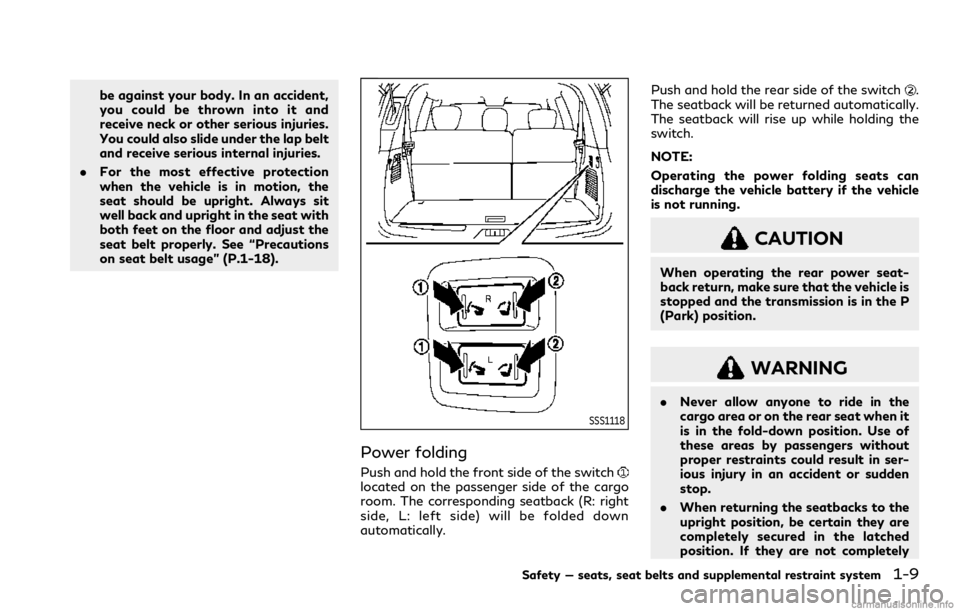
SSS1118
Power folding
Push and hold the front side of the switchlocated on the passenger side of the cargo
room. The corresponding seatback (R: right
side, L: left side) will be folded down
automatically. Push and hold the rear side of the switch
.
The seatback will be returned automatically.
The seatback will rise up while holding the
switch.
NOTE:
Operating the power folding seats can
discharge the vehicle battery if the vehicle
is not running.
CAUTION
When operating the rear power seat-
back return, make sure that the vehicle is
stopped and the transmission is in the P
(Park) position.
WARNING
. Never allow anyone to ride in the
cargo area or on the rear seat when it
is in the fold-down position. Use of
these areas by passengers without
proper restraints could result in ser-
ious injury in an accident or sudden
stop.
. When returning the seatbacks to the
upright position, be certain they are
completely secured in the latched
position. If they are not completely
Safety — seats, seat belts and supplemental restraint system1-9
Page 121 of 529

2-24Instruments and controls
OPERATIONAL INDICATORS
1. No Key Detected
This warning appears when the Intelligent
Key is left outside the vehicle with the
ignition switch in the ON position. Make
sure the Intelligent Key is inside the vehicle.
See “Intelligent Key system” (P.3-7) for more
details.
2. Key ID Incorrect
This warning appears when the ignition
switch is pushed from the OFF position
and the Intelligent Key is not recognized by
the system. You cannot start the engine with
an unregistered key.
See “Intelligent Key system” (P.3-7).
3. Key Battery Low
This indicator appears when the Intelligent
Key battery is running out of power.
If this indicator appears, replace the battery
with a new one. (See “Intelligent Key battery
replacement” (P.8-21).)
4. Key System Error: See Owner’s
Manual
This warning appears if there is a malfunc-
tion in the Intelligent Key system. If this
warning appears while the engine isstopped, it may be impossible to start the
engine.
If this warning appears while the engine is
running, you can drive the vehicle. However
in these cases, have the system checked. It is
recommended you visit an INFINITI retailer
for this service.
5. Key Registration Complete
This indicator appears when a new Intelli-
gent Key is registered to the vehicle.
6. Push brake and start switch to
drive
This indicator appears when the shift lever is
in the P (Park) position.
This indicator also appears when the vehicle
has been started using the Remote Engine
Start function (if so equipped).
This indicator means that the engine will
start by pushing the ignition switch with the
brake pedal depressed. You can start the
engine from any position of the ignition
switch.
7. Push Ignition to OFF
After the Shift to Park warning illuminates,
the warning will illuminate if the ignition
switch is placed in the ACC position when
the shift lever moves into the P (Park)
position.To turn off the warning, place the ignition
switch in the ON position and then in the
LOCK position.
8. Shift to Park
This warning appears when the ignition
switch is pushed to stop the engine with
the shift lever in any position except the P
(Park) position.
If this warning appears, move the shift lever
to the P (Park) position or push the ignition
switch to the ON position.
An inside warning chime will also sound. (See
“Intelligent Key system” (P.3-7).)
9. Engine start operation for Intel-
ligent Key system indicator (if I-Key
battery level is low)
This indicator appears when the Intelligent
Key battery is running out of power and
when the Intelligent Key system and vehicle
are not communicating normally.
If this indicator appears, touch the ignition
switch with the Intelligent Key while depres-
sing the brake pedal. (See “Intelligent Key
battery discharge” (P.5-14).)
10. Release Parking Brake
This warning appears when the vehicle
speed is above 4 MPH (7 km/h) and the
Page 141 of 529
2-44Instruments and controls
an INFINITI retailer for this service.
Battery saver system
A chime will sound when the driver side door
is opened with the light switch in theorposition and the ignition switch in the
OFF or LOCK position.
When the headlight switch is in the
orposition while the ignition switch is in
the ON position, the lights will automatically
turn off after a period of time when the
ignition switch has been pushed to the OFF
position.
When the headlight switch remains in the
orposition after the lights auto-
matically turn off, the lights will turn on
when the ignition switch is pushed to the ON
position.
CAUTION
. When you turn on the headlight
switch again after the lights auto-
matically turn off, the lights will not
turn off automatically. Be sure to
turn the light switch to the OFF
position when you leave the vehicle
for extended periods of time, other-
wise the battery will be discharged. .
Never leave the light switch on when
the engine is not running for ex-
tended periods of time even if the
headlights turn off automatically.
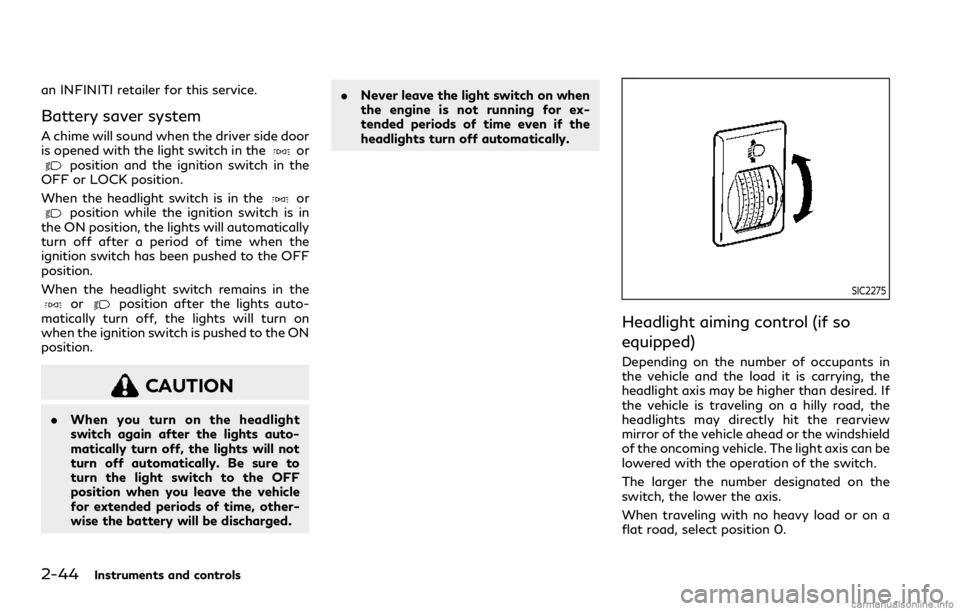
SIC2275
Headlight aiming control (if so
equipped)
Depending on the number of occupants in
the vehicle and the load it is carrying, the
headlight axis may be higher than desired. If
the vehicle is traveling on a hilly road, the
headlights may directly hit the rearview
mirror of the vehicle ahead or the windshield
of the oncoming vehicle. The light axis can be
lowered with the operation of the switch.
The larger the number designated on the
switch, the lower the axis.
When traveling with no heavy load or on a
flat road, select position 0.
Page 155 of 529
2-58Instruments and controls
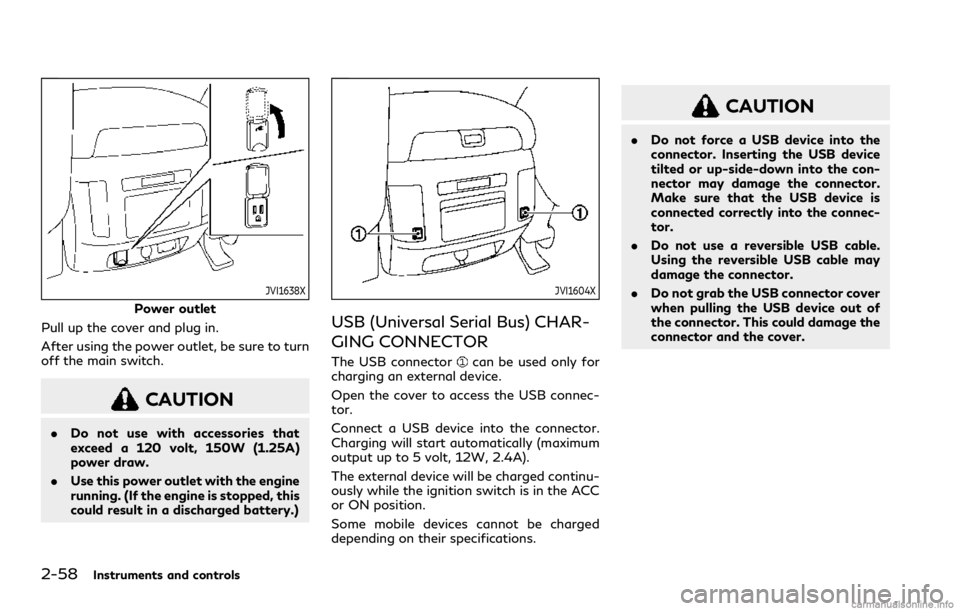
JVI1638X
Power outlet
Pull up the cover and plug in.
After using the power outlet, be sure to turn
off the main switch.
CAUTION
. Do not use with accessories that
exceed a 120 volt, 150W (1.25A)
power draw.
. Use this power outlet with the engine
running. (If the engine is stopped, this
could result in a discharged battery.)
JVI1604X
USB (Universal Serial Bus) CHAR-
GING CONNECTOR
The USB connectorcan be used only for
charging an external device.
Open the cover to access the USB connec-
tor.
Connect a USB device into the connector.
Charging will start automatically (maximum
output up to 5 volt, 12W, 2.4A).
The external device will be charged continu-
ously while the ignition switch is in the ACC
or ON position.
Some mobile devices cannot be charged
depending on their specifications.
CAUTION
. Do not force a USB device into the
connector. Inserting the USB device
tilted or up-side-down into the con-
nector may damage the connector.
Make sure that the USB device is
connected correctly into the connec-
tor.
. Do not use a reversible USB cable.
Using the reversible USB cable may
damage the connector.
. Do not grab the USB connector cover
when pulling the USB device out of
the connector. This could damage the
connector and the cover.
Page 172 of 529
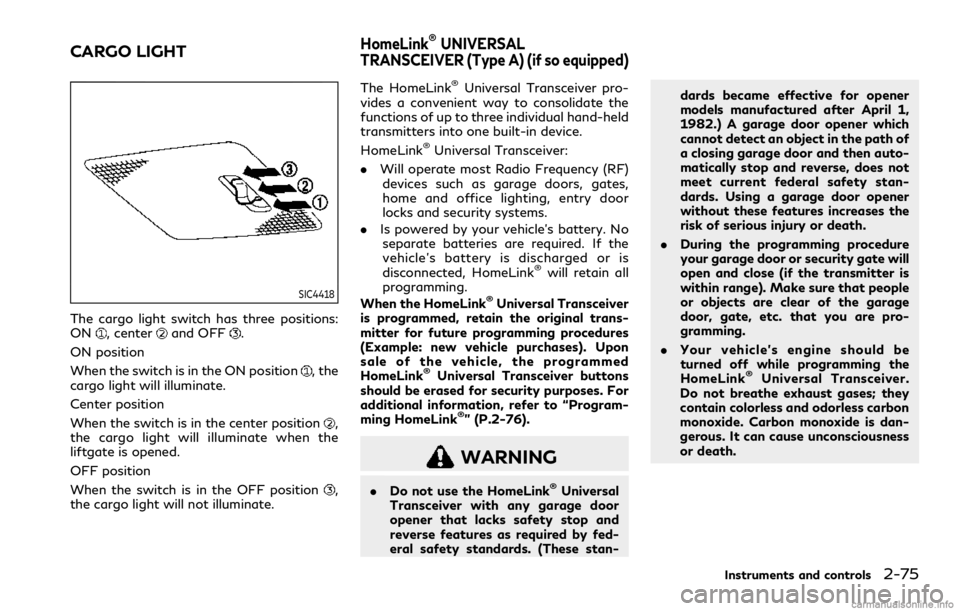
SIC4418
The cargo light switch has three positions:
ON, centerand OFF.
ON position
When the switch is in the ON position
, the
cargo light will illuminate.
Center position
When the switch is in the center position
,
the cargo light will illuminate when the
liftgate is opened.
OFF position
When the switch is in the OFF position
,
the cargo light will not illuminate. The HomeLink
®Universal Transceiver pro-
vides a convenient way to consolidate the
functions of up to three individual hand-held
transmitters into one built-in device.
HomeLink
®Universal Transceiver:
. Will operate most Radio Frequency (RF)
devices such as garage doors, gates,
home and office lighting, entry door
locks and security systems.
. Is powered by your vehicle’s battery. No
separate batteries are required. If the
vehicle’s battery is discharged or is
disconnected, HomeLink
®will retain all
programming.
When the HomeLink
®Universal Transceiver
is programmed, retain the original trans-
mitter for future programming procedures
(Example: new vehicle purchases). Upon
sale of the vehicle, the programmed
HomeLink
®Universal Transceiver buttons
should be erased for security purposes. For
additional information, refer to “Program-
ming HomeLink
®” (P.2-76).
WARNING
. Do not use the HomeLink®Universal
Transceiver with any garage door
opener that lacks safety stop and
reverse features as required by fed-
eral safety standards. (These stan- dards became effective for opener
models manufactured after April 1,
1982.) A garage door opener which
cannot detect an object in the path of
a closing garage door and then auto-
matically stop and reverse, does not
meet current federal safety stan-
dards. Using a garage door opener
without these features increases the
risk of serious injury or death.
. During the programming procedure
your garage door or security gate will
open and close (if the transmitter is
within range). Make sure that people
or objects are clear of the garage
door, gate, etc. that you are pro-
gramming.
. Your vehicle’s engine should be
turned off while programming the
HomeLink
®Universal Transceiver.
Do not breathe exhaust gases; they
contain colorless and odorless carbon
monoxide. Carbon monoxide is dan-
gerous. It can cause unconsciousness
or death.
Instruments and controls2-75
CARGO LIGHTHomeLink®UNIVERSAL
TRANSCEIVER (Type A) (if so equipped)
Page 176 of 529
NOTE:
Changes or modifications not expressly
approved by the party responsible for
compliance could void the user’s authority
to operate the equipment.
For Canada:
This device complies with Industry Canada
licence-exempt RSS standard(s). Operation
is subject to the following two conditions:
(1) this device may not cause interference,
and (2) this device must accept any inter-
ference, including interference that may
cause undesired operation of the device.The HomeLink®Universal Transceiver pro-
vides a convenient way to consolidate the
functions of up to three individual hand-held
transmitters into one built-in device.
HomeLink
®Universal Transceiver:
. Will operate most Radio Frequency (RF)
devices such as garage doors, gates,
home and office lighting, entry door
locks and security systems.
. Is powered by your vehicle’s battery. No
separate batteries are required. If the
vehicle’s battery is discharged or is
disconnected, HomeLink
®will retain all
programming.
When the HomeLink
®Universal Transceiver
is programmed, retain the original trans-
mitter for future programming procedures
(Example: new vehicle purchases). Upon
sale of the vehicle, the programmed
HomeLink
®Universal Transceiver buttons
should be erased for security purposes. For
additional information, refer to “Program-
ming HomeLink
®” (P.2-80).
WARNING
. Do not use the HomeLink®Universal
Transceiver with any garage door
opener that lacks safety stop and
reverse features as required by fed-
eral safety standards. (These stan- dards became effective for opener
models manufactured after April 1,
1982.) A garage door opener which
cannot detect an object in the path of
a closing garage door and then auto-
matically stop and reverse, does not
meet current federal safety stan-
dards. Using a garage door opener
without these features increases the
risk of serious injury or death.
. During the programming procedure
your garage door or security gate will
open and close (if the transmitter is
within range). Make sure that people
or objects are clear of the garage
door, gate, etc. that you are pro-
gramming.
. Your vehicle’s engine should be
turned off while programming the
HomeLink
®Universal Transceiver.
Do not breathe exhaust gases; they
contain colorless and odorless carbon
monoxide. Carbon monoxide is dan-
gerous. It can cause unconsciousness
or death.
NOTE:
If your vehicle is equipped with Smart
Rearview Mirror, you may have to complete
additional programming to enable Two-
Way Communication. The mirror can pro-
Instruments and controls2-79
HomeLink®UNIVERSAL
TRANSCEIVER (Type B) (if so equipped)
Page 190 of 529
WARNING
.Radio waves could adversely affect
electric medical equipment. Those
who use a pacemaker should contact
the electric medical equipment man-
ufacturer for the possible influences
before use.
. The Intelligent Key transmits radio
waves when the buttons are pushed.
The FAA advises that the radio
waves may affect aircraft navigation
and communication systems. Do not
operate the Intelligent Key while on
an airplane. Make sure the buttons
are not operated unintentionally
when the unit is stored during a
flight.
The Intelligent Key system can operate all
the door locks using the remote controller
function or pushing the request switch on
the vehicle without taking the key out from a
pocket or purse. The operating environment
and/or conditions may affect the Intelligent
Key system operation.
Be sure to read the following before using
the Intelligent Key system.
CAUTION
. Be sure to carry the Intelligent Key
with you when operating the vehicle.
. Never leave the Intelligent Key in the
vehicle when you leave the vehicle.
The Intelligent Key is always communicating
with the vehicle as it receives radio waves.
The Intelligent Key system transmits weak
radio waves. Environmental conditions may
interfere with the operation of the Intelligent
Key system under the following operating
conditions.
. When operating near a location where
strong radio waves are transmitted, such
as a TV tower, power station and broad-
casting station.
. When in possession of wireless equip-
ment, such as a cellular telephone,
transceiver, and CB radio.
. When the Intelligent Key is in contact
with or covered by metallic materials.
. When any type of radio wave remote
control is used nearby.
. When the Intelligent Key is placed near
an electric appliance such as a personal
computer. .
When the vehicle is parked near a parking
meter.
In such cases, correct the operating condi-
tions before using the Intelligent Key func-
tion or use the mechanical key.
Although the life of the battery varies
depending on the operating conditions, the
battery’s life is approximately 2 years. If the
battery is discharged, replace it with a new
one.
Since the Intelligent Key is continuously
receiving radio waves, if the key is left near
equipment which transmits strong radio
waves, such as signals from a TV and
personal computer, the battery life may
become shorter.
For information regarding replacement of a
battery, see “Intelligent Key battery replace-
ment” (P.8-21).
As many as 4 Intelligent Keys can be
registered and used with one vehicle. For
information about the purchase and use of
additional Intelligent Keys, contact an
INFINITI retailer.
CAUTION
. Do not allow the Intelligent Key,
which contains electrical compo-
nents, to come into contact with
Pre-driving checks and adjustments3-7
INTELLIGENT KEY SYSTEM
Page 195 of 529

3-12Pre-driving checks and adjustments
.When the Intelligent Key is placed
inside the glove box or a storage bin.
. When the Intelligent Key is placed
inside the door pockets.
. When the Intelligent Key is placed
inside or near metallic materials.
Unlocking doors and fuel-filler door
1. Push the door handle request switch
(driver’s or front passenger’s)or the
liftgate request switchonce while
carrying the Intelligent Key with you.
When you approach the vehicle with the
Intelligent Key, the puddle light and the
passenger cabin illumination will illumi-
nate and stay on for a short period of
time. (See “Welcome light” (P.2-72).)
2. The hazard indicator flashes once and outside chime sounds once. The corre-
sponding door will unlock.
The fuel-filler door will also unlock when
the driver’s door handle request switch is
pushed.
3. Push the door handle request switch again within 60 seconds.
4. The hazard indicator flashes once and outside chime sounds once again. All the
doors will unlock. The liftgate can be unlocked and opened by
pushing the liftgate opener switch. See
“Liftgate” (P.3-22).
All doors will be locked automatically unless
one of the following operations is performed
within 1 minute after pushing the request
switch while the doors are locked. If during
this 1-minute time period, the request switch
is pushed, all doors will be locked automa-
tically after another 1 minute.
.
Opening any door
. Pushing the ignition switch
Power liftgate open
1. Carry the Intelligent Key.
2. Push the power liftgate opener switch
.
3. The liftgate will unlock and automatically open.
4. The hazard indicator flashes 4 times and the outside chime sounds.
BATTERY SAVER SYSTEM
When all the following conditions are met
for a period of time, the battery saver
system will cut off the power supply to
prevent battery discharge.
.The ignition switch is in the ACC position,
and
. All doors are closed, and .
The shift lever is in the P (Park) position.
WARNING SIGNALS
To help prevent the vehicle from moving
unexpectedly by erroneous operation of the
Intelligent Key listed on the following chart
or to help prevent the vehicle from being
stolen, chime or beep sounds inside and
outside the vehicle and a warning displays in
the vehicle information display.
When a chime or beep sounds or the warning
displays, be sure to check the vehicle and
Intelligent Key.
See “Troubleshooting guide” (P.3-13) and
“Vehicle information display” (P.2-20).
Page 209 of 529

3-26Pre-driving checks and adjustments
pinching, keep hands and fingers
away from liftgate opening.
. Do not let children operate the lift-
gate.
SPA2778
LIFTGATE RELEASE LEVER
If the liftgate cannot be opened with the
door lock switch due to a discharged battery,
follow these steps.
1. Remove the cover
inside of the liftgate
using a suitable tool.
2. Move the lever
as illustrated to open
the liftgate.
It is recommended you contact an INFINITI
retailer as soon as possible for repair.
OPENING THE FUEL-FILLER
DOOR
CAUTION
Lock all doors before going through
automatic car wash. Locking doors helps
prevent fuel-filler door from opening
and becoming damaged.
FUEL-FILLER DOOR