torque ISUZU AXIOM 2002 Service Repair Manual
[x] Cancel search | Manufacturer: ISUZU, Model Year: 2002, Model line: AXIOM, Model: ISUZU AXIOM 2002Pages: 2100, PDF Size: 19.35 MB
Page 2049 of 2100
SUPPLEMENTAL RESTRAINT SYSTEM9J±35
Installation
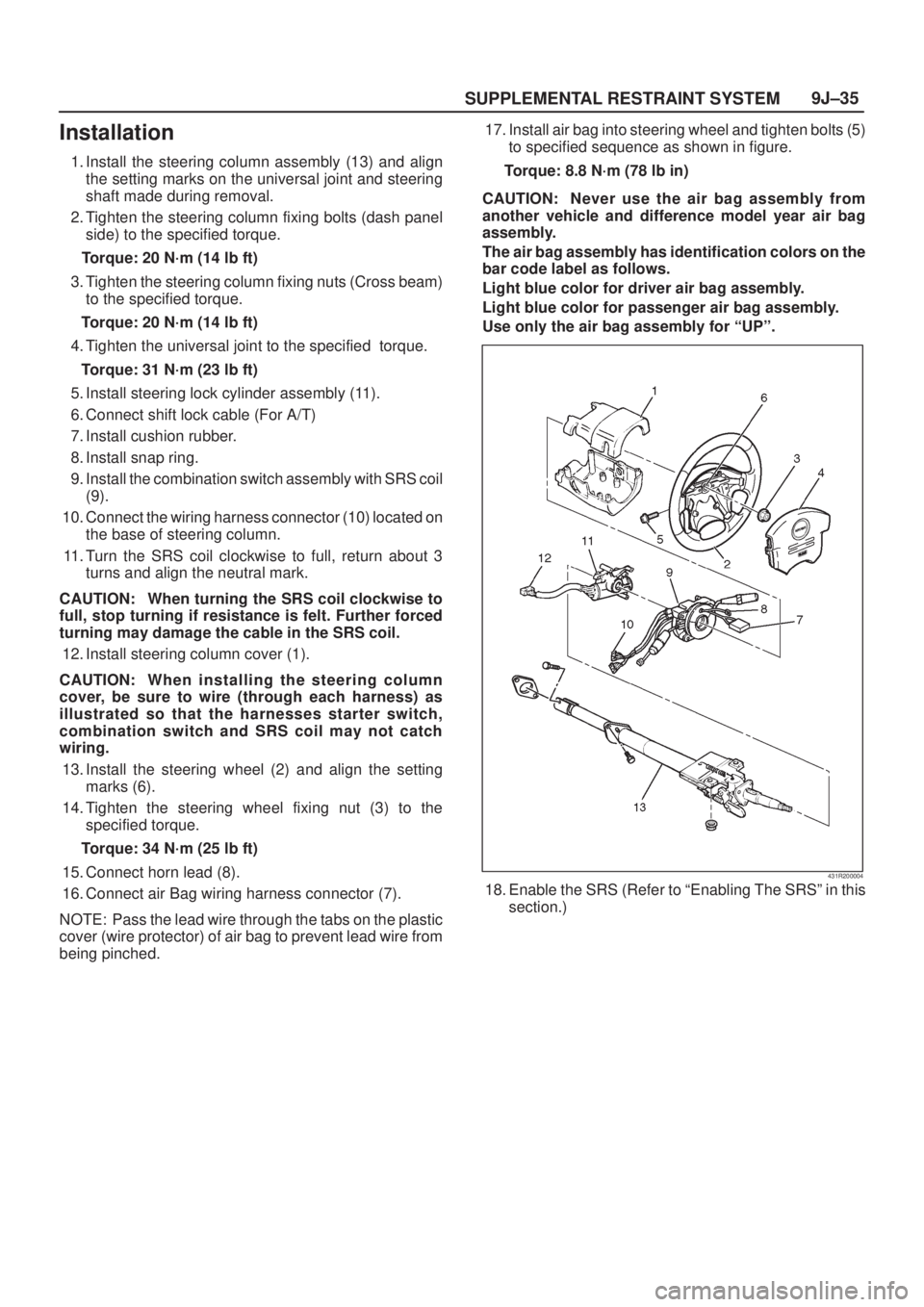
1. Install the steering column assembly (13) and align
the setting marks on the universal joint and steering
shaft made during removal.
2. Tighten the steering column fixing bolts (dash panel
side) to the specified torque.
Torque: 20 N´m (14 lb ft)
3. Tighten the steering column fixing nuts (Cross beam)
to the specified torque.
Torque: 20 N´m (14 lb ft)
4. Tighten the universal joint to the specified torque.
Torque: 31 N´m (23 lb ft)
5. Install steering lock cylinder assembly (11).
6. Connect shift lock cable (For A/T)
7. Install cushion rubber.
8. Install snap ring.
9. Install the combination switch assembly with SRS coil
(9).
10. Connect the wiring harness connector (10) located on
the base of steering column.
11. Turn the SRS coil clockwise to full, return about 3
turns and align the neutral mark.
CAUTION: When turning the SRS coil clockwise to
full, stop turning if resistance is felt. Further forced
turning may damage the cable in the SRS coil.
12. Install steering column cover (1).
CAUTION: When installing the steering column
cover, be sure to wire (through each harness) as
illustrated so that the harnesses starter switch,
combination switch and SRS coil may not catch
wiring.
13. Install the steering wheel (2) and align the setting
marks (6).
14. Tighten the steering wheel fixing nut (3) to the
specified torque.
Torque: 34 N´m (25 lb ft)
15. Connect horn lead (8).
16. Connect air Bag wiring harness connector (7).
NOTE: Pass the lead wire through the tabs on the plastic
cover (wire protector) of air bag to prevent lead wire from
being pinched.17. Install air bag into steering wheel and tighten bolts (5)
to specified sequence as shown in figure.
Torque: 8.8 N´m (78 lb in)
CAUTION: Never use the air bag assembly from
another vehicle and difference model year air bag
assembly.
The air bag assembly has identification colors on the
bar code label as follows.
Light blue color for driver air bag assembly.
Light blue color for passenger air bag assembly.
Use only the air bag assembly for ªUPº.
431R200004
18. Enable the SRS (Refer to ªEnabling The SRSº in this
section.)
Page 2050 of 2100

SUPPLEMENTAL RESTRAINT SYSTEM 9J±36
Passenger Air Bag Assembly
Service Precaution
WARNING: S A F E T Y P R ECAUTIONS MUST BE
FOLLOWED WHEN HANDLING A DEPLOYED AIR
BAG ASSEMBLY. AFTER DEPLOYMENT, THE AIR
BAG ASSEMBLY SURFACE MAY CONTAIN A SMALL
AMOUNT OF SODIUM HYDROXIDE, A BY±PRODUCT
OF THE DEPLOYMENT REACTION, THAT IS
IRRITATING TO THE SKIN AND EYES. MOST OF THE
POWDER ON THE AIR BAG ASSEMBLY IS
HARMLESS. AS A PRECAUTION, WEAR GLOVES
AND SAFETY GLASSES WHEN HANDLING A
DEPLOYED AIR BAG ASSEMBLY, AND WASH YOUR
HANDS WITH MILD SOAP AND WATER
AFTERWARDS.
WARNING: W H E N C A R RY I N G A L I V E A I R B A G
ASSEMBLY, MAKE SURE THE BAG AND TRIM
COVER ARE POINTED AWAY FROM YOU. NEVER
CARRY AIR BAG ASSEMBLY BY THE WIRES OR
CONNECTOR ON THE UNDERSIDE OF MODULE. IN
THE CASE OF AN ACCIDENTAL DEPLOYMENT, THE
BAG WILL THEN DEPLOY WITH MINIMAL CHANCE
OF INJURY. WHEN PLACING A LIVE AIR BAG
ASSEMBLY ON A BENCH OR OTHER SURFACE,
ALWAYS FACE BAG AND TRIM COVER UP, AWAY
FROM THE SURFACE. NEVER REST A STEERING
COLUMN ASSEMBLY ON THE STEERING WHEEL
WITH THE AIR BAG ASSEMBLY FACE DOWN AND
COLUMN VERTICAL. THIS IS NECESSARY SO THAT
A FREE SPACE IS PROVIDED TO ALLOW THE AIR
BAG ASSEMBLY TO EXPAND IN THE UNLIKELY
EVENT OF ACCIDENTAL DEPLOYMENT.
OTHERWISE, PERSONAL INJURY COULD RESULT.
NOTE: In the event deployment has occurred, inspect
coil assembly wire for any signs of scorching, melting or
any other damage due to excessive heat. If the coil has
been damaged, replace it.
Removal
1. Disable the SRS. (Refer to ªDisabling the SRSº in this
section.)
2. Remove glove box assembly.
3. Disconnect passenger air bag assembly harness
connector.
4. Remove air bag assembly fixing bolts and nuts.5. Remove passenger air bag assembly from glove box
opening of instrument panel.
827RY00001
Legend
(1) Passenger Air Bag Door
(2) Passenger Air Bag Assembly
(3) Passenger Air Bag Harness
(4) Cross Beam
Installation
1. Install passenger air bag assembly from glove box
opening of instrument panel.
2. Install air bag assembly fixing nuts and bolts, and
tighten to specified torque.
Torque: 7.8 N´m (69 lb in)
3. Connect air bag assembly harness connector.
4. Install glove box assembly.
5. Enable the SRS (Refer to ªEnabling the SRSº in this
section.)
Page 2051 of 2100

9J1±1
RESTRAINT CONTROL SYSTEM
AXIOM
RESTRAINTS
SRS CONTROL SYSTEM
CONTENTS
Service Precaution 9J1±1. . . . . . . . . . . . . . . . . . . . . .
Diagnostic Information 9J1±2. . . . . . . . . . . . . . . . . . .
Diagnostic Procedures 9J1±2. . . . . . . . . . . . . . . . .
Diagnostic Codes 9J1±2. . . . . . . . . . . . . . . . . . . . . .
How To Read Trouble Codes 9J1±2. . . . . . . . . . . .
How To Clear Trouble Codes 9J1±2. . . . . . . . . . . .
Scan Tool Diagnostics 9J1±2. . . . . . . . . . . . . . . . . .
Basic Knowledge Required 9J1±2. . . . . . . . . . . . .
Basic Electrical Circuits 9J1±2. . . . . . . . . . . . . . . . .
ªFlash Codeº Diagnostics 9J1±3. . . . . . . . . . . . . . .
System Schematic 9J1±3. . . . . . . . . . . . . . . . . . . . . .
SRS Diagnostic System Check 9J1±4. . . . . . . . . . . .
Circuit Description 9J1±4. . . . . . . . . . . . . . . . . . . . .
Notes On System Check Chart: 9J1±4. . . . . . . . .
Diagnostic Aids: 9J1±4. . . . . . . . . . . . . . . . . . . . . . .
Chart A SDM Integrity Check 9J1±6. . . . . . . . . . . . .
Chart B ªAIR BAGº Warning Lamp Comes
ªONº Steady 9J1±8. . . . . . . . . . . . . . . . . . . . . . . . . . .
Chart C ªAIR BAGº Warning Lamp Does
Not Comes ªONº Steady 9J1±10. . . . . . . . . . . . . . . . .
DTC 15 Passenger Deployment Loop
Resistance High 9J1±13. . . . . . . . . . . . . . . . . . . . . . . . DTC 16 Passenger Deployment Loop
Resistance Low 9J1±16. . . . . . . . . . . . . . . . . . . . . . . .
DTC 17 Passenger Deployment Loop Open 9J1±19
DTC 18 Passenger Deployment Loop
Short To Ground 9J1±21. . . . . . . . . . . . . . . . . . . . . . . .
DTC 19 Passenger Deployment Loop
Short To Voltage 9J1±23. . . . . . . . . . . . . . . . . . . . . . . .
DTC 21 Driver Deployment Loop
Resistance High 9J1±25. . . . . . . . . . . . . . . . . . . . . . . .
DTC 22 Driver Deployment Loop
Resistance Low 9J1±28. . . . . . . . . . . . . . . . . . . . . . . .
DTC 24 Driver Deployment Loop
Short To Ground 9J1±31. . . . . . . . . . . . . . . . . . . . . . . .
DTC 25 Driver Deployment Loop
Short To Voltage 9J1±33. . . . . . . . . . . . . . . . . . . . . . . .
DTC 26 Driver Deployment Loop Open 9J1±36. . . .
DTC 51 Deployment Event Commanded 9J1±39. . .
DTC 53 Deployment Commanded With
Deployment Loop Fault Or Energy
Reserves Out Of Range 9J1±41. . . . . . . . . . . . . . . . .
DTC 61 Warning Lamp Circuit Failure 9J1±43. . . . .
DTC 71 Internal SDM Fault 9J1±45. . . . . . . . . . . . . .
Service Precaution
WARNING: THIS VEHICLE HAS A SUPPLEMENTAL
RESTRAINT SYSTEM (SRS). REFER TO THE SRS
COMPONENT AND WIRING LOCATION VIEW IN
ORDER TO DETERMINE WHETHER YOU ARE
PERFORMING SERVICE ON OR NEAR THE SRS
COMPONENTS OR THE SRS WIRING. WHEN YOU
ARE PERFORMING SERVICE ON OR NEAR THE SRS
COMPONENTS OR THE SRS WIRING, REFER TO
THE SRS SERVICE INFORMATION. FAILURE TO
FOLLOW WARNINGS COULD RESULT IN POSSIBLE
AIR BAG DEPLOYMENT, PERSONAL INJURY, OR
OTHERWISE UNNEEDED SRS SYSTEM REPAIRS.CAUTION: Always use the correct fastener in the
proper location. When you replace a fastener, use
ONLY the exact part number for that application.
ISUZU will call out those fasteners that require a
replacement after removal. ISUZU will also call out
the fasteners that require thread lockers or thread
sealant. UNLESS OTHERWISE SPECIFIED, do not
use supplemental coatings (Paints, greases, or other
corrosion inhibitors) on threaded fasteners or
fastener joint interfaces. Generally, such coatings
adversely affect the fastener torque and the joint
clamping force, and may damage the fastener. When
you install fasteners, use the correct tightening
sequence and specifications. Following these
instructions can help you avoid damage to parts and
systems.
Page 2052 of 2100

RESTRAINT CONTROL SYSTEM 9J1±2
Diagnostic Information
Diagnostic Procedures
WARNING: W H E N FA S T E N E R S A R E R E M O V E D ,
ALWAYS REINSTALL THEN AT THE SAME
LOCATION FROM WHICH THEY WERE REMOVED. IF
A FASTENER NEEDS TO BE REPLACED, USE THE
CORRECT PART NUMBER FASTENER FOR THAT
APPLICATION. IF THE CORRECT PART NUMBER
FASTENER IS NOT AVAILABLE, A FASTENER OF
EQUAL SIZE AND STRENGTH (OR STRONGER) MAY
BE USED. FASTENERS THAT ARE NOT REUSED,
AND THOSE REQUIRING THREAD LOCKING
COMPOUND WILL BE CALLED OUT. THE CORRECT
TORQUE VALUE MUST BE USED WHEN
INSTALLING FASTENERS THAT REQUIRE IT. IF THE
ABOVE CONDITIONS ARE NOT FOLLOWED, PARTS
OR SYSTEM DAMAGE COULD RESULT.
WARNING: T O AV O I D D E P L O Y M E N T W H E N
TROUBLESHOOTING THE SRS, DO NOT USE
ELECTRICAL TEST EQUIPMENT SUCH AS A
BATTERY±POWERED OR AC±POWERED
VOLTMETER, OHMMETER, ETC., OR ANY TYPE OF
ELECTRICAL EQUIPMENT OTHER THAN THAT
SPECIFIED IN THIS MANUAL. DO NOT USE A
NONPOWERED, PROBE±TYPE TESTER.
INSTRUCTIONS IN THIS MANUAL MUST BE
FOLLOWED CAREFULLY, OTHERWISE PERSONAL
INJURY MAY RESULT.
The diagnostic procedures used in this section are
designed to aid in finding and repairing SRS problems.
Outlined below are the steps to find and repair SRS
problems quickly and effectively. Failure to carefully
follow these procedures may result in extended
diagnostic time, incorrect diagnosis and incorrect parts
Replacement.
1.Perform The ªSRS Diagnostic System Check.º
The ªSRS Diagnostic System Checkº should always be
the starting point of any SRS diagnostics. The ªSRS
Diagnostic System Checkº checks for proper ªAIR BAGº
warning lamp operation and checks for SRS trouble
codes using both ªFlash Codeº and ªScan Toolº Methods.
2.Refer To The Proper Diagnostic Chart As Directed
By The ªSRS Diagnostic System Check.º
The ªSRS Diagnostic System Checkº will lead you to the
correct chart to diagnose any SRS problems. Bypassing
these procedures may result in extended diagnostic time,
incorrect diagnosis and incorrect parts Replacement.
3.Repeat the ªSRS Diagnostic System Checkº After
Any Repair Or Diagnostic Procedures Have Been
Performed.
Performing the ªSRS Diagnostic System Checkº after all
repair or diagnostic procedures will assure that the repair
has been made correctly and that no other conditions
exist.
Diagnostic Codes
The Sensing and Diagnostic Module (SDM) maintains a
history record of all diagnostic codes that have been
detected since the SRS codes were last cleared during
service.
1. Active CodesÐFaults that are presently detected this
ignition cycle. Active codes are stored in RAM
(Random Access Memory).
2. History CodesÐAll faults detected since the last time
the history fault memory was cleared. History codes
are stored in EEPROM. (Electronically Erasable
Programmable Read only Memory)
How To Read Trouble Codes
All codes (Active and history) can be read (or cleared) by
using a scan tool or equivalent.
If a DTC is not available, have the vehicle serviced by
dealer.
How To Clear Trouble Codes
Trouble codes can only be cleared by using a scan tool. If
a scan tool is not available then inform the owner of the
stored codes and suggest that the codes are cleared
upon the next visit to a dealership.
Scan Tool Diagnostics
A scan tool can be used to read current and history codes
and to clear all history codes after a repair is complete.
The scan tool must be updated to communicate with the
SRS through a replaceable cartridge for SRS
diagnostics. To use the scan tool, connect it to the DLC
and turn the ignition switch ªONº. Then follow the
manufacturer's directions for communication with the
SRS. The scan tool reads serial data from the SDM
ªSerial Dataº output (terminal 24) to the DLC.
Basic Knowledge Required
Before using this section of the Service Manual, there is
some basic knowledge which will be required. Without
this knowledge, you will have trouble using the diagnostic
procedures in this section. Use care to prevent harm or
unwanted deployment. Read all cautions in the service
manual and on warning labels attached to SRS
components.
Basic Electrical Circuits
You should understand the basic theory of electricity
including series and parallel circuits, and understand the
voltage drops across series resistors. You should know
the meaning of voltage (volts), current (amps), and
resistance (ohms). You should understand what happens
in a circuit with an open or a shorted wire. You should be
able to read and understand a wiring diagram.
Page 2057 of 2100

9J1±7
RESTRAINT CONTROL SYSTEM
Chart A SDM Integrity Check
WARNING: DURING SERVICE PROCEDURES. BE VERY CAREFUL WHEN HANDLING A SENSING AND
DIAGNOSTIC MODULE (SDM). NEVER STRIKE OR JAR THE SDM. NEVER POWER UP THE SRS WHEN THE
SDM IS NOT RIGIDLY ATTACHED TO THE VEHICLE. ALL SDM AND MOUNTING BRACKET FASTENERS MUST
BE CAREFULLY TORQUED AND THE ARROW MUST BE POINTING TOWARD THE FRONT OF THE VEHICLE
TO ENSURE PROPER OPERATION OF THE SRS. THE SDM COULD BE ACTIVATED WHEN POWERED WHILE
NOT RIGIDLY ATTACHED TO THE VEHICLE WHICH COULD CAUSE DEPLOYMENT AND RESULT IN
PERSONAL INJURY.
Step
ActionYe sNo
11. This chart assumes that the ªSRS Diagnostic System Checkº
and either a symptom chart or a diagnostic trouble code chart
diagnosis have been performed When all circuitry outside the
SDM has been found to operate properly, as indicated by the
appropriate diagnostic chart, and the symptom or DTC
remains current, the following diagnostic procedures must be
performed to verify the need for SDM Replacement.
2. Ignition switch ªOFF.º
3. Reconnect all SRS components, ensure all components are
properly mounted.
4. Ensure the ignition switch has been ªOFFº for at least 15
seconds.
5. Confirm ªAIR BAGº warning lamp as ignition switch is turned
ªON.º
Does warning lamp flash 7 times then go ªOFFº?
The symptom or
DTC is no longer
occurring.
Clear SRS
diagnostic trouble
codes.
Repeat the ªSRS
Diagnostic
System Check.º
Go to Step 2
2Using a scan tool, request diagnostic trouble code display.
Is the same symptom or DTC occurring as was when the ªSRS
Diagnostic System Check º was first performed?Ignition switch
ªOFF.º
Go to the
appropriate chart
for the indicated
malfunction.
Go to Step 3
31. Clear ªSRS Diagnostic Trouble Codes.º
2. Ignition switch ªOFFº for at least two minutes.
3. Confirm ªAIR BAGº warning lamp as ignition switch is turned
ªON.º
Does warning lamp flash 7 times then go ªOFFº?SRS is functional
and free of
malfunctions.
No further
diagnosis is
required.
Go to
Step 4
Ignition switch
ªOFF.º
Replace SDM.
Go to
Step 4
4Reconnect all SRS components, ensure all components are
properly mounted.
Was this step finished?Repeat the ªSRS
Diagnostic
System Check.º
Go to Step 4
Page 2090 of 2100

RESTRAINT CONTROL SYSTEM 9J1±40
DTC 51 Deployment Event Commanded
WARNING:DURING SERVICE PROCEDURES. BE VERY CAREFUL WHEN HANDLING A SENSING AND
DIAGNOSTIC MODULE (SDM). NEVER STRIKE OR JAR THE SDM. NEVER POWER UP THE SRS WHEN THE
SDM IS NOT RIGIDLY ATTACHED TO THE VEHICLE. ALL SDM AND MOUNTING BRACKET FASTENERS MUST
BE CAREFULLY TORQUED AND THE ARROW MUST BE POINTING TOWARD THE FRONT OF THE VEHICLE
TO ENSURE PROPER OPERATION OF THE SRS. THE SDM COULD BE ACTIVATED WHEN POWERED WHILE
NOT RIGIDLY ATTACHED TO THE VEHICLE WHICH COULD CAUSE DEPLOYMENT AND RESULT IN
PERSONAL INJURY.
Step
ActionYe sNo
1Was the ªSRS Diagnostic System Checkº performed?
Go to Step 2
Go to the ªSRS
Diagnostic
System Check.º
2Ignition switch ªOFF.º
Have air bag assemblies deployed?Replace
components and
perform
inspections as
directed in
ªrepairs and
inspections
required after an
accidentº in this
section.
Clear diagnostic
trouble codes.
Repeat the ªSRS
Diagnostic
System Check.º
Go to Step 3
3Inspect front of vehicle and undercarriage for signs of impact.
Were signs of impact found?Replace
components and
perform
inspections as
directed in
ªrepairs and
inspections
required after an
accidentº in this
section.
Clear diagnostic
trouble codes.
Repeat the ªSRS
Diagnostic
System Check.º
Ignition switch
ªOFF.º
Replace SDM.
Reconnect all
SRS system
components,
ensure all
components are
properly
mounted.Repeat
the ªSRS
Diagnostic
System Check.º
Page 2092 of 2100
RESTRAINT CONTROL SYSTEM 9J1±42
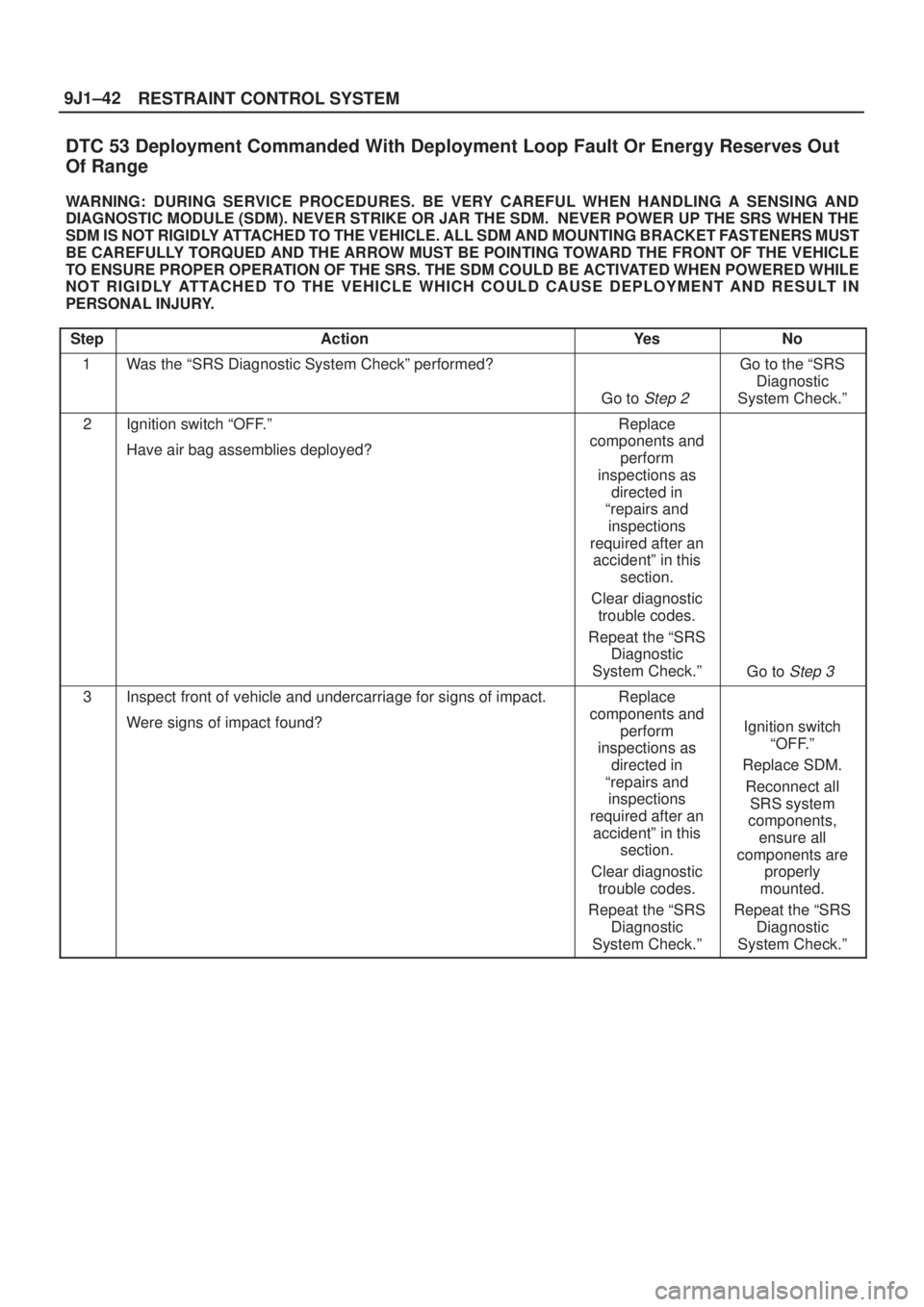
DTC 53 Deployment Commanded With Deployment Loop Fault Or Energy Reserves Out
Of Range
WARNING:DURING SERVICE PROCEDURES. BE VERY CAREFUL WHEN HANDLING A SENSING AND
DIAGNOSTIC MODULE (SDM). NEVER STRIKE OR JAR THE SDM. NEVER POWER UP THE SRS WHEN THE
SDM IS NOT RIGIDLY ATTACHED TO THE VEHICLE. ALL SDM AND MOUNTING BRACKET FASTENERS MUST
BE CAREFULLY TORQUED AND THE ARROW MUST BE POINTING TOWARD THE FRONT OF THE VEHICLE
TO ENSURE PROPER OPERATION OF THE SRS. THE SDM COULD BE ACTIVATED WHEN POWERED WHILE
NOT RIGIDLY ATTACHED TO THE VEHICLE WHICH COULD CAUSE DEPLOYMENT AND RESULT IN
PERSONAL INJURY.
Step
ActionYe sNo
1Was the ªSRS Diagnostic System Checkº performed?
Go to Step 2
Go to the ªSRS
Diagnostic
System Check.º
2Ignition switch ªOFF.º
Have air bag assemblies deployed?Replace
components and
perform
inspections as
directed in
ªrepairs and
inspections
required after an
accidentº in this
section.
Clear diagnostic
trouble codes.
Repeat the ªSRS
Diagnostic
System Check.º
Go to Step 3
3Inspect front of vehicle and undercarriage for signs of impact.
Were signs of impact found?Replace
components and
perform
inspections as
directed in
ªrepairs and
inspections
required after an
accidentº in this
section.
Clear diagnostic
trouble codes.
Repeat the ªSRS
Diagnostic
System Check.º
Ignition switch
ªOFF.º
Replace SDM.
Reconnect all
SRS system
components,
ensure all
components are
properly
mounted.
Repeat the ªSRS
Diagnostic
System Check.º
Page 2096 of 2100
RESTRAINT CONTROL SYSTEM 9J1±46
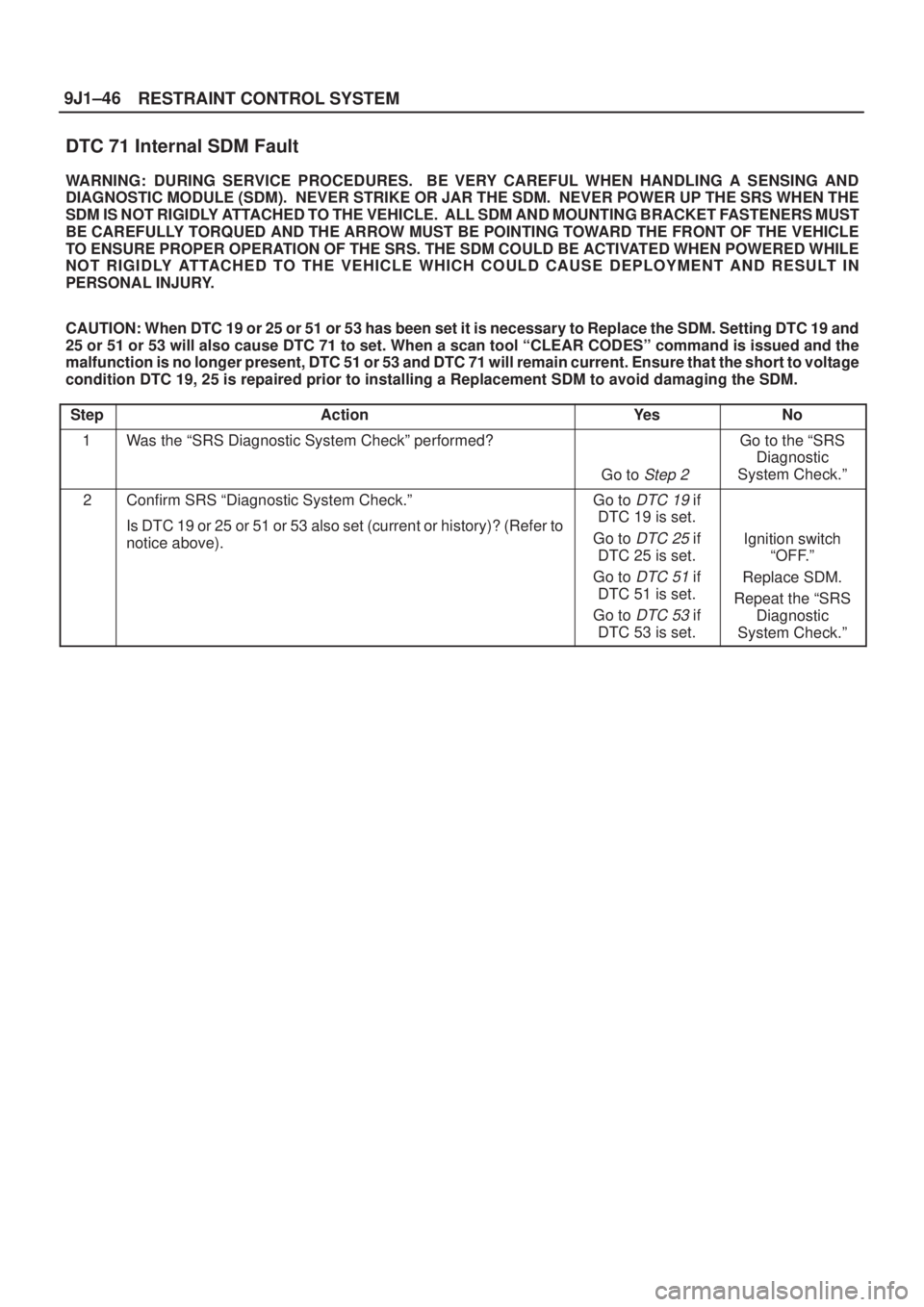
DTC 71 Internal SDM Fault
WARNING: DURING SERVICE PROCEDURES. BE VERY CAREFUL WHEN HANDLING A SENSING AND
DIAGNOSTIC MODULE (SDM). NEVER STRIKE OR JAR THE SDM. NEVER POWER UP THE SRS WHEN THE
SDM IS NOT RIGIDLY ATTACHED TO THE VEHICLE. ALL SDM AND MOUNTING BRACKET FASTENERS MUST
BE CAREFULLY TORQUED AND THE ARROW MUST BE POINTING TOWARD THE FRONT OF THE VEHICLE
TO ENSURE PROPER OPERATION OF THE SRS. THE SDM COULD BE ACTIVATED WHEN POWERED WHILE
NOT RIGIDLY ATTACHED TO THE VEHICLE WHICH COULD CAUSE DEPLOYMENT AND RESULT IN
PERSONAL INJURY.
CAUTION: When DTC 19 or 25 or 51 or 53 has been set it is necessary to Replace the SDM. Setting DTC 19 and
25 or 51 or 53 will also cause DTC 71 to set. When a scan tool ªCLEAR CODESº command is issued and the
malfunction is no longer present, DTC 51 or 53 and DTC 71 will remain current. Ensure that the short to voltage
condition DTC 19, 25 is repaired prior to installing a Replacement SDM to avoid damaging the SDM.
Step
ActionYe sNo
1Was the ªSRS Diagnostic System Checkº performed?
Go to Step 2
Go to the ªSRS
Diagnostic
System Check.º
2Confirm SRS ªDiagnostic System Check.º
Is DTC 19 or 25 or 51 or 53 also set (current or history)? (Refer to
notice above).Go to DTC 19 if
DTC 19 is set.
Go to
DTC 25 if
DTC 25 is set.
Go to
DTC 51 if
DTC 51 is set.
Go to
DTC 53 if
DTC 53 is set.
Ignition switch
ªOFF.º
Replace SDM.
Repeat the ªSRS
Diagnostic
System Check.º
Page 2097 of 2100
10A±1
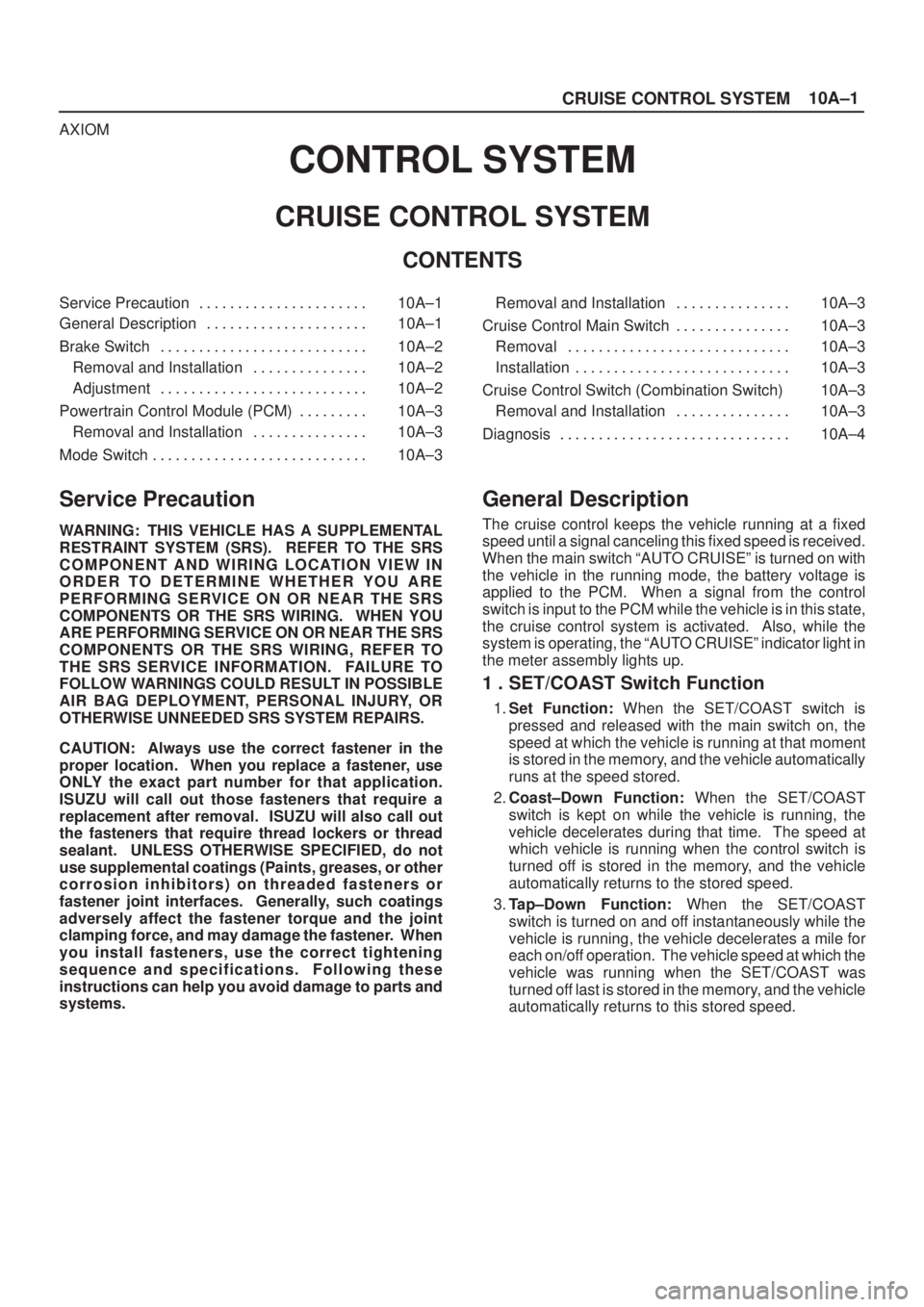
CRUISE CONTROL SYSTEM
AXIOM
CONTROL SYSTEM
CRUISE CONTROL SYSTEM
CONTENTS
Service Precaution 10A±1. . . . . . . . . . . . . . . . . . . . . .
General Description 10A±1. . . . . . . . . . . . . . . . . . . . .
Brake Switch 10A±2. . . . . . . . . . . . . . . . . . . . . . . . . . .
Removal and Installation 10A±2. . . . . . . . . . . . . . .
Adjustment 10A±2. . . . . . . . . . . . . . . . . . . . . . . . . . .
Powertrain Control Module (PCM) 10A±3. . . . . . . . .
Removal and Installation 10A±3. . . . . . . . . . . . . . .
Mode Switch 10A±3. . . . . . . . . . . . . . . . . . . . . . . . . . . . Removal and Installation 10A±3. . . . . . . . . . . . . . .
Cruise Control Main Switch 10A±3. . . . . . . . . . . . . . .
Removal 10A±3. . . . . . . . . . . . . . . . . . . . . . . . . . . . .
Installation 10A±3. . . . . . . . . . . . . . . . . . . . . . . . . . . .
Cruise Control Switch (Combination Switch) 10A±3
Removal and Installation 10A±3. . . . . . . . . . . . . . .
Diagnosis 10A±4. . . . . . . . . . . . . . . . . . . . . . . . . . . . . .
Service Precaution
WARNING: THIS VEHICLE HAS A SUPPLEMENTAL
RESTRAINT SYSTEM (SRS). REFER TO THE SRS
COMPONENT AND WIRING LOCATION VIEW IN
ORDER TO DETERMINE WHETHER YOU ARE
PERFORMING SERVICE ON OR NEAR THE SRS
COMPONENTS OR THE SRS WIRING. WHEN YOU
ARE PERFORMING SERVICE ON OR NEAR THE SRS
COMPONENTS OR THE SRS WIRING, REFER TO
THE SRS SERVICE INFORMATION. FAILURE TO
FOLLOW WARNINGS COULD RESULT IN POSSIBLE
AIR BAG DEPLOYMENT, PERSONAL INJURY, OR
OTHERWISE UNNEEDED SRS SYSTEM REPAIRS.
CAUTION: Always use the correct fastener in the
proper location. When you replace a fastener, use
ONLY the exact part number for that application.
ISUZU will call out those fasteners that require a
replacement after removal. ISUZU will also call out
the fasteners that require thread lockers or thread
sealant. UNLESS OTHERWISE SPECIFIED, do not
use supplemental coatings (Paints, greases, or other
corrosion inhibitors) on threaded fasteners or
fastener joint interfaces. Generally, such coatings
adversely affect the fastener torque and the joint
clamping force, and may damage the fastener. When
you install fasteners, use the correct tightening
sequence and specifications. Following these
instructions can help you avoid damage to parts and
systems.
General Description
The cruise control keeps the vehicle running at a fixed
speed until a signal canceling this fixed speed is received.
When the main switch ªAUTO CRUISEº is turned on with
the vehicle in the running mode, the battery voltage is
applied to the PCM. When a signal from the control
switch is input to the PCM while the vehicle is in this state,
the cruise control system is activated. Also, while the
system is operating, the ªAUTO CRUISEº indicator light in
the meter assembly lights up.
1 . SET/COAST Switch Function
1.Set Function: When the SET/COAST switch is
pressed and released with the main switch on, the
speed at which the vehicle is running at that moment
is stored in the memory, and the vehicle automatically
runs at the speed stored.
2.Coast±Down Function: When the SET/COAST
switch is kept on while the vehicle is running, the
vehicle decelerates during that time. The speed at
which vehicle is running when the control switch is
turned off is stored in the memory, and the vehicle
automatically returns to the stored speed.
3.Tap±Down Function: When the SET/COAST
switch is turned on and off instantaneously while the
vehicle is running, the vehicle decelerates a mile for
each on/off operation. The vehicle speed at which the
vehicle was running when the SET/COAST was
turned off last is stored in the memory, and the vehicle
automatically returns to this stored speed.