transmission ISUZU TROOPER 1995 Workshop Manual
[x] Cancel search | Manufacturer: ISUZU, Model Year: 1995, Model line: TROOPER, Model: ISUZU TROOPER 1995Pages: 1928
Page 928 of 1928
7 A-56 AUTOMATIC TRANSMISSION (4L30-E)
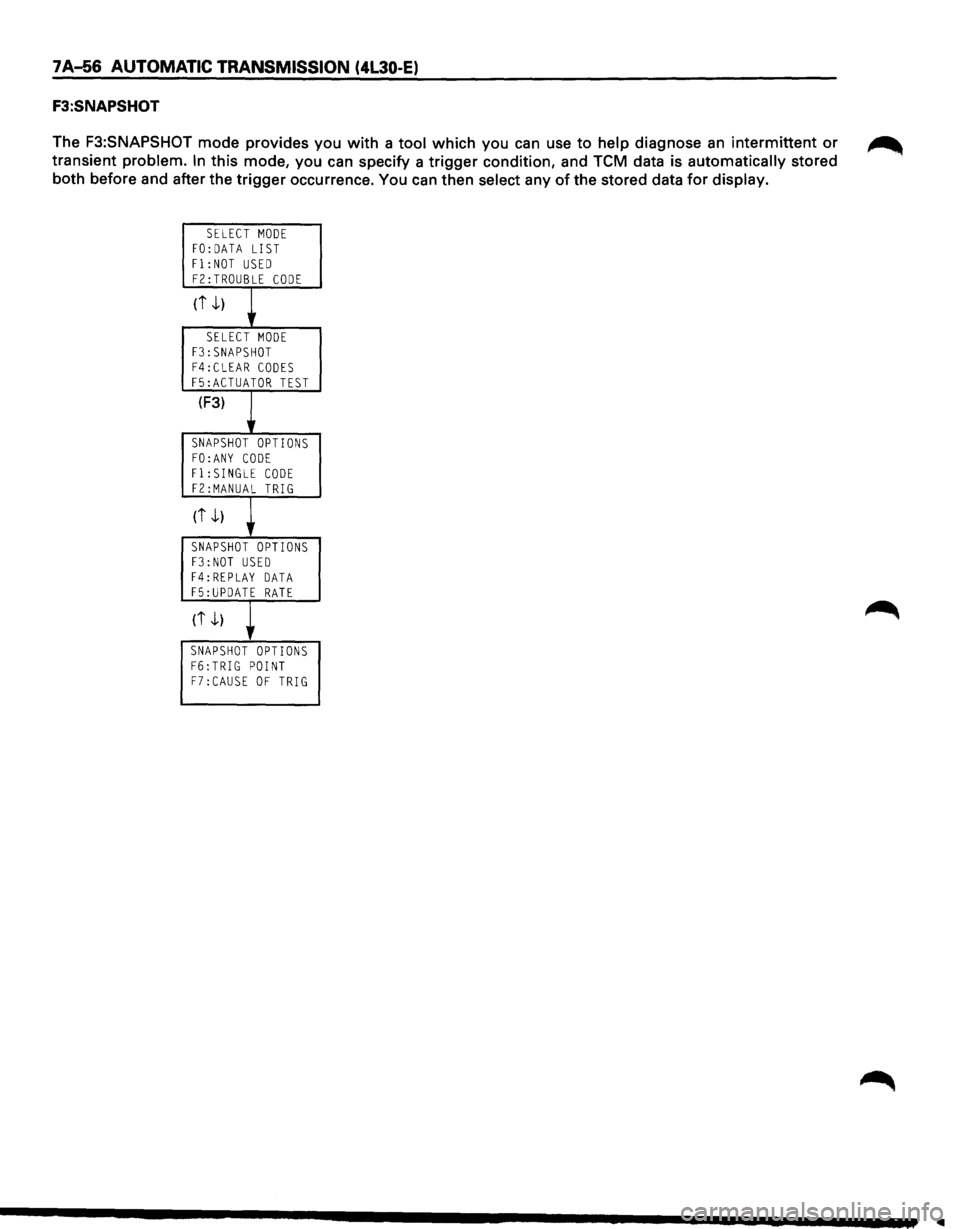
F3:SNAPSHOT
The F3:SNAPSHOT mode provides you with a tool which you can use to help diagnose an intermittent or ~
transient problem. In this mode, you can specify a trigger condition, and TCM data is automatically stored
both before and after the trigger occurrence. You can then select any
of the stored data for display.
SELECT MODE FO:DATA LIST
Fl:NOT USED FZ:TROUBLE CODE
(i -1)
+ SELECT MODE F3:SNAPSHOT F4:CLEAR CODES
F5:ACTUATOR TEST
(F3)
~ SNAPSHOT OPTIONS
FO:ANY CODE Fl:SINGLE CODE FZ:MANUAL TRIG
(i -1)
+ SNAPSHOT OPTIONS F3:NOT USED F4:REPLAY DATA F5:UPDATE RATE
(it)
~ SNAPSHOT OPTIONS F6:TRIG POINT F7:CAUSE OF TRIG
..
Page 929 of 1928
AUTOMATIC TRANSMISSION (4l30·E) 7 A-57
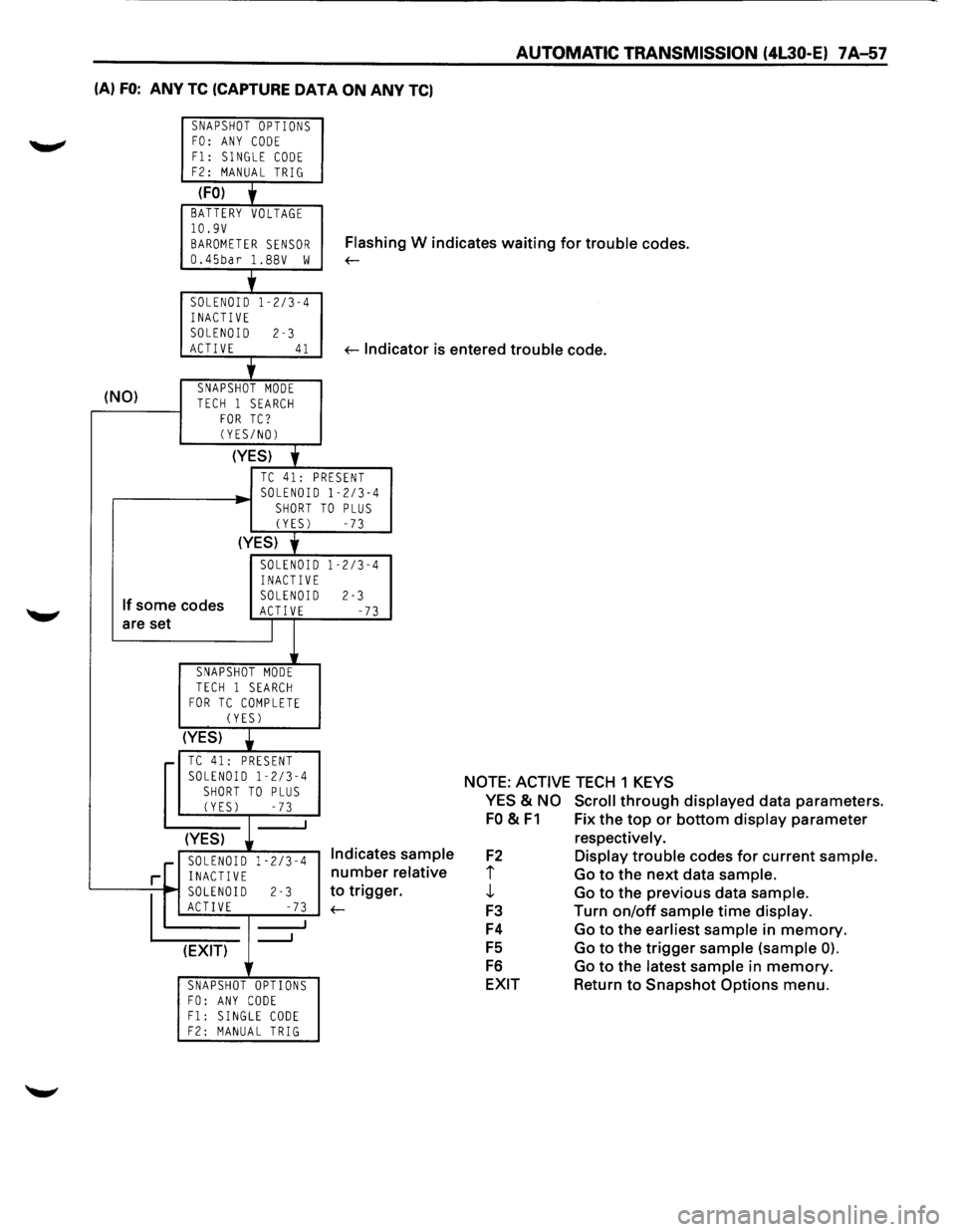
(A) FO: ANY TC (CAPTURE DATA ON ANY TC)
SNAPSHOT OPTIONS FO: ANY CODE
F1: SINGLE CODE F2: MANUAL TRIG
(FO) + BATTERY VOLTAGE 10.9V
BAROMETER SENSOR Flash in g W indicates waiting for trouble codes.
0.45bar l.BBV w ~
'
SOLENOID 1-2/3-4
INACTIVE SOLENOID 2-3 ACTIVE 41 ~lndi cator is entered trouble code.
+
(NO) SNAPSHOT MODE TECH 1 SEARCH FOR TC? (YES/NO)
(YES)
'
TC 41: PRESENT SOLENOID 1-2/3-4 SHORT TO PLUS (YES) -73
(YES) y
SOLENOID 1-2/3-4 INACTIVE
If some codes SOLENOID 2-3 ACT! VE -73 are set I
SNAPSHOT MODE
TECH 1 SEARCH FOR TC COMPLETE (YES)
(YES)
• TC 41: PRESENT SOLENOID 1-2/3-4
SHORT TO PLUS (YES) -73
(YES)
.[ SOLENOID 1-2/3-4 Indicates sample
relative
r. r INACTIVE number
~0
2-3 to trigge
E -73 ~
_J (EXIT) lr
SNAPSHOT OPTIONS FO: ANY CODE F1: SINGLE CODE F2: MANUAL TRIG
NOTE: ACTIVE TECH 1 KEYS
YES
& NO Scroll through displayed data parameters.
FO & F1 Fix the top or bottom display parameter
F2
i j,
F3
F4
FS
F6
EXIT respectively.
Display trouble
codes for current sample.
Go to the next data sample.
Go to the previous data sample.
Turn on/off sample time display.
Go to the earliest sample in memory.
Go to the trigger sample (sample 0).
Go to the latest sample in memory.
Return to Snapshot Options menu.
Page 930 of 1928
1 A-58 AUTOMATIC TRANSMISSION (4l30-E)
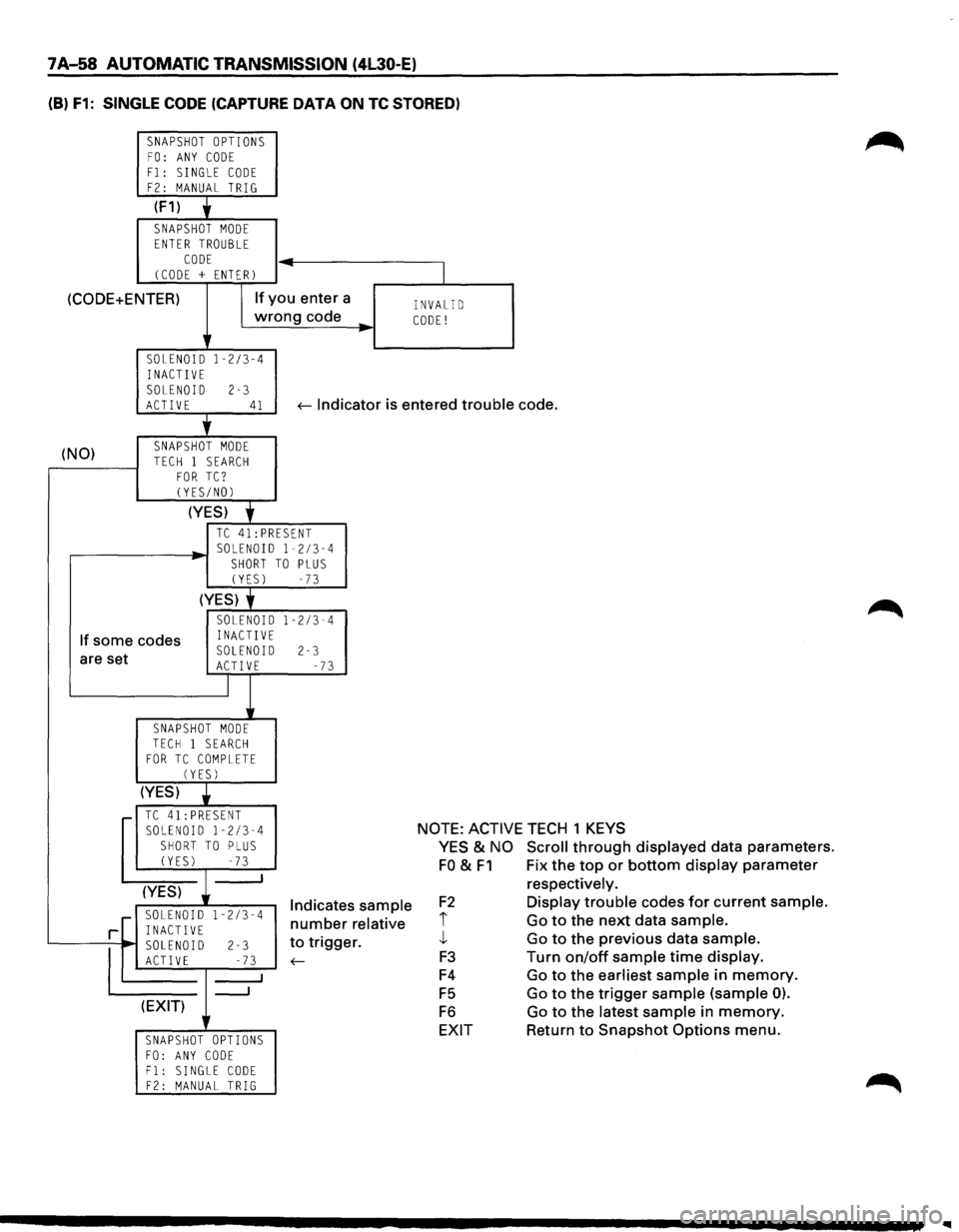
(B) F1: SINGLE CODE (CAPTURE DATA ON TC STORED)
SNAPSHOT OPTIONS FO: ANY CODE
F1: SINGLE CODE F2: MANUAL TRIG
(F1) y
SNAPSHOT MODE ENTER TROUBLE
CODE (CODE + ENTER) -
(CODE+ENTER) If you
enter a
wrong code
..
SOLENOID 1-2/3-4 INACTIVE
SOLENOID 2-3
I
INVALID CODE!
ACTIVE 41 ~ Indicator is entered trouble code.
(NO) '
SNAPSHOT MODE
TECH 1 SEARCH FOR TC? CYES/NOl
(YES) f
TC 41:PRESENT
,...-------~ SOLENOID 1-2/3-4 SHORT TO PLUS (YES) -73
(YES) f
If some codes
SOLENOID 1-2/3-4 INACTIVE
are set SOLENOID 2-3 ACTIVE -73
I
SNAPSHOT MODE TECH 1 SEARCH FOR TC COMPLETE (YES)
(YES) •
.-TC41:PRESENT SOLENOID 1-2/3-4 SHORT TO PLUS (YES) -73 _j
(YES)
1-2/3-4 r SOLENOID
rL INACTIVE
'------,~, SOLEN~ 1-,D ;------l-2 _: ;...;;.3---'
(EXIT)
SNAPSHOT OPTIONS
FO: ANY CODE F1: SINGLE CODE F2: MANUAL TRIG
Indicates sample
number relative
to trigger.
~
NOTE: ACTIVE TECH 1 KEYS
YES & NO Scroll through displayed data parameters.
FO & F1 Fix the top or bottom display parameter
F2
i j_
F3
F4
F5
F6
EXIT respectively.
Display trouble
codes for current sample.
Go to the next data sample.
Go to the previous data sample.
Turn on/off sample time display.
Go to the earliest sample in memory.
Go to the trigger
sample (sample 0).
Go to the latest sample in memory.
Return to Snapshot Options menu.
Page 931 of 1928
AUTOMATIC TRANSMISSION (4l30-E) 7A-59
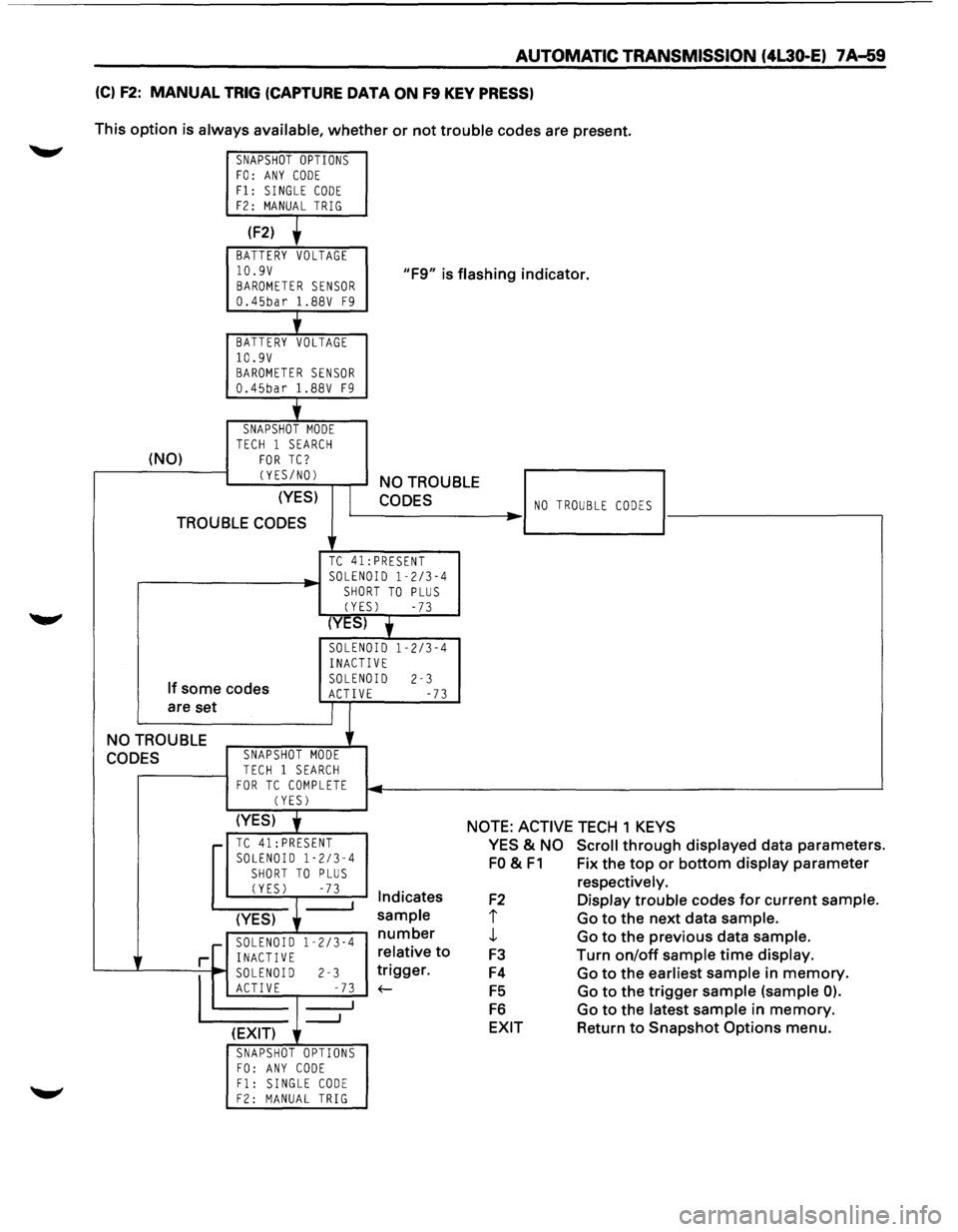
(C) F2: MANUAL TRIG (CAPTURE DATA ON F9 KEY PRESS)
This option is always available, whether or not trouble codes are present.
SNAPSHOT OPTIONS FO: ANY CODE Fl: SINGLE CODE F2: MANUAL TRIG
(F2)
BATTERY VOLTAGE
10.9V BAROMETER SENSOR 0.45bar 1.88V F9
"F9" is flashing indicator.
'
BATTERY VOLTAGE 10.9V BAROMETER SENSOR 0.45bar 1.88V F9
j_
SNAPSHOT MODE TECH 1 SEARCH (NO) FOR TC?
CYES/NOl
(YES)
TROUBLE CODES
NO TROUBLE
CODES
TC 41:PRESENT
.----------~· SOLENOID 1-2/3-4 SHORT TO PLUS
CYESl -73
(YES) y
SOLENOID 1-2/3-4
INACTIVE
If some codes
are set SOLENOID 2-3 ACTIVE -73
NO TROUBLE
CODES SNAPSHOT MODE
TECH 1 SEARCH FOR TC COMPLETE CYESl
NO TROUBLE CODES ..
(YES) j NOTE: ACTIVE TECH 1 KEYS r-TC 41: PRESENT SOLENOID 1-2/3-4
SHORT TO PLUS CYESl -73 I Indicates
(YES)
sample
r--~~:--":'"~~ number
r[ i~~g~0~ 1 -2
/3
-4 relative
to
'---...L----=--
1
~ soLEN~ I-D r-------l-2 _-~...;.7.;;..3 1
__, ~gger.
(EXIT)
SNAPSHOT OPTIONS FO: ANY CODE Fl: SINGLE CODE F2: MANUAL TRIG
YES & NO Scroll through displayed data parameters.
FO & F1 Fix the top or bottom display parameter
F2
I
J,
F3
F4
F5
F6
EXIT
respectively.
Display trouble codes for current sample.
Go to the next data sample.
Go to the previous data sample.
Turn
on/off sample time display.
Go to the earliest sample in memory.
Go to the trigger sample (sample 0).
Go to the latest sample in memory.
Return to Snapshot Options menu.
Page 932 of 1928
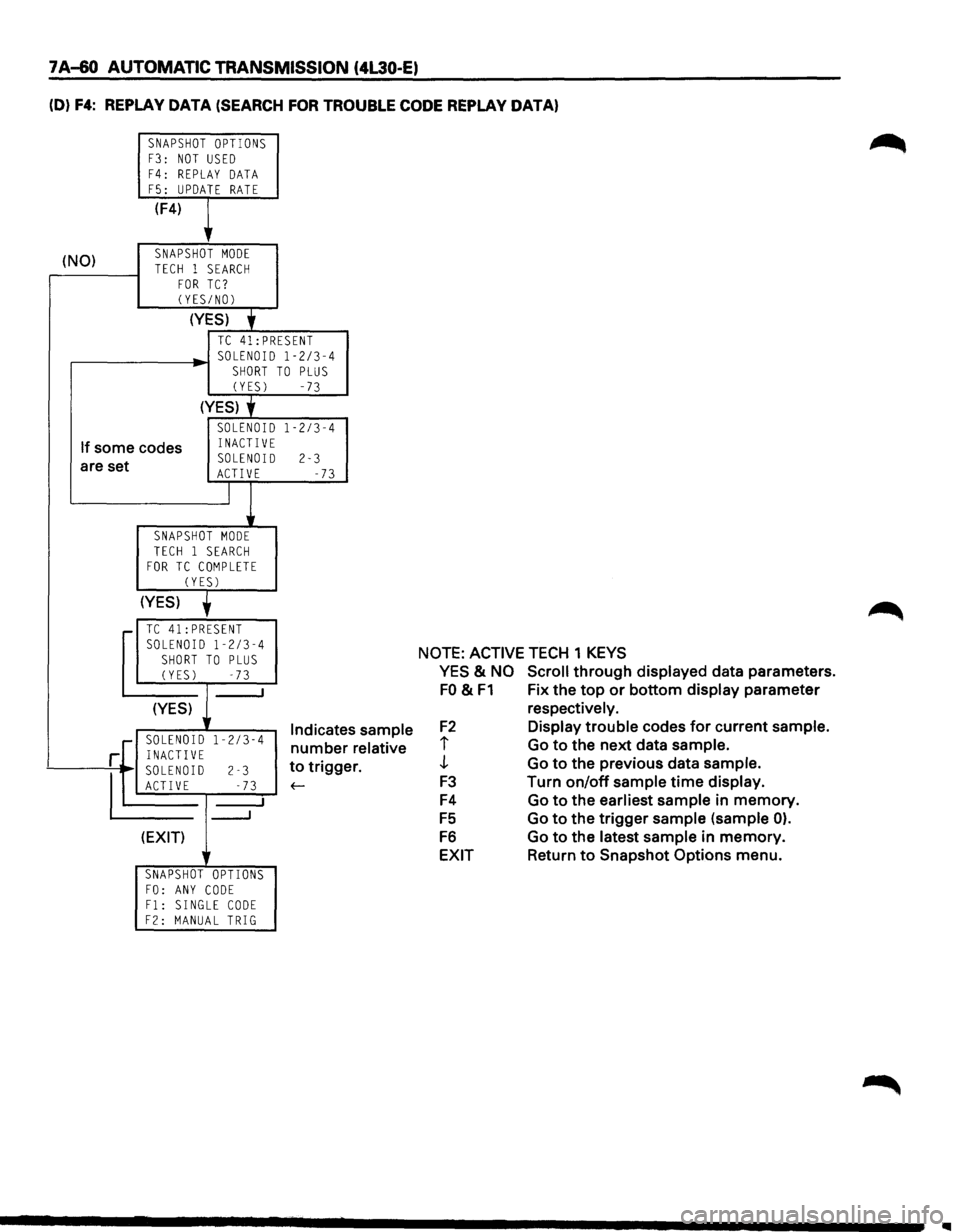
7 A-60 AUTOMATIC TRANSMISSION (4L30-E)
(D) F4: REPLAY DATA (SEARCH FOR TROUBLE CODE REPLAY DATA)
SNAPSHOT OPTIONS F3: NOT USED
F4: REPLAY DATA F5: UPDATE RATE
(F4)
,
(NO) SNAPSHOT MODE
TECH 1 SEARCH FOR TC? (YES/NOl
(YES)
• TC 41:PRESENT SOLENOID 1-2/3-4
SHORT TO PLUS (YES) -73
(YES) y
SOLENOID 1-2/3-4
If some codes INACTIVE
are set SOLENOID 2-3 ACTIVE -73
J
SNAPSHOT MODE TECH 1 SEARCH FOR TC COMPLETE
CYESl
(YES)
,.... TC 41:PRESENT
SOLENOID 1-2/3-4 SHORT TO PLUS (YES) -73
I
(YES) 1 Indicate 1-2/3-4 number ·[ SOLENOID r INACTIVE
~D
2-3
s sample
relative
r. to trigge
E -73 f-
___J
(EXIT)
r
SNAPSHOT OPTIONS FO: ANY CODE F1: SINGLE CODE F2: MANUAL TRIG
NOTE: ACTIVE TECH 1 KEYS
YES
& NO Scroll through displayed data parameters.
FO & F1 Fix the top or bottom display parameter
F2
i
J
F3
F4
FS
F6
EXIT
respectively.
Display trouble codes for current sample.
Go to the next data sample.
Go to the previous data sample.
Turn on/off sample time display.
Go to the earliest sample
in memory.
Go to the trigger sample (sample
0).
Go to the latest sample in memory.
Return to Snapshot
Options menu.
..
Page 933 of 1928
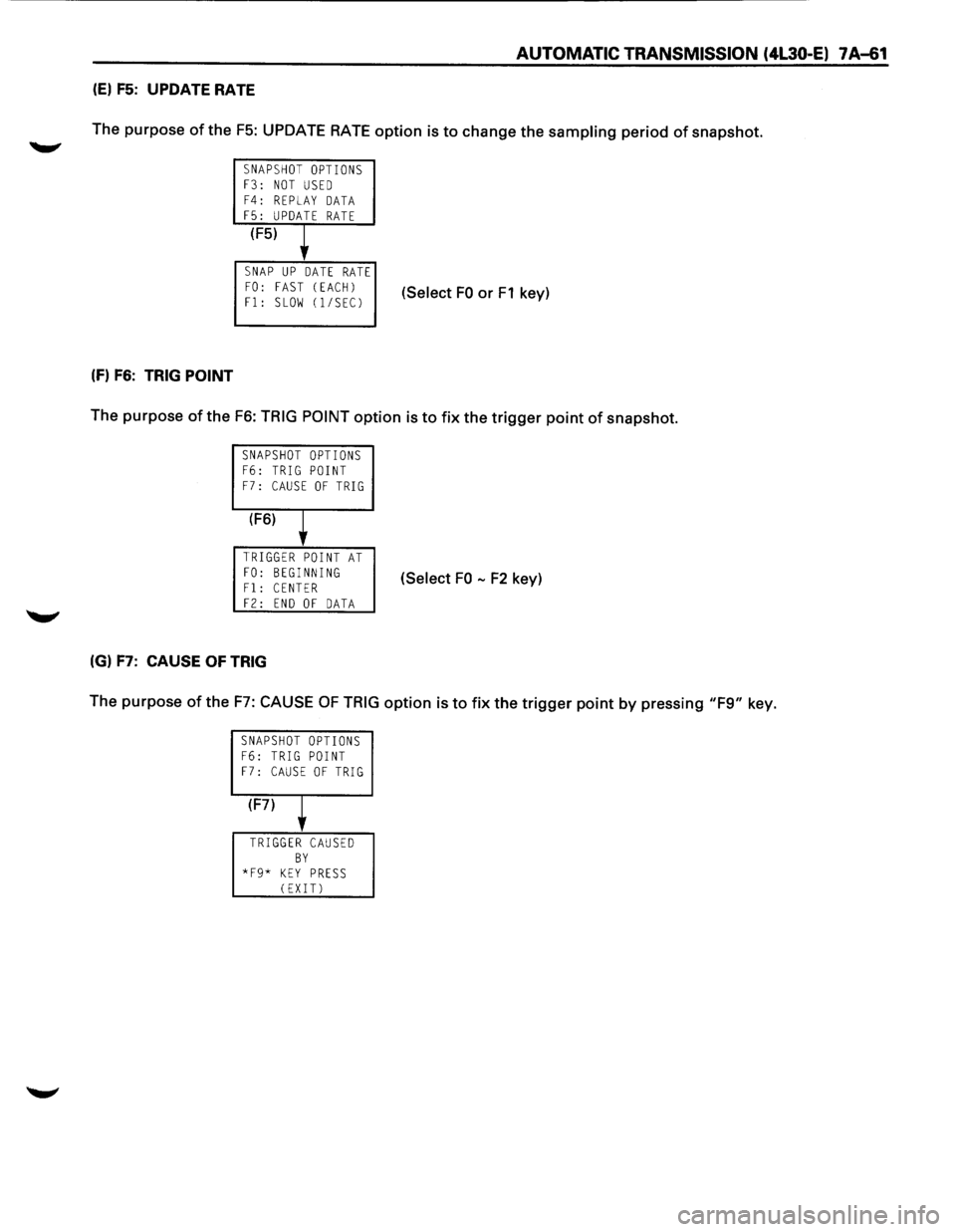
AUTOMATIC TRANSMISSION (4L30-E) 7 A-61
(E) F5: UPDATE RATE
The purpose of the
F5: UPDATE RATE option is to change the sampling period of snapshot.
SNAPSHOT OPTIONS F3: NOT USED F4: REPLAY DATA F5: UPDATE RATE
(F5)
l
SNAP UP DATE RATE FO: FAST (EACH)
Fl: SLOW (1/SECJ (Select FO or F1 key)
(f) F6: TRIG POINT
The purpose of the F6: TRIG POINT option is to fix the trigger point of snapshot.
SNAPSHOT OPTIONS F6: TRIG POINT F7: CAUSE OF TRIG
(F6)
l
TRIGGER POINT AT
FO: BEGINNING Fl: CENTER (Select FO -F2 key)
F2: END OF DATA
(G) F7: CAUSE OF TRIG
The purpose of the F7: CAUSE OF TRIG option is to fix the trigger point by pressing "F9" key.
SNAPSHOT OPTIONS F6: TRIG POINT F7: CAUSE OF TRIG
(F7)
T
TRIGGER CAUSED BY *F9* KEY PRESS (EXIT)
Page 934 of 1928
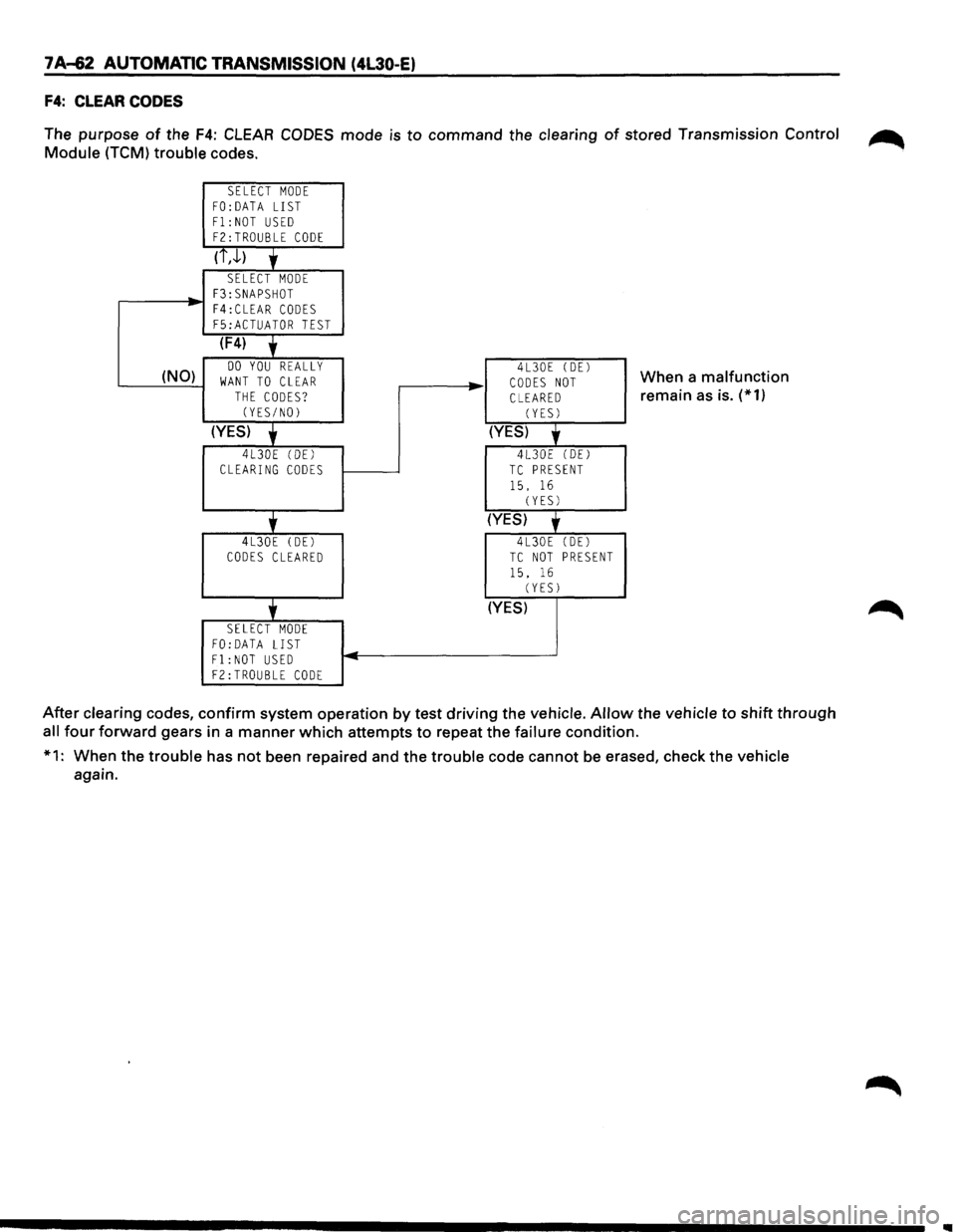
7 A-62 AUTOMATIC TRANSMISSION (4L30-E)
F4: CLEAR CODES
The purpose of the F4: CLEAR CODES mode is to command the clearing of stored Transmission Control ~
Module (TCM) trouble codes.
SELECT MODE FO:DATA LIST
F1:NOT USED F2:TROUBLE CODE
(i,J.)
'
SELECT MODE F3:SNAPSHOT
-F4:CLEAR CODES F5:ACTUATOR TEST
(F4)
' (NO) DO YOU REALLY WANT TO CLEAR THE CODES? (YES/NO)
(YES)
'
4L30E (DEl CLEARING CODES
'
4L30E (DE)
CODES CLEARED
'
SELECT MODE FO:DATA LIST F1:NOT USED
F2:TROUBLE CODE
..
-
4L30E (DEl
CODES NOT CLEARED (YES)
(YES)
'
4L30E (DEl TC PRESENT
15. 16 (YES)
(YES)
'
4L30E (DE)
TC NOT PRESENT
15. 16 (YESJ
(YES)
When a malfunction
remain
as is. (*1)
After clearing codes, confirm system operation by test driving the vehicle.
Allow the vehicle to shift through
all four forward gears in a manner which attempts to repeat the failure condition.
*1: When the trouble has not been repaired and the trouble code cannot
be erased, check the vehicle
again.
Page 935 of 1928
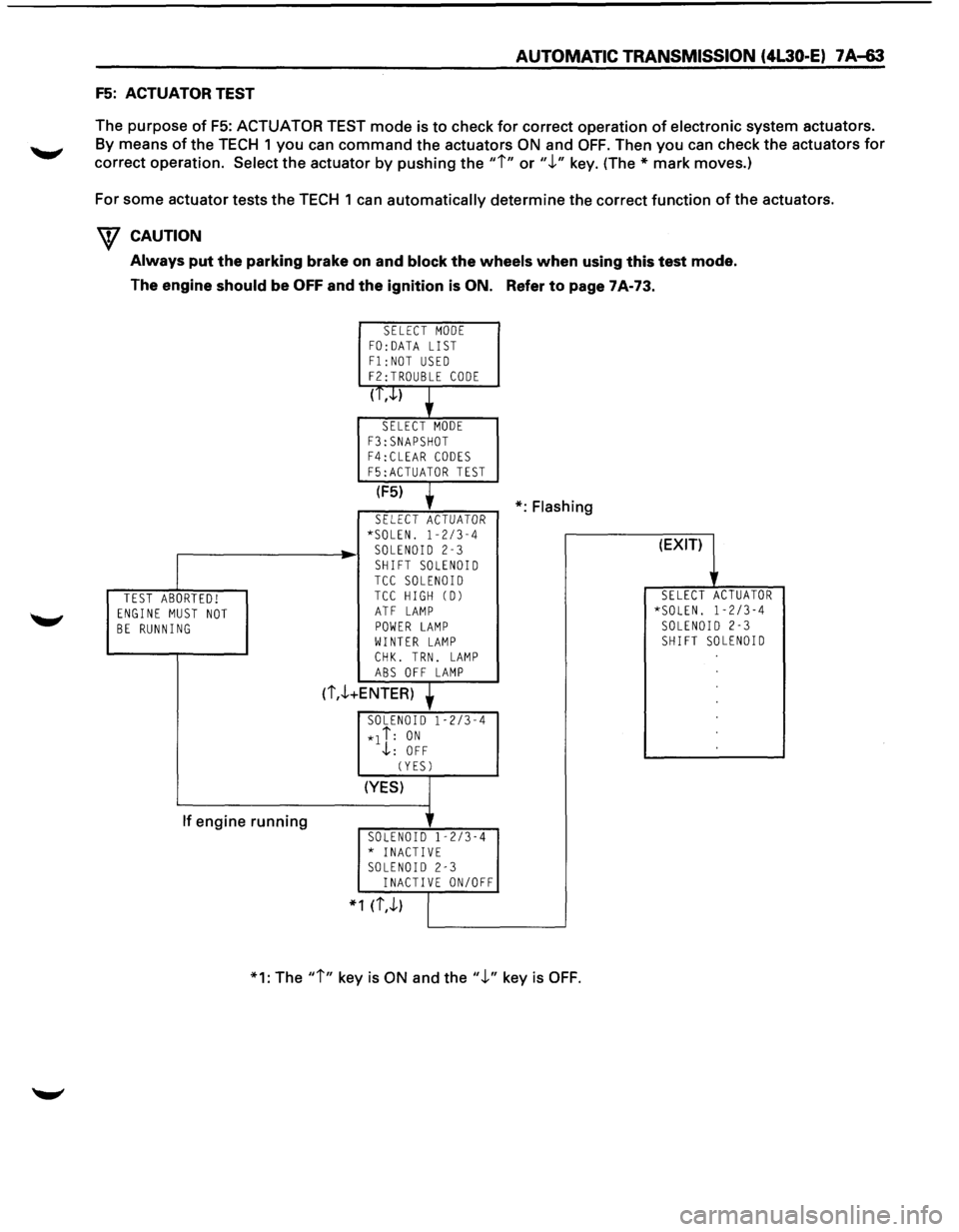
AUTOMATIC TRANSMISSION (4L30-E) 7 A-63
F5: ACTUATOR TEST
The purpose
of F5: ACTUATOR TEST mode is to check for correct operation of electronic system actuators.
By means of the TECH 1 you can command the actuators ON and OFF. Then you can check the actuators for
correct operation.
Select the actuator by pushing the "i" or".!." key. (The* mark moves.)
For some actuator tests the TECH 1
can automatically determine the correct function of the actuators.
W CAUTION
Always put the parking brake on and block the wheels when using this test mode.
The engine
should be OFF and the ignition is ON. Refer to page 7A-73.
TEST ABORTED! ENGINE MUST NOT BE RUNNING
If engine running
SELECT MODE FO: DATA LIST
F1:NOT USED F2:TROUBLE CODE
(T,.J..)
SELECT MODE
F3:SNAPSHOT F4:CLEAR CODES
F5:ACTUATOR TEST
(F5)
SELECT ACTUATOR *SOLEN. 1-2/3-4 SOLENOID 2-3
SHIFT SOLENOID TCC SOLENOID TCC HIGH CD)
ATF LAMP POWER LAMP WINTER LAMP
CHK. TRN. LAMP ABS OFF LAMP
(i,.!.+ENTER)
SOLENOID 1-2/3-4
*1 i: ON .j,: OFF
CYESJ
(YES)
SOLENOID 1-2/3-4 * INACTIVE SOLENOID 2-3 INACTIVE ON/OFF
* 1 (i,.!.)
*:Flashing
*1: The
"i" key is ON and the".!." key is OFF.
(EXIT)
SELECT ACTUATOR *SOLEN. 1-2/3-4 SOLENOID 2-3 SHIFT SOLENOID
Page 936 of 1928
7 A-64 AUTOMATIC TRANSMISSION (4L30-E)
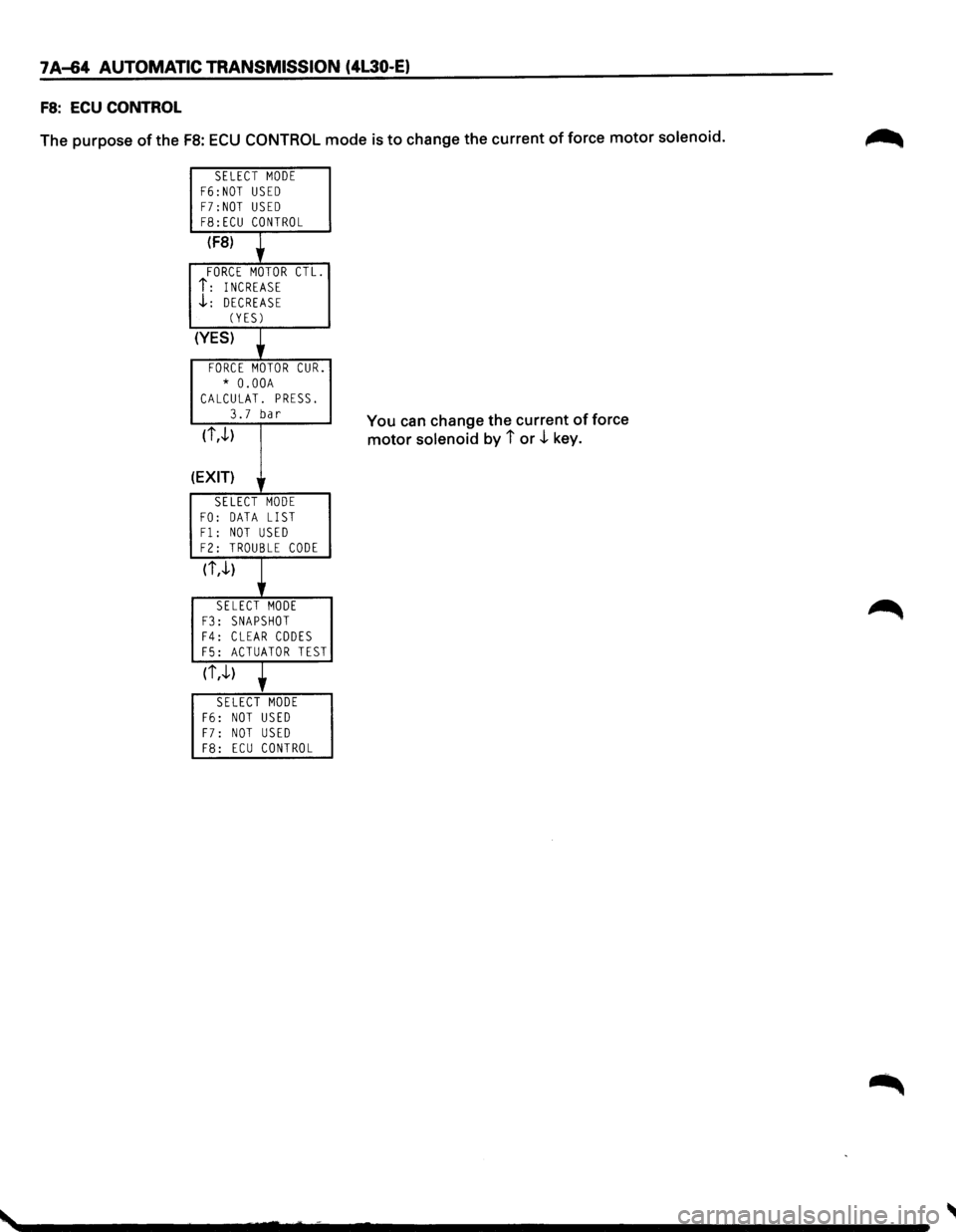
FS: ECU CONTROL
The purpose of the FB: ECU CONTROL mode is to change the current of force motor solenoid.
SELECT MODE F6:NOT USED F7:NOT USED F8:ECU CONTROL
(F8)
FORCE MOTOR CTL.
i: INCREASE .J..: DECREASE (YES)
(YES)
FORCE MOTOR CUR.
* O.OOA CALCULAT. PRESS.
3.7 bar
(i,.J..)
(EXIT) lr
SELECT MODE
FO: DATA LIST Fl: NOT USED F2: TROUBLE CODE
(i,.J..)
SELECT MODE F3: SNAPSHOT F4: CLEAR CODES F5: ACTUATOR TEST
(i,.J..)
SELECT MODE F6: NOT USED
F7: NOT USED F8: ECU CONTROL
You can change the current of force
motor solenoid by i or .J.. key.
Page 937 of 1928
CLEAR DTC
Remark: If you clear the DTC (Diagnosis Trouble
Codes) you will not be able to read any codes
recorded
during the last Trouble.
Remark: To be able to use the DTC again to identify
a problem you will need to reproduce the fault or
the problem. This may require a new test drive or
just turning the ignition on (this depends on the
nature
of the fault).
1. IF you have a TECH1:
(1) Connect the TECH1 if it is still not con-
nected
GOTHROUGH TECH1 CON-
NECTION.
(2) Push "F4" and answer "Yes" to the
question
"Do you really want to clear the
codes?"
CD When a malfunction remains as it is
the
TECH 1 displays "4L30E CODES
NOT
CLEARED". This means that the
problem is still there or that the
recovery was
not done please GOTO
DTCCHECK.
® When a malfunction has been re
paired and the recovery is
done the
TECH1 displays "4L30E CODES
CLEARED".
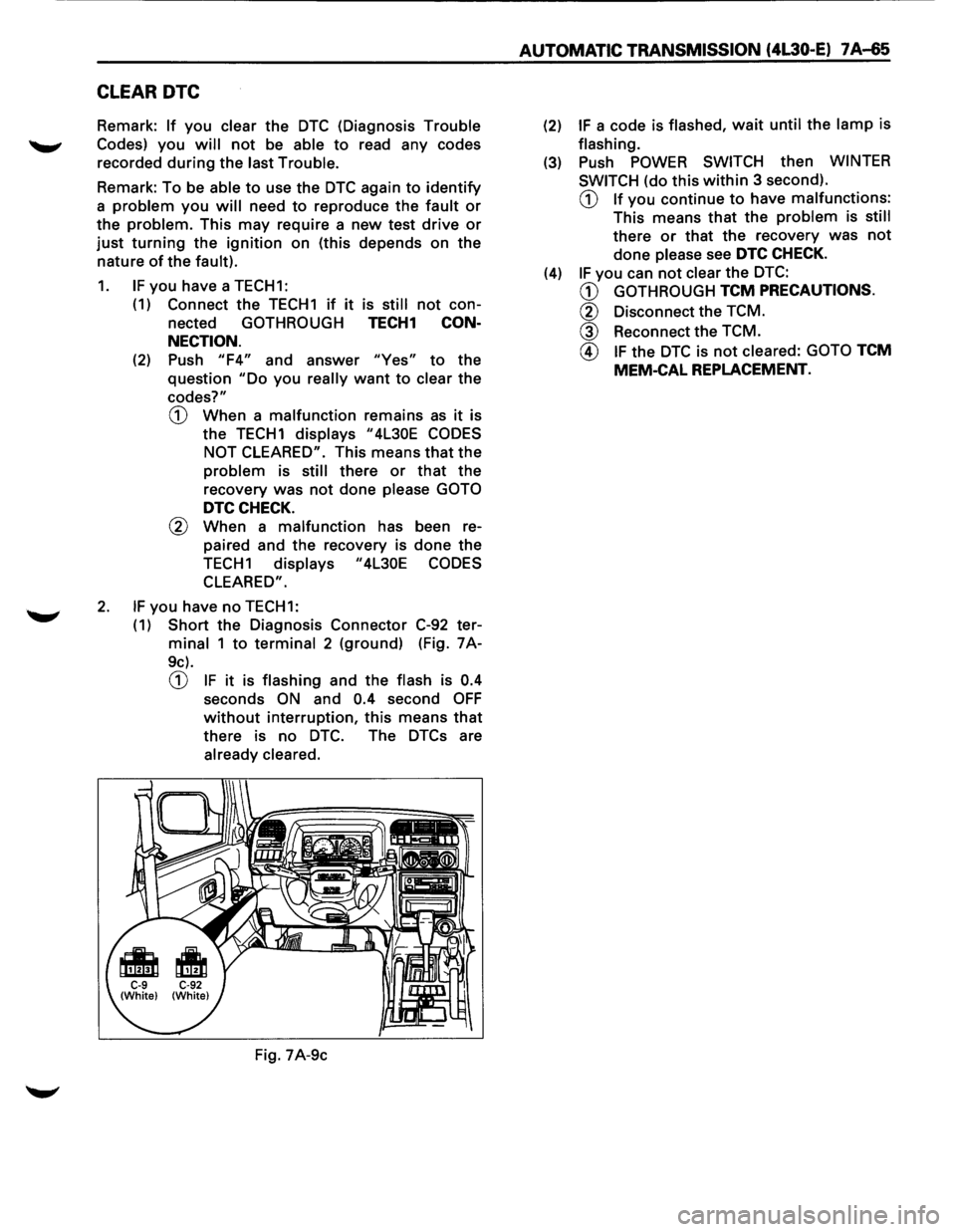
2. IF you have no TECH1:
(
1) Short the Diagnosis Connector C-92 ter
minal 1 to terminal 2 (ground) (Fig. 7A-
9c).
CD IF it is flashing and the flash is 0.4
seconds ON and 0.4 second OFF
without interruption, this means that
there is no DTC. The DTCs are
already cleared.
Fig. 7A-9c
AUTOMATIC TRANSMISSION (4L30-E) 7 A-65
(2) IF a code is flashed, wait until the lamp is
flashing.
(3) Push POWER SWITCH then WINTER
SWITCH
(do this within 3 second).
CD If you continue to have malfunctions:
This means that the problem is still
there or that the recovery was not
done please see DTC CHECK.
(4) IF you can not clear the DTC:
CD GOTHROUGH TCM PRECAUTIONS.
@ Disconnect the TCM.
@ Reconnect the TCM.
@ IF the DTC is not cleared: GOTO TCM
MEM-CAL REPLACEMENT.