charging ISUZU TROOPER 1995 Owner's Manual
[x] Cancel search | Manufacturer: ISUZU, Model Year: 1995, Model line: TROOPER, Model: ISUZU TROOPER 1995Pages: 1928
Page 682 of 1928
603-6 CHARGING SYSTEM
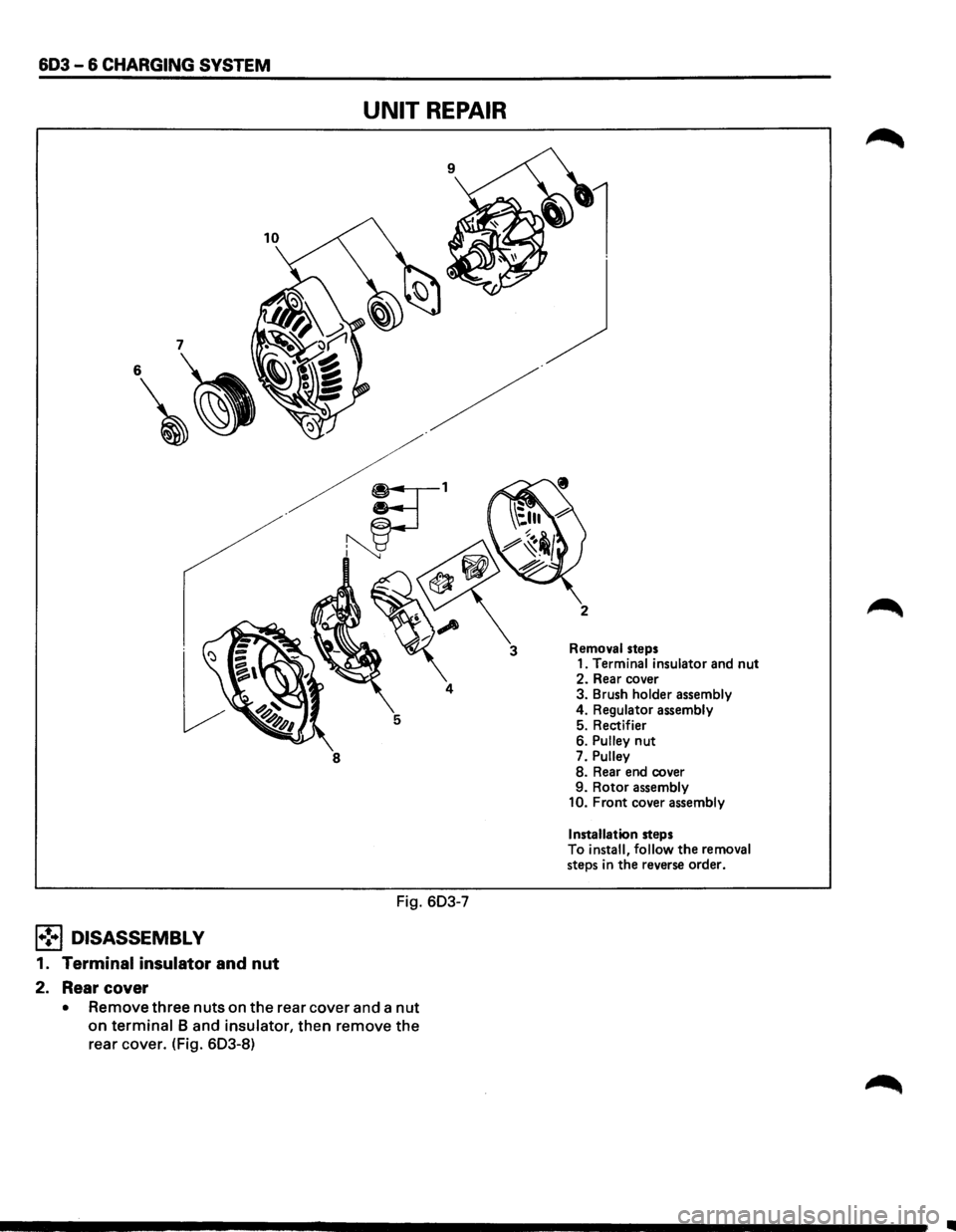
UNIT REPAIR
8
Fig. 603-7
l•!•l DISASSEMBLY
1. Terminal insulator and nut
2. Rear cover
• Remove three nuts on the rear cover and a nut
on terminal 8 and insulator, then remove the
rear cover. (Fig. 603-8)
3 Removal steps
1. Terminal insulator and nut 2. Rear cover
3. Brush holder assembly
4. Regulator assembly
5. Rectifier
6.
Pulley nut
7. Pulley 8. Rear end cover
9. Rotor assembly
10. Front cover assembly
Installation
steps
To install, follow the removal steps in the reverse order.
•
Page 683 of 1928
Terminal insulator and Nut
Nut
Rear cover .
Fig. 603-8
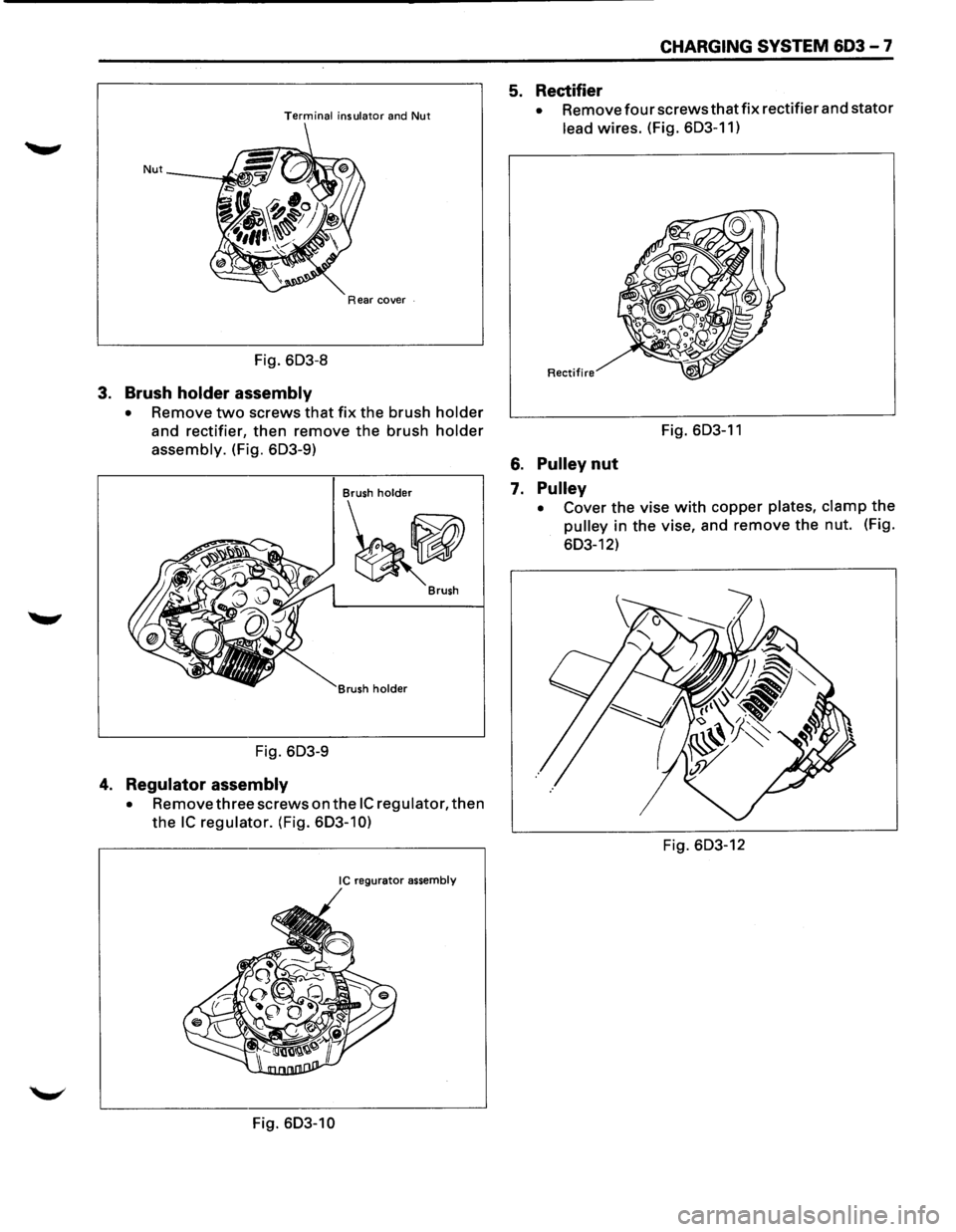
3. Brush holder assembly
• Remove two screws that fix the brush holder
and rectifier, then remove the brush holder
assembly. (Fig. 603-9)
Brush holder
~ Brush
rush
holder
Fig. 603-9
4. Regulator assembly
• Remove three screws on the IC regulator, then
the IC regulator. (Fig. 603-10)
IC regurator assembly
Fig. 603-10
CHARGING SYSTEM 603 - 7
5. Rectifier
• Removefourscrewsthatfix rectifier and stator
lead wires. (Fig. 603-11)
Rectifire
Fig. 603-11
6. Pulley nut
7. Pulley
• Cover the vise with copper plates, clamp the
pulley in the vise, and remove the nut. (Fig.
603-12)
Fig. 603-12
Page 684 of 1928
603 - 8 CHARGING SYSTEM
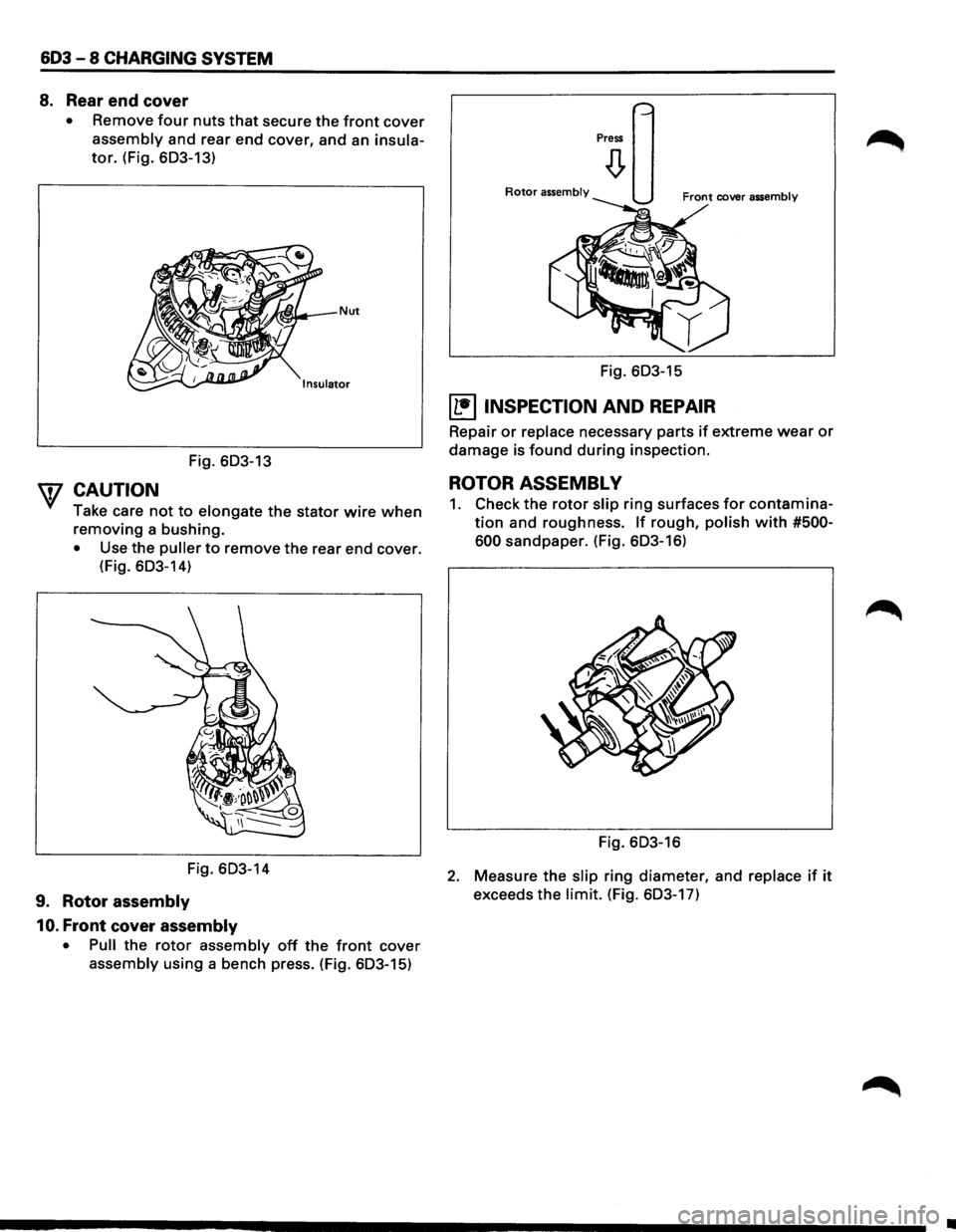
8. Rear end cover
• Remove four nuts that secure the front cover
assembly and rear end cover, and an insula
tor. (Fig. 603-13)
Fig. 603-13
W CAUTION
Take care not to elongate the stator wire when
removing a bushing.
• Use the puller to remove the rear end cover.
(Fig.
603-14)
Fig. 603-14
9. Rotor assembly
10.
Front cover assembly
• Pull the rotor assembly off the front cover
assembly using a bench press. (Fig. 603-15)
Press
Rotor assembly
Fig. 603-15
~ INSPECTION AND REPAIR
Repair or replace necessary parts if extreme wear or
damage is found during inspection.
ROTOR ASSEMBLY
1. Check the rotor slip ring surfaces for contamina
tion and roughness. If rough, polish with #500-
600
sandpaper. (Fig. 603-16)
Fig. 603-16
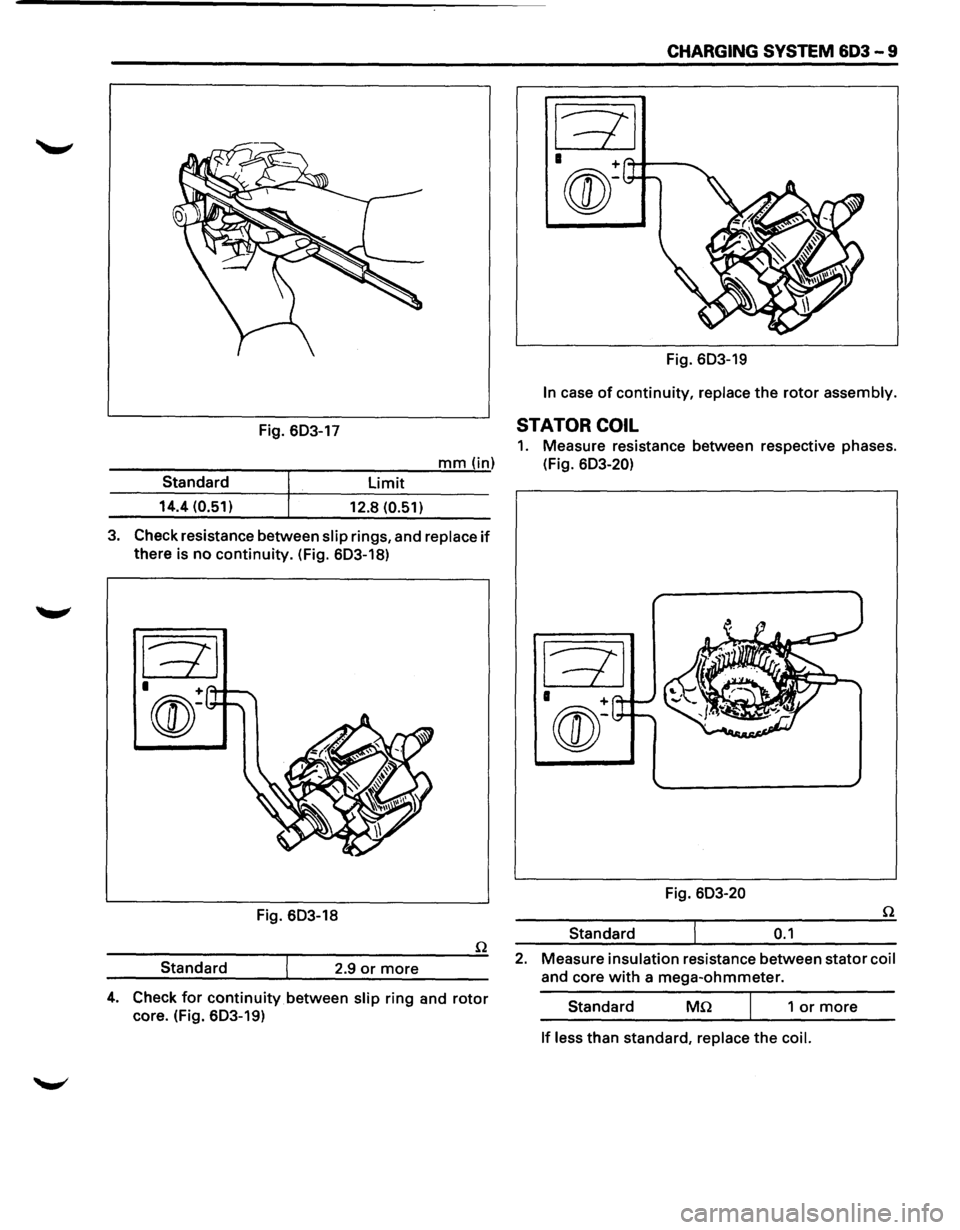
2. Measure the slip ring diameter, and replace if it
exceeds the limit. (Fig. 603-17)
•
Page 685 of 1928
CHARGING SYSTEM 603 - 9
Fig. 603-19
In case of continuity, replace the rotor assembly.
Fig. 603-17 STATOR COIL
1. Measure resistance between respective phases.
---------r-----:-:--:---'m;.;..;.;...;.m""'"(.....,..in) (Fig. 603-20)
limit Standard
14.4 (0.51)
12.8 (0.51)
3. Check resistance between slip rings, and replace if
there is no continuity. (Fig. 603-18)
Fig. 603-18
Standard 2.9
or more
4. Check for continuity between slip ring and rotor
core. (Fig. 603-19) Fig.
603-20
Standard
0.1
2. Measure insulation resistance between stator coil
and core with a mega-ohmmeter.
Standard
Mn 1 or more
If less than standard, replace the coil.
Page 686 of 1928
603 -10 CHARGING SYSTEM
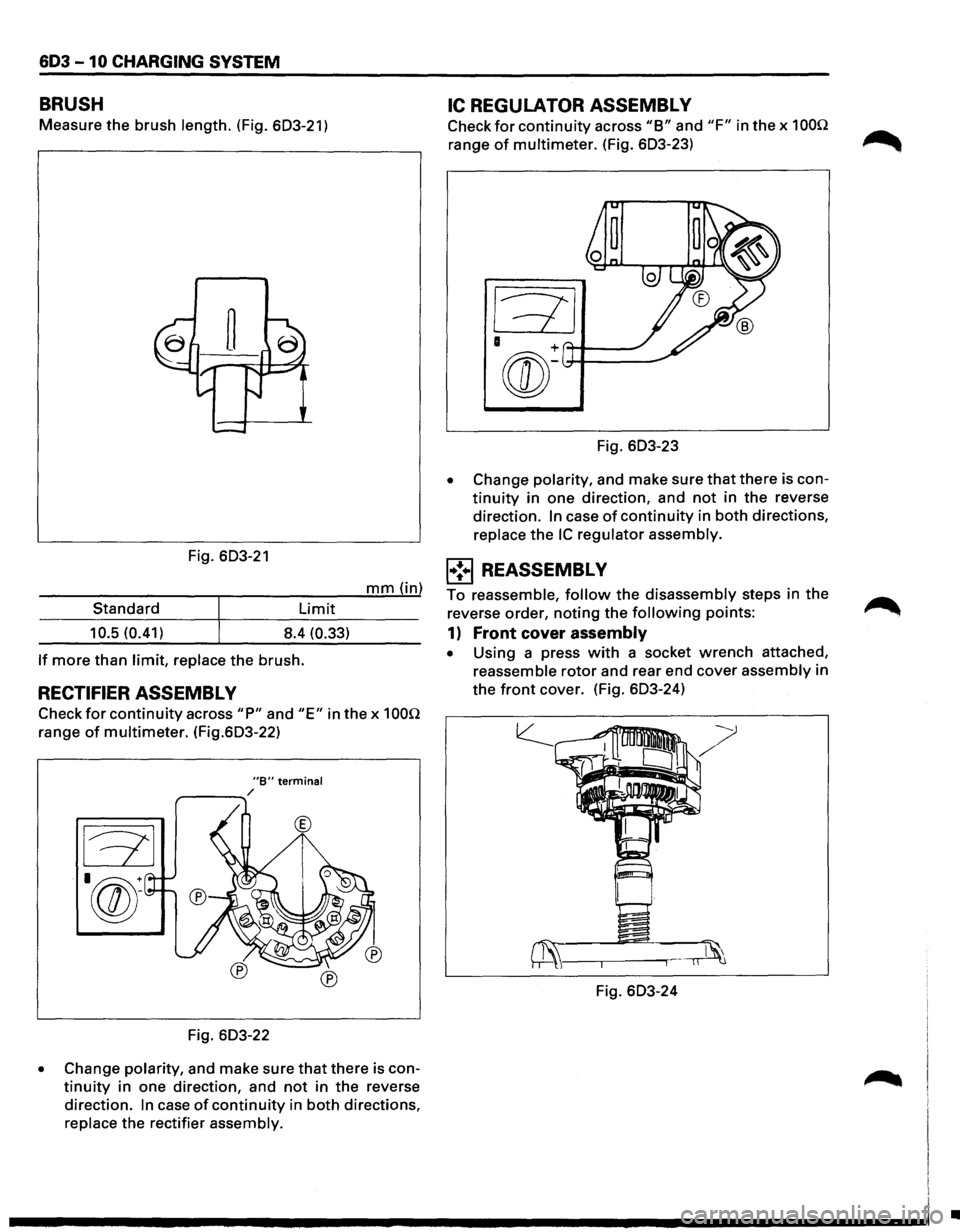
BRUSH
Measure the brush length. (Fig. 603-21)
Fig. 603-21
mm (in)
Standard
Limit
10.5 (0.41) 8.4 (0.33)
If more than limit, replace the brush.
RECTIFIER ASSEMBL V
Check for continuity across "P" and "E" in the x 100Q
range of multimeter. (Fig.603-22)
"B" terminal r---....... /
®
Fig. 603-22
• Change polarity, and make sure that there is con
tinuity in one direction, and not in the reverse
direction.
In case of continuity in both directions,
replace the rectifier assembly.
IC REGULATOR ASSEMBL V
Check for continuity across "B" and "F" in the x 100Q
range of multimeter. (Fig. 603-23)
Fig. 603-23
• Change polarity, and make sure that there is con
tinuity in one direction, and not in the reverse
direction.
In case of continuity in both directions,
replace
the IC regulator assembly.
l•!•l REASSEMBLY
To reassemble, follow the disassembly steps in the
reverse order,
noting the following points:
1) Front cover assembly
• Using a press with a socket wrench attached,
reassemble
rotor and rear end cover assembly in
the
front cover. (Fig. 603-24)
Fig. 603-24
•
Page 687 of 1928
-
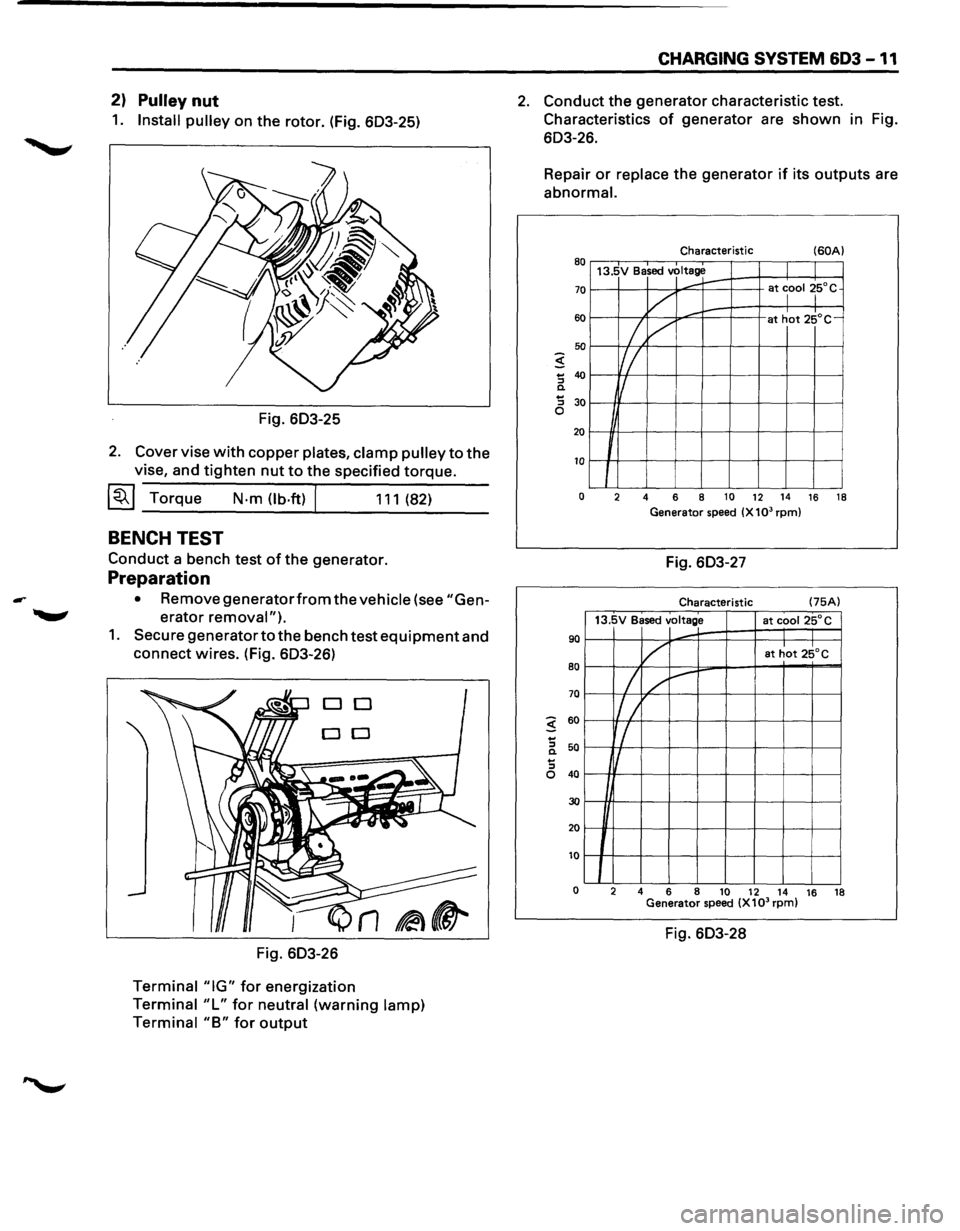
2) Pulley nut
1. Install pulley on the rotor. (Fig. 603-25)
Fig. 603-25
2. Cover vise with copper plates, clamp pulley to the
vise, and tighten nut to the specified torque.
~~~Torque N-m(lb.ft) 111(82)
BENCH TEST
Conduct a bench test of the generator.
Preparation
• Remove generatorfrom the vehicle (see "Gen
erator removal").
1. Secure generator to the bench test equipment and
connect wires. (Fig. 603-26)
DO
DO
Fig. 603-26
Terminal "IG" for energization
Terminal "L" for neutral (warning lamp)
Terminal
"B" for output
CHARGING SYSTEM 603 -11
2. Conduct the generator characteristic test.
Characteristics
of generator are shown in Fig.
603-26.
Repair
or replace the generator if its outputs are
abnormal.
Characteristic (60A) 80 13.5V Based voltage
70
60
50
5 ... 40 "' c. ... 30 "'
......... r-at lool ~5°C
v ,........
/, /
at hot 25°C-
Iff_
f/
0
20
10
J 0 2 4 6 8 10 12 14 16 18
Generator speed (X 103 rpm)
Fig. 603-27
Characteristic (75A)
13.5V Based
voltage at cooi25°C
90
80
70
5 60
...
"' 50 c. ...
v at hot 25°C
I / ~
l/ /
r/
I
"' 0 40
30
20
10
0 2
4 6
8
10 12 14 16
18
Generator speed (X103 rpm)
Fig. 603-28
Page 688 of 1928
603 -12 CHARGING SYSTEM
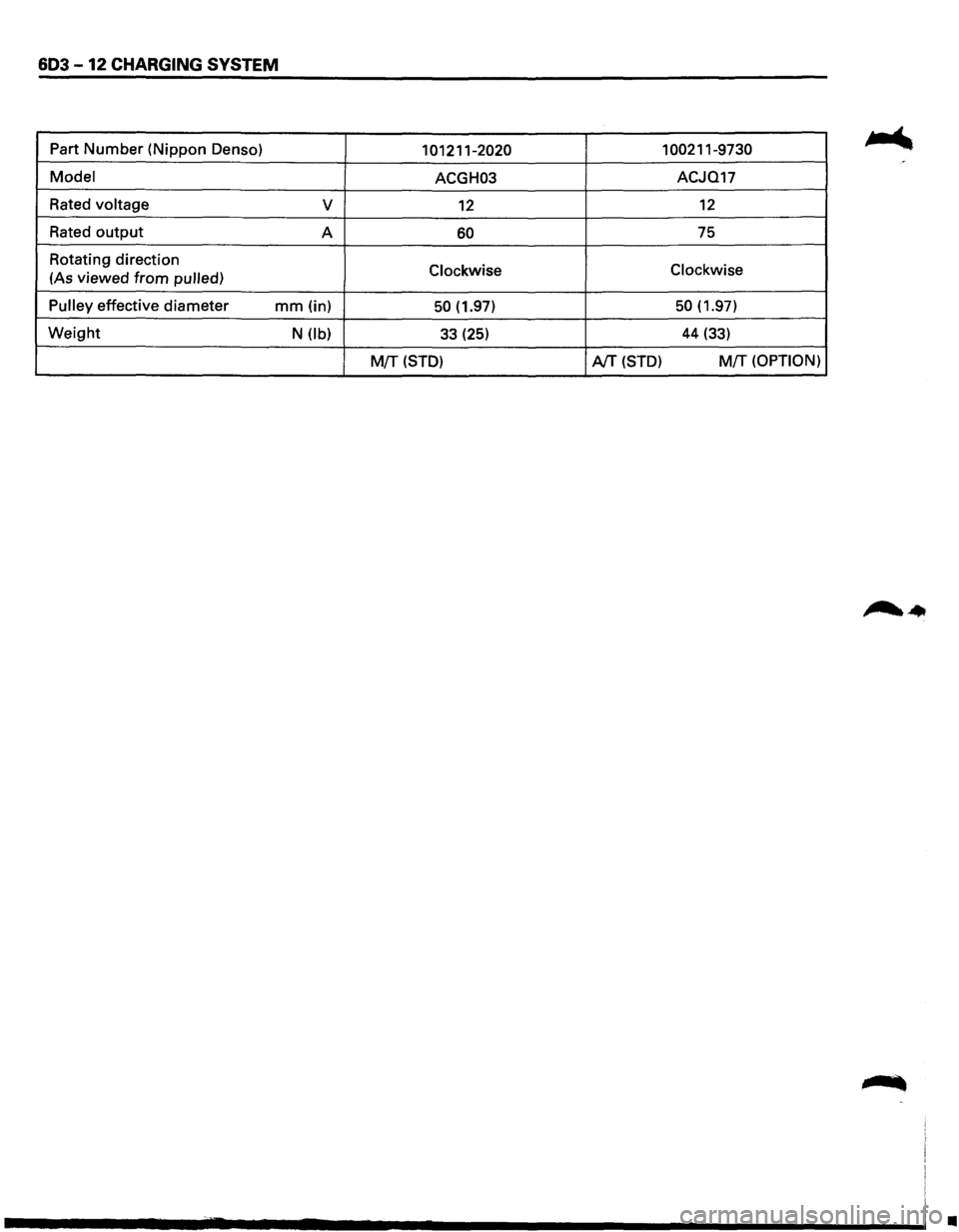
Part Number (Nippon Denso) 101211-2020 1 00211-9730
Model ACGH03 ACJQ17
Rated
voltage v 12 12
Rated output A 60 75
Rotating direction
Clockwise Clockwise (As
viewed from pulled)
Pulley
effective diameter mm (in) 50 (1.97) 50 (1.97)
Weight N (lb) 33 (25) 44 (33)
M{f (STD) AfT (STD) M!T (OPTION)
•
Page 729 of 1928
DRIVEABILITY AND EMISSIONS 6E2-33
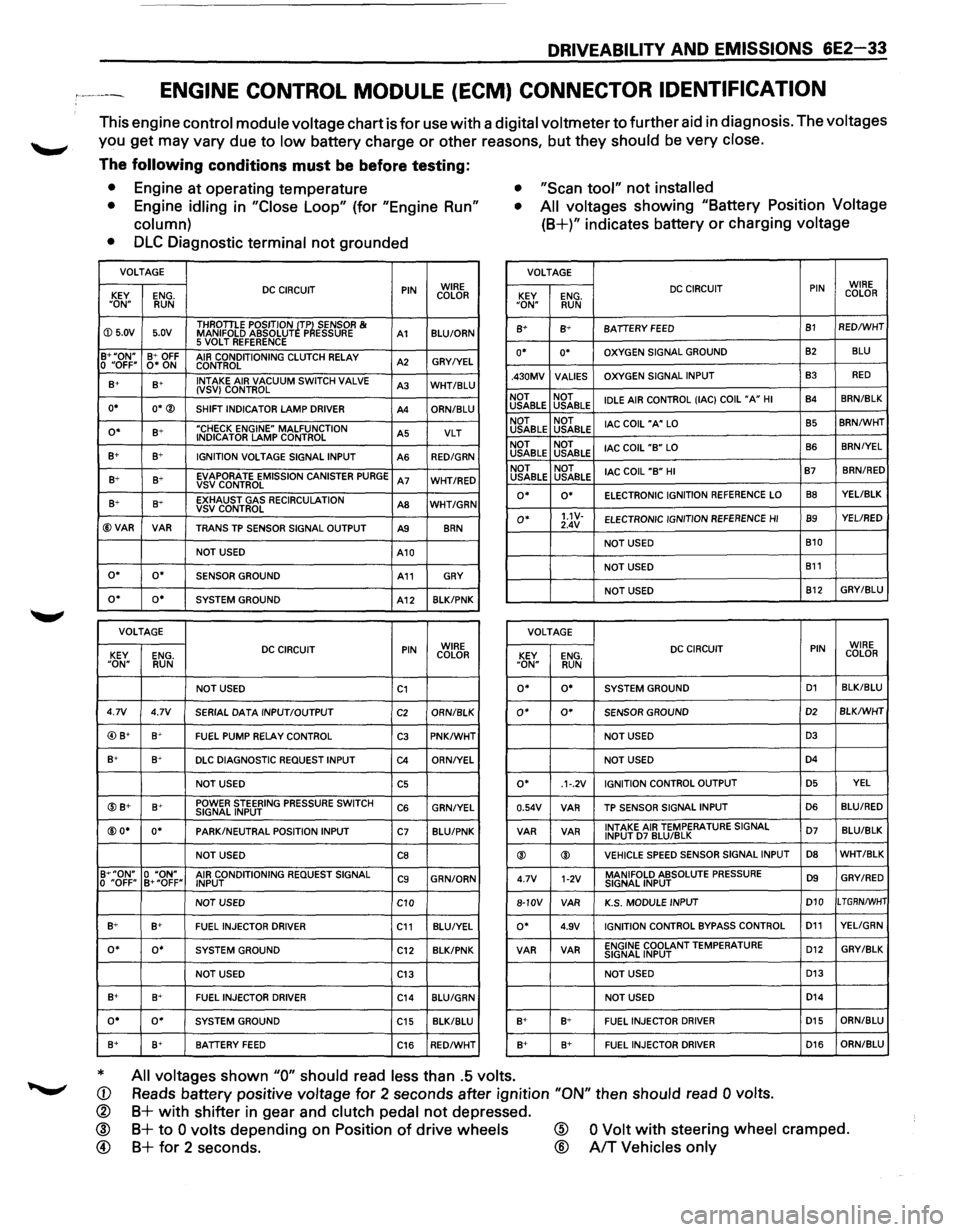
ENGINE CONTROL MODULE (ECM) CONNECTOR IDENTIFICATION
This engine control module voltage chart is for use with a digital voltmeter to further aid in diagnosis. The voltages
you get may vary due to low battery charge or other reasons, but they should be very close.
The following conditions must be before testing:
• Engine at operating temperature • "Scan tool" not installed
•
Engine idling in "Close Loop" (for "Engine Run"
column) •
All voltages showing "Battery Position Voltage
(8+)" indicates battery or charging voltage
•
DLC Diagnostic terminal not grounded
VOLTAGE VOLTAGE
DC CIRCUIT PIN WIRE
KEY ENG. COLOR
"ON" RUN
DC CIRCUIT PIN WIRE
KEY ENG. COLOR "ON" RUN
ID 5.0V 5.0V THROTILE
POSITION ~TP~ SENSOR & MANIFOLD ABSOLUT P ESSURE A1 BLU/ORN 8+ B+ BATIERY FEED B1 RED/WHT
5 VOLT REFERENCE B+"ON" B+ OFF AIR CONDITIONING CLUTCH RELAY A2 GRY/YEL 0 "OFF" 0* ON
CONTROL o• o• OXYGEN SIGNAL GROUND 82 BLU
B+ s+ INTAKE
AIR VACUUM SWITCH VALVE A3 WHT/BLU (VSV) CONTROL
o• O*® SHIFT INDICATOR LAMP DRIVER A4 ORN/BLU .430MV
VALlES OXYGEN
SIGNAL INPUT
B3 RED
NOT NOT
IDLE AIR CONTROL (lAC) COIL "A" HI B4 8RN/BLK USABLE
USABLE
o• B+ "CHECK ENGINE" MALFUNCTION A5 VLT INDICATOR LAMP CONTROL
B+ B+ IGNITION VOLTAGE SIGNAL INPUT
AS RED/GRN
NOT NOT
lAC COIL "A" LO B5 8RN/WHT USABLE USABLE
NOT NOT
lAC COIL
"B" LO B6 BRN/YEL USABLE
USABLE
B+ B+ EVAPORATE EMISSION CANISTER PURGE A7 WHT/RED VSVCONTROL NOT
NOT
lAC COIL "B" HI B7 BRN/RED USABLE
USABLE
B+ 8~ EXHAUST GAS RECIRCULATION AS WHT/GRN VSV CONTROL
@VAR VAR TRANS TP SENSOR SIGNAL OUTPUT A9 8RN
o• o• ELECTRONIC IGNITION REFERENCE LO 88 YEL/BLK
o• 1.1V-ELECTRONIC
IGNITION REFERENCE HI B9 YEL/RED
2.4V
NOT USED B10
NOT USED
A10
NOT USED
B11 o• o• SENSOR GROUND A11 GRY
NOT USED B12 GRY/BLU o• o• SYSTEM
GROUND A12 8LK/PNK
VOLTAGE
VOLTAGE
DC CIRCUIT PIN WIRE
KEY ENG. COLOR DC CIRCUIT PIN WIRE
KEY ENG. COLOR "ON" RUN "ON" RUN
NOT USED C1 o• o• SYSTEM GROUND D1 BLK/BLU
4.7V 4.7V
SERIAL DATA INPUT/OUTPUT C2 ORN/8LK o• 0* SENSOR GROUND D2 BLK/WHT
@) B+ B+ FUEL PUMP RELAY CONTROL C3 PNK/WHT NOT USED D3
B+ B+ DLC DIAGNOSTIC REQUEST INPUT C4 ORN/YEL NOT USED D4
NOT USED C5 o• .1·.2V IGNITION
CONTROL OUTPUT D5 YEL
@B+ B+ POWER STEERING PRESSURE SWITCH C6 GRN/YEL SIGNAL INPUT 0.54V VAR
TP SENSOR
SIGNAL INPUT D6 BLU/RED
@O* o• PARK/NEUTRAL POSITION
INPUT C7 BLU/PNK VAR
VAR INTAKE AIR TEMPERATURE SIGNAL D7 BLU/BLK INPUT D7 BLU/BLK
NOT USED CB ® ® VEHICLE SPEED SENSOR
SIGNAL INPUT D8 WHT/BLK
B+"ON" 0 "ON" AIR CONDITIONING REQUEST SIGNAL C9 GRN/ORN
0 "OFF" B+"OFF"
INPUT 4.7V 1-2V MANIFOLD ABSOLUTE PRESSURE D9 GRY/RED SIGNAL
INPUT
NOT USED
C10 8-10V
VAR K.S.
MODULE INPUT D10 LTGRN/WHT
B+ B+ FUEL INJECTOR
DRIVER C11 BLU/YEL o• 4.9V IGNITION CONTROL BYPASS CONTROL D11 YELIGRN
o• o• SYSTEM GROUND
C12 BLK/PNK VAR VAR ENGINE COOLANT TEMPERATURE
D12 GRY/BLK SIGNAL
INPUT
NOT USED
C13 NOT USED D13
B+ 8+
FUEL INJECTOR DRIVER C14 BLU/GRN NOT USED D14
o• o• SYSTEM GROUND
C15 BLK/BLU B+ B+ FUEL INJECTOR DRIVER D15 ORN/BLU
8+ B+ BATIERY FEED C16 RED/WHT B+ 8+
FUEL INJECTOR DRIVER D16 ORN/8LU
* All voltages shown "0" should read less than .5 volts.
Reads battery positive voltage for 2 seconds after ignition "ON" then should read 0 volts. CD
®
® @
B+ with shifter in gear and clutch pedal not depressed.
B+ to 0 volts depending on Position of drive wheels
B+ for 2 seconds.
@
®
0 Volt with steering wheel cramped.
A/T Vehicles only
Page 810 of 1928
6E2-114 DRIVEABILITY AND EMISSIONS
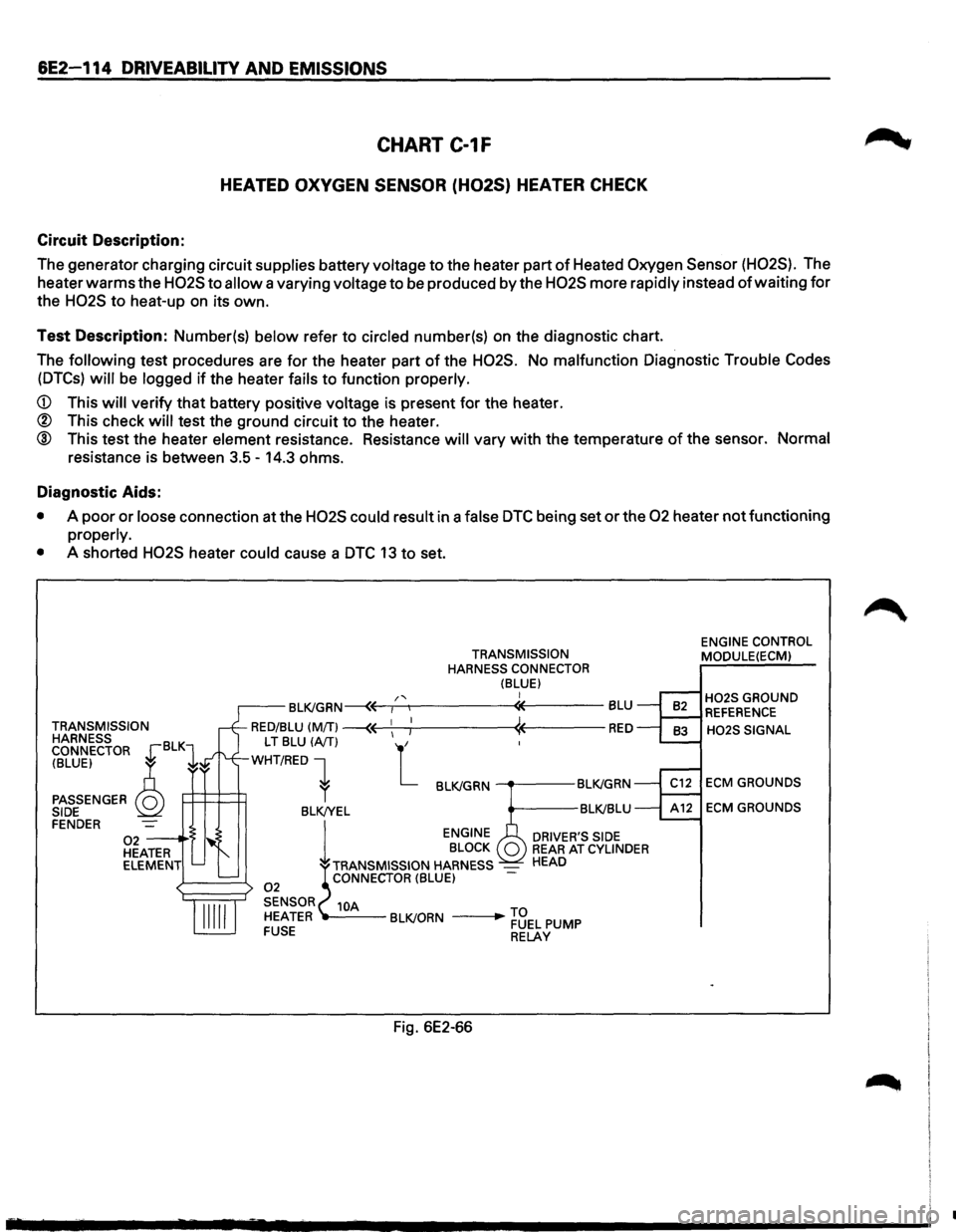
CHART C-1F
HEATED OXYGEN SENSOR (H02S} HEATER CHECK
Circuit Description:
The generator charging circuit supplies battery voltage to the heater part of Heated Oxygen Sensor (H02S). The
heater
warms the H02S to allow a varying voltage to be produced by the H02S more rapidly instead of waiting for
the H02S to heat-up on its own.
Test Description: Number(s) below refer to circled number(s) on the diagnostic chart.
The
following test procedures are for the heater part of the H02S. No malfunction Diagnostic Trouble Codes
(DTCs) will be logged if the heater fails to function properly.
CD This will verify that battery positive voltage is present for the heater.
® This check will test the ground circuit to the heater.
® This test the heater element resistance. Resistance will vary with the temperature of the sensor. Normal
resistance is between 3.5-14.3 ohms.
Diagnostic Aids:
• A poor or loose connection at the H02S could result in a false DTC being set or the 02 heater not functioning
properly.
•
A shorted H02S heater could cause a DTC 13 to set.
TRANSMISSION
HARNESS
CONNECTOR
~BLKl
(BLUE) ~ ~
PASSENGER Q SIDE FENDER 02--·'> HEATER
ELEMENT
TRANSMISSION
HARNESS CONNECTOR
(BLUE) I
Fig. 6E2-66
ENGINE CONTROL
MODULE(ECM)
H02S GROUND REFERENCE
H02S SIGNAL
ECM GROUNDS
ECM GROUNDS
•
Page 1017 of 1928
AUTOMATIC TRANSMISSION (4L30-E) 7 A-145
TCM PRECAUTONS
The TCM can be damaged by:
(1) The Electrostatic discharge
(2) The short circuit of some terminals to voltage
or to ground.
Electrostatic Discharge Damage Description:
(1) Electronic components used to control systems
are often designed
to carry very low voltage,
and are
very susceptible to damage caused by
electrostatic discharge. It is possible for less
than 100 volts of static electricity to cause
damage
to some electronic components. By
comparison,
it takes as much as 4000 volts for
a person to even feel the zap of a static
discharge.
(2) There are several
ways for a person to become
statically charged. The most common methods
of charging are by friction and induction. An
example
of charging by friction is a person
sliding across a car seat, in
which a charge of
as much as 25,000 volts can build up.
Charging
by induction occurs when a person
with well insulated shoes stands near a highly
charged object and momentarily touches
ground. Charges for the same polarity are
drained off, leaving the person
highly charged
with the opposite polarity. Static charges of
either type can cause damage, therefore, it is
important to use care when handling and
testing electronic components.
NOTICE: To prevent possible Electrostatic
Discharge damage:
(1) Do not touch the TCM connector pins or
soldered components on the TCM circuit
board.
(2) When handling a Mem-Cal (PROM), do not
touch the component leads, and do not
remove integrated circuit from carrier.
(3) Be sure to follow the guidelines listed below if
servicing any of these electronic components:
(4) Do not open the replacement part package
until
it is time to install the part.
(5)
Avoid touching electrical terminals of the part.
(6) Before removing the part from its package,
ground the package to a known good ground
on the vehicle.
(7) Always touch a known good ground before
handling the part. This step should be repeated
before installing
the part if the part has been
handled
while sliding across the seat, while
sitting down from a standing position or while
walking some distance.
INFORMATION ON TCM:
(1) The Transmission Control Module (TCM) is
located in the
driver compartment and is the
control center
of the electronic transmission
control system.
(2) The TCM must be maintained at a temperature
below 185°F (85°C) at all times. This is most
essential if the vehicle is put through a paint
baking process. The
TCM will become in
operative
if its temperature exceeds 85°C
(185°F). Therefore, it is recommended that the
TCM be removed or that temporary insulation
be placed around the
TCM during the time the
vehicle is in a paint oven
or other high
temperature process.
(3) The
TCM is designed to process the various
inputs and then respond by sending the
appropriate electrical signals
to control trans
mission upshift,
downshift, shift feel and
torque converter clutch engagement.
(4) The TCM constantly interprets information
from the various sensors, and controls the
systems
that affect transmission and vehicle
performance. By analyzing operational prob
lems, the
TCM is able to perform a diagnostic
function
by displaying DTC(s) and aid the
technician in making repairs.
PROM/MEM-CAL:
(1) Information for a specific engine and vehicle is
programmed using an integrated circuit called
a Programmable Read-Only
Memory (PROM).
It
is also called a MEM-CAL (Memory Cali
brator). This allows one model of controller to
be used for many different vehicles. The
PROM is located inside the TCM and has
information on the engine, transmission,
calibration., etc. While one
TCM part number
can be used by many vehicle lines, a PROM is
more specific and must be used only with the
right vehicles. For this reason, it is very
important to check the latest parts book and
Service Bulletin
information for the correct part
number when replacing a PROM.