charging ISUZU TROOPER 1995 Owner's Guide
[x] Cancel search | Manufacturer: ISUZU, Model Year: 1995, Model line: TROOPER, Model: ISUZU TROOPER 1995Pages: 1928
Page 1191 of 1928
CHASSIS ELECTRICAL 8-1
·SECTION 8
CHASSIS ELECTRICAL
'\f CAUTION: .
When fasteners are removed, always reinstall them at the same location from which they were removed.
If a fastener needs to be replaced, use the correct part number fastener for that application. If the correct
part number fastener is not
available, a fastener of equal size and strength (or stronger) may be used.
Fasteners that are not reused, and those requiring thread
locking compound, will be called out. The correct
torque
values must be used when installing fasteners that require it. If the above conditions are not
followed, parts or system damage could result.
CONTENTS
General Information .................................... 8-2
Notes for Working on Electrical
Items .................................................... 8-2
Symbols and Abbreviations ................. 8-8
Symbols ............................................ 8-8
Abbreviations ................................... 8-9
Parts for Electrical Circuit ..................... 8-10
Wiring ............................................... 8-10
Fuse .................................................. 8-11
Fusible Link ....................................... 8-12
Circuit Breaker ................................... 8-12
Relay ................................................. 8-12
Relay Specifications and
Configurations ................................ 8-13
Diode ................................................. 8-14
Connector ......................................... 8-15
Reading the Circuit Diagram ................ 8-17
Main Data and Specifications .................... 8-19
Bulb Specifications ................................ 8-19
Fuse,
Fusible Link and
Circuit Breaker Location ..................... 8-21
Fuse
Block Circuit .................................. 8-22
Reference Table of Fuse, Fusible
Link and Circuit Breaker ..................... 8-23
Relay Location ....................................... 8-27
Diode Location .......................................
8-28
Grounding Point .................................... 8-29
Reference Table ................................ 8-29
Location ............................................ 8-31
Cable Harness Routing .......................... 8-34
System Repair .............................................. 8-38
Start and Charging ................................ 8-38
Engine Control Module
(ECM) ................................................... 8-47
Headlight and Fog Light ........................ 8-58
Front Side Marker Light, Parking Light,
Taillight, License Plate Light and
Illumination Light .............................. 8-76
Stoplight and Rear Defogger .............. 8-92
Turn Signal Light, Hazard
Warning
Light, Cornering Light,
Backup
Light and Horn ..................... 8-106
Dome Light, Luggage room Light,
Courtesy Light, Map Light,
Seat Belt Switch and
Warning Buzzer ................................. 8-128
Power Door Lock ................................. 8-142
Power
Window .................................... 8-156
Cruise
Control ...................................... 8-172
Anti-Lock Brake
System (ABS) ........... 8-178
Rear
Wheel Anti-Lock Brake
System (RWAL) ................................. 8-185
Transmission
Control Module
(TCM) ................................................. 8-192
A/T Shift Lock ...................................... 8-200
Windshield
Wiper/Washer and
Rear
Wiper/Washer .......................... 8-205
Headlight wiper /washer ..................... 8-232
Audio, Auto Antenna,
Cigarette
Lighter and digital clock ... 8-246
Power Door Mirror ............................... 8-254
Anti-theft System ................................ 8-270
Meter and Warning/Indicator Light ... 8-288
A/T Shift Indicator ............................... 8-336
Heater and
Air Conditioning ............... 8-340
Sun
Roof ............................................... 8-346
Power Seat ........................................... 8-360
Seat
Heater .......................................... 8-37 4
Supplemental Restraint
System (SRS) -AIR BAG ................... 8-382
Page 1200 of 1928
8-10 CHASSIS ELECTRICAL
PARTS FOR ELECTRICAL CIRCUIT
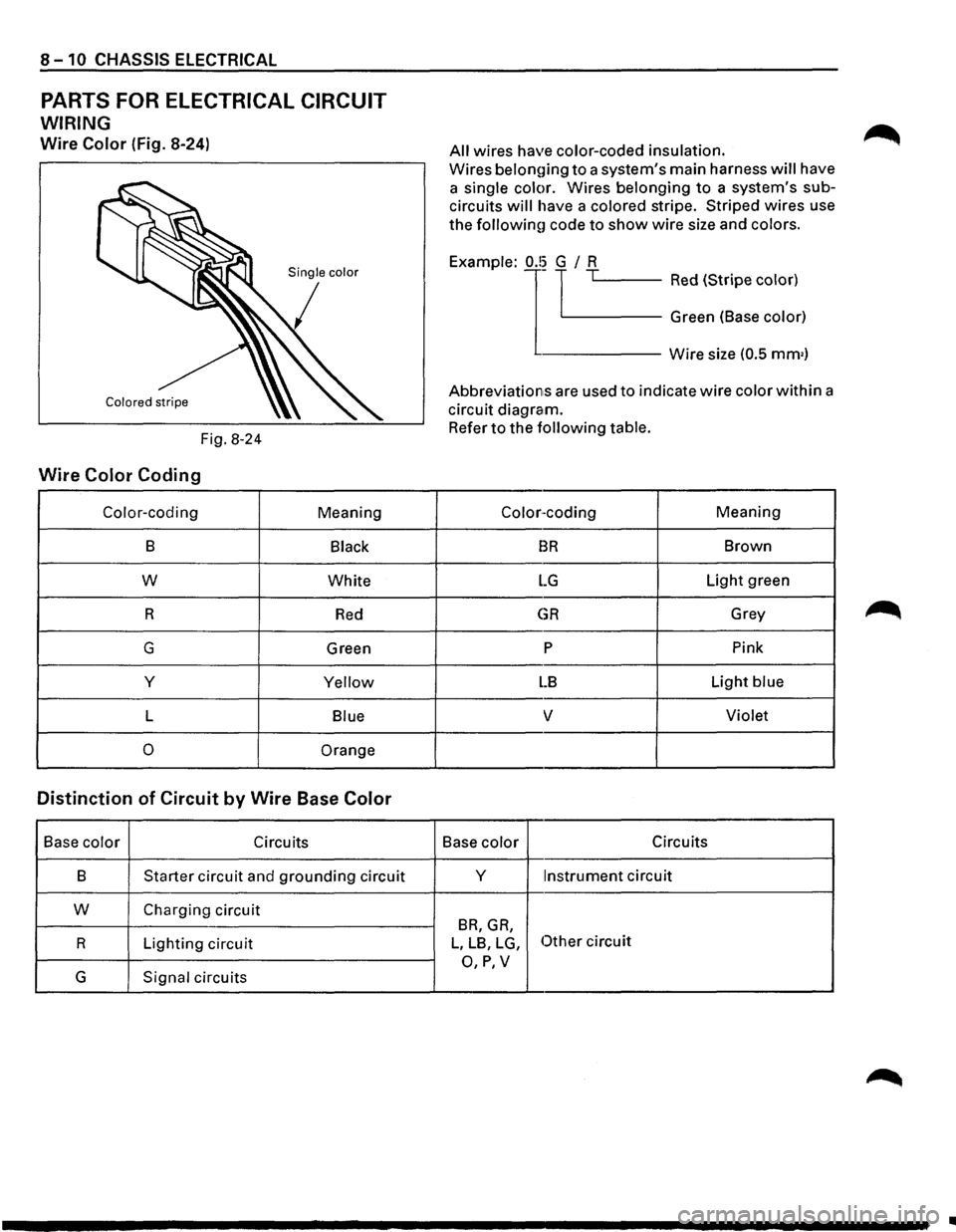
WIRING
Wire Color (Fig. 8-24)
Fig. 8-24
Wire Color Coding
Color-coding Meaning
B Black
w White
R
Red
G Green
y
Yellow
L Blue
0 Orange
Distinction of Circuit by Wire Base Color
Base color Circuits
B
Starter circuit and grounding circuit
w Charging circuit
R Lighting circuit
G Signal circuits
All wires have color-coded insulation.
Wires belon{)ing to a system's main harness will have
a
single color. Wires belonging to a system's sub
circuits will have a colored stripe. Striped wires use
the followinu code to show wire size and colors.
j '-----Red (Stripe color) Example:
1
0.!~ TL.-~-~---
Green (Base color)
------Wire size (0.5 mm•)
Abbreviations are used to indicate wire color within a
circuit diagram.
Refer to the following table.
Color-coding Meaning
BR Brown
LG Light green
GR Grey
p Pink
LB Light blue
v Violet
Base color Circuits
y
Instrument circuit
BR, GR,
L, LB, LG, Other circuit
O,P,V
Page 1228 of 1928
8-38 CHASSIS ELECTRICAL
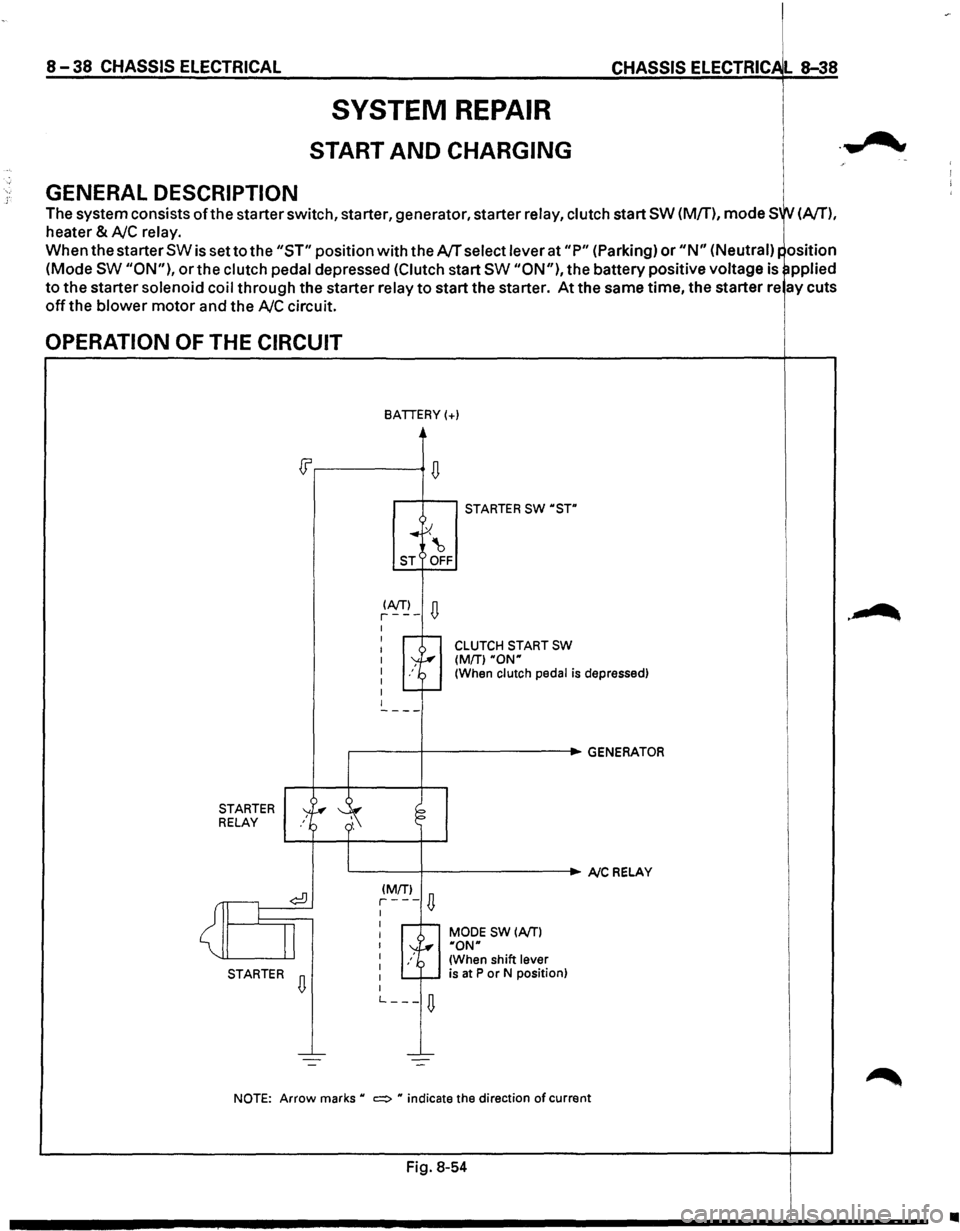
GENERAL DESCRIPTION
SYSTEM REPAIR
START AND CHARGING
CHASSIS ELECTRIC L 8-38
The system consists ofthe starter switch, starter, generator, starter relay, clutch start SW (M/T), mode SW (A/T),
heater & AJC relay.
When the starter SW is set to the "ST" position with the AJT select lever at "P" (Parking) or "N" (Neutral)~ osition
(Mode SW "ON"), or the clutch pedal depressed (Clutch start SW "ON"), the battery positive voltage is ~pplied
to the starter solenoid coil through the starter relay to start the starter. At the same time, the starter re ay cuts
off the blower motor and the AJC circuit.
OPERATION OF THE CIRCUIT
STARTER RELAY
<~
STARTER
BATTERY(+)
~ .. ~ ~ ST OFF
~A!fJ-D I I -r-1 I I I I I
STARTER SW ·sTn
CLUTCH START SW (MfTl ·ow (When clutch pedal is depressed)
,-------+----------.GENERATOR
~ ';
L.-----+----------. A/C RELAY
¢!) (MrrJ
D r---I
I
I r--r-MODE SW (A/T) I ~ I y, ·oNn I /~ (When shift lever I is at P or N position)
D I -r-I L ___
D
NOTE: Arrow marks • c:::::> • indicate the direction of current
Fig. 8-54
•
Page 1246 of 1928
8-56 CHASSIS ElECTRICAl
STARTER SWITCH NOTE:
Refer
to START AND CHARGING in this section. For relay
removal, refer to "Connector H ndling" ~
under "NOTES FOR WORKING ON ELE TRICAL .,..........
DATA LINK CONNECTOR ITEMS" in this section.
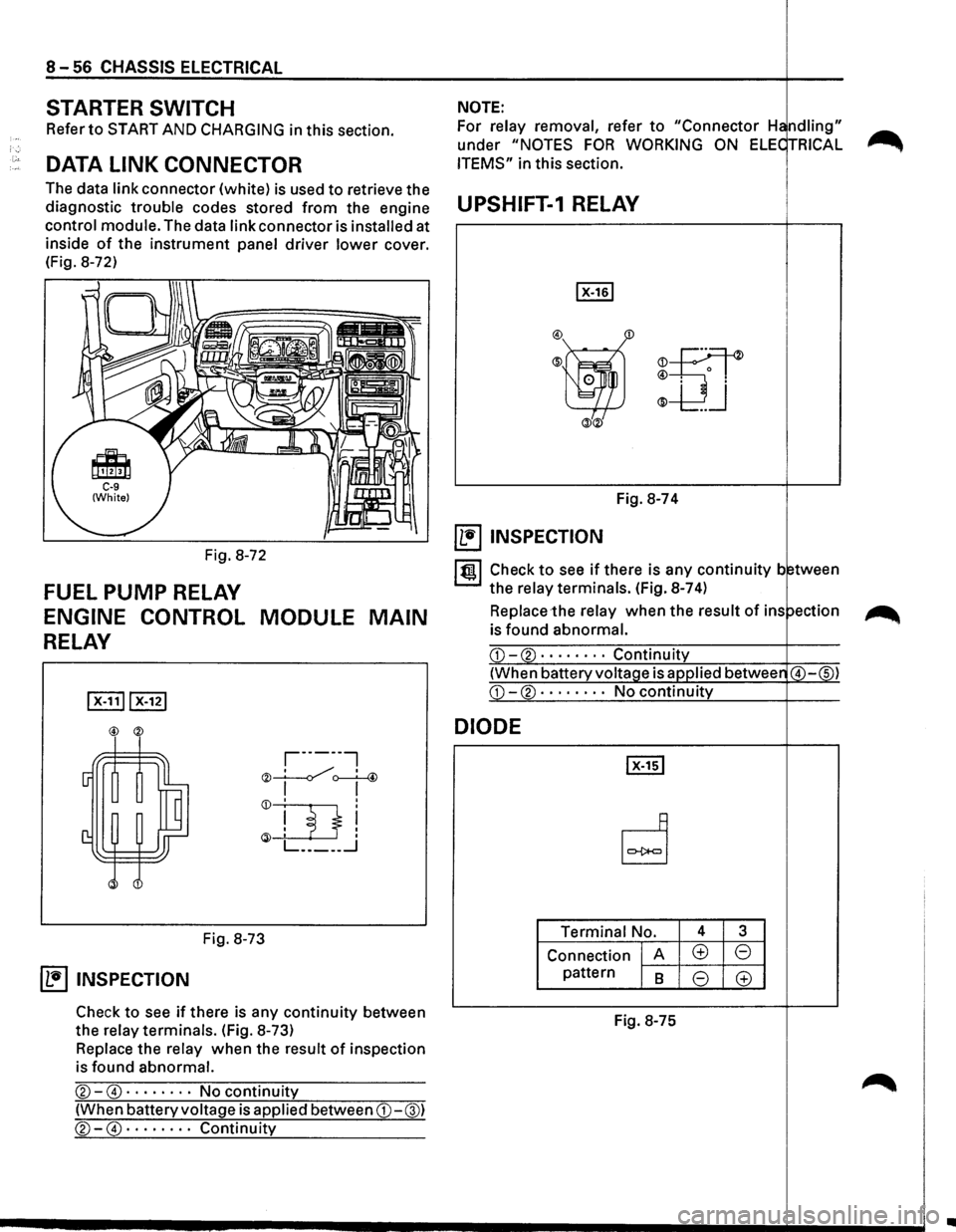
The data
link connector (white) is used to retrieve the
diagnostic
trouble codes stored from the engine UPSHIFT-1 RELAY
control module. The data link connector is installed at .----------------+----.
inside of the instrument panel driver lower cover.
(Fig. 8-72)
Fig. 8-72
FUEL PUMP RELAY
ENGINE CONTROL MODULE MAIN
RELAY
,-------,
"" __!.___./, ' 4 '<)I ~
Fig. 8-73
~ INSPECTION
Check to see if there is any continuity between
the
relay terminals. (Fig. 8-73)
Replace the relay when the result of inspection
is found
abnormal.
®-@ · · · · · · · · No continuity
(When battery voltage is applied between CD-@)
®-@ · · · · · · · · Continuity
m
Fig. 8-74
~ INSPECTION
ltgl Check to see if there is any continuity b tween
the
relay terminals. (Fig. 8-7 4)
Replace the relay when the result of ins ~
is found abnormal.
DIODE
Terminal No. 4 3
Connection A (±) 8
pattern 8 8 (±)
Fig.
8-75
..
Page 1291 of 1928
STARTER SWITCH
Refer to "START AND CHARGING" in this section.
'-' STOPLIGHT SWITCH (FOR VEHICLES
W/0 CRUISE CONTROL)
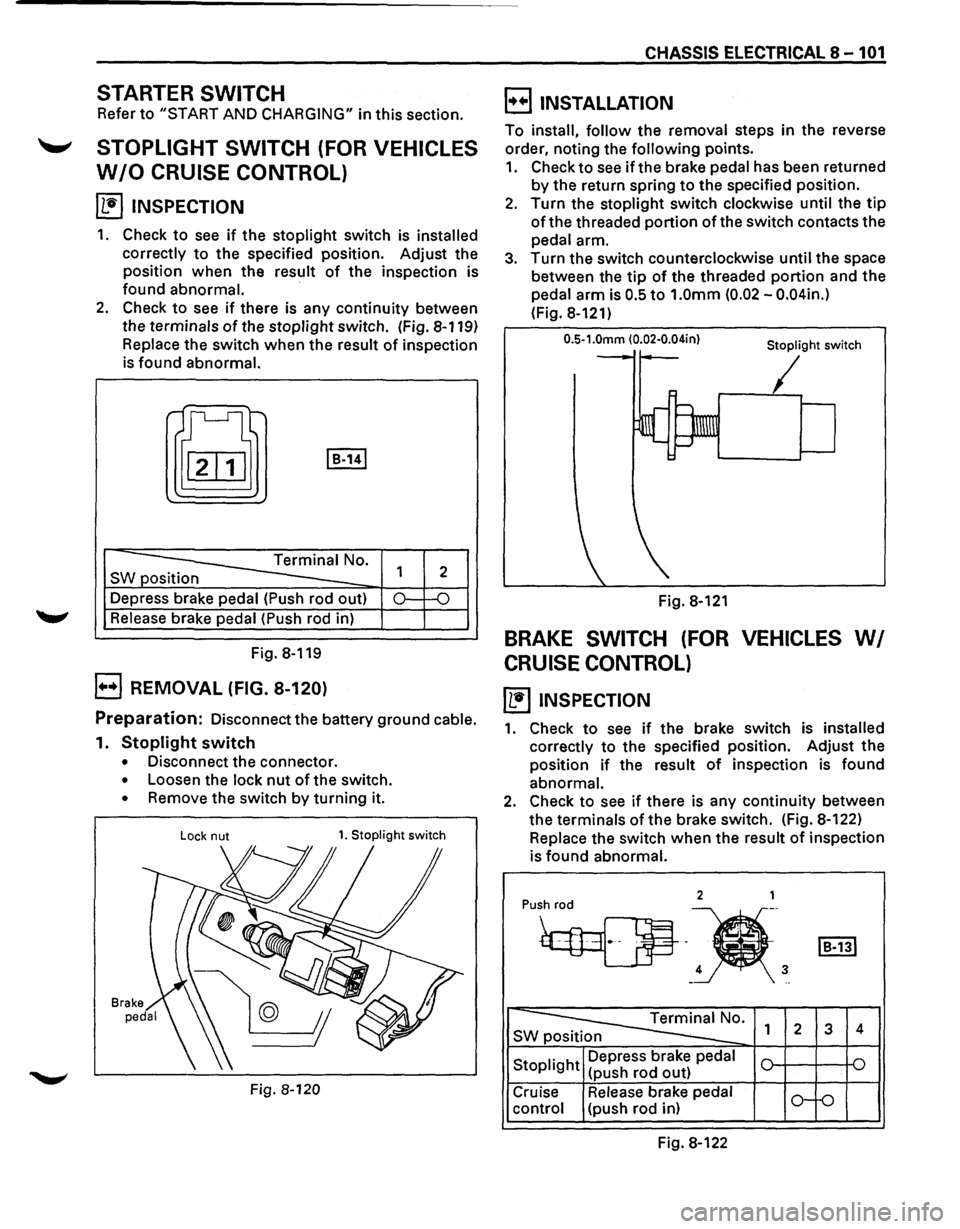
~ INSPECTION
1. Check to see if the stoplight switch is installed
correctly
to the specified position. Adjust the
position when the result
of the inspection is
found abnormal.
·
2. Check to see if there is any continuity between
the terminals
of the stoplight switch. (Fig. 8-119)
Replace the switch when the result of inspection
is found abnormal.
t[J I B-141
-----==== Terminal No.
SW position
--Depress brake pedal (Push rod out)
Release brake pedal (Push rod in)
Fig. 8-119
B REMOVAL (FIG. 8-120)
1
2
0.: -o
Preparation: Disconnect the battery ground cable.
1. Stoplight switch
• Disconnect the connector.
• Loosen the lock nut of the switch.
• Remove the switch by turning it.
Lock nut 1. Stoplight switch
Fig. 8-120
CHASSIS ELECTRICAL 8-101
B INSTALLATION
To install, follow the removal steps in the reverse
order, noting the
following points.
1. Check to see if the brake pedal has been returned
by the return spring to the specified position.
2. Turn the stoplight switch clockwise until the tip
of the threaded portion of the switch contacts the
pedal arm.
3. Turn the switch counterclockwise until the space
between the
tip of the threaded portion and the
pedal arm is
0.5 to 1.0mm (0.02 -0.04in.)
(Fig. 8-121)
0.5-1.0mm (0.02·0.04in} Stoplight switch
Fig. 8-121
BRAKE SWITCH (FOR VEHICLES WI
CRUISE CONTROL)
~ INSPECTION
1. Check to see if the brake switch is installed
correctly
to the specified position. Adjust the
position
if the result of inspection is found
abnormal.
2. Check to see if there is any continuity between
the terminals
of the brake switch. (Fig. 8-122)
Replace the switch
when the result of inspection
is
found abnormal.
2 1
Pu•h
4 3 -..
~0. SWp 1 2 3 4
Stoplight Depress
brake pedal
(push rod out)
Cruise Release brake pedal
o-f-o control (push rod in)
Fig. 8-122
Page 1310 of 1928
8 -120 CHASSIS ELECTRICAL
STARTER SWITCH
Refer to "START AND CHARGING" in this section.
LIGHTING SWITCH (COMBINATION
SWITCH)
Refer to HEADLIGHT AND FOG LIGHT in this section.
TURN SIGNAL SWITCH/CORNE
LIGHT SWITCH (COMBIN
SWITCH)
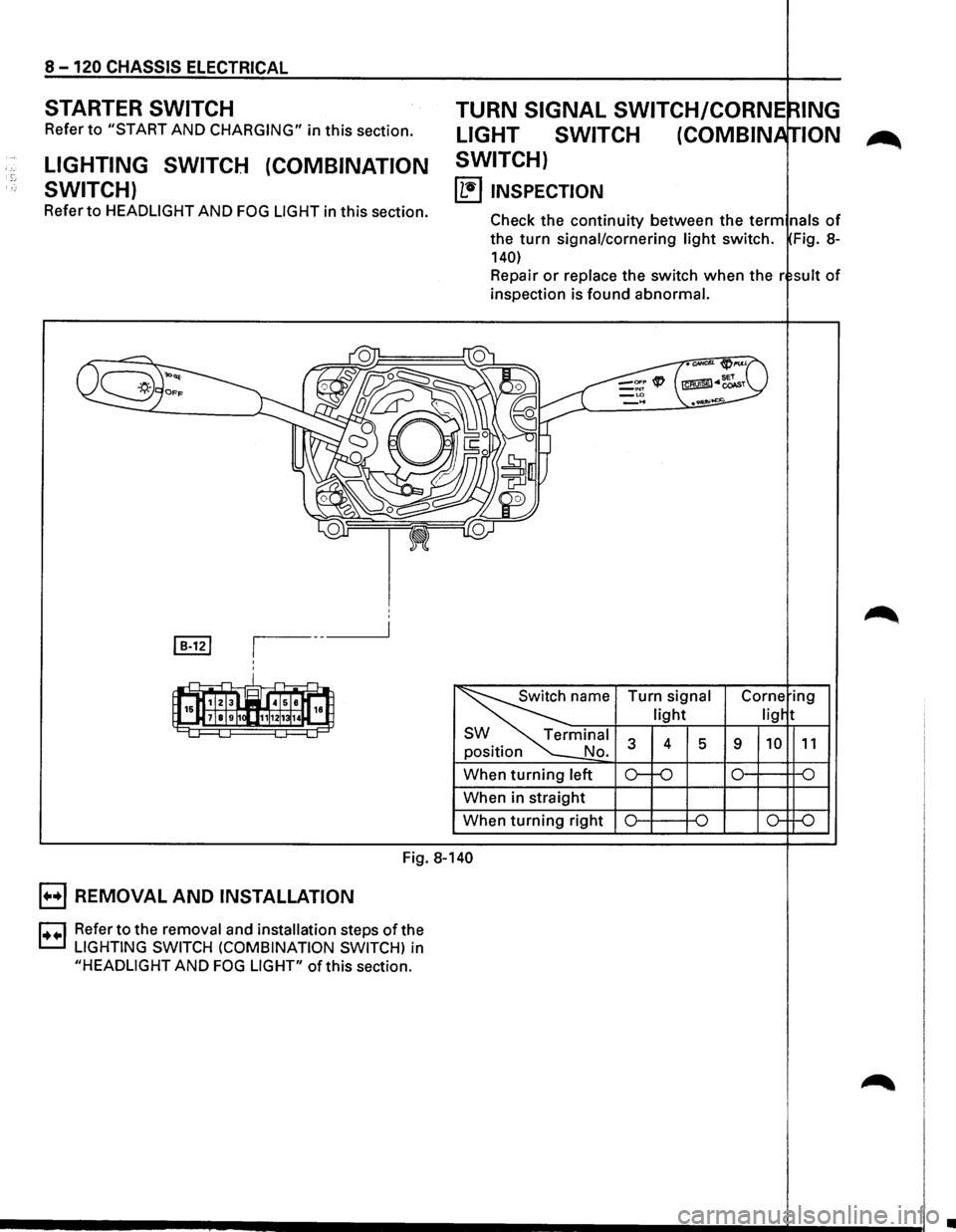
~ INSPECTION
lNG
ION
Check the continuity between the term nals of
the turn signal/cornering light switch. Fig. 8-
140)
Repair or replace the switch when the r suit of
inspection is found abnormal.
position
When
turning left
When in straight
When
turning right Turn
signal
light
4 5 9
Fig. 8-140
B REMOVAL
AND INSTALLATION
D Refer to the removal and installation steps of the
t.::.l LIGHTING SWITCH (COMBINATION SWITCH) in
"HEADLIGHT AND FOG LIGHT" of this section.
•
Page 1324 of 1928
![ISUZU TROOPER 1995 Owners Guide 8-134 CHASSIS ELECTRICAL
STARTER SWITCH
Refer to "START AND CHARGING" of this section.
DOOR SWITCH
(1!] INSPECTION
Push o
[]:!]
Connector No. IR-11IIB-22IIB-35l Switch
operation Terminal 1 B](/img/61/57183/w960_57183-1323.png "ISUZU TROOPER 1995 Owners Guide 8-134 CHASSIS ELECTRICAL
STARTER SWITCH
Refer to \"START AND CHARGING\" of this section.
DOOR SWITCH
(1!] INSPECTION
Push o
[]:!]
Connector No. IR-11IIB-22IIB-35l Switch
operation Terminal 1 B")
8-134 CHASSIS ELECTRICAL
STARTER SWITCH
Refer to "START AND CHARGING" of this section.
DOOR SWITCH
(1!] INSPECTION
Push o
[]:!]
Connector No. IR-11IIB-22IIB-35l Switch
operation Terminal 1 Body
Push
Release
Fig. 8-164
I t!ll Check to see if there is any continuity between
the
terminals and the body while operating the
door switch. (Fig. 8-164)
Repair
or replace the switch, when the result of
inspection is found abnormal.
B REMOVAL (FIG. 8-165)
Preparation: Disconnect the battery ground cable.
1. Door switch
Fig. 8-165
1.
Door switch
• Remove the screw.
• Disconnect the connector of the switch.
B INSTALLATION
To install, follow the removal steps in the averse
order.
TAILGATE SWITCH
(b!] INSPECTION
Release
Fig. 8-166
I til Check to see if there is any continuity b tween
the
terminals and the body while operati g the
tailgate switch. (Fig. 8-166)
Repair
or replace the tailgate switch wh n the
result of inspection is found abnormal.
B REMOVAL (FIG. 8-167)
Preparation: Disconnect the battery ground cable.
Fig. 8-167
1.
Tailgate switch
• Remove the screws.
• Disconnect the connector of the switch.
•
Page 1330 of 1928
._, '•'
8 -140 CHASSIS ELECTRICAL
E) REMOVAL AND INSTALLATION E) REMOVAL (FIG. 8-180)
l••l Refer to "START AND CHARGING" in this sec-Preparation: Disconnect the battery ground cable.
tion for starter switch removal and installation
steps.
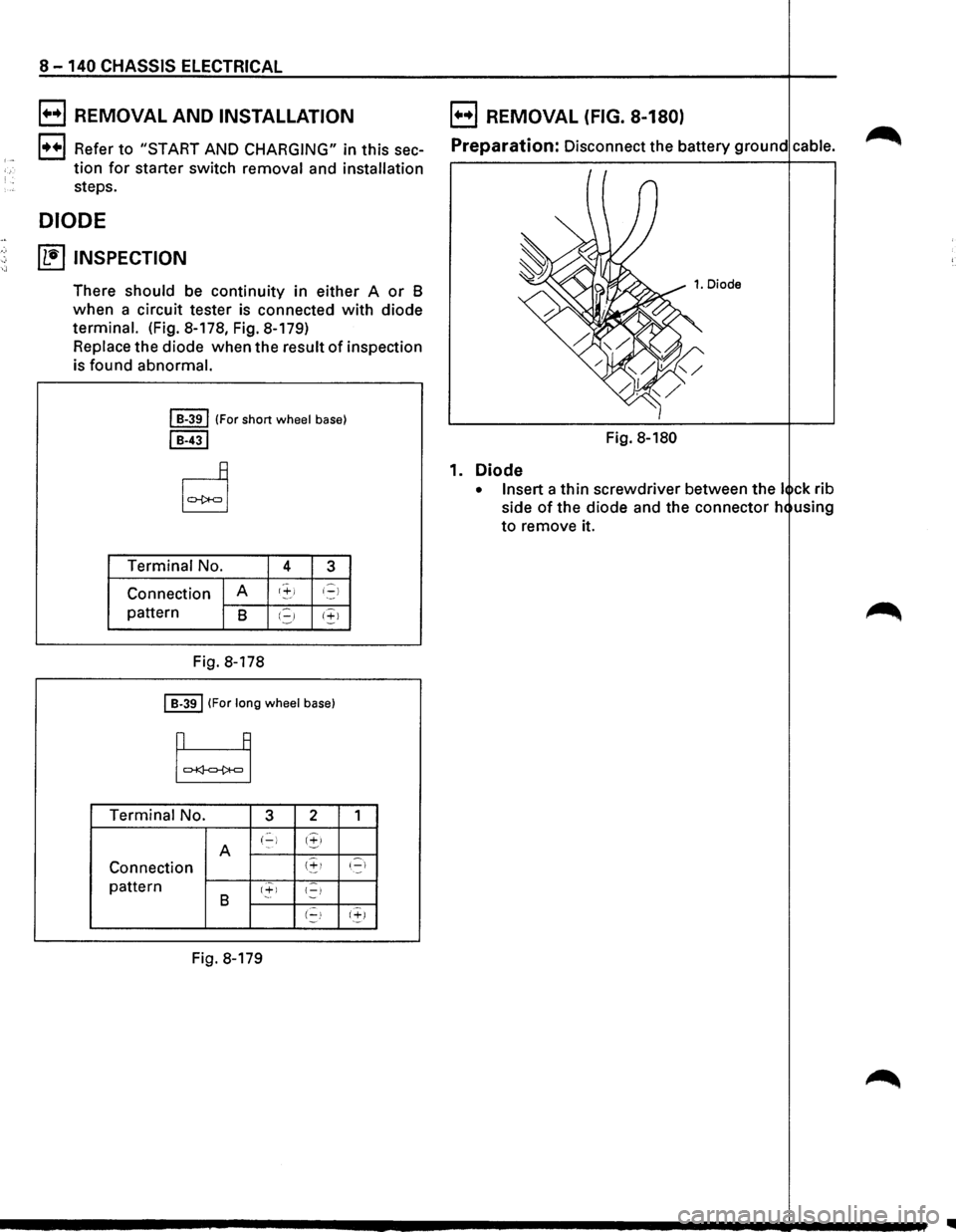
DIODE
~ INSPECTION
There should be continuity in either A or B
when a circuit tester is connected with diode
terminal. (Fig. 8-178, Fig. 8-179)
Replace the diode when the result
of inspection
is found abnormal.
I B-391 (For short wheel base)
I B-431
Terminal No. 4 3
Connection A t'+i i-)
pattern B I.=,J 1+1
Fig.
8-178
I B-391 (For long wheel base)
Terminal No. 3 2
A (-) 1.!,>
Connection (~!
pattern 1+1 {-) B (-!
Fig. 8-179
1
'.-::::1
(~)
Fig. 8-180
1. Diode
• Insert a thin screwdriver between the I ck rib
side
of the diode and the connector h using
to remove it.
..
Page 1355 of 1928
STARTER SWITCH
Refer to "START AND CHARGING" in this section .
........,. POWER WINDOW SWITCH
DRIVER SEAT SIDE
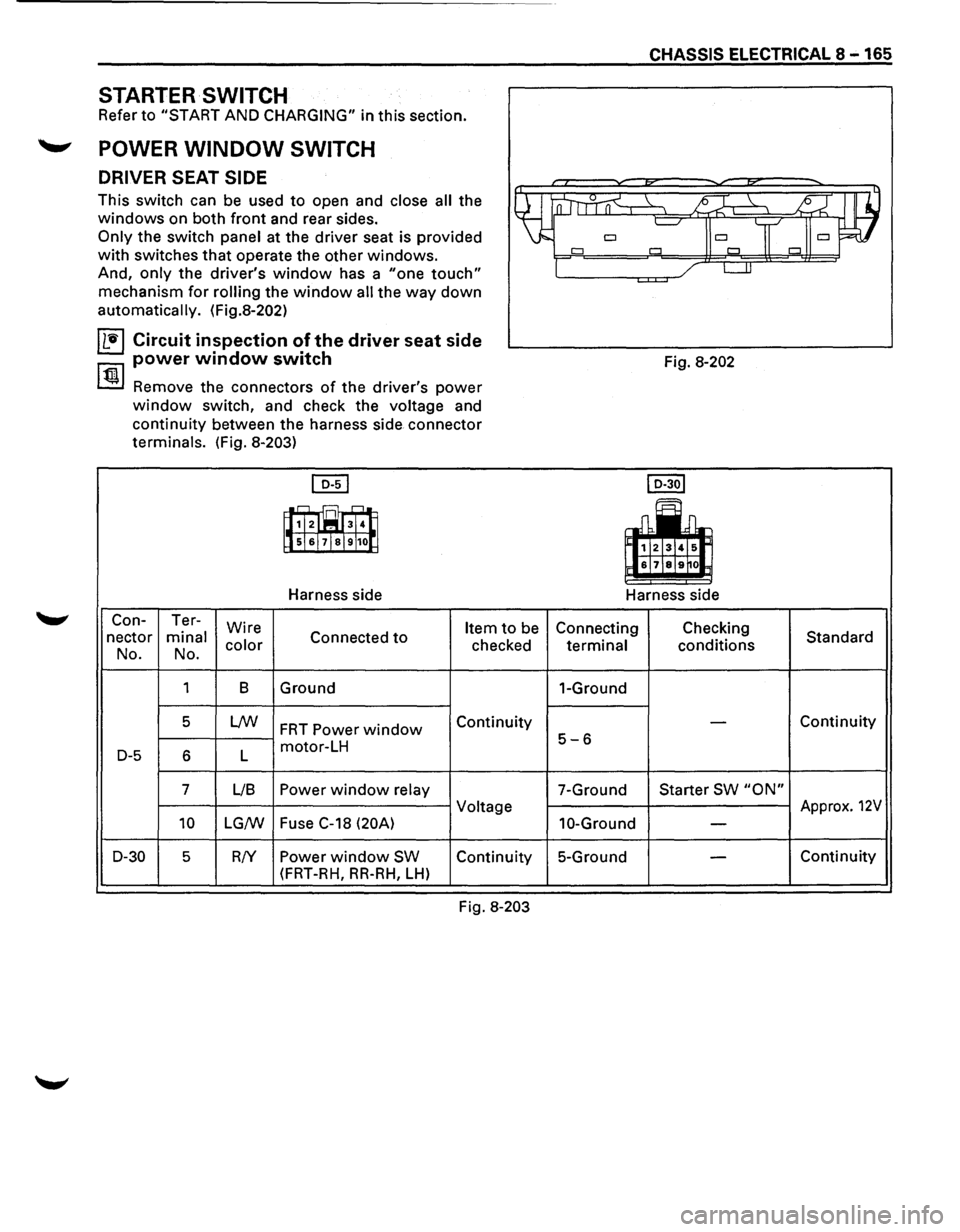
This switch can be used to open and close all the
windows on both front and rear sides.
Only the switch panel at the driver seat is provided
with switches that operate the other windows.
And, only the driver's window has a "one touch"
mechanism for rolling the window all the way down
automatically. (Fig.8-202)
IL'ti'l Circuit inspection of the driver seat side
power window switch
~ Remove the connectors of the driver's power
window switch, and check the voltage and
continuity between the harness side connector
terminals. (Fig.
8-203)
[QI]
~B
lls!&!7!sl9 100
Harness side
Con- Ter-
Wire
Item to be
nectar minal Connected to
No. No. color checked
1 8 Ground
5
LNJ FRT Power window Continuity
D-5 6 L motor-LH
7 L/8
Power window relay
Voltage
10 LG/W Fuse
C-18 (20A)
D-30
5 R!Y Power window SW Continuity
(FRT-RH,
RR-RH, LH)
Fig. 8-203
CHASSIS ELECTRICAL 8-165
Fig. 8-202
I D-30l
~~~
&171&19~0
Harness side
Connecting Checking
Standard
terminal conditions
1-Ground
-Continuity
5-6
7-Ground Starter SW "ON"
Approx. 12V
10-Ground -
5-Ground -Continuity
Page 1394 of 1928
·;.
8 -204 CHASSIS ELECTRICAL
STARTER SWITCH
Refer to "START AND CHARGING" in this section.
STOPLIGHT
STOPLIGHT SWITCH
BRAKE SWITCH
Refer to "STOPLIGHT AND REAR DEFOGGER" in
,c, this section.
SHIFT LOCK CONTROLLER
Refer to the shift lock controller in Section 7 A
"AUTOMATIC TRANSMISSION."
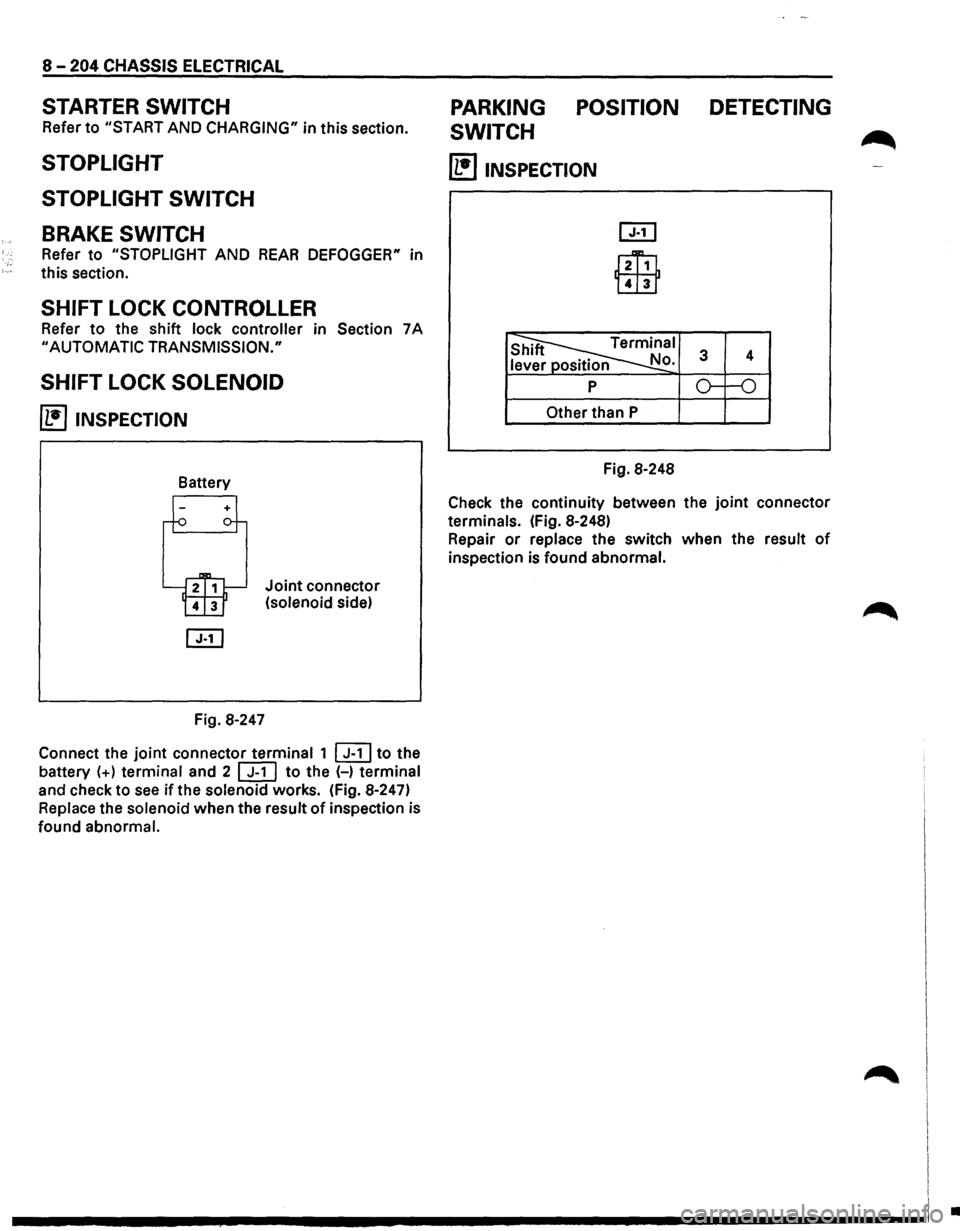
SHIFT LOCK SOLENOID
~ INSPECTION
Fig. 8-247
Joint connector
(solenoid side)
Connect the
joint connector terminal 1 ~to the
battery
(+) terminal and 2 [ill to the (-) terminal
and check to
see if the solenoid works. (Fig. 8-247)
Replace the solenoid when the result
of inspection is
found abnormal.
PARKING POSITION DETECTING
SWITCH
~
(1!]1NSPECTION
l2Ti1
Lill1
Other than P
Fig. 8-248
Check the continuity between the
joint connector
terminals. (Fig. 8-248)
Repair
or replace the switch when the result of
inspection is found abnormal.
I
I I
.............. ~ ................................ -----------------1 .