battery ISUZU TROOPER 1998 Service User Guide
[x] Cancel search | Manufacturer: ISUZU, Model Year: 1998, Model line: TROOPER, Model: ISUZU TROOPER 1998Pages: 3573, PDF Size: 60.36 MB
Page 72 of 3573
SERVICE INFORMATION 00 Ð 33
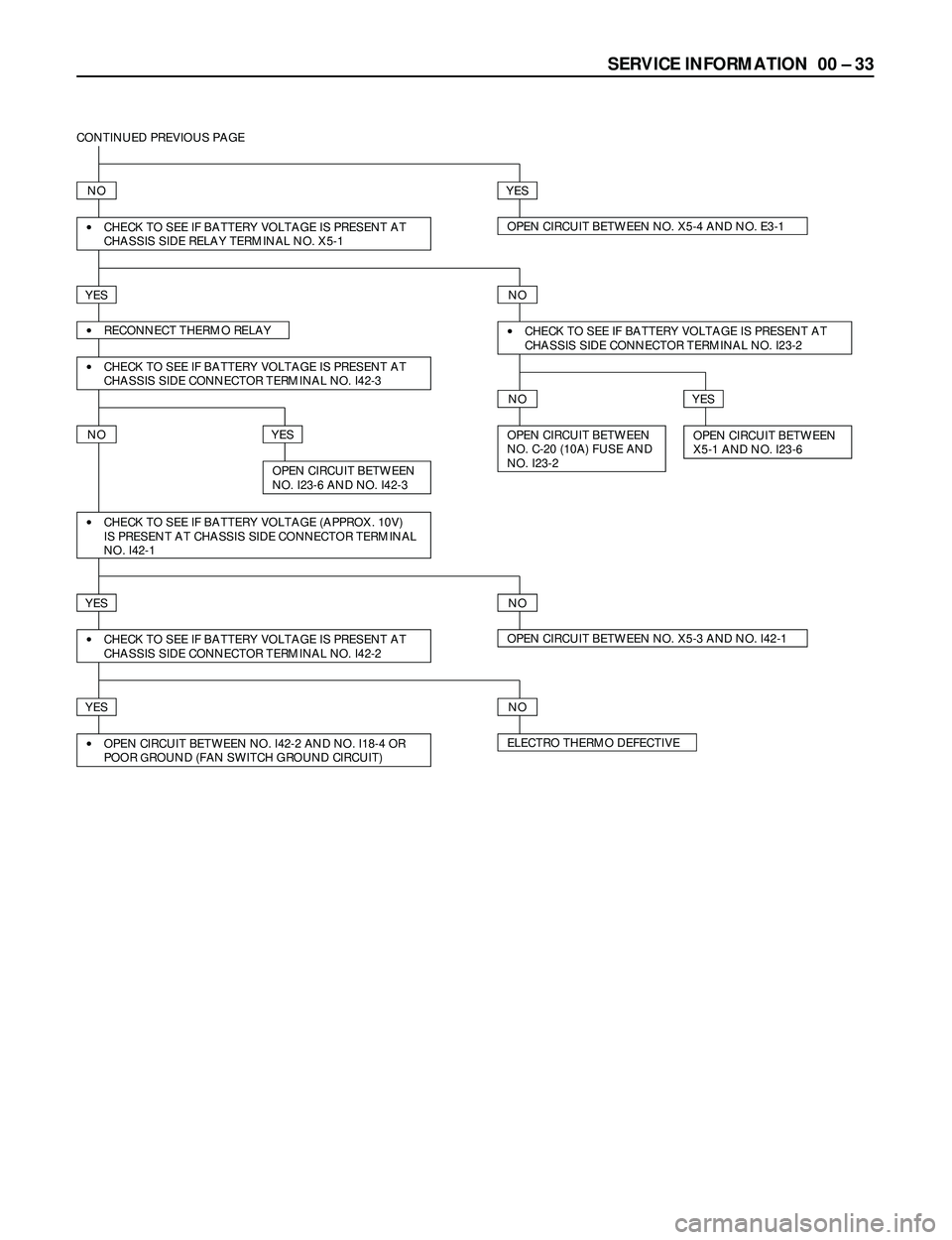
CONTINUED PREVIOUS PAGE
NOYES
·CHECK TO SEE IF BATTERY VOLTAGE IS PRESENT AT
CHASSIS SIDE RELAY TERMINAL NO. X5-1OPEN CIRCUIT BETWEEN NO. X5-4 AND NO. E3-1
YESNO
·RECONNECT THERMO RELAY
·CHECK TO SEE IF BATTERY VOLTAGE IS PRESENT AT
CHASSIS SIDE CONNECTOR TERMINAL NO. I42-3
·CHECK TO SEE IF BATTERY VOLTAGE IS PRESENT AT
CHASSIS SIDE CONNECTOR TERMINAL NO. I23-2
NOYES
OPEN CIRCUIT BETWEEN
NO. C-20 (10A) FUSE AND
NO. I23-2OPEN CIRCUIT BETWEEN
X5-1 AND NO. I23-6NOYES
·CHECK TO SEE IF BATTERY VOLTAGE (APPROX. 10V)
IS PRESENT AT CHASSIS SIDE CONNECTOR TERMINAL
NO. I42-1
YESNO
·CHECK TO SEE IF BATTERY VOLTAGE IS PRESENT AT
CHASSIS SIDE CONNECTOR TERMINAL NO. I42-2OPEN CIRCUIT BETWEEN NO. X5-3 AND NO. I42-1
YESNO
·OPEN CIRCUIT BETWEEN NO. I42-2 AND NO. I18-4 OR
POOR GROUND (FAN SWITCH GROUND CIRCUIT)ELECTRO THERMO DEFECTIVE
OPEN CIRCUIT BETWEEN
NO. I23-6 AND NO. I42-3
Page 73 of 3573

00 Ð 34 SERVICE INFORMATION
4JX1 ENGINE
123
45 6
RELAY; A/C
B-36C-20
10A
A/C FL-1
80A
MAIN
1
2
B-2
C-25
2
4
X-5
1
3
4
13
24
1
A/C SW.
FAN SW.
I-23
PRESSURE
SW.
RELAY;
THERMO
B-2
C-25I-23
BATTERY
1
E-27
MAGNETIC
CLUTCHMg
OFF
I-18
2
6
1
321123
12
34
12
213
5 46
I-18
X-5
B-1(LHD) (RHD)
3
1
2ELECTRONIC
THERMOSTAT
I-42
B-1
1
2 34
W/ CONDENSER
FAN
I-42B-36
E-27
11
D08RY00170
Page 74 of 3573
SERVICE INFORMATION 00 Ð 35
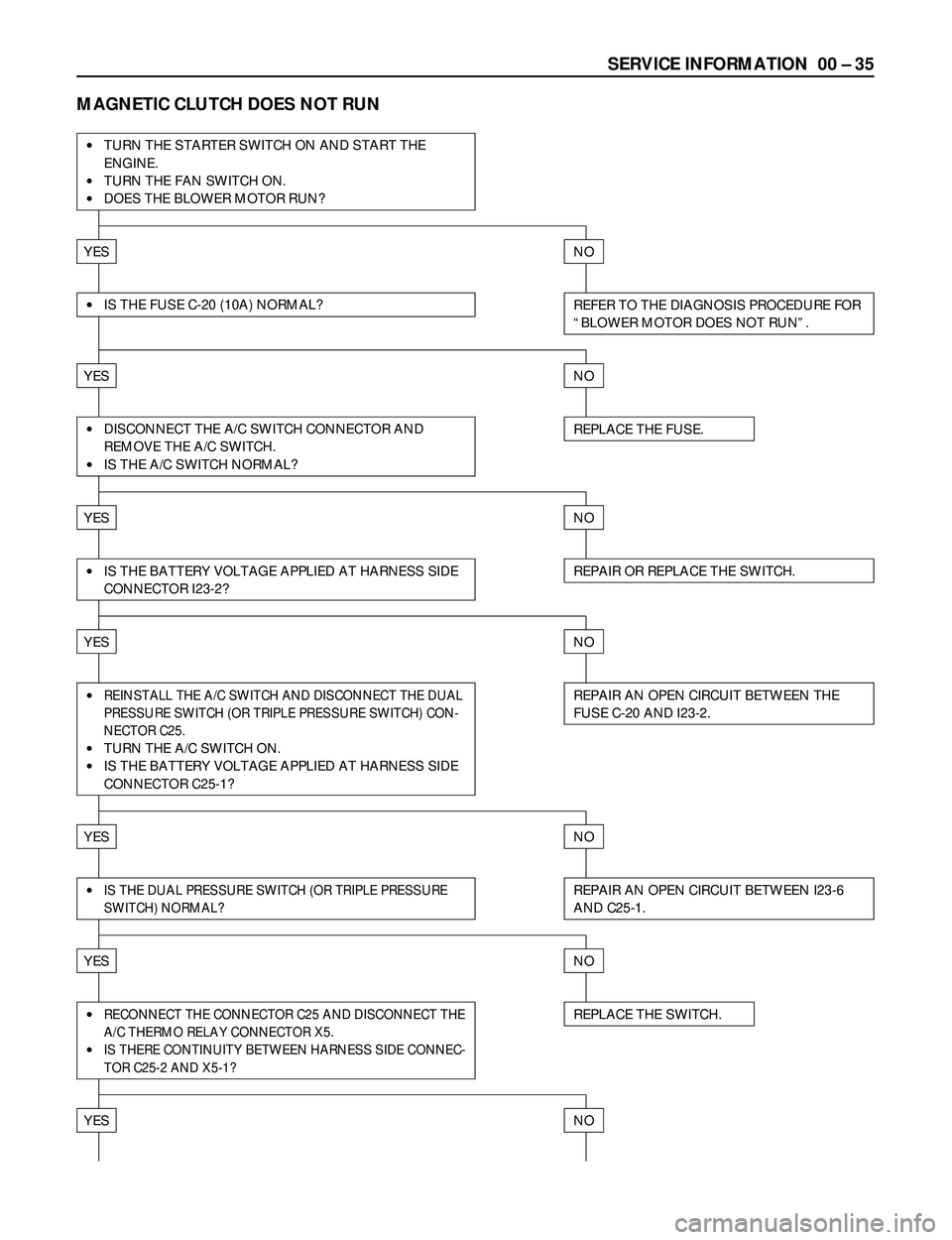
MAGNETIC CLUTCH DOES NOT RUN
·TURN THE STARTER SWITCH ON AND START THE
ENGINE.
·TURN THE FAN SWITCH ON.
·DOES THE BLOWER MOTOR RUN?
YESNO
REFER TO THE DIAGNOSIS PROCEDURE FOR
ÒBLOWER MOTOR DOES NOT RUNÓ.·IS THE FUSE C-20 (10A) NORMAL?
YESNO
REPLACE THE FUSE.·DISCONNECT THE A/C SWITCH CONNECTOR AND
REMOVE THE A/C SWITCH.
·IS THE A/C SWITCH NORMAL?
YESNO
YESNO
REPAIR AN OPEN CIRCUIT BETWEEN THE
FUSE C-20 AND I23-2.·REINSTALL THE A/C SWITCH AND DISCONNECT THE DUAL
PRESSURE SWITCH (OR TRIPLE PRESSURE SWITCH) CON-
NECTOR C25.
·TURN THE A/C SWITCH ON.
·IS THE BATTERY VOLTAGE APPLIED AT HARNESS SIDE
CONNECTOR C25-1?
YESNO
REPLACE THE SWITCH.·RECONNECT THE CONNECTOR C25 AND DISCONNECT THE
A/C THERMO RELAY CONNECTOR X5.
·IS THERE CONTINUITY BETWEEN HARNESS SIDE CONNEC-
TOR C25-2 AND X5-1?
YESNO
REPAIR AN OPEN CIRCUIT BETWEEN I23-6
AND C25-1.·IS THE DUAL PRESSURE SWITCH (OR TRIPLE PRESSURE
SWITCH) NORMAL?
YESNO
REPAIR OR REPLACE THE SWITCH.·IS THE BATTERY VOLTAGE APPLIED AT HARNESS SIDE
CONNECTOR I23-2?
Page 75 of 3573
00 Ð 36 SERVICE INFORMATION
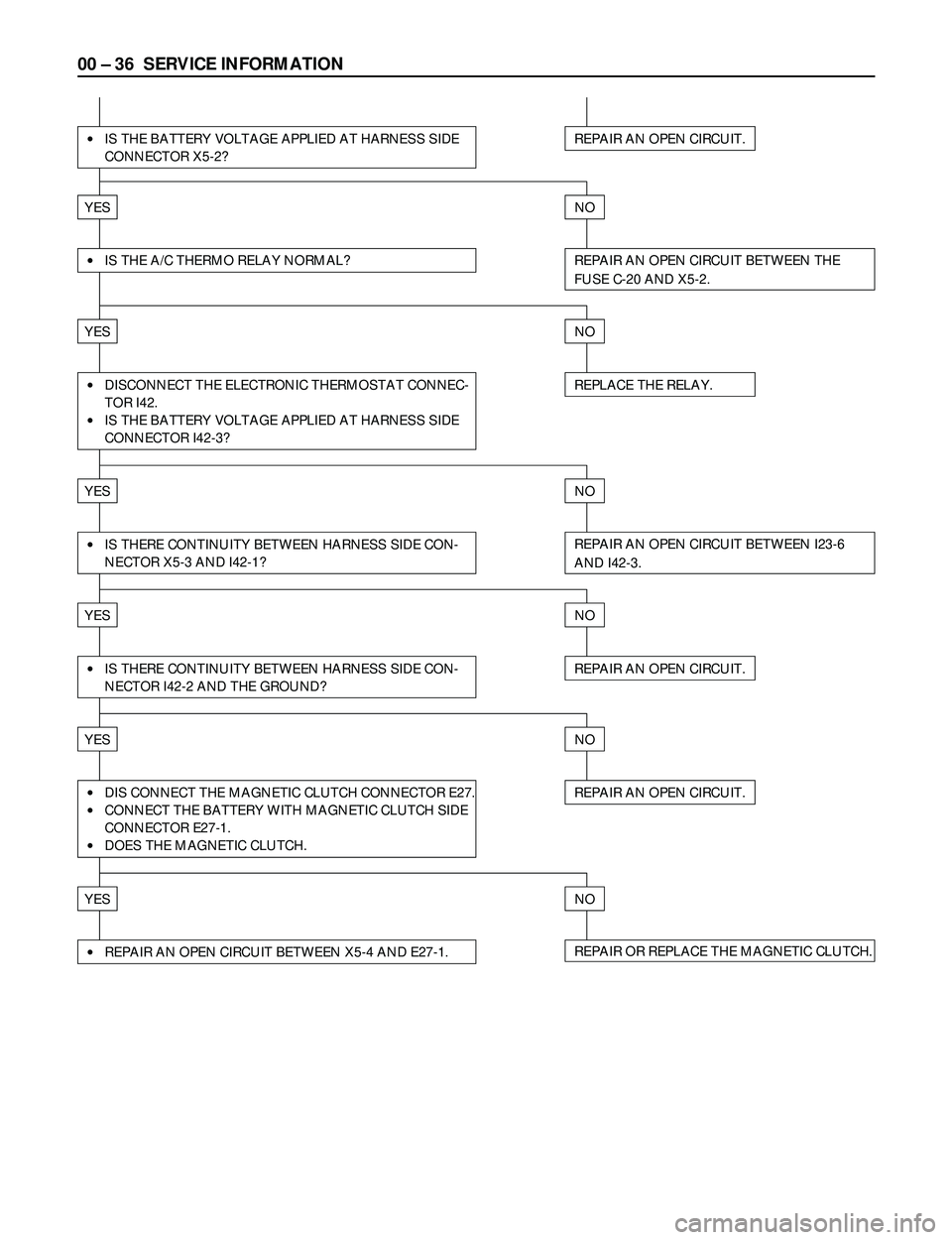
·IS THE BATTERY VOLTAGE APPLIED AT HARNESS SIDE
CONNECTOR X5-2?REPAIR AN OPEN CIRCUIT.
YESNO
·IS THE A/C THERMO RELAY NORMAL?REPAIR AN OPEN CIRCUIT BETWEEN THE
FUSE C-20 AND X5-2.
YESNO
·DISCONNECT THE ELECTRONIC THERMOSTAT CONNEC-
TOR I42.
·IS THE BATTERY VOLTAGE APPLIED AT HARNESS SIDE
CONNECTOR I42-3?
YESNO
·IS THERE CONTINUITY BETWEEN HARNESS SIDE CON-
NECTOR X5-3 AND I42-1?REPAIR AN OPEN CIRCUIT BETWEEN I23-6
AND I42-3.
YESNO
REPAIR AN OPEN CIRCUIT.
YESNO
·IS THERE CONTINUITY BETWEEN HARNESS SIDE CON-
NECTOR I42-2 AND THE GROUND?REPAIR AN OPEN CIRCUIT.
REPLACE THE RELAY.
·DIS CONNECT THE MAGNETIC CLUTCH CONNECTOR E27.
·CONNECT THE BATTERY WITH MAGNETIC CLUTCH SIDE
CONNECTOR E27-1.
·DOES THE MAGNETIC CLUTCH.
YESNO
REPAIR OR REPLACE THE MAGNETIC CLUTCH.·REPAIR AN OPEN CIRCUIT BETWEEN X5-4 AND E27-1.
Page 80 of 3573

SERVICE INFORMATION 00 Ð 41
I-18 I-23
123456126
OFF
1
FAN SW. 2
3
4
OFF
A/C SW.
ON
FAN CONTROL KNOB (FAN SWITCH) AND A/C
SWITCH
INDIVIDUAL INSPECTION
Check for continuity between fan switch and A/C switch
side connector terminals.
2
65 4 31362
51
4
I-23I-18
I-23I-18
5
A/C SW. BEZEL
ILLUMI-
NATION
FAN SW. OFF1
2
3
4 32 6 1253641
HEATER & A/C, THERMOSTAT, COMPRESSOR,
CONDENSER FAN AND CERAMIC HEATER RELAY
Check for continuity between the relay terminals.
2Ð 4..... No continuity
(When battery voltage is applied between 1Ð 3)
2Ð 4..... Continuity
2
2
1
144
3
3
Terminal
No. SW.
position
DUAL PRESSURE SWITCH
21
Disconnect pressure switch connector and check for
continuity between pressure switch side connector
terminals.
Page 81 of 3573

00 Ð 42 SERVICE INFORMATION
TRIPLE PRESSURE SWITCH (W/CONDENSER FAN)
43
12
1) Disconnect the connector and check for continuity
between pressure switch side connector terminal.
2) Reconnect the connector to activate the A/C switch,
and check to see if there is continuity between the
chassis side connectors and the fan operates.
[A/C OFF]
[A/C ON]
Terminal No. Control Continuity
1- 2Magnetic Clutch Continuity
3- 4Condenser Fan No Continuity
Terminal
Refrigerant Pressure Continuity Fan
No.
1079±98 kPa No
OFF
(11.0±1.0 kgácm
2/ 156±14 psi) Continuity
3- 4
1471±98 kPa
Continuity ON
(15.0±1.0 kgácm
2/ 213±14 psi)
BLOWER MOTOR
1
2
1) Disconnect the blower motor (B-5) connector from
the blower motor.
2) Connect the battery positive terminal to the No. 1
(NO.2; RHD) terminal of the blower motor and
negative to the No. 2 (NO. 1; RHD).
3) Be sure to check to see if the blower motor operates
correctly.
Terminal Normal
SW. No.12346Operating
position Resistance
2.4W
0.90W
0.28W
Ð 1
2
3
4
RESISTOR
14263
2
Motor3641
432
(SW.position) (Connector
terminal)
1
1) Disconnect resistor (I-41) connector.
2) Check for continuity and resistance between the
terminals of the resistor.
Page 82 of 3573

SERVICE INFORMATION 00 Ð 43
CONDENSER FAN
1 2
THERMO SWITCH (ENGINE)
1 2
1) Disconnect the condenser fan connector (C-75).
2) Connect the battery positive terminal to the No. 1
terminal and negative to No. 2.
3) Be sure to check to see if condenser fan operates
correctly.
With the environmental temperature of the switch set to
the following conditions, check to see if there is any
continuity between the switch side connector terminals.
Ambient Terminal
Continuity
Temperature No.
Above 77 Ð 83°C
1Ð 2No Continuity
(170.6Ð181.4°F)
CERAMIC HEATER
1
2
Ceramic heater
Disconnect the ceramic heater connector and check for
continuity between ceramic heater side connector
terminals.
Connector No. B-48
Terminal 1 2
Continuity
Page 102 of 3573
HEATING AND VENTILATION 1A Ð 7
INSTALLATION
To install, follow the removal steps in the reverse order,
noting the following points:
1. When handling the ECM and the control unit, be
careful not to make any improper connection of the
connectors.
2. Adjust control lever assembly cables.
Refer to ÒCONTROL LEVER ASSEMBLYÓ installation
steps in this section.
3. When installing the heater unit, defroster nozzle and
center vent duct, be sure that proper seal is made,
without any gap between then.
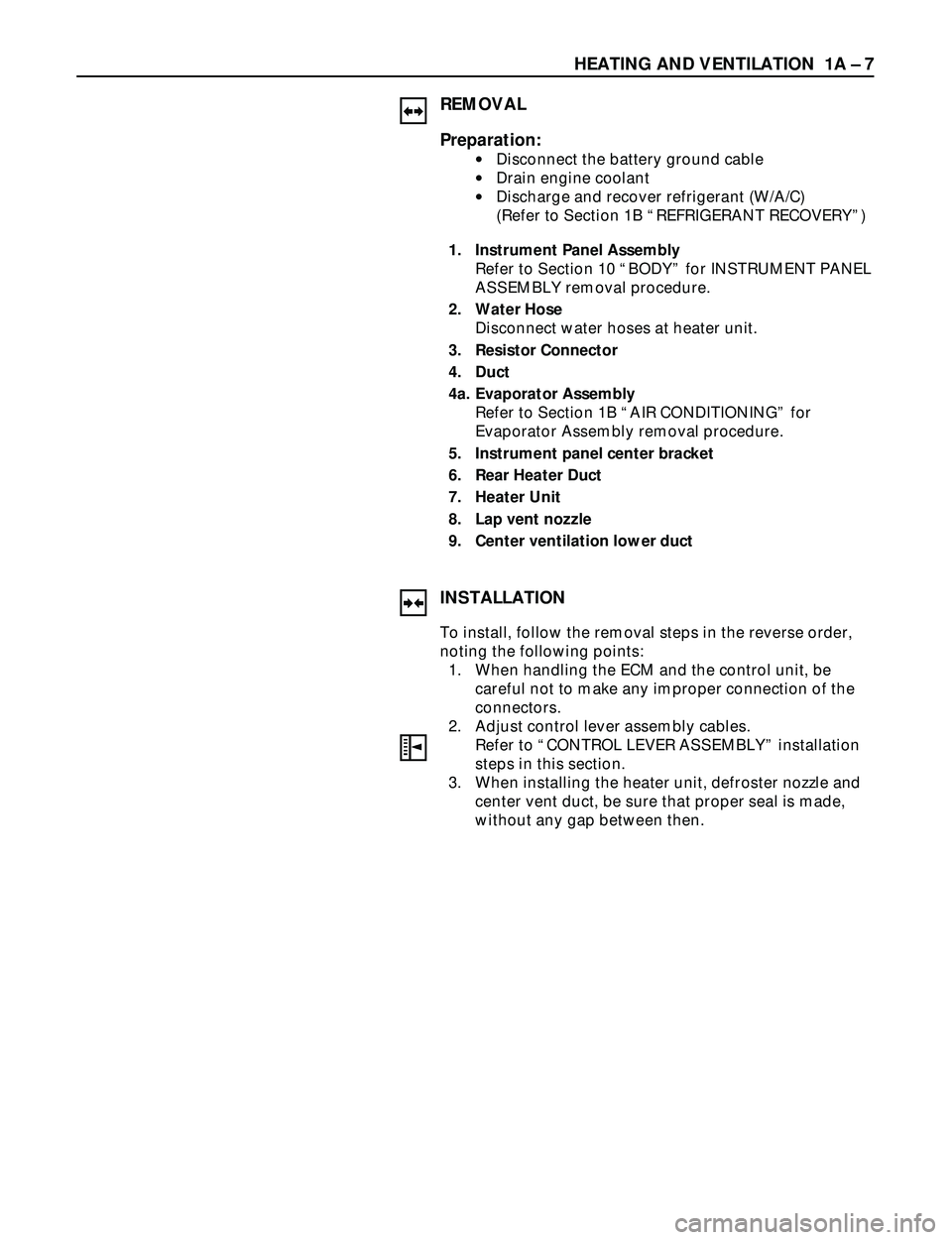
REMOVAL
Preparation:
·Disconnect the battery ground cable
·Drain engine coolant
·Discharge and recover refrigerant (W/A/C)
(Refer to Section 1B ÒREFRIGERANT RECOVERYÓ)
1. Instrument Panel Assembly
Refer to Section 10 ÒBODYÓ for INSTRUMENT PANEL
ASSEMBLY removal procedure.
2. Water Hose
Disconnect water hoses at heater unit.
3. Resistor Connector
4. Duct
4a. Evaporator Assembly
Refer to Section 1B ÒAIR CONDITIONINGÓ for
Evaporator Assembly removal procedure.
5. Instrument panel center bracket
6. Rear Heater Duct
7. Heater Unit
8. Lap vent nozzle
9. Center ventilation lower duct
Page 104 of 3573
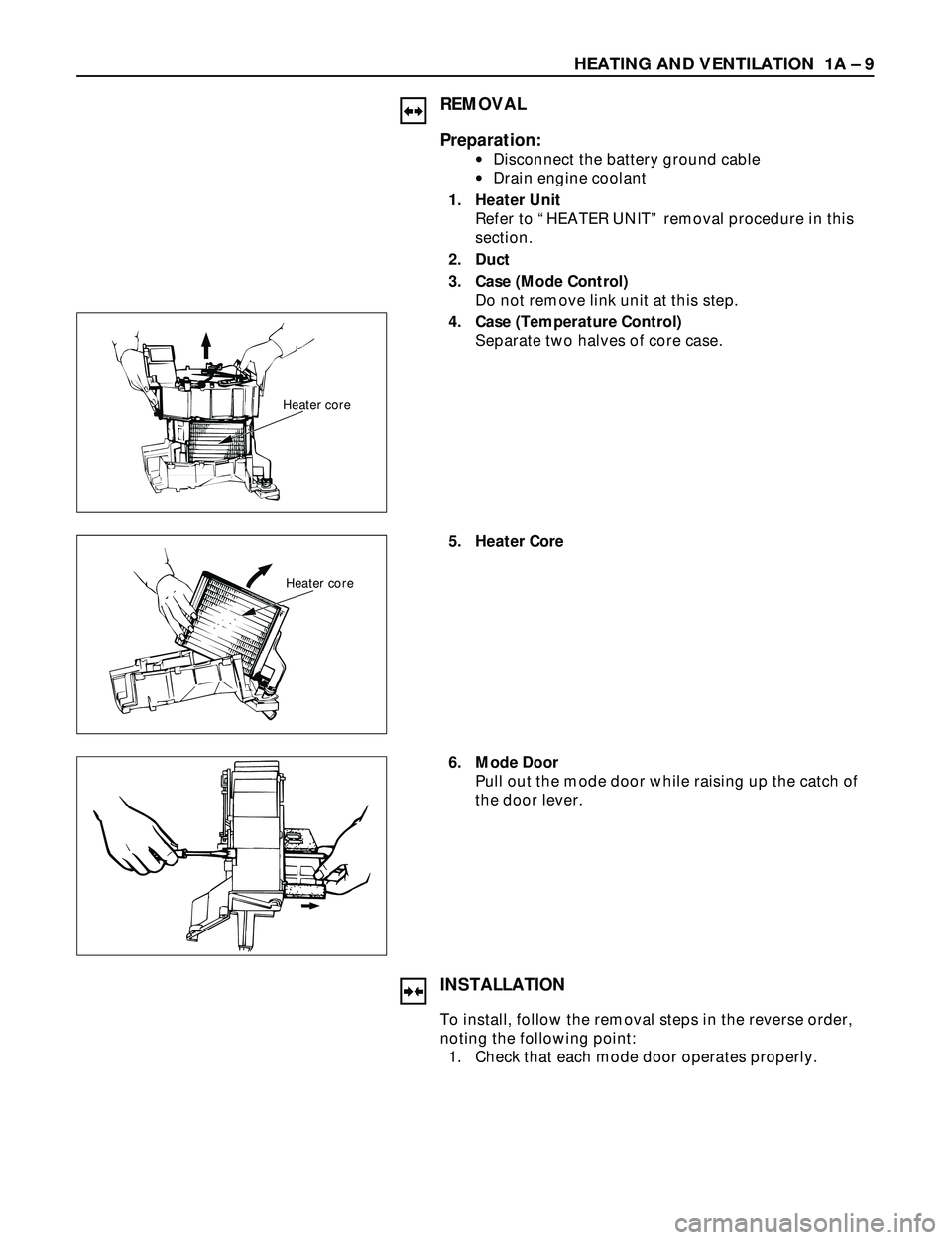
HEATING AND VENTILATION 1A Ð 9
REMOVAL
Preparation:
·Disconnect the battery ground cable
·Drain engine coolant
1. Heater Unit
Refer to ÒHEATER UNITÓ removal procedure in this
section.
2. Duct
3. Case (Mode Control)
Do not remove link unit at this step.
4. Case (Temperature Control)
Separate two halves of core case.
Heater core
5. Heater Core
Heater core
6. Mode Door
Pull out the mode door while raising up the catch of
the door lever.
INSTALLATION
To install, follow the removal steps in the reverse order,
noting the following point:
1. Check that each mode door operates properly.
Page 106 of 3573

HEATING AND VENTILATION 1A Ð 11
REMOVAL
Preparation:
·Disconnect the battery ground cable
·Drain engine coolant
1. Heater Unit
Refer to ÒHEATER UNITÓ removal procedure in this
section.
2. Case (Mode Control)
Remove the case (Mode control) from heater unit.
3. Washer and Mode Main Lever
4. Rod
5. Mode Sub-Lever
Press the tab of the sub-lever inward, and take out the
sub-lever.
6. Door Lever
Pull out the door lever while raising up the catch of
the door lever.
INSTALLATION
To install, follow the removal steps in the reverse order,
noting the following points:
1. Apply grease to mode sub-lever and to the abrasive
surface of the heater unit.
2. After installing the link unit, check to see if the link
unit operates correctly.