Display JAGUAR XF 2009 1.G Owners Manual
[x] Cancel search | Manufacturer: JAGUAR, Model Year: 2009, Model line: XF, Model: JAGUAR XF 2009 1.GPages: 391, PDF Size: 19.32 MB
Page 346 of 391
Navigation system
346
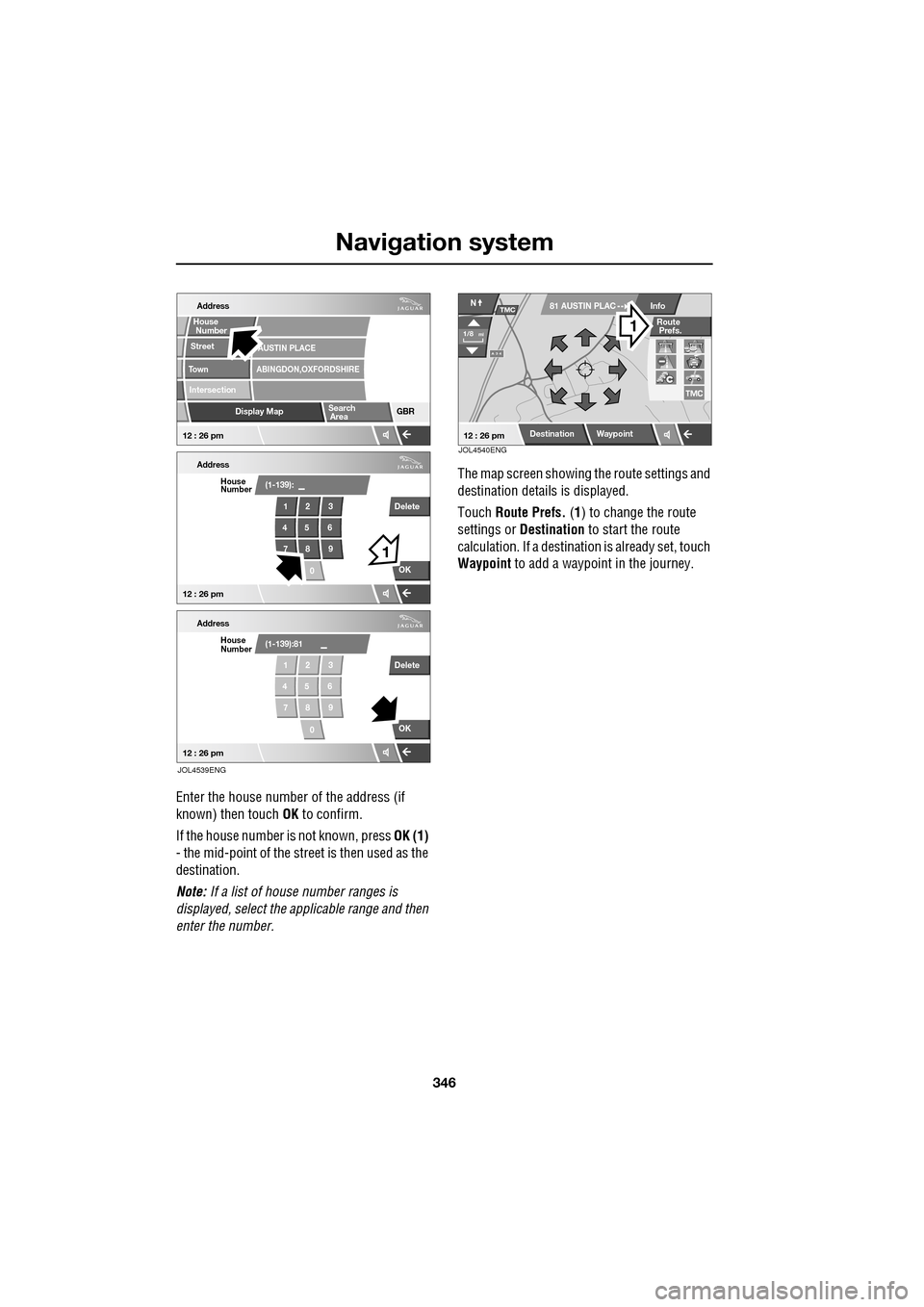
Enter the house number of the address (if
known) then touch OK to confirm.
If the house number is not known, press OK (1)
- the mid-point of the street is then used as the
destination.
Note: If a list of house number ranges is
displayed, select the a pplicable range and then
enter the number. The map screen showing the route settings and
destination detail
s is displayed.
Touch Route Prefs. (1) to change the route
settings or Destination to start the route
calculation. If a destinati on is already set, touch
Waypoint to add a waypoint in the journey.
Address
Street
To w n
Intersection
Display Map GBR
ABINGDON,OXFORDSHIREAUSTIN PLACE
Address
(1-139):
OK
1
Delete
23
45 6 78 9
0
Address
(1-139):81
OK
1 Delete
23
45 6 78 9
0
House
Number
HouseNumber
House Number
Search Area
12 : 26 pm
12 : 26 pm
12 : 26 pm
1
JOL4539ENG
A 3 4
Info
Route
Prefs.N
1/8mi
81 AUSTIN PLACTMC
12 : 26 pmDestinationWaypoint
JOL4540ENG
Page 347 of 391
347
Navigation system
ROUTE PREFERENCES
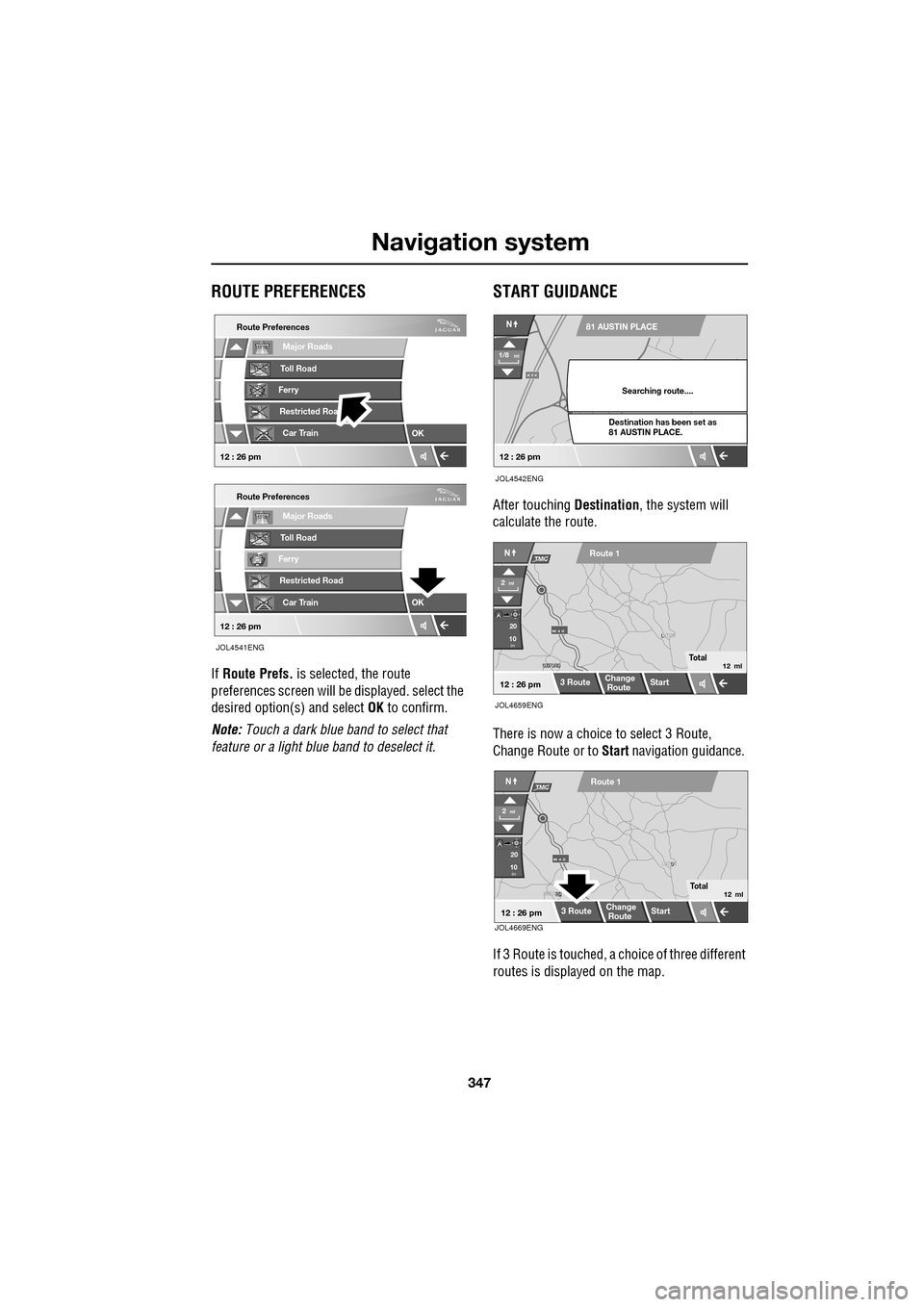
If Route Prefs. is selected, the route
preferences screen will be displayed. select the
desired option(s) and select OK to confirm.
Note: Touch a dark blue band to select that
feature or a light blue band to deselect it.
START GUIDANCE
After touching Destination, the system will
calculate the route.
There is now a choice to select 3 Route,
Change Route or to Start navigation guidance.
If 3 Route is touc hed, a choice of three different
routes is displayed on the map.
Major Roads
Route Preferences
Toll Road
Ferry
Restricted Roa
Car Train
OK
Major Roads
Route Preferences
Toll Road
Ferry
Restricted Road
Car Train
OK
12 : 26 pm
12 : 26 pm
JOL4541ENG
A 3 4
N
1/8mi
81 AUSTIN PLACE
Searching route....
Destination has been set as
81 AUSTIN PLACE.
12 : 26 pm
JOL4542ENG
OXFORD
OXFORD L
LUTON
M 4 0
12 : 26 pm
m
Route 1
Change
Route Start
3 Route
2ml
JOL4659ENG
Total12 ml
20
10
NTMC
JOL4669ENG
RD
OXFORD O
LUTON
M 4 0
12 : 26 pm
m
Route 1
Change
Route Start
3 Route
2ml
Total12 ml
20
10
NTMC
Page 348 of 391
Navigation system
348
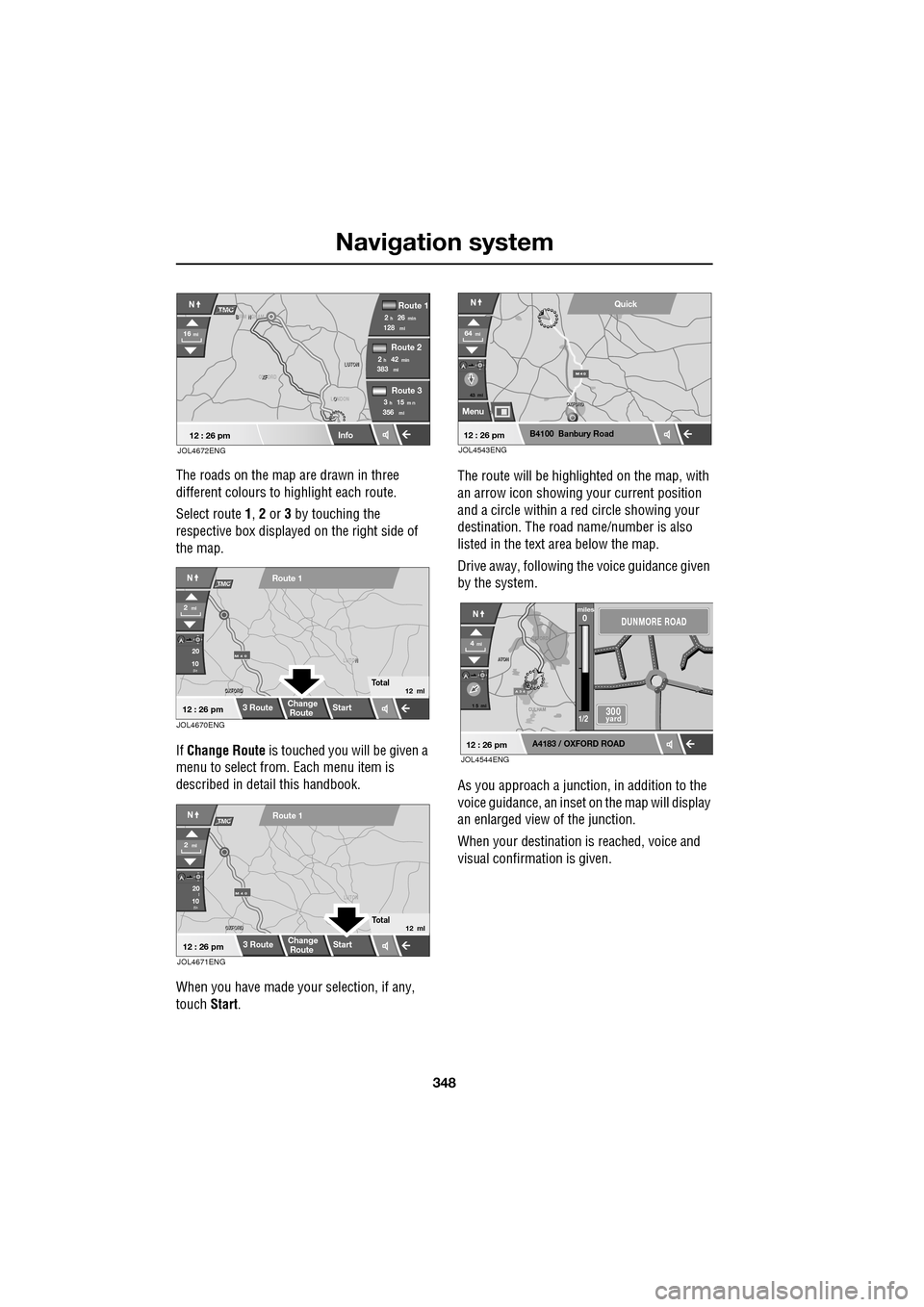
The roads on the map are drawn in three
different colours to highlight each route.
Select route 1, 2 or 3 by touching the
respective box displaye d on the right side of
the map.
If Change Route is touched you will be given a
menu to select from . Each menu item is
described in deta il this handbook.
When you have made your selection, if any,
touch Start. The route will be highlighted on the map, with
an arrow icon showing your current position
and a circle within a re
d circle showing your
destination. The road name/number is also
listed in the text area below the map.
Drive away, following the voice guidance given
by the system.
As you approach a junction, in addition to the
voice guidance, an inset on the map will display
an enlarged view of the junction.
When your destination is reached, voice and
visual confirmation is given.
XF
OXFORD LUTON
LUTON
12 : 26 pm
NTMC
Info
Route 1
mi
Route 2
Route 3
128min26h2
mi383min42h2
mi356m n15h3
16mi
O
LONDON
B N
BIRM NGHAM
JOL4672ENG
JOL4670ENG
OXFORD
OXFORD N
LUTON
M 4 0
12 : 26 pm
m
Route 1
Change
Route Start
3 Route
2ml
Total12 ml
20
10
NTMC
JOL4671ENG
OXFORD
OXFORD LUTON
M 4 0
12 : 26 pm
m
Route 1
Change
Route
Start
3 Route
2ml
Total12 ml
20
10l
NTMC
43 mi
Menu
B4100 Banbury Road
64mi
NQuick
12 : 26 pmJOL4543ENG
A 3 4
OXFORD
CULHAM
A
TON
A
TON
1 5 mi
A4183 / OXFORD ROAD
4mi
NDUNMORE ROAD
300 yard
miles0
1/2
12 : 26 pmJOL4544ENG
Page 349 of 391
349
Navigation system
VOICE GUIDANCE
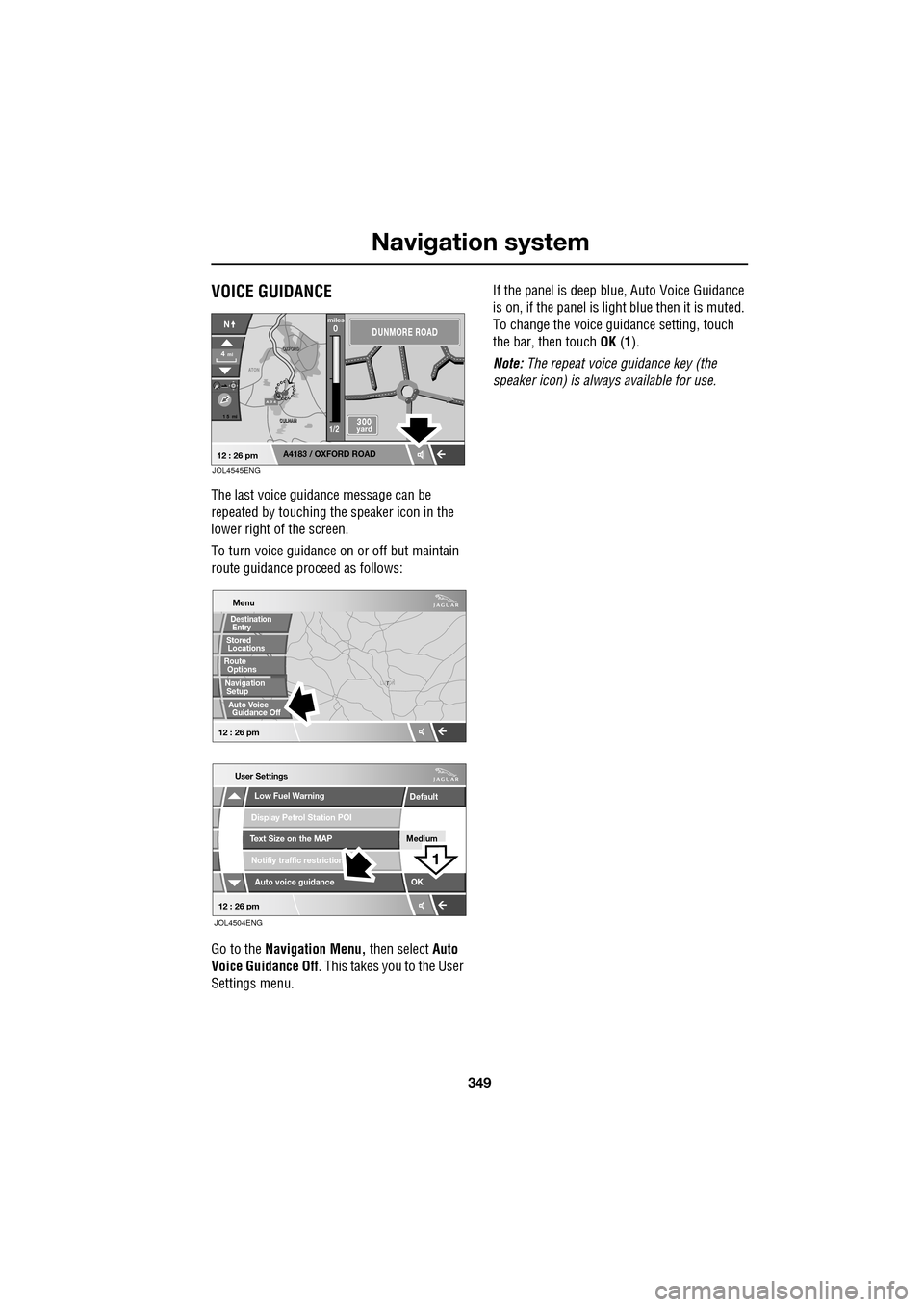
The last voice guidance message can be
repeated by touching the speaker icon in the
lower right of the screen.
To turn voice guidance on or off but maintain
route guidance proceed as follows:
Go to the Navigation Menu, then select Auto
Voice Guidance Off . This takes you to the User
Settings menu. If the panel is deep blue, Auto Voice Guidance
is on, if the panel is light
blue then it is muted.
To change the voice gui dance setting, touch
the bar, then touch OK (1).
Note: The repeat voice guidance key (the
speaker icon) is always available for use.
A 3 4
OXFORD
OXFORD
CULHAM
CULHAM
ATON
1 5 mi
A4183 / OXFORD ROAD
4mi
NDUNMORE ROAD
300 yard
miles0
1/2
12 : 26 pmJOL4545ENG
T
LUTON
Menu
Low Fuel Warning
User Settings
Display Petrol Station POI
Text Size on the MAP
Notifiy traffic restriction
Auto voice guidance
Medium
OK
Default
12 : 26 pm
12 : 26 pm
1
JOL4504ENG
Stored
Destination
Auto Voice
Entry
Guidance Off
Locations
Navigation SetupRoute Options
Page 350 of 391
Navigation system
350
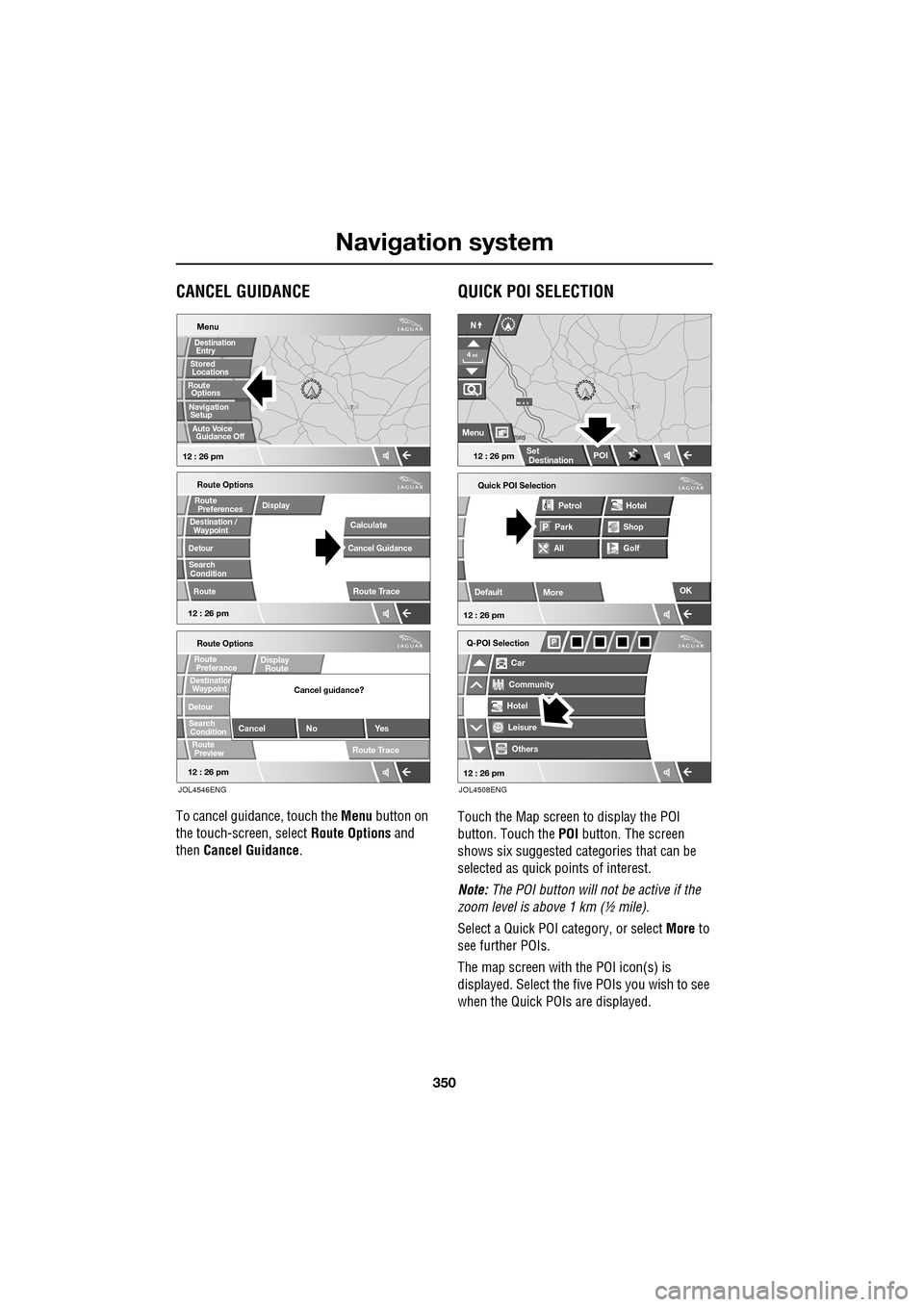
CANCEL GUIDANCE
To cancel guidance, touch the Menu button on
the touch-screen, select Route Options and
then Cancel Guidance .
QUICK POI SELECTION
Touch the Map screen to display the POI
button. Touch the POI button. The screen
shows six suggested ca tegories that can be
selected as quick points of interest.
Note: The POI button will not be active if the
zoom level is above 1 km (½ mile).
Select a Quick POI category, or select More to
see further POIs.
The map screen with the POI icon(s) is
displayed. Select the five POIs you wish to see
when the Quick POIs are displayed.
T
LUTON
Menu
12 : 26 pm
Stored
Destination
Auto Voice
Entry
Guidance Off
Locations
Navigation SetupRoute Options
12 : 26 pm
Route Options
Destination /
Detour
Search
Route
RouteDisplay
Preferences
Condition
Calculate
Cancel Guidance
Route Trace
12 : 26 pm
Route Options
Waypoint
Detour
Search
Route
Preview
RouteDisplay
RoutePreferance
ConditionDestination
Cancel No Yes
Cancel guidance?
Route Trace
Waypoint
JOL4546ENG
Quick POI Selection
DefaultOK
All
Park Petrol
Golf ShopHotel
Car
Q-POI Selection
Community
Hotel
Leisure
Others
12 : 26 pm
12 : 26 pm
More
FORD
FORD T
LUTON
M 4 0
12 : 26 pm
4
N
Set
Destination
Menu
POI
mi
JOL4508ENG
Page 351 of 391
351
Navigation system
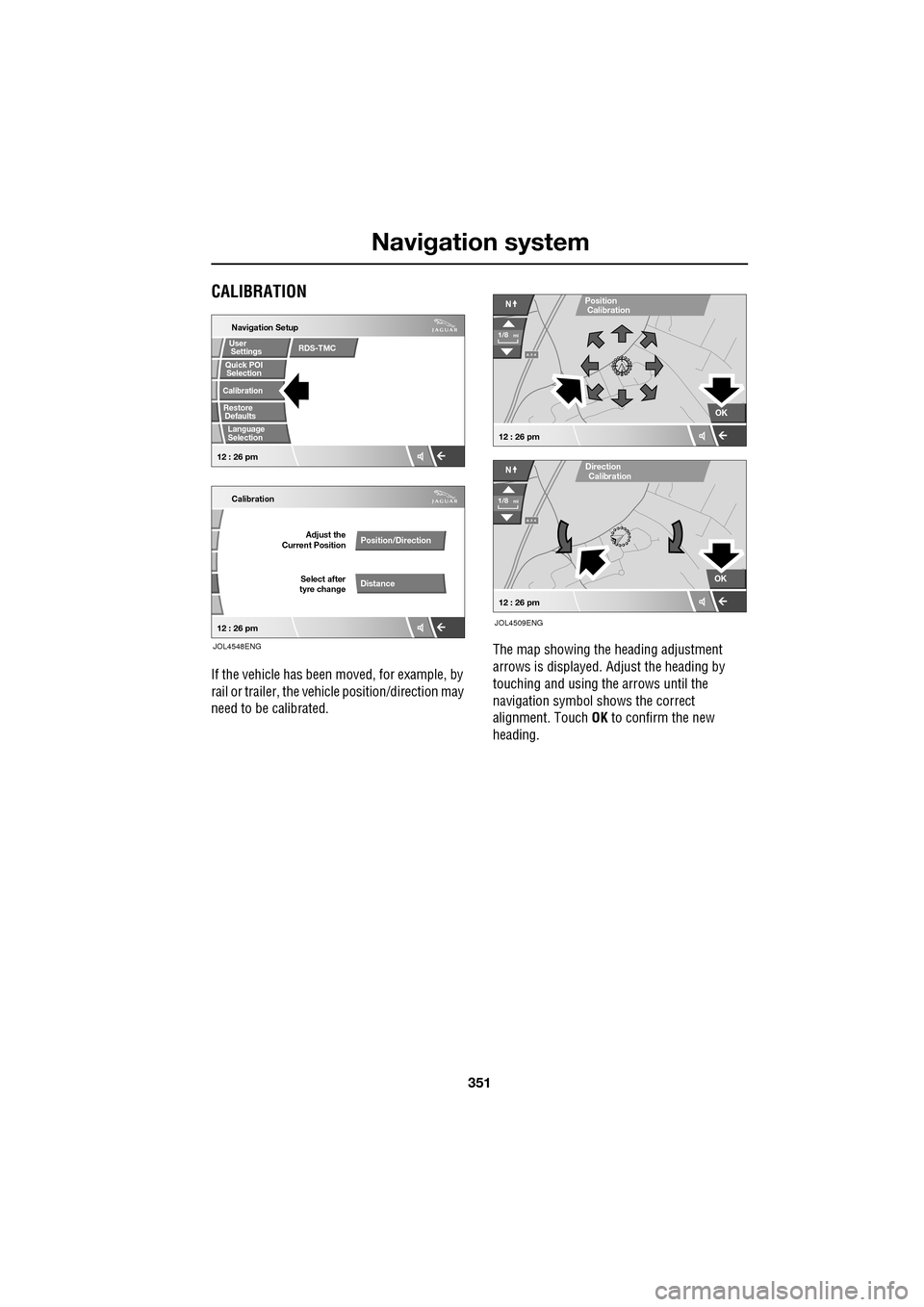
CALIBRATION
If the vehicle has been moved, for example, by
rail or trailer, the vehi cle position/direction may
need to be calibrated. The map showing the heading adjustment
arrows is displayed. Adjust the heading by
touching and using th
e arrows until the
navigation symbol shows the correct
alignment. Touch OK to confirm the new
heading.
Quick POI
Navigation Setup
Calibration
Select after
tyre change Adjust the
Current Position
Position/Direction
Distance
12 : 26 pm 12 : 26 pm
Selection
Calibration
Restore User
Settings
Defaults Quick POI
JOL4548ENG
RDS-TMC
Language
Selection
A 3 4
OK
NPosition
A 3 4
N
Calibration
OK
1/8mi
1/8mi
12 : 26 pm
12 : 26 pm
Direction
Calibration
JOL4509ENG
Page 353 of 391
353
Navigation system
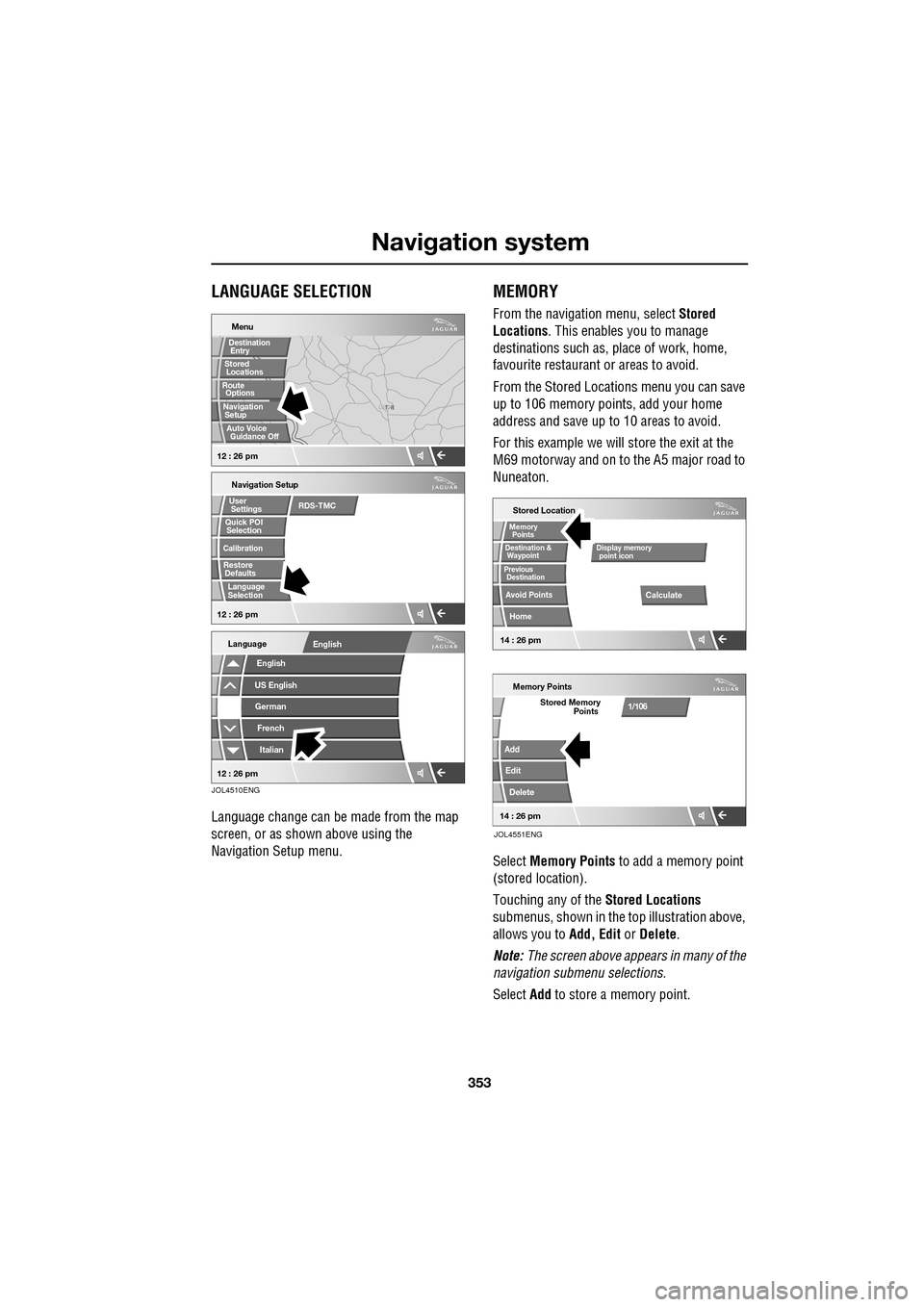
LANGUAGE SELECTION
Language change can be made from the map
screen, or as shown above using the
Navigation Setup menu.
MEMORY
From the navigation menu, select Stored
Locations . This enables you to manage
destinations such as, place of work, home,
favourite restaurant or areas to avoid.
From the Stored Locations menu you can save
up to 106 memory points, add your home
address and save up to 10 areas to avoid.
For this example we will store the exit at the
M69 motorway and on to the A5 major road to
Nuneaton.
Select Memory Points to add a memory point
(stored location).
Touching any of the Stored Locations
submenus, shown in the top illustration above,
allows you to Add, Edit or Delete .
Note: The screen above appears in many of the
navigation submenu selections.
Select Add to store a memory point.
T N
LUTON
Menu
Navigation Setup
Selection
Calibration
Restore User
Settings
Defaults Quick POI
12 : 26 pm 12 : 26 pm
Stored
Destination
Auto Voice
Entry
Guidance Off
Locations
Navigation SetupRoute Options
RDS-TMC
Language
Selection
English
Language
US EnglishGerman
French
Italian
English
12 : 26 pm
JOL4510ENG
Stored Location
Destination &
Waypoint
Previous
Avoid Points
Home
Memory
Calculate
Display memory
Memory Points
Add
Edit
Delete
Stored Memory1/106
point icon
Points
Destination
Points
JOL4551ENG
14 : 26 pm14 : 26 pm
Page 356 of 391
Navigation system
356
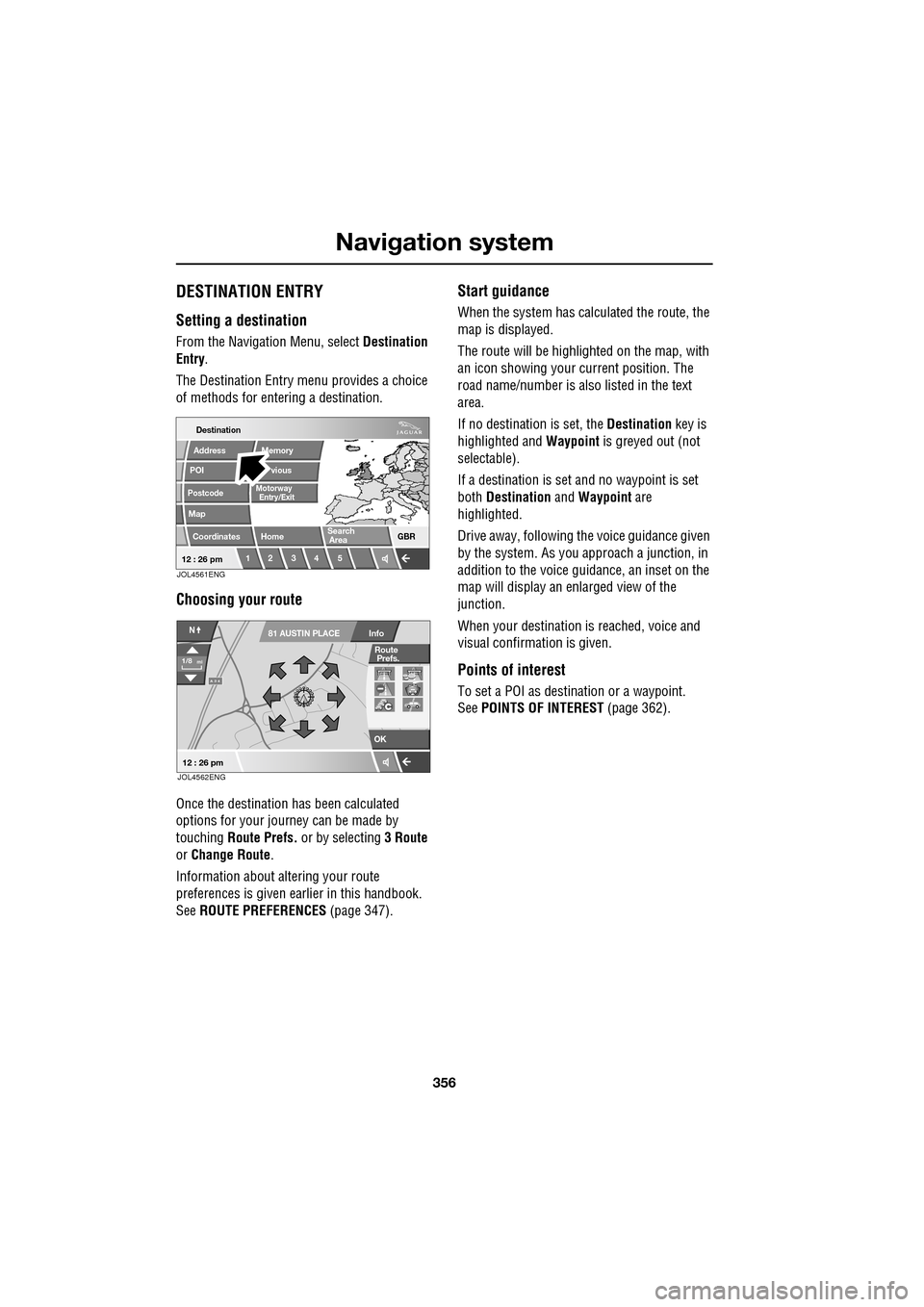
DESTINATION ENTRY
Setting a destination
From the Navigation Menu, select Destination
Entry .
The Destination Entry menu provides a choice
of methods for ente ring a destination.
Choosing your route
Once the destination has been calculated
options for your journey can be made by
touching Route Prefs. or by selecting 3 Route
or Change Route .
Information about al tering your route
preferences is given ea rlier in this handbook.
See ROUTE PREFERENCES (page 347).
Start guidance
When the system has calculated the route, the
map is displayed.
The route will be highlighted on the map, with
an icon showing your current position. The
road name/number is al so listed in the text
area.
If no destination is set, the Destination key is
highlighted and Waypoint is greyed out (not
selectable).
If a destination is set and no waypoint is set
both Destination and Waypoint are
highlighted.
Drive away, following the voice guidance given
by the system. As you approach a junction, in
addition to the voice guidance, an inset on the
map will display an enlarged view of the
junction.
When your destination is reached, voice and
visual confirmation is given.
Points of interest
To set a POI as destination or a waypoint.
See POINTS OF INTEREST (page 362).
Destination
POI
Postcode
Map
Coordinates
Address
Home GBR
12 3 4 5
vious
Memory
Search
Motorway
Entry/Exit
Area
12 : 26 pmJOL4561ENG
A 3 4
OK
Info
N
1/8mi
81 AUSTIN PLACE
12 : 26 pm
Route
Prefs.
JOL4562ENG
Page 357 of 391
357
Navigation system
POSTCODE
Not all countries have this facility. Enter the
postcode of your waypoi nt or destination from
the keypad. Ensure that any spaces and
punctuation is as used in reality otherwise the
system may not find it.
Postcode formats
The following is a list of countries where the
navigation system provid es full postcode entry:
• Austria
• Belgium
• Denmark
• France
• Germany
• Italy
• Luxembourg
• Spain
• Switzerland
• United Kingdom
The following is a list of countries where the
navigation system prov ides reduced postcode
entry:
• Netherlands - The four numeric digits only,
e.g. 4817
• Sweden - Only the first three digits of the
postcode can be entered,
e.g. 162 00 must be entered as 162.
When the postcode has been entered touch OK.
MAP
After selecting map, the local area map is
displayed. If the destinat ion or waypoint is not
shown on the map, use the zoom button to
increase the area. By using your finger on the
touch-screen move the circle to the area for
your destination or wa ypoint, zooming in if
required.
This location can be stor ed as a destination or
waypoint.
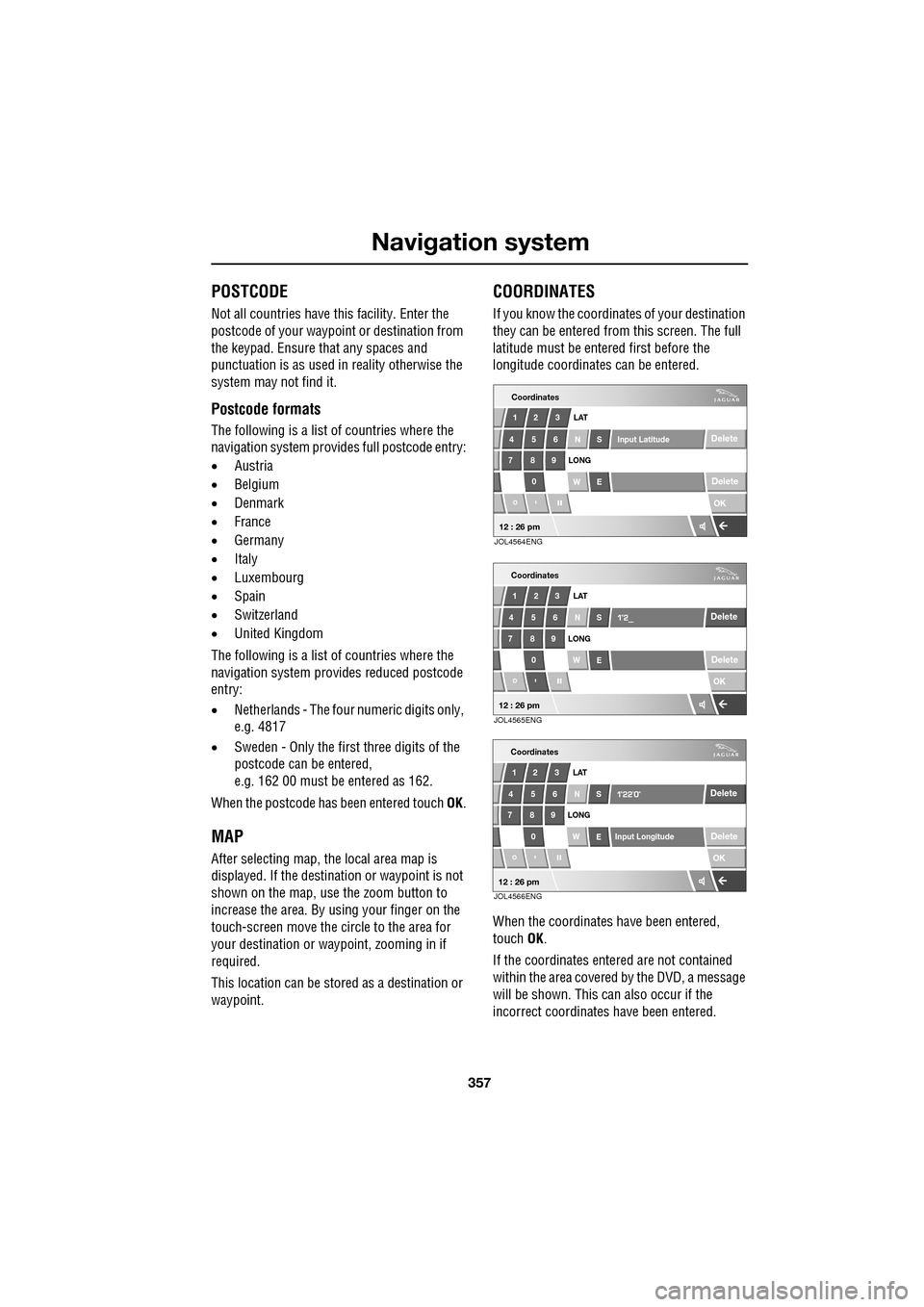
COORDINATES
If you know the coordinates of your destination
they can be entered from this screen. The full
latitude must be entered first before the
longitude coordinates can be entered.
When the coordinates have been entered,
touch OK.
If the coordinates ente red are not contained
within the area covered by the DVD, a message
will be shown. This can also occur if the
incorrect coordinates have been entered.
Coordinates
OK
Delete
Delete
12 3
4 56 LAT
N S Input Latitude
789
0 WE
LONG
"
12 : 26 pmJOL4564ENG
OK
Delete
Delete
123
4 56 LAT
NS
789 0 WE
LONG
"
Coordinates
12 : 26 pmJOL4565ENG
OK
Delete
Delete
12 3
4 56 LAT
NS
789
0 WE
LONG
"
Input Longitude
Coordinates
12 : 26 pmJOL4566ENG
Page 358 of 391
Navigation system
358
MEMORY
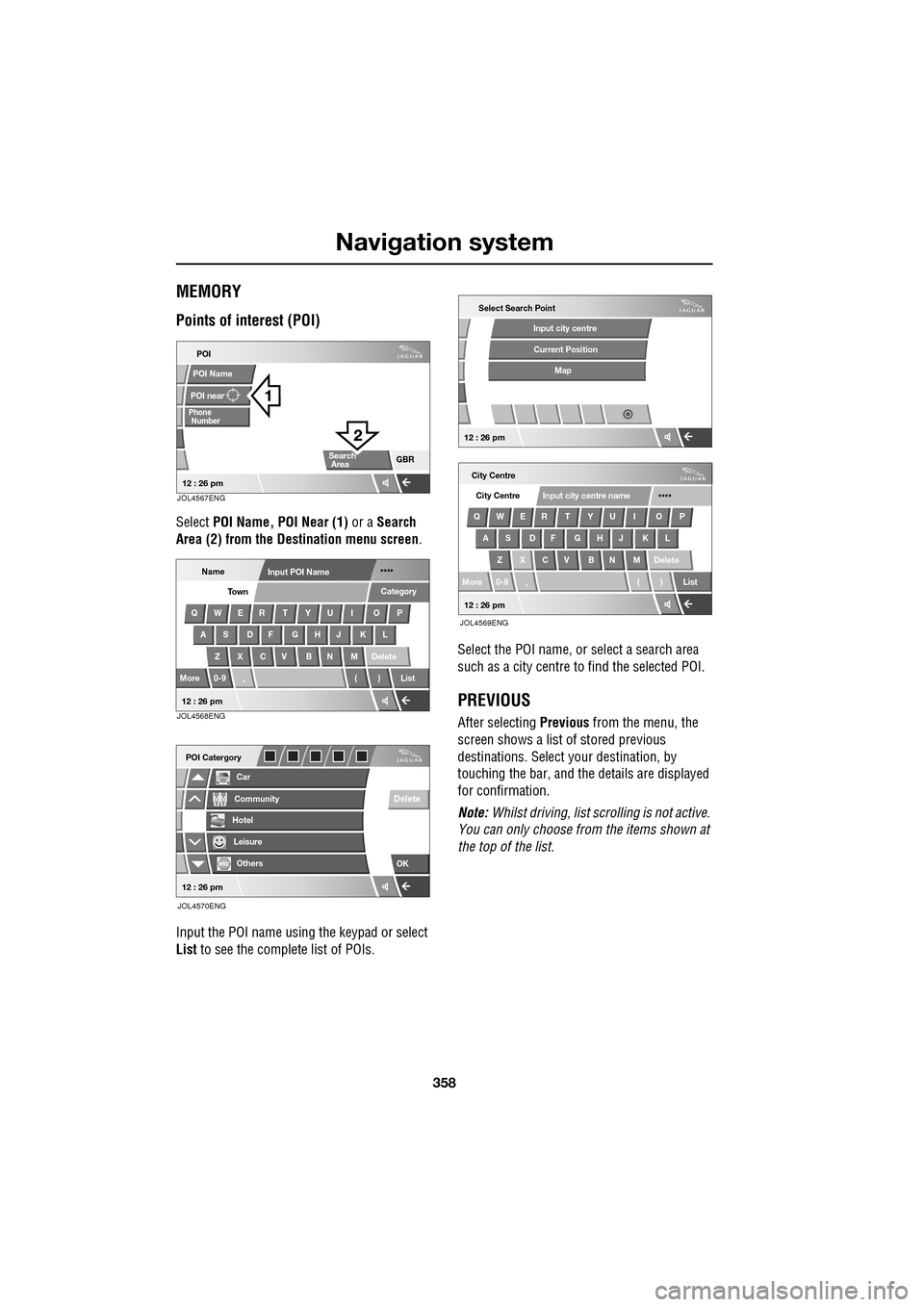
Points of interest (POI)
Select POI Name, POI Near (1) or a Search
Area (2) from the Destination menu screen .
Input the POI name using the keypad or select
List to see the complete list of POIs. Select the POI name, or select a search area
such as a city centre to find the selected POI.
PREVIOUS
After selecting
Previous from the menu, the
screen shows a list of stored previous
destinations. Select y our destination, by
touching the bar, and th e details are displayed
for confirmation.
Note: Whilst driving, list sc rolling is not active.
You can only choose from the items shown at
the top of the list.
POI
POI near
Phone
POI Name
GBR
Number
Search
Area
12 : 26 pmJOL4567ENG
NameInput POI Name ****
QWER T YU I O P
AS DF GHJ KL
Z X C V B N M Delete
More 0-9 , ( ) List Category
Town
12 : 26 pmJOL4568ENG
Car
POI Catergory
Community
Hotel
Leisure
Others
OK
Delete
12 : 26 pm
JOL4570ENG
City Centre
QWER T YU I O P AS DF GHJ KL
Z X C V B N M Delete
More 0-9 , ( ) List City Centre
****
Input city centre name
Select Search Point
Input city centre
Current Position
Map
12 : 26 pm
12 : 26 pm
JOL4569ENG