Warning JAGUAR XF 2009 1.G Owners Manual
[x] Cancel search | Manufacturer: JAGUAR, Model Year: 2009, Model line: XF, Model: JAGUAR XF 2009 1.GPages: 391, PDF Size: 19.32 MB
Page 240 of 391
Wheels and tyres
240
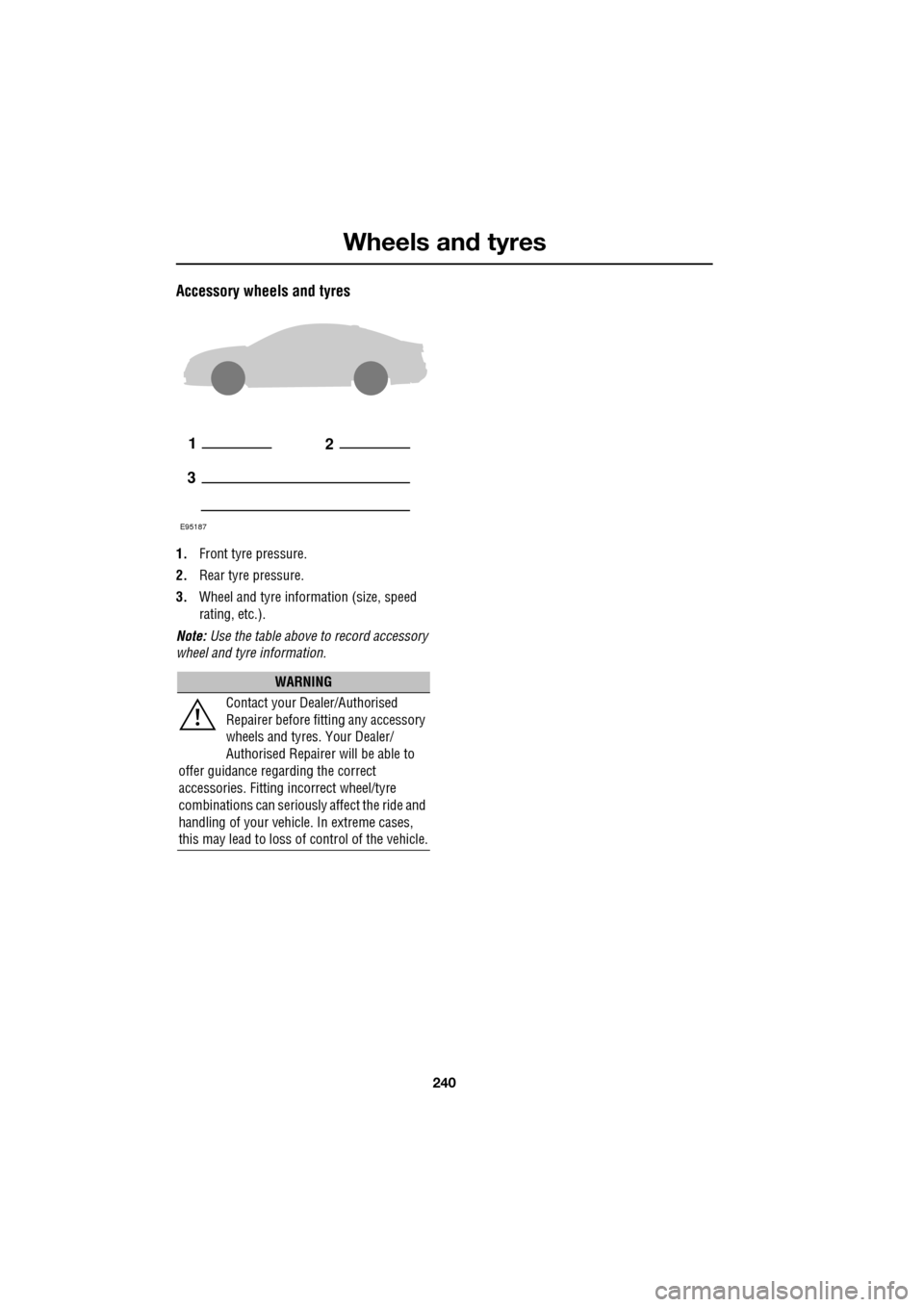
Accessory wheels and tyres
1.Front tyre pressure.
2. Rear tyre pressure.
3. Wheel and tyre information (size, speed
rating, etc.).
Note: Use the table above to record accessory
wheel and tyre information.
WARNING
Contact your Dealer/Authorised
Repairer before fitting any accessory
wheels and tyres. Your Dealer/
Authorised Repairer will be able to
offer guidance rega rding the correct
accessories. Fitting incorrect wheel/tyre
combinations can seriously affect the ride and
handling of your vehicl e. In extreme cases,
this may lead to loss of control of the vehicle.
12
3
E95187
Page 250 of 391
Emergency equipment
250
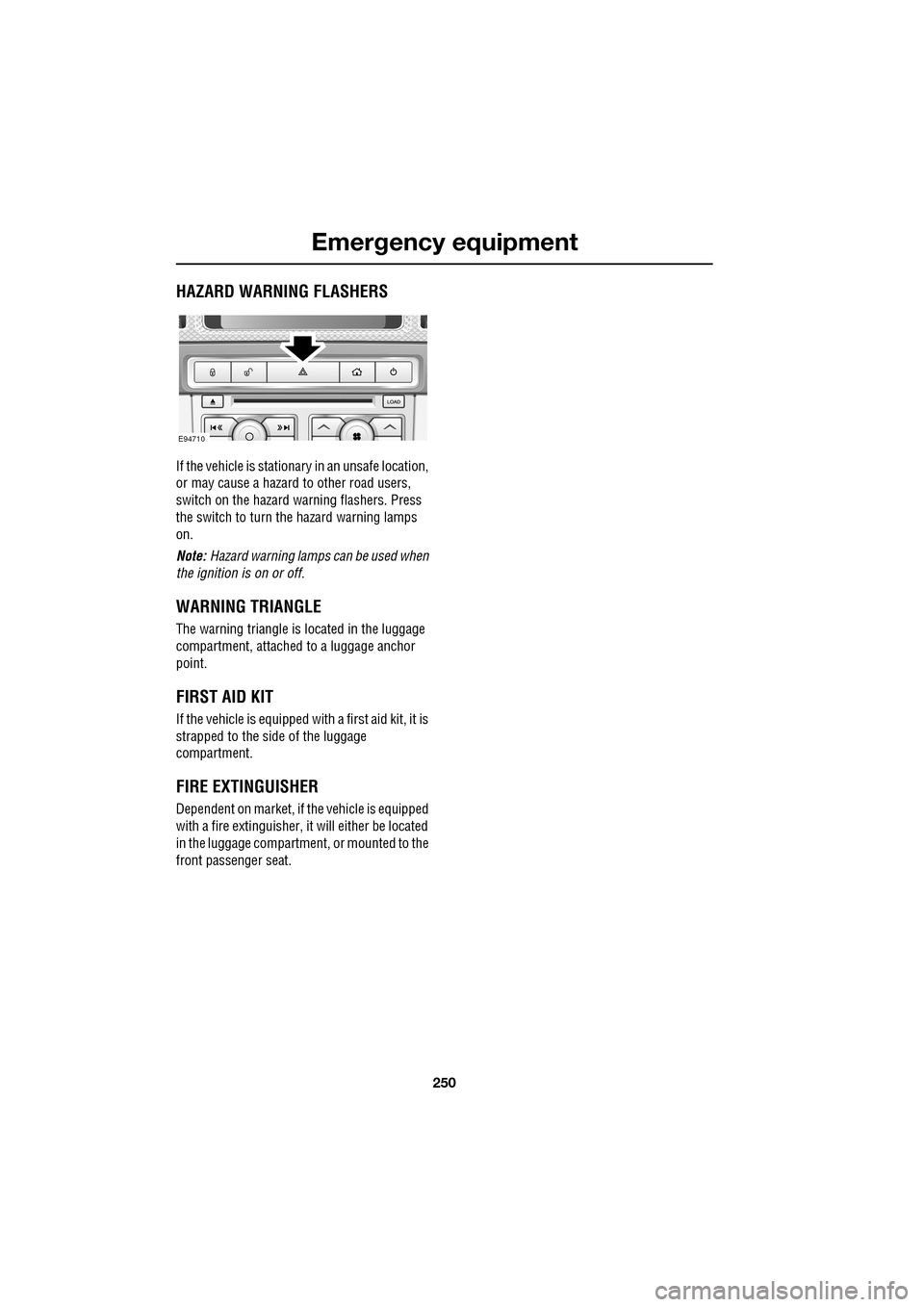
HAZARD WARNING FLASHERS
If the vehicle is stationary in an unsafe location,
or may cause a hazard to other road users,
switch on the hazard warning flashers. Press
the switch to turn the hazard warning lamps
on.
Note: Hazard warning lamps can be used when
the ignition is on or off.
WARNING TRIANGLE
The warning triangle is located in the luggage
compartment, attached to a luggage anchor
point.
FIRST AID KIT
If the vehicle is equipped wi th a first aid kit, it is
strapped to the side of the luggage
compartment.
FIRE EXTINGUISHER
Dependent on market, if the vehicle is equipped
with a fire extinguisher, it will either be located
in the luggage compartment, or mounted to the
front passenger seat.
E94710
Page 251 of 391
251
Status after a collision
DRIVING AFTER A COLLISION
Before starting or driving
If the vehicle has been involved in an accident
it should be checked thoroughly before
attempting to start the engine or drive the
vehicle.
Check for:-
• Fuel leaks.
• Fluid leaks.
• Battery damage.
• Damage to wiring.
• Damage to lights.
• Damage to steering, suspension, wheels
or tyres.
• Sharp or protruding bodywork.
• Operation of doors and locks.
• Condition and operation of seat belts and
SRS components.
• Activation of the pe destrian protection
system.
• Condition of chil d seats and their
mounting/attach ment points.
Note: This list is not exhaustive.
Resetting the fuel cut-off
The fuel system cut-off forms part of the Safety
and Restraint System (SRS) fitted to your
vehicle. Following an impact, and depending on
the severity, the fuel pump may be switched
off.
1.Switch the ignition off, and wait for 10
seconds.
2. Without pressing the brake pedal, press
the engine START/STOP button, to switch
the electrical circuits on. Wait for 30
seconds.
3. Check the vehicle thoroughly for fuel leaks.
If a leak is detected switch the ignition off
immediately.
•The vehicle must not be started if a leak
is present. Seek qualified advice, and
have the vehicle recovered.
4. If no leaks are detected, start the engine.
WARNING
If the vehicle is involved in a collision
it should be checked by a Dealer/
Authorised repairer, or suitably
qualified personnel, before starting or driving.
WARNING
The fuel cut-off should never be reset
if you can smell fuel, or a leak can be
seen. Doing so can lead to a fire
which may cause personal injury or death.
Page 252 of 391
Status after a collision
252
When driving
When driving a vehicle which has been
involved in a collision use caution and pay extra
attention to the operation of the vehicle. If any
changes in vehicle operation after the collision
are noted when compared to it's operation
before the collision, do not continue to drive
the vehicle. Stop the vehi cle as soon as it is
safe to do so, and have the vehicle recovered.
Pay particular attent ion to changes in:-
• Steering.
• Braking.
• Unusual noises.
• Warning lights or messages displayed.
• Problems with electrical systems.
INSPECTING SAFETY SYSTEM
COMPONENTS
Following a collision the seat belt and
Supplementary Restrain t System components
should be inspected for damage and/or
deformity. The inspection and any subsequent
repair work should only be carried out by a
Dealer/Authorised Repair er, or other suitably
qualified personnel.
Components which require inspection
include:-
• Seat belt webbing and mechanisms.
• Seat belt pre-tensioners.
• Airbag covers and modules.
• Seat frames a nd mounting points.
• Child seats.
• Child seat anchor points.
• Pedestrian prot ection system.
Note: This list is not exhaustive.
In addition to the physical items checked, the
electronic control system and its associated
wiring should also be checked thoroughly. This
process will include a diagnostic check which
can only be carried out by a Dealer/Authorised
repairer or suitably qualified and equipped
persons.
WARNING
It is not recommended that the
vehicle be driven or used until all of
the occupant protection systems
have been checked.
Page 253 of 391
253
Vehicle recovery
TOWING POINTS
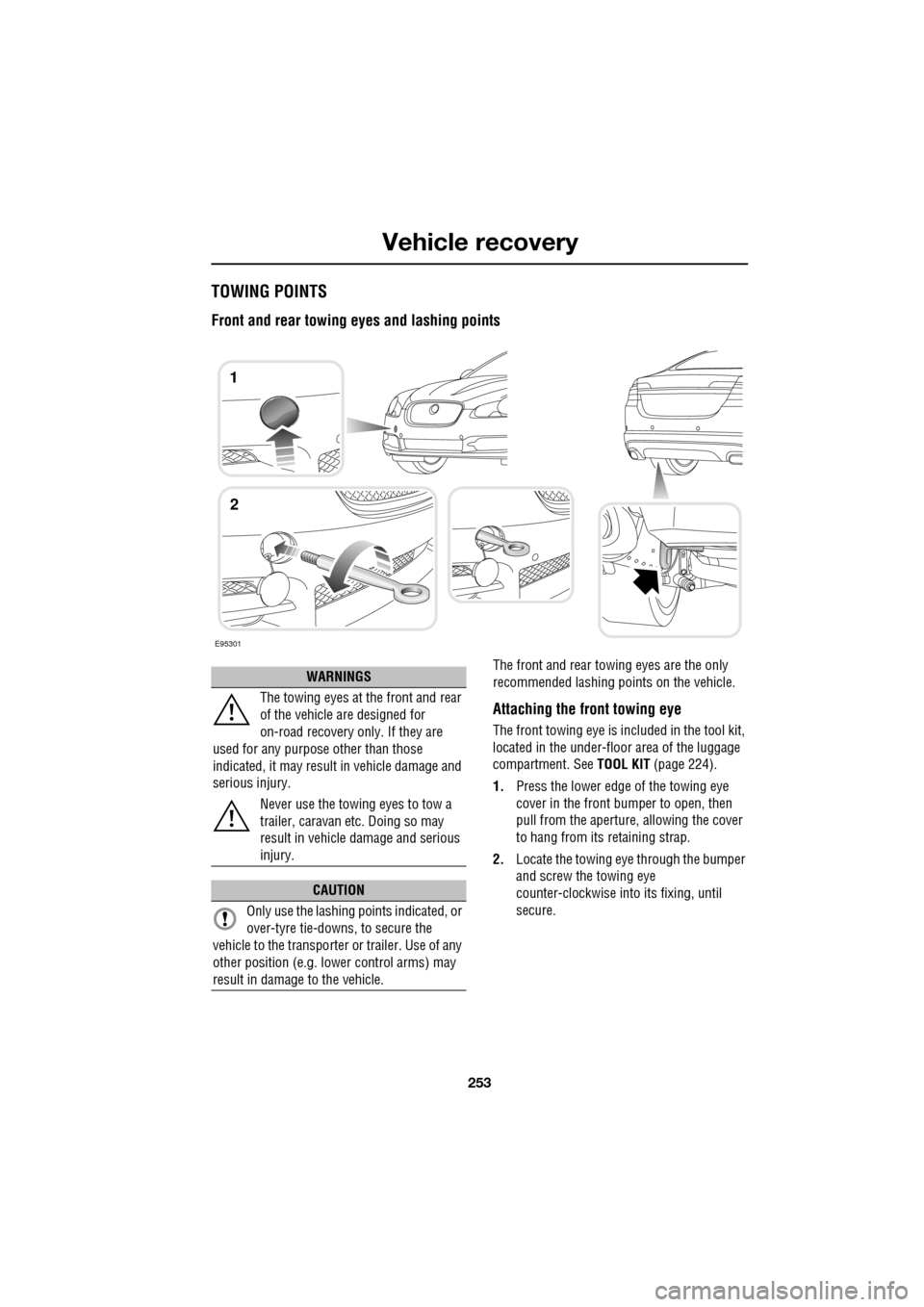
Front and rear towing eyes and lashing points
The front and rear towing eyes are the only
recommended lashing points on the vehicle.
Attaching the front towing eye
The front towing eye is included in the tool kit,
located in the under-floor area of the luggage
compartment. See TOOL KIT (page 224).
1. Press the lower edge of the towing eye
cover in the front bumper to open, then
pull from the aperture, allowing the cover
to hang from its retaining strap.
2. Locate the towing eye through the bumper
and screw the towing eye
counter-clockwise into its fixing, until
secure.
E95301
1
2
WARNINGS
The towing eyes at the front and rear
of the vehicle are designed for
on-road recovery only. If they are
used for any purpose other than those
indicated, it may result in vehicle damage and
serious injury.
Never use the towing eyes to tow a
trailer, caravan etc. Doing so may
result in vehicle damage and serious
injury.
CAUTION
Only use the lashing points indicated, or
over-tyre tie-downs, to secure the
vehicle to the transporter or trailer. Use of any
other position (e.g. lower control arms) may
result in damage to the vehicle.
Page 256 of 391
Vehicle recovery
256
TOWING THE VEHICLE ON FOUR
WHEELS
Note: The recommended recovery method is
to raise all four wheels.
Towing procedure
1. The vehicle should be parked on firm level
ground, with the parking brake on, and the
gear selector in P (Park).
2. Secure the towing attachment from the
recovery vehicle to the front towing eye.
See TOWING POINTS (page 253).
3. Dock the Jaguar Smart Key and switch on
the ignition. See GENERAL INFORMATION
(page 132). 4.
Apply the foot brake and release the
parking brake.
5. With the foot brake st ill applied, activate
the Emergency Park Release (EPR).
See TRANSPORTING THE VEHICLE
(page 254).
6. The vehicle can now be towed a maximum
of 0.8 km (0.5 miles) at a maximum speed
of 48 kmh (30 mph).
7. Upon arrival at the destination, ensure
wherever possible that the vehicle is
parked on firm level ground.
8. Lower the Emergency Park Release (EPR)
lever, to cancel EP R and to re-engage P
(Park).
9. Apply the parking brake.
10. Switch off the ignition and remove the
Jaguar Smart Key.
11. Remove the towing attachment from the
towing eye.
WARNINGS
Ensure that the remote control
remains docked whilst the vehicle is
being towed. Removing the remote
control will engage the steering lock, which
will prevent the vehicle from steering
correctly.
If the engine cannot be run whilst the
vehicle is being towed, there will be
no power assistance for the steering
or brakes. This will result in greater effort
being required to steer or slow the vehicle, and
greatly increased stopping distances.
CAUTIONS
The vehicle should only be towed in a
forward direction with all four wheels on
the ground.
The vehicle should only be towed for a
maximum of 0.8 km (0.5 miles), at a
maximum speed of 48 km/h (30 mph). Towing
for a greater distance or at a higher speed, may
result in serious damage to the transmission.
CAUTION
Leaving the ignition switched on for
extended periods will cause the battery
to drain.
WARNING
Use extreme caution when detaching
towing equipment. Vehicle movement
is possible which can result in serious
injuries.
Page 269 of 391
269
Audio unit overview
AUDIO UNIT OVERVIEW
The Jaguar infotainment system contains
AM/FM radio, compact disc player and portable
audio interface. Digital (DAB) radio, six-disc CD
player and TV are optional.
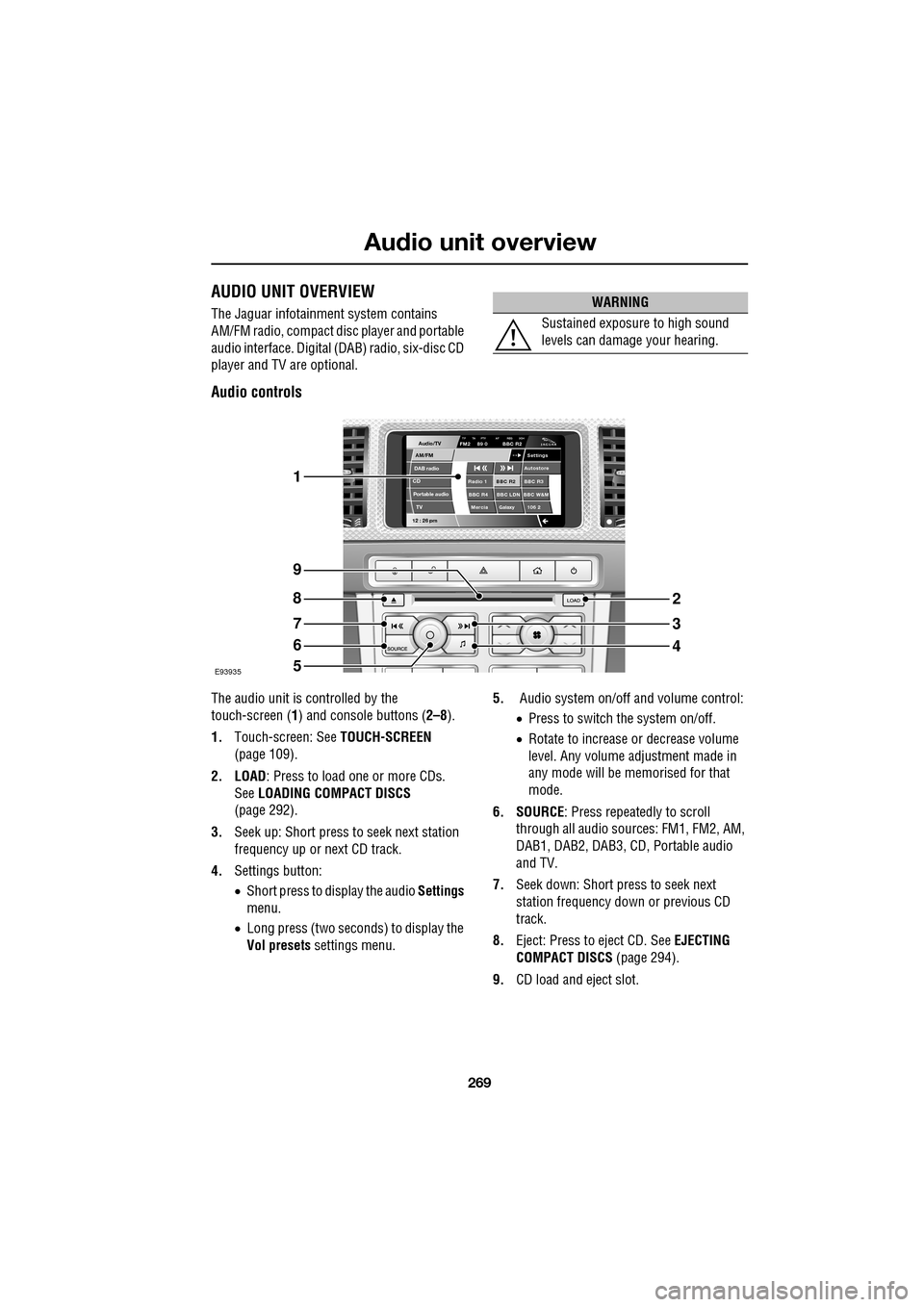
Audio controls
The audio unit is c ontrolled by the
touch-screen ( 1) and console buttons ( 2–8).
1. Touch-screen: See TOUCH-SCREEN
(page 109).
2. LOAD : Press to load one or more CDs.
See LOADING COMPACT DISCS
(page 292).
3. Seek up: Short press to seek next station
frequency up or next CD track.
4. Settings button:
•Short press to display the audio Settings
menu.
• Long press (two seconds) to display the
Vol presets settings menu. 5.
Audio system on/off and volume control:
•Press to switch the system on/off.
• Rotate to increase or decrease volume
level. Any volume adjustment made in
any mode will be memorised for that
mode.
6. SOURCE : Press repeatedly to scroll
through all audio sources: FM1, FM2, AM,
DAB1, DAB2, DAB3, CD , Portable audio
and TV.
7. Seek down: Short press to seek next
station frequency down or previous CD
track.
8. Eject: Press to eject CD. See EJECTING
COMPACT DISCS (page 294).
9. CD load and eject slot.
WARNING
Sustained exposure to high sound
levels can damage your hearing.
Audio/TV
DAB radio
CDAM/FM
12 : 26 pm
BBC R2 BBC R3
BBC R4 BBC LDN BBC W&M Mercia Galaxy 106 2Radio 1
Settings
Autostore
TP TA PTY AF REG 3CHFM2 89 0 BBC R2
Portable audio TV
E93935
1
9
8
7
6
5
2
3
4
Page 271 of 391
271
Audio unit operation
ON/OFF CONTROL
The audio system can be used with the vehicle
ignition on or off, but will switch off
automatically when the ignition is switched off.
To operate the audio system when the ignition
has been switched off, press the On/off volume
control.
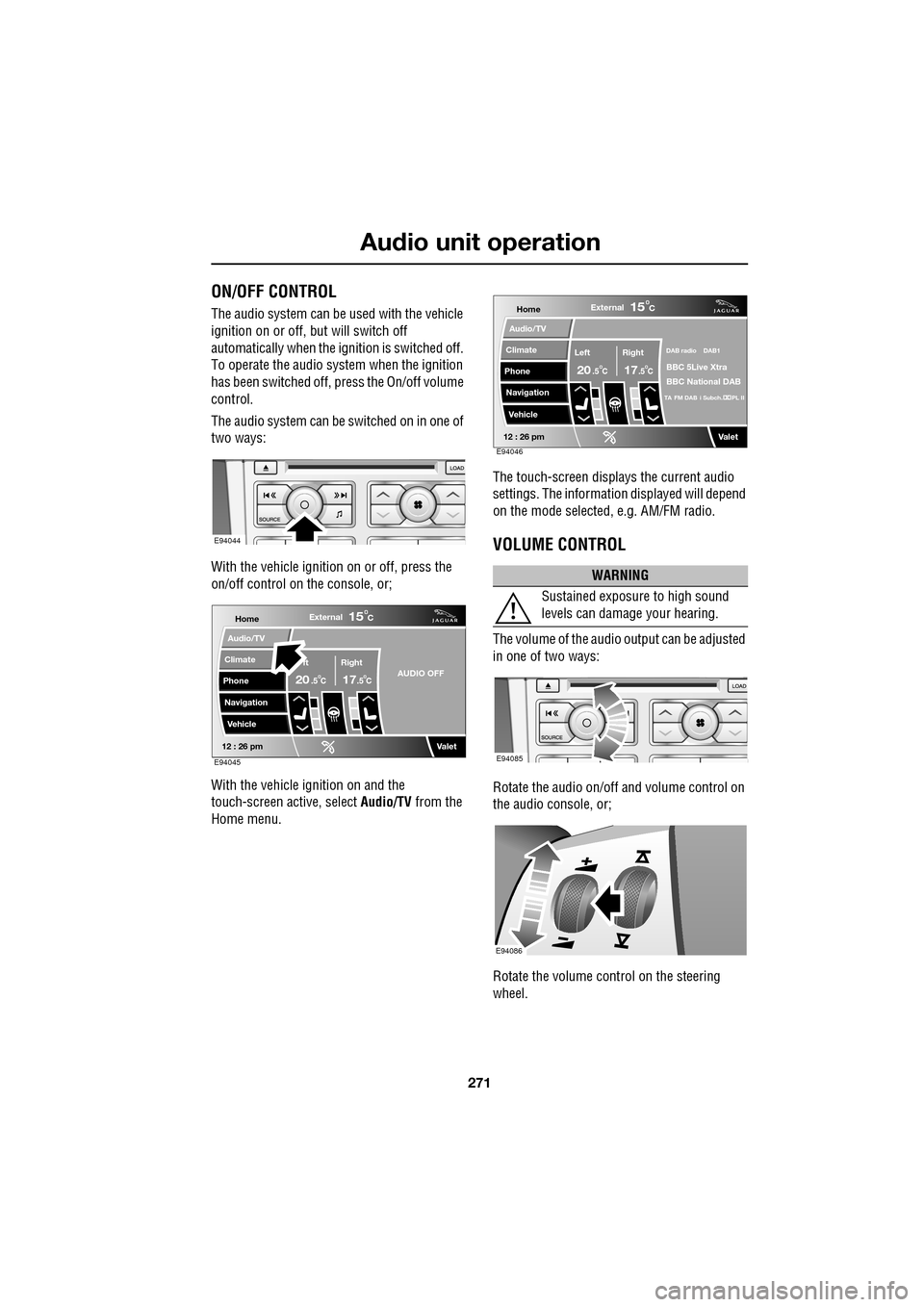
The audio system can be switched on in one of
two ways:
With the vehicle ignition on or off, press the
on/off control on the console, or;
With the vehicle ignition on and the
touch-screen active, select Audio/TV from the
Home menu. The touch-screen displays the current audio
settings. The informati
on displayed will depend
on the mode selected , e.g. AM/FM radio.
VOLUME CONTROL
The volume of the audio output can be adjusted
in one of two ways:
Rotate the audio on/off and volume control on
the audio console, or;
Rotate the volume control on the steering
wheel.
E94044
Home
Audio/TV
Climate
Phone
Navigation
VehicleExternal
ft Right
20 17CC
15C
.5 .5AUDIO OFF
Valet12 : 26 pmE94045
WARNING
Sustained exposure to high sound
levels can damage your hearing.
Home
Audio/TV
Climate
Phone
Navigation
VehicleExternal
Left Right
20 17CC
15C
.5 .5
DAB radio DAB1
BBC 5Live Xtra
BBC National DAB
TA FM DAB i Subch. PL II
Valet12 : 26 pmE94046
E94085
E94086
Page 302 of 391
Portable audio
302
AUXILIARY INPUT DEVICES
Playing a portable device
If you are using a USB mass storage device or
iPod, you can control playback using the
touch-screen controls.
If you are using any por table audio device via
the AUX socket, then you must control
playback from the device itself.
Autoplay
Whenever a USB device is docked, play will
start automatically at the first track in the first
available folder.
For an iPod, play will always resume from the
current track, whether previously docked or
not.
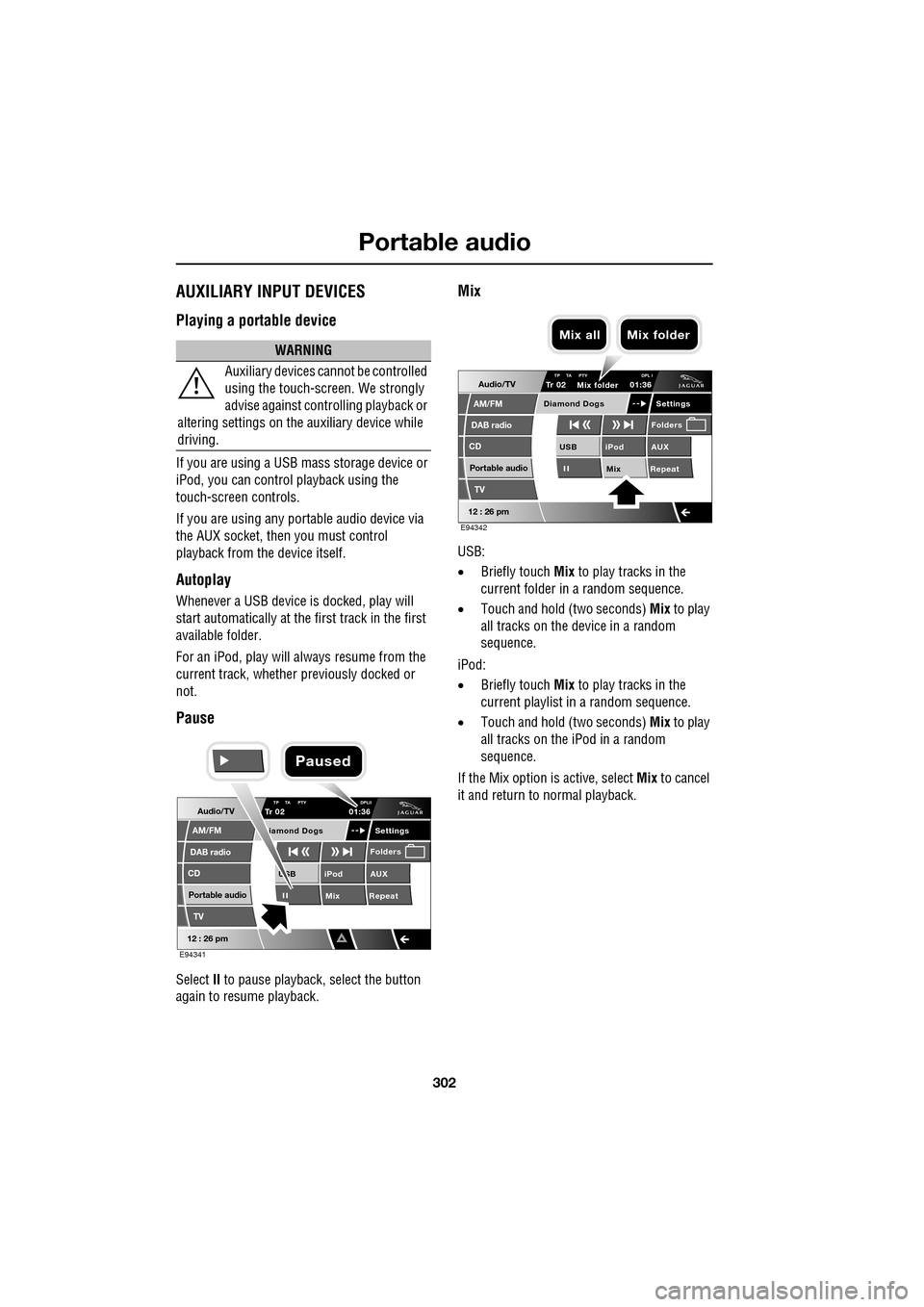
Pause
Select II to pause playback , select the button
again to resume playback.
Mix
USB:
• Briefly touch Mix to play tracks in the
current folder in a random sequence.
• Touch and hold (two seconds) Mix to play
all tracks on the device in a random
sequence.
iPod:
• Briefly touch Mix to play tracks in the
current playlist in a random sequence.
• Touch and hold (two seconds) Mix to play
all tracks on the iPod in a random
sequence.
If the Mix option is active, select Mix to cancel
it and return to normal playback.
WARNING
Auxiliary devices ca nnot be controlled
using the touch-screen. We strongly
advise against controlling playback or
altering settings on the auxiliary device while
driving.
Audio/TV
DAB radio
CD
AM/FM
12 : 26 pm
iPod AUX
Mix RepeatUSB
Settings
Folders
TP TA PTY DPLIITr 02
Portable audio
TV
iamond Dogs
01:36
E94341
Paused
Audio/TV
DAB radio
CD
AM/FM
12 : 26 pm
iPod AUX
Mix RepeatUSB
Settings
Folders
TP TA PTY DPL ITr 02
Portable audio
TV
Diamond Dogs
01:36
E94342
Mix folder
Mix all Mix folder
Page 307 of 391
307
Telephone
GENERAL INFORMATIONNote: The vehicle telephone system is
designed to function with a wide variety of
Bluetooth® telephones.
As these telephones have a wide range of audio
and echo characteristics, it may take a few
seconds for the vehicle telephone system to
adapt and deliver optimum audio performance.
It may be necessary to reduce the in-vehicle
volume slightly, to fully optimise audio
performance and reduce echo.
In order to achieve th e best possible audio
performance, it may be necessary to select a
lower speed on the heat er blower and reduce
the system volume slightly, when using certain
mobile phones.
Telephone networks
The telephone network standard allows you to
use your telephone in many countries.
However, telephone rece ption may be poor or
unavailable in remote re gions. This may be due
to the inadequate power of the transmitter,
which results in a weak signal or incomplete
coverage.
What is Bluetooth®?
Jaguar Bluetooth® Connectivity was
developed to be used wi th a selected range of
mobile phones, from a number of different
manufacturers. Some mobile phones feature
different operating soft ware versions - the
correct version is needed for successful
integration with the Jaguar Bluetooth®
system.
Bluetooth is an intern ational standard that
allows electronic com ponents to communicate
with each other, using a short-range radio link.
Bluetooth eliminates the need for wires or
cables: Typically, devices can communicate at
a range of up to 10 metres (33 feet).
WARNING
Using the telephone near the car: Do
not telephone inside a garage or near
an open car bonnet. The air may
contain fuel vapours a nd the telephone could
produce sparks and start a fire.
Unusual ambient conditions: Switch
off the telephone in areas where high
explosives are being used. High
frequency remote controls could be interfered
with and cause an explos ion. Switch off your
telephone in areas with a high explosion risk.
This includes filling st ations, fuel storage
areas or chemical factories, as well as places
where the air contains fuel vapour, chemicals
or metal dust. The telephone might produce
sparks and cause a fire or explosion.
Medical equipment: The functioning
of cardiac pacemakers or hearing aids
may be impaired when the phone is in
use. Check with a doctor or manufacturer
whether any such devices you or your
passengers are using, are sufficiently
protected against high-frequency energy.
Always stow your mobile phone
securely. In an accident, loose items
can cause injury.
Using any hand-held appliance while
driving, can be dangerous and is
illegal in cert ain countries.