ABS JAGUAR XF 2009 1.G User Guide
[x] Cancel search | Manufacturer: JAGUAR, Model Year: 2009, Model line: XF, Model: JAGUAR XF 2009 1.GPages: 391, PDF Size: 19.32 MB
Page 170 of 391
Driving dynamics
170
DYNAMIC MODE
(V8 petrol and diesel vehicles only)
Press to operate. Dynamic mode
co-ordinates the vehicle's control
systems to deliver a high
performance driving experience. This setting
enhances key vehicle systems so that the
vehicle's full potential can be exploited. The
vehicle's responses are aimed at involving the
driver more in focused and purposeful driving,
helping swift progress.
Note: When the transmission is set to
permanent manual mode (i.e. using the
paddles to change gear while in Sport mode)
and Dynamic mode is selected, transmission
upshifts are fully controlled by the driver. This
means that the transmissi on will not change up
a gear automatically, even when the vehicle's
rev limit is reached. When the rev limit is
reached, the gear position indicator in the
message centre will glow amber, to indicate
that the next gear should be selected.
Note: Dynamic mode cannot be active at the
same time as Winter m ode. Dynamic mode will
remain selected for approximately six hours
after the ignition is swit ched off, after which
point it will need to be reselected if required.
STABILITY CONTROL
Dynamic Stability Control (DSC)
Dynamic Stability Contro l (DSC) is operational
whenever the engine is running, unless it has
been manually switched off. When the system
is operating, the warn ing indicator in the
instrument panel will flash.
The DSC system controls the Anti-lock Braking
System (ABS), traction control and yaw control
of the vehicle.
The DSC system assists the driver in retaining
directional control of th e vehicle in situations
where the vehicle is sliding (understeer or
oversteer). It must not encourage the driver to
drive beyond the limit of adhesion or at speeds
higher than those suitable for the prevailing
road and traffic conditions.
DSC applies braking pres sure to individual
wheels if excessive variation is detected. This
ensures that the vehicle follows the driver’s
intended direction of travel as closely as
possible.
Traction control will intervene to control wheel
spin by automatically reducing the power
output from the engine and applying braking to
individual wheels. This improves acceleration,
particularly on surfaces with uneven friction
(e.g. one wheel on ice with another on tarmac).
Note: For recommended DSC mode selection,
refer to the JaguarDri ve Control scenarios
section in this handbook.
WARNING
The fact that the vehicle is fitted with
DSC, must never allow the driver to
be tempted into taking risks which
could affect his or her sa fety or that of other
road users. In all cases, it remains the driver’s
responsibility to drive sa fely according to the
prevailing conditions.
Page 205 of 391
205
Maintenance
Topping up the coolant
Top-up to the upper level indicator mark
located on the side of the expansion tank. Use
only a 50% mix of water and antifreeze to
specification WSS M97B44 (coloured orange)
Extended Life Coolant.
Note: In an emergency - and only if the
approved antifreeze is unavailable - top-up the
cooling system with clea n water, but be aware
of the resultant reduction in frost protection.
Do not top-up or refill with conventional
antifreeze formulations . If in doubt consult a
qualified technician.
Ensure the cap is tightened fully after top-up is
completed by turning the cap until the ratchet
cap clicks.
Antifreeze
Antifreeze contains important corrosion
inhibitors. The antifreeze content of the coolant
must be maintained at 50% ± 5% all year round
(not just in cold conditions). To ensure that the
anti-corrosion properties of the coolant are
retained, the antifreeze content should be
checked once a year and completely renewed
every ten years, regardless of distance
travelled. Failure to do so may cause corrosion
of the radiator and engine components.
The specific gravity of a 50% antifreeze
solution at 20°C (68°F) is 1.068 and protects
against frost down to -40°C (-40°F).
Use antifreeze to specification WSS M97B44
(coloured orange) Extended Life Coolant.
WARNINGS
Never remove the filler cap when the
engine is hot - escaping steam or
scalding water coul d cause serious
personal injury.
Antifreeze is highly inflammable. Do
not allow antifreeze to come into
contact with naked flames or other
sources of ignition (e.g. a hot engine) - a fire
may result.
Unscrew the filler cap slowly,
allowing the pressure to escape
before removing completely.
CAUTION
When travelling in territories where the
water supply contains salt, always
ensure you carry a supply of fresh (rain or
distilled) water. Topping up with salt water will
cause serious e ngine damage.
WARNINGS
Antifreeze is poisonous and can be
fatal if swallowed - keep containers
sealed and out of the reach of
children. If accident al consumption is
suspected, seek medical attention
immediately.
If the fluid comes into contact with
the skin or eyes, rinse immediately
with plenty of water.
CAUTIONS
The use of non-approved antifreeze will
have an adverse effect on the engine
cooling system and therefore engine
durability.
Antifreeze will damage painted surfaces;
soak up any spillage with an absorbent
cloth immediately and wash the area with a
mixture of car shampoo and water.
Page 207 of 391
207
Maintenance
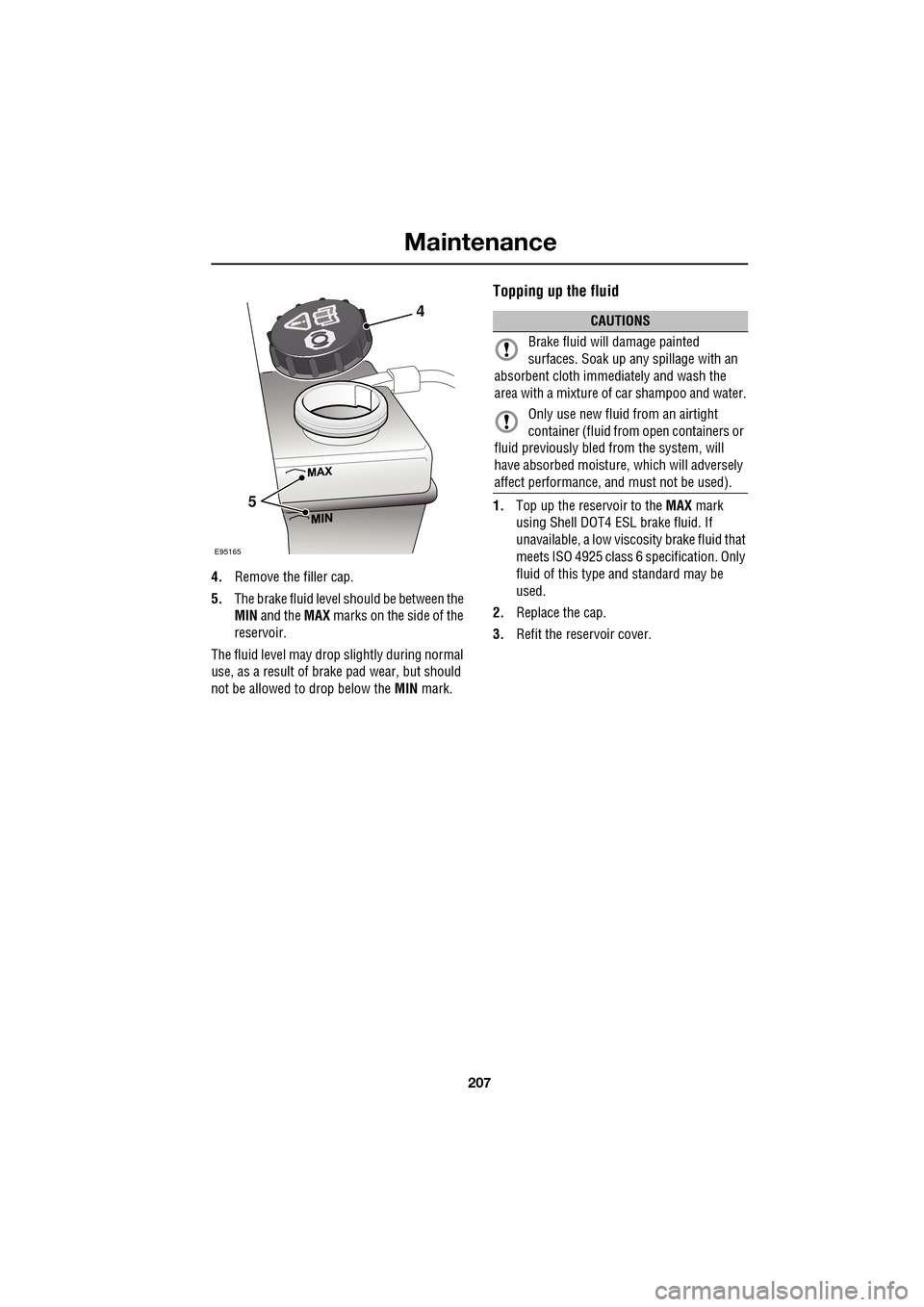
4.Remove the filler cap.
5. The brake fluid level should be between the
MIN and the MAX marks on the side of the
reservoir.
The fluid level may drop slightly during normal
use, as a result of brake pad wear, but should
not be allowed to drop below the MIN mark.
Topping up the fluid
1.Top up the reservoir to the MAX mark
using Shell DOT4 ESL brake fluid. If
unavailable, a low viscosity brake fluid that
meets ISO 4925 class 6 sp ecification. Only
fluid of this type and standard may be
used.
2. Replace the cap.
3. Refit the reservoir cover.
E95165
4
5
CAUTIONS
Brake fluid will damage painted
surfaces. Soak up an y spillage with an
absorbent cloth immediately and wash the
area with a mixture of car shampoo and water.
Only use new fluid from an airtight
container (fluid from open containers or
fluid previously bled from the system, will
have absorbed moisture, which will adversely
affect performa nce, and must not be used).
Page 208 of 391
Maintenance
208
POWER STEERING FLUID CHECK
Checking the fluid level
Check and top-up the fluid with the vehicle on
level ground, with the e ngine switched off and
the system cold. Ensure that the steering wheel
is not turned after stopping the engine.
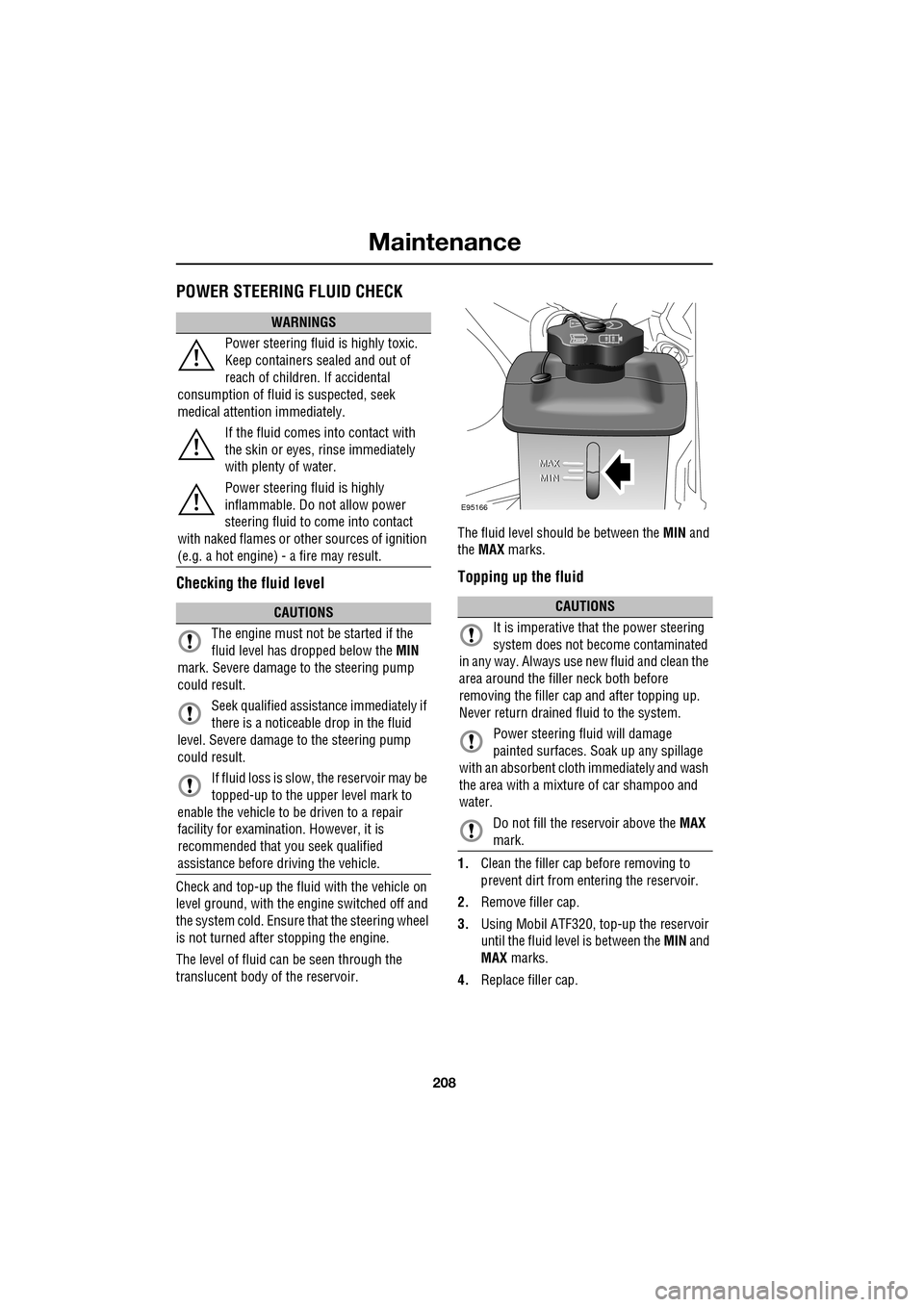
The level of fluid can be seen through the
translucent body of the reservoir. The fluid level shoul
d be between the MIN and
the MAX marks.
Topping up the fluid
1.Clean the filler cap before removing to
prevent dirt from entering the reservoir.
2. Remove filler cap.
3. Using Mobil ATF320, top-up the reservoir
until the fluid level is between the MIN and
MAX marks.
4. Replace filler cap.
WARNINGS
Power steering fluid is highly toxic.
Keep containers sealed and out of
reach of children. If accidental
consumption of fluid is suspected, seek
medical attenti on immediately.
If the fluid comes into contact with
the skin or eyes, rinse immediately
with plenty of water.
Power steering fluid is highly
inflammable. Do not allow power
steering fluid to come into contact
with naked flames or other sources of ignition
(e.g. a hot engine) - a fire may result.
CAUTIONS
The engine must not be started if the
fluid level has dropped below the MIN
mark. Severe damage to the steering pump
could result.
Seek qualified assistance immediately if
there is a noticeable drop in the fluid
level. Severe damage to the steering pump
could result.
If fluid loss is slow, the reservoir may be
topped-up to the upper level mark to
enable the vehicle to be driven to a repair
facility for examination. However, it is
recommended that you seek qualified
assistance before driving the vehicle.CAUTIONS
It is imperative that the power steering
system does not beco me contaminated
in any way. Always use new fluid and clean the
area around the filler neck both before
removing the filler ca p and after topping up.
Never return drained fluid to the system.
Power steering fluid will damage
painted surfaces. So ak up any spillage
with an absorbent cloth immediately and wash
the area with a mixture of car shampoo and
water.
Do not fill the reservoir above the MAX
mark.
E95166
Page 301 of 391
301
Portable audio
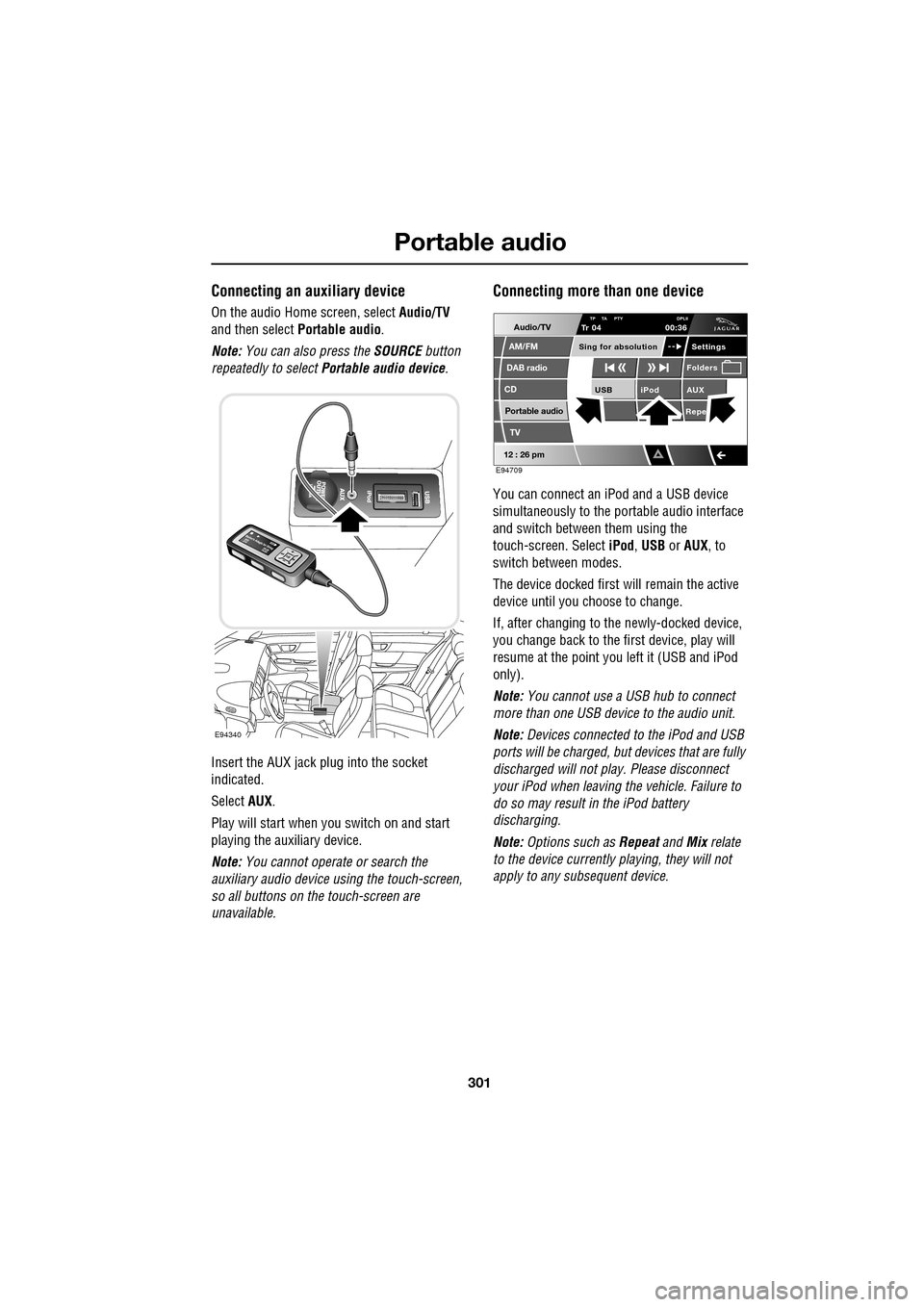
Connecting an auxiliary device
On the audio Home screen, select Audio/TV
and then select Portable audio.
Note: You can also press the SOURCE button
repeatedly to select Portable audio device .
Insert the AUX jack plug into the socket
indicated.
Select AUX.
Play will start when you switch on and start
playing the auxiliary device.
Note: You cannot operate or search the
auxiliary audio device using the touch-screen,
so all buttons on the touch-screen are
unavailable.
Connecting more than one device
You can connect an iPod and a USB device
simultaneously to the portable audio interface
and switch between them using the
touch-screen. Select iPod, USB or AUX , to
switch between modes.
The device docked first will remain the active
device until you choose to change.
If, after changing to the newly-docked device,
you change back to the first device, play will
resume at the point you left it (USB and iPod
only).
Note: You cannot use a USB hub to connect
more than one USB device to the audio unit.
Note: Devices connected to the iPod and USB
ports will be charged, but devices that are fully
discharged will not play. Please disconnect
your iPod when leaving the vehicle. Failure to
do so may result in the iPod battery
discharging.
Note: Options such as Repeat and Mix relate
to the device currently playing, they will not
apply to any subsequent device.
E94340
Audio/TV
DAB radio
CD
AM/FM
12 : 26 pm
iPod AUX
RepeUSB
Settings
Folders
TP TA PTY DPLIITr 04
Portable audio
TV
Sing for absolution
00:36
E94709
Page 303 of 391
303
Portable audio
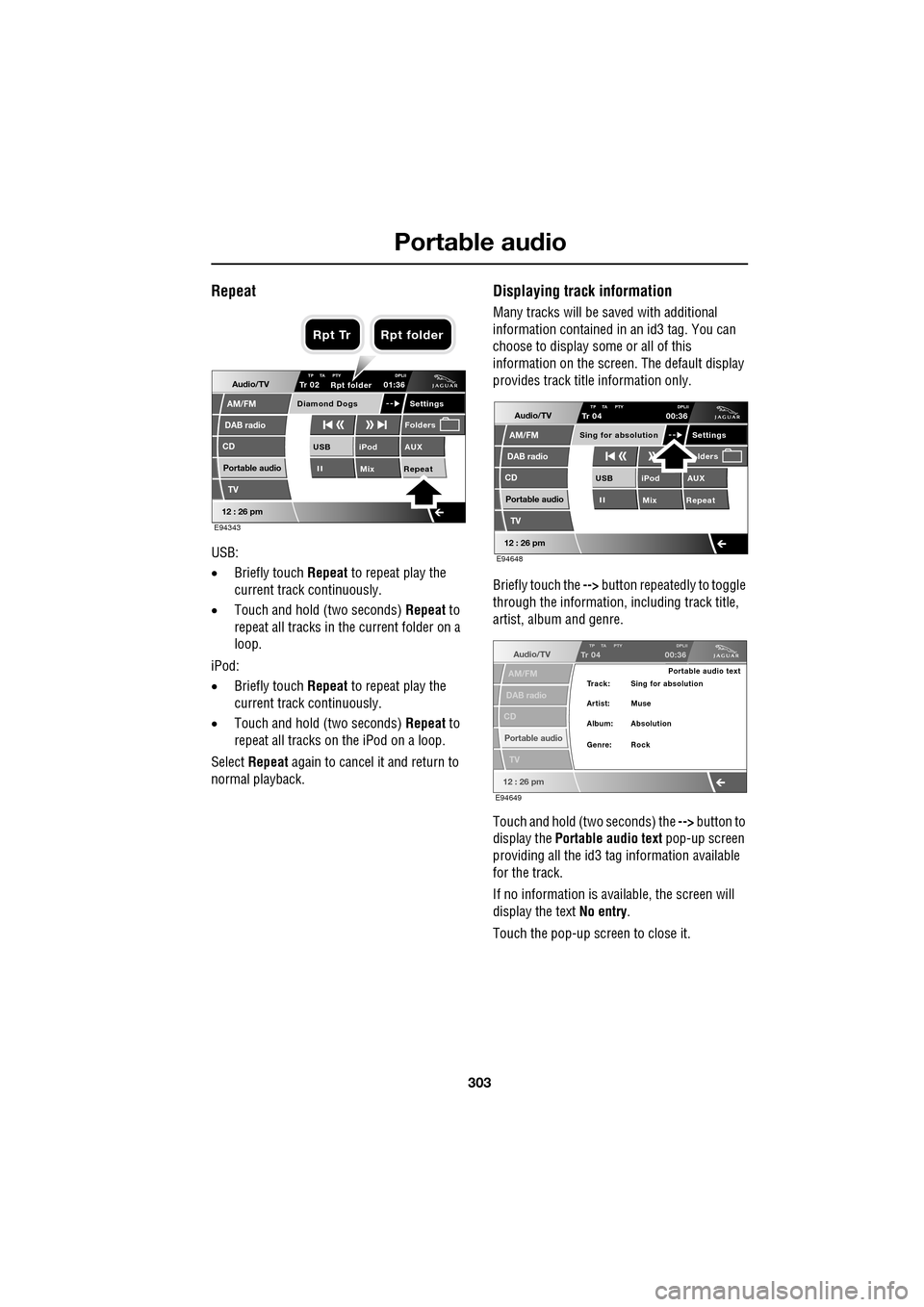
Repeat
USB:
•Briefly touch Repeat to repeat play the
current track continuously.
• Touch and hold (two seconds) Repeat to
repeat all tracks in the current folder on a
loop.
iPod:
• Briefly touch Repeat to repeat play the
current track continuously.
• Touch and hold (two seconds) Repeat to
repeat all tracks on the iPod on a loop.
Select Repeat again to cancel it and return to
normal playback.
Displaying track information
Many tracks will be saved with additional
information contained in an id3 tag. You can
choose to display some or all of this
information on the screen. The default display
provides track title information only.
Briefly touch the --> button repeatedly to toggle
through the information, including track title,
artist, album and genre.
Touch and hold (two seconds) the --> button to
display the Portable audio text pop-up screen
providing all the id3 ta g information available
for the track.
If no information is available, the screen will
display the text No entry.
Touch the pop-up screen to close it.
Audio/TV
DAB radio
CD
AM/FM
12 : 26 pm
iPod AUX
Mix RepeatUSB
Settings
Folders
TP TA PTY DPLIITr 02
Portable audio
TV
Diamond Dogs
01:36
E94343
Rpt folder
Rpt Tr Rpt folder
Audio/TV
DAB radio
CD
AM/FM
12 : 26 pm
iPod AUX
Mix RepeatUSB
Settings lders
TP TA PTY DPLIITr 04
Portable audio
TV
Sing for absolution
00:36
E94648
Audio/TV
DAB radio
CD
AM/FM
12 : 26 pm
TP TA PTY DPLIITr 04
Portable audio
TV
00:36
Portable audio text
Artist: Muse Track: Sing for absolution
Genre: Rock Album: Absolution
E94649
Page 381 of 391
Index
381
A
ABS driving hints . . . . . . . . . . . . . . . . . . 144
ACC . . . . . . . . . . . . . . . . . . . . . . . . . . . . . 159
Accessories . . . . . . . . . . . . . . . . . . . . . . . . 14
Adaptive cruise control . . . . . . . . . . . . . . 159
Adaptive cruise control (ACC)principle of operation . . . . . . . . . . . . . 159
Adaptive dynamics . . . . . . . . . . . . . . . . . 172
Adjusting the headlamps . . . . . . . . . . . . . . 78
Adjusting the steering wheel . . . . . . . . . . . 67 entry and exit mode . . . . . . . . . . . . . . . 67
Advanced emergency brake assist . . . . . 165
AFS . . . . . . . . . . . . . . . . . . . . . . . . . . . . . . 79
Air vents . . . . . . . . . . . . . . . . . . . . . . . . . 115 rear vents . . . . . . . . . . . . . . . . . . . . . . 115
Airbag labels . . . . . . . . . . . . . . . . . . . . . . . 58
Airbag service information . . . . . . . . . . . . 58
Airbag warning lamp . . . . . . . . . . . . . . . . . 57
Alarm trigger information . . . . . . . . . . . . . . . . 39
Alarm sensor override . . . . . . . . . . . . . . . . 22
Approach lamps . . . . . . . . . . . . . . . . . . . . 81
Arming . . . . . . . . . . . . . . . . . . . . . . . . . . . 19
Arming the alarm . . . . . . . . . . . . . . . . . . . 37
alarm indicator . . . . . . . . . . . . . . . . . . . 38
battery-backed sounder . . . . . . . . . . . . 38
full alarm. . . . . . . . . . . . . . . . . . . . . . . . 37
perimeter alarm . . . . . . . . . . . . . . . . . . 37
ASL . . . . . . . . . . . . . . . . . . . . . . . . . . . . . 167
Audible warnings and indicators . . . . . . . 104
Audio portable interface . . . . . . . . . . . . . . . . 131
Audio control. . . . . . . . . . . . . . . . . . . 69, 272
sound settings . . . . . . . . . . . . . . . . . . 272
Audio controls . . . . . . . . . . . . . . . . . . . . . 282 steering wheel controls. . . . . . . . . . . . 282
Audio unit overview. . . . . . . . . . . . . . . . . 269 audio controls . . . . . . . . . . . . . . . . . . . 269
sound system overview . . . . . . . . . . . 270
Autolamps . . . . . . . . . . . . . . . . . . . . . . . . . 76 exit delay. . . . . . . . . . . . . . . . . . . . . . . . 77
windscreen wiper detection . . . . . . . . . 76
Automatic climate control . . . . . . . . . . . . 116 controls . . . . . . . . . . . . . . . . . . . . . . . 116
touch-screen operation . . . . . . . . . . . . 119 Automatic speed limiter . . . . . . . . . . . . . . 167
Automatic speed limiter (ASL)
principle of operation . . . . . . . . . . . . . . 167
Automatic transmission . . . . . . . . . . . . . . 137
automatic mode . . . . . . . . . . . . . . . . . . 139
JaguarDrive selector . . . . . . . . . . . . . . 137
limp-home mode . . . . . . . . . . . . . . . . . 143
manual mode . . . . . . . . . . . . . . . . . . . . 141
message centre display . . . . . . . . . . . . 143
sport mode . . . . . . . . . . . . . . . . . . . . . 140
starting. . . . . . . . . . . . . . . . . . . . . . . . . 139
Autostore control . . . . . . . . . . . . . . . . . . . 274
Auxiliary connections . . . . . . . . . . . . . . . . 299 connecting a USB device . . . . . . . . . . . 300
connecting an auxiliary device . . . . . . . 301
connecting an iPod . . . . . . . . . . . . . . . 300
connecting more than one device . . . . 301
portable audio overview . . . . . . . . . . . . 299
Auxiliary input devices . . . . . . . . . . . . . . . 302 displaying track information. . . . . . . . . 303
playing a portable device . . . . . . . . . . . 302
portable device settings . . . . . . . . . . . . 306
searching a portable device . . . . . . . . . 304
Auxiliary power sockets . . . . . . . . . . . . . . 125
B
Battery charging faults . . . . . . . . . . . . . . . . . . . 213
Battery care . . . . . . . . . . . . . . . . . . . . . . . 212 Battery Monitoring System (BMS) . . . . 213
Battery charging . . . . . . . . . . . . . . . . . . . . 215
Battery warning symbols . . . . . . . . . . . . . 212
Blind spot monitor . . . . . . . . . . . . . . . . . . . 97 sensor blockage . . . . . . . . . . . . . . . . . . . 98
system fault . . . . . . . . . . . . . . . . . . . . . . 98
Block heaters . . . . . . . . . . . . . . . . . . . . . . 134
Bonnet lock . . . . . . . . . . . . . . . . . . . . . . . 195
Booster cables . . . . . . . . . . . . . . . . . . . . . 214
Booster cushions . . . . . . . . . . . . . . . . . . . . 61
Brake fluid check . . . . . . . . . . . . . . . . . . . 206
checking the fluid level. . . . . . . . . . . . . 206
topping up the fluid . . . . . . . . . . . . . . . 207
Brakes
brake pads . . . . . . . . . . . . . . . . . . . . . . 144
pad wear warning. . . . . . . . . . . . . . . . . 144
principle of operation . . . . . . . . . . . . . . 144
Page 384 of 391
Index
384
Essential towing checks . . . . . . . . . . . . . 185
Event data recording . . . . . . . . . . . . . . . . . 11
Exterior mirrors . . . . . . . . . . . . . . . . . . . . . 95adjusting and folding . . . . . . . . . . . . . . 95
mirror dip when reversing. . . . . . . . . . . 96
F
Fascia - controls overview . . . . . . . . . . . . . 12
Fastening the seat belts . . . . . . . . . . . . . . . 51releasing the seat belts . . . . . . . . . . . . . 51
Ferry disarming the tilt alarm sensor . . . . . . . 22
Fire extinguisher . . . . . . . . . . . . . . . . . . . 250
First aid kit . . . . . . . . . . . . . . . . . . . . . . . . 250
Forward alert function . . . . . . . . . . . . . . . 164
Fuel
octane rating . . . . . . . . . . . . . . . . . . . . 175
petrol fuel guard . . . . . . . . . . . . . . . . . 180
refuelling . . . . . . . . . . . . . . . . . . . . . . . 179
Fuel cut-off . . . . . . . . . . . . . . . . . . . . . . . 177 resetting the fuel cut-off . . . . . . . . . . . 178
Fuel filler flap . . . . . . . . . . . . . . . . . . . . . . 178
Fuel guard . . . . . . . . . . . . . . . . . . . . . . . . 180
Fuel quality . . . . . . . . . . . . . . . . . . . . . . . 174 alternative fuels for pe trol engines . . . 175
diesel engined vehicles . . . . . . . . . . . . 176
petrol engined vehicles . . . . . . . . . . . . 174
unleaded fuel. . . . . . . . . . . . . . . . . . . . 175
Fuse box locations . . . . . . . . . . . . . . . . . . 242 engine compartment fuse box. . . . . . . 242
fuse and relay positions . . . . . . . . . . . 244
luggage compartment fuse box. . . . . . 243
passenger compartment fuse box . . . . 243
Fuse specification chart . . . . . . . . . . . . . . 245
G
Garage door transceiver . . . . . . . . . . . . . 128 before programming . . . . . . . . . . . . . . 128
entry gate programming . . . . . . . . . . . 130
information and assistance . . . . . . . . . 130
programming . . . . . . . . . . . . . . . . . . . 129
reprogramming a single garage door opener
button . . . . . . . . . . . . . . . . . . . . . . . 130
rolling code device equipment
programming . . . . . . . . . . . . . . . . . 130
to erase all programming . . . . . . . . . . 129 General information on
radio frequencies . . 16
Global opening and closing. . . . . . . . . . . . . 35 cancelling global opening/closing . . . . . 36
window global closing (not Japan). . . . . 36
window global opening . . . . . . . . . . . . . 35
Glove box . . . . . . . . . . . . . . . . . . . . . . . . . 125
H
Hazard warning flashers . . . . . . . . . . . 77, 250
Head restraints . . . . . . . . . . . . . . . . . . . . . . 44
head restraint removal . . . . . . . . . . . . . . 45
manual head restraints . . . . . . . . . . . . . . 45
tilt adjustment . . . . . . . . . . . . . . . . . . . . 44
whiplash protection . . . . . . . . . . . . . . . . 44
Headlamp adjustment . . . . . . . . . . . . . . . . . 78
Headlamp levelling . . . . . . . . . . . . . . . . . . . 79
halogen headlamps . . . . . . . . . . . . . . . . 79
xenon headlamps . . . . . . . . . . . . . . . . . . 79
Headlamp removal . . . . . . . . . . . . . . . . . . . 81
Headlamp washers . . . . . . . . . . . . . . . . . . . 90
Heated seats . . . . . . . . . . . . . . . . . . . . . . . . 47
Heated steering wheel. . . . . . . . . . . . . . . . . 68
Hints on driving with ABS . . . . . . . . . . . . . 144 ABS braking techniques . . . . . . . . . . . . 145
ABS warning indicator . . . . . . . . . . . . . 144
brake vacuum assist (V6 petrol models
only) . . . . . . . . . . . . . . . . . . . . . . . . 146
Electronic Brakeforce Distribution (EBD) . .
145
Emergency Brake Assist (EBA) . . . . . . . 146
Horn . . . . . . . . . . . . . . . . . . . . . . . . . . . . . . 68
I
Information displays general information . . . . . . . . . . . . . . . 105
Information messages . . . . . . . . . . . . . . . 106
Inspecting safety syst em components . . . 252
Instrument lighting dimmer . . . . . . . . . . . 123
Instrument panel overview . . . . . . . . . . . . . 99 instrument panel . . . . . . . . . . . . . . . . . . 99
Interior lamps . . . . . . . . . . . . . . . . . . . . . . . 80
rear interior lighting . . . . . . . . . . . . . . . . 80
Interior mirror . . . . . . . . . . . . . . . . . . . . . . . 94 auto dimming . . . . . . . . . . . . . . . . . . . . . 94
manual dimming . . . . . . . . . . . . . . . . . . 94
Isofix child restraints . . . . . . . . . . . . . . . . . 62
Page 390 of 391
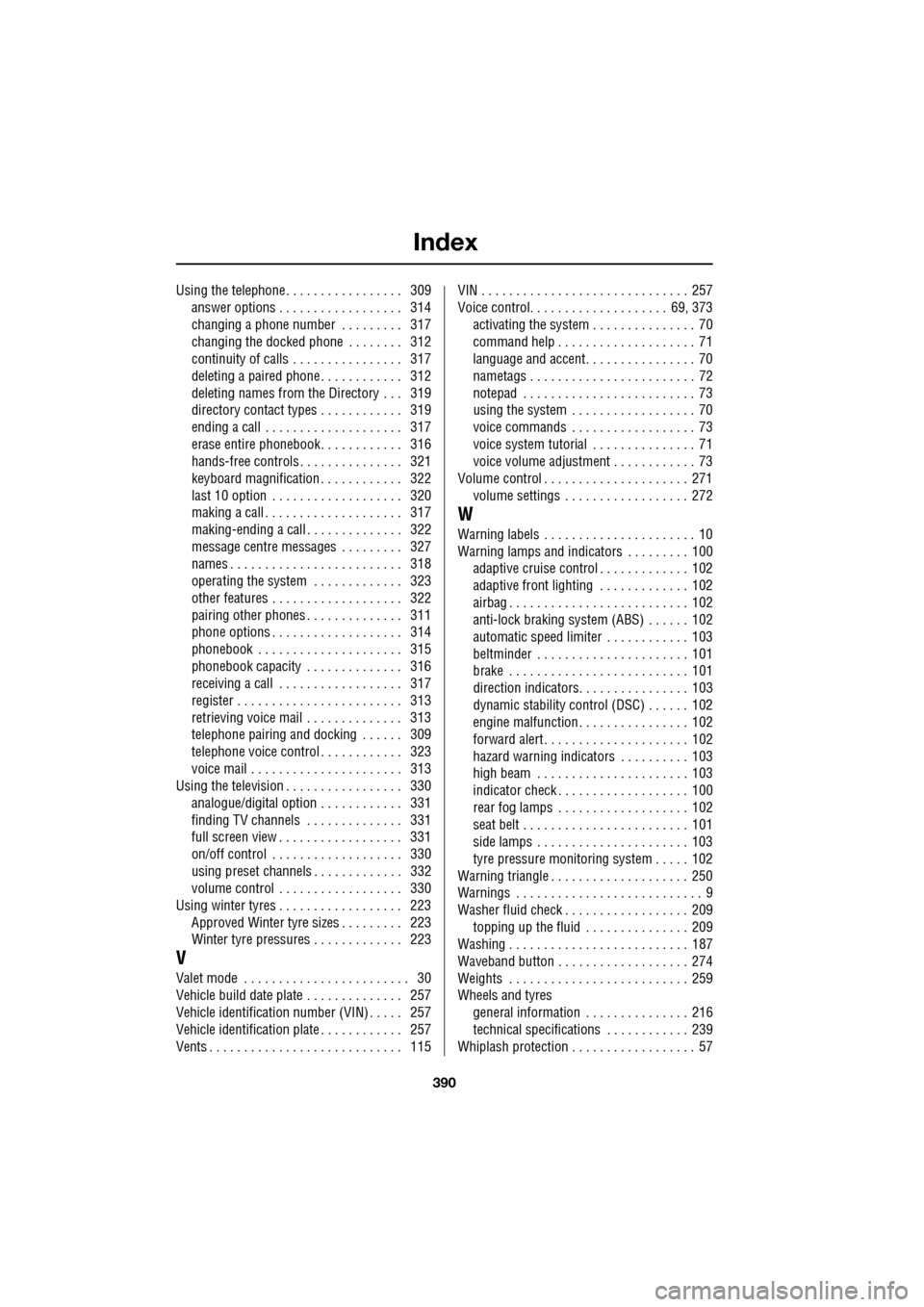
Index
390
Using the telephone . . . . . . . . . . . . . . . . . 309answer options . . . . . . . . . . . . . . . . . . 314
changing a phone number . . . . . . . . . 317
changing the docked phone . . . . . . . . 312
continuity of calls . . . . . . . . . . . . . . . . 317
deleting a paired phone . . . . . . . . . . . . 312
deleting names from the Directory . . . 319
directory contact types . . . . . . . . . . . . 319
ending a call . . . . . . . . . . . . . . . . . . . . 317
erase entire phonebook. . . . . . . . . . . . 316
hands-free controls . . . . . . . . . . . . . . . 321
keyboard magnification . . . . . . . . . . . . 322
last 10 option . . . . . . . . . . . . . . . . . . . 320
making a call . . . . . . . . . . . . . . . . . . . . 317
making-ending a call . . . . . . . . . . . . . . 322
message centre messages . . . . . . . . . 327
names . . . . . . . . . . . . . . . . . . . . . . . . . 318
operating the system . . . . . . . . . . . . . 323
other features . . . . . . . . . . . . . . . . . . . 322
pairing other phones . . . . . . . . . . . . . . 311
phone options . . . . . . . . . . . . . . . . . . . 314
phonebook . . . . . . . . . . . . . . . . . . . . . 315
phonebook capacity . . . . . . . . . . . . . . 316
receiving a call . . . . . . . . . . . . . . . . . . 317
register . . . . . . . . . . . . . . . . . . . . . . . . 313
retrieving voice mail . . . . . . . . . . . . . . 313
telephone pairing and do cking . . . . . . 309
telephone voice control . . . . . . . . . . . . 323
voice mail . . . . . . . . . . . . . . . . . . . . . . 313
Using the television . . . . . . . . . . . . . . . . . 330
analogue/digital option . . . . . . . . . . . . 331
finding TV channels . . . . . . . . . . . . . . 331
full screen view . . . . . . . . . . . . . . . . . . 331
on/off control . . . . . . . . . . . . . . . . . . . 330
using preset channels . . . . . . . . . . . . . 332
volume control . . . . . . . . . . . . . . . . . . 330
Using winter tyres . . . . . . . . . . . . . . . . . . 223 Approved Winter tyre sizes . . . . . . . . . 223
Winter tyre pressures . . . . . . . . . . . . . 223
V
Valet mode . . . . . . . . . . . . . . . . . . . . . . . . 30
Vehicle build date plate . . . . . . . . . . . . . . 257
Vehicle identification num ber (VIN) . . . . . 257
Vehicle identification plate . . . . . . . . . . . . 257
Vents . . . . . . . . . . . . . . . . . . . . . . . . . . . . 115 VIN . . . . . . . . . . . . . . . . . . . . . . . . . . . . . . 257
Voice control. . . . . . . . . . . . . . . . . . . . 69, 373
activating the system . . . . . . . . . . . . . . . 70
command help . . . . . . . . . . . . . . . . . . . . 71
language and accent. . . . . . . . . . . . . . . . 70
nametags . . . . . . . . . . . . . . . . . . . . . . . . 72
notepad . . . . . . . . . . . . . . . . . . . . . . . . . 73
using the system . . . . . . . . . . . . . . . . . . 70
voice commands . . . . . . . . . . . . . . . . . . 73
voice system tutorial . . . . . . . . . . . . . . . 71
voice volume adjustment . . . . . . . . . . . . 73
Volume control . . . . . . . . . . . . . . . . . . . . . 271
volume settings . . . . . . . . . . . . . . . . . . 272
W
Warning labels . . . . . . . . . . . . . . . . . . . . . . 10
Warning lamps and indicators . . . . . . . . . 100adaptive cruise control . . . . . . . . . . . . . 102
adaptive front lighting . . . . . . . . . . . . . 102
airbag . . . . . . . . . . . . . . . . . . . . . . . . . . 102
anti-lock braking system (ABS) . . . . . . 102
automatic speed limiter . . . . . . . . . . . . 103
beltminder . . . . . . . . . . . . . . . . . . . . . . 101
brake . . . . . . . . . . . . . . . . . . . . . . . . . . 101
direction indicators. . . . . . . . . . . . . . . . 103
dynamic stability contro l (DSC) . . . . . . 102
engine malfunction . . . . . . . . . . . . . . . . 102
forward alert . . . . . . . . . . . . . . . . . . . . . 102
hazard warning indicators . . . . . . . . . . 103
high beam . . . . . . . . . . . . . . . . . . . . . . 103
indicator check . . . . . . . . . . . . . . . . . . . 100
rear fog lamps . . . . . . . . . . . . . . . . . . . 102
seat belt . . . . . . . . . . . . . . . . . . . . . . . . 101
side lamps . . . . . . . . . . . . . . . . . . . . . . 103
tyre pressure monitoring system . . . . . 102
Warning triangle . . . . . . . . . . . . . . . . . . . . 250
Warnings . . . . . . . . . . . . . . . . . . . . . . . . . . . 9
Washer fluid check . . . . . . . . . . . . . . . . . . 209 topping up the fluid . . . . . . . . . . . . . . . 209
Washing . . . . . . . . . . . . . . . . . . . . . . . . . . 187
Waveband button . . . . . . . . . . . . . . . . . . . 274
Weights . . . . . . . . . . . . . . . . . . . . . . . . . . 259
Wheels and tyres
general information . . . . . . . . . . . . . . . 216
technical specifications . . . . . . . . . . . . 239
Whiplash protection . . . . . . . . . . . . . . . . . . 57