ECO mode JAGUAR XF 2009 1.G User Guide
[x] Cancel search | Manufacturer: JAGUAR, Model Year: 2009, Model line: XF, Model: JAGUAR XF 2009 1.GPages: 391, PDF Size: 19.32 MB
Page 117 of 391
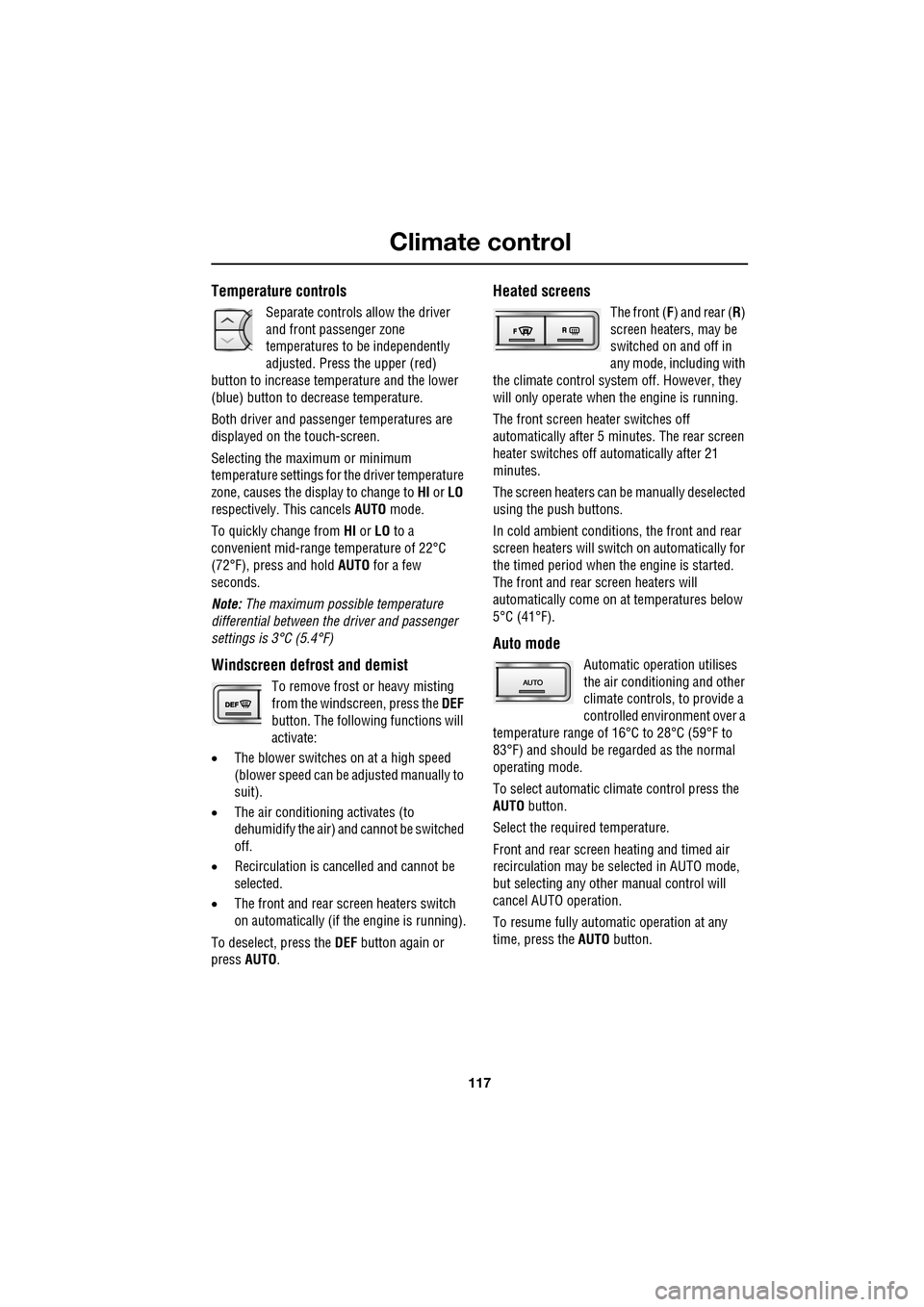
117
Climate control
Temperature controls
Separate controls allow the driver
and front passenger zone
temperatures to be independently
adjusted. Press the upper (red)
button to increase temperature and the lower
(blue) button to decrease temperature.
Both driver and passenger temperatures are
displayed on the touch-screen.
Selecting the maximum or minimum
temperature settings for the driver temperature
zone, causes the disp lay to change to HI or LO
respectively. This cancels AUTO mode.
To quickly change from HI or LO to a
convenient mid-rang e temperature of 22°C
(72°F), press and hold AUTO for a few
seconds.
Note: The maximum possible temperature
differential between the driver and passenger
settings is 3°C (5.4°F)
Windscreen defrost and demist
To remove frost or heavy misting
from the windscreen, press the DEF
button. The following functions will
activate:
• The blower switches on at a high speed
(blower speed can be adjusted manually to
suit).
• The air conditioni ng activates (to
dehumidify the air) and cannot be switched
off.
• Recirculation is canc elled and cannot be
selected.
• The front and rear screen heaters switch
on automatically (if th e engine is running).
To deselect, press the DEF button again or
press AUTO .
Heated screens
The front (F) and rear ( R)
screen heaters, may be
switched on and off in
any mode, including with
the climate control system off. However, they
will only operate when the engine is running.
The front screen heater switches off
automatically after 5 minutes. The rear screen
heater switches off automatically after 21
minutes.
The screen heaters can be manually deselected
using the push buttons.
In cold ambient conditions, the front and rear
screen heaters will switch on automatically for
the timed period when the engine is started.
The front and rear screen heaters will
automatically come on at temperatures below
5°C (41°F).
Auto mode
Automatic operation utilises
the air conditioning and other
climate controls , to provide a
controlled environment over a
temperature range of 16°C to 28°C (59°F to
83°F) and should be rega rded as the normal
operating mode.
To select automatic climate control press the
AUTO button.
Select the required temperature.
Front and rear screen heating and timed air
recirculation may be se lected in AUTO mode,
but selecting any othe r manual control will
cancel AUTO operation.
To resume fully automatic operation at any
time, press the AUTO button.
Page 120 of 391
Climate control
120
Note: If the air vents are programmed to rotate,
they will rotate into th e fascia when climate
control is turned off.
External temperature
The external temperature is displayed at the top
of the Climate menu.
Smog/pollution filter
The smog filter operates in conjunction with
the air recirculation feature, to reduce
pollutants entering the vehicle.
When pollution is detected by the smog
sensor, air recirculation is selected
automatically, to help prevent pollution
entering the vehicle.
The sensitivity of the smog sensor can be
adjusted for personal preference or the sensor
can be switched off entirely, as follows:
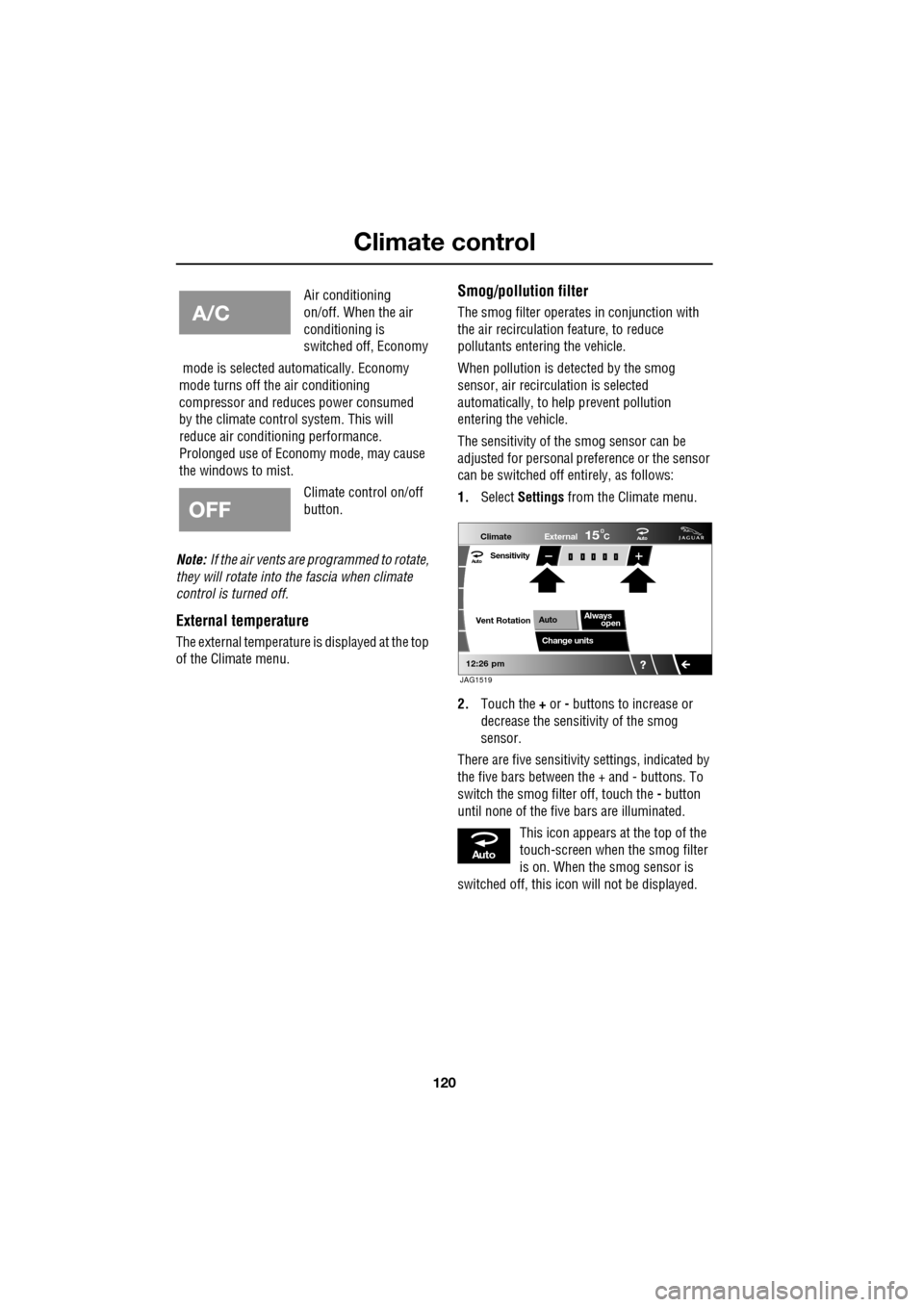
1. Select Settings from the Climate menu.
2. Touch the + or - buttons to increase or
decrease the sensitivity of the smog
sensor.
There are five sensitivit y settings, indicated by
the five bars between the + and - buttons. To
switch the smog filter off, touch the - button
until none of the five bars are illuminated.
This icon appears at the top of the
touch-screen when the smog filter
is on. When the smog sensor is
switched off, this icon will not be displayed.
Air conditioning
on/off. When the air
conditioning is
switched off, Economy
mode is selected automatically. Economy
mode turns off the air conditioning
compressor and redu ces power consumed
by the climate control system. This will
reduce air conditioning performance.
Prolonged use of Econom y mode, may cause
the windows to mist.
Climate control on/off
button.
Aut o
12:26 pm
Aut oClimate
Vent RotationExternal
Sensitivity
Change unitsAlways
open
Auto
15C
JAG1519
Aut o
Page 129 of 391
129
Convenience features
To erase all programming
For first time programming, ensure that the
engine is switched off:
1.Ensure that the ignition system is in
convenience mode.
2. Press and hold the two outer buttons on
the transceiver in th e rear-view mirror.
Keep the buttons pressed until the
indicator lamp begins to flash (this will
take approximately 20 seconds), then
release the buttons.
All memories in the gara ge door opener have
now been cleared.
Note: Do not perform this procedure when
programming the addi tional garage door
opener buttons.
Programming
Ensuring that the engine is switched off:
1. Ensure that the ignition system is on.
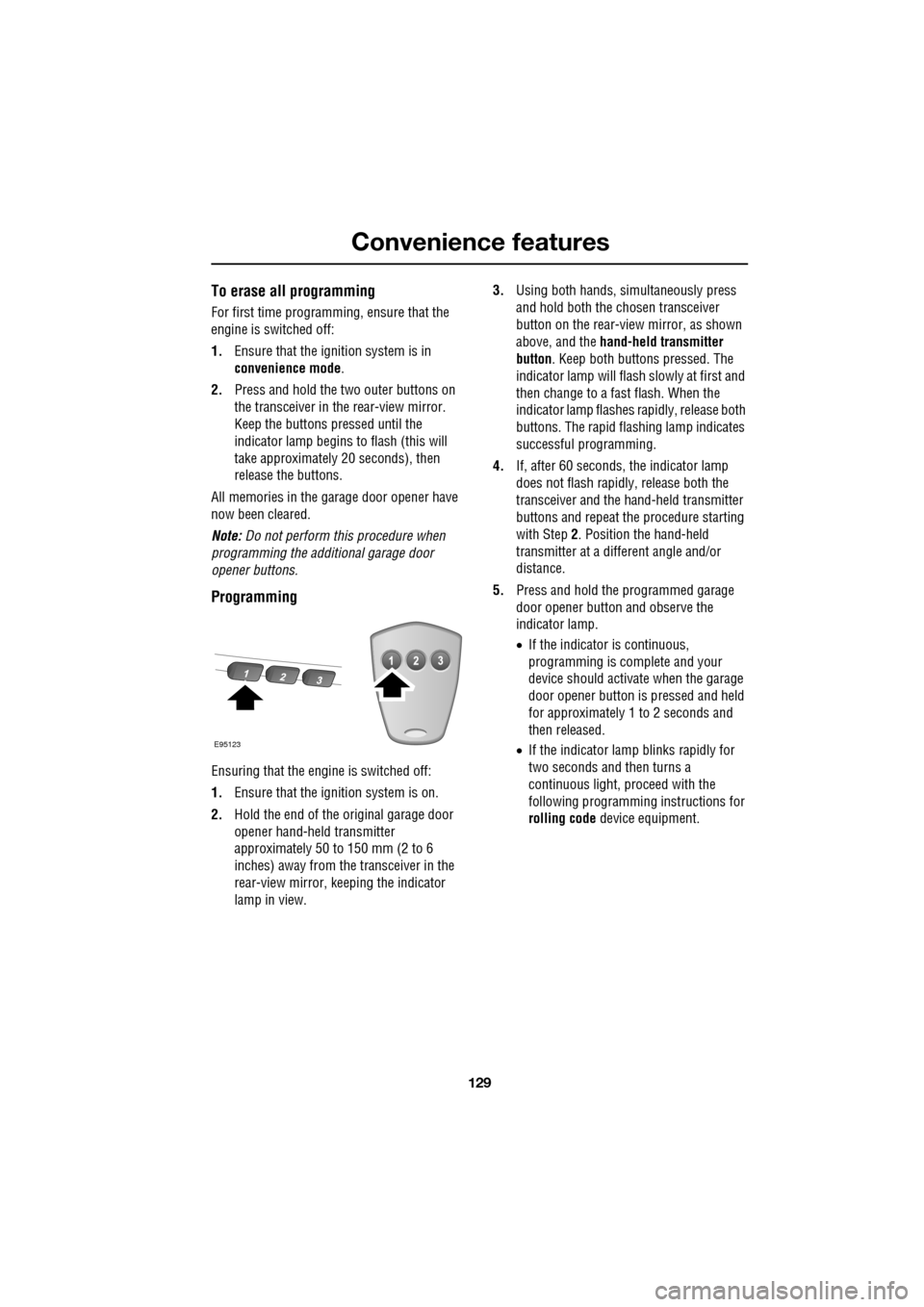
2. Hold the end of the original garage door
opener hand-held transmitter
approximately 50 to 150 mm (2 to 6
inches) away from the transceiver in the
rear-view mirror, keeping the indicator
lamp in view. 3.
Using both hands , simultaneously press
and hold both the chosen transceiver
button on the rear-view mirror, as shown
above, and the hand-held transmitter
button. Keep both buttons pressed. The
indicator lamp will flash slowly at first and
then change to a fast flash. When the
indicator lamp flashes rapidly, release both
buttons. The rapid flas hing lamp indicates
successful programming.
4. If, after 60 seconds, the indicator lamp
does not flash rapidl y, release both the
transceiver and the hand-held transmitter
buttons and repeat the procedure starting
with Step 2. Position the hand-held
transmitter at a diffe rent angle and/or
distance.
5. Press and hold the programmed garage
door opener button and observe the
indicator lamp.
•If the indicator is continuous,
programming is complete and your
device should activate when the garage
door opener button is pressed and held
for approximately 1 to 2 seconds and
then released.
• If the indicator lamp blinks rapidly for
two seconds and then turns a
continuous light, pr oceed with the
following programming instructions for
rolling code device equipment.
E95123
Page 132 of 391
Starting the engine
132
GENERAL INFORMATION
START/STOP button
The START/STOP button is used to start or
stop the engine, or to turn on the ignition
without starting the engine.
Note: The START/STOP button will only be
operational if a valid Jaguar Smart key is
detected within the vehicle.
Switching on the ignition
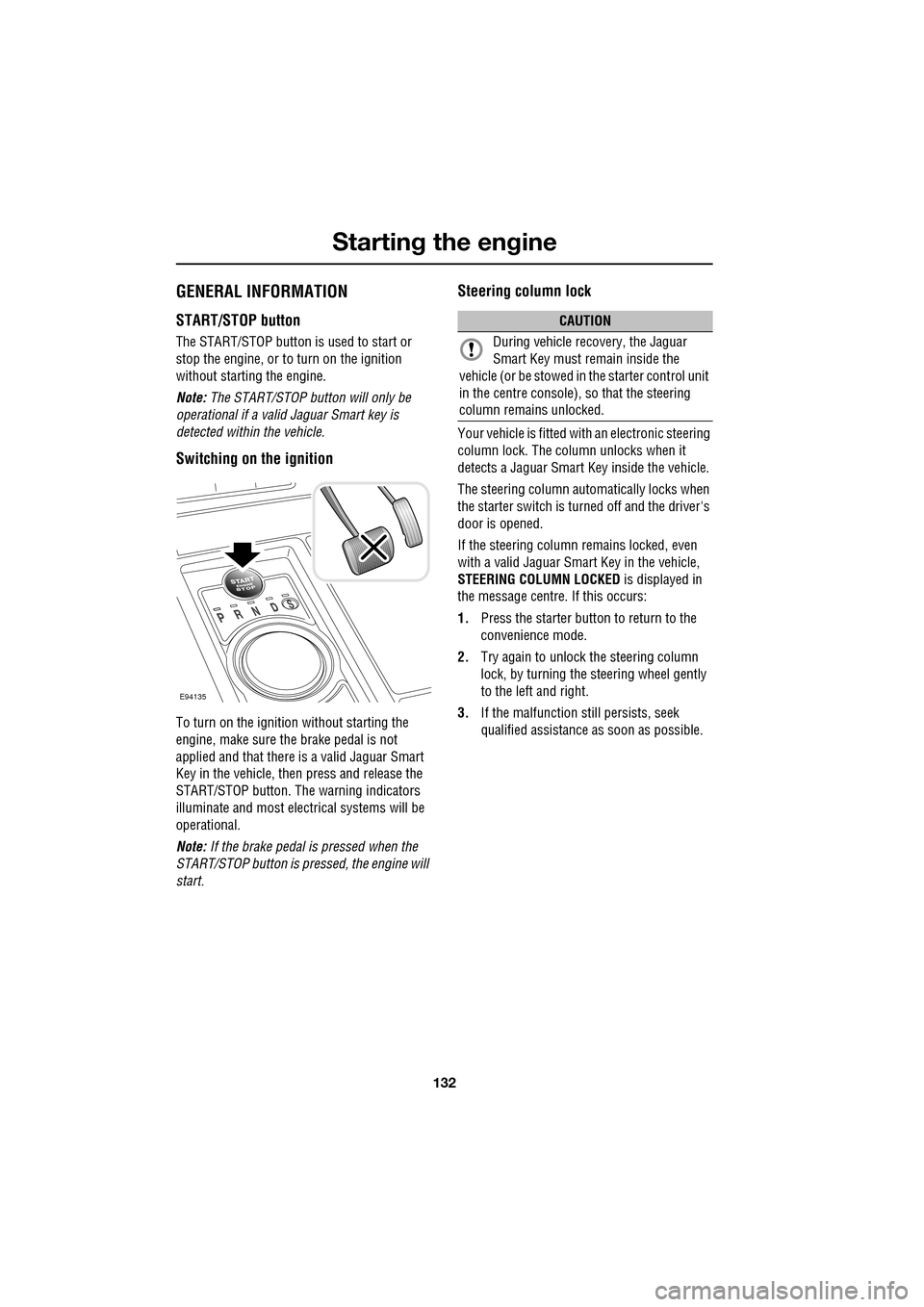
To turn on the ignition without starting the
engine, make sure the brake pedal is not
applied and that there is a valid Jaguar Smart
Key in the vehicle, then press and release the
START/STOP button. The warning indicators
illuminate and most electr ical systems will be
operational.
Note: If the brake pedal is pressed when the
START/STOP button is pressed, the engine will
start.
Steering column lock
Your vehicle is fitted with an electronic steering
column lock. The column unlocks when it
detects a Jaguar Smart Key inside the vehicle.
The steering column automatically locks when
the starter switch is turned off and the driver's
door is opened.
If the steering column remains locked, even
with a valid Jaguar Smart Key in the vehicle,
STEERING COLUMN LOCKED is displayed in
the message centre. If this occurs:
1. Press the starter button to return to the
convenience mode.
2. Try again to unlock the steering column
lock, by turning the steering wheel gently
to the left and right.
3. If the malfunction still persists, seek
qualified assistance as soon as possible.
E94135
CAUTION
During vehicle recovery, the Jaguar
Smart Key must remain inside the
vehicle (or be stowed in the starter control unit
in the centre console), so that the steering
column remains unlocked.
Page 133 of 391
133
Starting the engine
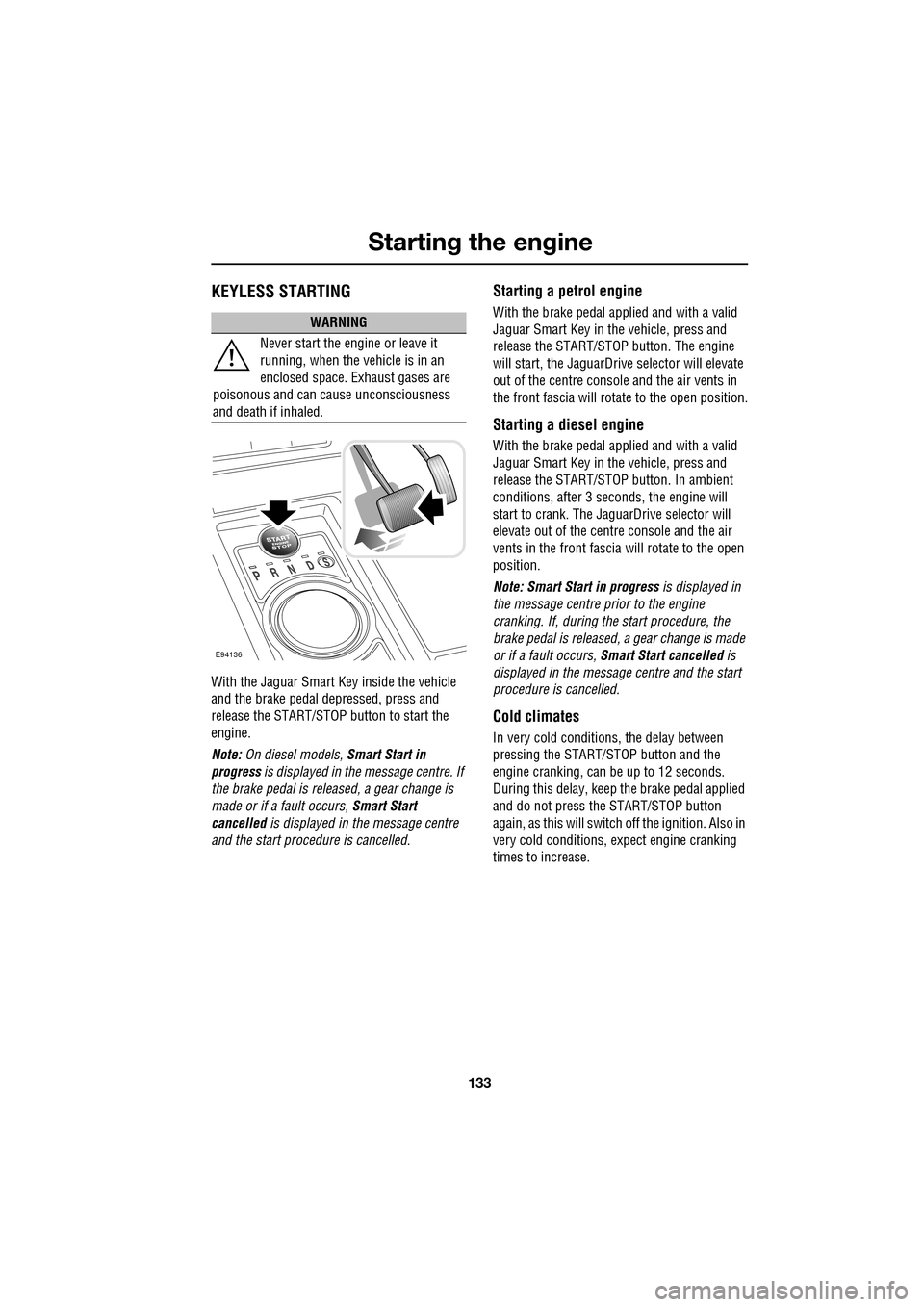
KEYLESS STARTING
With the Jaguar Smart Key inside the vehicle
and the brake pedal depressed, press and
release the START/STOP button to start the
engine.
Note: On diesel models, Smart Start in
progress is displayed in the message centre. If
the brake pedal is released, a gear change is
made or if a fault occurs, Smart Start
cancelled is displayed in the message centre
and the start procedure is cancelled.
Starting a petrol engine
With the brake pedal applied and with a valid
Jaguar Smart Key in the vehicle, press and
release the START/STOP button. The engine
will start, the JaguarDrive selector will elevate
out of the centre console and the air vents in
the front fascia will ro tate to the open position.
Starting a diesel engine
With the brake pedal applied and with a valid
Jaguar Smart Key in the vehicle, press and
release the START/STOP button. In ambient
conditions, after 3 seconds, the engine will
start to crank. The JaguarDrive selector will
elevate out of the centre console and the air
vents in the front fascia will rotate to the open
position.
Note: Smart Start in progress is displayed in
the message centre prior to the engine
cranking. If, during the start procedure, the
brake pedal is released, a gear change is made
or if a fault occurs, Smart Start cancelled is
displayed in the message centre and the start
procedure is cancelled.
Cold climates
In very cold conditions, the delay between
pressing the START/STOP button and the
engine cranking, can be up to 12 seconds.
During this delay, keep the brake pedal applied
and do not press the START/STOP button
again, as this will switch off the ignition. Also in
very cold conditions, expect engine cranking
times to increase.
WARNING
Never start the engine or leave it
running, when the vehicle is in an
enclosed space. Exhaust gases are
poisonous and can cause unconsciousness
and death if inhaled.
E94136
Page 138 of 391
Transmission
138
P should be selected before switching off the
engine. However, it is possible to switch the
engine off with R, D or S selected - the selector
will automatica lly select P, while retracting into
the centre console.
Note: If the engine is switched off with N
selected, the system will wait for 10 minutes
before selecting P. This procedure is to allow
the vehicle to be conveyed through a car wash
only and should not be used for vehicle
recovery purposes.
To prevent the transmission from
automatically selecting P (e.g. for vehicle
recovery purposes), it is necessary to activate
the Emergency Park Release.
See TRANSPORTING THE VEHICLE
(page 254).
Selector positions
P - Park: Use when parked. In this position the
transmission is locked, do not attempt to select
P if the vehicle is moving.
Note: P will be selected automatically when the
engine is switched off.
R - Reverse: Do not select if the vehicle is
moving forward.
N - Neutral: Disconnects drive to the wheels.
Use the parking brake when stopping
temporarily with N selected.
D - Drive: Gear changing is automatic for all six
forward gears. The shift points are determined
by accelerator pedal pos ition and road speed,
to provide the best ba lance of performance,
refinement and fuel economy, for the large
majority of driving conditions.
S - Sport: Gear changing is automatic for all six
forward gears, with modified gear shift points
to maximise the ve hicle response in
demanding driving condi tions. This mode is
not suitable for town or highway cruising. Note:
Both D and S positions also offer
additional features, wh ich are listed under
Automatic mode and Sport mode , later in this
section.
Stationary vehicle
When the vehicle is stationary, the selector
may be left in D or S, unless the vehicle is to be
parked. When stopping fo r extended periods,
either select P or apply the parking brake and
select N.
Selector interlock
The transmission is equippe d with an interlock,
to prevent inadvertent selection of a drive gear
(D , S or R) from the P or N positions. To
release the interlock to select a drive gear,
press the brake pedal while making the
selection.
Ensure the required driv ing range has selected
prior to releasing the brake pedal. The range
indicator ( R, D or S) on the selector and
message centre disp lays, will illuminate
continuously to confirm selection.
Note: If the brake pedal is released too early
during selector rotation from P or N to a driving
range ( R, D or S), then the selected range will
not be engaged. The selected range will flash
on the selector and message centre displays.
To obtain the selected range, press the brake
pedal, select P or N and reselect the required
range, ensuring the brake pedal is depressed.
If N is selected for less than 2 seconds (e.g.
when moving the selector between R and D),
the interlock will not ac tivate and the brake
pedal will not need to be pressed.
Note: The interlock is deactivated when the
vehicle is travelling at more than 5 km/h
(3 mph).
Page 140 of 391
Transmission
140
Fast off
Activated when rapidly lifting off the
accelerator pedal and takes account of road
gradient. This feature inhibits up-shifts,
enhancing pe rformance.
Note: If Sport mode is selected, driver type
recognition will vary the activation of this
feature according to driving style.
Shift adapt under braking
Under braking, the transmission will vary the
down-shift point in proportion to braking effort
and road gradient. This feature works in
conjunction with the posit ive torque function,
resulting in a smoother down-shift.
Note: If Sport mode is selected, driver type
recognition will vary the activation of this
feature according to driving style.
Corner recognition
Inhibits up-shifts during cornering, to provide
improved vehicle balance.
Note: If Sport mode is selected, driver type
recognition will vary the activation of this
feature according to driving style.
Road gradient recognition
When the vehicle is being driven on an uphill
gradient, the transmission adapts the shift
pattern to make better use of engine power.
When driving on a long downhill gradient, the
transmission may automatically select a lower
gear, to increase engi ne braking. Selecting
Sport mode (S ) will increase the tendency of
the transmission to select a lower gear in these
conditions, further incr easing engine braking.
Note: It is also possible to manually select a
lower gear to increase e ngine braking via use of
the shift paddles.
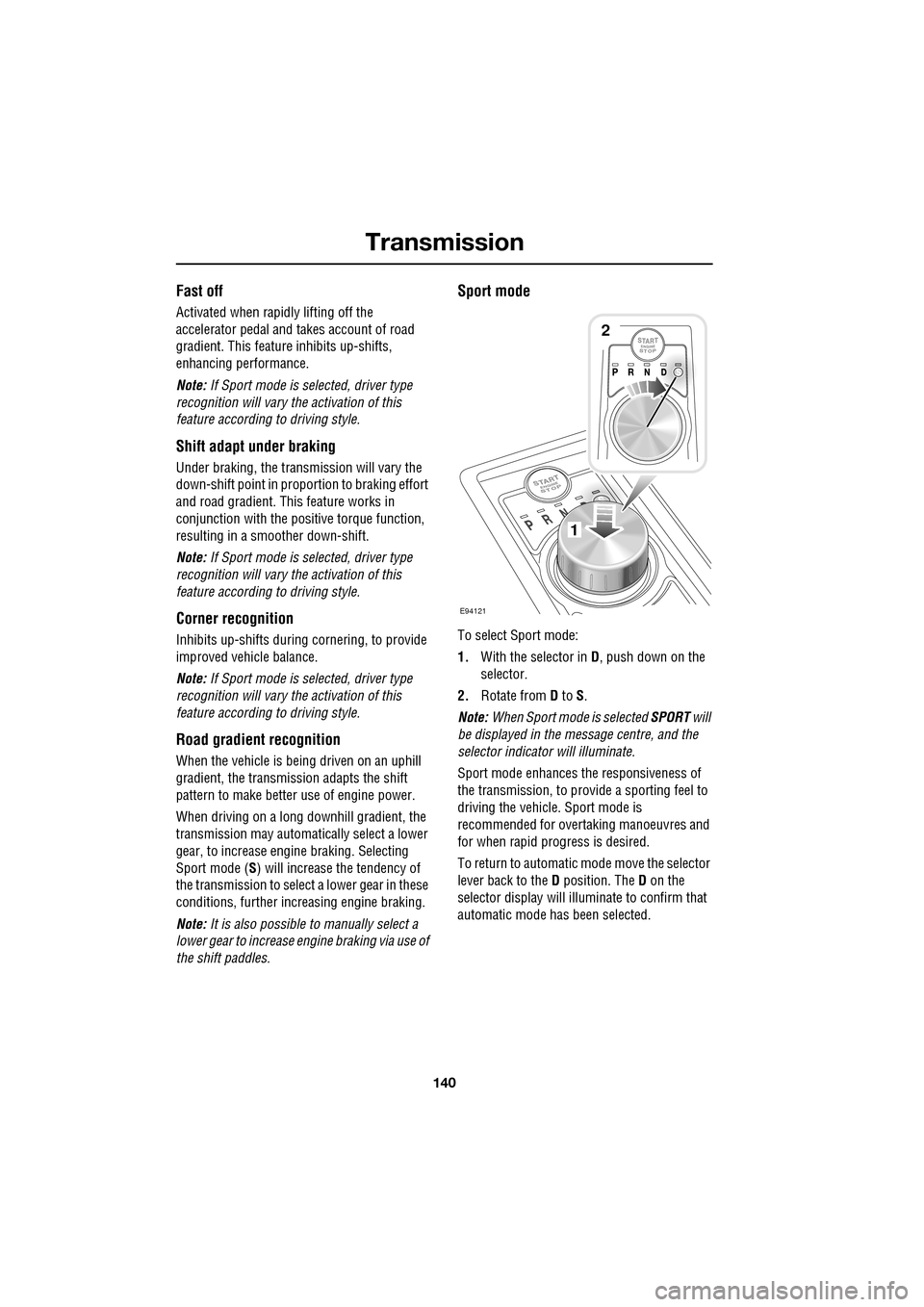
Sport mode
To select Sport mode:
1. With the selector in D, push down on the
selector.
2. Rotate from D to S.
Note: When Sport mode is selected SPORT will
be displayed in the message centre, and the
selector indicator will illuminate.
Sport mode enhances th e responsiveness of
the transmission, to prov ide a sporting feel to
driving the vehicle. Sport mode is
recommended for over taking manoeuvres and
for when rapid progress is desired.
To return to automatic m ode move the selector
lever back to the D position. The D on the
selector display will illuminate to confirm that
automatic mode has been selected.
E94121
1
2
Page 141 of 391
141
Transmission
Driver type recognition
In Sport mode, the transmission monitors
driving style and in combination with sensors
in the vehicle, varies the shift schedule,
fast-off, corner recognition and shift adapt
under braking functions, according to the
driving style.
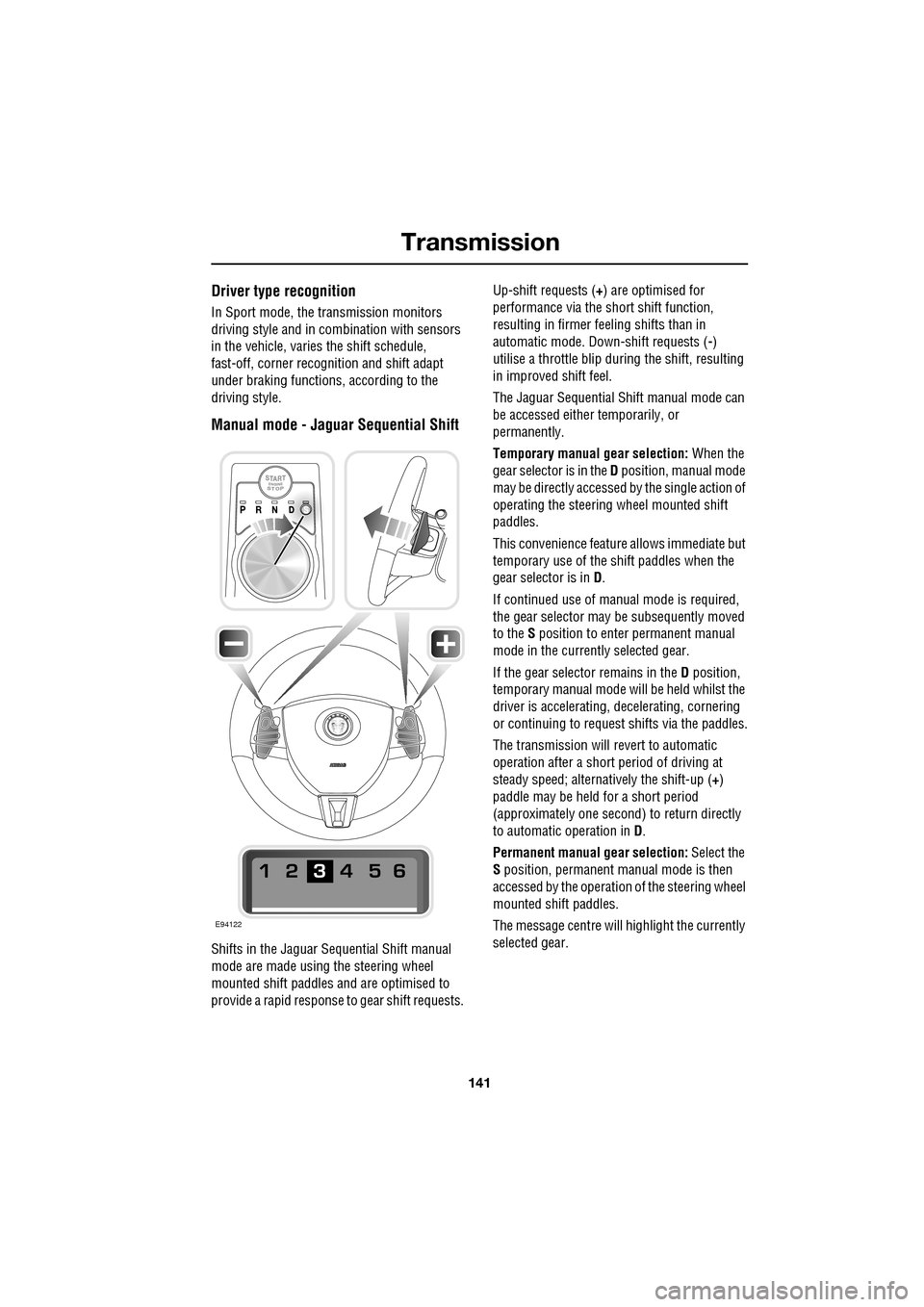
Manual mode - Jaguar Sequential Shift
Shifts in the Jaguar Sequential Shift manual
mode are made using the steering wheel
mounted shift paddles and are optimised to
provide a rapid response to gear shift requests. Up-shift requests (
+) are optimised for
performance via the s hort shift function,
resulting in firmer feeling shifts than in
automatic mode. Down-shift requests ( -)
utilise a throttle blip duri ng the shift, resulting
in improved shift feel.
The Jaguar Sequential Shift manual mode can
be accessed either temporarily, or
permanently.
Temporary manual gear selection: When the
gear selector is in the D position, manual mode
may be directly accessed by the single action of
operating the steering wheel mounted shift
paddles.
This convenience feature allows immediate but
temporary use of the sh ift paddles when the
gear selector is in D.
If continued use of manua l mode is required,
the gear selector may be subsequently moved
to the S position to enter permanent manual
mode in the currently selected gear.
If the gear selector remains in the D position,
temporary manual mode will be held whilst the
driver is accelerating, decelerating, cornering
or continuing to request shifts via the paddles.
The transmission will revert to automatic
operation after a short pe riod of driving at
steady speed; alternatively the shift-up ( +)
paddle may be held for a short period
(approximately one second) to return directly
to automatic operation in D .
Permanent manual gear selection: Select the
S position, permanent manual mode is then
accessed by the operation of the steering wheel
mounted shift paddles.
The message centre will highlight the currently
selected gear.
E94122
Page 142 of 391
Transmission
142
Note: When the transmission is set to
permanent manual mode (i.e. using the
paddles to change gear while in Sport mode)
and Dynamic mode is selected, transmission
up-shifts are fully controlled by the driver. This
means that the transmissi on will not change up
a gear automatically, even when the vehicle's
rev limit is reached. When the rev limit is
reached, the gear position indicator in the
message centre will glow amber, to indicate
that the next gear should be selected.
To exit from the Jaguar Sequential Shift
permanent manual mode, either pull and hold
the shift-up paddle for approximately one
second (to return directly to automatic
operation in S ), or rotate the gear selector to
the D position. The transmission will revert to
the D automatic shift mode.
Manual operation
To shift-up, briefly pull the shift-up ( +) paddle
on the right-hand side of the steering wheel
towards you.
To shift-down, briefly pull the shift-down
paddle ( -) on the left-hand side of the steering
wheel towards you.
The message centre display will change to
highlight the requested gear.
Note: The transmission will inhibit up-shifts
and down-shifts if the requested shift would
result in an engine speed outside the normal
operating range of the engine. If this occurs,
the message centre will briefly display the
requested gear selection, but will return to
displaying the current gear.
The Jaguar Sequential Shift mode also has the
following features: Kick-down:
Operation of kick-down in Jaguar
Sequential Shift mode will override the
currently selected gear. The lowest available
gear will be selected for maximum acceleration
and will be highlighted in the message centre
display. Subsequent manu al shifts may then be
selected as usual.
Positive torque: Provides throttle blips on
down-shifts, improving shift feel and response.
Shift assist: The transmission will
automatically up-shift at the engine speed
redline in Jaguar Sequential Shift mode, as if
commanded manually.
The transmission will automatically
down-shift, when the engine speed drops too
low for the currently selected gear.
When the vehicle approaches, or comes to
rest, second gear is au tomatically selected.
Subsequent pull-aways will occur in second
gear, unless the accelerator pedal demand is
high or a down-shift is manually selected, in
which case, first gear will be selected.
In all cases the message centre will display the
current gear.
Note: During sustained braking, if a down-shift
is selected at a speed which would result in the
engine speed exceeding its normal operating
range, the gear change wi ll be indicated in the
message centre, but the down-shift will be
delayed until the vehi cle speed has reduced
sufficiently for the gear selection to be made,
without causing the engine speed to exceed its
normal operating range.
Page 148 of 391

Parking aid
148
PRINCIPLE OF OPERATION
Note: Once the system has been activated by
selecting reverse or using the switch, the front
and rear sensors are active when the gear
selector is in neutral. Therefore, if an obstacle
is detected an audible warning tone will sound.
The parking aid is automatically in standby
when the ignition is on and provides the driver
with information on most obstructions, and
their distance from the vehicle, when
manoeuvring. This is ac hieved by using four
ultrasonic sensors on each bumper.
When objects are detected the Park aid will
emit a warning tone which increases in
frequency and then becomes constant, as the
vehicle gets closer to the object.
USING THE PARKING AID
Touch-screen
To set the volume of the parking aid warning
tones:
• Select Vehicle from the touch-screen
Home menu, then select Veh. settings.
• Select Parking , then select Vol. presets.
Touch the Parking aid + or - button to increase
or decrease the warning tone volume.
Note: This adjusts both front and rear speaker
volume.
WARNINGS
It remains the driver’s responsibility
to be vigilant when reversing. Small
children or animals may not be
detected by the system.
It remains the driver’s responsibility
to detect obstacles and estimate the
vehicle’s distance from them. Some
overhanging objects , barriers, thin
obstructions or painted surfaces which could
possibly cause damage to the vehicle may not
be detected by the system. Always be vigilant
when reversing.
CAUTIONS
Objects moving away from the vehicle
will be reported. Howe ver, whilst driving
away, object warning may be temporarily
reported due to ground reflection.
Systems using the same frequency
band as the front parking sensors, may
cause irregular tones to be emitted.
mirror dip
Vol. presetsOff
On
Vehicle
Security
ParkingReverse
12 : 26 pm
Navigat
Phone
Vehicle
Display set.
Preferences
Button audioParking aid
Vol. presets
AVC Low
MediumHigh
12 : 26 pm
Valet mode
E94137