Traffic info JAGUAR XF 2009 1.G User Guide
[x] Cancel search | Manufacturer: JAGUAR, Model Year: 2009, Model line: XF, Model: JAGUAR XF 2009 1.GPages: 391, PDF Size: 19.32 MB
Page 338 of 391
Navigation system
338
MAIN MENU
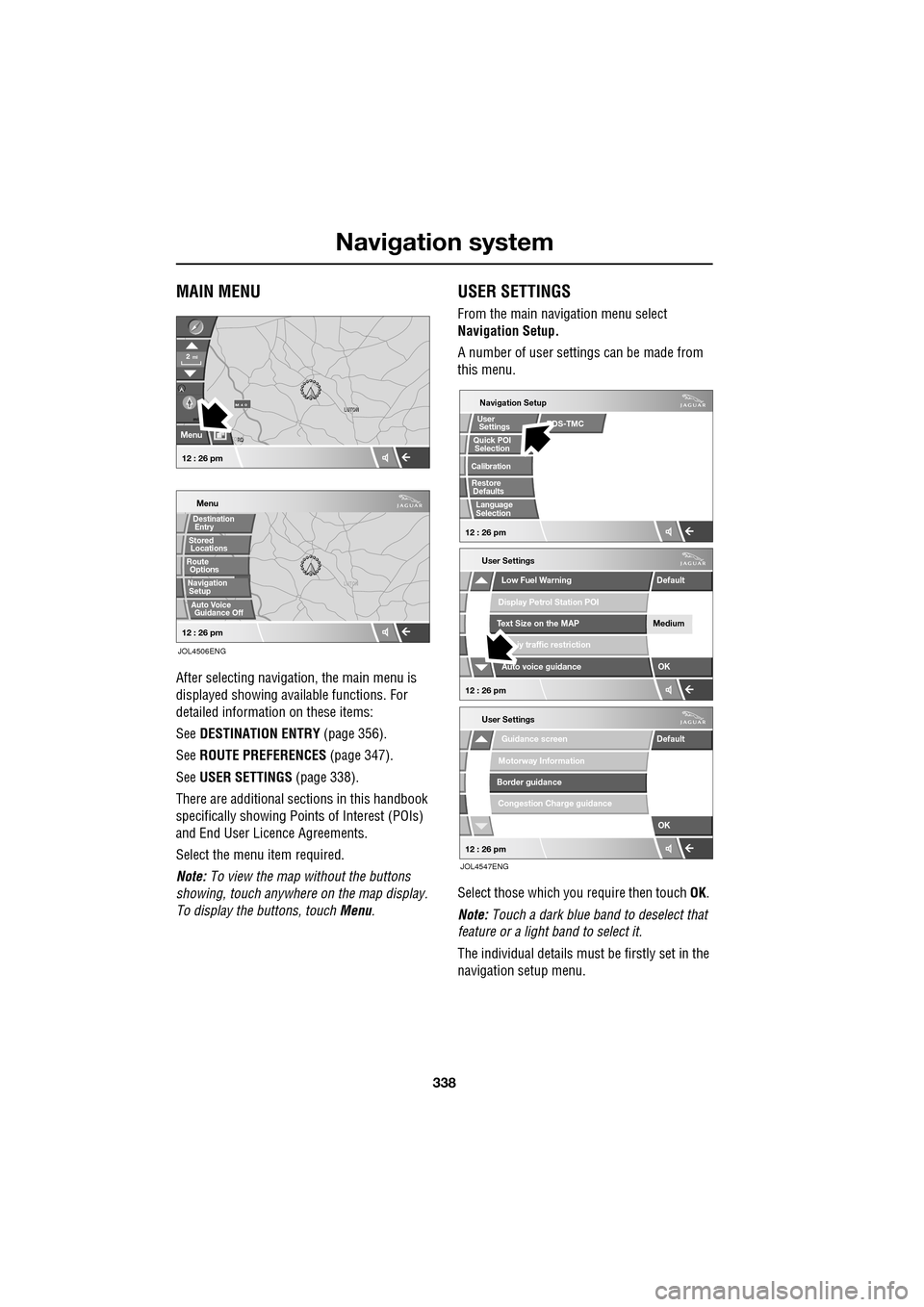
After selecting navigation, the main menu is
displayed showing ava ilable functions. For
detailed information on these items:
See DESTINATION ENTRY (page 356).
See ROUTE PREFERENCES (page 347).
See USER SETTINGS (page 338).
There are additional sections in this handbook
specifically showing Points of Interest (POIs)
and End User Licence Agreements.
Select the menu item required.
Note: To view the map without the buttons
showing, touch anywhere on the map display.
To display the buttons, touch Menu .
USER SETTINGS
From the main navigation menu select
Navigation Setup.
A number of user settings can be made from
this menu.
Select those which you require then touch OK .
Note: Touch a dark blue band to deselect that
feature or a light band to select it.
The individual details must be firstly set in the
navigation setup menu.
LUTON
Menu
Stored
Destination
Auto Voice
Entry
Guidance Off
LUTON
LUTON
RD
FORD
M 4 0mi
Menu
2mi
12 : 26 pm
12 : 26 pm
Locations
Navigation SetupRoute Options
JOL4506ENG
Guidance screen
User Settings
Motorway Information
Border guidance
Congestion Charge guidance
OK
Default
Navigation Setup
Low Fuel Warning
User Settings
Display Petrol Station POI
Text Size on the MAP
iy traffic restriction
Auto voice guidance
Medium
OK
Default
Selection
Calibration
Restore
User
Settings
Defaults Quick POI
12 : 26 pm
12 : 26 pm
12 : 26 pm
RDS-TMC
Language
Selection
JOL4547ENG
Page 368 of 391
Navigation system
368
RDS-TMC OVERVIEW
Radio Data System-Traffic Message Channel
(RDS-TMC) is a feature that announces traffic
hold-ups on your route, as broadcast by radio
stations that transmit TMC information.
Touch the RDS-TMC button on the Navigation
Menu to access the TMC menu.
Touch the Change button - the sy stem begins
a search of all radio stat ions being received in
your locality.
The tuner will scan the FM frequency once and
this may take a few minutes. Searching will be
displayed while sca nning is in progress.
When a station is found which is offering TMC
information, the RDS name is shown on the list
and the search for more stations will continue.
Note: In the United Kingdom the station giving
TMC information is Classic FM.
You can stop the search at any time and select
any stations presented on the list, by touching
the Change button or the button next to the
desired station in the list.
RDS-TMC display
When a TMC signal is received the icon in the
top left of the screen w ill appear gray. If a TMC
signal is not being rece ived, the icon will be
shown with a bar through it.
The system will inform the driver of any
roadworks, narrow road, contraflow,
accidents, slippery road, diversion,
information, parking in formation, congestion
or other hazard. The driver is informed of a traffic event as
follows:
•
A TMC Event icon shown on the map at the
location of the event.
• Text can be displaye d showing the details
of each occurrence wh ich can be selected
either by touching the screen icon or from
the traffic information list.
• Voice guidance will describe the event on
the route. This information will be repeated
when the repeat switch is selected.
• Dynamic route guidance, which calculates
an alternative route when the system
receives the traffic event warning affecting
the route currently set in the navigation
system.
• Traffic event list shows all events sorted by
road name/ distance on your selected
route in a straight line or along your actual
route.
The information rega rding the hold-up is
maintained and updated even if the vehicle
crosses into another country.RDS-TMC icons
Any traffic event (broadcast on TMC) in your
area, will be displayed as a warning icon on the
map and an alert may be displayed as a
message giving the road number(s) and
between which junctions the hold-up or event
occurs. Voice guidance will also inform you of
the hold-up when an event icon exists on the
current route.
This data is stored in the system for up to of 30
minutes.
The colour of the TMC icon changes in order to
show the type and priori ty of a TMC event. The
background colour of the icon returns to
normal when there is no longer an event or
hold-up, or if any re-route instructions are
calculated.
Page 369 of 391
369
Navigation system
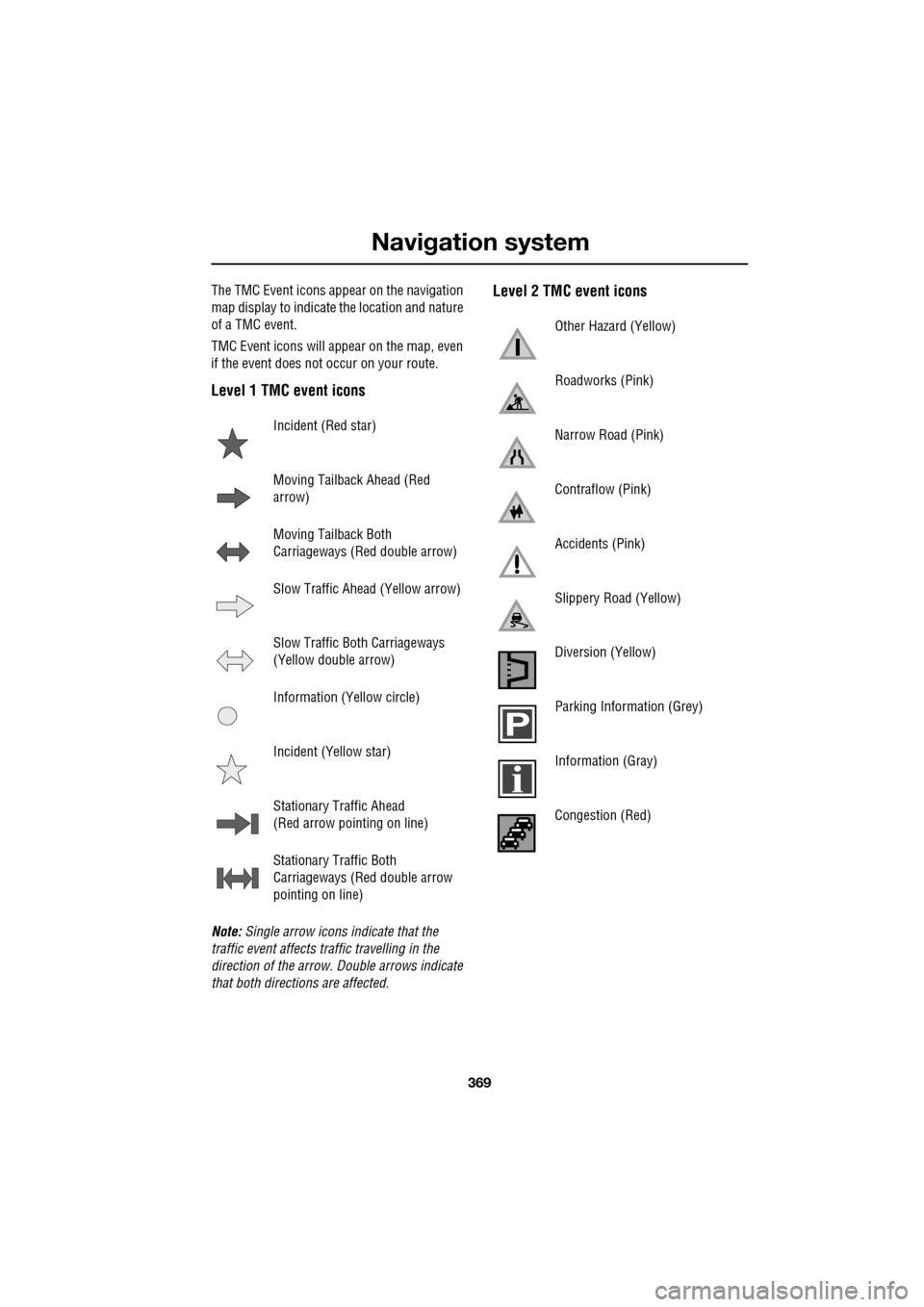
The TMC Event icons appear on the navigation
map display to indicate the location and nature
of a TMC event.
TMC Event icons will appear on the map, even
if the event does not occur on your route.
Level 1 TMC event icons
Note: Single arrow icons indicate that the
traffic event affects traffic travelling in the
direction of the arrow. Double arrows indicate
that both directions are affected.
Level 2 TMC event icons
Incident (Red star)
Moving Tailback Ahead (Red
arrow)
Moving Tailback Both
Carriageways (Red double arrow)
Slow Traffic Ahead (Yellow arrow)
Slow Traffic Both Carriageways
(Yellow double arrow)
Information (Yellow circle)
Incident (Yellow star)
Stationary Traffic Ahead
(Red arrow pointing on line)
Stationary Traffic Both
Carriageways (Red double arrow
pointing on line)
Other Hazard (Yellow)
Roadworks (Pink)
Narrow Road (Pink)
Contraflow (Pink)
Accidents (Pink)
Slippery Road (Yellow)
Diversion (Yellow)
Parking Information (Grey)
Information (Gray)
Congestion (Red)
Page 370 of 391
Navigation system
370
USING TMC
Dynamic route guidance
Dynamic route guidance will calculate an
alternative route to avoid a traffic event when
the system receives an event warning.
The system calculates a new route for all
sections. However, if any way points are set,
the system calculates for the next way point.
If the event on route is serious (closed road) or
if the new route is shorter than the current one
and the current one was not recalculated within
the last 5 minutes, then a message to confirm
the new route will be displayed. This pop-up
message will be displa yed for 10 minutes and
if the new route is not rejected, then the vehicle
will follow the new route.
Voice guidance
While voice guidance is on, the system will give
audio guidance for tra ffic events on route.
If the on route icon is touched, with audio
guidance switched on, the audio message will
be repeated. If the ic on is grey, the audio
guidance function has been switched off and
touching the icon will no t repeat any message.
After the vehicle passes the event, you will be
notified of the next nearest event on route.
Audio messages are not gi ven if you are in that
event.
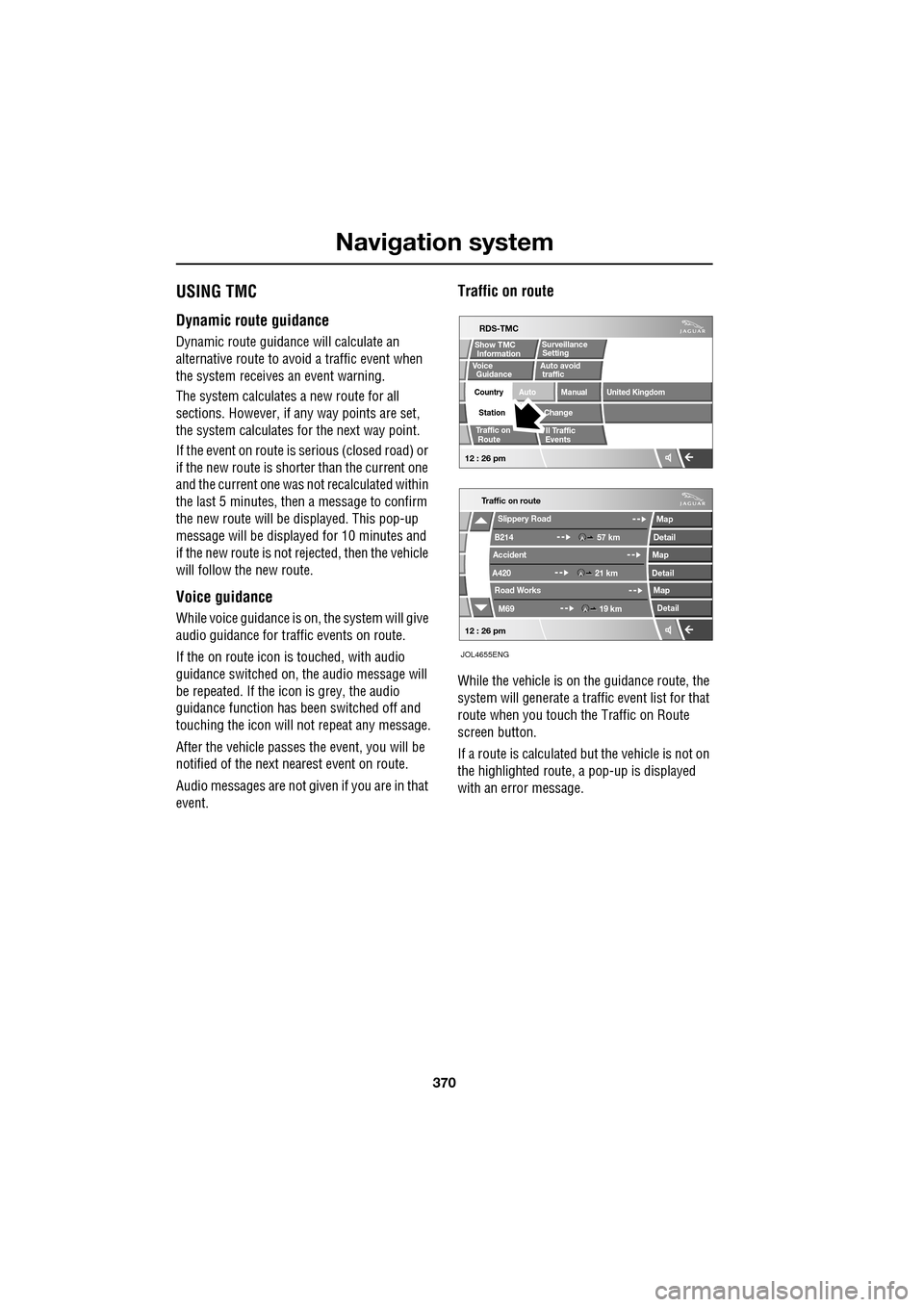
Traffic on route
While the vehicle is on the guidance route, the
system will generate a traffic event list for that
route when you touch the Traffic on Route
screen button.
If a route is calculated but the vehicle is not on
the highlighted route, a pop-up is displayed
with an error message.
Traffic on route
Slippery Road
B214
Accident
A420 Road Works
M69 57 km
21 km 19 km
Map
Detail
Map
Detail Map
Detail
12 : 26 pm
RDS-TMC
Traffic on
Show TMC
Auto avoid
ll Traffic
United Kingdom
Country
Station
Manual
Change
Auto
Surveillance
Events
Voice
Guidance
12 : 26 pm
Information Setting
traffic
Route
JOL4655ENG
Page 371 of 391
371
Navigation system
On route event icon
The on route event icon will show a traffic event
as a line of stationary vehicles with the distance
to the start point of the event. Touch the icon to
repeat audio guidance (when audio guidance is
switched on).
The icon will be displayed on the map with the
following conditions:
•The map scale is between 50 metres and
4 km (1/32 mile and 2 miles).
• RDS-TMC setting is on and there are some
events on the route.
The on route event icon will show the nearest
event on the route and the distance to the
event.
All traffic events
When the All Traffic Events button on the
RDS-TMC setting screen is touched, all traffic
events are listed by road name. If an event
occurs on more than one road of your route,
the system will list it wi th the first road name.
Each event is seen as text information from the
menu.
While the list is being displayed the information
is not updated.
When you select a road the system shows
traffic events, if there are any, with the basic
information.
Note: The maximum text length displayed is 24
characters. The basic informat
ion screen shows:
• Road number.
• Brief information of the event.
• Direction and distance to the start point of
the event (in a straight line).
Up to 20 events can be shown in distance order
from the current vehicle position. If the event
list is longer than three the remaining can be
seen by scrolling the screen.
When the Map button is touc hed, the map
screen will display the place of the event start
point. The scale is always 500 metres (1/4
mile). If the event has finished, the map screen
will still be displayed when the Map button is
touched but no event icon will be shown on the
map.
When the Detail button is touche d, the system
shows the detail of that event.
Page 372 of 391
Navigation system
372
SURVEILLANCE SETTING
If you frequently travel through an area that is
subject to slow or stat ionary traffic, it is
possible to set a surveillance area which can be
viewed at any time.
Up to three areas can be set for this
surveillance.
RDS-TMC radio data for the selected
surveillance area must be available and TMC
must be enabled in order to show TMC events
in this area
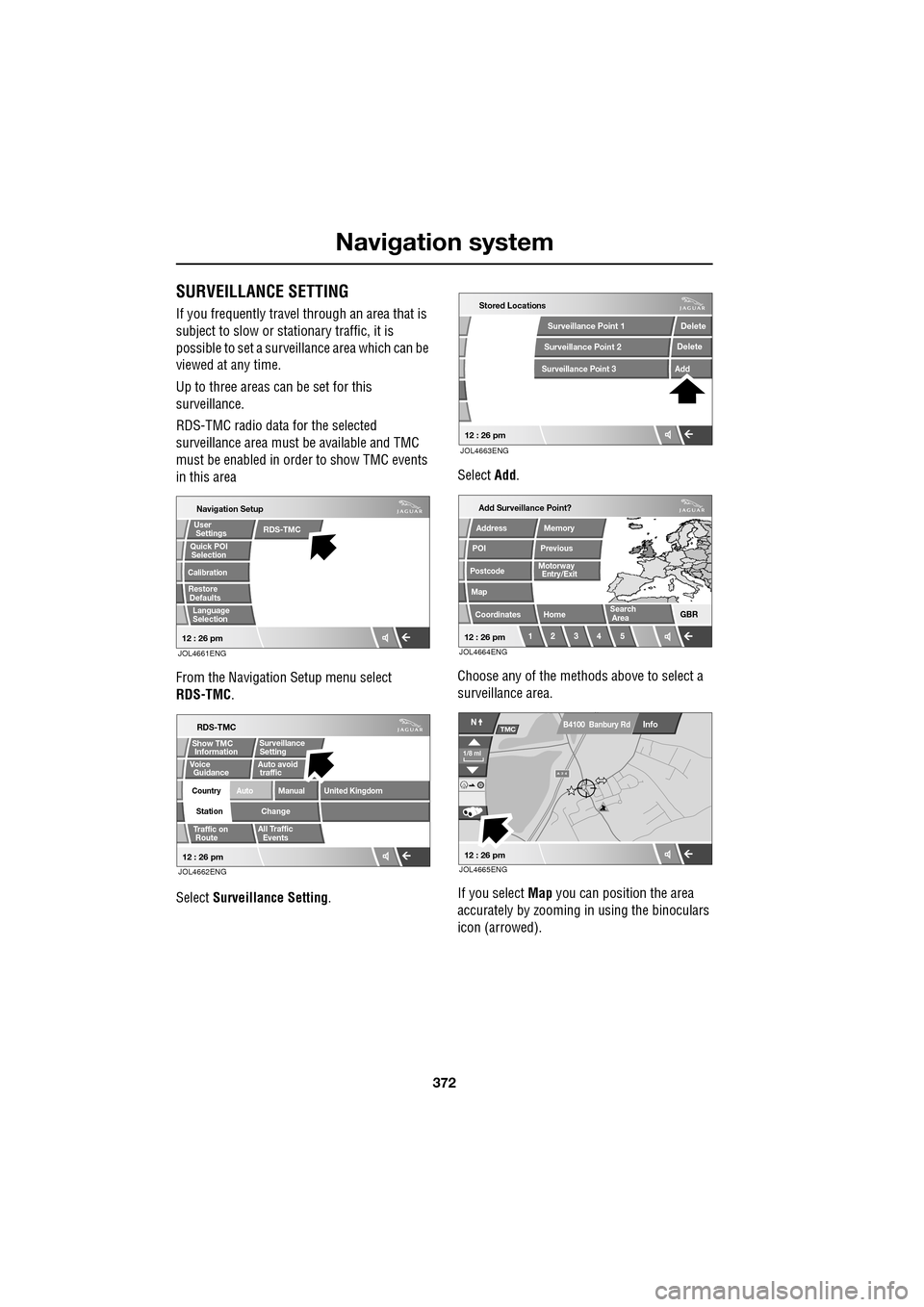
From the Navigation Setup menu select
RDS-TMC .
Select Surveillance Setting . Select
Add.
Choose any of the met hods above to select a
surveillance area.
If you select Map you can position the area
accurately by zooming in using the binoculars
icon (arrowed).
JOL4661ENG
Quick POI
Navigation Setup
Selection
Calibration
Restore User
Settings
Defaults Quick POI
12 : 26 pm
RDS-TMC
Language
Selection
JOL4662ENG
RDS-TMC
Traffic on
Show TMC
Auto avoid
All Traffic
United Kingdom
Country
Station
Manual
Change
Auto
Surveillance
Events
Voice
Guidance
12 : 26 pm
Information Setting
traffic
Route
JOL4663ENG
Stored Locations
Surveillance Point 2
Surveillance Point 3
Surveillance Point 1 Delete
Add
Delete
12 : 26 pm
Add Surveillance Point?
POI
Postcode
Map
Coordinates
Address
HomeGBR
12 3 4 5
PreviousMemory
12 : 26 pm
Search
Motorway
Entry/Exit
Area
JOL4664ENG
A 3 4
Info
N
1/8 ml
TMC
12 : 26 pm
B4100 Banbury Rd
JOL4665ENG
Page 377 of 391
377
Navigation system
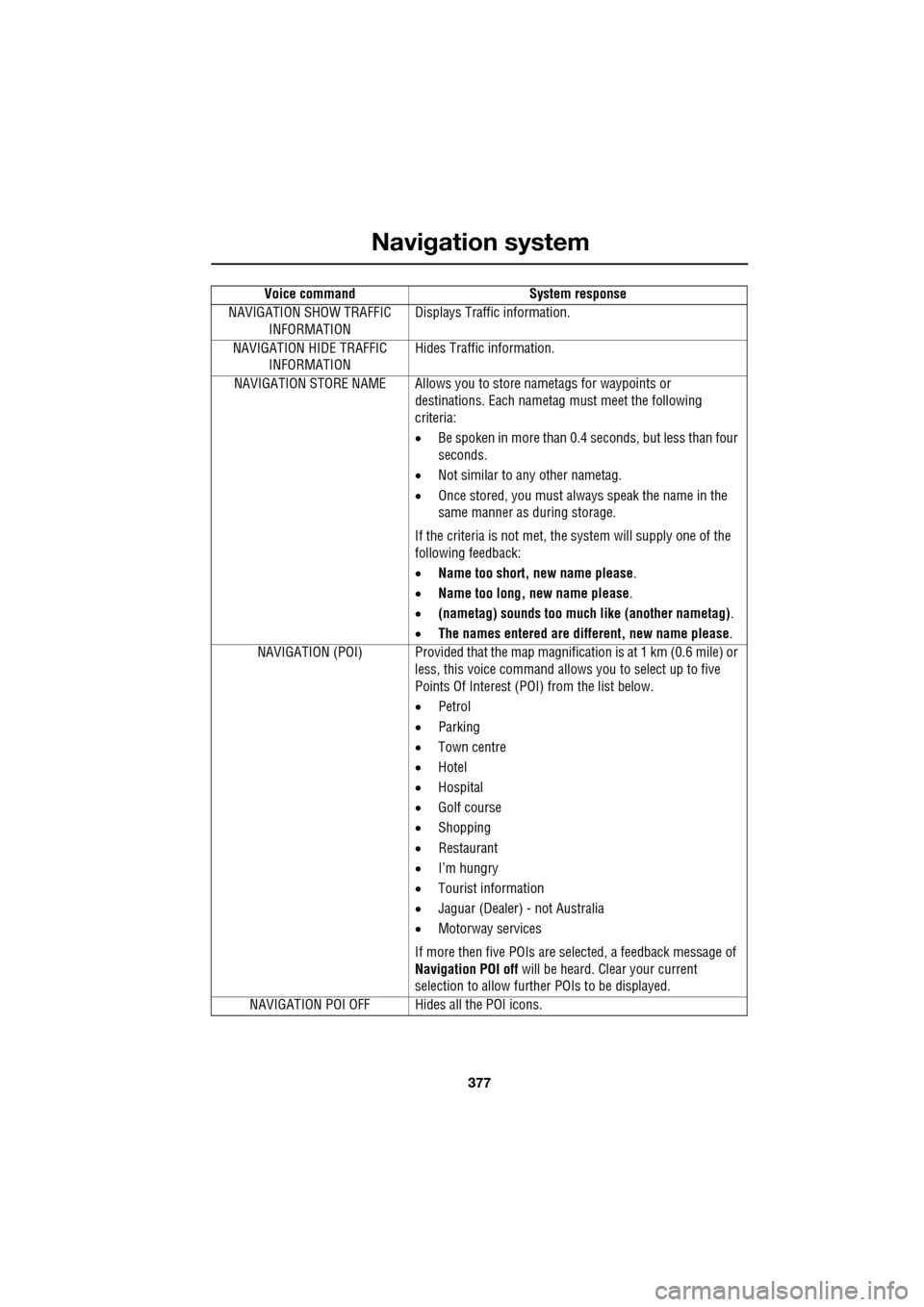
NAVIGATION SHOW TRAFFIC INFORMATION Displays Traffic information.
NAVIGATION HIDE TRAFFIC INFORMATION Hides Traffic information.
NAVIGATION STORE NAME Allows you to store nametags for waypoints or
destinations. Each nametag must meet the following
criteria:
• Be spoken in more than 0.4 seconds, but less than four
seconds.
• Not similar to any other nametag.
• Once stored, you must always speak the name in the
same manner as during storage.
If the criteria is not met, the system will supply one of the
following feedback:
• Name too short, new name please .
• Name too long, new name please .
• (nametag) sounds too much like (another nametag) .
• The names entered are different, new name please.
NAVIGATION (POI) Provided that the map ma gnification is at 1 km (0.6 mile) or
less, this voice command allows you to select up to five
Points Of Interest (POI) from the list below.
• Petrol
• Parking
• Town centre
• Hotel
• Hospital
• Golf course
• Shopping
• Restaurant
• I’m hungry
• Tourist information
• Jaguar (Dealer) - not Australia
• Motorway services
If more then five POIs are selected, a feedback message of
Navigation POI off will be heard. Clear your current
selection to allow furthe r POIs to be displayed.
NAVIGATION POI OFF Hid es all the POI icons.
Voice command
System response
Page 380 of 391
Navigation system
380
THE DISCLAIMER OF WARRANTY AND
LIMITATION OF LIABILITY, SET FORTH IN
THIS AGREEMENT, DO NOT AFFECT OR
PREJUDICE YOUR STATUTORY RIGHTS
WHERE YOU HAVE ACQUIRED THE
DATABASE OTHERWISE THAN IN THE
COURSE OF A BUSINESS. Some states and
laws do not allow the exclusion of implied
warranties, so the abov e disclaimer may not
apply to you.
Government end users
If the DATABASE is for a region of North
America and is being acqui red by or on behalf
of the United States government or any other
entity seeking or applyi ng rights similar to
those customarily claimed by the United States
government, the DATABASE is licensed with
‘limited rights’. Utilization of the DATA
BASE is subject to the
restrictions specified in the ‘Rights in Technical
Data and Computer Database’ clause at DFARS
252.227–7013, or the equivalent clause for
non-defence agencies. Manufacturer of the
DATABASE of North America is NAVTEQ
Corporation, 10400 W. Higgins Road, Suite
400, Rosemont, Illinois 60018, USA.
EUROPEAN DECLARATION OF
CONFORMITY
Hereby, DENSO CORPORATION
declares that this DN-NS-019 is in
compliance with the essential
requirements and other relevant
provisions of Directive 1999/5/EC.WARNING
The DATABASE reflects reality as
existing before you received the
DATABASE and it comprises data and
information from government and other
sources, which may contain errors and
omissions. Accordingly, the DATABASE may
contain inaccurate or incomplete information
due to the passage of time, changing
circumstances, and due to the nature of the
sources used. The DATABASE does not
include or reflect inform ation on - inter alia -
neighbourhood safety; law enforcement;
emergency assistance; construction work;
road or lane closures; vehicle or speed
restrictions; road slope or grade; bridge
height, weight or other limits; road or traffic
conditions; special even ts; traffic congestion;
or travel time.
Page 387 of 391
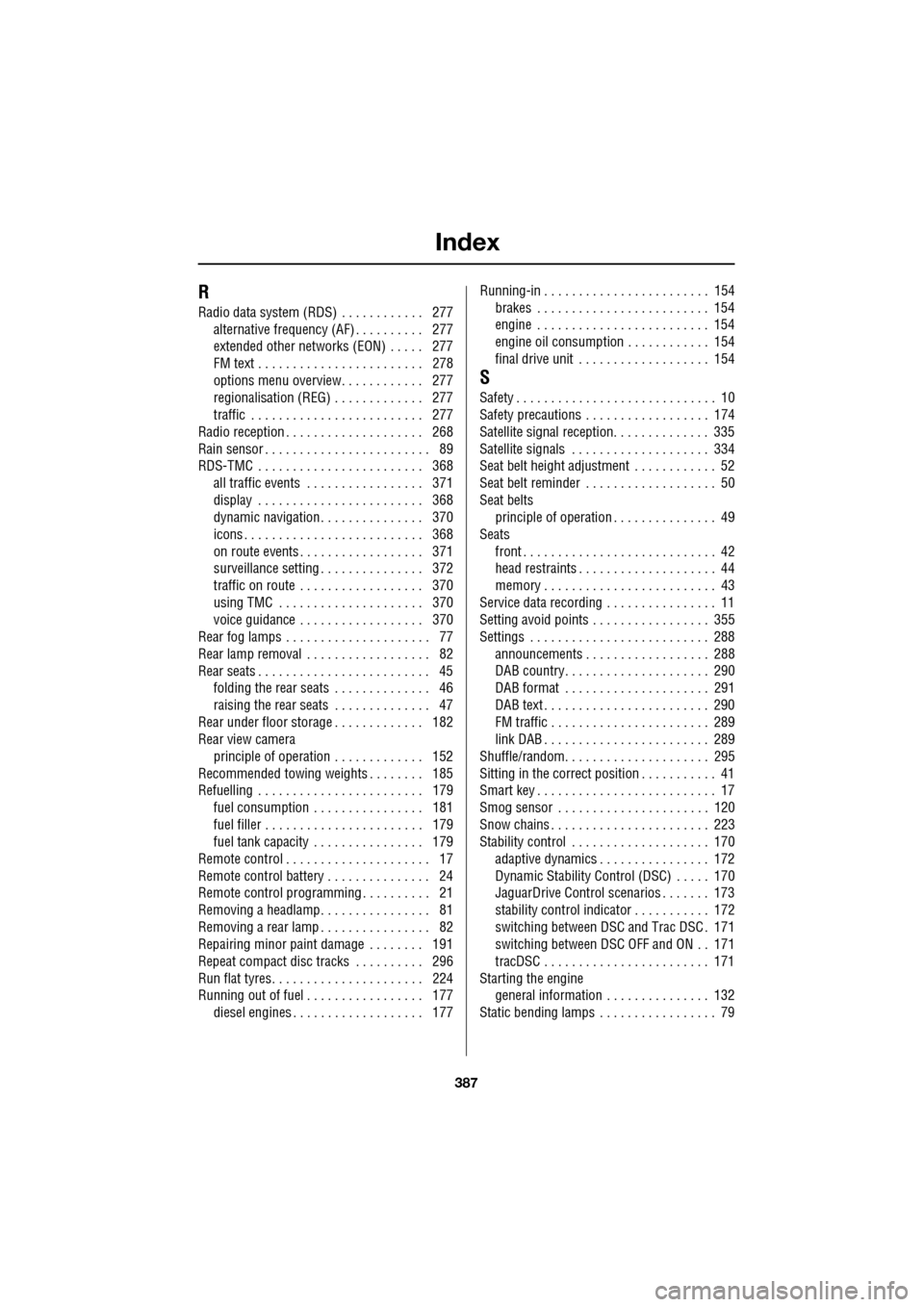
Index
387
R
Radio data system (RDS) . . . . . . . . . . . . 277alternative frequency (AF) . . . . . . . . . . 277
extended other networks (EON) . . . . . 277
FM text . . . . . . . . . . . . . . . . . . . . . . . . 278
options menu overview. . . . . . . . . . . . 277
regionalisation (REG) . . . . . . . . . . . . . 277
traffic . . . . . . . . . . . . . . . . . . . . . . . . . 277
Radio reception . . . . . . . . . . . . . . . . . . . . 268
Rain sensor . . . . . . . . . . . . . . . . . . . . . . . . 89
RDS-TMC . . . . . . . . . . . . . . . . . . . . . . . . 368 all traffic events . . . . . . . . . . . . . . . . . 371
display . . . . . . . . . . . . . . . . . . . . . . . . 368
dynamic navigation . . . . . . . . . . . . . . . 370
icons . . . . . . . . . . . . . . . . . . . . . . . . . . 368
on route events . . . . . . . . . . . . . . . . . . 371
surveillance setting . . . . . . . . . . . . . . . 372
traffic on route . . . . . . . . . . . . . . . . . . 370
using TMC . . . . . . . . . . . . . . . . . . . . . 370
voice guidance . . . . . . . . . . . . . . . . . . 370
Rear fog lamps . . . . . . . . . . . . . . . . . . . . . 77
Rear lamp removal . . . . . . . . . . . . . . . . . . 82
Rear seats . . . . . . . . . . . . . . . . . . . . . . . . . 45 folding the rear seats . . . . . . . . . . . . . . 46
raising the rear seats . . . . . . . . . . . . . . 47
Rear under floor storage . . . . . . . . . . . . . 182
Rear view camera
principle of operation . . . . . . . . . . . . . 152
Recommended towing weights . . . . . . . . 185
Refuelling . . . . . . . . . . . . . . . . . . . . . . . . 179
fuel consumption . . . . . . . . . . . . . . . . 181
fuel filler . . . . . . . . . . . . . . . . . . . . . . . 179
fuel tank capacity . . . . . . . . . . . . . . . . 179
Remote control . . . . . . . . . . . . . . . . . . . . . 17
Remote control battery . . . . . . . . . . . . . . . 24
Remote control programming . . . . . . . . . . 21
Removing a headlamp. . . . . . . . . . . . . . . . 81
Removing a rear lamp . . . . . . . . . . . . . . . . 82
Repairing minor paint damage . . . . . . . . 191
Repeat compact disc tracks . . . . . . . . . . 296
Run flat tyres. . . . . . . . . . . . . . . . . . . . . . 224
Running out of fuel . . . . . . . . . . . . . . . . . 177 diesel engines . . . . . . . . . . . . . . . . . . . 177 Running-in . . . . . . . . . . . . . . . . . . . . . . . . 154
brakes . . . . . . . . . . . . . . . . . . . . . . . . . 154
engine . . . . . . . . . . . . . . . . . . . . . . . . . 154
engine oil consumption . . . . . . . . . . . . 154
final drive unit . . . . . . . . . . . . . . . . . . . 154
S
Safety . . . . . . . . . . . . . . . . . . . . . . . . . . . . . 10
Safety precautions . . . . . . . . . . . . . . . . . . 174
Satellite signal reception. . . . . . . . . . . . . . 335
Satellite signals . . . . . . . . . . . . . . . . . . . . 334
Seat belt height adjustment . . . . . . . . . . . . 52
Seat belt reminder . . . . . . . . . . . . . . . . . . . 50
Seat beltsprinciple of operation . . . . . . . . . . . . . . . 49
Seats
front . . . . . . . . . . . . . . . . . . . . . . . . . . . . 42
head restraints . . . . . . . . . . . . . . . . . . . . 44
memory . . . . . . . . . . . . . . . . . . . . . . . . . 43
Service data recording . . . . . . . . . . . . . . . . 11
Setting avoid points . . . . . . . . . . . . . . . . . 355
Settings . . . . . . . . . . . . . . . . . . . . . . . . . . 288 announcements . . . . . . . . . . . . . . . . . . 288
DAB country. . . . . . . . . . . . . . . . . . . . . 290
DAB format . . . . . . . . . . . . . . . . . . . . . 291
DAB text . . . . . . . . . . . . . . . . . . . . . . . . 290
FM traffic . . . . . . . . . . . . . . . . . . . . . . . 289
link DAB . . . . . . . . . . . . . . . . . . . . . . . . 289
Shuffle/random. . . . . . . . . . . . . . . . . . . . . 295
Sitting in the correct position . . . . . . . . . . . 41
Smart key . . . . . . . . . . . . . . . . . . . . . . . . . . 17
Smog sensor . . . . . . . . . . . . . . . . . . . . . . 120
Snow chains . . . . . . . . . . . . . . . . . . . . . . . 223
Stability control . . . . . . . . . . . . . . . . . . . . 170 adaptive dynamics . . . . . . . . . . . . . . . . 172
Dynamic Stability Control (DSC) . . . . . 170
JaguarDrive Control scenarios . . . . . . . 173
stability control indicator . . . . . . . . . . . 172
switching between DSC and Trac DSC . 171
switching between DSC OFF and ON . . 171
tracDSC . . . . . . . . . . . . . . . . . . . . . . . . 171
Starting the engine general information . . . . . . . . . . . . . . . 132
Static bending lamps . . . . . . . . . . . . . . . . . 79
Page 388 of 391
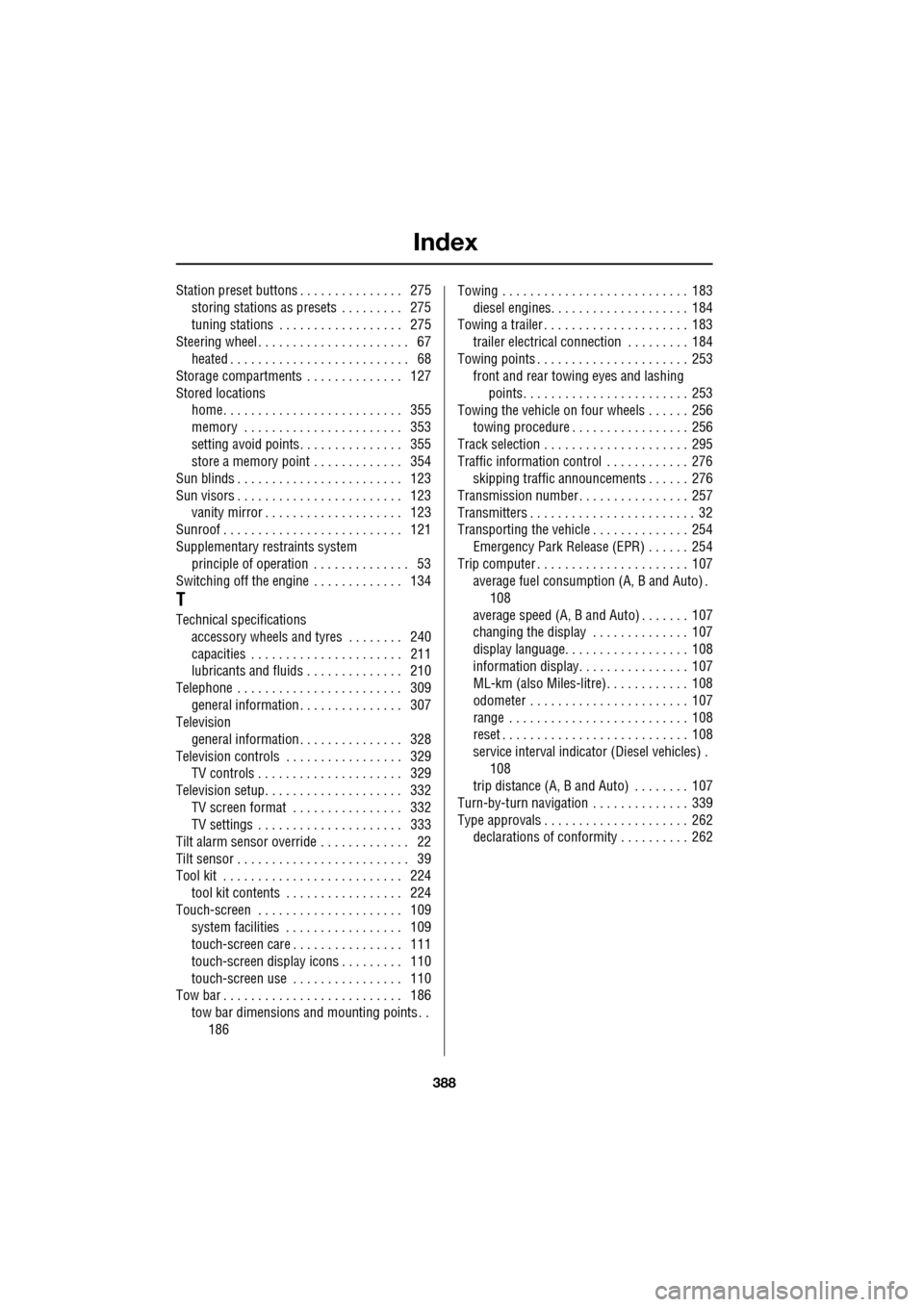
Index
388
Station preset buttons . . . . . . . . . . . . . . . 275storing stations as pres ets . . . . . . . . . 275
tuning stations . . . . . . . . . . . . . . . . . . 275
Steering wheel . . . . . . . . . . . . . . . . . . . . . . 67
heated . . . . . . . . . . . . . . . . . . . . . . . . . . 68
Storage compartments . . . . . . . . . . . . . . 127
Stored locations home. . . . . . . . . . . . . . . . . . . . . . . . . . 355
memory . . . . . . . . . . . . . . . . . . . . . . . 353
setting avoid points. . . . . . . . . . . . . . . 355
store a memory point . . . . . . . . . . . . . 354
Sun blinds . . . . . . . . . . . . . . . . . . . . . . . . 123
Sun visors . . . . . . . . . . . . . . . . . . . . . . . . 123 vanity mirror . . . . . . . . . . . . . . . . . . . . 123
Sunroof . . . . . . . . . . . . . . . . . . . . . . . . . . 121
Supplementary re straints system
principle of operation . . . . . . . . . . . . . . 53
Switching off the engine . . . . . . . . . . . . . 134
T
Technical specifications accessory wheels and tyres . . . . . . . . 240
capacities . . . . . . . . . . . . . . . . . . . . . . 211
lubricants and fluids . . . . . . . . . . . . . . 210
Telephone . . . . . . . . . . . . . . . . . . . . . . . . 309
general information . . . . . . . . . . . . . . . 307
Television general information . . . . . . . . . . . . . . . 328
Television controls . . . . . . . . . . . . . . . . . 329 TV controls . . . . . . . . . . . . . . . . . . . . . 329
Television setup. . . . . . . . . . . . . . . . . . . . 332
TV screen format . . . . . . . . . . . . . . . . 332
TV settings . . . . . . . . . . . . . . . . . . . . . 333
Tilt alarm sensor override . . . . . . . . . . . . . 22
Tilt sensor . . . . . . . . . . . . . . . . . . . . . . . . . 39
Tool kit . . . . . . . . . . . . . . . . . . . . . . . . . . 224 tool kit contents . . . . . . . . . . . . . . . . . 224
Touch-screen . . . . . . . . . . . . . . . . . . . . . 109 system facilities . . . . . . . . . . . . . . . . . 109
touch-screen care . . . . . . . . . . . . . . . . 111
touch-screen display icons . . . . . . . . . 110
touch-screen use . . . . . . . . . . . . . . . . 110
Tow bar . . . . . . . . . . . . . . . . . . . . . . . . . . 186
tow bar dimensions and mounting points . . 186 Towing . . . . . . . . . . . . . . . . . . . . . . . . . . . 183
diesel engines. . . . . . . . . . . . . . . . . . . . 184
Towing a trailer . . . . . . . . . . . . . . . . . . . . . 183 trailer electrical connection . . . . . . . . . 184
Towing points . . . . . . . . . . . . . . . . . . . . . . 253 front and rear towing eyes and lashing
points. . . . . . . . . . . . . . . . . . . . . . . . 253
Towing the vehicle on four wheels . . . . . . 256 towing procedure . . . . . . . . . . . . . . . . . 256
Track selection . . . . . . . . . . . . . . . . . . . . . 295
Traffic information control . . . . . . . . . . . . 276 skipping traffic announcements . . . . . . 276
Transmission number . . . . . . . . . . . . . . . . 257
Transmitters . . . . . . . . . . . . . . . . . . . . . . . . 32
Transporting the vehicle . . . . . . . . . . . . . . 254 Emergency Park Releas e (EPR) . . . . . . 254
Trip computer . . . . . . . . . . . . . . . . . . . . . . 107 average fuel consumptio n (A, B and Auto) .
108
average speed (A, B and Auto) . . . . . . . 107
changing the display . . . . . . . . . . . . . . 107
display language. . . . . . . . . . . . . . . . . . 108
information display. . . . . . . . . . . . . . . . 107
ML-km (also Miles-litre). . . . . . . . . . . . 108
odometer . . . . . . . . . . . . . . . . . . . . . . . 107
range . . . . . . . . . . . . . . . . . . . . . . . . . . 108
reset . . . . . . . . . . . . . . . . . . . . . . . . . . . 108
service interval indicator (Diesel vehicles) . 108
trip distance (A, B and Auto) . . . . . . . . 107
Turn-by-turn navigation . . . . . . . . . . . . . . 339
Type approvals . . . . . . . . . . . . . . . . . . . . . 262 declarations of conformity . . . . . . . . . . 262