warning JAGUAR XF 2009 1.G User Guide
[x] Cancel search | Manufacturer: JAGUAR, Model Year: 2009, Model line: XF, Model: JAGUAR XF 2009 1.GPages: 391, PDF Size: 19.32 MB
Page 19 of 391
19
Keys and remote controls
LOCKING AND ARMING THE VEHICLE
Press the lock button to secure the
vehicle. The vehicle can be Single
or Double locked, as follows:
Single locking
Press the lock button briefly. Single locking
secures the vehicle and prevents the doors
being opened from outside of the vehicle. The
doors can be unlocked and opened from inside
the vehicle. The haza rd warning lamps will
flash once as confirmation.
Note: In some markets, an audible warning will
sound.
Double locking
Press the lock button twice within three
seconds. Double locki ng secures the vehicle
and prevents the doors being unlocked or
opened from inside or outside of the vehicle,
except with the correct Jaguar Smart Key. The
hazard warning lamps w ill flash twice (with a
long second flash) and an audible warning will
sound, as confirmation. Double locking provides a
dditional security if
the vehicle is left una ttended. The vehicle
cannot be opened by breaking a window and
operating the door locks from inside the
vehicle.
Power-fold mirrors
If automatic power-fold is enabled, the door
mirrors will fold in towards the vehicle body
when the vehicle is locked. The power-fold
feature can be enable d/disabled using the
touch-screen. See PROGRAMMING THE
REMOTE CONTROL (page 21).
Lock confirmation
If you are uncertain whether the vehicle is
locked and armed (either by single or double
locking), press the lock button again. The
hazard warning lights will flash to indicate and
confirm the current lock status.
Note: If the vehicle is not already locked and
armed, pressing the lock button will single lock
the vehicle. Press again to double lock, if
required.
Global closing
Press and hold the lock button for three
seconds. The vehicle wi ll single lock and the
alarm will be fully arme d immediately. After the
three seconds, all the windows and the sunroof
will close.
WARNING
The vehicle will only lock, if all door,
luggage compartment and bonnet
apertures are closed. If a lock attempt
is made when an aperture is open, the vehicle
will not lock and two audible error warnings
will sound.
WARNING
Never double lock the vehicle with
people, children, or pets inside. In the
event of an emergency they would be
unable to escape, and the emergency services
would be unable to release them quickly.
WARNING
Ensure that no children, pets, or
obstructions are in any open aperture
before operating global closing.
Safety mechanisms are in place to prevent
serious injury, however, injuries can still
occur.
Page 26 of 391
Locks
26
LOCKING AND UNLOCKING
Locking and unlocking from outside the
vehicle
Locking and unlocking the vehicle using the
Jaguar Smart Key, is explained earlier in this
handbook. See USING THE REMOTE
CONTROL (page 17). Locking and unlocking
the vehicle using the Keyless Entry system is
explained later in this handbook. See KEYLESS
ENTRY (page 33).
Note: To help prevent locking the Jaguar Smart
Key inside the vehicle, it has been made
difficult to slam lock a door using the interior
door locking lever. The door will not lock.
Luggage compartment
Note: If the Jaguar Smart Key is placed within
a metal box, it will not be detected by the
vehicle security system.
The luggage compartment can be opened at
any time, using the appropriate button on the
Jaguar Smart Key or via keyless entry. It can
also be opened using th e exterior release,
provided the doors are unlocked.
Provided the vehicle is not locked or alarmed,
the luggage compartment can also be opened
using the interior release button.
The luggage compartment can also be
unlocked and opened usi ng the emergency key
blade, as described la ter in this section.
Drive-away locking
This feature locks all unsecured locks when the
vehicle reaches a designated forward speed.
This designated speed and whether or not
drive-away locking is en abled, can be set using
the vehicle touch-screen. See PROGRAMMING
THE REMOTE CONTROL (page 21).
WARNING
Never double lock the vehicle with
people, children or pets inside. In the
event of an emergency they would be
unable to escape, and the emergency services
would be unable to release them quickly.
When the vehicle is double-locked the doors
cannot be opened, either from inside or
outside the vehicle.
Breaking a window will not allow a door to be
opened.CAUTION
If the luggage comp artment is opened
after the driver an d passenger doors are
locked, ensure that the Jaguar Smart Key
remains outside the vehicle when it is closed
again. If the Jaguar Smart Key is inadvertently
left inside the luggage compartment, an
audible warning will sound and the luggage
compartment will re-ope n after three seconds.
Page 28 of 391
Locks
28
Press to open the luggage compartment.
Mislock
If one of the doors, the bonnet, or the luggage
compartment are not shut fully when the
vehicle is locked using the Jaguar Smart Key or
by Keyless locking, the vehicle will not lock and
two warning tones will sound. Check that all
doors, the bonnet and the luggage
compartment are closed properly and lock the
vehicle again.
If one or more of the doors fails to lock
properly when a lock attempt is made using the
Jaguar Smart Key, tw o warning tones will
sound and one or more of the doors may not be
locked.
USING THE EMERGENCY KEY BLADE
The emergency key blade will be needed to
unlock the vehicle, if the Jaguar Smart Key has
a discharged battery or is damaged. The
emergency key blade is also used for accessing
the luggage compartment if the vehicle has
been left in Valet mode. Withdraw the key from
the Jaguar Smart Key for use. See USING THE
REMOTE CONTROL (page 17).
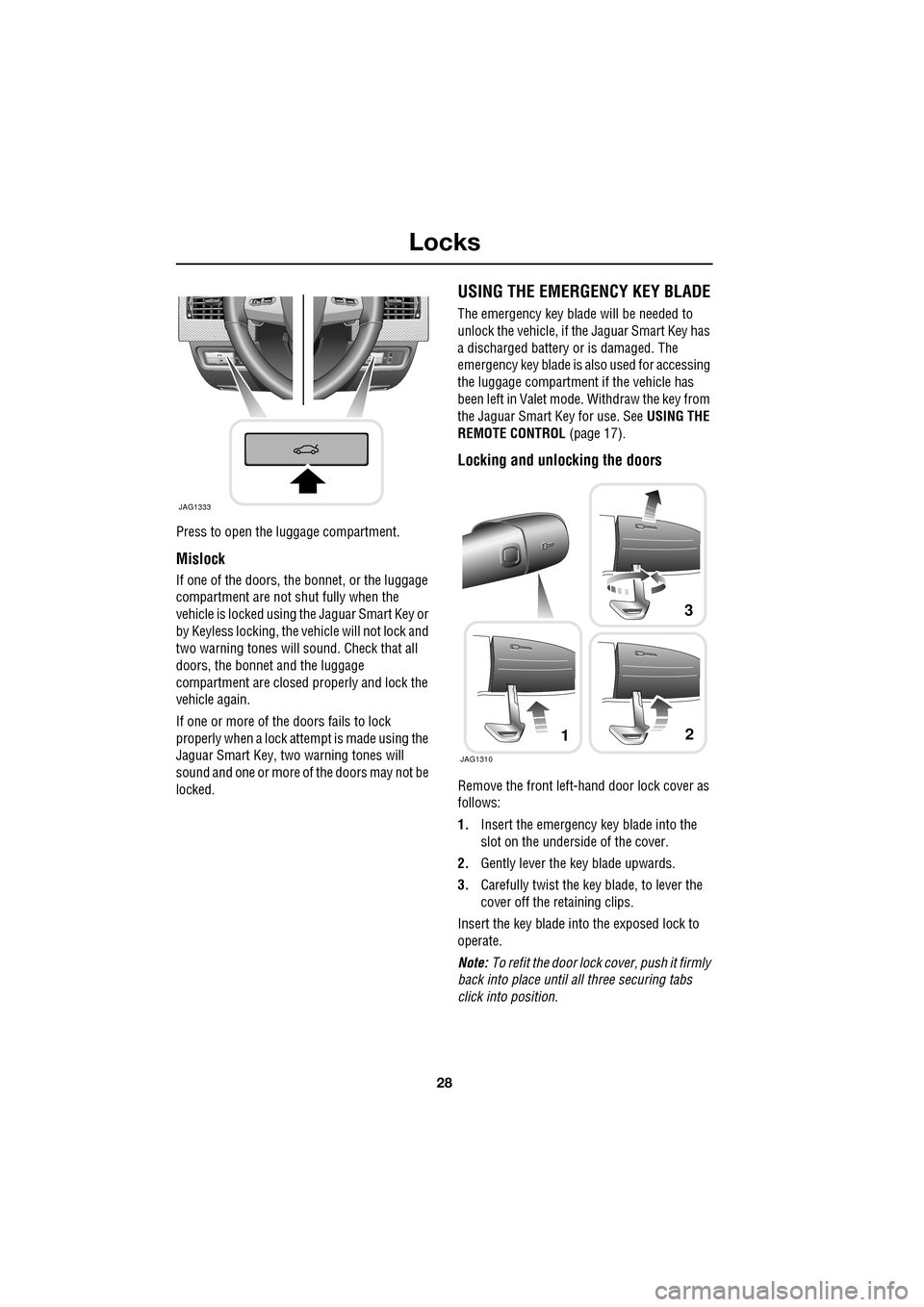
Locking and unlocking the doors
Remove the front left-hand door lock cover as
follows:
1.Insert the emergency key blade into the
slot on the underside of the cover.
2. Gently lever the key blade upwards.
3. Carefully twist the key blade, to lever the
cover off the retaining clips.
Insert the key blade into the exposed lock to
operate.
Note: To refit the door lock cover, push it firmly
back into place until al l three securing tabs
click into position.
JAG1333
JAG1310
12
3
Page 32 of 391
Locks
32
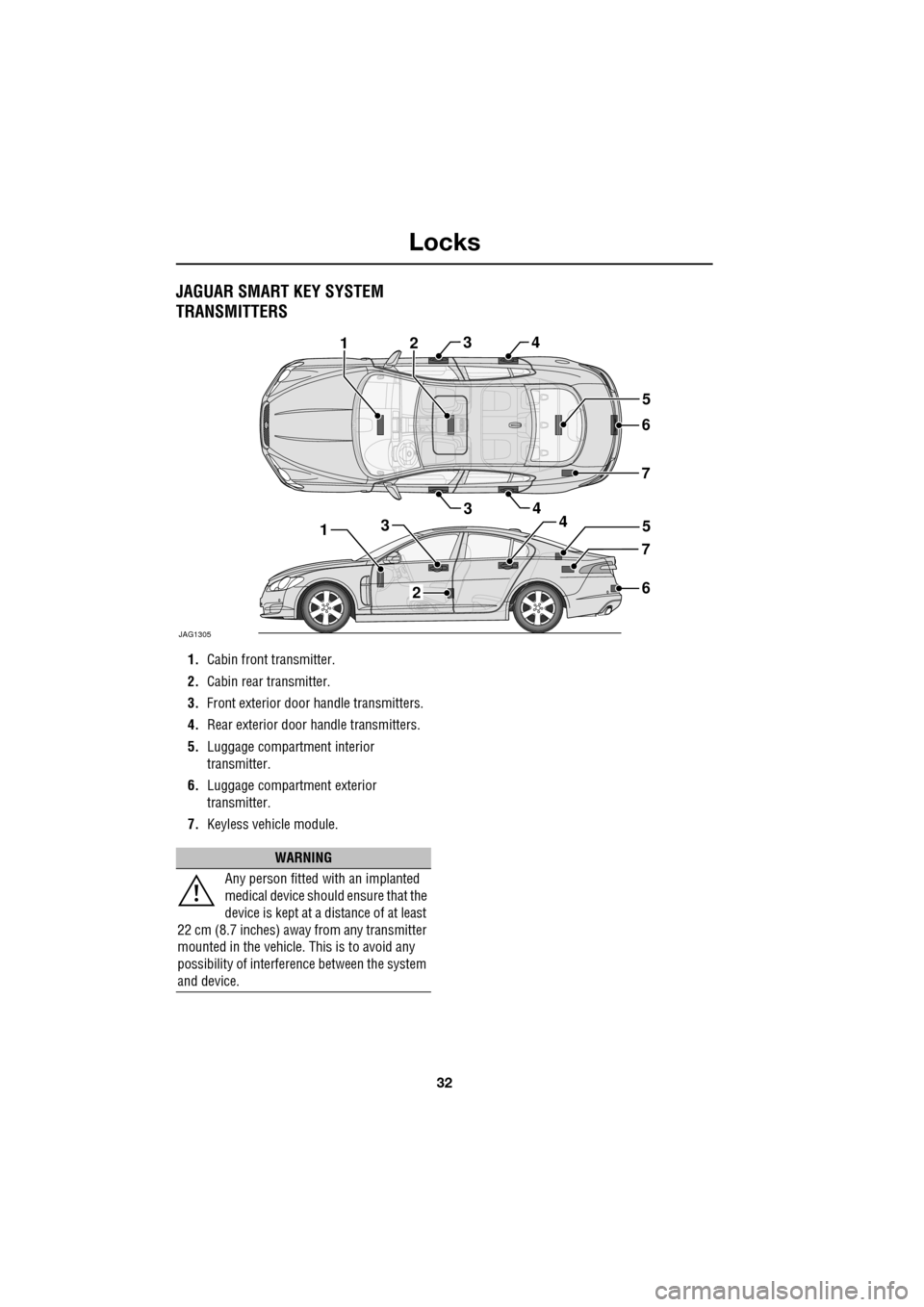
JAGUAR SMART KEY SYSTEM
TRANSMITTERS
1.Cabin front transmitter.
2. Cabin rear transmitter.
3. Front exterior door handle transmitters.
4. Rear exterior door handle transmitters.
5. Luggage compartment interior
transmitter.
6. Luggage compartment exterior
transmitter.
7. Keyless vehicle module.
JAG1305
34
5
6
7
12
34
31
2
5
6
7
4
WARNING
Any person fitted with an implanted
medical device should ensure that the
device is kept at a distance of at least
22 cm (8.7 inches) away from any transmitter
mounted in the vehicle. This is to avoid any
possibility of interference between the system
and device.
Page 33 of 391
33
Locks
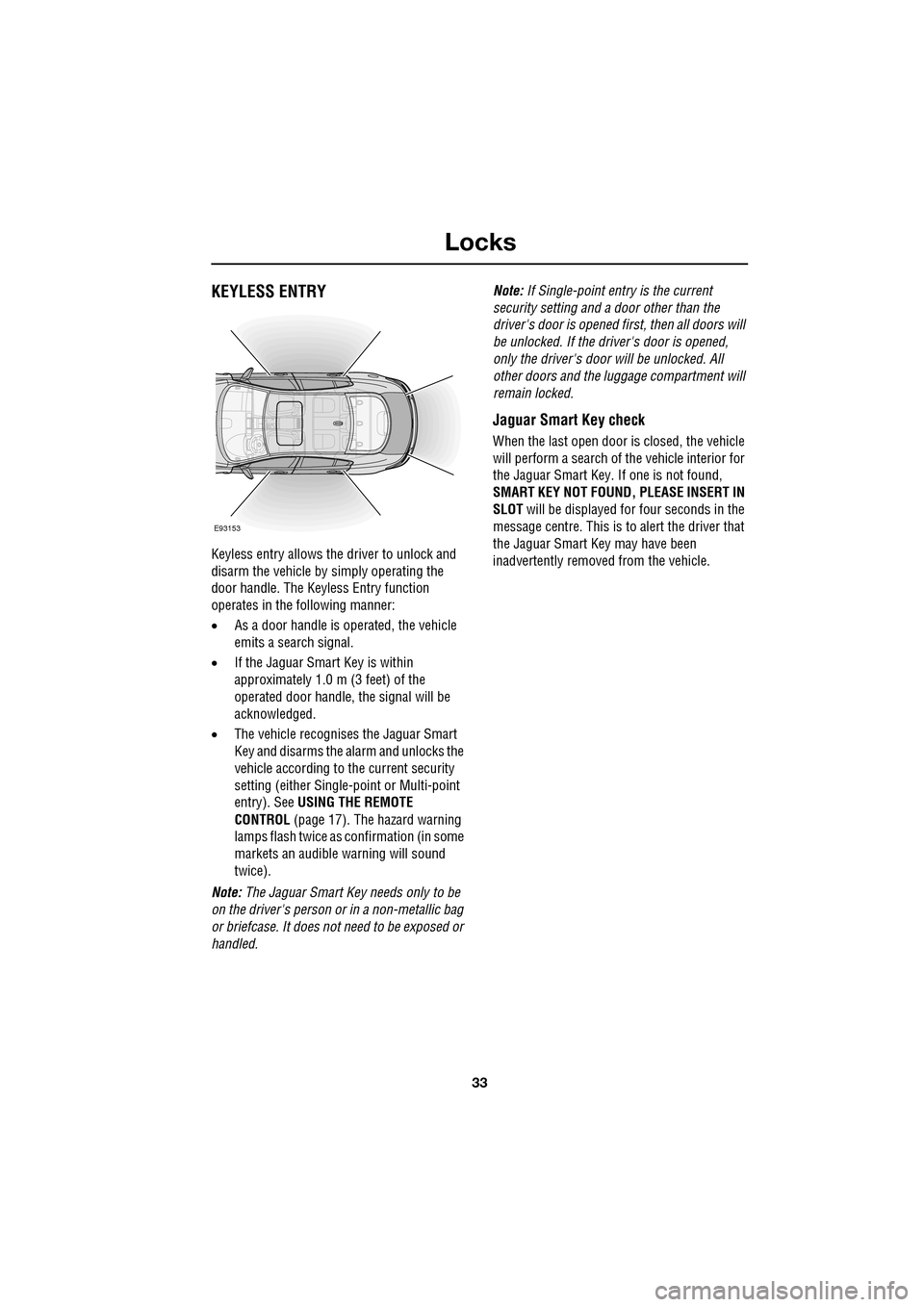
KEYLESS ENTRY
Keyless entry allows the driver to unlock and
disarm the vehicle by simply operating the
door handle. The Keyless Entry function
operates in the following manner:
•As a door handle is operated, the vehicle
emits a search signal.
• If the Jaguar Smart Key is within
approximately 1.0 m (3 feet) of the
operated door handle, the signal will be
acknowledged.
• The vehicle recognise s the Jaguar Smart
Key and disarms the alarm and unlocks the
vehicle according to the current security
setting (either Single-point or Multi-point
entry). See USING THE REMOTE
CONTROL (page 17). The hazard warning
lamps flash twice as confirmation (in some
markets an audible warning will sound
twice).
Note: The Jaguar Smart Key needs only to be
on the driver's person or in a non-metallic bag
or briefcase. It does not need to be exposed or
handled. Note:
If Single-point entry is the current
security setting and a door other than the
driver's door is opened fi rst, then all doors will
be unlocked. If the driver's door is opened,
only the driver's door will be unlocked. All
other doors and the luggage compartment will
remain locked.
Jaguar Smart Key check
When the last open door is closed, the vehicle
will perform a search of the vehicle interior for
the Jaguar Smart Key. If one is not found,
SMART KEY NOT FOUND, PLEASE INSERT IN
SLOT will be displayed for four seconds in the
message centre. This is to alert the driver that
the Jaguar Smart Key may have been
inadvertently removed from the vehicle.
E93153
Page 34 of 391
Locks
34
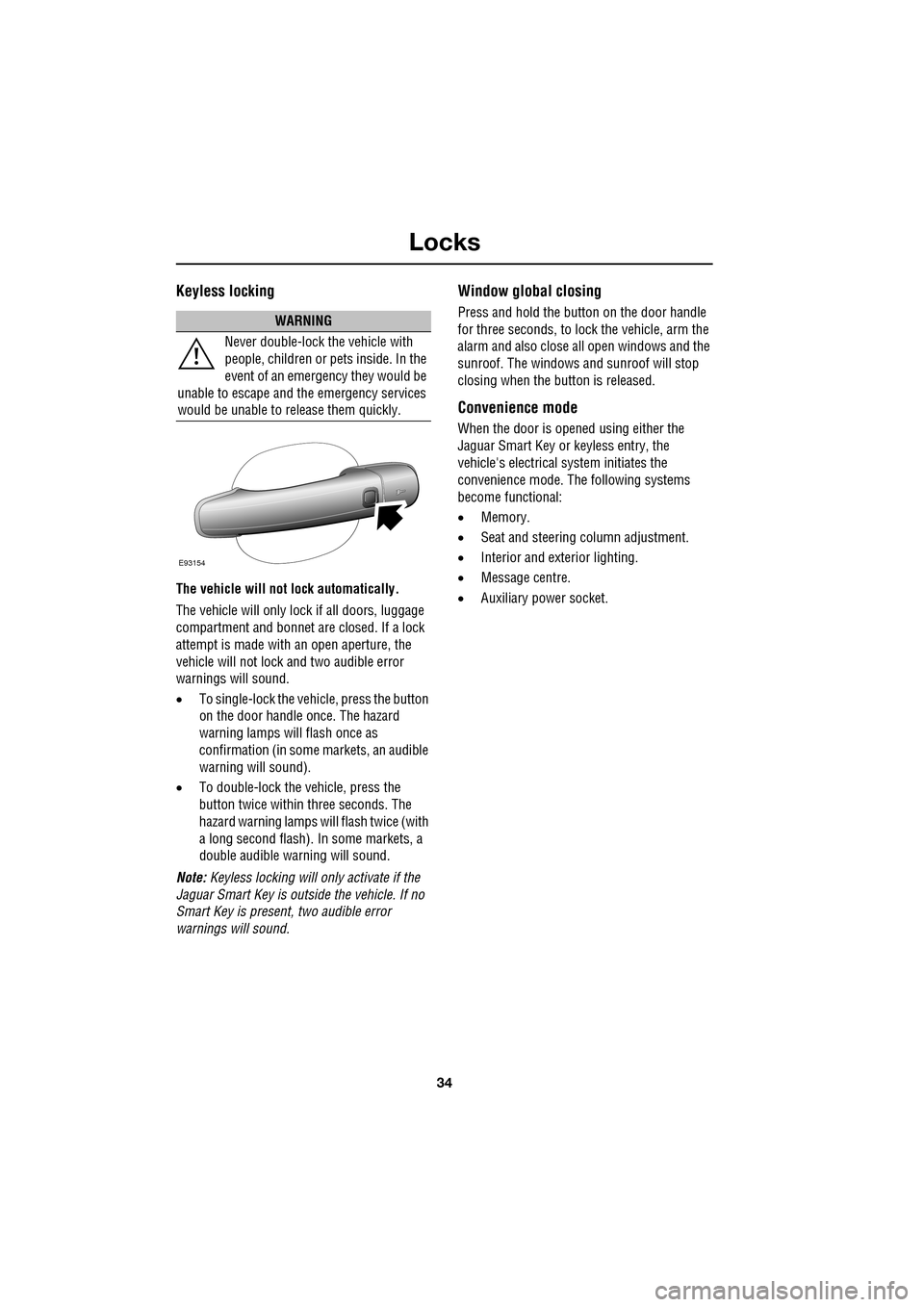
Keyless locking
The vehicle will not lock automatically.
The vehicle will only lock if all doors, luggage
compartment and bonnet are closed. If a lock
attempt is made with an open aperture, the
vehicle will not lock and two audible error
warnings will sound.
• To single-lock the vehicle, press the button
on the door handle once. The hazard
warning lamps will flash once as
confirmation (in some markets, an audible
warning will sound).
• To double-lock the ve hicle, press the
button twice within three seconds. The
hazard warning lamps will flash twice (with
a long second flash). In some markets, a
double audible warning will sound.
Note: Keyless locking will only activate if the
Jaguar Smart Key is outside the vehicle. If no
Smart Key is present, two audible error
warnings will sound.
Window global closing
Press and hold the button on the door handle
for three seconds, to lock the vehicle, arm the
alarm and also close all open windows and the
sunroof. The windows and sunroof will stop
closing when the button is released.
Convenience mode
When the door is opened using either the
Jaguar Smart Key or keyless entry, the
vehicle's electrical system initiates the
convenience mode. The following systems
become functional:
• Memory.
• Seat and steering column adjustment.
• Interior and exterior lighting.
• Message centre.
• Auxiliary power socket.
WARNING
Never double-lock the vehicle with
people, children or pets inside. In the
event of an emergency they would be
unable to escape and the emergency services
would be unable to release them quickly.
E93154
Page 35 of 391
35
Locks
Steering column lock
Your vehicle is fitted with an electronic steering
column lock. The column unlocks when it
detects a Jaguar Smart Key inside the vehicle.
The steering column automatically locks when
the starter switch is turned off and the driver's
door is opened.
Any malfunction of the steering column lock
will be indicated by the message STEERING
COLUMN LOCKED displaying in the message
centre. If this occurs:
1. Press the starter button to return to the
convenience mode.
2. Try again to unlock the steering column
lock, by turning the steering wheel gently
to the left and right.
3. If the malfunction st ill persists, seek
qualified assistance as soon as possible.
GLOBAL OPENING AND CLOSING
Global opening and closi ng is enabled/disabled
via the touch-screen.See PROGRAMMING THE
REMOTE CONTROL (page 21).
Window global opening
Press and hold the unlock button
on the Jaguar Smart Key for at least
three seconds. The alarm will
disarm, all doors and the luggage
compartment will unlock and all the windows
and sunroof will open.
Note: The windows and sunroof will continue
to open when the unlock button is released.
Press and hold the inte rior unlock button on
the fascia. After three seconds, all the windows
and the sunroof will open.
Note: The windows and sunroof will stop
opening when the unlock button is released.
CAUTION
During vehicle recovery, the Jaguar
Smart Key must remain inside the
vehicle (or be stowed in the starter control unit
in the centre console), so that the steering
column remains unlocked.WARNING
Accidental closing of an electrically
operated window or sunroof on
fingers, hands or any vulnerable part
of the body, can result in serious injury.
Always observe the following precautions:
Ensure that you have a clear view of all open
apertures on the vehicle and that all apertures
are unobstructed before activating global
closing.
Page 37 of 391
37
Alarm
ARMING THE ALARM
The engine is automatically
immobilised when the Jaguar
Smart Key is removed from the
vehicle. The alarm system is armed when the
lock button on the Jaguar Smart Key is pressed
or the button on the ex terior door handle is
pressed with a valid Jaguar Smart Key in close
proximity. The hazard lamps will flash to
indicate that the alarm is armed (in certain
markets, an audible tone will sound). The alarm
can also arm automatically (known as passive
arming), 30 seconds afte r all doors, luggage
compartment and bonnet apertures are closed,
and the Jaguar Smart Key is removed from the
vehicle. Passive arming does not lock the
vehicle.
This feature can be enab led/disabled using the
vehicle touch-screen. See PROGRAMMING
THE REMOTE CONTROL (page 21).
Full alarm
To set full alarm protection, ensure that all the
windows and the sunroof are closed. Then, on
vehicles fitted with doubl e-locking, press the
lock button twice within three seconds. The
hazard warning lights will flash twice to
confirm the alarm state and, in some markets,
an audible tone will sound.
Once fully armed the alarm will sound if:-
• The bonnet, luggage compartment, or a
door are opened.
• If a front door is unlocked using the
emergency key blade or the interior door
lock release levers and then opened.
• Movement is detected within the vehicle
interior.
• A window, front or rear windscreen, or
sunroof glass are broken.
• The vehicle is raised or tilted.
• The vehicle battery is disconnected. •
An attempt is made to disconnect the
alarm siren.
• An attempt is made to start the vehicle,
without a valid Jaguar Smart Key present.
Note: If the alarm is armed and a window or the
sunroof are left open, the alarm may sound due
to movement of air currents.
Note: Some of the above conditions are market
or option dependent a nd therefore may not
apply to your vehicle.
Perimeter alarm
To set perimeter alarm pr otection, briefly press
the lock button once. The hazard warning lights
will flash once to confirm the alarm state.
Once armed the perimeter alarm will sound if:-
• The bonnet, luggage compartment, or a
door are opened.
• If a front door is unlocked using the
emergency key blade or the interior door
lock release levers and then opened.
• The vehicle battery is disconnected.
• An attempt is made to disconnect the
alarm siren.
• An attempt is made to start the vehicle,
without a valid Jaguar Smart Key present.
Note: This setting should be used in
circumstances such as travelling on a ferry,
when pets are to be left in the vehicle, when a
window must be left open etc.
Note: Some of the above conditions are market
or option dependent a nd therefore may not
apply to your vehicle.
Page 41 of 391
41
Seats
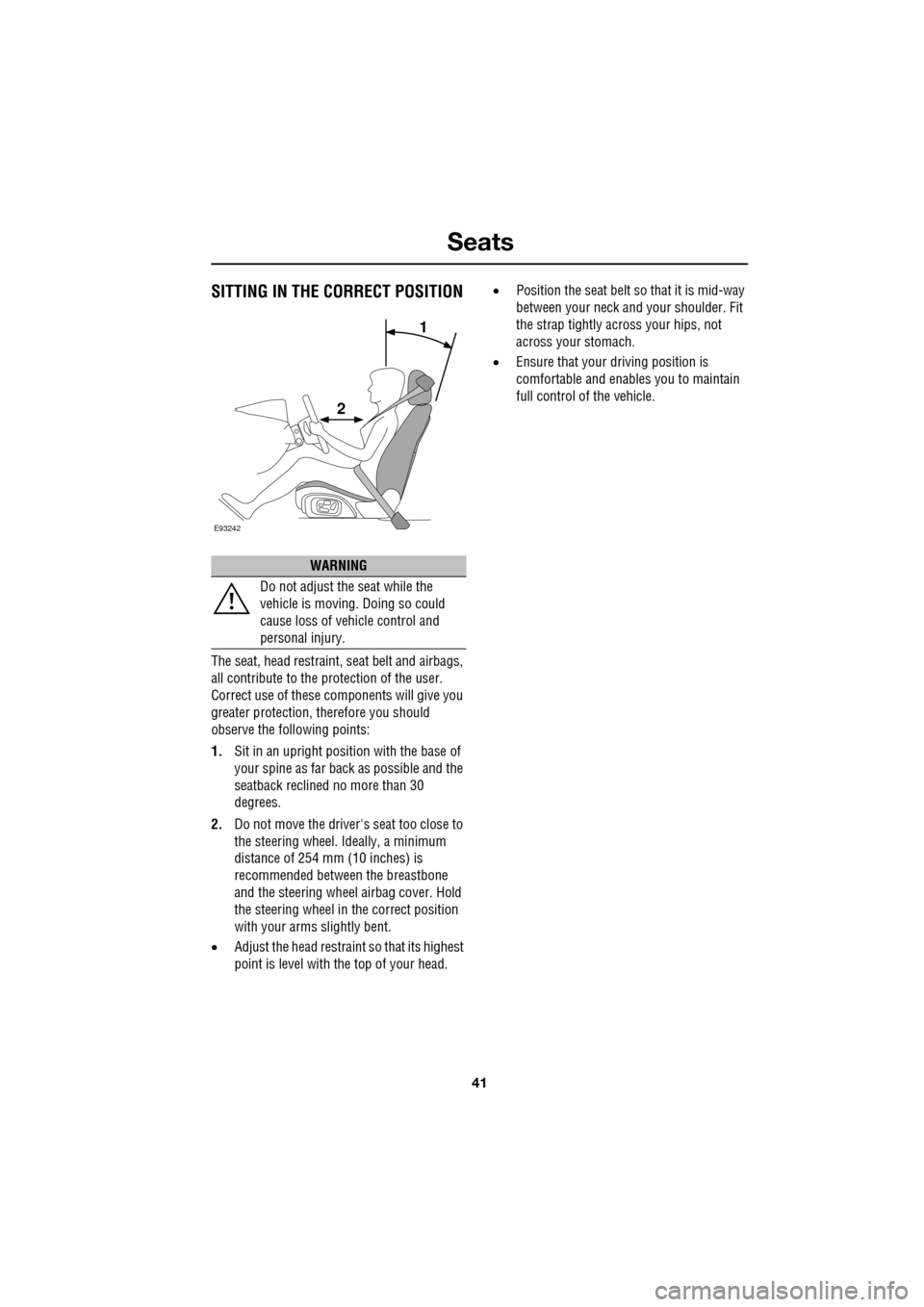
SITTING IN THE CORRECT POSITION
The seat, head restraint, seat belt and airbags,
all contribute to the protection of the user.
Correct use of these components will give you
greater protection, therefore you should
observe the following points:
1. Sit in an upright position with the base of
your spine as far back as possible and the
seatback reclined no more than 30
degrees.
2. Do not move the driver's seat too close to
the steering wheel. Ideally, a minimum
distance of 254 mm (10 inches) is
recommended betwee n the breastbone
and the steering wheel airbag cover. Hold
the steering wheel in the correct position
with your arms slightly bent.
• Adjust the head restraint so that its highest
point is level with the top of your head. •
Position the seat belt so that it is mid-way
between your neck an d your shoulder. Fit
the strap tightly across your hips, not
across your stomach.
• Ensure that your driving position is
comfortable and enables you to maintain
full control of the vehicle.
WARNING
Do not adjust the seat while the
vehicle is moving. Doing so could
cause loss of vehicle control and
personal injury.
E93242
1
2
Page 43 of 391
43
Seats
1.Cushion length adjustment.
2. Bolster adjustment:
A. Bolster inflate.
B. Bolster deflate.
3. Lumbar support adjustment.
4. Seat back angle adjustment.
5. Head restraint height adjustment.
6. Height adjustment.
7. Fore and aft adjustment.
8. Cushion front tilt adjustment.
To adjust the seats, the Jaguar Smart Key must
be in the vehicle and the ignition turned on.Driving position memory
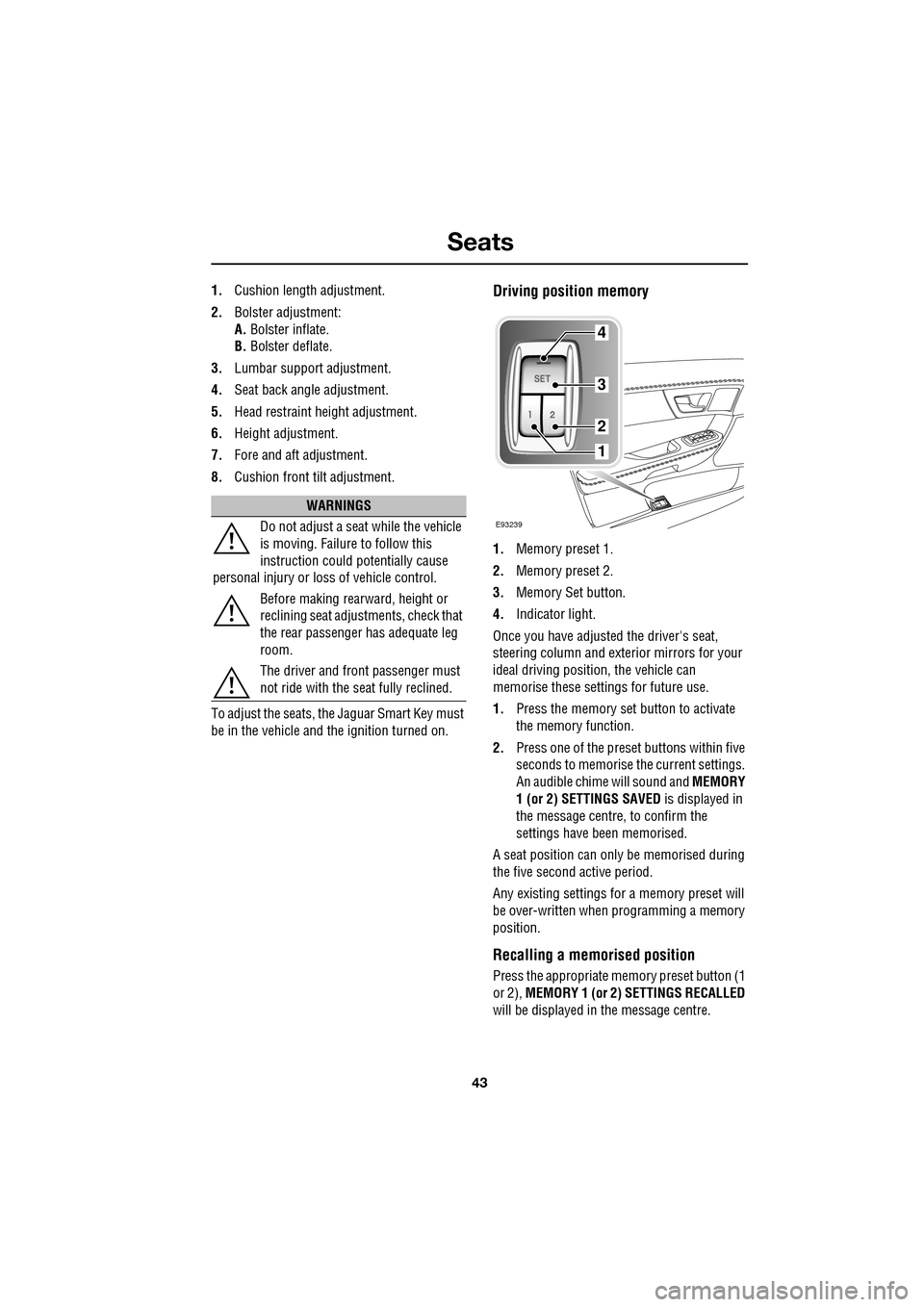
1. Memory preset 1.
2. Memory preset 2.
3. Memory Set button.
4. Indicator light.
Once you have adjusted the driver's seat,
steering column and exte rior mirrors for your
ideal driving position, the vehicle can
memorise these settings for future use.
1. Press the memory set button to activate
the memory function.
2. Press one of the preset buttons within five
seconds to memorise the current settings.
An audible chime will sound and MEMORY
1 (or 2) SETTINGS SAVED is displayed in
the message centre, to confirm the
settings have been memorised.
A seat position can onl y be memorised during
the five second active period.
Any existing settings for a memory preset will
be over-written when programming a memory
position.
Recalling a memorised position
Press the appropriate memory preset button (1
or 2), MEMORY 1 (or 2) SETTINGS RECALLED
will be displayed in the message centre.
WARNINGS
Do not adjust a seat while the vehicle
is moving. Failure to follow this
instruction could potentially cause
personal injury or loss of vehicle control.
Before making rearward, height or
reclining seat adjustments, check that
the rear passenger has adequate leg
room.
The driver and front passenger must
not ride with the seat fully reclined.
E93239
4
3
2
1