All JAGUAR XF 2009 1.G Owners Manual
[x] Cancel search | Manufacturer: JAGUAR, Model Year: 2009, Model line: XF, Model: JAGUAR XF 2009 1.GPages: 391, PDF Size: 19.32 MB
Page 277 of 391
277
Audio unit menus
RADIO DATA SYSTEM (RDS)
Options menu overview
Your radio is equipped with Radio Data System
(RDS), which enables the audio unit to receive
additional inform ation with normal FM radio
signals.
When tuned to certai n stations on the FM
waveband, the radi o decodes signals
transmitted to provide the functions listed
below (dependent upon th e service available
from the broadcasters).
Note: Not all FM radio stat ions broadcast RDS
information. If you are currently tuned to a
non-RDS station, then RDS features will be
unavailable.
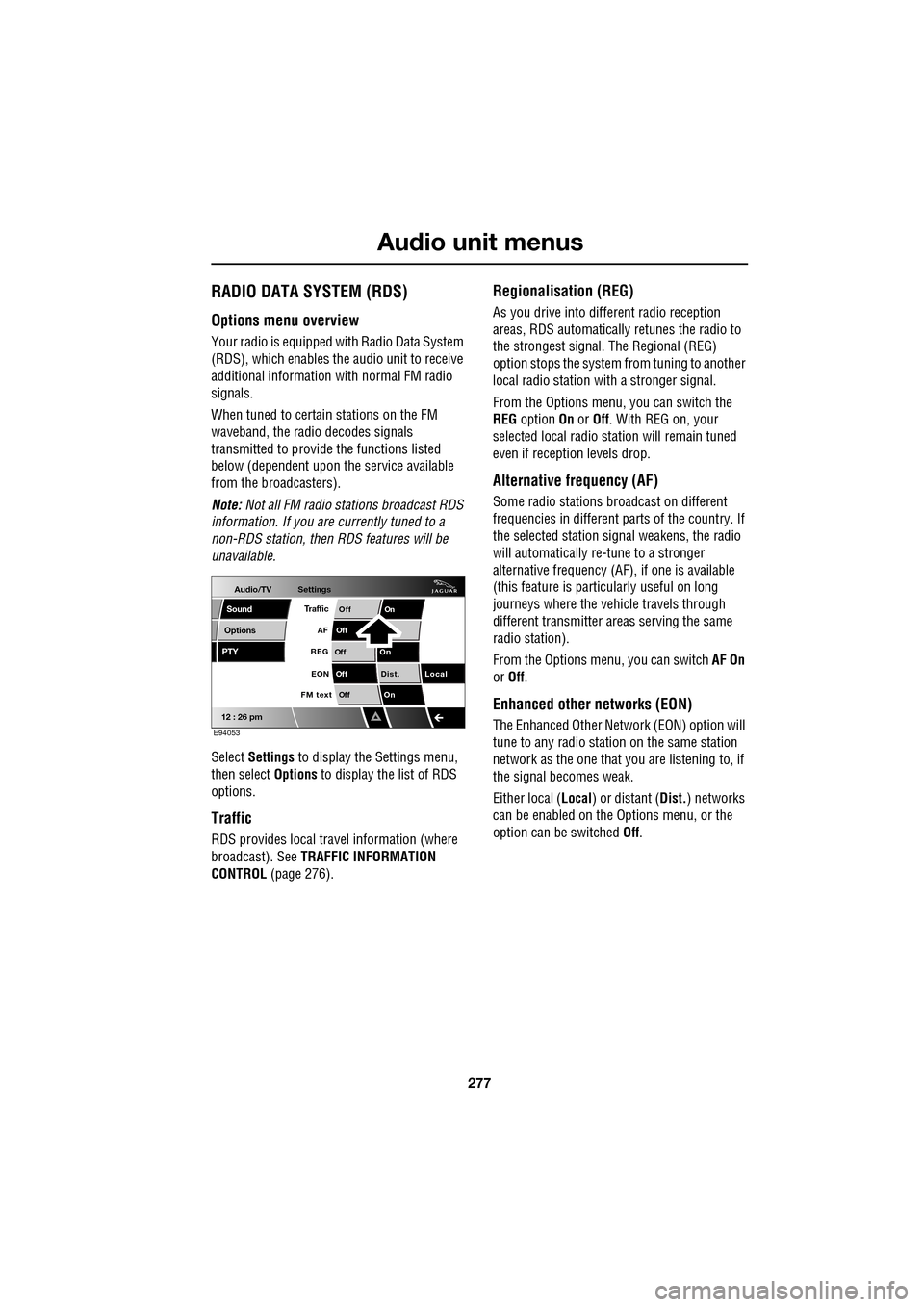
Select Settings to display the Settings menu,
then select Options to display the list of RDS
options.
Traffic
RDS provides local trav el information (where
broadcast). See TRAFFIC INFORMATION
CONTROL (page 276).
Regionalisation (REG)
As you drive into different radio reception
areas, RDS automatically retunes the radio to
the strongest signal. The Regional (REG)
option stops the system from tuning to another
local radio station wi th a stronger signal.
From the Options menu, you can switch the
REG option On or Off . With REG on, your
selected local radio st ation will remain tuned
even if reception levels drop.
Alternative frequency (AF)
Some radio stations broadcast on different
frequencies in different parts of the country. If
the selected station signal weakens, the radio
will automatically re -tune to a stronger
alternative frequency (AF) , if one is available
(this feature is partic ularly useful on long
journeys where the vehicle travels through
different transmitter areas serving the same
radio station).
From the Options menu, you can switch AF On
or Off .
Enhanced other networks (EON)
The Enhanced Other Network (EON) option will
tune to any radio station on the same station
network as the one that you are listening to, if
the signal becomes weak.
Either local ( Local) or distant ( Dist.) networks
can be enabled on the Options menu, or the
option can be switched Off.
Audio/TV
Options
PTY
Sound
12 : 26 pm
Settings
TrafficOnOff
Of f
On
Of
f
Dist. Local
Of f
On
Of f
FM text EON
REG
AF
E94053
Page 278 of 391
Audio unit menus
278
FM text
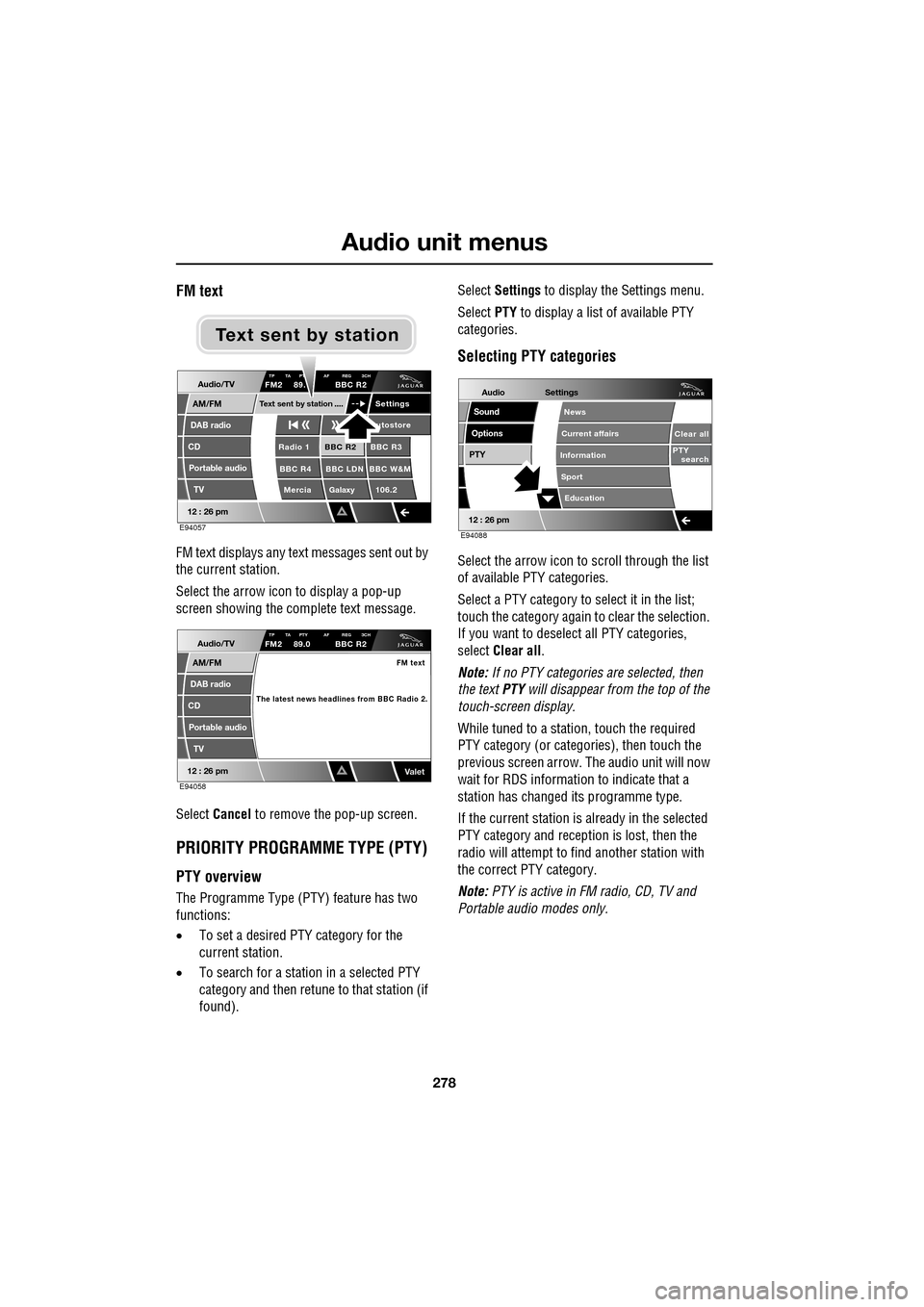
FM text displays any text messages sent out by
the current station.
Select the arrow icon to display a pop-up
screen showing the complete text message.
Select Cancel to remove the pop-up screen.
PRIORITY PROGRAMME TYPE (PTY)
PTY overview
The Programme Type (PTY) feature has two
functions:
•To set a desired PTY category for the
current station.
• To search for a station in a selected PTY
category and then retune to that station (if
found). Select
Settings to display the Settings menu.
Select PTY to display a list of available PTY
categories.
Selecting PTY categories
Select the arrow icon to scroll through the list
of available PTY categories.
Select a PTY category to select it in the list;
touch the category again to clear the selection.
If you want to deselect all PTY categories,
select Clear all .
Note: If no PTY categories are selected, then
the text PTY will disappear from the top of the
touch-screen display.
While tuned to a stati on, touch the required
PTY category (or categories), then touch the
previous screen arrow. The audio unit will now
wait for RDS informati on to indicate that a
station has changed its programme type.
If the current station is already in the selected
PTY category and reception is lost, then the
radio will attempt to fi nd another station with
the correct PTY category.
Note: PTY is active in FM radio, CD, TV and
Portable audi o modes only.
Audio/TV
DAB radio
CD
AM/FM
12 : 26 pm
BBC R2 BBC R3
BBC R4 BBC LDN BBC W&M Mercia Galaxy 106.2Radio 1
Settings
utostore
TP TA PT AF REG 3CHFM2 89. BBC R2
Portable audio TV
Text sent by station
E94057
Text sent by station
Audio/TV
DAB radio
CD
AM/FM
12 : 26 pm
TP TA PTY AF REG 3CHFM2 89.0 BBC R2
Portable audio
TV
FM text
The latest news headlines from BBC Radio 2.
ValetE94058
Audio
Options
PTY
Sound
12 : 26 pm
Settings
Clear all
PTY search
Education
News
Current affairs
Information
Sport
E94088
Page 279 of 391
279
Audio unit menus
PTY alarm (where broadcast)
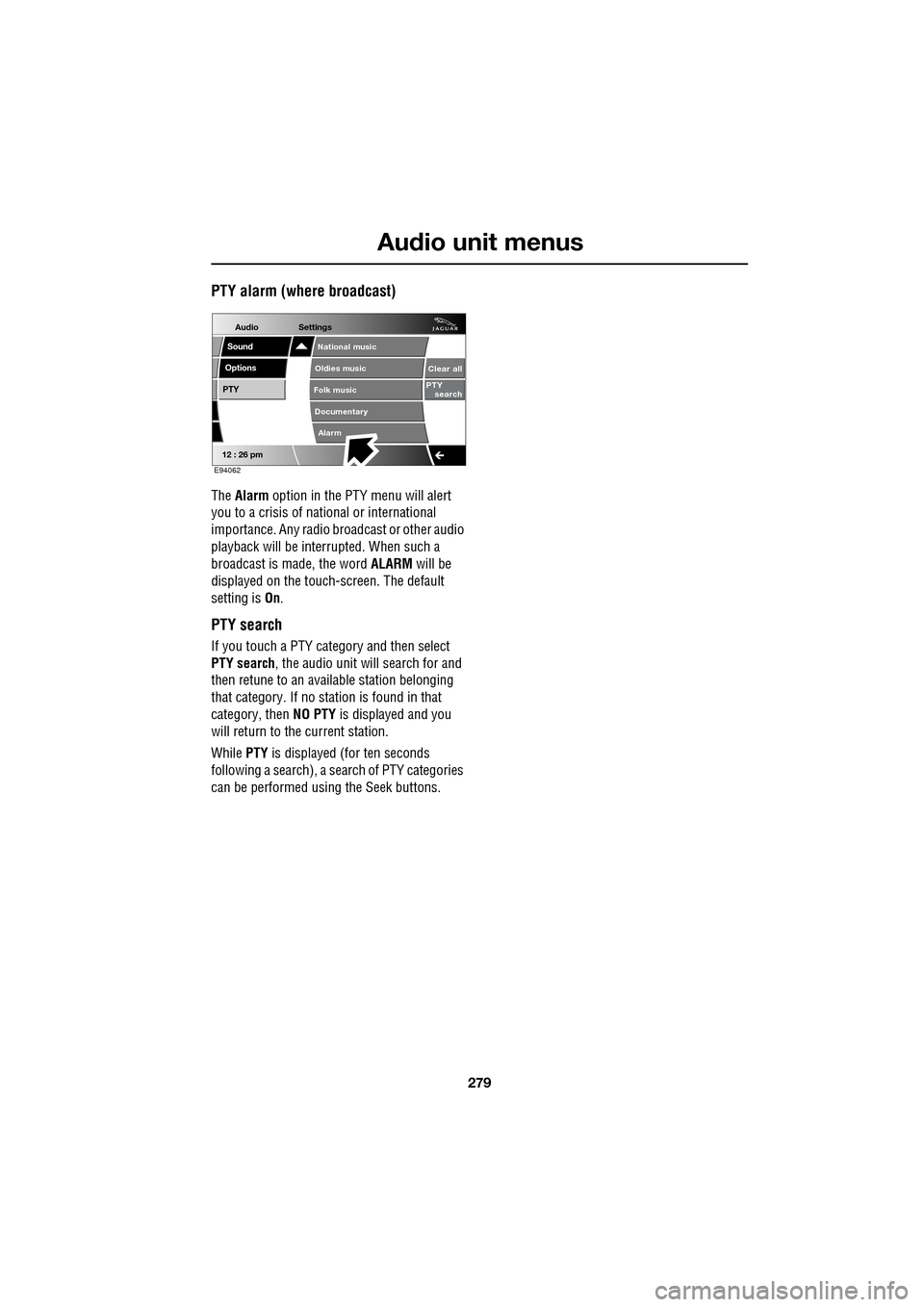
The Alarm option in the PTY menu will alert
you to a crisis of na tional or international
importance. Any radio br oadcast or other audio
playback will be interrupted. When such a
broadcast is made, the word ALARM will be
displayed on the touch-screen. The default
setting is On.
PTY search
If you touch a PTY category and then select
PTY search , the audio unit will search for and
then retune to an avai lable station belonging
that category. If no station is found in that
category, then NO PTY is displayed and you
will return to the current station.
While PTY is displayed (for ten seconds
following a search), a search of PTY categories
can be performed usin g the Seek buttons.
Audio
Options
PTY
Sound
12 : 26 pm
Settings
Alarm
National music
Oldies music
Folk music
Documentary
Clear all
PTY search
E94062
Page 280 of 391
Digital audio broadcasting
280
GENERAL INFORMATION
Digital radio reception
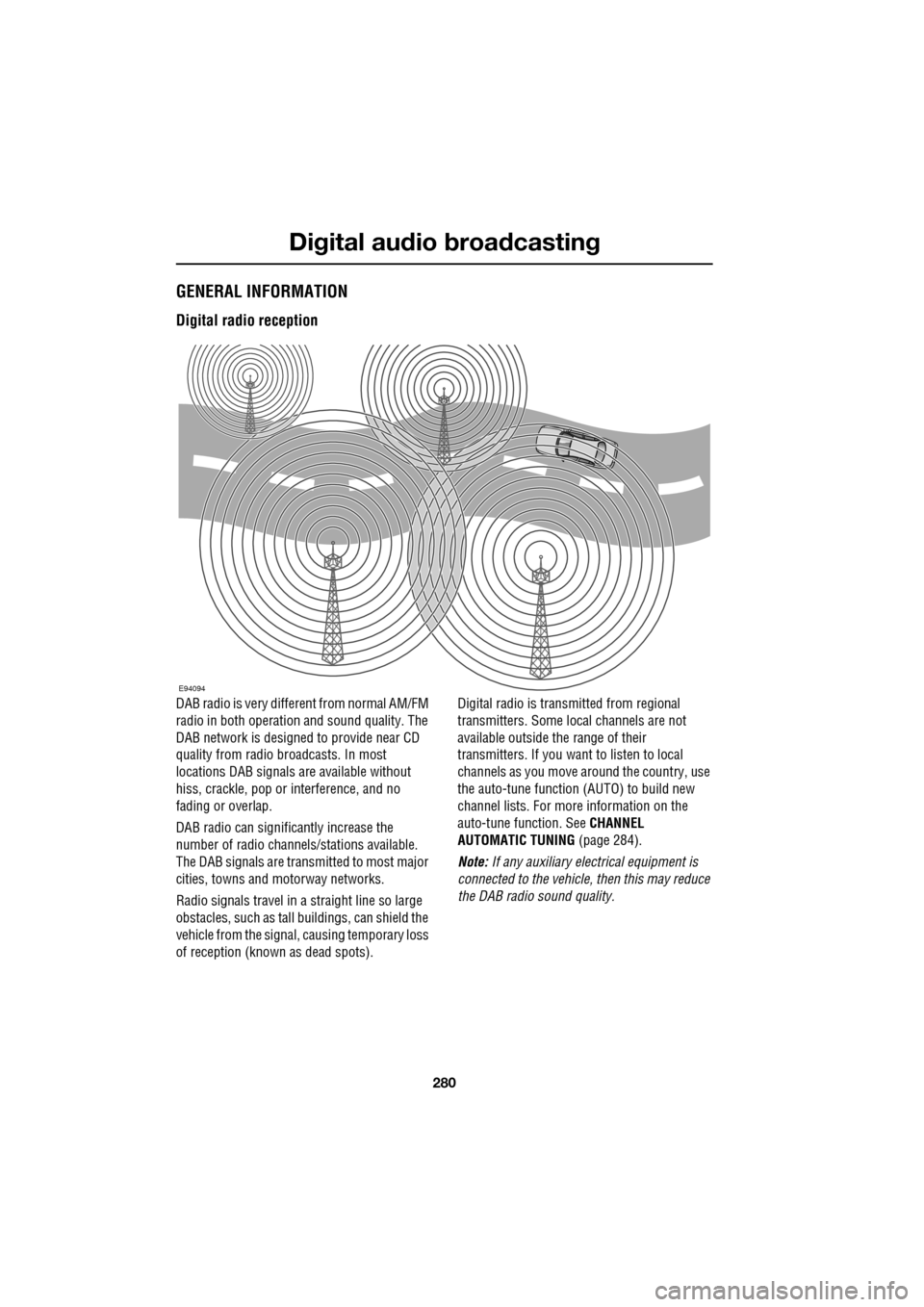
DAB radio is very different from normal AM/FM
radio in both operation and sound quality. The
DAB network is designed to provide near CD
quality from radio broadcasts. In most
locations DAB signals are available without
hiss, crackle, pop or interference, and no
fading or overlap.
DAB radio can significantly increase the
number of radio channe ls/stations available.
The DAB signals are transmitted to most major
cities, towns and motorway networks.
Radio signals travel in a straight line so large
obstacles, such as tall buildings, can shield the
vehicle from the signal, causing temporary loss
of reception (known as dead spots). Digital radio is transm
itted from regional
transmitters. Some local channels are not
available outside th e range of their
transmitters. If you want to listen to local
channels as you move around the country, use
the auto-tune function (AUTO) to build new
channel lists. For more information on the
auto-tune function. See CHANNEL
AUTOMATIC TUNING (page 284).
Note: If any auxiliary electrical equipment is
connected to the vehicle, then this may reduce
the DAB radio sound quality.
E94094
Page 283 of 391
283
Digital audio broadcasting
DISPLAY OPTIONS
Touch-screen information panel
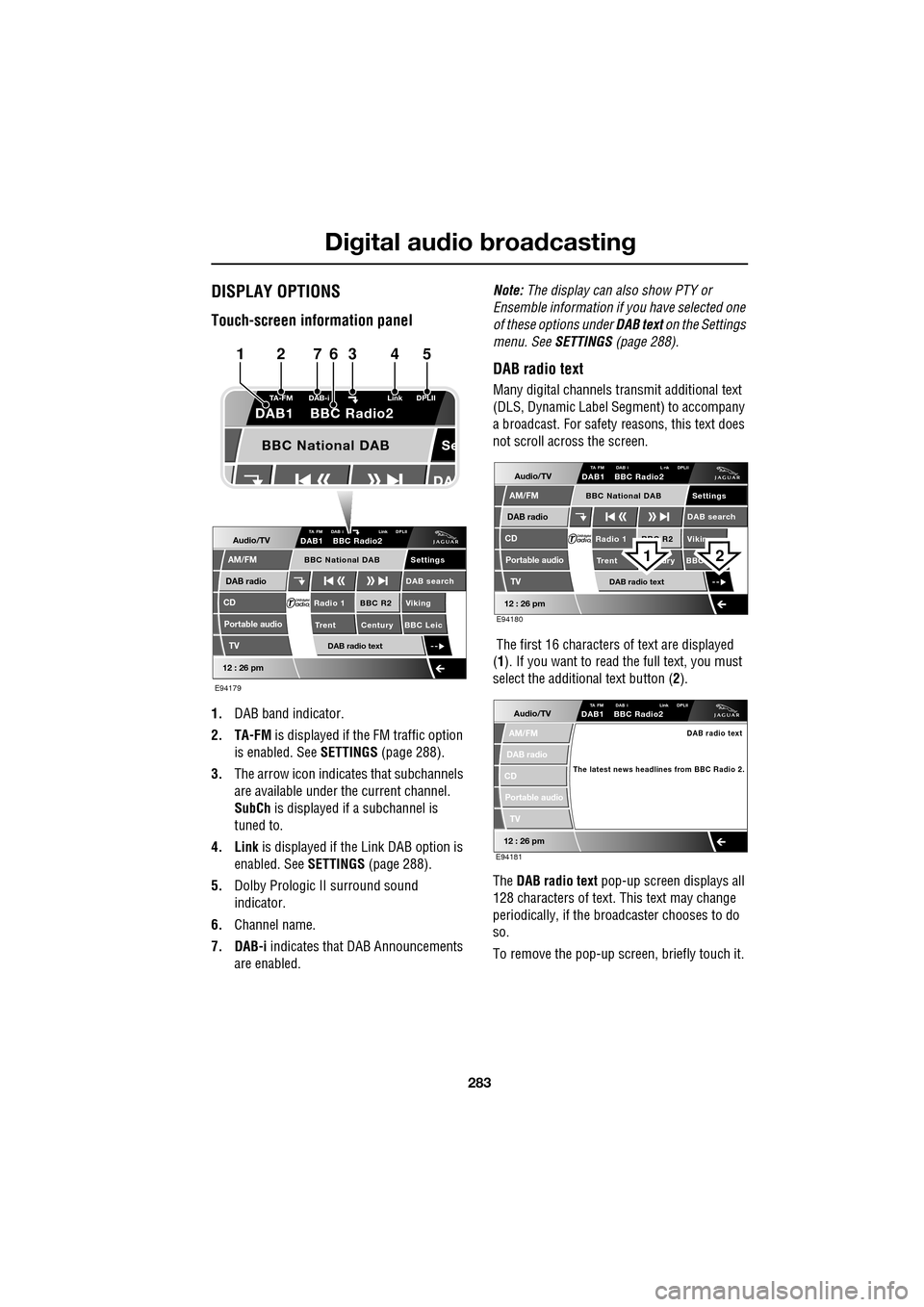
1.DAB band indicator.
2. TA-FM is displayed if the FM traffic option
is enabled. See SETTINGS (page 288).
3. The arrow icon indicates that subchannels
are available under the current channel.
SubCh is displayed if a subchannel is
tuned to.
4. Link is displayed if th e Link DAB option is
enabled. See SETTINGS (page 288).
5. Dolby Prologic II surround sound
indicator.
6. Channel name.
7. DAB-i indicates that DAB Announcements
are enabled. Note:
The display can also show PTY or
Ensemble information if you have selected one
of these options under DAB text on the Settings
menu. See SETTINGS (page 288).
DAB radio text
Many digital channels tr ansmit additional text
(DLS, Dynamic Label Segment) to accompany
a broadcast. For safety reasons, this text does
not scroll across the screen.
The first 16 characters of text are displayed
(1 ). If you want to read the full text, you must
select the additional text button ( 2).
The DAB radio text pop-up screen displays all
128 characters of text. This text may change
periodically, if the broadcaster chooses to do
so.
To remove the pop-up screen, briefly touch it.
Audio/TV
DAB radio
CD
AM/FM
12 : 26 pm
BBC R2 Viking
Trent Century BBC LeicRadio 1
Settings
DAB search
TA FM DAB i Link DPLIIDAB1 BBC Radio2
Portable audio
TV
DAB radio text
BBC National DAB
Se
TA-FM DAB-i
Link DPLII
DAB1 BBC Radio2
BBC National DAB
E94179
1234567
Audio/TV
DAB radio
CD
AM/FM
12 : 26 pm
BBC R2 Vikin
Trent ury BBC Radio 1
Settings
DAB search
TA FM DAB i L nk DPLIIDAB1 BBC Radio2
Portable audio
TV
DAB radio text
BBC National DAB
E94180
21
Audio/TV
DAB radio
CD
AM/FM
12 : 26 pm
TA FM DAB i Link DPLIIDAB1 BBC Radio2
Portable audio
TV
DAB radio text
The latest news headlines from BBC Radio 2.
E94181
Page 284 of 391
Digital audio broadcasting
284
CHANNEL AUTOMATIC TUNING
Note: When you first use the DAB radio, you
will be unable to listen to any digital broadcasts
until you have comp leted the auto-tune
process.
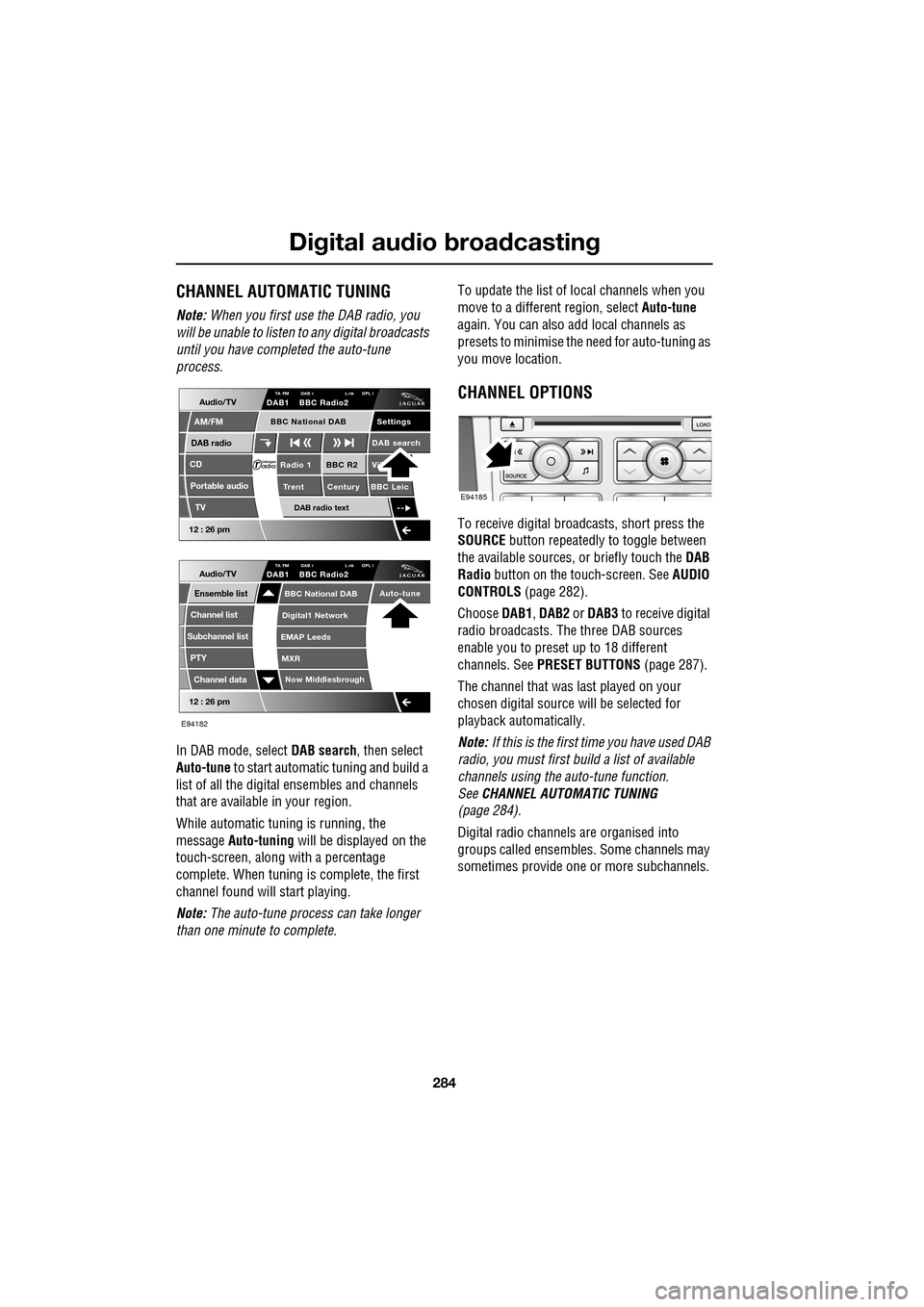
In DAB mode, select DAB search, then select
Auto-tune to start automatic tuning and build a
list of all the digital ensembles and channels
that are available in your region.
While automatic tuning is running, the
message Auto-tuning will be displayed on the
touch-screen, along with a percentage
complete. When tuning is complete, the first
channel found will start playing.
Note: The auto-tune process can take longer
than one minute to complete. To update the list of lo
cal channels when you
move to a different region, select Auto-tune
again. You can also add local channels as
presets to minimise the need for auto-tuning as
you move location.
CHANNEL OPTIONS
To receive digital broadcasts, short press the
SOURCE button repeatedly to toggle between
the available sources, or briefly touch the DAB
Radio button on the touch-screen. See AUDIO
CONTROLS (page 282).
Choose DAB1, DAB2 or DAB3 to receive digital
radio broadcasts. The three DAB sources
enable you to preset up to 18 different
channels. See PRESET BUTTONS (page 287).
The channel that was last played on your
chosen digital source will be selected for
playback automatically.
Note: If this is the first time you have used DAB
radio, you must first build a list of available
channels using the auto-tune function.
See CHANNEL AUTOMATIC TUNING
(page 284).
Digital radio channels are organised into
groups called ensembles. Some channels may
sometimes provide one or more subchannels.
Audio/TV
DAB radio
CD
AM/FM
12 : 26 pm
BBC R2 Vik
Trent Century BBC LeicRadio 1
Settings
DAB search
TA FM DAB i L nk DPL IDAB1 BBC Radio2
Portable audio
TV
DAB radio text
BBC National DAB
12 : 26 pm
Now Middlesbrough
BBC National DAB
Digital1 Network
EMAP Leeds
MXR
Audio/TVTA FM DAB i L nk DPL IDAB1 BBC Radio2
Channel list
Subchannel list
Ensemble list
PTY
Channel data
Auto-tune
E94182
E94185
Page 286 of 391
Digital audio broadcasting
286
Finding an ensemble
Touch and hold (two seconds) the seek
buttons to find the next or previous ensemble.
SeeAUDIO CONTROLS (page 282).
After a few seconds pause, the first channel in
the ensemble found will start playing.
DAB search
The DAB search menu enables you to view lists
of available ensembles, channels and
subchannels. You can al so perform searches
based on programme type (PTY).
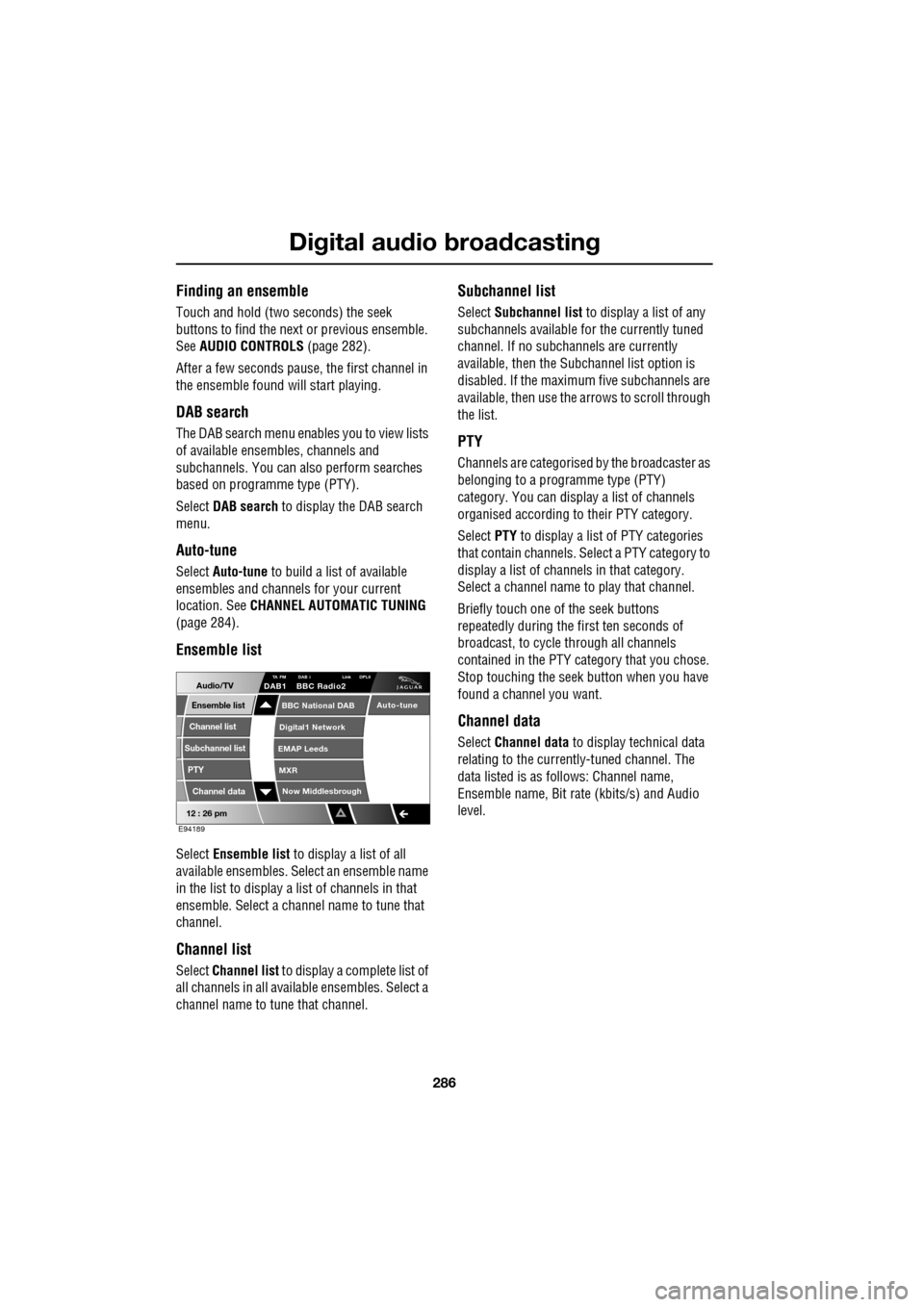
Select DAB search to display the DAB search
menu.
Auto-tune
Select Auto-tune to build a list of available
ensembles and channels for your current
location. See CHANNEL AUTOMATIC TUNING
(page 284).
Ensemble list
Select Ensemble list to display a list of all
available ensembles. Select an ensemble name
in the list to display a list of channels in that
ensemble. Select a channe l name to tune that
channel.
Channel list
Select Channel list to display a complete list of
all channels in all availa ble ensembles. Select a
channel name to tune that channel.
Subchannel list
Select Subchannel list to display a list of any
subchannels available for the currently tuned
channel. If no subcha nnels are currently
available, then the Subchannel list option is
disabled. If the maximum five subchannels are
available, then use the arrows to scroll through
the list.
PTY
Channels are categorised by the broadcaster as
belonging to a programme type (PTY)
category. You can display a list of channels
organised according to their PTY category.
Select PTY to display a list of PTY categories
that contain channels. Select a PTY category to
display a list of channels in that category.
Select a channel name to play that channel.
Briefly touch one of the seek buttons
repeatedly during the first ten seconds of
broadcast, to cycle through all channels
contained in the PTY category that you chose.
Stop touching the seek button wh en you have
found a channel you want.
Channel data
Select Channel data to display technical data
relating to the currently-tuned channel. The
data listed is as follows: Channel name,
Ensemble name, Bit rate (kbits/s) and Audio
level.
12 : 26 pm
Now Middlesbrough
BBC National DAB
Digital1 Network
EMAP Leeds
MXR
Audio/TVTA FM DAB i Link DPLIIDAB1 BBC Radio2
Channel list
Subchannel list
Ensemble list
PTY
Channel data
Auto-tune
E94189
Page 287 of 391
287
Digital audio broadcasting
PRESET BUTTONS
Storing channels as presets
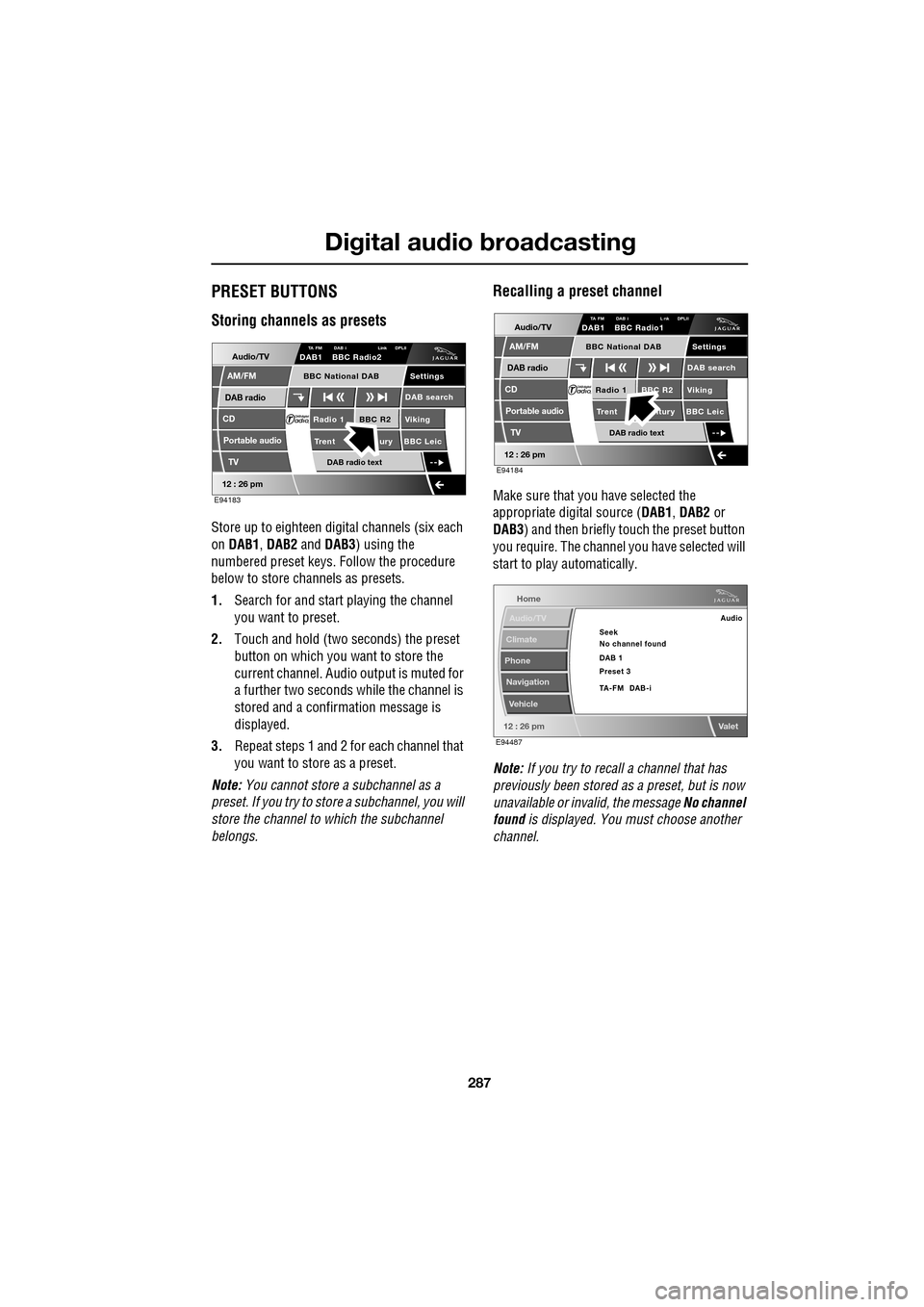
Store up to eighteen digital channels (six each
on DAB1 , DAB2 and DAB3 ) using the
numbered preset keys. Follow the procedure
below to store channels as presets.
1. Search for and start playing the channel
you want to preset.
2. Touch and hold (two seconds) the preset
button on which you want to store the
current channel. Audi o output is muted for
a further two seconds while the channel is
stored and a confirmation message is
displayed.
3. Repeat steps 1 and 2 for each channel that
you want to store as a preset.
Note: You cannot store a subchannel as a
preset. If you try to stor e a subchannel, you will
store the channel to which the subchannel
belongs.
Recalling a preset channel
Make sure that you have selected the
appropriate digital source ( DAB1, DAB2 or
DAB3 ) and then briefly touch the preset button
you require. The channel you have selected will
start to play automatically.
Note: If you try to recall a channel that has
previously been stored as a preset, but is now
unavailable or invalid, the message No channel
found is displayed. You must choose another
channel.
Audio/TV
DAB radio
CD
AM/FM
12 : 26 pm
BBC R2 Viking
Trent ury BBC LeicRadio 1
Settings
DAB search
TA FM DAB i Link DPLIIDAB1 BBC Radio2
Portable audio
TV
DAB radio text
BBC National DAB
E94183
Audio/TV
DAB radio
CD
AM/FM
12 : 26 pm
BBC R2 Viking
Trent ntury BBC LeicRadio 1
Settings
DAB search
TA FM DAB i L nk DPLIIDAB1 BBC Radio1
Portable audio
TV
DAB radio text
BBC National DAB
E94184
Home
Audio/TV
Climate
Phone
Navigation
Vehicle
Valet12 : 26 pm
Audio
Seek
No channel found
Preset 3 DAB 1
TA-FM DAB-i
E94487
Page 288 of 391
Digital audio broadcasting
288
SETTINGS
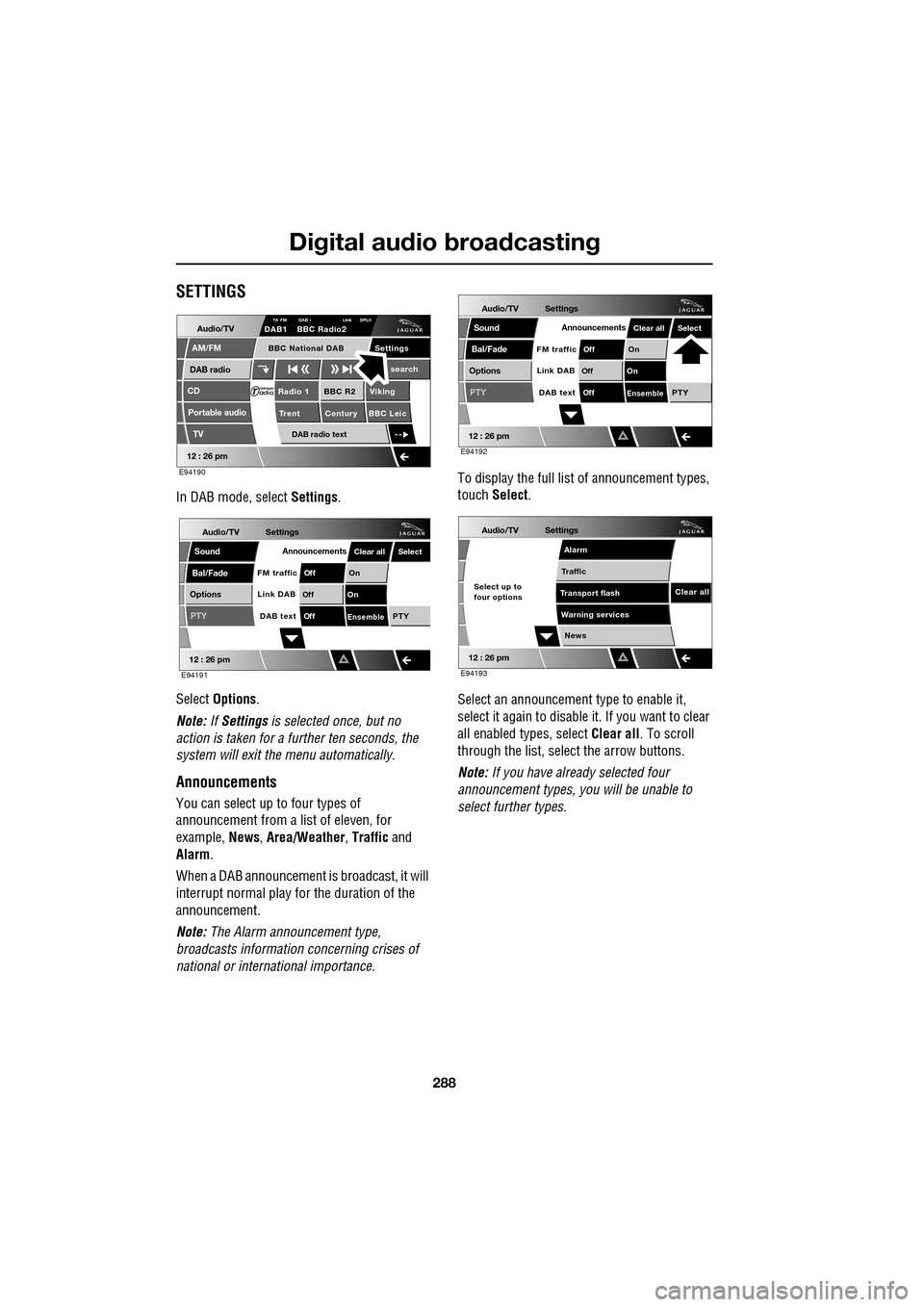
In DAB mode, select Settings.
Select Options .
Note: If Settings is selected once, but no
action is taken for a further ten seconds, the
system will exit the menu automatically.
Announcements
You can select up to four types of
announcement from a list of eleven, for
example, News, Area/Weather , Traffic and
Alarm .
When a DAB announcement is broadcast, it will
interrupt normal play for the duration of the
announcement.
Note: The Alarm announcement type,
broadcasts information concerning crises of
national or international importance. To display the full list
of announcement types,
touch Select .
Select an announcement type to enable it,
select it again to disabl e it. If you want to clear
all enabled types, select Clear all. To scroll
through the list, select the arrow buttons.
Note: If you have already selected four
announcement types, y ou will be unable to
select further types.
Audio/TV
DAB radio
CD
AM/FM
12 : 26 pm
BBC R2 Viking
Trent Century BBC LeicRadio 1
Settings search
TA FM DAB i Link DPLIIDAB1 BBC Radio2
Portable audio
TV
DAB radio text
BBC National DAB
E94190
Audio/TV
Bal/Fade
Options
Sound
12 : 26 pm
Settings
Announcements
On
Of f
On
Of f
EnsemblePTY
Of f
DAB text
Link DAB
FM trafficPTY
Select
Clear all
E94191
Audio/TV
Bal/Fade
Options
Sound
12 : 26 pm
Settings
Announcements
On
Of f
On
Of f
EnsemblePTY
Of f
DAB text
Link DAB
FM trafficPTY
Select
Clear all
E94192
Audio/TV
12 : 26 pm
Settings
News
Alarm
Traffic
T ransport flash
W
arning services
Clear allSelect up to
four options
E94193
Page 289 of 391
289
Digital audio broadcasting
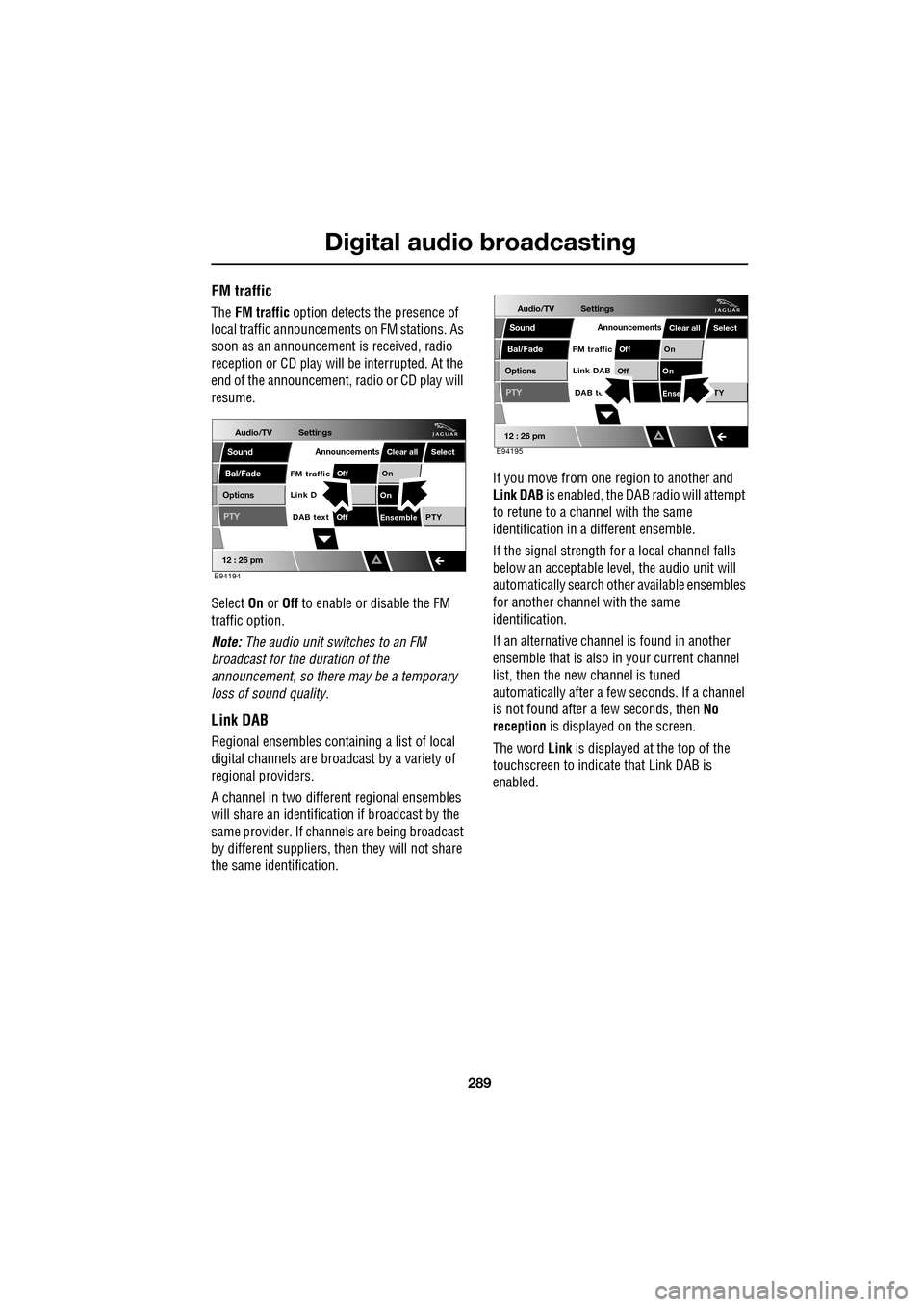
FM traffic
The FM traffic option detects the presence of
local traffic announcements on FM stations. As
soon as an announcement is received, radio
reception or CD play will be interrupted. At the
end of the announcement, radio or CD play will
resume.
Select On or Off to enable or disable the FM
traffic option.
Note: The audio unit switches to an FM
broadcast for the duration of the
announcement, so there may be a temporary
loss of sound quality.
Link DAB
Regional ensembles contai ning a list of local
digital channels are broadcast by a variety of
regional providers.
A channel in two differ ent regional ensembles
will share an identification if broadcast by the
same provider. If channels are being broadcast
by different suppliers, th en they will not share
the same identification. If you move from one region to another and
Link DAB
is enabled, the DAB radio will attempt
to retune to a channel with the same
identification in a different ensemble.
If the signal strength for a local channel falls
below an acceptable level, the audio unit will
automatically search other available ensembles
for another channel with the same
identification.
If an alternative channel is found in another
ensemble that is also in your current channel
list, then the new channel is tuned
automatically after a few seconds. If a channel
is not found after a few seconds, then No
reception is displayed on the screen.
The word Link is displayed at the top of the
touchscreen to indicate that Link DAB is
enabled.
Audio/TV
Bal/Fade
Options
Sound
12 : 26 pm
Settings
Announcements
On
Of f
On
EnsemblePTY
Of f
DAB text
Link D
FM trafficPTY
Select
Clear all
E94194
Audio/TV
Bal/Fade
Options
Sound
12 : 26 pm
Settings
Announcements
On
Of f
On
Of f
EnseTY
DAB te
Link DAB
FM trafficPTY
Select
Clear all
E94195