Cat JAGUAR XF 2009 1.G Owner's Manual
[x] Cancel search | Manufacturer: JAGUAR, Model Year: 2009, Model line: XF, Model: JAGUAR XF 2009 1.GPages: 391, PDF Size: 19.32 MB
Page 38 of 391
Alarm
38
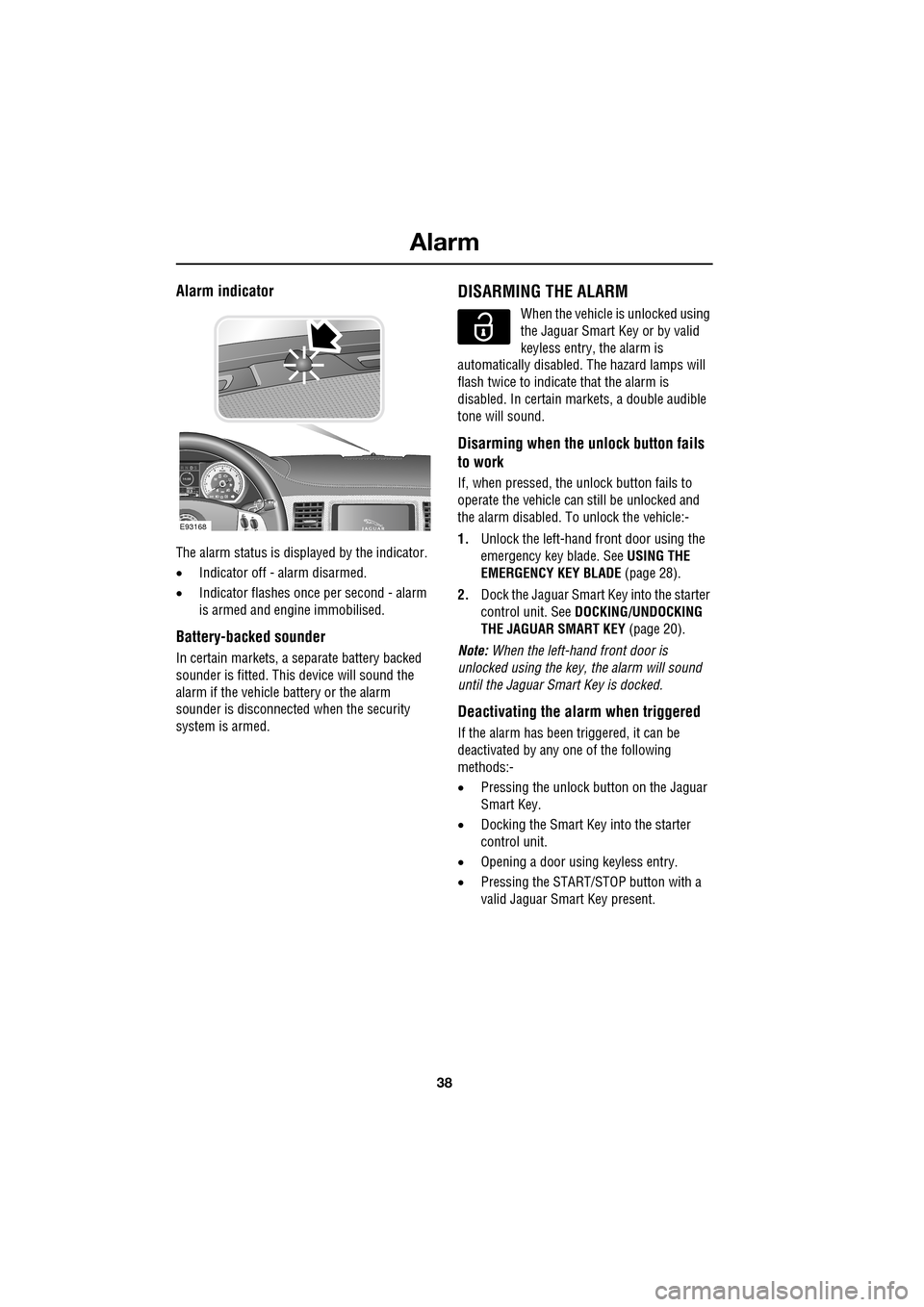
Alarm indicator
The alarm status is displayed by the indicator.
•Indicator off - alarm disarmed.
• Indicator flashes onc e per second - alarm
is armed and engine immobilised.
Battery-backed sounder
In certain markets, a separate battery backed
sounder is fitted. This device will sound the
alarm if the vehicle battery or the alarm
sounder is disconnected when the security
system is armed.
DISARMING THE ALARM
When the vehicle is unlocked using
the Jaguar Smart Key or by valid
keyless entry, the alarm is
automatically disabled. The hazard lamps will
flash twice to indicate that the alarm is
disabled. In certain ma rkets, a double audible
tone will sound.
Disarming when the unlock button fails
to work
If, when pressed, the unlock button fails to
operate the vehicle can still be unlocked and
the alarm disabled. To unlock the vehicle:-
1. Unlock the left-hand front door using the
emergency key blade. See USING THE
EMERGENCY KEY BLADE (page 28).
2. Dock the Jaguar Smart Key into the starter
control unit. See DOCKING/UNDOCKING
THE JAGUAR SMART KEY (page 20).
Note: When the left-hand front door is
unlocked using the key, the alarm will sound
until the Jaguar Smart Key is docked.
Deactivating the alarm when triggered
If the alarm has been triggered, it can be
deactivated by any one of the following
methods:-
• Pressing the unlock button on the Jaguar
Smart Key.
• Docking the Smart Key into the starter
control unit.
• Opening a door using keyless entry.
• Pressing the START/ST OP button with a
valid Jaguar Smart Key present.
km/ 0 km
E93168
Page 39 of 391
39
Alarm
Alarm trigger information
If you have reason to believe that the alarm was
triggered when you were away from the
vehicle, it is possible to check on your return
using the touch-screen.
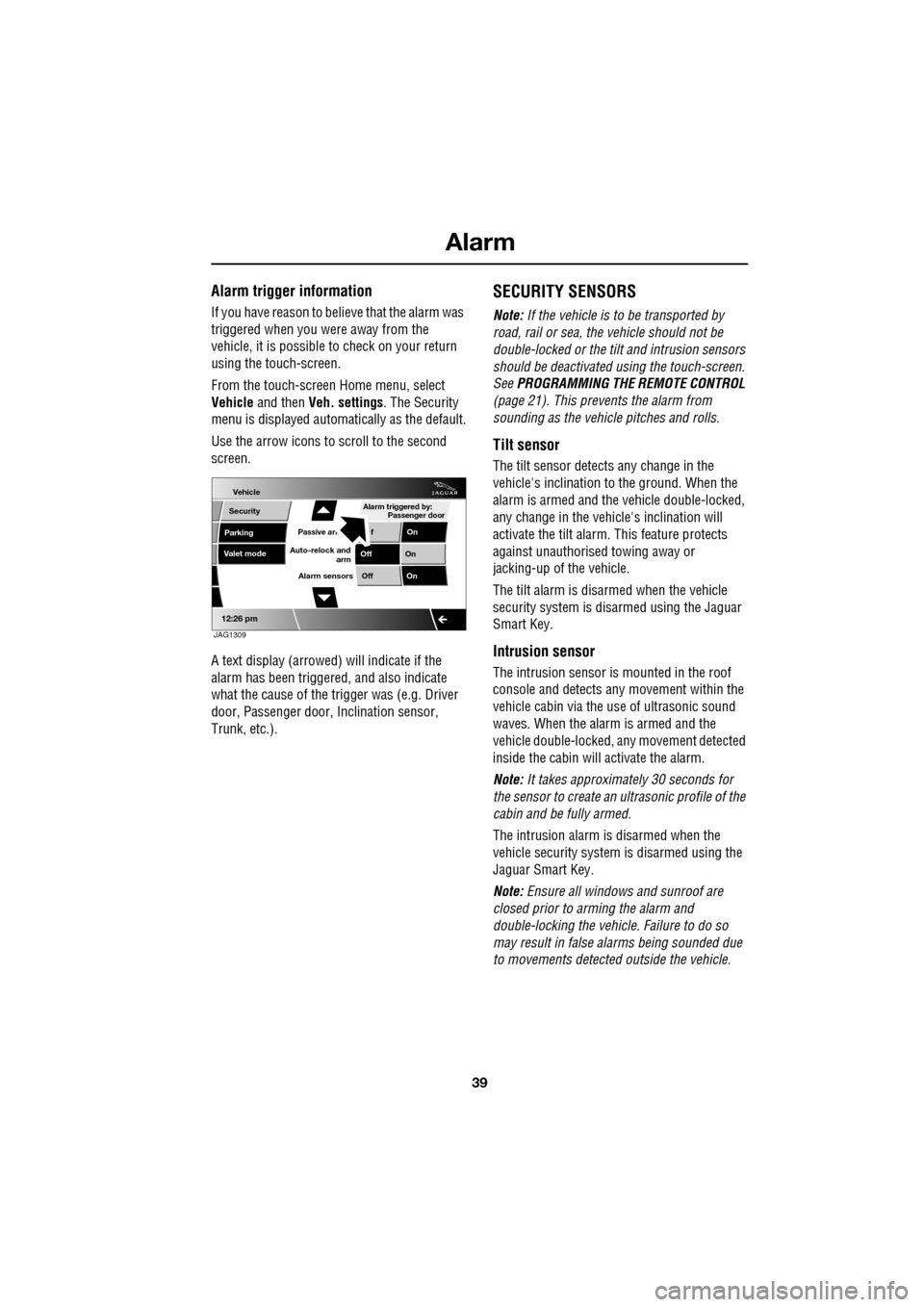
From the touch-screen Home menu, select
Vehicle and then Veh. settings . The Security
menu is displayed automatically as the default.
Use the arrow icons to scroll to the second
screen.
A text display (arrowed) will indicate if the
alarm has been triggere d, and also indicate
what the cause of the trigger was (e.g. Driver
door, Passenger door, Inclination sensor,
Trunk, etc.).
SECURITY SENSORS
Note: If the vehicle is to be transported by
road, rail or sea, the vehicle should not be
double-locked or the tilt and intrusion sensors
should be deactivated using the touch-screen.
See PROGRAMMING THE REMOTE CONTROL
(page 21). This prevents the alarm from
sounding as the vehi cle pitches and rolls.
Tilt sensor
The tilt sensor detect s any change in the
vehicle's inclination to the ground. When the
alarm is armed and the vehicle double-locked,
any change in the vehicle's inclination will
activate the tilt alarm. This feature protects
against unauthorised towing away or
jacking-up of the vehicle.
The tilt alarm is disarmed when the vehicle
security system is disarmed using the Jaguar
Smart Key.
Intrusion sensor
The intrusion sensor is mounted in the roof
console and detects any movement within the
vehicle cabin via the use of ultrasonic sound
waves. When the alarm is armed and the
vehicle double-locked, an y movement detected
inside the cabin will activate the alarm.
Note: It takes approximately 30 seconds for
the sensor to create an ultrasonic profile of the
cabin and be fully armed.
The intrusion alarm is disarmed when the
vehicle security system is disarmed using the
Jaguar Smart Key.
Note: Ensure all windows and sunroof are
closed prior to arming the alarm and
double-locking the vehicl e. Failure to do so
may result in false al arms being sounded due
to movements detected outside the vehicle.
Vehicle
Security
Parking
Passive armf On
Alarm sensors Of f On
12:26 pm
Off On
Auto-relock and
armValet mode
Passenger door
Alarm triggered by:
JAG1309
Page 40 of 391
Alarm
40
Passive arming
This vehicle is fitted with a passive arming
feature which can, if enabled, automatically
arm the anti-theft system. Passive arming will
automatically arm the perimeter alarm system
30 seconds after the driver's door is closed,
provided all doors, bonnet and luggage
compartment are closed, the ignition is
switched off and there are no valid Jaguar
Smart Keys inside the vehicle.
It will also automatically arm the perimeter
alarm system 30 seconds after the vehicle is
unlocked, if none of the doors or the luggage
compartment are opened.
Passive arming will not lock the vehicle,
although access to the luggage compartment
via the interior or exterior release buttons will
be inhibited and the fuel filler flap will be
locked.
Passive arming can be di sabled/enabled using
the touch-screen. See PROGRAMMING THE
REMOTE CONTROL (page 21).
Automatic relocking and re-arming of the
alarm
Automatic relock and re-a rm is a feature which,
if enabled, automatically relocks the vehicle
and arms the anti-theft system.
If the vehicle is in a locked and armed state and
the remote unlock button is pressed, but none
of the doors or the luggage compartment are
opened within 45 seconds, the vehicle will
automatically relock all the doors and the
luggage compartment a nd will re-arm the
alarm system.
Note: Automatic relocking and arming will only
relock to a centrally lo cked state and will only
arm to a perimeter alarm condition.
Automatic relocking an d re-arming can be
disabled/enabled using the touch-screen.
See PROGRAMMING THE REMOTE CONTROL
(page 21).
Sensor faults
If the security systems detect a fault with one
of the security sensors, two error tones will
sound from the alarm sire n after the vehicle is
unlocked and disarmed. If this condition
occurs, please visit your Dealer/Authorised
Repairer for rectification.
Page 43 of 391
43
Seats
1.Cushion length adjustment.
2. Bolster adjustment:
A. Bolster inflate.
B. Bolster deflate.
3. Lumbar support adjustment.
4. Seat back angle adjustment.
5. Head restraint height adjustment.
6. Height adjustment.
7. Fore and aft adjustment.
8. Cushion front tilt adjustment.
To adjust the seats, the Jaguar Smart Key must
be in the vehicle and the ignition turned on.Driving position memory
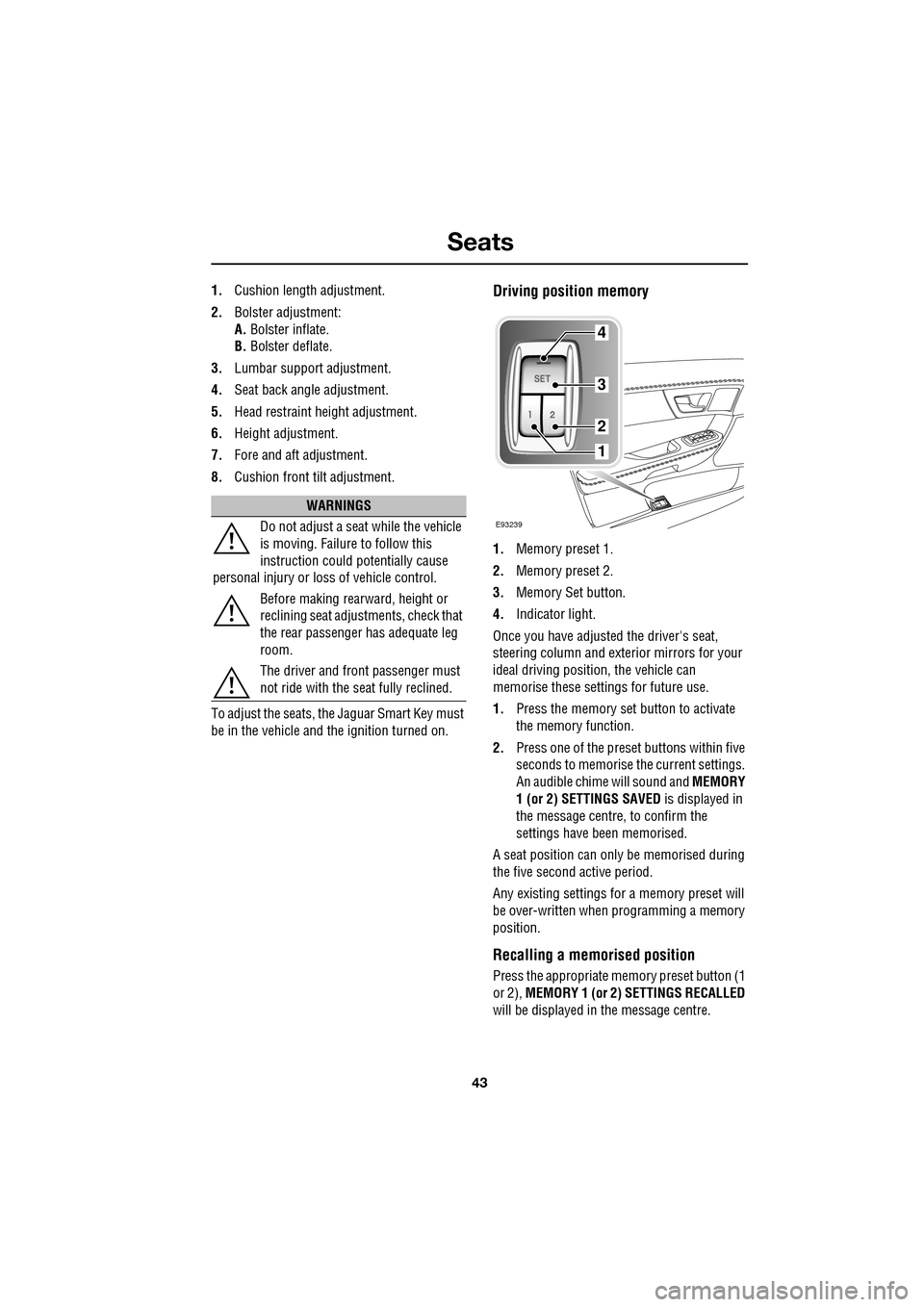
1. Memory preset 1.
2. Memory preset 2.
3. Memory Set button.
4. Indicator light.
Once you have adjusted the driver's seat,
steering column and exte rior mirrors for your
ideal driving position, the vehicle can
memorise these settings for future use.
1. Press the memory set button to activate
the memory function.
2. Press one of the preset buttons within five
seconds to memorise the current settings.
An audible chime will sound and MEMORY
1 (or 2) SETTINGS SAVED is displayed in
the message centre, to confirm the
settings have been memorised.
A seat position can onl y be memorised during
the five second active period.
Any existing settings for a memory preset will
be over-written when programming a memory
position.
Recalling a memorised position
Press the appropriate memory preset button (1
or 2), MEMORY 1 (or 2) SETTINGS RECALLED
will be displayed in the message centre.
WARNINGS
Do not adjust a seat while the vehicle
is moving. Failure to follow this
instruction could potentially cause
personal injury or loss of vehicle control.
Before making rearward, height or
reclining seat adjustments, check that
the rear passenger has adequate leg
room.
The driver and front passenger must
not ride with the seat fully reclined.
E93239
4
3
2
1
Page 46 of 391
Seats
46
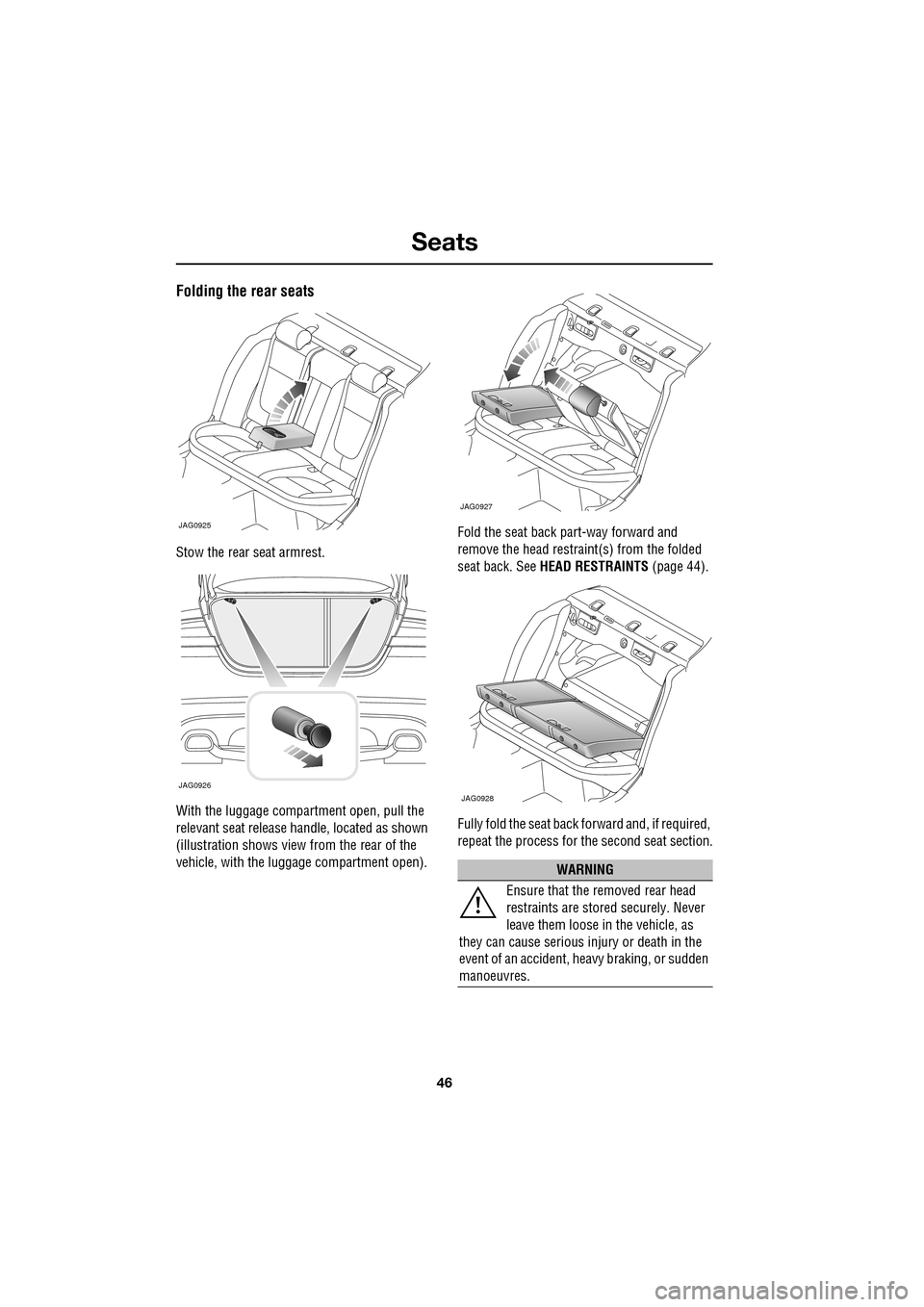
Folding the rear seats
Stow the rear seat armrest.
With the luggage compartment open, pull the
relevant seat release handle, located as shown
(illustration shows view from the rear of the
vehicle, with the luggage compartment open).Fold the seat back part-way forward and
remove the head restraint(s) from the folded
seat back. See
HEAD RESTRAINTS (page 44).
Fully fold the seat back forward and, if required,
repeat the process for the second seat section.
JAG0925
JAG0926
WARNING
Ensure that the removed rear head
restraints are stored securely. Never
leave them loose in the vehicle, as
they can cause serious injury or death in the
event of an accident, he avy braking, or sudden
manoeuvres.
JAG0927
JAG0928
Page 48 of 391
Seats
48
CLIMATE SEATS
Note: To prevent the battery from becoming
discharged the climate seats will only operate
when the engine is running.
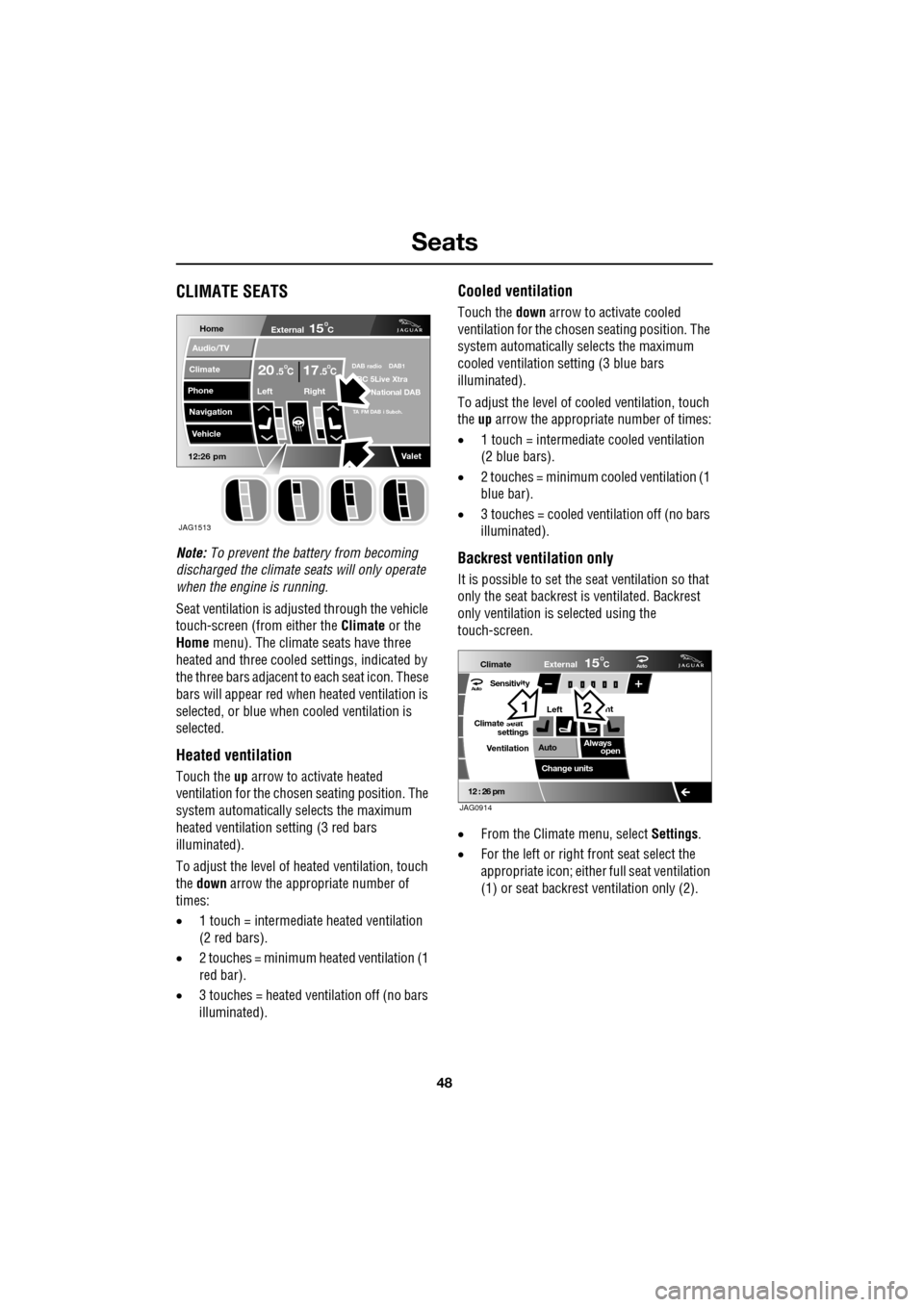
Seat ventilation is adjusted through the vehicle
touch-screen (from either the Climate or the
Home menu). The climate seats have three
heated and three cooled settings, indicated by
the three bars adjacent to each seat icon. These
bars will appear red wh en heated ventilation is
selected, or blue when cooled ventilation is
selected.
Heated ventilation
Touch the up arrow to activate heated
ventilation for the chosen seating position. The
system automatically selects the maximum
heated ventilation setting (3 red bars
illuminated).
To adjust the level of he ated ventilation, touch
the down arrow the appropriate number of
times:
• 1 touch = intermediate heated ventilation
(2 red bars).
• 2 touches = minimum heated ventilation (1
red bar).
• 3 touches = heated ventilation off (no bars
illuminated).
Cooled ventilation
Touch the down arrow to activate cooled
ventilation for the chosen seating position. The
system automatically selects the maximum
cooled ventilation se tting (3 blue bars
illuminated).
To adjust the level of co oled ventilation, touch
the up arrow the appropriate number of times:
• 1 touch = intermediate cooled ventilation
(2 blue bars).
• 2 touches = minimum cooled ventilation (1
blue bar).
• 3 touches = cooled ventilation off (no bars
illuminated).
Backrest ventilation only
It is possible to set the se at ventilation so that
only the seat backrest is ventilated. Backrest
only ventilation is se lected using the
touch-screen.
• From the Climate menu, select Settings.
• For the left or right front seat select the
appropriate icon; either full seat ventilation
(1) or seat backrest ventilation only (2).
Home
Audio/TV
Climate
Phone
Navigation
Vehicle
Valet12:26 pm
External15C
Left Right
20 17CC.5 .5DAB radio DAB1BC 5Live Xtra
National DAB
TA FM DAB i Subch.
JAG1513
Aut o
12 : 26 pm
Aut oClimate
VentilationExternal
Left
Sensitivity
Climate seat settings
Change units ht
Always open
Auto
15C
JAG0914
12
Page 49 of 391
49
Seat belts
PRINCIPLE OF OPERATION
Seat beltsSeat belt safety
WARNINGS
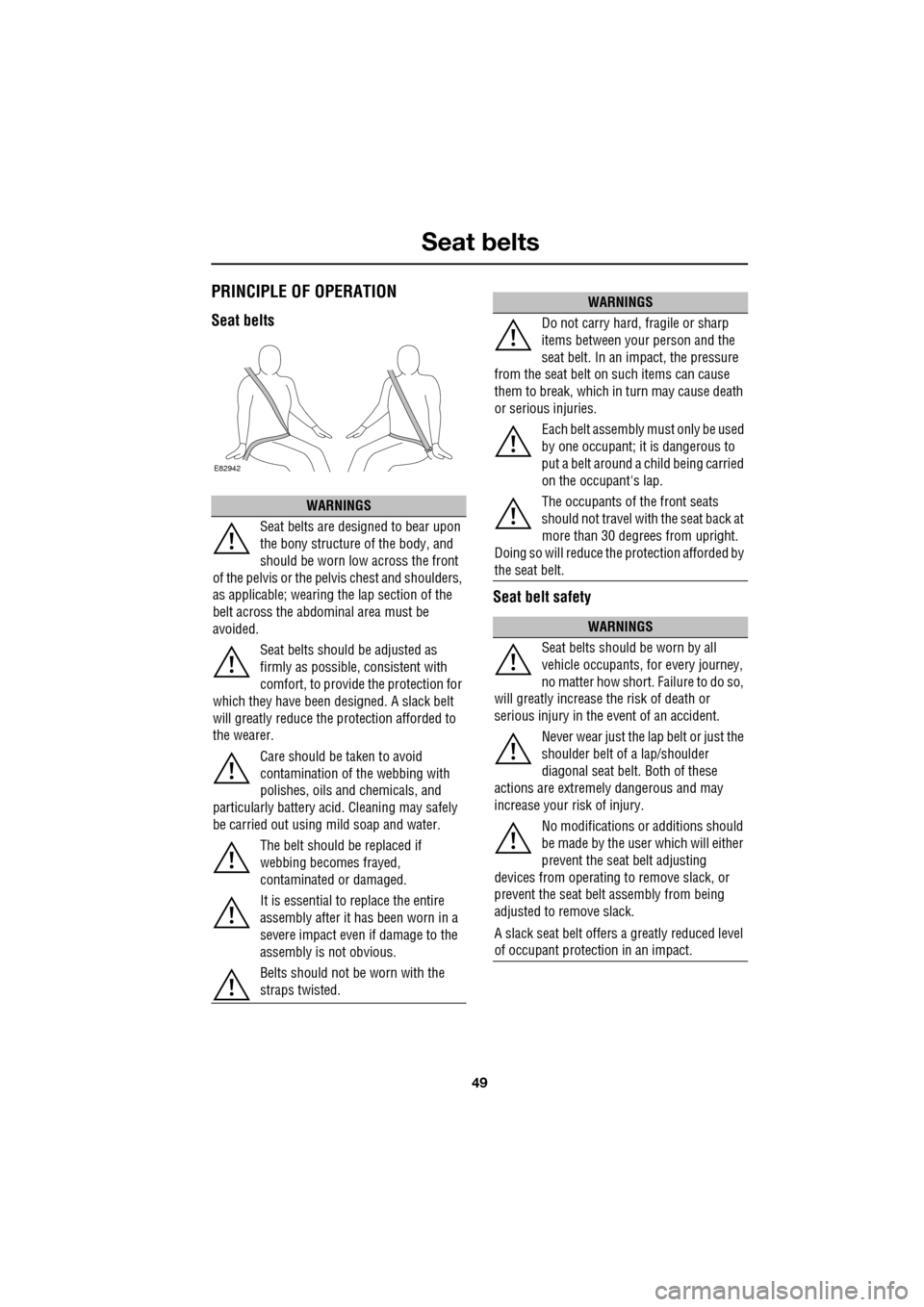
Seat belts are designed to bear upon
the bony structure of the body, and
should be worn low across the front
of the pelvis or the pe lvis chest and shoulders,
as applicable; wearing the lap section of the
belt across the abdominal area must be
avoided.
Seat belts should be adjusted as
firmly as possible, consistent with
comfort, to provide the protection for
which they have been designed. A slack belt
will greatly reduce the protection afforded to
the wearer.
Care should be taken to avoid
contamination of the webbing with
polishes, oils and chemicals, and
particularly battery acid . Cleaning may safely
be carried out using mild soap and water.
The belt should be replaced if
webbing becomes frayed,
contaminated or damaged.
It is essential to replace the entire
assembly after it has been worn in a
severe impact even if damage to the
assembly is not obvious.
Belts should not be worn with the
straps twisted.
E82942
WARNINGS
Do not carry hard, fragile or sharp
items between your person and the
seat belt. In an impact, the pressure
from the seat belt on such items can cause
them to break, which in turn may cause death
or serious injuries.
Each belt assembly must only be used
by one occupant; it is dangerous to
put a belt around a child being carried
on the occupant's lap.
The occupants of the front seats
should not travel with the seat back at
more than 30 degrees from upright.
Doing so will reduce the protection afforded by
the seat belt.
WARNINGS
Seat belts should be worn by all
vehicle occupants, for every journey,
no matter how short. Failure to do so,
will greatly increase the risk of death or
serious injury in the event of an accident.
Never wear just the la p belt or just the
shoulder belt of a lap/shoulder
diagonal seat belt. Both of these
actions are extremel y dangerous and may
increase your risk of injury.
No modifications or additions should
be made by the user which will either
prevent the seat belt adjusting
devices from operating to remove slack, or
prevent the seat belt assembly from being
adjusted to remove slack.
A slack seat belt offers a greatly reduced level
of occupant protect ion in an impact.
Page 50 of 391
Seat belts
50
Seat belt checks
Note: If the vehicle is parked on an incline, the
seat belt mechanism may lock. This is not a
fault and the belt should be gently eased out
from the upper anchorage.
The seat belts should be inspected regularly to
check for fraying, cuts or wear to the webbing,
and the condition and security of the
mechanism, buckles, adjusters, and mounting
points.
• With the seat belt fastened, give the
webbing near the buckle a quick upward
pull. The buckle must remain securely
locked. •
With the seat belt unfastened, unreel the
seat belt to the limit of its travel. Check that
it unreels smoothly with no snatches or
snags. Allow the belt to fully retract, again
checking for smooth operation.
• Partially unreel the seat belt, then hold the
tongue plate and give a quick forward pull.
The mechanism must lock and prevent any
further unreeling.
If any of the seat belts fail to meet those
criteria, immediately contact your Dealer/
Authorised Repairer.
SEAT BELT REMINDER
If the driver's seat belt is not
fastened when the vehicle is in
motion, a chime will be heard and
the seat belt warning i ndicator will illuminate.
The warning chime and indicator will also be
activated if the front passenger seat is
occupied without the seat belt being fastened.
Note: Objects placed on the front passenger
seat may activate the seat belt reminder
warning chime and i ndicator. It is
recommended that any objects placed on the
front passenger seat are secured using the seat
belt.
If any damage, wear, cuts, defects or
impaired operation are noted with the
seat belts, the vehi
cle should be taken
to a Dealer/Authorised Repairer for immediate
attention. Do not use th e vehicle if the seat
belts cannot be operated correctly.
When using seat belts to restrain
items other than occ upants, take care
to ensure that the belts are not
damaged, or exposed to sharp edges.
Care must be taken to avoid
contaminating the seat belt webbing
and seat belt mechanisms with any
chemicals, liquids, gr it, dirt or cleaning
products. If the seat belts do become
contaminated, they should be replaced
immediately. Contaminat ed seat belts my not
operate correctly in an impact and cannot be
relied upon.
The use of comfort clips, or devices
that would create slackness in the
seat belt system, is not advised.
WARNINGS
Page 52 of 391
Seat belts
52
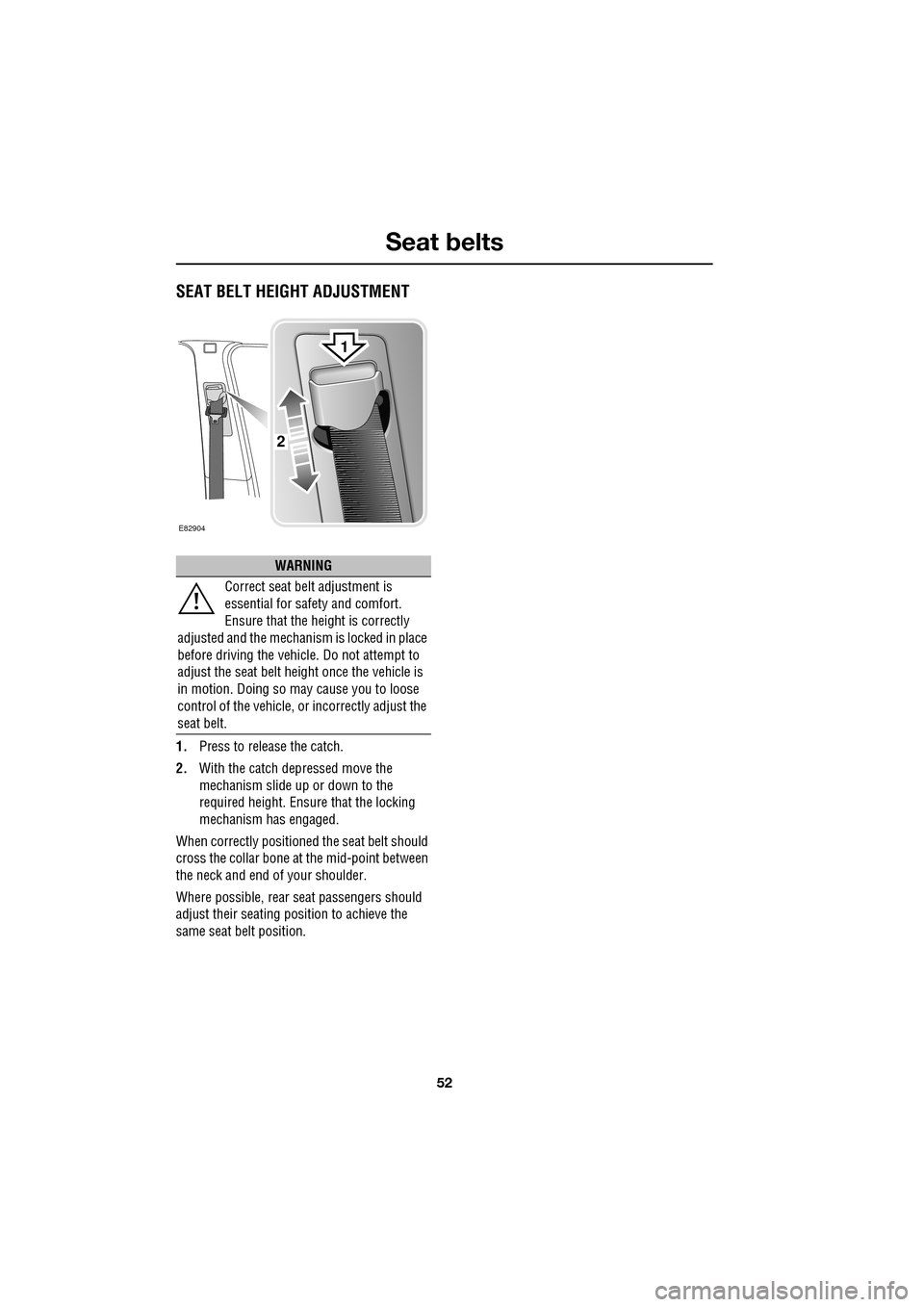
SEAT BELT HEIGHT ADJUSTMENT
1.Press to release the catch.
2. With the catch depressed move the
mechanism slide up or down to the
required height. Ensure that the locking
mechanism has engaged.
When correctly positione d the seat belt should
cross the collar bone at the mid-point between
the neck and end of your shoulder.
Where possible, rear seat passengers should
adjust their seating pos ition to achieve the
same seat belt position.
WARNING
Correct seat belt adjustment is
essential for safety and comfort.
Ensure that the height is correctly
adjusted and the mechanism is locked in place
before driving the vehicl e. Do not attempt to
adjust the seat belt height once the vehicle is
in motion. Doing so may cause you to loose
control of the vehicle, or incorrectly adjust the
seat belt.
E82904
2
1
Page 53 of 391
53
Supplementary restraints system
PRINCIPLE OF OPERATION
Introduction
In the event of a collision, the airbag control
unit monitors the rate of deceleration caused
by the collision. This information is then used
to determine whether airbags should be
deployed.
Airbag deployment is de pendent on the rate at
which the passenger compartment changes
velocity following the collision. The
circumstances affecting different collisions
(vehicle speed, angle of impact, type and size
of object hit, etc.), vary considerably and will
affect the rate of de celeration accordingly.
The Supplementary Restraint System (SRS)
components include:-
• SRS warning indicator.
• Rotary coupler.
• Airbag modules.
• Seat belt pre-te nsioners (front seat belts).
• Restraints control module.
• Crash sensors.
• Airbag wiring harnesses. The SRS is not designed to
operate as a result
of:
• Rear impacts.
• Minor front impacts.
• Minor side impacts.
• Heavy braking.
• Driving over bumps and pot holes.
Therefore, it follows that considerable
superficial damage to the vehicle can occur,
without causing the airbags to deploy.