navigation JAGUAR XF 2009 1.G Owner's Guide
[x] Cancel search | Manufacturer: JAGUAR, Model Year: 2009, Model line: XF, Model: JAGUAR XF 2009 1.GPages: 391, PDF Size: 19.32 MB
Page 319 of 391
319
Telephone
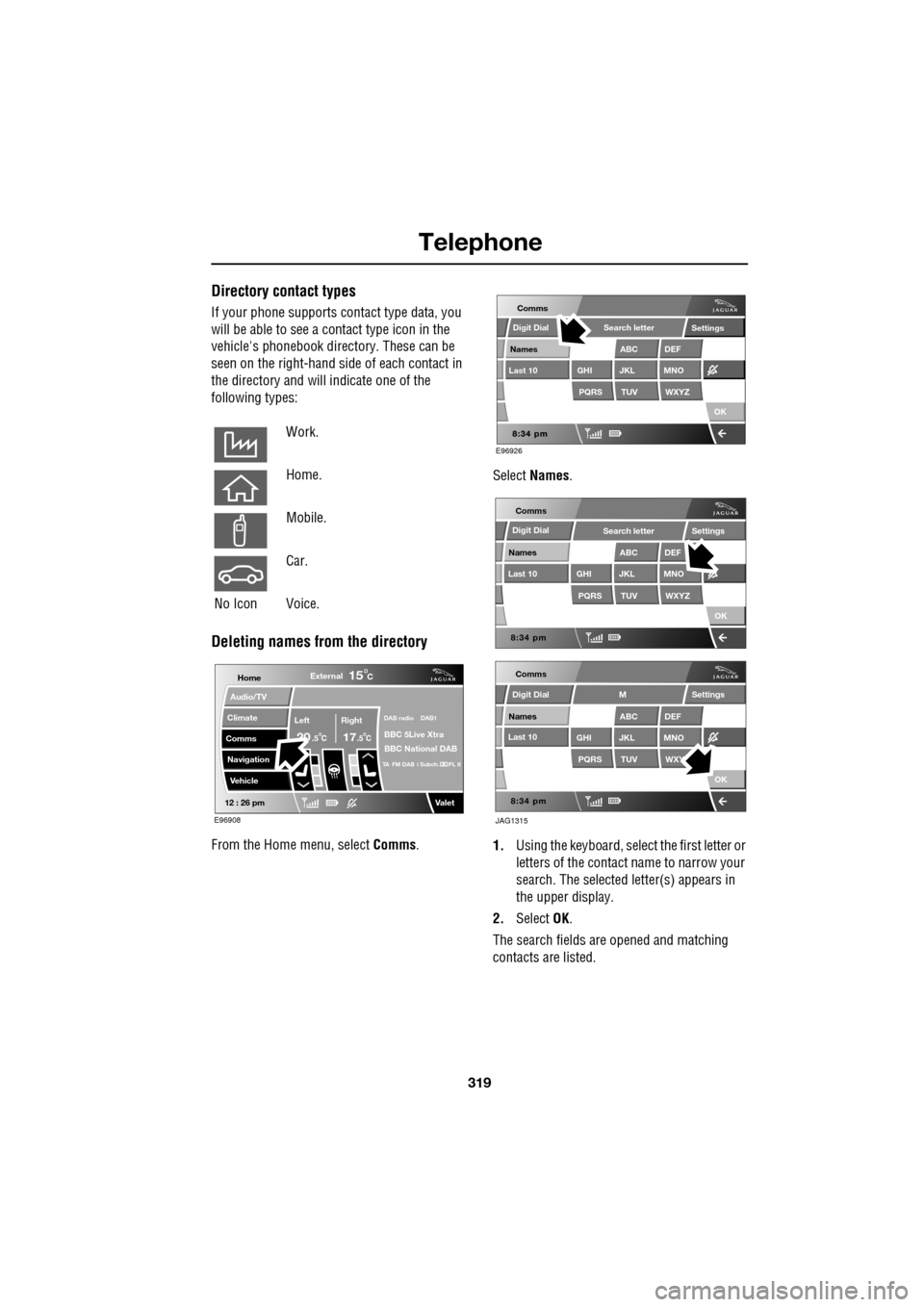
Directory contact types
If your phone supports contact type data, you
will be able to see a contact type icon in the
vehicle's phonebook dire ctory. These can be
seen on the right-hand side of each contact in
the directory and will indicate one of the
following types:
Deleting names from the directory
From the Home menu, select Comms. Select
Names .
1. Using the keyboard, select the first letter or
letters of the contact name to narrow your
search. The selected letter(s) appears in
the upper display.
2. Select OK.
The search fields ar e opened and matching
contacts are listed.
Work.
Home.
Mobile.
Car.
No Icon Voice.
Home
Audio/TV
Climate
Comms
Navigation
VehicleExternal
Left Right
20 17CC
15C
.5 .5
DAB radio DAB1
BBC 5Live Xtra
BBC National DAB
TA FM DAB i Subch. PL II
Valet12 : 26 pm
E96908
E96926
Comms
Digit Dial
Names
Last 10
Settings
PQRS
GHITUV
ABC
JKL
WXYZ
DEF
MNO
Search letter
OK
Comms
Comms
Names
Last 10
Settings
PQRS
GHITUV
ABC
JKL
WXYZ
DEF
MNO
Search letter
OK
Names
Last 10
Settings
PQRS
GHITUV
ABC
JKL
WXY
DEF
MNO
M
OK
JAG1315
Digit Dial
Digit Dial
Page 320 of 391
Telephone
320
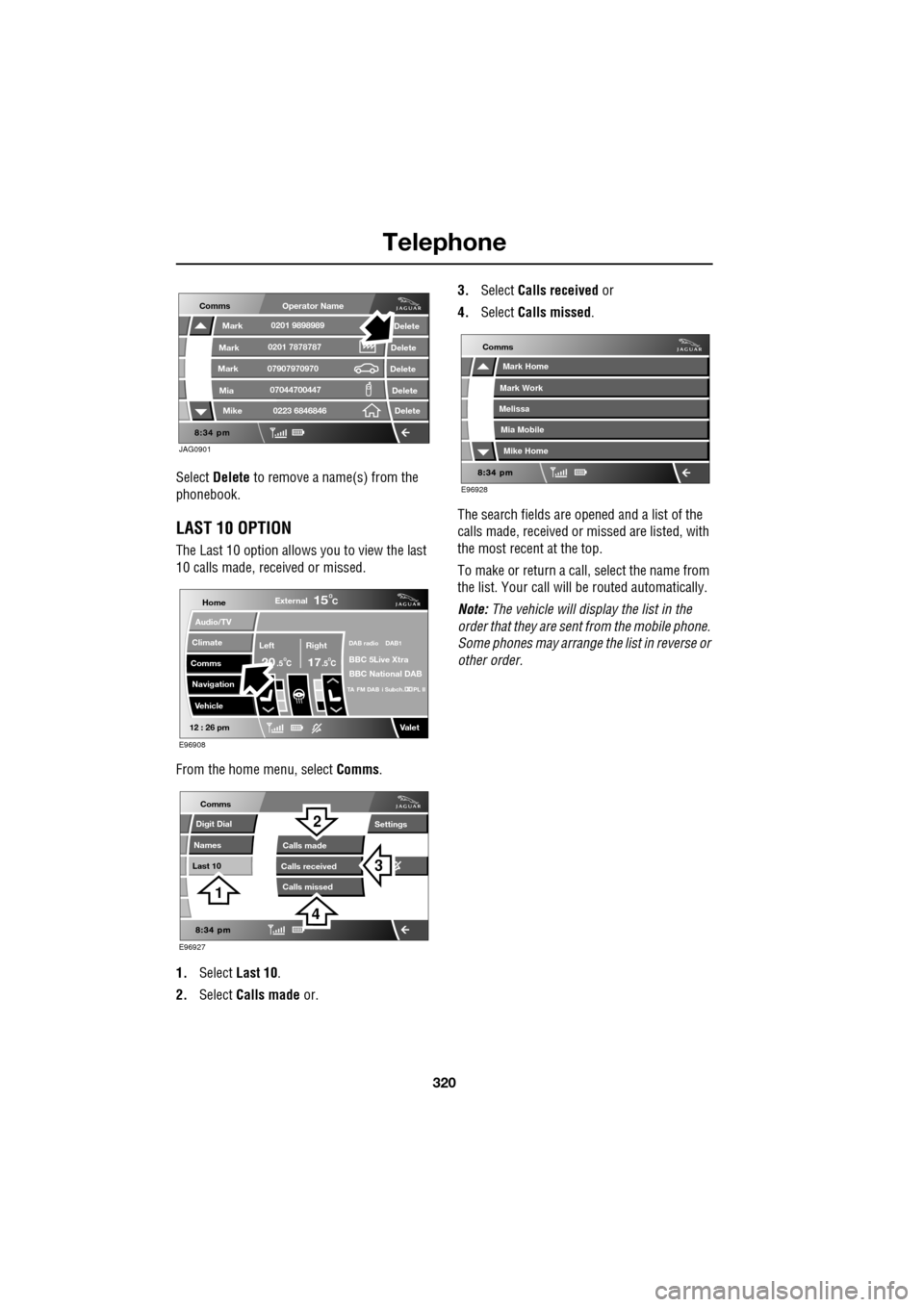
Select Delete to remove a name(s) from the
phonebook.
LAST 10 OPTION
The Last 10 option allows you to view the last
10 calls made, received or missed.
From the home menu, select Comms.
1. Select Last 10 .
2. Select Calls made or. 3.
Select Calls received or
4. Select Calls missed .
The search fields are opened and a list of the
calls made, received or missed are listed, with
the most recent at the top.
To make or return a call, select the name from
the list. Your call will be routed automatically.
Note: The vehicle will display the list in the
order that they are sent from the mobile phone.
Some phones may arrange the list in reverse or
other order.
JAG0901
Comms
Delete
Delete
Delete
Delete
Delete
Mark
Mark
Mark
Mike
Mia0201 9898989
0201 7878787
0223 6846846
07907970970
07044700447
Operator Name
Home
Audio/TV
Climate
Comms
Navigation
VehicleExternal
Left Right
20 17CC
15C
.5 .5
DAB radio DAB1
BBC 5Live Xtra
BBC National DAB
TA FM DAB i Subch. PL II
Valet12 : 26 pm
E96908
E96927
Comms
Digit Dial
Names
Last 10
Settings
Calls missedCalls made
Calls received
3
2
1
4
E96928
Comms
Mark Home
Mark Work
Melissa
Mike Home
Mia Mobile
Page 329 of 391
329
Television
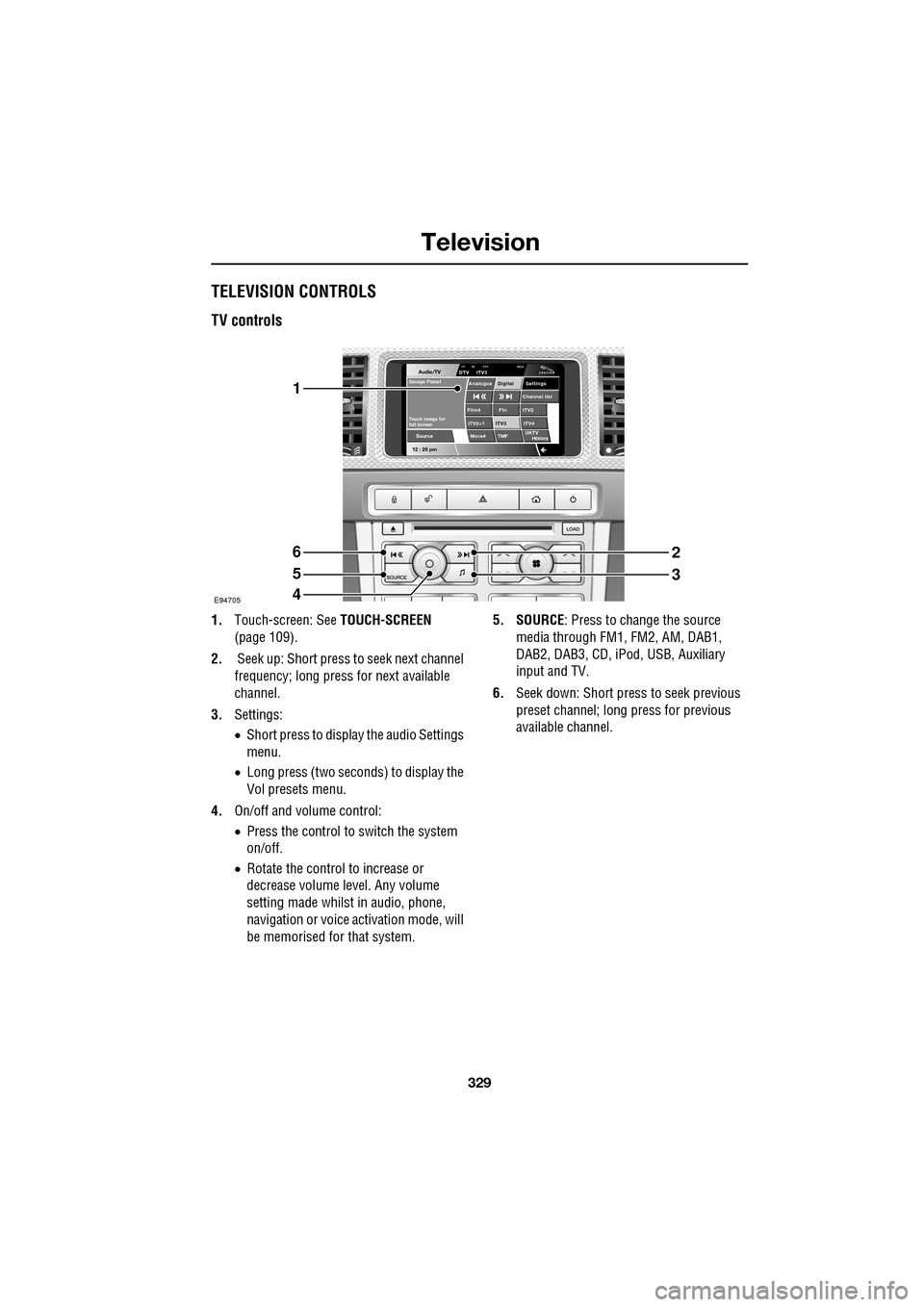
TELEVISION CONTROLS
TV controls
1.Touch-screen: See TOUCH-SCREEN
(page 109).
2. Seek up: Short press to seek next channel
frequency; long press for next available
channel.
3. Settings:
•Short press to display the audio Settings
menu.
• Long press (two seconds) to display the
Vol presets menu.
4. On/off and volume control:
•Press the control to switch the system
on/off.
• Rotate the control to increase or
decrease volume level. Any volume
setting made whilst in audio, phone,
navigation or voice ac tivation mode, will
be memorised for that system. 5. SOURCE
: Press to change the source
media through FM1, FM2, AM, DAB1,
DAB2, DAB3, CD, iPod, USB, Auxiliary
input and TV.
6. Seek down: Short press to seek previous
preset channel; long press for previous
available channel.
Audio/TV
12 : 26 pmMore4 TMF
TP TA PTY DPLIIDTV ITV3
UKTV
HistorySource
ITV2
ITV2+1 ITV4Film4
Settings
Channel listAnalogue Digital
Ftn
ITV3
Touch image for
full screen
Savage Planet
E94705
1
6
5
4
2
3
Page 334 of 391
Navigation system
334
THE NAVIGATION SYSTEM
Loading the navigation DVD
Note: Before use, ensure that the navigation
DVD player is loaded with the correct mapping
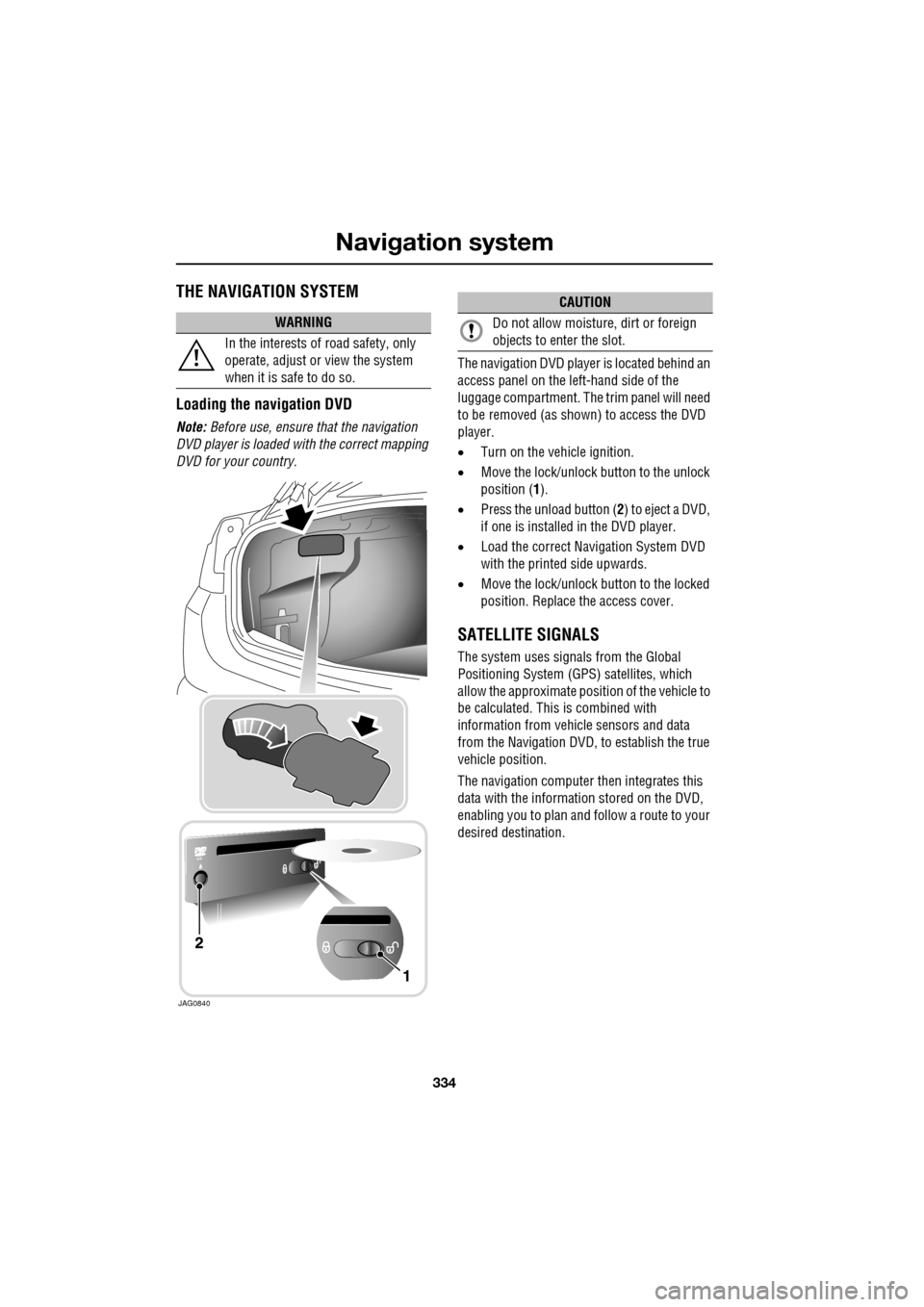
DVD for your country. The navigation DV
D player is located behind an
access panel on the left-hand side of the
luggage compartment. The trim panel will need
to be removed (as shown) to access the DVD
player.
• Turn on the vehicle ignition.
• Move the lock/unlock button to the unlock
position ( 1).
• Press the unload button ( 2) to eject a DVD,
if one is installed in the DVD player.
• Load the correct Navigation System DVD
with the printed side upwards.
• Move the lock/unlock button to the locked
position. Replace the access cover.
SATELLITE SIGNALS
The system uses signa ls from the Global
Positioning Syst em (GPS) satellites, which
allow the approximate posi tion of the vehicle to
be calculated. This is combined with
information from vehi cle sensors and data
from the Navigation DVD, to establish the true
vehicle position.
The navigation computer then integrates this
data with the information stored on the DVD,
enabling you to plan and follow a route to your
desired destination.
WARNING
In the interests of road safety, only
operate, adjust or view the system
when it is safe to do so.
JAG0840
CAUTION
Do not allow moisture, dirt or foreign
objects to enter the slot.
Page 335 of 391
335
Navigation system
Digitised area
Ensure that you are using the latest version of
the correct DVD for your country.
Note: Your Dealer/Authorised Repairer will
have details of how to order DVD updates.
The navigation DVD provided, contains a
digitised street map. Larger cities and
boroughs are completely covered. The regional
and unclassified roads or access roads and the
town centre for smaller towns and boroughs
are included.
One way streets, pedestrian zones, turn bans
and other traffic regula tions are taken into
account as far as pos sible. There may be
discrepancies between the data on the
navigation DVD and the actual local situation,
due to temporary or permanent changes to
road systems and their traffic regulations.
If the vehicle battery ha s been disconnected, or
if the vehicle has been transported to a new
location on another vehicle (e.g. by trailer or
train), the navigation system may require
several minutes to iden tify the new position.
Errors in vehicle position
Under certain driving condi tions, it is possible
that the vehicle pos ition shown may be
incorrect. Some examples are shown below:
• Negotiating circular ramps in car parks.
• Elevated roads in proximity to other roads.
• Where two roads run parallel to each other.
• Driving on steep roads.
• When the vehicle is transported by ferry or
train.
• After the tyres have been replaced.
• When using snow chains.
• After the vehicle has been rotated on a
turntable.
• After vehicle battery removal or supply
fuse failure.
Reception of GPS signals
GPS signals are high ly directional and
reception may occasiona lly be interrupted.
Some examples of situations likely to cause
problems are shown below:
• Inside buildings
• Forest roads between mountains
• Between tall buildings
• Roads under cliffs.
The vehicle’s direction and speed sensors will
minimise any adverse effect on the operation of
the navigation system, if this should occur.
Normal operation will resume once the
obstruction has been passed.
Page 336 of 391
Navigation system
336
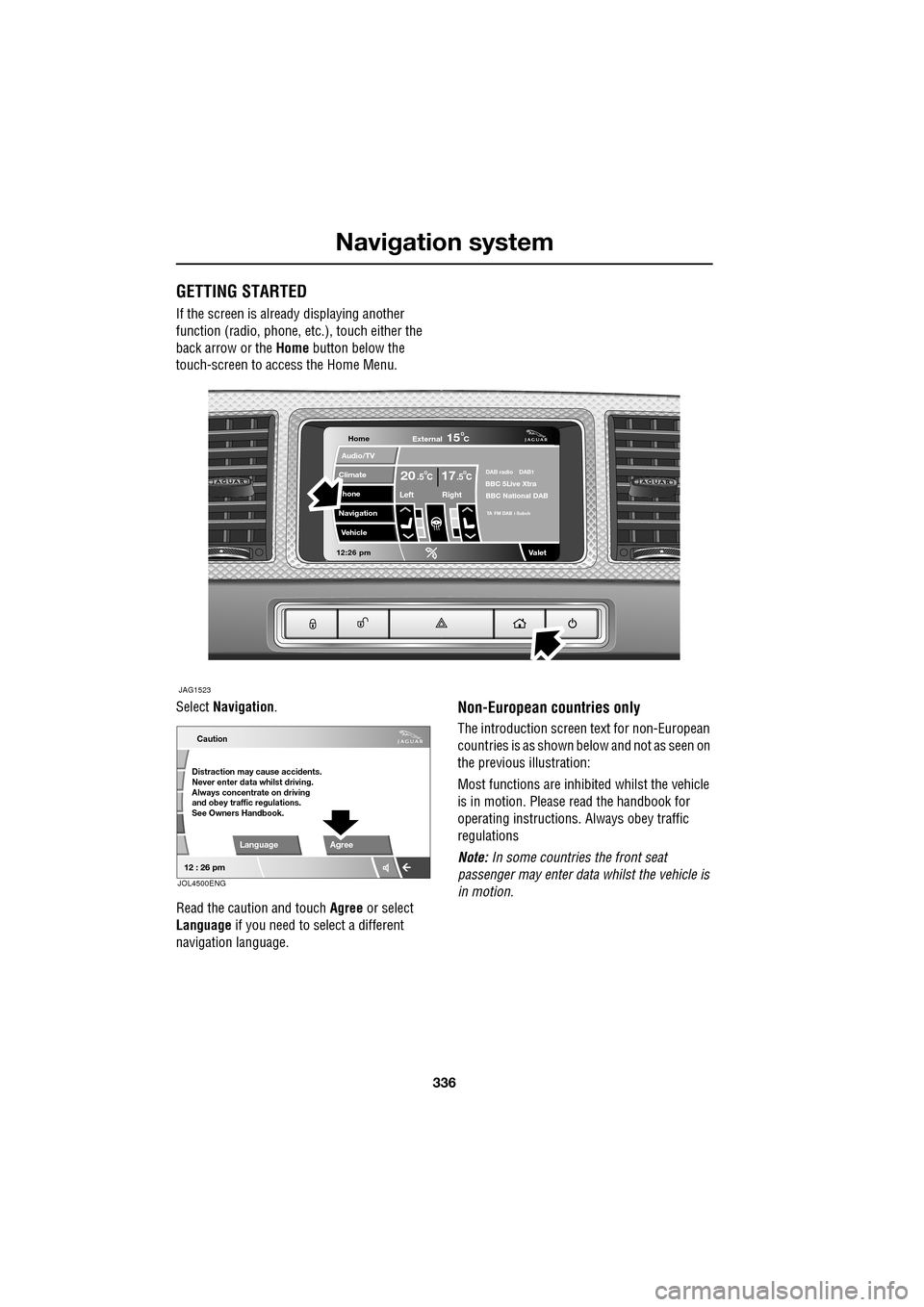
GETTING STARTED
If the screen is already displaying another
function (radio, phone, etc.), touch either the
back arrow or the Home button below the
touch-screen to access the Home Menu.
Select Navigation .
Read the caution and touch Agree or select
Language if you need to select a different
navigation language.
Non-European countries only
The introduction screen text for non-European
countries is as shown be low and not as seen on
the previous illustration:
Most functions are inhibited whilst the vehicle
is in motion. Please read the handbook for
operating instructions. Always obey traffic
regulations
Note: In some countries the front seat
passenger may enter data whilst the vehicle is
in motion.
Home
Audio/TV
Climate
hone
Navigation
Vehicle
Valet12:26 pm
JAG1523
External15C
Left Right
20 17CC.5 .5DAB radio DAB1BBC 5Live Xtra
BBC National DAB
TA FM DAB i Subch
Caution
Distraction may cause accidents.
Never enter data whilst driving.
Always concentrate on driving
and obey traffic regulations.
See Owners Handbook.
Language Agree
12 : 26 pm
JOL4500ENG
Page 337 of 391
337
Navigation system
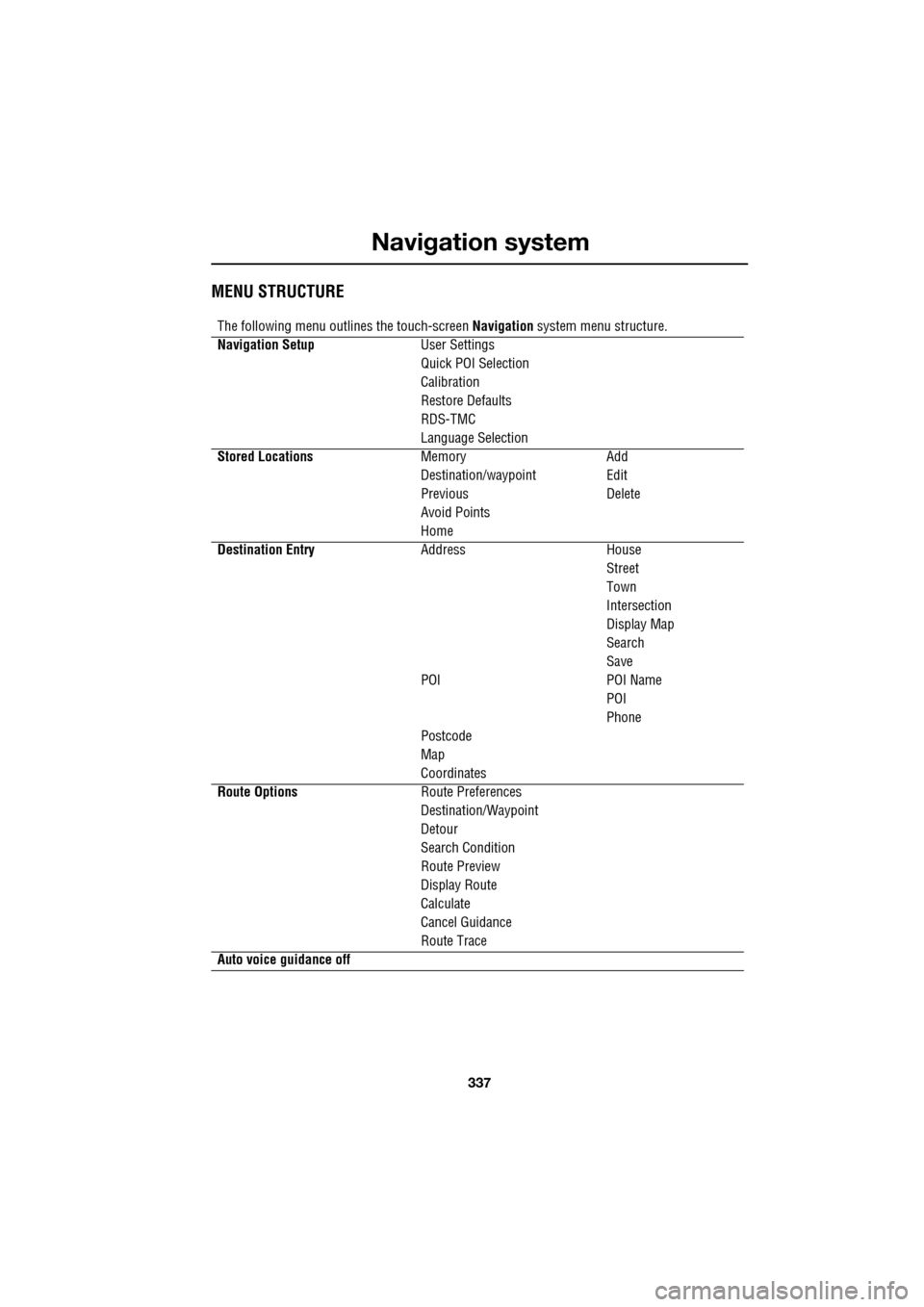
MENU STRUCTURE
The following menu outlines the touch-screen Navigation system menu structure.
Navigation Setup User Settings
Quick POI Selection
Calibration
Restore Defaults
RDS-TMC
Language Selection
Stored Locations Memory Add
Destination/waypointEdit
Previous Delete
Avoid Points
Home
Destination Entry AddressHouse
Street
Town
Intersection
Display Map
Search
Save
POI POI Name
POI
Phone
Postcode
Map
Coordinates
Route Options Route Preferences
Destination/Waypoint
Detour
Search Condition
Route Preview
Display Route
Calculate
Cancel Guidance
Route Trace
Auto voice guidance off
Page 338 of 391
Navigation system
338
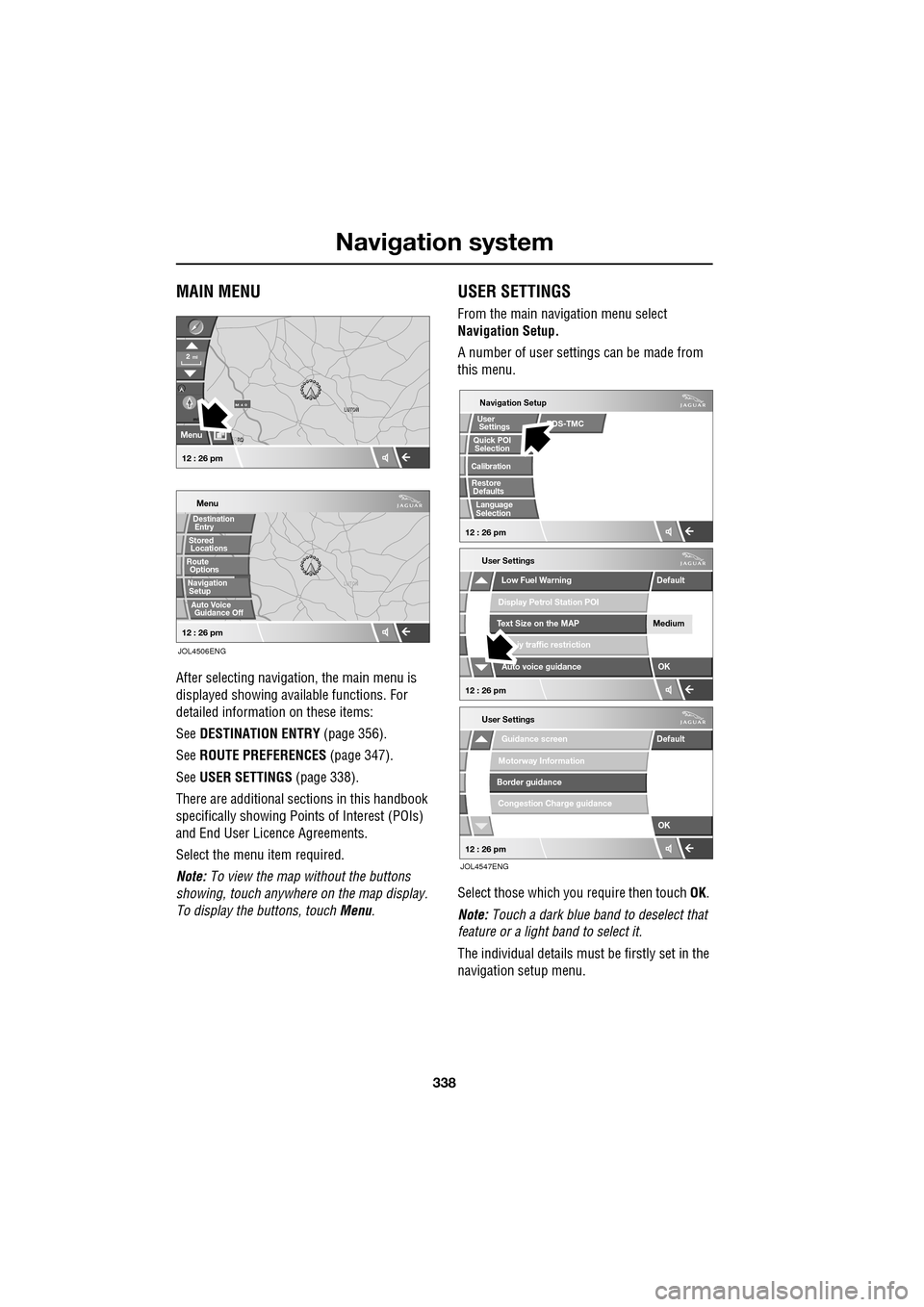
MAIN MENU
After selecting navigation, the main menu is
displayed showing ava ilable functions. For
detailed information on these items:
See DESTINATION ENTRY (page 356).
See ROUTE PREFERENCES (page 347).
See USER SETTINGS (page 338).
There are additional sections in this handbook
specifically showing Points of Interest (POIs)
and End User Licence Agreements.
Select the menu item required.
Note: To view the map without the buttons
showing, touch anywhere on the map display.
To display the buttons, touch Menu .
USER SETTINGS
From the main navigation menu select
Navigation Setup.
A number of user settings can be made from
this menu.
Select those which you require then touch OK .
Note: Touch a dark blue band to deselect that
feature or a light band to select it.
The individual details must be firstly set in the
navigation setup menu.
LUTON
Menu
Stored
Destination
Auto Voice
Entry
Guidance Off
LUTON
LUTON
RD
FORD
M 4 0mi
Menu
2mi
12 : 26 pm
12 : 26 pm
Locations
Navigation SetupRoute Options
JOL4506ENG
Guidance screen
User Settings
Motorway Information
Border guidance
Congestion Charge guidance
OK
Default
Navigation Setup
Low Fuel Warning
User Settings
Display Petrol Station POI
Text Size on the MAP
iy traffic restriction
Auto voice guidance
Medium
OK
Default
Selection
Calibration
Restore
User
Settings
Defaults Quick POI
12 : 26 pm
12 : 26 pm
12 : 26 pm
RDS-TMC
Language
Selection
JOL4547ENG
Page 339 of 391
339
Navigation system
Saving user preferences to memory
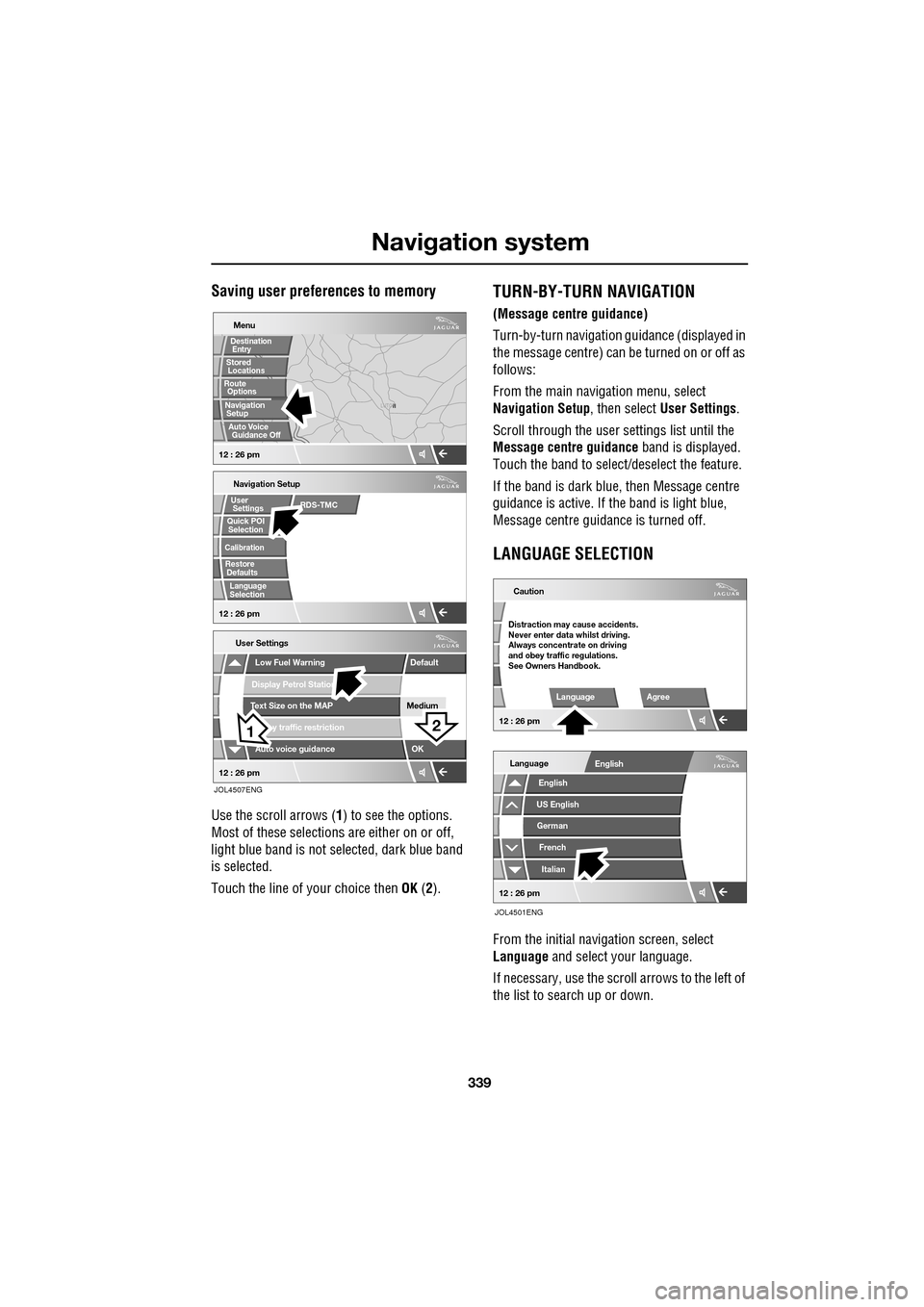
Use the scroll arrows (1) to see the options.
Most of these selections are either on or off,
light blue band is not selected, dark blue band
is selected.
Touch the line of your choice then OK (2).
TURN-BY-TURN NAVIGATION
(Message centre guidance)
Turn-by-turn navigation guidance (displayed in
the message centre) can be turned on or off as
follows:
From the main navi gation menu, select
Navigation Setup , then select User Settings .
Scroll through the user settings list until the
Message centre guidance band is displayed.
Touch the band to select/d eselect the feature.
If the band is dark blue, then Message centre
guidance is acti ve. If the band is light blue,
Message centre guidance is turned off.
LANGUAGE SELECTION
From the initial navigation screen, select
Language and select your language.
If necessary, use the scroll arrows to the left of
the list to search up or down.
N
LUTON
Menu
Navigation Setup
Low Fuel Warning
User Settings
Display Petrol Station
Text Size on the MAP
y traffic restriction
Auto voice guidance
Medium
OK
Default
Selection
Calibration
Restore
User
Settings
Defaults Quick POI
12 : 26 pm 12 : 26 pm
12 : 26 pm
21
Stored
Destination
Auto Voice
Entry
Guidance Off
Locations
Navigation SetupRoute Options
RDS-TMC
Language
Selection
JOL4507ENG
German
French
Italian
English
Caution
Language Agree
English
Language
US English
12 : 26 pm
12 : 26 pm
JOL4501ENG
Distraction may cause accidents.
Never enter data whilst driving.
Always concentrate on driving
and obey traffic regulations.
See Owners Handbook.
Page 340 of 391
Navigation system
340
MEASUREMENT UNITS
Distances are shown on the screen and given in
voice guidance, either in metric units
(kilometres and metres) or in Imperial units
(miles and yards) and can only be changed
from the vehicle touch-screen menu, not from
the navigation system menu.
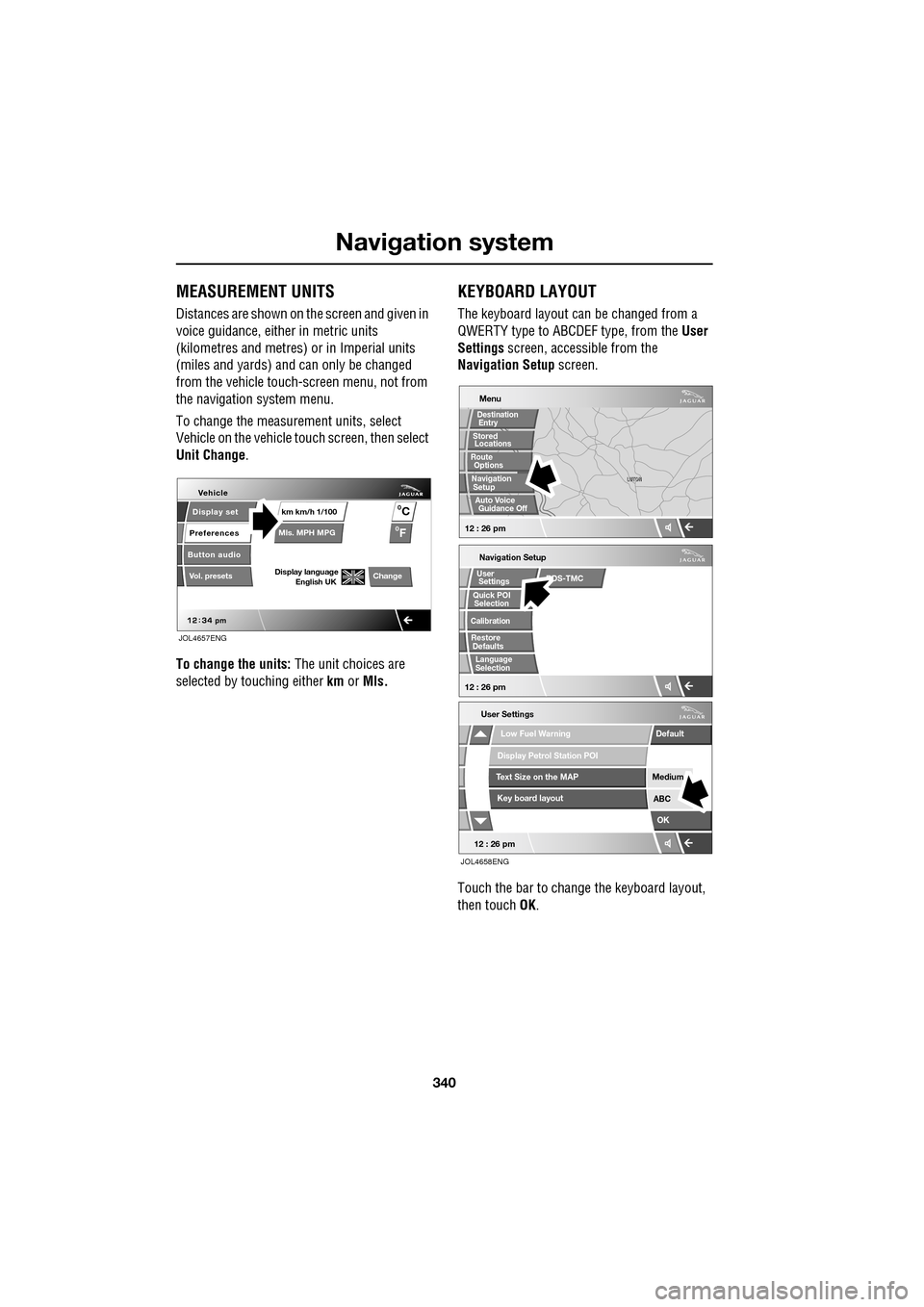
To change the measur ement units, select
Vehicle on the vehicle touch screen, then select
Unit Change .
To change the units: The unit choices are
selected by touching either km or Mls.
KEYBOARD LAYOUT
The keyboard layout ca n be changed from a
QWERTY type to ABC DEF type, from the User
Settings screen, accessible from the
Navigation Setup screen.
Touch the bar to change the keyboard layout,
then touch OK.
Display set
Preferences
Button audio
Mls. MPH MPG km km/h 1/100
VehicleF
C
0
0
Display language English UKVol. presetsChange
JOL4657ENG
Navigation Setup
Selection
Calibration
RestoreUser
Settings
Defaults Quick POI
12 : 26 pm
RDS-TMC
Language
Selection
12 : 26 pm
Low Fuel Warning
User Settings
Display Petrol Station POI
Text Size on the MAP
Key board layout
Medium
OK
Default
ABC
JOL4658ENG
LUTON
LUTON
Menu
12 : 26 pm
Stored
Destination
Auto Voice
Entry
Guidance Off
Locations
Navigation SetupRoute Options