Warning JAGUAR XF 2009 1.G Repair Manual
[x] Cancel search | Manufacturer: JAGUAR, Model Year: 2009, Model line: XF, Model: JAGUAR XF 2009 1.GPages: 391, PDF Size: 19.32 MB
Page 121 of 391
121
Climate control
ELECTRIC SUNROOF
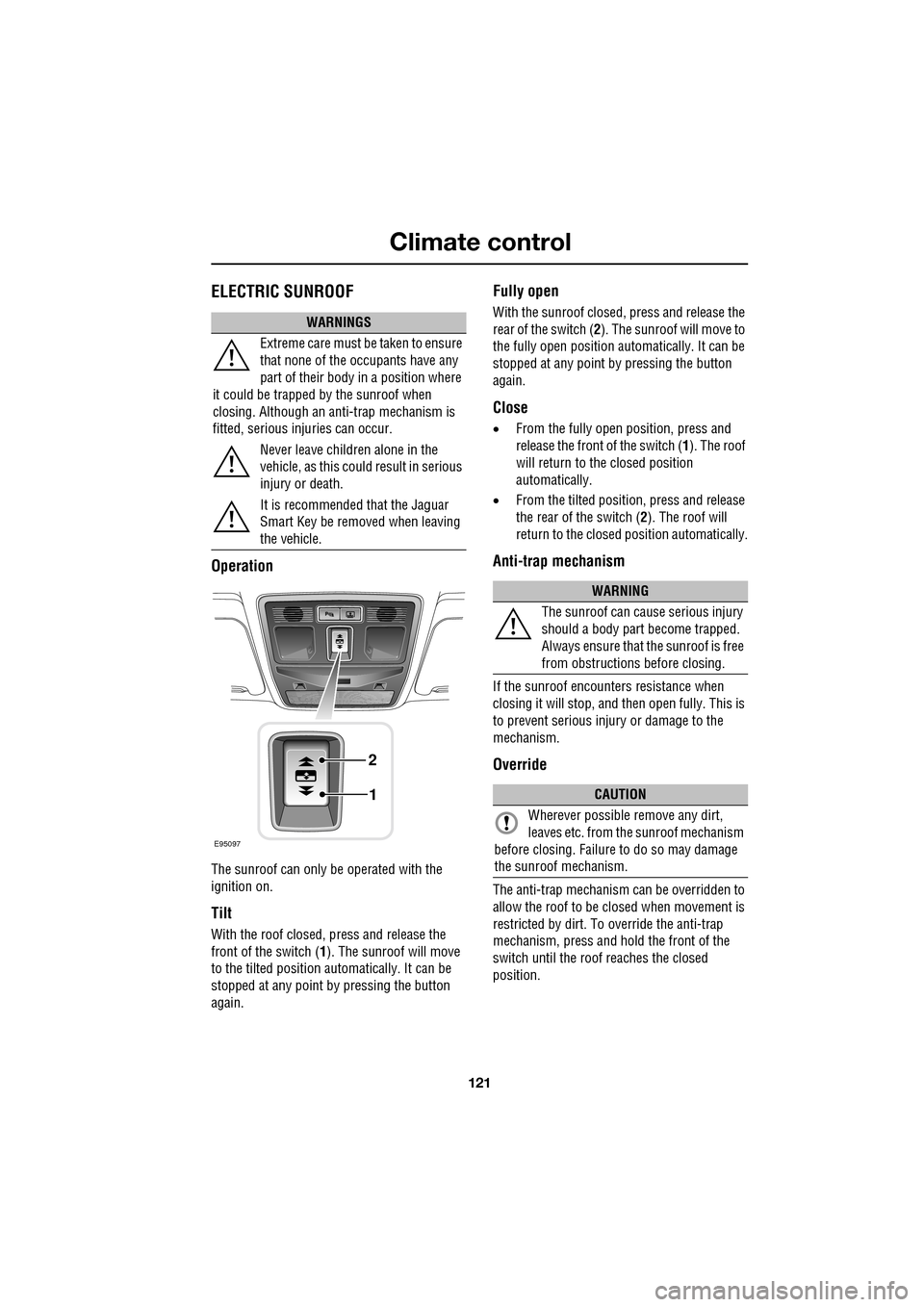
Operation
The sunroof can only be operated with the
ignition on.
Tilt
With the roof closed, press and release the
front of the switch (1). The sunroof will move
to the tilted position automatically. It can be
stopped at any point by pressing the button
again.
Fully open
With the sunroof closed, press and release the
rear of the switch ( 2). The sunroof will move to
the fully open position auto matically. It can be
stopped at any point by pressing the button
again.
Close
• From the fully open position, press and
release the front of the switch ( 1). The roof
will return to the closed position
automatically.
• From the tilted position, press and release
the rear of the switch ( 2). The roof will
return to the closed position automatically.
Anti-trap mechanism
If the sunroof encounters resistance when
closing it will stop, and then open fully. This is
to prevent serious injury or damage to the
mechanism.
Override
The anti-trap mechanism can be overridden to
allow the roof to be closed when movement is
restricted by dirt. To override the anti-trap
mechanism, press and hold the front of the
switch until the roof reaches the closed
position.
WARNINGS
Extreme care must be taken to ensure
that none of the oc cupants have any
part of their body in a position where
it could be trapped by the sunroof when
closing. Although an anti-trap mechanism is
fitted, serious injuries can occur.
Never leave children alone in the
vehicle, as this could result in serious
injury or death.
It is recommended that the Jaguar
Smart Key be removed when leaving
the vehicle.
E95097
1
2
WARNING
The sunroof can cause serious injury
should a body part become trapped.
Always ensure that the sunroof is free
from obstructions before closing.
CAUTION
Wherever possible remove any dirt,
leaves etc. from the sunroof mechanism
before closing. Failure to do so may damage
the sunroof mechanism.
Page 126 of 391
Convenience features
126
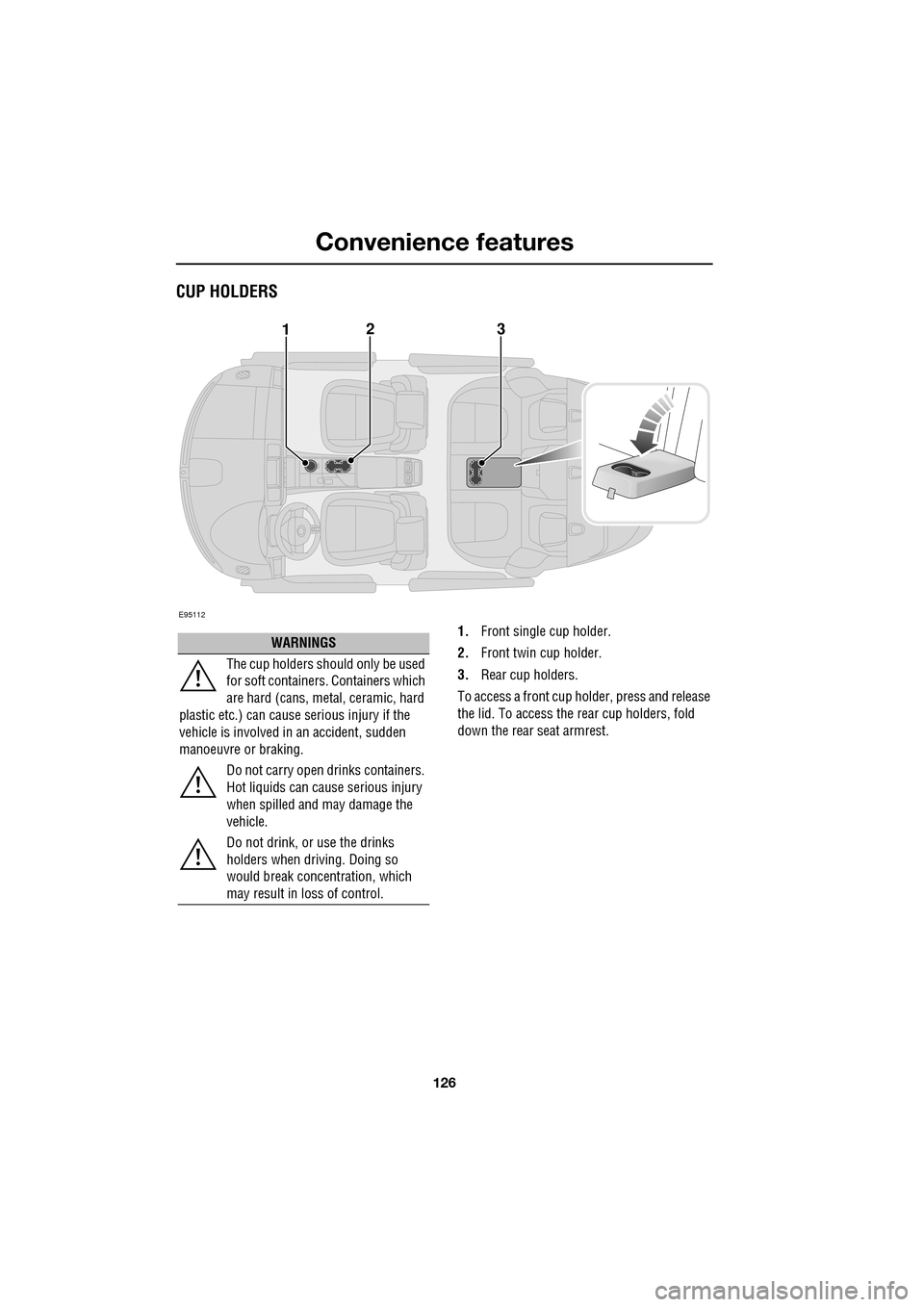
CUP HOLDERS
1.Front single cup holder.
2. Front twin cup holder.
3. Rear cup holders.
To access a front cup holder, press and release
the lid. To access the re ar cup holders, fold
down the rear seat armrest.
E95112
123
WARNINGS
The cup holders shoul d only be used
for soft containers . Containers which
are hard (cans, metal, ceramic, hard
plastic etc.) can cause serious injury if the
vehicle is involved in an accident, sudden
manoeuvre or braking.
Do not carry open drinks containers.
Hot liquids can cause serious injury
when spilled and may damage the
vehicle.
Do not drink, or use the drinks
holders when driving. Doing so
would break concentration, which
may result in loss of control.
Page 127 of 391
127
Convenience features
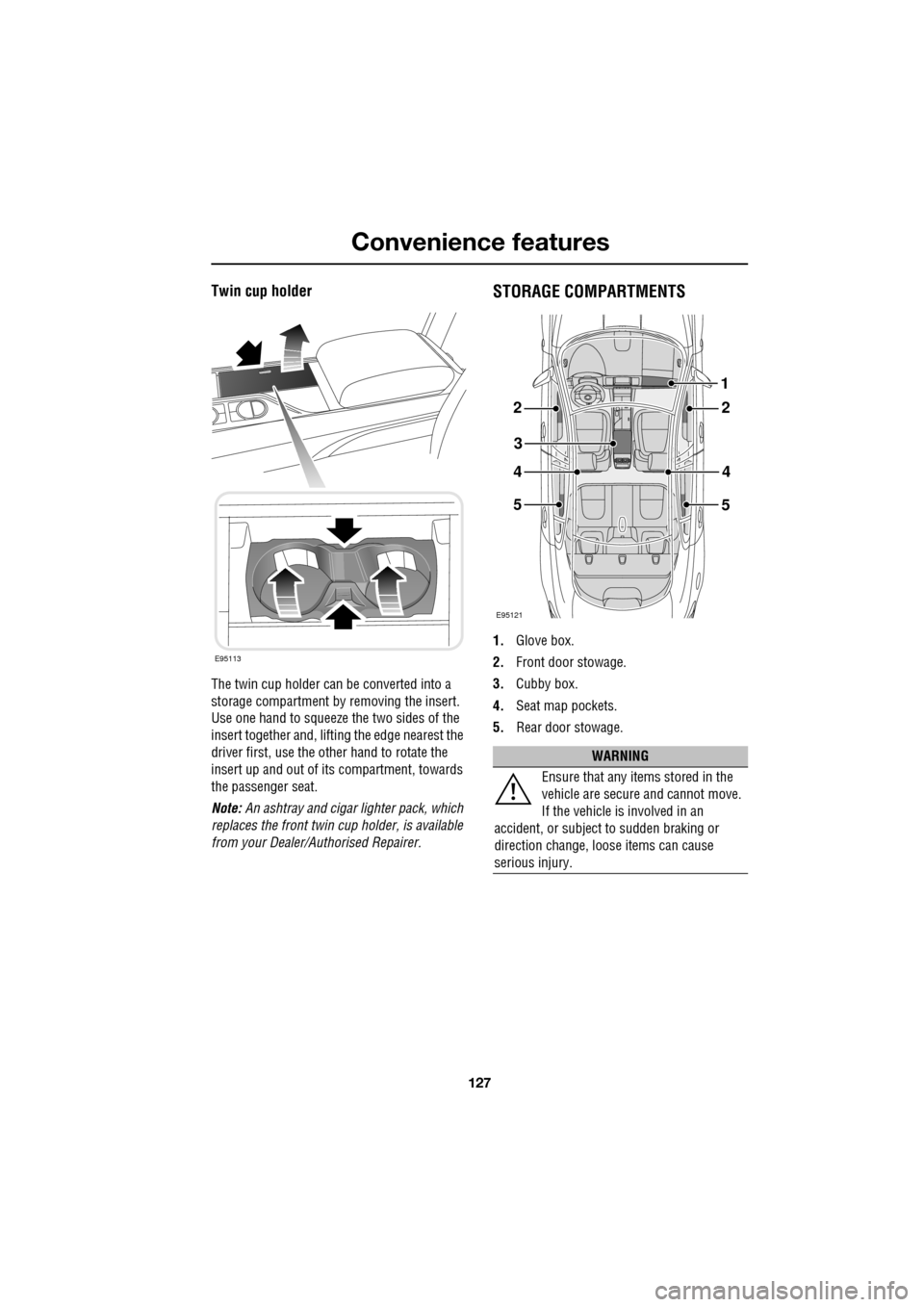
Twin cup holder
The twin cup holder can be converted into a
storage compartment by removing the insert.
Use one hand to squeeze the two sides of the
insert together and, lifting the edge nearest the
driver first, use the other hand to rotate the
insert up and out of it s compartment, towards
the passenger seat.
Note: An ashtray and cigar lighter pack, which
replaces the front twin cup holder, is available
from your Dealer/A uthorised Repairer.
STORAGE COMPARTMENTS
1.Glove box.
2. Front door stowage.
3. Cubby box.
4. Seat map pockets.
5. Rear door stowage.
E95113
WARNING
Ensure that any items stored in the
vehicle are secure and cannot move.
If the vehicle is involved in an
accident, or subject to sudden braking or
direction change, loose items can cause
serious injury.
E95121
22
3
44
5
1
5
Page 128 of 391
Convenience features
128
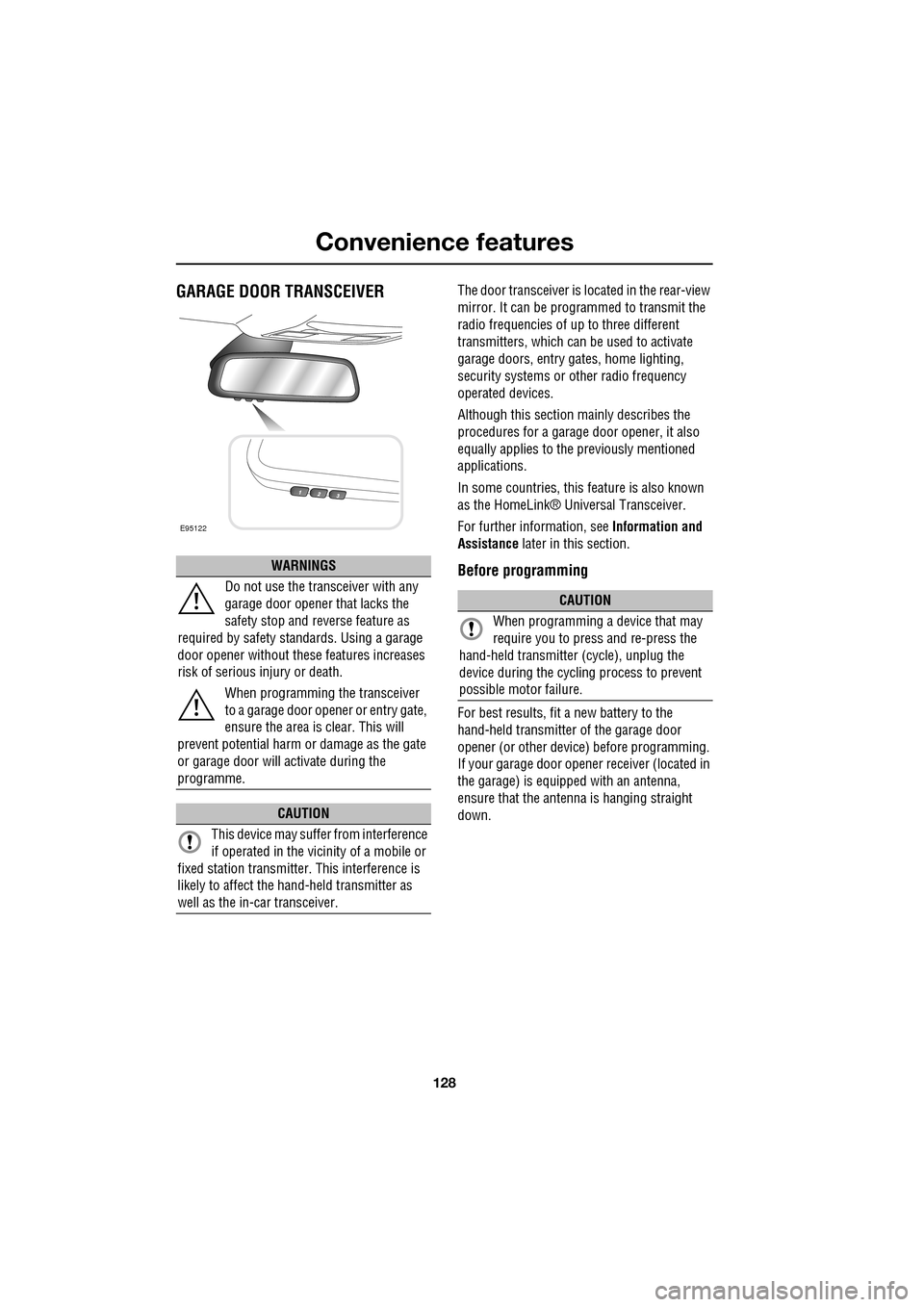
GARAGE DOOR TRANSCEIVERThe door transceiver is located in the rear-view
mirror. It can be programmed to transmit the
radio frequencies of up to three different
transmitters, which can be used to activate
garage doors, entry ga tes, home lighting,
security systems or other radio frequency
operated devices.
Although this section mainly describes the
procedures for a garage door opener, it also
equally applies to the previously mentioned
applications.
In some countries, this feature is also known
as the HomeLink® Universal Transceiver.
For further information, see Information and
Assistance later in this section.
Before programming
For best results, fit a new battery to the
hand-held transmitter of the garage door
opener (or other device ) before programming.
If your garage door opener receiver (located in
the garage) is equippe d with an antenna,
ensure that the antenna is hanging straight
down.
WARNINGS
Do not use the transceiver with any
garage door opener that lacks the
safety stop and reverse feature as
required by safety standards. Using a garage
door opener without these features increases
risk of serious injury or death.
When programming the transceiver
to a garage door opener or entry gate,
ensure the area is clear. This will
prevent potential harm or damage as the gate
or garage door will activate during the
programme.
CAUTION
This device may suffer from interference
if operated in the vici nity of a mobile or
fixed station transmitter. This interference is
likely to affect the hand-held transmitter as
well as the in-car transceiver.
E95122
CAUTION
When programming a device that may
require you to press and re-press the
hand-held transmitte r (cycle), unplug the
device during the cycling process to prevent
possible motor failure.
Page 132 of 391
Starting the engine
132
GENERAL INFORMATION
START/STOP button
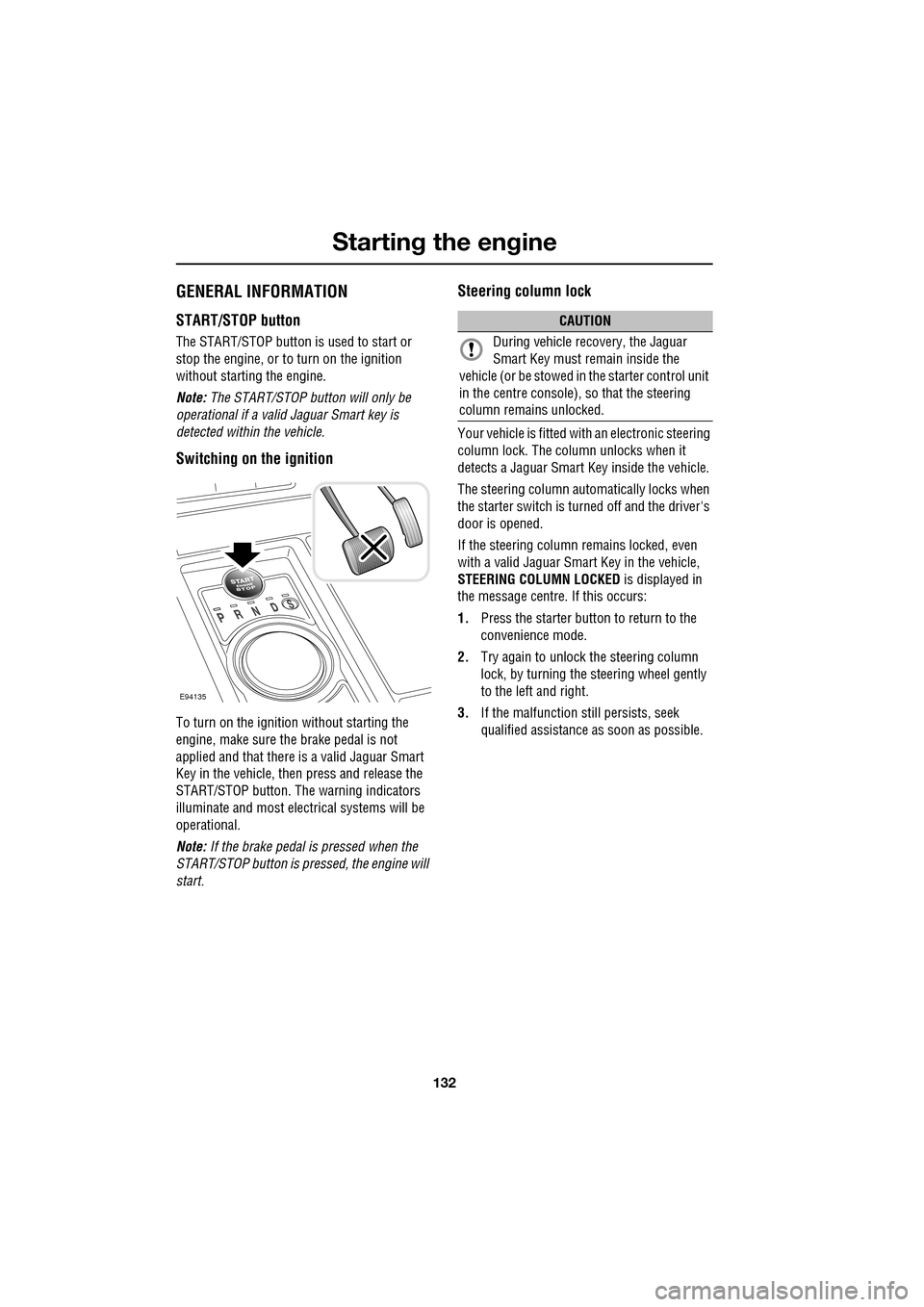
The START/STOP button is used to start or
stop the engine, or to turn on the ignition
without starting the engine.
Note: The START/STOP button will only be
operational if a valid Jaguar Smart key is
detected within the vehicle.
Switching on the ignition
To turn on the ignition without starting the
engine, make sure the brake pedal is not
applied and that there is a valid Jaguar Smart
Key in the vehicle, then press and release the
START/STOP button. The warning indicators
illuminate and most electr ical systems will be
operational.
Note: If the brake pedal is pressed when the
START/STOP button is pressed, the engine will
start.
Steering column lock
Your vehicle is fitted with an electronic steering
column lock. The column unlocks when it
detects a Jaguar Smart Key inside the vehicle.
The steering column automatically locks when
the starter switch is turned off and the driver's
door is opened.
If the steering column remains locked, even
with a valid Jaguar Smart Key in the vehicle,
STEERING COLUMN LOCKED is displayed in
the message centre. If this occurs:
1. Press the starter button to return to the
convenience mode.
2. Try again to unlock the steering column
lock, by turning the steering wheel gently
to the left and right.
3. If the malfunction still persists, seek
qualified assistance as soon as possible.
E94135
CAUTION
During vehicle recovery, the Jaguar
Smart Key must remain inside the
vehicle (or be stowed in the starter control unit
in the centre console), so that the steering
column remains unlocked.
Page 133 of 391
133
Starting the engine
KEYLESS STARTING
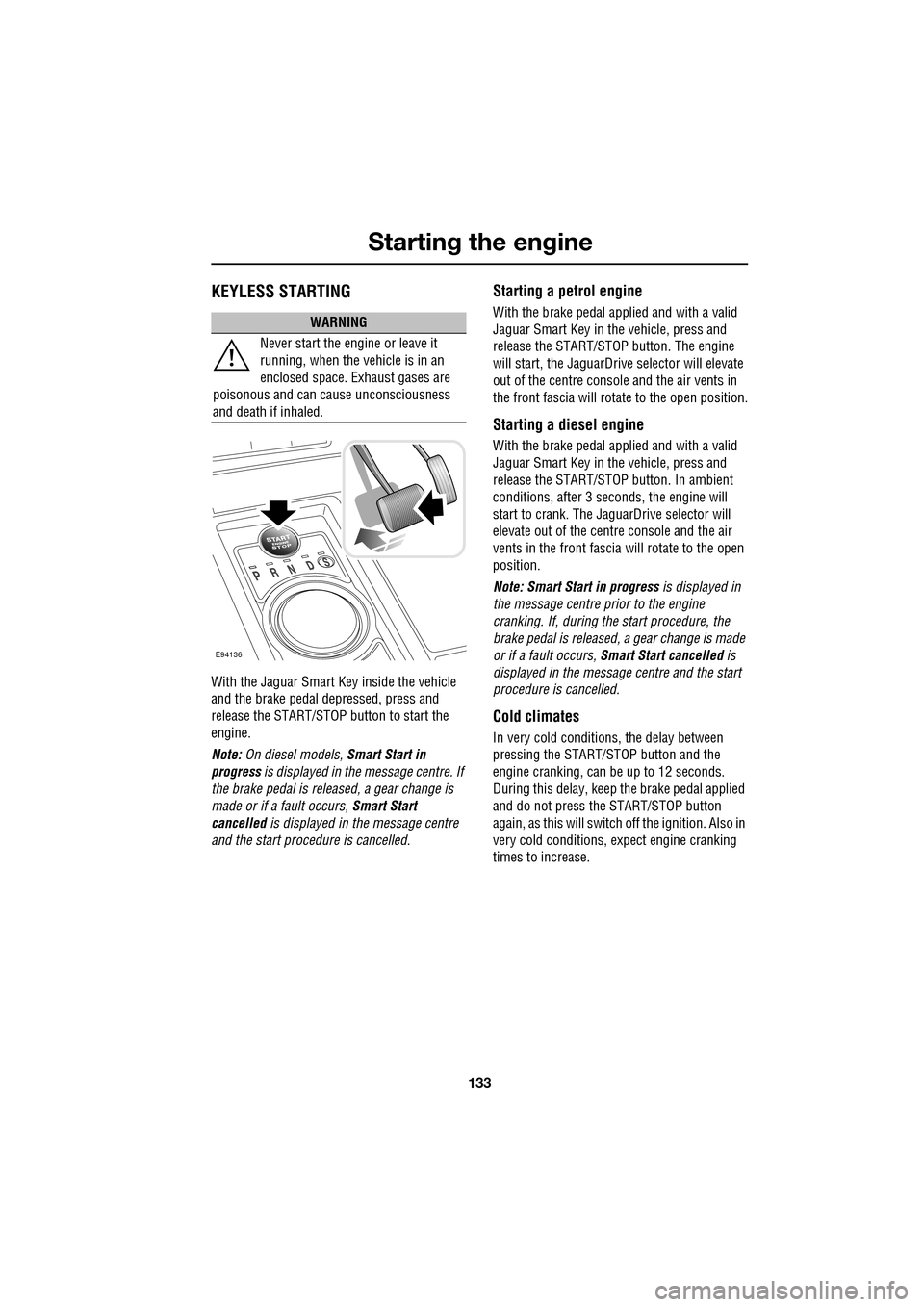
With the Jaguar Smart Key inside the vehicle
and the brake pedal depressed, press and
release the START/STOP button to start the
engine.
Note: On diesel models, Smart Start in
progress is displayed in the message centre. If
the brake pedal is released, a gear change is
made or if a fault occurs, Smart Start
cancelled is displayed in the message centre
and the start procedure is cancelled.
Starting a petrol engine
With the brake pedal applied and with a valid
Jaguar Smart Key in the vehicle, press and
release the START/STOP button. The engine
will start, the JaguarDrive selector will elevate
out of the centre console and the air vents in
the front fascia will ro tate to the open position.
Starting a diesel engine
With the brake pedal applied and with a valid
Jaguar Smart Key in the vehicle, press and
release the START/STOP button. In ambient
conditions, after 3 seconds, the engine will
start to crank. The JaguarDrive selector will
elevate out of the centre console and the air
vents in the front fascia will rotate to the open
position.
Note: Smart Start in progress is displayed in
the message centre prior to the engine
cranking. If, during the start procedure, the
brake pedal is released, a gear change is made
or if a fault occurs, Smart Start cancelled is
displayed in the message centre and the start
procedure is cancelled.
Cold climates
In very cold conditions, the delay between
pressing the START/STOP button and the
engine cranking, can be up to 12 seconds.
During this delay, keep the brake pedal applied
and do not press the START/STOP button
again, as this will switch off the ignition. Also in
very cold conditions, expect engine cranking
times to increase.
WARNING
Never start the engine or leave it
running, when the vehicle is in an
enclosed space. Exhaust gases are
poisonous and can cause unconsciousness
and death if inhaled.
E94136
Page 134 of 391
Starting the engine
134
Engine block heaters
Engines are more difficult to start when the
ambient temperature is very low. In
geographical areas where temperatures below
-10°C (14°F) are experienced frequently, it is
advisable to fit an engine block heater. The
block heater will have an insulated connector at
the front of the vehicle, which is connected to a
mains supply using a suitable extension cable.
The heater can remain in use overnight if
required. Typically, an e ngine block heater will
use between 400W and 1000W per hour.
For further information consult your Jaguar
Dealer/Authorised Repairer.
If the engine fails to start
When pressing the engine START/STOP button
to start the engine, if the security status
indicator lamp on the top surface of the
instrument panel rema ins flashing, a fault
condition is indicate d. Seek qualified
assistance as soon as possible.
Note: If the Jaguar Smart Key is placed in the
door pocket, it may be outside the range of the
sensors when the door is opened.
Note: If the fuel system inertia switch has
tripped, the ignition circuit will be isolated.
See FUEL CUT-OFF (page 177).
Petrol engines
If the engine persistently fails to start, press the
START/STOP button (without applying the
brake pedal) to return the ignition to
convenience mode. Slowly depress the
accelerator pedal fully, hold it in this position
and press the START/STOP button with the
brake pedal applied, the engine will start to
crank. Release the accelerator pedal when the
engine starts.
If the engine still fails to start, consult your
Dealer/Authorised Repairer.
Diesel engines
If the engine persistently fails to start, press
and hold the START/STOP button (with the
brake pedal applied). Keep the START/STOP
button and the brake pedal pressed until the
engine starts, then release.
If the engine still fails to start, consult your
Dealer/Authorised Repairer.
SWITCHING OFF THE ENGINE
With the gear selector in position P, press the
engine START/STOP button. The engine will
stop and the ignition syst em will return to
convenience mode. The audio, telephone and
touch-screen systems will revert to stand-by
mode and the JaguarDrive selector will retract
into the centre console. Pressing the
START/STOP button ag ain (without pressing
the brake pedal) will activate the systems.
CAUTION
The fitting of an engine block heater
does not eliminate the need for
antifreeze.
WARNING
Never switch off the engine when the
vehicle is in motion.
Page 135 of 391
135
Starting the engine
DIESEL PARTICULATE FILTER (DPF)
The Diesel Particulate Filter (DPF) forms part of
the emissions reduction system fitted to your
vehicle. The DPF will remove a high proportion
of the harmful car bon microspheres (soot)
before they leave the exhaust. It achieves this
by filtering out the particles, which are then
stored until they are burnt away and the filter is
emptied.
Regeneration
Unlike a normal filter which requires periodic
replacement, the DPF has been designed to
regenerate, or clean itself, to maintain
operating efficiency. Th is regeneration process
takes place automatically in most cases.
However, some unfavourable driving
conditions may mean th at the regeneration
process must be initiate d deliberately by the
driver.
Warning indicators and messages
If regeneration cannot be achieved
automatically by the system, due to short
journeys for example, the driver will be notified
via a warning indicator or message.
DPF FULL
If this message appears in the message centre
(with a red backlight), the vehicle should be
taken to your Dealer/Authorised Repairer as
soon as possible.
DPF FULL SEE HANDBOOK
If this message appears in the message centre
(with an amber backlight), the driver should
carry out the DPF regene ration procedure that
follows, as soon as possible.
CAUTION
The regeneration procedure produces
high temperatures in the DPF. Heat can
be felt radiating from beneath the vehicle,
which is normal and not a cause for concern.
However, the vehicle should not be parked
over combustible material, particularly during
dry weather. The heat generated could be
sufficient to start a fire when in close proximity
to combustible material such as long dry
grass, paper etc.
CAUTION
Failure to take the appropriate action
when a warning message appears, may
result in damage to the engine and DPF
system, increased vehicle emissions and
costly repairs.
Page 136 of 391
Starting the engine
136
Regeneration procedure
If the warning DPF FULL SEE HANDBOOK
appears in the message centre, carry out the
following procedure as soon as possible.
Note: At all times during this procedure you
should observe all releva nt speed limits, laws
and regulations. Always ta ke account of traffic
and weather conditions and drive with
consideration for other road users.
1. Drive the vehicle until the engine reaches
normal operating temp erature. The engine
should not be left idli ng to achieve working
temperature.
2. Drive the vehicle for a further twenty
minutes, keeping the vehicle at a steady
speed between 75 km/h (45 mph) and
120 km/h (75 mph).
Keeping a constant speed enables the DPF
to regenerate more efficiently. It is
therefore recommended that Cruise
control is used to achieve this, if possible.
3. If regeneration is su ccessful, the warning
message will extinguish. If the message
remains, repeat the process.
If the warning message fa ils to extinguish after
60 minutes of driving, contact your Dealer/
Authorised Repairer for assistance.
Page 143 of 391
143
Transmission
Limp-home mode
Note: The driver should be aware that the
vehicle’s performance will be reduced and
must take this into account when driving. Also
the use of the Jaguar Sequential Shift paddles
will be disabled. In this event, seek qualified
assistance as soon as possible.
In the unlikely event of an electrical or
mechanical failure, tran smission operation will
be limited. The vehicle gear selector ranges P,
R , N , D and S may still be used to enable the
vehicle to be driven to a safe area.
Some faults will cause the selector to be locked
in position until the igniti on is switched off. If
the selected range flashes, it signifies that the
driver request cannot be engaged. Re-select N
and repeat the attempt.
If the transmission is still unable to select the
requested gear, contact your Dealer/
Authorised Repairer.
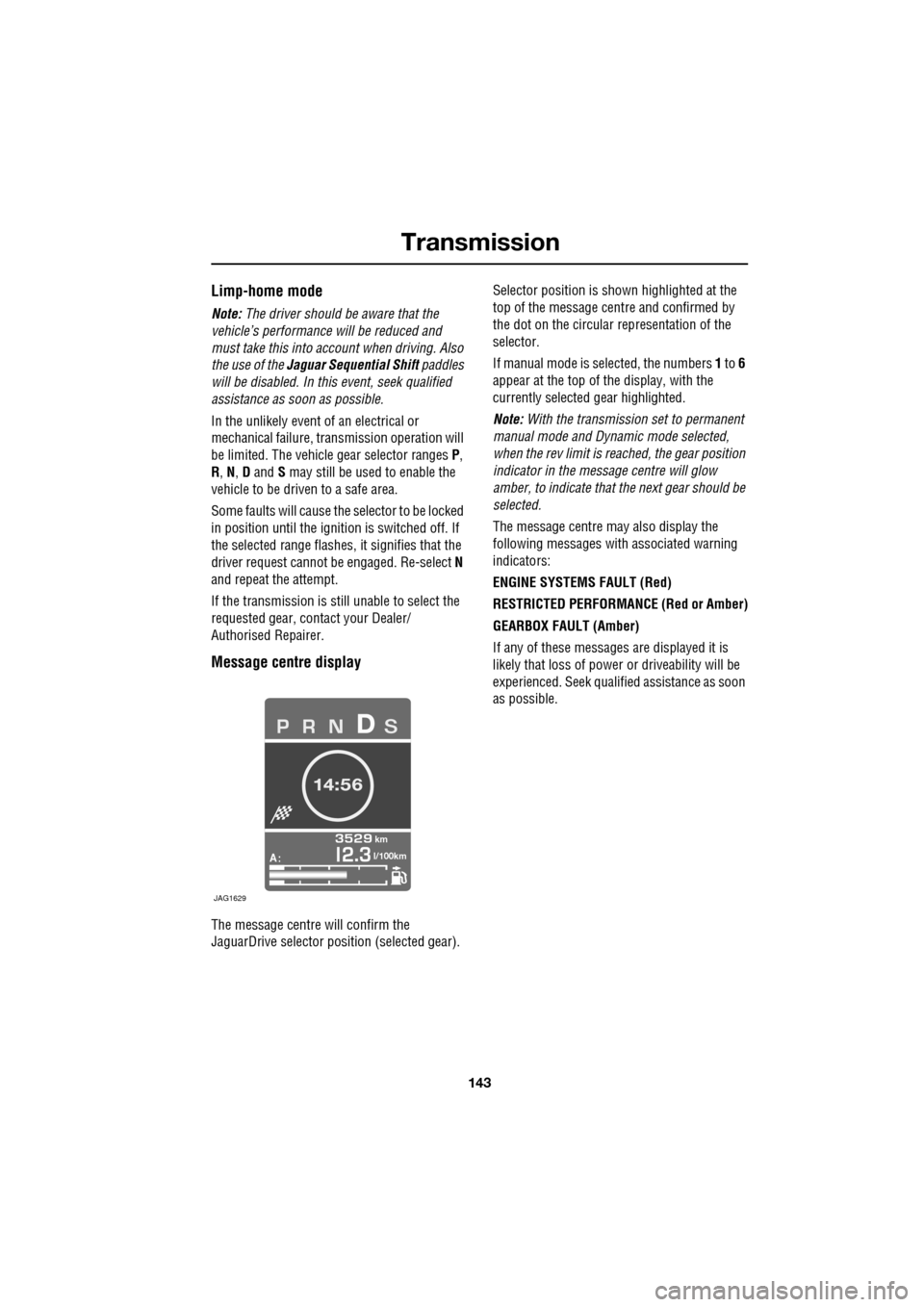
Message centre display
The message centre will confirm the
JaguarDrive selector pos ition (selected gear). Selector position is sh
own highlighted at the
top of the message cent re and confirmed by
the dot on the circular representation of the
selector.
If manual mode is se lected, the numbers 1 to 6
appear at the top of the display, with the
currently selected gear highlighted.
Note: With the transmission set to permanent
manual mode and Dynamic mode selected,
when the rev limit is re ached, the gear position
indicator in the message centre will glow
amber, to indicate that the next gear should be
selected.
The message centre may also display the
following messages with associated warning
indicators:
ENGINE SYSTEMS FAULT (Red)
RESTRICTED PERFORMANCE (Red or Amber)
GEARBOX FAULT (Amber)
If any of these messages are displayed it is
likely that loss of power or driveability will be
experienced. Seek qualified assistance as soon
as possible.
A
km
l/100km
JAG1629