ignition JAGUAR XF 2009 1.G Manual PDF
[x] Cancel search | Manufacturer: JAGUAR, Model Year: 2009, Model line: XF, Model: JAGUAR XF 2009 1.GPages: 391, PDF Size: 19.32 MB
Page 309 of 391
309
Telephone
Safety
Driving
Check local regulations covering the use of
in-car telephones in the areas that you intend to
use your telephone, and always obey them.
Observe the following guidelines if you are
using the phone when driving.
• Give full attention to driving - safe driving
is your prime responsibility.
• Always use hands-free operation when
driving.
• When receiving a call, if driving conditions
demand, pull off the road and park.
Electronic devices
Most modern electronic equipment is shielded
from Radio Frequency (R F) signals. However,
certain equipment may not be shielded against
RF signals from your phone.
Pacemakers
The Health Industry Manufacturers'
Association recommends that a minimum
separation of 15 centimetres (six inches) is
maintained between a wireless phone antenna
and a pacemaker, to avoid potential
interference with the pacemaker. These
recommendations are consistent with the
independent research by, and
recommendations of, Wireless Technology
Research.
TELEPHONE PAIRING AND DOCKING
Before use, your mobile phone must be paired
and docked with the vehicle’s Bluetooth
system. This is done via your mobile phone or
the touch-screen.
Pairing and docking using your mobile
phone
Follow the steps below, to pair and dock your
phone with the vehicle using your mobile
phone.
Note: The process of pairing and docking your
phone with the vehicle using the mobile phone,
will vary depending on the type of mobile
phone used.
3. Ensure that the ignition is on and the
touch-screen is active.
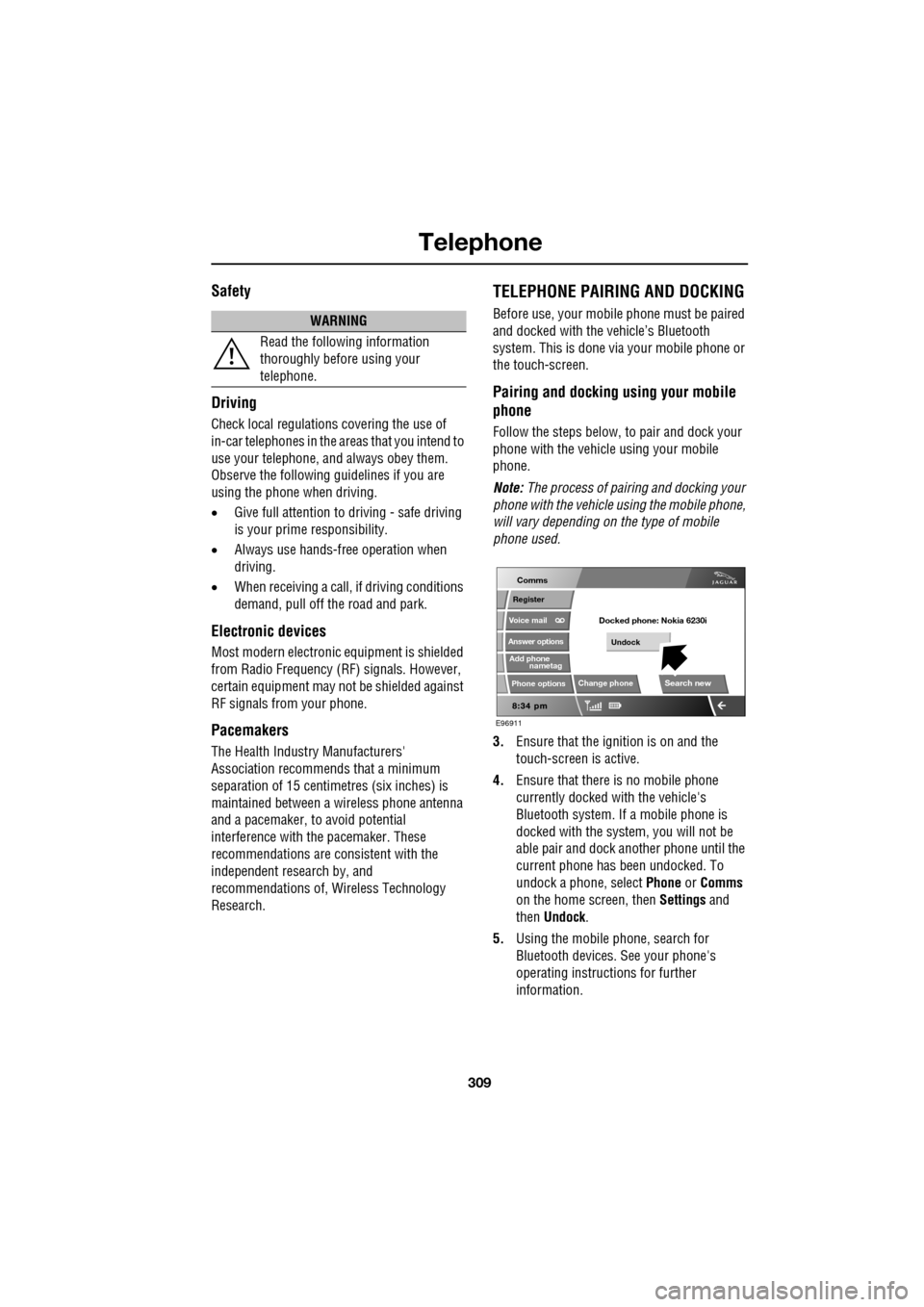
4. Ensure that there is no mobile phone
currently docked with the vehicle's
Bluetooth system. If a mobile phone is
docked with the system, you will not be
able pair and dock another phone until the
current phone has been undocked. To
undock a phone, select Phone or Comms
on the home screen, then Settings and
then Undock .
5. Using the mobile phone, search for
Bluetooth devices. See your phone's
operating instructions for further
information.
WARNING
Read the following information
thoroughly before using your
telephone.
nametag
Register
Voice mail
Answer options
Phone options
Change phone
E96911
Comms
Add phone
Search new
Docked phone: Nokia 6230i
Undock
Page 310 of 391
Telephone
310
6.When the vehicle's Bluetooth system is
discovered, your mob ile phone will list
Jaguar as a discovered Bluetooth device.
Select this device from the list.
7. You will now be requested to enter a
Bluetooth PIN. When pairing and docking
from your mobile phone, this number is
always 1313.
Once your phone is paired to the vehicle's
Bluetooth system, it can connect automatically.
If the phone does not automatically connect,
you will have to conne ct manually with the
Jaguar Bluetooth System, via the mobile
phone. Please consul t the mobile phone's
handbook for further information.
Note: Some mobile phones require you to
authorise the connection each time you start
the system. To change this, you must set
Jaguar as ‘authorised’ in the mobile phone’s
known device list. This will enable connections
from the vehicle to the mobile phone to take
place automatically without confirmation each
time. Please consul t the mobile phone’s
handbook for further information.
Pairing and docking using the
touch-screen
1. Switch on your mobile phone’s Bluetooth
connection, using the phone’s menu. Make
sure that your mobile phone is in Bluetooth
discoverable mode, sometimes referred to
as find me mode (s ee your phone’s
operating instructions for more
information).
2. Switch the ignition system on, ensure that
the touch-screen is active. 3.
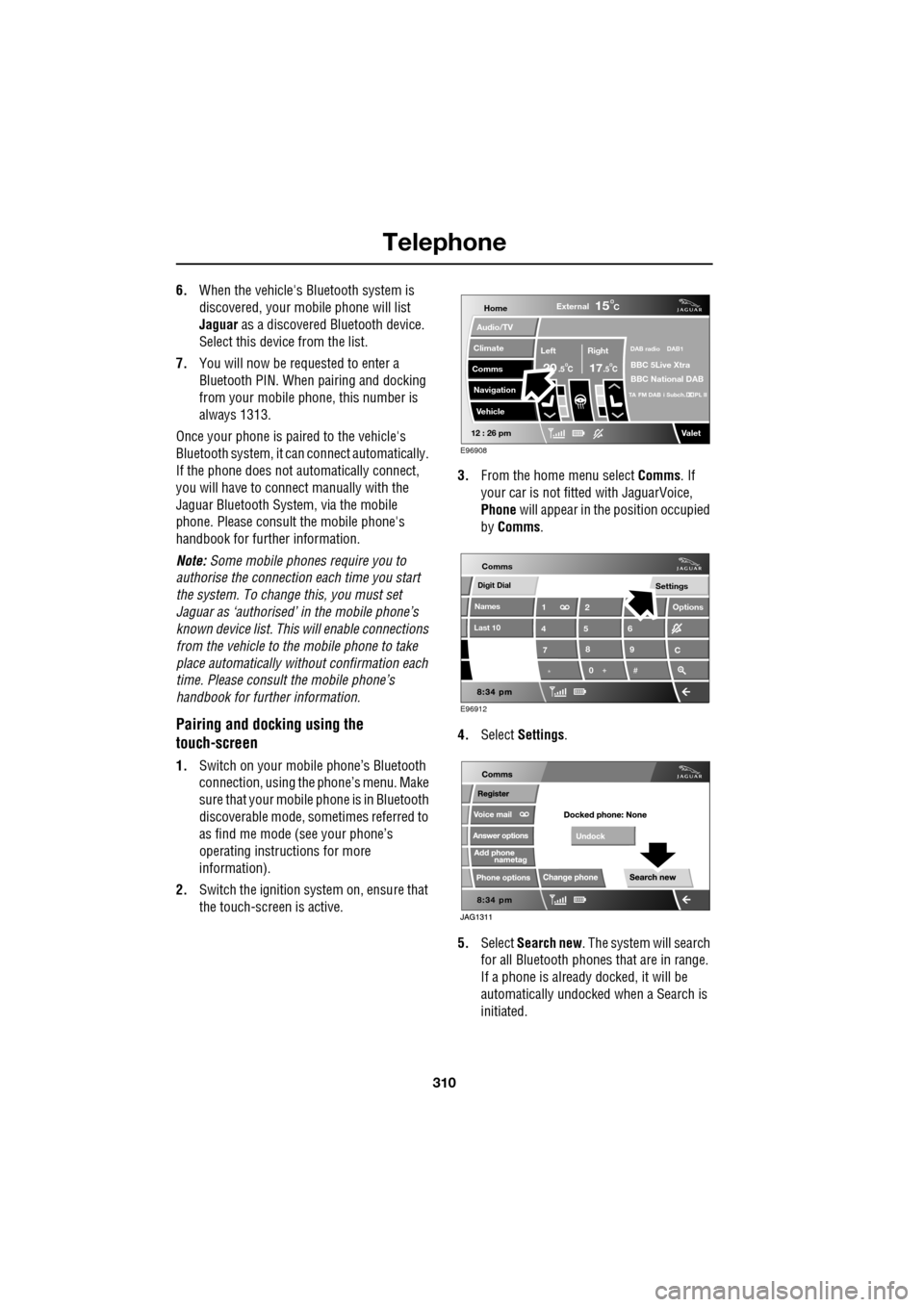
From the home menu select Comms. If
your car is not fitted with JaguarVoice,
Phone will appear in the position occupied
by Comms .
4. Select Settings .
5. Select Search new . The system will search
for all Bluetooth phones that are in range.
If a phone is already docked, it will be
automatically undocked when a Search is
initiated.
Home
Audio/TV
Climate
Comms
Navigation
VehicleExternal
Left Right
20 17CC
15C
.5 .5
DAB radio DAB1
BBC 5Live Xtra
BBC National DAB
TA FM DAB i Subch. PL II
Valet12 : 26 pm
E96908
Digit Dial
Names
Last 10
Settings
7
1
4
*8
2
5
0 9
6
Options
C
E96912
Comms
Page 311 of 391
311
Telephone
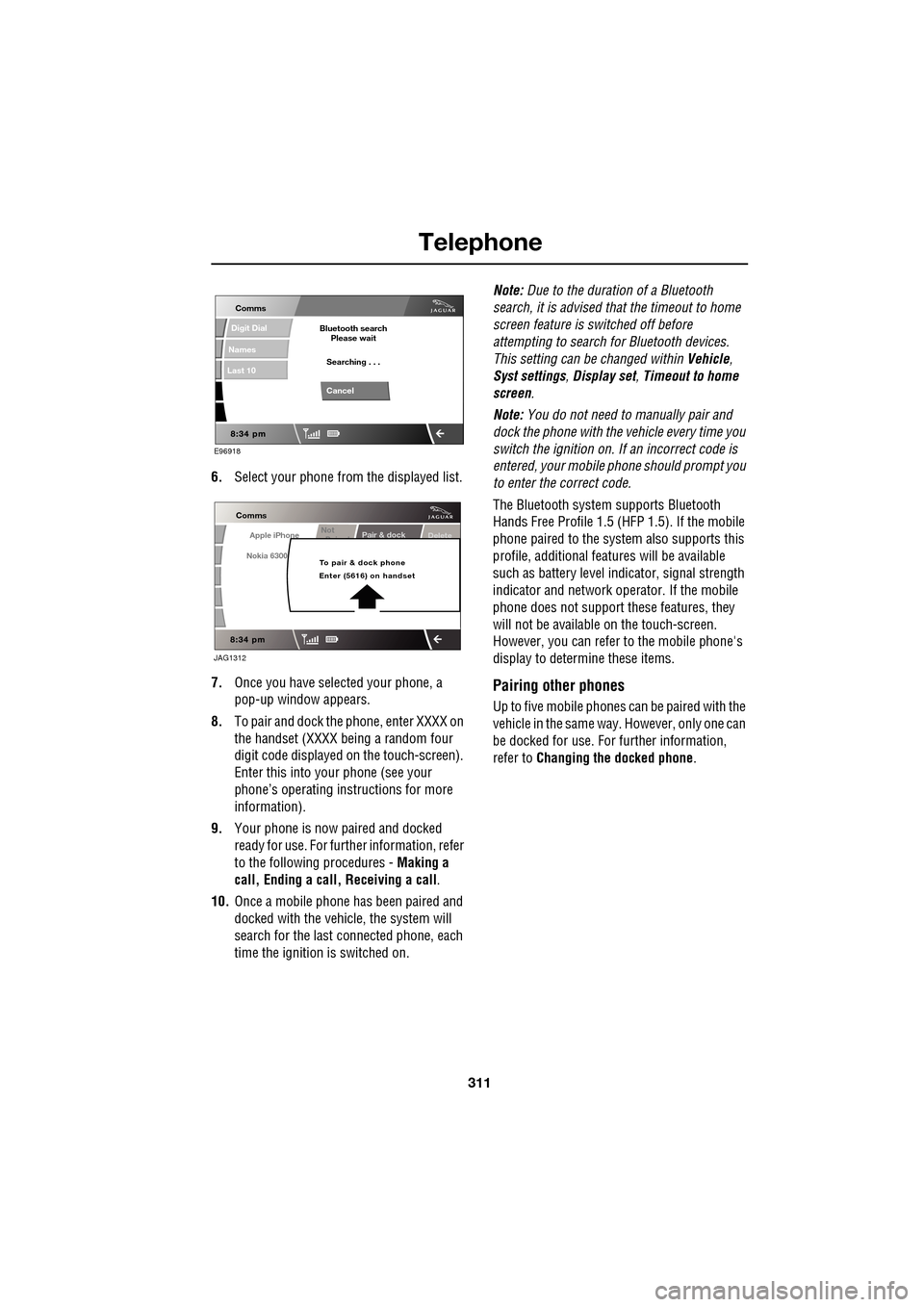
6.Select your phone from the displayed list.
7. Once you have sele cted your phone, a
pop-up window appears.
8. To pair and dock the phone, enter XXXX on
the handset (XXXX being a random four
digit code displayed on the touch-screen).
Enter this into y our phone (see your
phone’s operating instructions for more
information).
9. Your phone is now paired and docked
ready for use. For further information, refer
to the following procedures - Making a
call, Ending a call, Receiving a call .
10. Once a mobile phone has been paired and
docked with the vehicle, the system will
search for the last connected phone, each
time the ignition is switched on. Note:
Due to the duration of a Bluetooth
search, it is advised that the timeout to home
screen feature is switched off before
attempting to search fo r Bluetooth devices.
This setting can be changed within Vehicle,
Syst settings , Display set , Timeout to home
screen .
Note: You do not need to manually pair and
dock the phone with the vehicle every time you
switch the ignition on. If an incorrect code is
entered, your mobile phone should prompt you
to enter the correct code.
The Bluetooth system supports Bluetooth
Hands Free Profile 1.5 (H FP 1.5). If the mobile
phone paired to the system also supports this
profile, additional featur es will be available
such as battery level indicator, signal strength
indicator and network ope rator. If the mobile
phone does not support these features, they
will not be available on the touch-screen.
However, you can refer to the mobile phone's
display to determine these items.
Pairing other phones
Up to five mobile phones can be paired with the
vehicle in the same way. However, only one can
be docked for use. For further information,
refer to Changing the docked phone .
E96918
Comms
Digit Dial
Names
Last 10
Cancel
Bluetooth search
Please wait
Searching . . .
Apple iPhone
Comms
Nokia 6300
Pair & dockDeleteNot
P i d
To pair & dock phone
Enter (5616) on handset
JAG1312
Page 317 of 391
317
Telephone
MAKING A CALL
Before you make a call, your mobile phone
must be paired and docked with the vehicle’s
Bluetooth system.
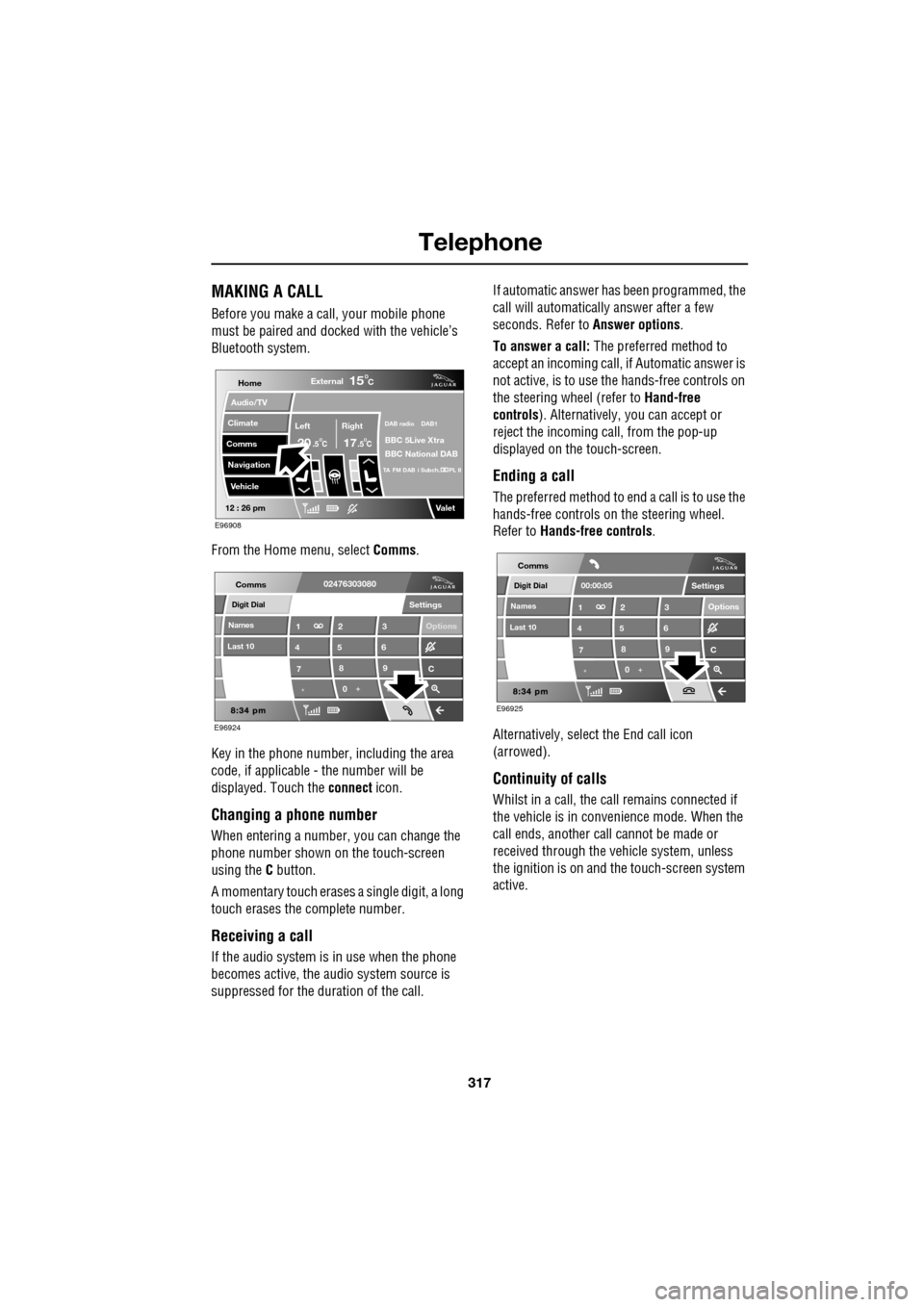
From the Home menu, select Comms.
Key in the phone number, including the area
code, if applicable - the number will be
displayed. Touch the connect icon.
Changing a phone number
When entering a number, you can change the
phone number shown on the touch-screen
using the C button.
A momentary touch erases a single digit, a long
touch erases the complete number.
Receiving a call
If the audio system is in use when the phone
becomes active, the audio system source is
suppressed for the dur ation of the call. If automatic answer has been programmed, the
call will automatically answer after a few
seconds. Refer to
Answer options.
To answer a call: The preferred method to
accept an incoming call, if Automatic answer is
not active, is to use th e hands-free controls on
the steering wheel (refer to Hand-free
controls ). Alternatively, you can accept or
reject the incoming call, from the pop-up
displayed on the touch-screen.
Ending a call
The preferred method to end a call is to use the
hands-free controls on the steering wheel.
Refer to Hands-free controls .
Alternatively, select the End call icon
(arrowed).
Continuity of calls
Whilst in a call, the ca ll remains connected if
the vehicle is in convenience mode. When the
call ends, another call cannot be made or
received through the vehicle system, unless
the ignition is on and the touch-screen system
active.
Home
Audio/TV
Climate
Comms
Navigation
VehicleExternal
Left Right
20 17CC
15C
.5 .5
DAB radio DAB1
BBC 5Live Xtra
BBC National DAB
TA FM DAB i Subch. PL II
Valet12 : 26 pm
E96908
Digit Dial
Names
Last 10
Settings
7
1
4
*8
2
5
0 9
3
6
Options
C
E96924
Comms02476303080Digit Dial
Names
Last 10
Settings
7
1
4
*8
2
5
0 9
3
6
Options
C
E96925
Comms
00:00:05
Page 330 of 391
Television
330
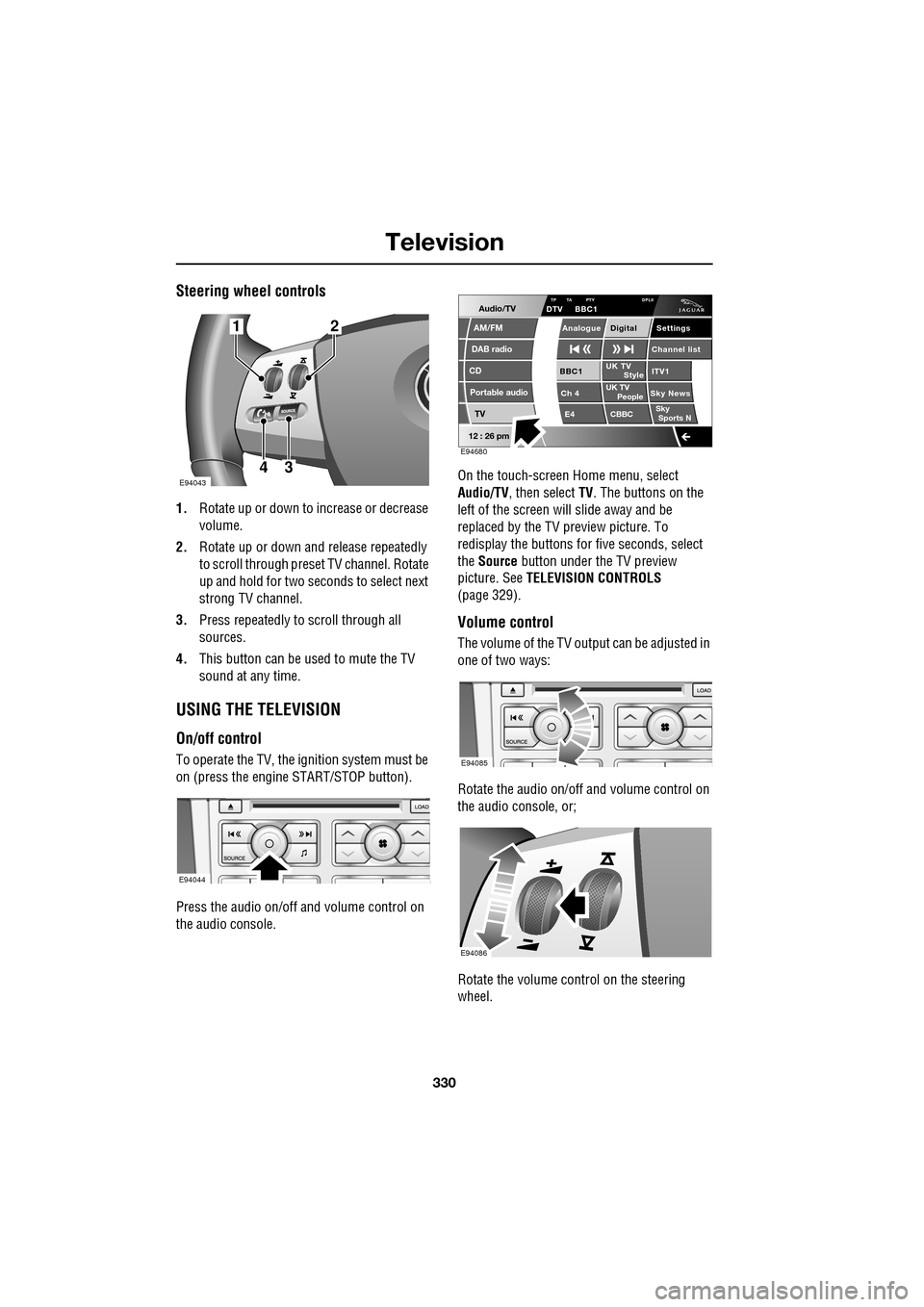
Steering wheel controls
1.Rotate up or down to increase or decrease
volume.
2. Rotate up or down and release repeatedly
to scroll through preset TV channel. Rotate
up and hold for two seconds to select next
strong TV channel.
3. Press repeatedly to scroll through all
sources.
4. This button can be used to mute the TV
sound at any time.
USING THE TELEVISION
On/off control
To operate the TV, the ignition system must be
on (press the engine START/STOP button).
Press the audio on/off and volume control on
the audio console. On the touch-screen
Home menu, select
Audio/TV , then select TV. The buttons on the
left of the screen will slide away and be
replaced by the TV preview picture. To
redisplay the buttons for five sec onds, select
the Source button under the TV preview
picture. See TELEVISION CONTROLS
(page 329).
Volume control
The volume of the TV output can be adjusted in
one of two ways:
Rotate the audio on/off and volume control on
the audio console, or;
Rotate the volume control on the steering
wheel.
E94043
12
43
E94044
Audio/TV
DAB radio
CD
AM/FM
12 : 26 pm
Portable audio
TV
UK TV ITV1
Ch 4 Sky News E4 CBBCBBC1
Settings
Channel list
TA PTY DPLIIDTV BBC1
Style
UK TV People
SkySports NTP
Analogue Digital
E94680
E94085
E94086
Page 334 of 391
Navigation system
334
THE NAVIGATION SYSTEM
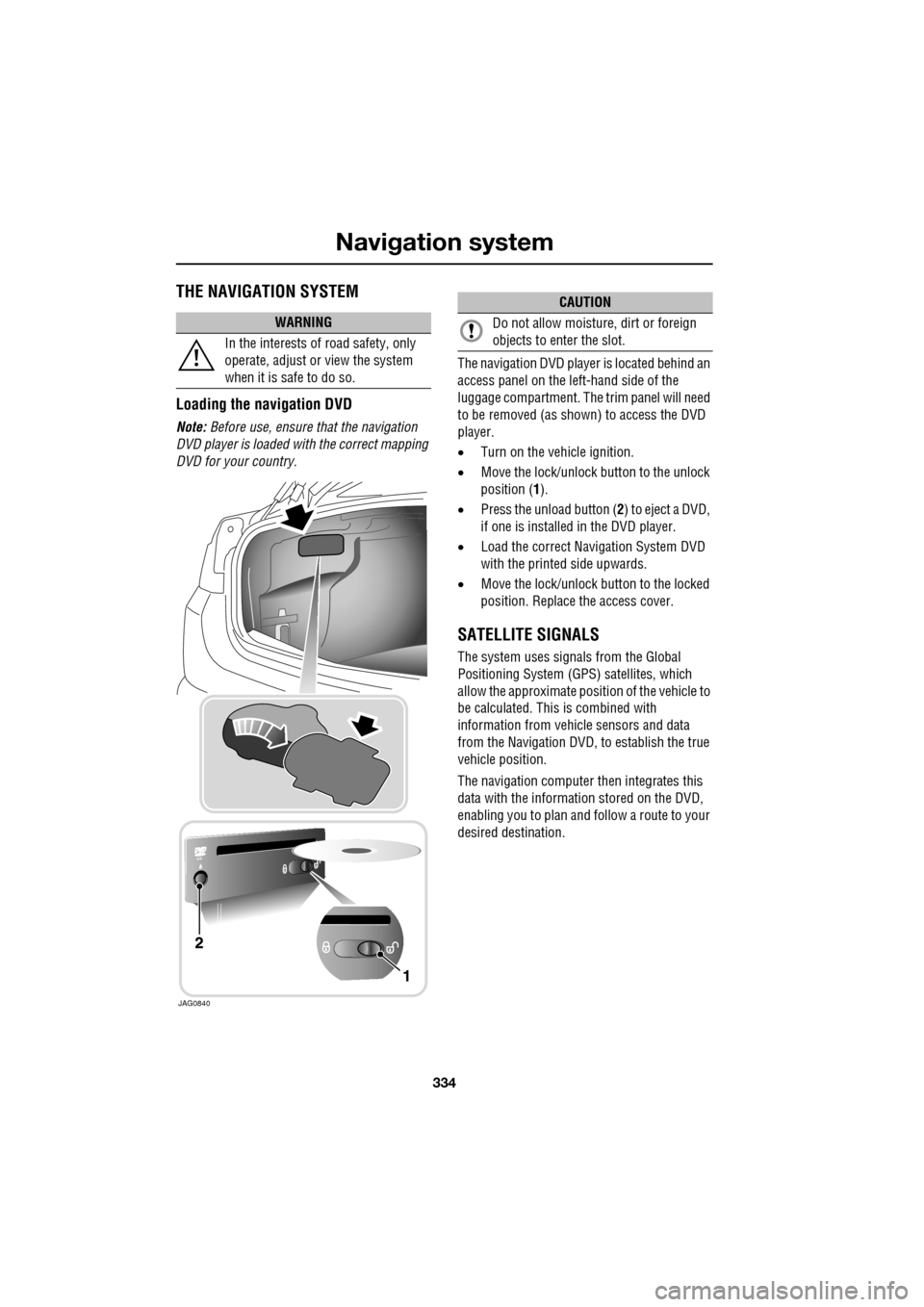
Loading the navigation DVD
Note: Before use, ensure that the navigation
DVD player is loaded with the correct mapping
DVD for your country. The navigation DV
D player is located behind an
access panel on the left-hand side of the
luggage compartment. The trim panel will need
to be removed (as shown) to access the DVD
player.
• Turn on the vehicle ignition.
• Move the lock/unlock button to the unlock
position ( 1).
• Press the unload button ( 2) to eject a DVD,
if one is installed in the DVD player.
• Load the correct Navigation System DVD
with the printed side upwards.
• Move the lock/unlock button to the locked
position. Replace the access cover.
SATELLITE SIGNALS
The system uses signa ls from the Global
Positioning Syst em (GPS) satellites, which
allow the approximate posi tion of the vehicle to
be calculated. This is combined with
information from vehi cle sensors and data
from the Navigation DVD, to establish the true
vehicle position.
The navigation computer then integrates this
data with the information stored on the DVD,
enabling you to plan and follow a route to your
desired destination.
WARNING
In the interests of road safety, only
operate, adjust or view the system
when it is safe to do so.
JAG0840
CAUTION
Do not allow moisture, dirt or foreign
objects to enter the slot.