U3000 JAGUAR XFR 2010 1.G User Guide
[x] Cancel search | Manufacturer: JAGUAR, Model Year: 2010, Model line: XFR, Model: JAGUAR XFR 2010 1.GPages: 3039, PDF Size: 58.49 MB
Page 202 of 3039

DTC Description Possible Causes Action B11A9-23 Tone Button - Signal stuck
low
Button stuck
down/jammed
Integrated control
panel failure
Check for stuck down/jammed button. Check and
install a new integrated control panel as required B121F-23
Climate Switch - Signal
stuck low
Button stuck
down/jammed
Integrated control
panel failure
Check for stuck down/jammed button. Check and
install a new integrated control panel as required U0010-88
Medium Speed CAN
Communication Bus - Bus
off
Bus off
Carry out any pinpoint tests associated with this DTC
using the manufacturer approved diagnostic system U0140-00
Lost Communication With
Body Control Module - No
sub type information
Missing message
from CJB
Carry out any pinpoint tests associated with this DTC
using the manufacturer approved diagnostic system U0142-00
Lost Communication With
Body Control Module "B" -
No sub type information
Missing message
from RJB
Carry out any pinpoint tests associated with this DTC
using the manufacturer approved diagnostic system U0155-00
Lost Communication With
Instrument Panel Cluster
(IPC) Control Module - No
sub type information
Missing message
from instrument
cluster
Carry out any pinpoint tests associated to this DTC
using the manufacturer approved diagnostic system U0156-00
Lost Communication With
Information Center "A" -
No sub type information
Missing message
from information and
entertainment control
module
Carry out any pinpoint tests associated with this DTC
using the manufacturer approved diagnostic system U0300-00
Internal Control Module
Software Incompatibility -
No sub type information
Invalid car
configuration data
received
Re-configure the integrated control panel as new.
Clear DTC and re-test, if DTC remains suspect the
integrated control panel. Check and install a new
integrated control panel as required, refer to the new
module/component installation note at the top of the
DTC Index U3000-41
Control Module - General
checksum failure
Checksum error,
internal module
failure
Suspect the integrated control panel, check and
install a new integrated control panel as required,
refer to the new module/component installation note
at the top of the DTC Index
Page 205 of 3039

DTC Description Possible Causes Action U3000-04
Control Module -
System Internal
Failures
Occupancy seat module
internal electronic failure
Check and install a new occupancy seat module as
required. Refer to the warranty policy and procedures
manual, or determine if any prior approval programme is
in operation, prior to the installation of a new
module/component U3000-54
Control Module -
Missing calibration
This diagnostic trouble
code is set if a 'calibrate
occupancy seat module
empty seat offset'
routine is requested and
fails due to one of the
pre-conditions to
execute the routine
Check the following criteria have all been achieved:
Ignition status set to RUN/START. Verify seat is always
empty after power-up before re-zero is requested. The
occupancy seat module has gone through the seat
assembly plant calibration. No collision event received
from the restraints control module during the current
ignition cycle. No faults present in the current ignition
cycle. The trigger message for calibrate empty seat
offset has been received from the diagnostic tool.
Occupancy seat module has enough time to begin
classification. Temperature is between 6C (42F) and 36C
(97F) U3003-16
Battery Voltage -
Circuit voltage
below threshold
Circuit voltage below
threshold
Check battery is in fully charged and serviceable
condition. Check integrity of charging system U3003-17
Battery Voltage -
Circuit voltage
above threshold
Circuit voltage above
threshold
Check battery is in fully charged and serviceable
condition. Check integrity of charging system
Page 213 of 3039
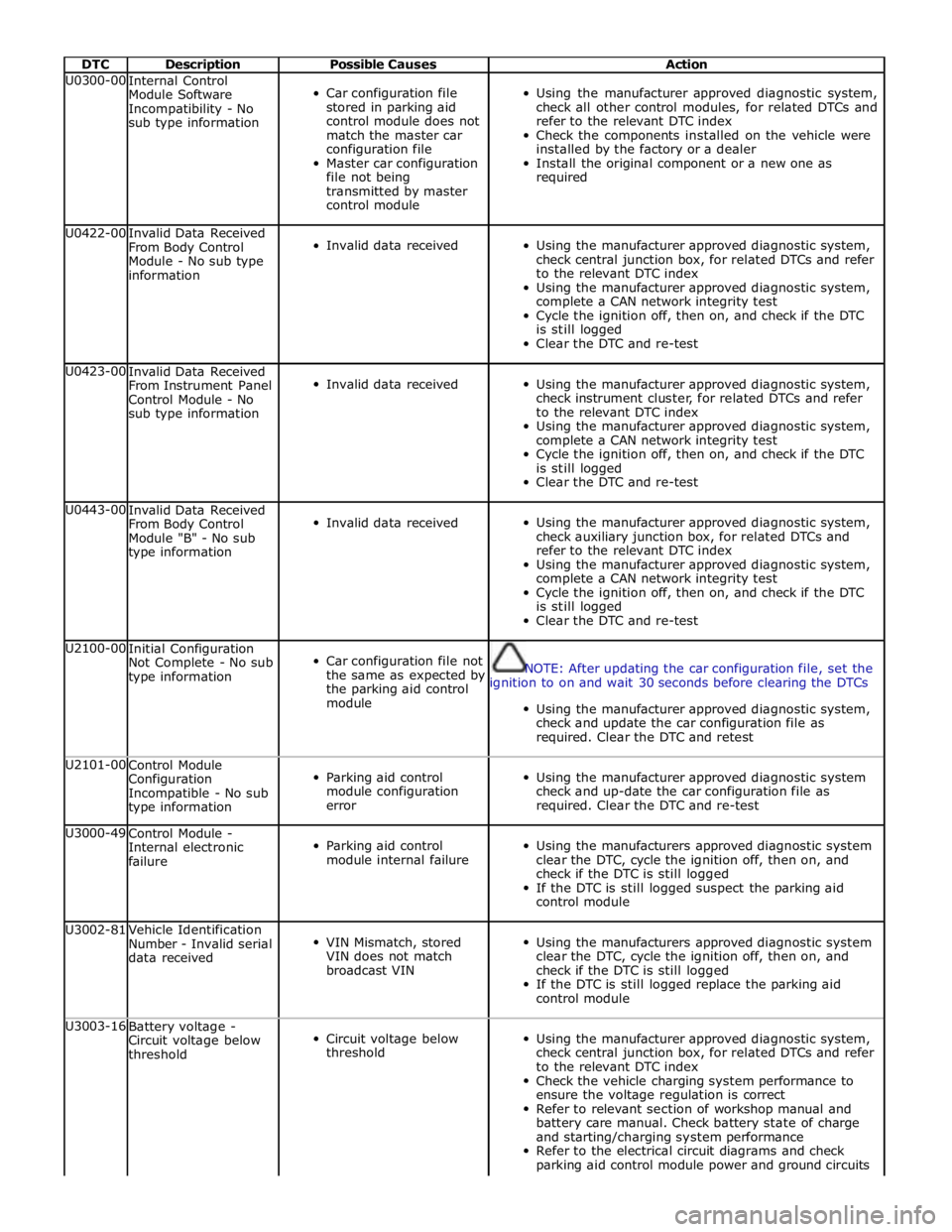
DTC Description Possible Causes Action U0300-00
Internal Control
Module Software
Incompatibility - No
sub type information
Car configuration file
stored in parking aid
control module does not
match the master car
configuration file
Master car configuration
file not being
transmitted by master
control module
Using the manufacturer approved diagnostic system,
check all other control modules, for related DTCs and
refer to the relevant DTC index
Check the components installed on the vehicle were
installed by the factory or a dealer
Install the original component or a new one as
required U0422-00
Invalid Data Received
From Body Control
Module - No sub type
information
Invalid data received
Using the manufacturer approved diagnostic system,
check central junction box, for related DTCs and refer
to the relevant DTC index
Using the manufacturer approved diagnostic system,
complete a CAN network integrity test
Cycle the ignition off, then on, and check if the DTC
is still logged
Clear the DTC and re-test U0423-00
Invalid Data Received
From Instrument Panel
Control Module - No
sub type information
Invalid data received
Using the manufacturer approved diagnostic system,
check instrument cluster, for related DTCs and refer
to the relevant DTC index
Using the manufacturer approved diagnostic system,
complete a CAN network integrity test
Cycle the ignition off, then on, and check if the DTC
is still logged
Clear the DTC and re-test U0443-00
Invalid Data Received
From Body Control
Module "B" - No sub
type information
Invalid data received
Using the manufacturer approved diagnostic system,
check auxiliary junction box, for related DTCs and
refer to the relevant DTC index
Using the manufacturer approved diagnostic system,
complete a CAN network integrity test
Cycle the ignition off, then on, and check if the DTC
is still logged
Clear the DTC and re-test U2100-00
Initial Configuration
Not Complete - No sub
type information
Car configuration file not
the same as expected by
the parking aid control
module
NOTE: After updating the car configuration file, set the
ignition to on and wait 30 seconds before clearing the DTCs
Using the manufacturer approved diagnostic system,
check and update the car configuration file as
required. Clear the DTC and retest U2101-00
Control Module
Configuration
Incompatible - No sub
type information
Parking aid control
module configuration
error
Using the manufacturer approved diagnostic system
check and up-date the car configuration file as
required. Clear the DTC and re-test U3000-49
Control Module -
Internal electronic
failure
Parking aid control
module internal failure
Using the manufacturers approved diagnostic system
clear the DTC, cycle the ignition off, then on, and
check if the DTC is still logged
If the DTC is still logged suspect the parking aid
control module U3002-81
Vehicle Identification
Number - Invalid serial
data received
VIN Mismatch, stored
VIN does not match
broadcast VIN
Using the manufacturers approved diagnostic system
clear the DTC, cycle the ignition off, then on, and
check if the DTC is still logged
If the DTC is still logged replace the parking aid
control module U3003-16
Battery voltage -
Circuit voltage below
threshold
Circuit voltage below
threshold
Using the manufacturer approved diagnostic system,
check central junction box, for related DTCs and refer
to the relevant DTC index
Check the vehicle charging system performance to
ensure the voltage regulation is correct
Refer to relevant section of workshop manual and
battery care manual. Check battery state of charge
and starting/charging system performance
Refer to the electrical circuit diagrams and check
parking aid control module power and ground circuits
Page 226 of 3039

DTC Description Possible Causes Action U0155-00
Lost Communication
With Instrument Panel
Cluster (IPC) Control
Module - No sub type
information
No sub type information
Carry out any pinpoint test associated with this DTC
using the manufacturer approved diagnostic system U0159-00
Lost Communication
With Parking Assist
Control Module "A" - No
sub type information
No sub type information
Carry out any pinpoint test associated with this DTC
using the manufacturer approved diagnostic system U0164-00
Lost Communication
With HVAC Control
Module - No sub type
information
No sub type information
Carry out any pinpoint test associated with this DTC
using the manufacturer approved diagnostic system U0214-00
Lost Communication
With Remote Function
Actuation - No sub type
information
No sub type information
Carry out any pinpoint test associated with this DTC
using the manufacturer approved diagnostic system U0300-46
Internal Control Module
Software Incompatibility
- Calibration/parameter
memory failure
Calibration/parameter
memory failure
Suspect the RJB. Check and install a new RJB as
required, refer to the new module/component
installation note at the top of the DTC Index U1000-00
Solid State Driver
Protection Active -Driver
Disabled - No sub type
information
No sub type information
Carry out any pinpoint test associated with this DTC
using the manufacturer approved diagnostic system U1A14-49
CAN Initialisation
Failure - Internal
electronic failure
Internal electronic
failure
Suspect the RJB. Check and install a new RJB as
required, refer to the new module/component
installation note at the top of the DTC Index U3000-49
Control Module -
Internal electronic
failure
Internal electronic
failure
Suspect the RJB. Check and install a new RJB as
required, refer to the new module/component
installation note at the top of the DTC Index U3000-55
Control Module - Not
configured
Not configured
Re-configure the RJB using the manufacturer
approved diagnostic system www.JagDocs.com
Page 230 of 3039

DTC Description Possible Causes Action U0142-00
Lost Communication
With Body Control
Module "B" - No
subtype information
Missing message from
RJB
Carry out any pinpoint tests associated with this
DTC using the manufacturer approved diagnostic
system. Carry out CAN network integrity test using
the manufacturer approved diagnostic system. Refer
to the electrical circuit diagrams and check power
and ground supplies to RJB U0155-00
Lost Communication
With Instrument Panel
Cluster (IPC) Control
Module - No subtype
information
Missing message from
instrument cluster
Carry out any pinpoint tests associated with this
DTC using the manufacturer approved diagnostic
system. Carry out CAN network integrity test using
the manufacturer approved diagnostic system. Refer
to the electrical circuit diagrams and check power
and ground supplies to instrument cluster U0300-00
Internal Control
Module Software
Incompatibility - No
subtype information
Invalid configuration
message is received
Re-configure the RJB using the manufacturer
approved diagnostic system. Clear the DTC and
retest. If the DTC is still logged suspect the remote
keyless entry module, refer to the new module
installation note at the top of the DTC Index U201F-00
External Receiver - No
subtype information
No subtype information -
communication error
Suspect the RF receiver, check and install a new RF
receiver as required, refer to the new
module/component installation note at top of DTC
Index U201F-13
External Receiver -
Circuit open
Line open
Refer to the electrical circuit diagrams and test RF
receiver communication circuit to remote keyless
entry module for short to ground or open circuit U201F-87
External Receiver -
Missing message
Transmission error
Refer to the electrical circuit diagrams and check
the data line between the RF receiver and the
remote keyless entry module for short, open circuit.
Suspect the RF receiver or remote keyless entry
module, check and install a new RF receiver or
remote keyless entry module as required, refer to
the new module/component installation note at top
of DTC Index U2100-00
Initial Configuration
Not Complete - No
subtype information
No subtype information
Configure the Remote Keyless Entry module using
the manufacturer approved diagnostic system U2101-00
Control Module
Configuration
Incompatible - No subtype information
No subtype information
Re-configure the RJB using the manufacturer
approved diagnostic system U3000-49
Control Module -
Internal electronic
failure
Internal electronic failure
Install a new remote keyless entry module, refer to
the new module installation note at the top of the
DTC Index U3002-81
Vehicle Identification
Number - Invalid serial
data received
Vehicle/component
mis-match. Module
previously installed to
other vehicle
Install correct/new module to vehicle specification,
refer to the new module/component installation
note at the top of the DTC Index U3003-62
Battery Voltage -
Signal compare failure
Mis-match in battery
voltage, of 2 volts or
more, between remote
keyless entry module and
RJB
Carry out any pinpoint tests associated with this
DTC using the manufacturer approved diagnostic
system
Refer to the relevant section of the workshop
manual and test the battery and charging system
Page 237 of 3039

DTC Description Possible Causes Action B1A89-12
Satellite Antenna -
Circuit short to
battery
Satellite antenna circuit -
short to power
Refer to the electrical circuit diagrams and check
satellite antenna circuit for short circuit to power. Repair
wiring harness as required. Clear DTC and retest B1A89-13
Satellite Antenna -
Circuit open
Satellite antenna circuit -
open circuit, high
resistance
Refer to the electrical circuit diagrams and check
satellite antenna circuit for open circuit, high
resistance. Repair wiring harness as required. Clear DTC
and retest U3000-04
Control Module -
System internal
failures
System internal failure
Check and install a new satellite radio module as
required. Refer to the warranty policy and procedures
manual, or determine if any prior approval programme is
in operation, prior to the installation of a new
module/component U3000-4A Control Module -
Satellite radio module -
Using the manufacturer approved diagnostic system Incorrect component Incorrect component select the vehicle configuration main menu>vehicle installed installed configuration>display and modify the vehicle Car configuration configuration file data mismatch Check update as required U3000-55
Control Module -
Not configured
Satellite radio module -
Incorrect component
installed
Incorrect car configuration
file data received
Using the manufacturer approved diagnostic system
select the vehicle configuration main menu>select
configure existing modules menu and program the
satellite radio module U3000-87
Control Module -
Missing message
The satellite radio module
has not received the
configuration file
Master module not
transmitting configuration
file
Using the manufacturer approved diagnostic system
check that the satellite radio module is configured
correctly
Check that the configuration file is being transmitted by
the master module
Using the manufacturer approved diagnostic system,
complete a MOST network integrity test U3000-98
Control Module -
Component or
system over
temperature
Satellite radio module
cooling vents obstructed
Wiring harness fault
Internal electronic failure
Check for possible causes of the satellite radio module
overheating. Check that the ventilation is not
obstructed
Check for short circuit related DTCs. Refer to the
electrical circuit diagrams and check ground circuit for
high resistance. Check antenna circuit for short to power
or ground. Repair wiring harness as required. Clear DTC
and retest
Check for internal electronic failure related DTCs
If fault persists, check and install a new satellite radio
module. Refer to the warranty policy and procedures
manual, or determine if any prior approval programme is
in operation, prior to the installation of a new
module/component U3003-62
Battery Voltage -
Signal compare
failure
Signal compare failure
Satellite radio module
voltage differs more than
±2V compared to rear
junction box voltage
Refer to relevant section of workshop manual and
battery care manual. Check battery state of charge and
starting/charging system performance. Check power
supply circuit from rear junction box to satellite radio
module
Refer to electrical circuit diagrams and check the power
and ground supply circuits to the module. Repair wiring
harness as required. Clear DTC and retest
Page 241 of 3039

DTC Description Possible Causes Action Support for further advice. Under no circumstance
should any parts be replaced to overcome this issue U1A14-49
CAN Initialisation
Failure - Internal
electronic failure
Internal electronic failure
Suspect the speed control module. Check and install
a new module as required, refer to the new
module/component installation note at the top of
the DTC Index U2101-00
Control Module
Configuration
Incompatible - No sub
type information
Data sent from RJB is
invalid
Check/amend Car Configuration File using the
manufacturer approved diagnostic system, clear DTC
and re-test. If DTC remains, re-configure RJB using
manufacturer approved diagnostic system, clear DTC
and re-test. If DTC remains check RJB for DTCs and
refer to DTC Index U3000-41
Control Module -
General checksum
failure
Internal micro controller
error
Checksum fault
Suspect the speed control module. Check and install
a new module as required, refer to the new
module/component installation note at the top of
the DTC Index U3000-42
Control Module -
General memory failure
Internal RAM test fault
Suspect the speed control module. Check and install
a new module as required, refer to the new
module/component installation note at the top of
the DTC Index U3000-49
Control Module -
Internal electronic
failure
Internal control module
failure
Suspect the speed control module. Check and install
a new module as required, refer to the new
module/component installation note at the top of
the DTC Index U3000-63
Control Module -
Circuit/component
protection time-out
Circuit/component
protection time-out
The Control module internal protection has been
activated. Check for other related DTCs that could
lead to this event. Clear the DTC and retest. If the
problem persists, renew the module. Refer to the
warranty policy and procedures manual if a module is
suspect U3003-62
Battery Voltage -
Signal compare failure
Signal compare failure
Battery supply voltage
below a recognized value
Check vehicle battery and charging system. Refer to
the relevant section in the workshop manual. Refer
to the electrical circuit diagrams and check the power
and ground supply circuits to the modules www.JagDocs.com
Page 243 of 3039
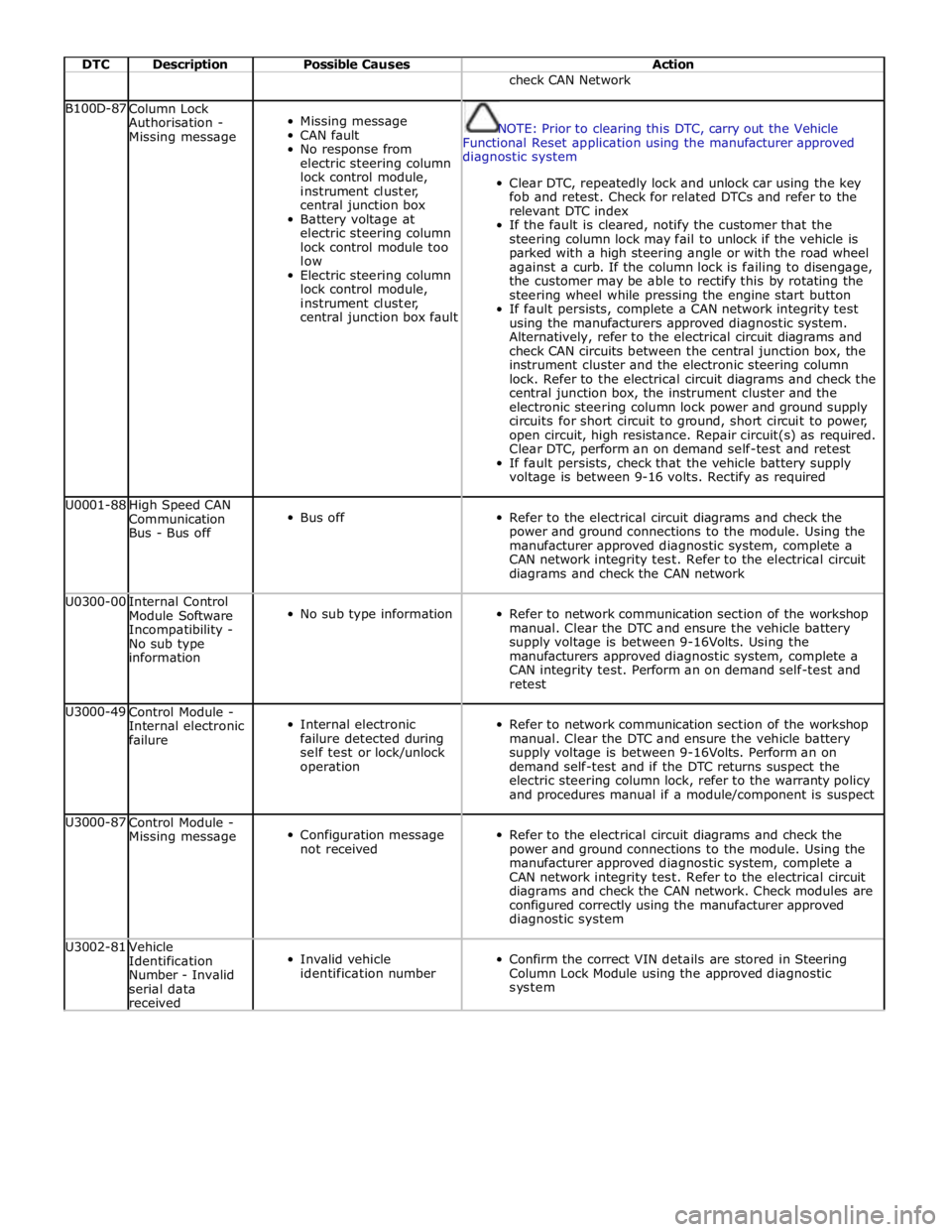
DTC Description Possible Causes Action check CAN Network B100D-87
Column Lock
Authorisation -
Missing message
Missing message
CAN fault
No response from
electric steering column
lock control module,
instrument cluster,
central junction box
Battery voltage at
electric steering column
lock control module too
low
Electric steering column
lock control module,
instrument cluster,
central junction box fault
NOTE: Prior to clearing this DTC, carry out the Vehicle
Functional Reset application using the manufacturer approved
diagnostic system
Clear DTC, repeatedly lock and unlock car using the key
fob and retest. Check for related DTCs and refer to the
relevant DTC index
If the fault is cleared, notify the customer that the
steering column lock may fail to unlock if the vehicle is
parked with a high steering angle or with the road wheel
against a curb. If the column lock is failing to disengage,
the customer may be able to rectify this by rotating the
steering wheel while pressing the engine start button
If fault persists, complete a CAN network integrity test
using the manufacturers approved diagnostic system.
Alternatively, refer to the electrical circuit diagrams and
check CAN circuits between the central junction box, the
instrument cluster and the electronic steering column
lock. Refer to the electrical circuit diagrams and check the
central junction box, the instrument cluster and the
electronic steering column lock power and ground supply
circuits for short circuit to ground, short circuit to power,
open circuit, high resistance. Repair circuit(s) as required.
Clear DTC, perform an on demand self-test and retest
If fault persists, check that the vehicle battery supply
voltage is between 9-16 volts. Rectify as required U0001-88
High Speed CAN
Communication
Bus - Bus off
Bus off
Refer to the electrical circuit diagrams and check the
power and ground connections to the module. Using the
manufacturer approved diagnostic system, complete a
CAN network integrity test. Refer to the electrical circuit
diagrams and check the CAN network U0300-00
Internal Control
Module Software
Incompatibility -
No sub type
information
No sub type information
Refer to network communication section of the workshop
manual. Clear the DTC and ensure the vehicle battery
supply voltage is between 9-16Volts. Using the
manufacturers approved diagnostic system, complete a
CAN integrity test. Perform an on demand self-test and
retest U3000-49
Control Module -
Internal electronic
failure
Internal electronic
failure detected during
self test or lock/unlock
operation
Refer to network communication section of the workshop
manual. Clear the DTC and ensure the vehicle battery
supply voltage is between 9-16Volts. Perform an on
demand self-test and if the DTC returns suspect the
electric steering column lock, refer to the warranty policy
and procedures manual if a module/component is suspect U3000-87
Control Module -
Missing message
Configuration message
not received
Refer to the electrical circuit diagrams and check the
power and ground connections to the module. Using the
manufacturer approved diagnostic system, complete a
CAN network integrity test. Refer to the electrical circuit
diagrams and check the CAN network. Check modules are
configured correctly using the manufacturer approved
diagnostic system U3002-81
Vehicle
Identification
Number - Invalid
serial data
received
Invalid vehicle
identification number
Confirm the correct VIN details are stored in Steering
Column Lock Module using the approved diagnostic
system
Page 245 of 3039

DTC Description Possible Causes Action B1D55-13
Antenna#2 - Circuit
open
Antenna #2
circuit open
circuit
Carry out any pinpoint tests associated with this DTC using the
manufacturer approved diagnostic system. Refer to electrical
circuit diagrams and check antenna #2 circuit for open circuit B1D56-11
Antenna #3 Circuit -
Circuit short to
ground
Antenna #3
circuit short to
ground
Carry out any pinpoint tests associated with this DTC using the
manufacturer approved diagnostic system. Refer to electrical
circuit diagrams and check antenna #3 circuit for short to
ground B1D56-12
Antenna #3 Circuit -
Circuit short to
battery
Antenna #3
circuit short to
power
Carry out any pinpoint tests associated with this DTC using the
manufacturer approved diagnostic system. Refer to electrical
circuit diagrams and check antenna #3 circuit for short to power B1D56-13
Antenna #3 Circuit -
Circuit open
Antenna #3
circuit open
circuit
Carry out any pinpoint tests associated with this DTC using the
manufacturer approved diagnostic system. Refer to electrical
circuit diagrams and check antenna #3 circuit for open circuit B1D57-11
Antenna #4 Circuit -
Circuit short to
ground
Antenna #4
circuit short to
ground
Carry out any pinpoint tests associated with this DTC using the
manufacturer approved diagnostic system. Refer to electrical
circuit diagrams and check antenna #4 circuit for short to
ground B1D57-12
Antenna #4 Circuit -
Circuit short to
battery
Antenna #4
circuit short to
power
Carry out any pinpoint tests associated with this DTC using the
manufacturer approved diagnostic system. Refer to electrical
circuit diagrams and check antenna #4 circuit for short to power B1D57-13
Antenna #4 Circuit -
Circuit open
Antenna #4
circuit open
circuit
Carry out any pinpoint tests associated with this DTC using the
manufacturer approved diagnostic system. Refer to electrical
circuit diagrams and check antenna #4 circuit for open circuit B1D58-11 Television Output -
Circuit short to
ground
Television output
circuit short to
ground
Carry out any pinpoint tests associated with this DTC using the
manufacturer approved diagnostic system. Refer to electrical
circuit diagrams and check television output circuit for short to
ground B1D58-12 Television Output -
Circuit short to
battery
Television output
circuit short to
power
Carry out any pinpoint tests associated with this DTC using the
manufacturer approved diagnostic system. Refer to electrical
circuit diagrams and check television output circuit for short to
power B1D58-13 Television Output -
Circuit open
Television output
circuit open
circuit
Carry out any pinpoint tests associated with this DTC using the
manufacturer approved diagnostic system. Refer to electrical
circuit diagrams and check television output circuit for open
circuit U3000-49
Control Module -
Internal electronic
failure
Internal
electronic failure
Suspect the television module, check and install a new module
as required, refer to the new module/component installation
note at the top of the DTC Index U3003-16
Battery Voltage -
Circuit voltage below
threshold
Circuit voltage
below threshold
Carry out any pinpoint tests associated with this DTC using the
manufacturer approved diagnostic system U3003-17
Battery Voltage -
Circuit voltage above
threshold
Circuit voltage
above threshold
Carry out any pinpoint tests associated with this DTC using the
manufacturer approved diagnostic system
Page 250 of 3039
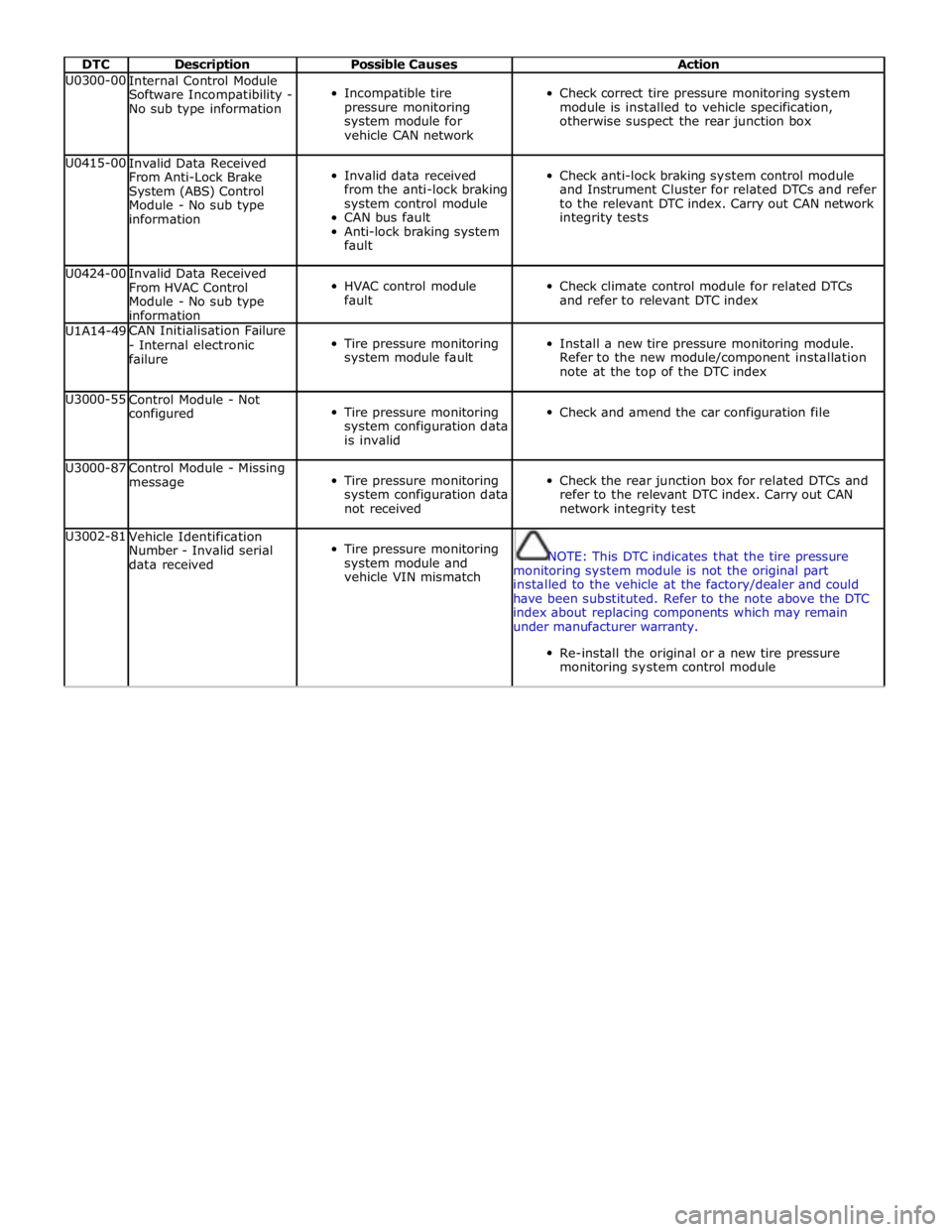
DTC Description Possible Causes Action U0300-00
Internal Control Module
Software Incompatibility -
No sub type information
Incompatible tire
pressure monitoring
system module for
vehicle CAN network
Check correct tire pressure monitoring system
module is installed to vehicle specification,
otherwise suspect the rear junction box U0415-00
Invalid Data Received
From Anti-Lock Brake
System (ABS) Control
Module - No sub type
information
Invalid data received
from the anti-lock braking
system control module
CAN bus fault
Anti-lock braking system
fault
Check anti-lock braking system control module
and Instrument Cluster for related DTCs and refer
to the relevant DTC index. Carry out CAN network
integrity tests U0424-00
Invalid Data Received
From HVAC Control
Module - No sub type
information
HVAC control module
fault
Check climate control module for related DTCs
and refer to relevant DTC index U1A14-49 CAN Initialisation Failure
- Internal electronic
failure
Tire pressure monitoring
system module fault
Install a new tire pressure monitoring module.
Refer to the new module/component installation
note at the top of the DTC index U3000-55
Control Module - Not
configured
Tire pressure monitoring
system configuration data
is invalid
Check and amend the car configuration file U3000-87
Control Module - Missing
message
Tire pressure monitoring
system configuration data
not received
Check the rear junction box for related DTCs and
refer to the relevant DTC index. Carry out CAN
network integrity test U3002-81
Vehicle Identification
Number - Invalid serial
data received
Tire pressure monitoring
system module and
vehicle VIN mismatch
NOTE: This DTC indicates that the tire pressure
monitoring system module is not the original part
installed to the vehicle at the factory/dealer and could
have been substituted. Refer to the note above the DTC
index about replacing components which may remain
under manufacturer warranty.
Re-install the original or a new tire pressure
monitoring system control module