wheel size JAGUAR XFR 2010 1.G User Guide
[x] Cancel search | Manufacturer: JAGUAR, Model Year: 2010, Model line: XFR, Model: JAGUAR XFR 2010 1.GPages: 3039, PDF Size: 58.49 MB
Page 721 of 3039
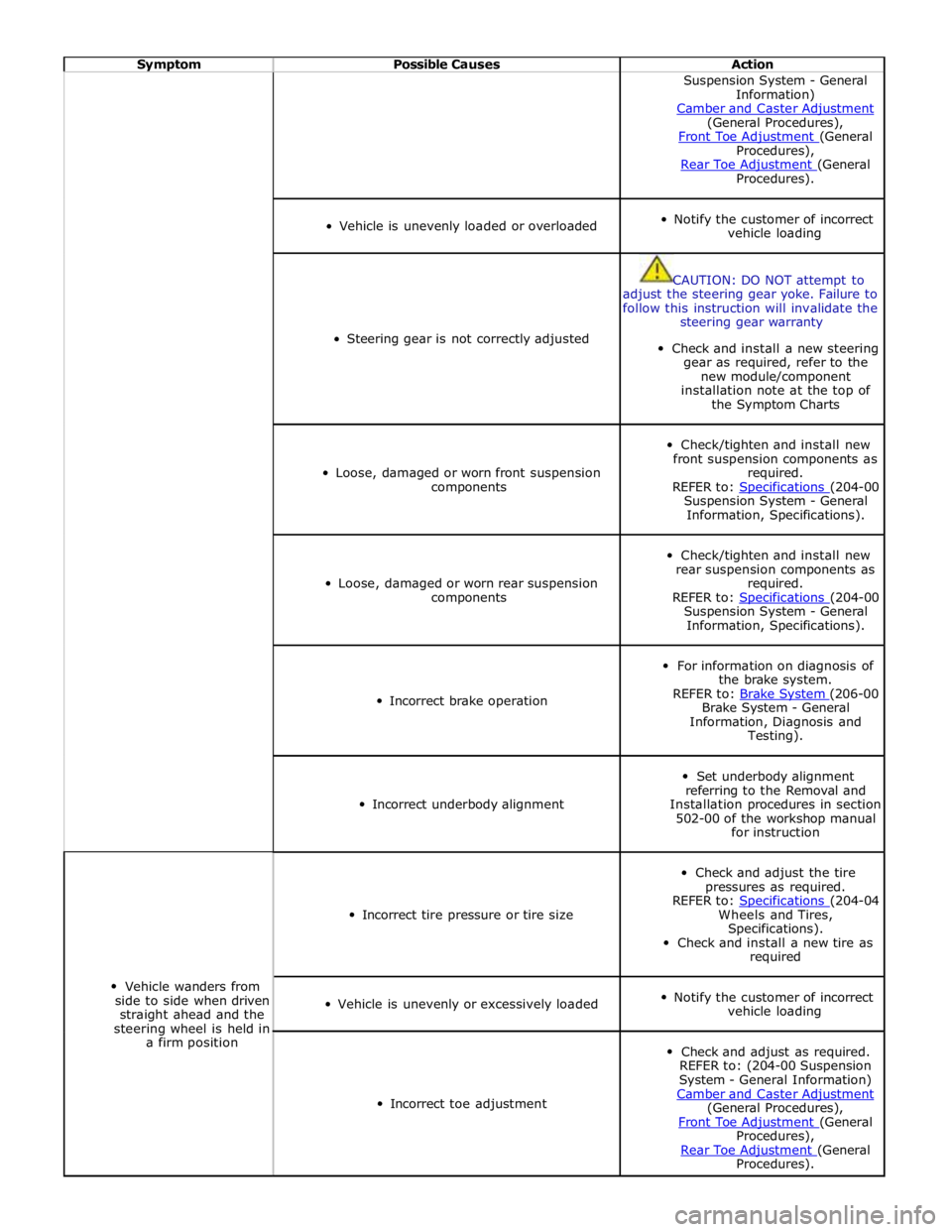
Symptom Possible Causes Action Suspension System - General
Information)
Camber and Caster Adjustment (General Procedures),
Front Toe Adjustment (General Procedures),
Rear Toe Adjustment (General Procedures).
Vehicle is unevenly loaded or overloaded
Notify the customer of incorrect
vehicle loading
Steering gear is not correctly adjusted
CAUTION: DO NOT attempt to
adjust the steering gear yoke. Failure to
follow this instruction will invalidate the
steering gear warranty
Check and install a new steering
gear as required, refer to the
new module/component
installation note at the top of
the Symptom Charts
Loose, damaged or worn front suspension
components
Check/tighten and install new
front suspension components as
required.
REFER to: Specifications (204-00 Suspension System - General
Information, Specifications).
Loose, damaged or worn rear suspension
components
Check/tighten and install new
rear suspension components as
required.
REFER to: Specifications (204-00 Suspension System - General
Information, Specifications).
Incorrect brake operation
For information on diagnosis of
the brake system.
REFER to: Brake System (206-00 Brake System - General
Information, Diagnosis and
Testing).
Incorrect underbody alignment
Set underbody alignment
referring to the Removal and
Installation procedures in section
502-00 of the workshop manual
for instruction
Vehicle wanders from
side to side when driven
straight ahead and the
steering wheel is held in
a firm position
Incorrect tire pressure or tire size
Check and adjust the tire
pressures as required.
REFER to: Specifications (204-04 Wheels and Tires,
Specifications).
Check and install a new tire as
required
Vehicle is unevenly or excessively loaded
Notify the customer of incorrect
vehicle loading
Incorrect toe adjustment
Check and adjust as required.
REFER to: (204-00 Suspension
System - General Information)
Camber and Caster Adjustment (General Procedures),
Front Toe Adjustment (General Procedures),
Rear Toe Adjustment (General Procedures).
Page 1792 of 3039

Specific warning lamp
'ON' C–1
Check with IDS for DTCs related to
identified vehicle system. . . C–2
Check for open circuit/shorts in wiring
related to warning lamp circuit (module,
sensor, switch) where appropriate. . . C–3
Perform cluster Self-Diagnostic Mode/ETM
test 3. Frost/ice warning illuminated in mixed red and
amber; therefore colour differs from other
warning lamps. When this test is ended,
warning lamps currently required to be 'ON' will
remain illuminated. . C–4
Check the specific vehicle system
indicated by the warning lamp
illuminated? What is the warning lamp telling me? Does this
check out with the DTC logged by the system indicating the fault? Fuel gauge operation D–1
Perform Self-Diagnostic Mode/ETM test 21
to establish if fuel level input to cluster is
out of range or invalid. 0 - 9 = short circuit; gauge will show empty. 10
– 254 = normal range. 255 = open circuit;
gauge will show empty. --- = missing signal; gauge will show empty. . D–2
Check gauge function versus
Self-Diagnostic Mode/ETM test 21. 0 = empty, 254 = full. 255 = invalid; gauge will
show empty. . D–3
Check for open circuit/shorts in wiring
between the Fuel Delivery Module, Jet
Pump Module and Rear Electronic Module (REM). . Fuel gauge reading E–1
Check gauge position versus
Self-Diagnostic Mode/ETM test 21. 0 = empty to 254 = full (255 invalid; gauge will
show empty). Other values percentage of above range e.g. 127 = half. . E–2
Calculate percentage fuel level from figure
obtained from Self-Diagnostic Mode/ETM
test 21 and compare to IDS vehicle fuel percentage test. Self-Diagnostic Mode fuel level percentage can
be calculated as follows: Value from
Self-Diagnostic Mode test 26 ÷ 254 x 100 = %
shown on gauge. . E–3
Monitor value of Self-Diagnostic Mode
test/ETM test 21 (during test drive) to
establish if input drops out of range. 0 - 9 = short circuit; gauge will show empty. 10
– 254 = normal range. 255 = open circuit;
gauge will show empty. --- = missing signal; gauge will show empty. . E–4
Monitor 'FUEL LEVEL' in IDS data logger
(during test drive) to correlate gauge position to vehicle reported fuel level. Gauge function is damped so will not follow
rapidly changing Fuel Delivery Module values. Speedometer
operation H–1
Monitor Self-Diagnostic Mode/ETM test 19
(during test drive) check to establish if
vehicle speed input to cluster is out of range or invalid. Display speed input in 1/10 mile/h, no decimal
point shown, and is compensated for tire size
etc. Displays ---- or INV if message is not
received or if received data is invalid. Speedometer reading I–1
During test drive compare speedometer
position to Self-Diagnostic Mode/ETM test
19, displayed value. Self-Diagnostic Mode displayed speed figure will
be approx 3% higher than speed indicated by
speedometer. Allowed tolerance – minus nothing/+ 10% + 2.5 mile/h. . I–2
Monitor Self-Diagnostic Mode/ETM test 19
(during test drive) to establish if vehicle
speed input to cluster drops out of range
or is invalid. Displays ---- if message is not received or if
received data is invalid for two seconds or more. . I–3
Check that installed wheels and tires are
standard Jaguar fitment. Confirm wheel
size in IDS, 'ADD REMOVE ACCESSORY'
section. Non standard wheels and tires may lead to
speed indication inaccuracies. Incorrectly set
wheel size will result in speed indication
inaccuracies. Trip and odometer distance
accumulation will also be incorrect. Tachometer operation J–1
Perform Self-Diagnostic Mode/ETM test 20
to establish if vehicle rpm input to cluster
out of range or invalid. Displays ---- or INV if message is not received
or if received data is invalid. Tachometer reading K–1
Check tachometer position versus
Self-Diagnostic Mode/ETM test 20, displayed value. Tachometer accuracy +/- 100 rpm. . K–2
Monitor 'ENGINE RPM' in IDS data logger
at constant engine rpm to compare
tachometer indicated engine rpm to
engine rpm reported by Engine Control
Module (ECM). Tachometer accuracy +/- 100 rpm. . K–3
Monitor Self-Diagnostic Mode test/ETM
test 20, (during test drive) to establish if
input to cluster drops out of range or is
invalid. Displays ---- or INV if message is not received
or if received data is invalid. Gauge judder L–1
Perform Self-Diagnostic Mode test/ETM
test 2, to prove out smooth gauge operation. . Gauge noise M–1
Perform vehicle road test. Gauges should
not be audible during operation in drive cycle. . www.JagDocs.com
Page 1793 of 3039

. M–2
Benchmark noise against non-complaint
vehicle. . Trip (fuel) computer N–1
Check for consistent display (during test
drive) of valid 'Rolling Odometer' count in
Self-Diagnostic Mode/ETM test 24. Displays ---- , INV or 255 if message is not
received, or if received data is invalid. . N–2
Check that installed wheels and tires are
standard Jaguar fit. Confirm fitted wheel
size in IDS, 'ADD REMOVE ACCESSORY'
section. Non standard wheels and tires or incorrectly set
wheel size may lead to Odometer increment
inaccuracies. This will impact the distance
accumulators, which in turn affects the rolling
average, fuel economy and range values. Trip
distance accumulation will also be incorrect. . N–3
Consider noting odometer value and
resetting fuel computer system. Advise
customer to conduct brim-to-brim fuel
tank test. Use collected information to
determine if system accurate. . Column adjust O-1
Check with IDS for DTCs related to powered column system. . O-2
Check cluster battery supply voltage and
ground resistance. Check for loose
connections. . O-3
Check power column motors supply voltage. . O-4
Check power column switch for physical damage. . Passive Anti-Theft
System (PATS)
indicator P–1
Check for three second prove out when
vehicle start button is pressed. . . P–2
Check for loose connections/wiring continuity. . . P–3 Check ignition switch for physical damage. . Cluster illumination Q–1
Check for loose connections/wiring continuity. . . Q–2 Check dimmer switch operation. . Cluster backlight operation R–1
Is the backlight on other components inoperative. . . R–2 Check dimmer switch operation. . . R–3
Check for loose connections/wiring continuity. . Chime/tone operation S–1 Check vehicle configuration. . . S–2
Utilize lights ON, ignition OFF, door open warning to verify chime operation. . . S–3 Check appropriate sensing circuit. . Continuous chime/tone T–1 Check appropriate sensing circuit. . Unexpected chime operation U–1 Check vehicle configuration. . Message centre display illumination V–1
Is the backlight 'ON' and other components dim? . . V–2
Does the lighting level of other
components change when dimmer adjusted? . Message centre
display issue W–1
Perform Self-Diagnostic Mode test/ETM
tests 5 to 9, to prove out LCD display
function. . Message centre
missing lines X–1
Perform Self-Diagnostic Mode test/ETM
tests 5 to 9, to prove out LCD display
function. . Message centre
incorrect message Y–1 What is the message? . . Y–2
Check for open circuit/shorts in wiring to
related warning light trigger (module,
sensor, switch). . Cluster/connectivity Z–1 Check cluster battery and ignition wiring. . . Z–2 Check cluster grounds. . . Z–3 Disconnect/reconnect cluster. . . Z–4
Attempt to enter Self-Diagnostic
Mode/ETM to prove cluster response to inputs. . No crank AA–1
Check with IDS for presence of related
DTCs. . . AA–2
Is there a Passive Anti-Theft System (PATS) flash code? . . AA–3
Does the vehicle crank with the other passive key? .
Page 2104 of 3039

Wiring Harnesses - Wiring Harness
Description and Operation
Introduction Published: 21-Jan-2014
CAUTION: Do not use any other heat shrink sleeve other than the approved glue lined heat shrink sleeve mentioned in
the repair procedure.
The purpose of this document is to promote quick and efficient minor repair to harness connectors or cables using approved
methods. Repairs may only be made to cables and connectors which have been mechanically, not electrically damaged. It also
applies where the whole extent of the damage can be clearly identified and rectified.
Care and neatness are essential requirements in making a perfect repair.
Caution:
This harness repair guide, does not approve repairs to any of the following circuits:
1. Any media orientated system transport network harnesses.
2. Supplement restraint system (SRS) firing circuits (Air bags).
3. Link lead assembles, which are unique to safety critical circuits such as anti-lock brake system (ABS) and thermocouple
circuits. An example of this is the ABS wheel speed sensors with moulded connectors.
4. 4. Screened cables, leads and wiring harness(s).
If any harness(s) with defective electrical connector terminals or wires from the above circuits are a concern, new
components must be installed.
Repair Components
CAUTION: Where the repair procedure indicates that a glue lined heat shrink sleeve should be applied, apply sufficient
heat to the glue lined heat shrink to melt the glue in order to provide a water tight seal. Do not over heat the glue lined heat
shrink sleeve so that the wiring harness insulation becomes damaged.
The wiring harness repair components comprises:
Pre-terminated wiring harness(s) of different sizes and types
Three sizes of butt splice connectors
A selection of colored cable identification sleeves
Two sizes of glue lined heat shrink sleeves
A suitable heat source, for shrinking heat shrink sleeves will be required.
The pre-insulated diamond grip range of electrical connector terminals and in-line, butt splice connectors are the only
acceptable product for the repairs of wiring harnesses. The butt connectors not only grip the wire but also the insulation,
making a very secure joint.
If an electrical connector terminal is not available approval for the repair is NOT given and in these circumstances a new wiring
harness must be installed.
Pre-Terminated Wiring Harness(s) and Butt Splice Connectors
The pre-terminated wiring harness(s) are supplied with the insulation in one of three colors, red, blue or yellow. The colors do
not apply to any particular circuit but to the harness wire size. See the Relationship Table in the Repair Method section.
Butt splice connectors are also supplied with red, blue or yellow coverings, which must be matched to the pre-terminated
wiring harness insulation color.
Page 2170 of 3039
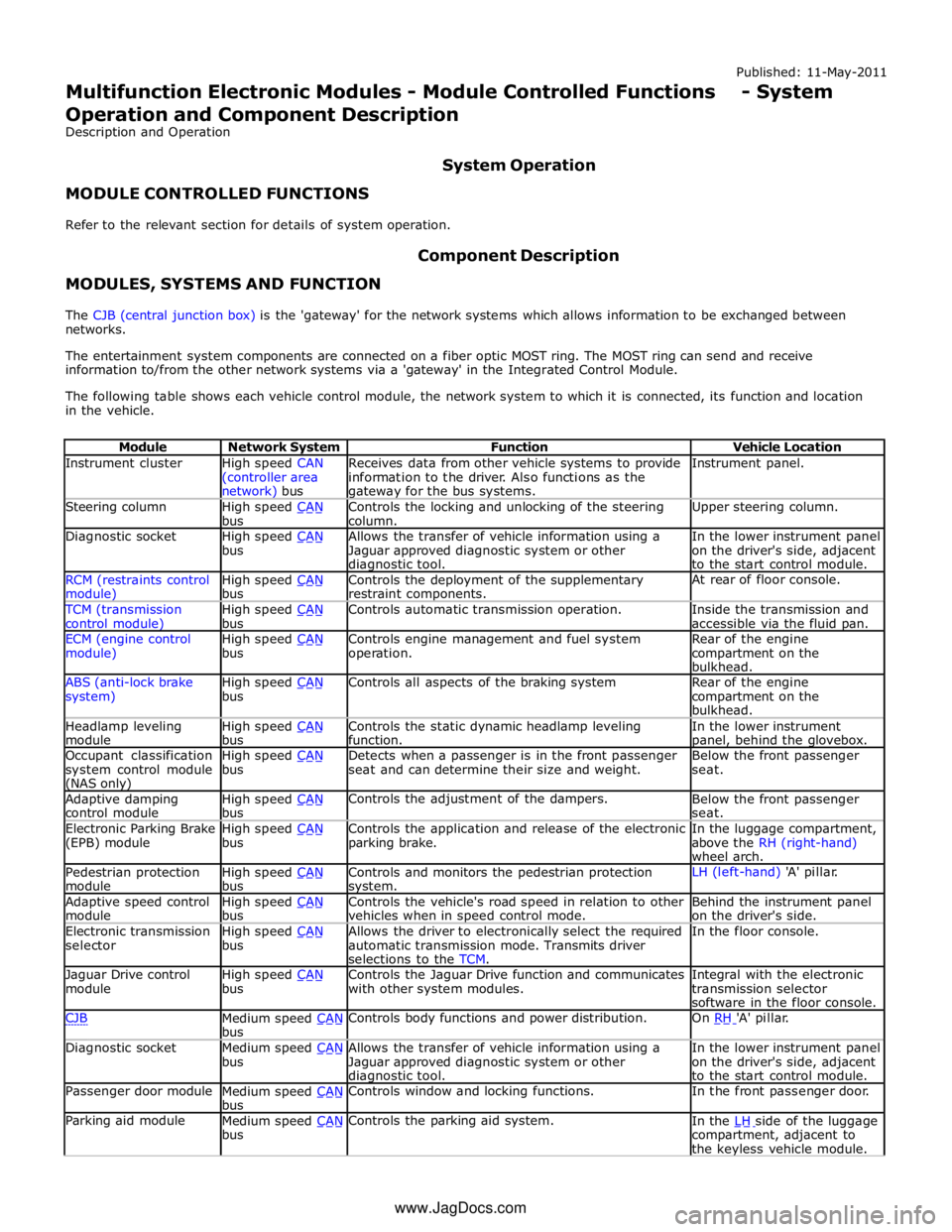
Instrument cluster
High speed CAN
(controller area network) bus Receives data from other vehicle systems to provide
information to the driver. Also functions as the gateway for the bus systems. Instrument panel. Steering column
High speed CAN bus Controls the locking and unlocking of the steering
column. Upper steering column. Diagnostic socket
High speed CAN bus Allows the transfer of vehicle information using a
Jaguar approved diagnostic system or other diagnostic tool. In the lower instrument panel
on the driver's side, adjacent
to the start control module. RCM (restraints control module) High speed CAN bus Controls the deployment of the supplementary
restraint components. At rear of floor console. TCM (transmission
control module) High speed CAN bus Controls automatic transmission operation.
Inside the transmission and
accessible via the fluid pan. ECM (engine control
module) High speed CAN bus Controls engine management and fuel system
operation. Rear of the engine
compartment on the
bulkhead. ABS (anti-lock brake
system) High speed CAN bus Controls all aspects of the braking system
Rear of the engine
compartment on the
bulkhead. Headlamp leveling
module High speed CAN bus Controls the static dynamic headlamp leveling
function. In the lower instrument panel, behind the glovebox. Occupant classification
system control module (NAS only) High speed CAN bus Detects when a passenger is in the front passenger
seat and can determine their size and weight. Below the front passenger
seat. Adaptive damping
control module High speed CAN bus Controls the adjustment of the dampers.
Below the front passenger
seat. Electronic Parking Brake
(EPB) module High speed CAN bus Controls the application and release of the electronic
parking brake. In the luggage compartment,
above the RH (right-hand)
wheel arch. Pedestrian protection
module High speed CAN bus Controls and monitors the pedestrian protection system. LH (left-hand) 'A' pillar. Adaptive speed control
module High speed CAN bus Controls the vehicle's road speed in relation to other
vehicles when in speed control mode. Behind the instrument panel
on the driver's side. Electronic transmission
selector High speed CAN bus Allows the driver to electronically select the required
automatic transmission mode. Transmits driver
selections to the TCM. In the floor console. Jaguar Drive control
module High speed CAN bus Controls the Jaguar Drive function and communicates
with other system modules. Integral with the electronic
transmission selector
software in the floor console. CJB
Medium speed CAN bus Controls body functions and power distribution. On RH 'A' pillar. Diagnostic socket
Medium speed CAN bus Allows the transfer of vehicle information using a
Jaguar approved diagnostic system or other diagnostic tool. In the lower instrument panel
on the driver's side, adjacent
to the start control module. Passenger door module
Medium speed CAN bus Controls window and locking functions. In the front passenger door. Parking aid module
Medium speed CAN bus Controls the parking aid system.
In the LH side of the luggage compartment, adjacent to
the keyless vehicle module. www.JagDocs.com