ESP JAGUAR XJ 2004 X350 / 3.G User Guide
[x] Cancel search | Manufacturer: JAGUAR, Model Year: 2004, Model line: XJ, Model: JAGUAR XJ 2004 X350 / 3.GPages: 227, PDF Size: 4.22 MB
Page 104 of 227
On the Road 4 - 33
Sunroof
!WARNING:
1. Before opening or closing the sunroof check that all occupants
are clear.
2. When leaving the vehicle take the ignition key to prevent misuse of
the sunroof switch by remaining
occupants, especially children.
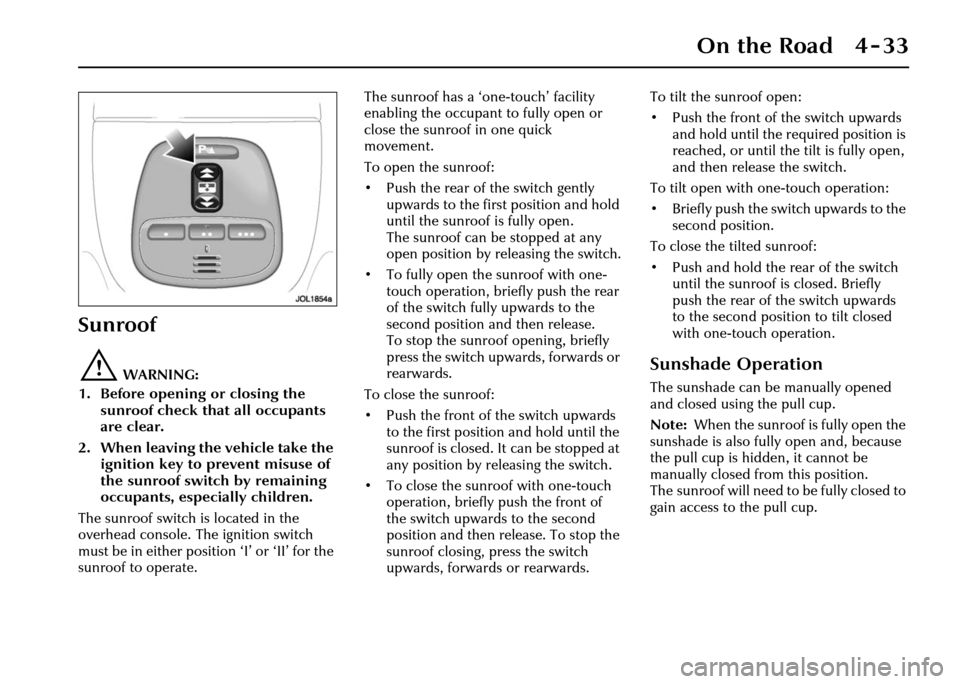
The sunroof switch is located in the
overhead console. The ignition switch
must be in either position ‘I’ or ‘II’ for the
sunroof to operate. The sunroof has a ‘one-touch’ facility
enabling the occupant to fully open or
close the sunroof in one quick
movement.
To open the sunroof:
• Push the rear of the switch gently
upwards to the first position and hold
until the sunroof is fully open.
The sunroof can be stopped at any
open position by releasing the switch.
• To fully open the sunroof with one- touch operation, briefly push the rear
of the switch fully upwards to the
second position and then release.
To stop the sunroof opening, briefly
press the switch upwards, forwards or
rearwards.
To close the sunroof:
• Push the front of the switch upwards to the first position and hold until the
sunroof is closed. It can be stopped at
any position by re leasing the switch.
• To close the sunroof with one-touch operation, briefly push the front of
the switch upwards to the second
position and then release. To stop the
sunroof closing, press the switch
upwards, forwards or rearwards. To tilt the sunroof open:
• Push the front of the switch upwards
and hold until the required position is
reached, or until the tilt is fully open,
and then release the switch.
To tilt open with one-touch operation:
• Briefly push the switch upwards to the second position.
To close the tilted sunroof:
• Push and hold the rear of the switch until the sunroof is closed. Briefly
push the rear of the switch upwards
to the second position to tilt closed
with one-touch operation.Sunshade Operation
The sunshade can be manually opened
and closed using the pull cup.
Note: When the sunroof is fully open the
sunshade is also fully open and, because
the pull cup is hidden, it cannot be
manually closed from this position.
The sunroof will need to be fully closed to
gain access to the pull cup.
Page 106 of 227
On the Road 4 - 35
Park Distance Control
Caution: It remains the driver’s
responsibility to detect obstacles and
estimate the car’s distance from
them. Some overhanging objects,
barriers, thin obstructions or painted
surfaces which could possibly cause
damage to the vehicle may not be
detected by the system. Always be
vigilant when reversing.
Park distance control is always
automatically switched on when the
ignition is turned on.
Caution:
1. If, for example, you are driving into a confined space such as a
home garage, the outer sensors
will detect the side walls and after
3 seconds will switch the tone off.
However, as movement
continues, the inner sensors will
eventually detect the rear wall
and will start the tone again.
2. The sensors are not active when the gear selector is in neutral,
therefore, take care if moving the
vehicle as the tone will not be
heard.
3. Do not clean the sensors with abrasive or sharp objects. Note:
1. For reliable operation, the sensors in
the front (if fitted) and rear bumpers
should be kept free from frost, ice and
grime.
2. When using a high pressure spray the sensors should only be sprayed briefly
and at least 8 inches (20 cm) distance
from the sensors.
3. The front parking aid may sound spurious tones if it detects a frequency
tone using the same band as the
sensors.
Rear Park Distance Control
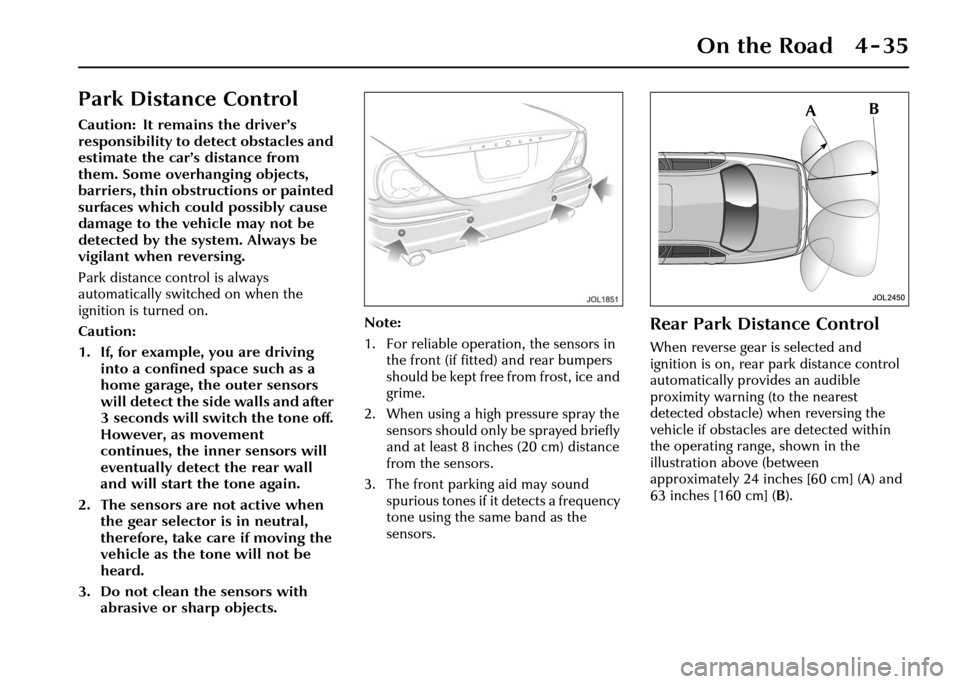
When reverse gear is selected and
ignition is on, rear park distance control
automatically provides an audible
proximity warning (to the nearest
detected obstacle) when reversing the
vehicle if obstacles are detected within
the operating range, shown in the
illustration above (between
approximately 24 inches [60 cm] ( A) and
63 inches [160 cm] ( B).
Page 107 of 227
4-36 On the Road
Front and Rear Park Distance
Control
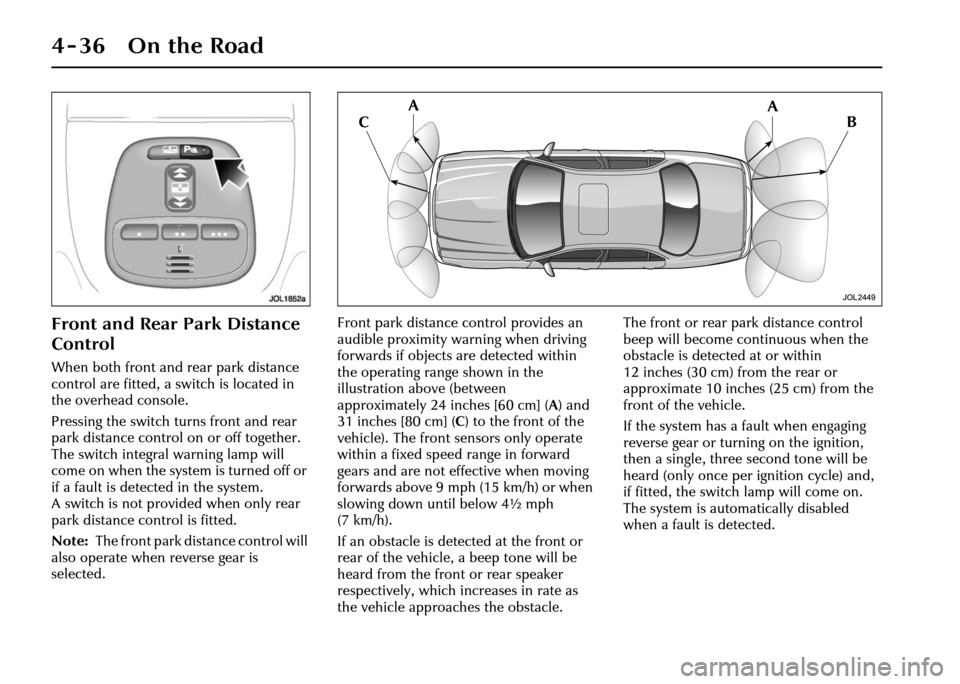
When both front and rear park distance
control are fitted, a switch is located in
the overhead console.
Pressing the switch turns front and rear
park distance control on or off together.
The switch integral warning lamp will
come on when the system is turned off or
if a fault is detected in the system.
A switch is not provided when only rear
park distance control is fitted.
Note: The front park distance control will
also operate when reverse gear is
selected. Front park distance control provides an
audible proximity warning when driving
forwards if objects are detected within
the operating range shown in the
illustration above (between
approximately 24 inches [60 cm] (
A) and
31 inches [80 cm] (C ) to the front of the
vehicle). The front sensors only operate
within a fixed speed range in forward
gears and are not effective when moving
forwards above 9mph (15km/h) or when
slowing down until below 4½ mph
(7 km/h).
If an obstacle is detected at the front or
rear of the vehicle, a beep tone will be
heard from the front or rear speaker
respectively, which increases in rate as
the vehicle approaches the obstacle. The front or rear park distance control
beep will become co
ntinuous when the
obstacle is detected at or within
12 inches (30 cm) from the rear or
approximate 10 inches (25 cm) from the
front of the vehicle.
If the system has a fault when engaging
reverse gear or turning on the ignition,
then a single, three second tone will be
heard (only once per ignition cycle) and,
if fitted, the switch lamp will come on.
The system is automatically disabled
when a fault is detected.
Page 116 of 227
On the Road 4 - 45
Limp-home mode
In the unlikely event of an electrical or
mechanical failure, transmission
operation will be impaired. The vehicle
gear selector ranges P, R, N, D can still be
used to enable the vehicle to be driven to
a safe area. In this event consult a Jaguar
Retailer immediately.
!WARNING:
The driver should be aware that the
vehicle’s performance will be
reduced and must take this into
account when driving.
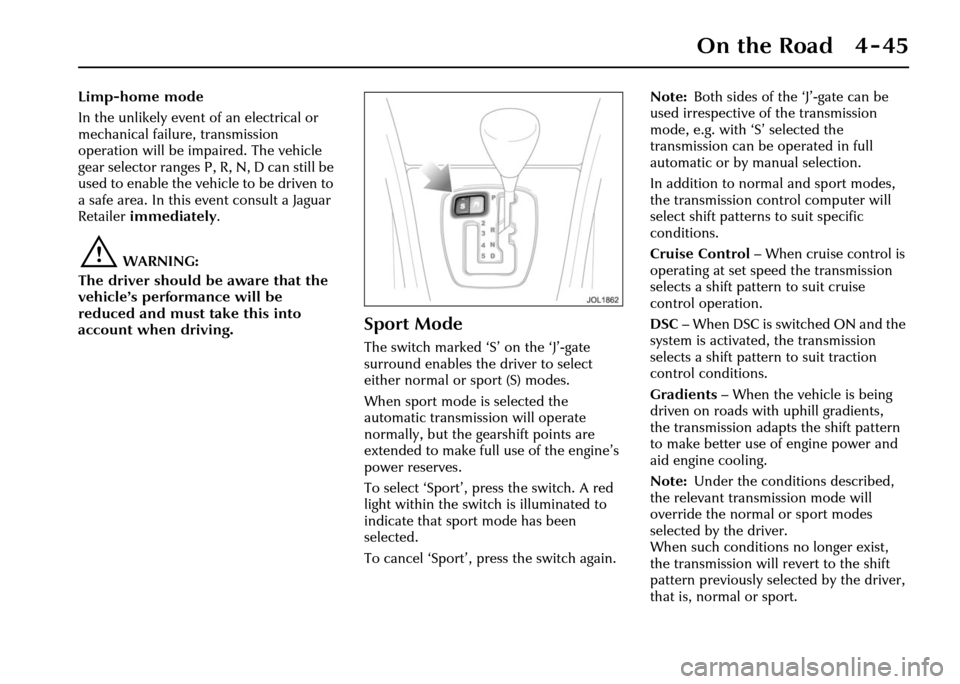
Sport Mode
The switch marked ‘S ’ on the ‘J’-gate
surround enables the driver to select
either normal or sport (S) modes.
When sport mode is selected the
automatic transmission will operate
normally, but the ge arshift points are
extended to make full use of the engine’s
power reserves.
To select ‘Sport’, press the switch. A red
light within the switch is illuminated to
indicate that sport mode has been
selected.
To cancel ‘Sport’, press the switch again. Note:
Both sides of the ‘J’-gate can be
used irrespective of the transmission
mode, e.g. with ‘S’ selected the
transmission can be operated in full
automatic or by manual selection.
In addition to norm al and sport modes,
the transmission control computer will
select shift patterns to suit specific
conditions.
Cruise Control – When cruise control is
operating at set speed the transmission
selects a shift pattern to suit cruise
control operation.
DSC – When DSC is switched ON and the
system is activated, the transmission
selects a shift pattern to suit traction
control conditions.
Gradients – When the vehicle is being
driven on roads with uphill gradients,
the transmission adapts the shift pattern
to make better use of engine power and
aid engine cooling.
Note: Under the conditions described,
the relevant transmission mode will
override the normal or sport modes
selected by the driver.
When such conditions no longer exist,
the transmission will revert to the shift
pattern previously selected by the driver,
that is, normal or sport.
Page 117 of 227
4-46 On the Road
Dynamic Stability
Control (DSC)
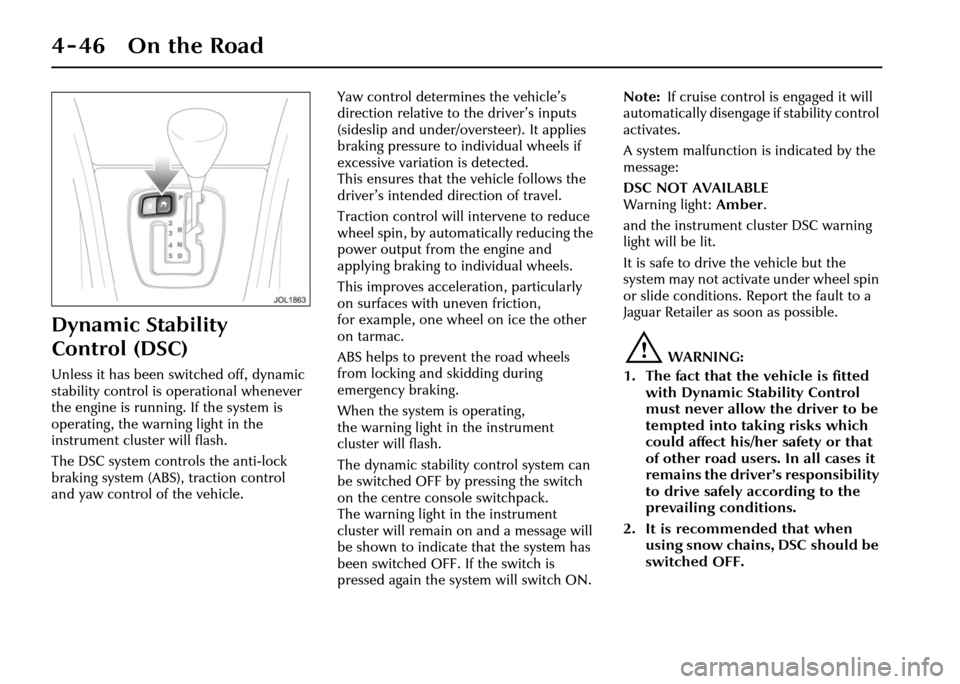
Unless it has been switched off, dynamic
stability control is operational whenever
the engine is running. If the system is
operating, the warning light in the
instrument cluster will flash.
The DSC system controls the anti-lock
braking system (ABS), traction control
and yaw control of the vehicle.Yaw control determines the vehicle’s
direction relative to
the driver’s inputs
(sideslip and under/ov ersteer). It applies
braking pressure to individual wheels if
excessive variation is detected.
This ensures that the vehicle follows the
driver’s intended direction of travel.
Traction control will intervene to reduce
wheel spin, by automatically reducing the
power output from the engine and
applying braking to individual wheels.
This improves acceleration, particularly
on surfaces with uneven friction,
for example, one wheel on ice the other
on tarmac.
ABS helps to prevent the road wheels
from locking and skidding during
emergency braking.
When the system is operating,
the warning light in the instrument
cluster will flash.
The dynamic stability control system can
be switched OFF by pressing the switch
on the centre console switchpack.
The warning light in the instrument
cluster will remain on and a message will
be shown to indicate that the system has
been switched OFF. If the switch is
pressed again the system will switch ON. Note:
If cruise control is engaged it will
automatically disengage if stability control
activates.
A system malfunction is indicated by the
message:
DSC NOT AVAILABLE
Warning light: Amber .
and the instrument cluster DSC warning
light will be lit.
It is safe to drive the vehicle but the
system may not activate under wheel spin
or slide conditions. Report the fault to a
Jaguar Retailer as soon as possible.
!WARNING:
1. The fact that the vehicle is fitted with Dynamic Stability Control
must never allow th e driver to be
tempted into taking risks which
could affect his/her safety or that
of other road users. In all cases it
remains the driver’s responsibility
to drive safely according to the
prevailing conditions.
2. It is recommended that when using snow chains, DSC should be
switched OFF.
Page 119 of 227
4-48 On the Road
ABS Monitoring
The ABS control module monitors the
ABS electrical system from ignition switch
ON to ignition switch OFF.
Any malfunction will be indicated by the
anti-lock warning light coming on.
Should a fault develo p in the ABS system,
the brake system will still operate
conventionally and with the same
standard of performance as vehicles not
equipped with ABS.
Caution: Consult a Jaguar Retailer
immediately if the warning light
comes on while driving, a system
failure is indicated.
Advice on ABS Braking
Techniques
For optimum ABS performance the
instructions on braking techniques during
ABS operation should be followed:
1. Do not release brake pressure when the pulsating effect is felt. Maintain a
constant pressure until the manoeuvre
is completed. 2. To familiarise yourself with the feel of
the brake pedal duri ng ABS braking,
practise an emergency stop
procedure, always making sure it is
safe to do so. With the seat belts fitted
to all occupants, drive the vehicle at
20 mph (32 km/h) and brake sharply.
3. ABS enables the driver to steer around obstacles during emergency braking.
However, the consequ ences of turning
sharply at high speed cannot be
overcome by the ABS.
4. Do not attempt to ‘pump’ the brakes to avoid skidding as this can interfere
with the ABS operation. The ABS will
not allow the wheels to skid under
normal road conditions.
5. The ABS will tend to keep the vehicle straight during braking. Because
braking distances may increase under
certain road conditio ns, it is necessary
to plan and make turning manoeuvres
as early as possible.
Emergency Brake Assist (EBA)
The EBA system measures the rate at
which the brake pressure increases.
If the system detect s an emergency
braking situation, EBA automatically
initiates the full br aking effect. This can
reduce stopping distances in critical
situations, which can help an
inexperienced driver to stop in the same
distance as an experienced driver.
!WARNING:
The EBA system is an additional safety
system: it is not intended to relieve
the driver of his responsibility for
exercising due care and attention
when driving.
Page 123 of 227
4-52 On the Road
• It is the drivers responsibility to stay alert, drive safely and be in control of
the vehicle at all times.
• Keep the front of the vehicle free from dirt, metal badges or objects,
including vehicle front protectors,
which may prevent the sensor from
operating.
• Do not use ACC when entering or leaving a motorway.
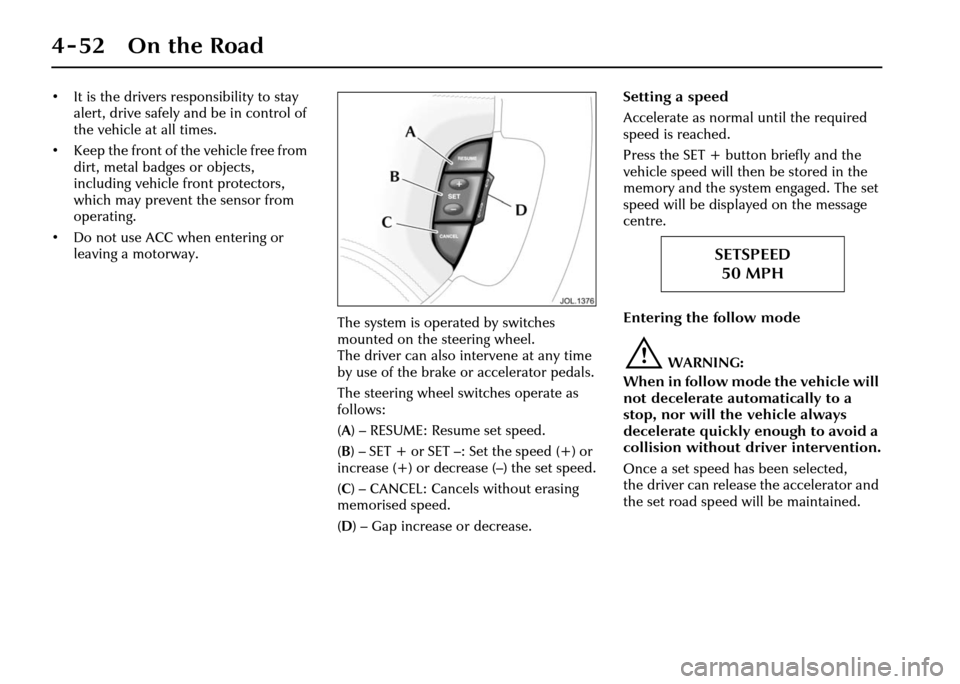
The system is operated by switches
mounted on the steering wheel.
The driver can also intervene at any time
by use of the brake or accelerator pedals.
The steering wheel switches operate as
follows:
(A ) – RESUME: Resume set speed.
( B )– SET+ or SET–: Setthe speed(+) or
increase (+) or decrease (–) the set speed.
( C ) – CANCEL: Cancels without erasing
memorised speed.
( D ) – Gap increase or decrease. Setting a speed
Accelerate as normal
until the required
speed is reached.
Press the SET + butto n briefly and the
vehicle speed will then be stored in the
memory and the system engaged. The set
speed will be displayed on the message
centre.
Entering the follow mode
!WARNING:
When in follow mode the vehicle will
not decelerate automatically to a
stop, nor will the vehicle always
decelerate quickly enough to avoid a
collision without driver intervention.
Once a set speed has been selected,
the driver can release the accelerator and
the set road speed will be maintained.
SETSPEED 50 MPH
Page 124 of 227
On the Road 4 - 53
When a vehicle ahead enters the same
lane or a slower vehicle is ahead in the
same lane, the vehicle speed will be
adjusted automatically until the gap to
the vehicle ahead corresponds to the
preset gap. The vehicle is now in ‘follow
mode’.The warning light in the
instrument cluster will be
illuminated,
and the message centre
will display the gap set.
The vehicle will then maintain the
constant time gap to the vehicle ahead
until:
• The vehicle ahead accelerates to a speed above the set speed.
• The vehicle ahead moves out of lane or out of view.
• The vehicle ahead slows so that ‘low speed automatic switch off’ occurs.
• A new gap distance is set.
If necessary, the vehicle brakes will be
automatically applied to slow the vehicle
to maintain the gap to the vehicle in
front. The maximum braking which is applied
by the ACC system is limited and can be
overridden by the driver applying the
brakes, if required.
Note:
Driver braking will cancel adaptive
cruise control.
If the ACC system predicts that its
maximum braking level will not be
sufficient, then an audible warning will
sound while the ACC continues to brake.
This is accompanied by a red warning
light and ‘DRIVER INTERVENE’ will be
displayed on the message centre.
The driver should take IMMEDIATE
action.
When in follow mode the vehicle will
automatically return to the set speed
when the road ahead is clear, for instance
when:
• The vehicle in front accelerates or changes lane.
• The driver changes lane to either side or enters an exit lane.
The driver should intervene if
appropriate.
Low speed automatic switch off
If the speed of the vehicle decreases
below 18 mph (30 km/h), the ACC system
will be automatically switched OFF and
the instrument warning lamp will go out. If the brakes were
being applied by the
ACC system, they will be slowly released.
This will be accompanied by an audible
warning, a red warning light and ‘DRIVER
INTERVENE’ will be displayed on the
message centre. The driver must take
control.
Overriding the set speed/follow mode
!WARNING:
Whenever the driver is overriding the
ACC by depressing the accelerator
pedal, the ACC will not automatically
apply the brakes to maintain
separation from any vehicle ahead.
The set speed and gap can be overridden
by pressing the accelerator pedal when
cruising at constant speed or in follow
mode. If the vehicle is in follow mode,
the instrument warning lamp will go out
when the ACC is overridden by the driver
using the accelera tor and ‘CRUISE
OVERRIDE’ will be displayed on the
message centre. When the accelerator is
released the ACC function will operate
again and vehicle speed will decrease to
the set speed, or a lower speed if follow
mode is active.
GAP
Page 125 of 227
4-54 On the Road
Changing the set speed
There are three ways to change the set
speed:
1. Accelerate or brake to the required speed and press the ‘SET +’ button.
2. Increase or decrease the speed by pressing and holding either the
‘SET +’ or ‘–’ button until the required
set speed is shown on the message
centre. The vehicle speed will
gradually change to the selected
speed.
3. Increase or decrease the speed in steps of 1 mph (2 km/h) by briefly
pressing the ‘SET +’ or ‘–’ button.
ACC operates between approximately
20 mph and 110 mph (34 km/h and
180 km/h) dependent on the country
specification.
Set speeds outside this range will not be
captured.
The ACC may apply the brakes to slow
down the vehicle to the new set speed.
The new set speed will be displayed on
the message centre for four seconds after
it has been changed. Changing the gap
The gap from the vehicle ahead can be
decreased or increased by pressing the
gap setting rocker switch on the steering
wheel. Four gaps are available and the
selected gap setting will be displayed on
the message centre when the rocker
switch is pressed. After the ignition is
switched ON the default gap will be
automatically selected ready for ACC
operation.
Note:
It is the driver’s responsibility to
select a gap appropriate to the driving
conditions, and in accordance with
national driving regulations.
ACC automatic switch off
Adaptive cruise control will disengage,
but not clear the memory when:
• The CANCEL button is pressed.
• The brake pedal is pressed.
• The vehicle speed falls below 18 mph (30 km/h).
• Neutral, Park or Reverse gear positions are selected.
• The parkbrake is applied.
• DSC is activated. Adaptive cruise control will disengage,
and clear the memory when:
• The ignition switch is set to
position ‘0’.
• Maximum vehicle speed is reached.
• A fault occurs in the ACC system.
Resuming the set speed/follow mode
By pressing the RESUME button after ACC
has been cancelled, for example, after
braking, the ACC will become active
again provided that the set speed
memory has not been erased. The set
speed will be displayed for four seconds
and the original set speed will be
resumed, unless a vehicle ahead causes
the follow mode to become active.
Caution: ‘RESUME’ should only be
used if the driver is aware of the set
speed and intends to return to it.
Page 127 of 227
4-56 On the Road
Notes on using adaptive cruise
control
1. Adaptive cruise control operates when the gear selector lever is in
position ‘2’, ‘3’ ‘4’ ‘5’ or ‘D’.
2. When engaged, the accelerator pedal rests in the raised position.
Fully release the pedal to allow
normal ACC operation.
3. When braking is applied by the ACC
the brake pedal will move down and
up as braking is applied or removed.
The vehicle brake lights will be
switched on while braking is applied.
!WARNING:
The driver must not rest a foot under
the brake pedal, as it may become
trapped. Driving with ACC active
The system acts by regulating the speed
of the vehicle using engine control and
the brakes. Gear changes may occur in
response to decelerati
on or acceleration
whilst in ACC.
ACC is not a collision avoidance system,
however, during some situations the
system may provide the driver with an
indication that intervention is required.
An audible alarm will sound,
accompanied by a re d warning light and
the message ‘DRIVER INTERVENE’ if the
ACC detects:
• That using maximum ACC braking only is not sufficient.
• That the vehicle speed has decreased below the minimum for ACC
operation.
• A failure has occurred whilst the system is active.