Locks JAGUAR XJ 2004 X350 / 3.G Owner's Manual
[x] Cancel search | Manufacturer: JAGUAR, Model Year: 2004, Model line: XJ, Model: JAGUAR XJ 2004 X350 / 3.GPages: 227, PDF Size: 4.22 MB
Page 36 of 227
Security and Locks 2 - 21
Before Programming
Caution: When programming a
garage door opener or entry gate that
may require you to press and re-press
the hand-held transmitter (cycle),
unplug the device during the ‘cycling’
process to prevent possible motor
failure.
It is recommended that for best results,
fit a new battery to the hand-held
transmitter of the garage door opener
(or other device) before programming.
If your garage door opener receiver
(located in the garage) is equipped with
an antenna, ensure that the antenna is
hanging straight down.
To Erase All Programming
For first time progra mming, ensure that
the engine is switched off:
1. Turn the ignition switch to position ‘I’.
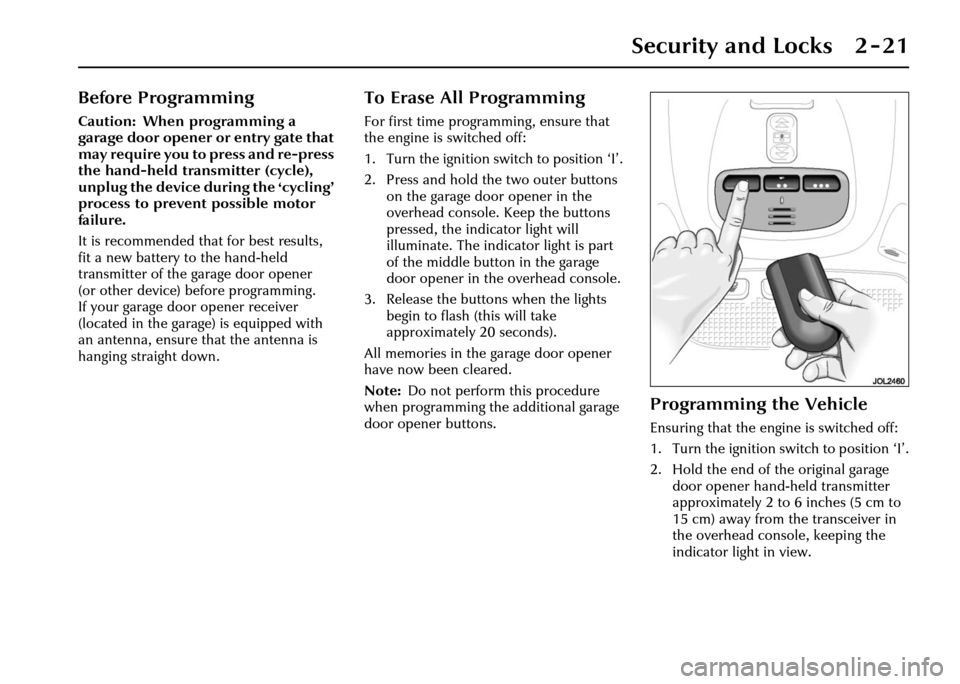
2. Press and hold th e two outer buttons
on the garage door opener in the
overhead console. Keep the buttons
pressed, the indicator light will
illuminate. The indicator light is part
of the middle button in the garage
door opener in the overhead console.
3. Release the buttons when the lights
begin to flash (this will take
approximately 20 seconds).
All memories in the garage door opener
have now been cleared.
Note: Do not perform this procedure
when programming the additional garage
door opener buttons.
Programming the Vehicle
Ensuring that the engine is switched off:
1. Turn the ignition switch to position ‘I’.
2. Hold the end of the original garage door opener hand -held transmitter
approximately 2 to 6 inches (5 cm to
15 cm) away from the transceiver in
the overhead console, keeping the
indicator light in view.
Page 37 of 227
2 - 22 Security and Locks
3. Using both hands, simultaneously press and hold both the desired garage
door opener button on the overhead
console and the hand -held transmitter
button. Keep both buttons pressed.
The light will flash, slowly at first and
then change to a fast flash. When the
indicator light flashes rapidly, release
both buttons. The rapid flashing light
indicates successful programming.
4. If, after 60 seconds, the indicator light does not flash rapidl y, release both the
transceiver and the hand-held
transmitter buttons and repeat the
procedure starting with Step 2.
However, position the hand-held
transmitter at a different angle and/or
distance.
5. Press and hold the programmed overhead console garage door opener
button and observe the indicator light:
• If the indicator light is solid/continuous, programming is
complete. Your device should
activate when the garage door
opener button is pressed and held
for 1 to 2 seconds and then
released. • If the indicator light blinks rapidly
for 2 seconds and then turns a
solid/continuous light, proceed
with the following programming
instructions for ‘rolling code’
device equipment.
Note: To programme additional garage
door opener buttons, begin at Step 2.
Rolling code device equipment
programming
Note: A second person may make the
following steps quicker and easier as once
the button has been pressed there are
30 seconds only in which to complete
Step 3.
1. At the garage door opener receiver (motor head unit) in the garage, locate
the ‘learn’ or ‘smart’ button/switch.
Note: The name of the button/switch
may vary between manufacturers.
2. Press and release the ‘learn’ or ‘smart’ button.
3. Return to the vehicle and firmly press and hold the programmed garage door
opener button for 2 seconds and
release. 4. Repeat the press/hold/release
sequence 3 times to complete the
learning/training process.
The garage door opener in the overhead
console should now activate the ‘rolling
code’ device.
Reprogramming a sing le garage door
opener button
To programme a device to a previously
trained button:
1. Press and hold the desired pre- programmed garage door opener
button for at least 20 seconds, but no
longer than 30 seconds, until the
indicator light begins to flash.
2. Without releasing the overhead console button, position the hand-
held transmitter approximately 2 to
6 inches (5 cm to 15 cm) away from
the transceiver in the overhead
console, keeping the indicator light in
view.
3. Carry out Step 3 of programming the vehicle, see column 1.
Page 38 of 227
Security and Locks 2 - 23
Entry gate programming
The technology of some entry gates
requires you to press and re-press (cycle)
the hand-held transmitter every
2 seconds during programming.
Continue to press and hold the desired
overhead console button while you cycle
your hand-held transmitter until the
indicator light flashes rapidly.
Information and Assistance
For information on the range of available
compatible products or accessories,
or for assistance, contact your Jaguar
Retailer.
You can also contact the supplier’s
helpline on 1–800–355–3515 or the
website address for Homelink™ is
www.homelink.jci.com. Note:
Keep the original transmitter for
future use or programming procedures if,
for example, you purchase a new vehicle’
Caution: It is recommended that
when you sell or dispose of the
vehicle, the programmed transceiver
buttons be erased for security
purposes.
!WARNING:
The manufacturer is not responsible
for any radio or TV interference
caused by unauthorised
modifications to this equipment.
Such modifications could void the
user’s authority to operate the
equipment.
Page 47 of 227
3 - 8 Before Driving
Door Mirrors
Both door mirrors are adjusted from the
driver’s door switchpack.
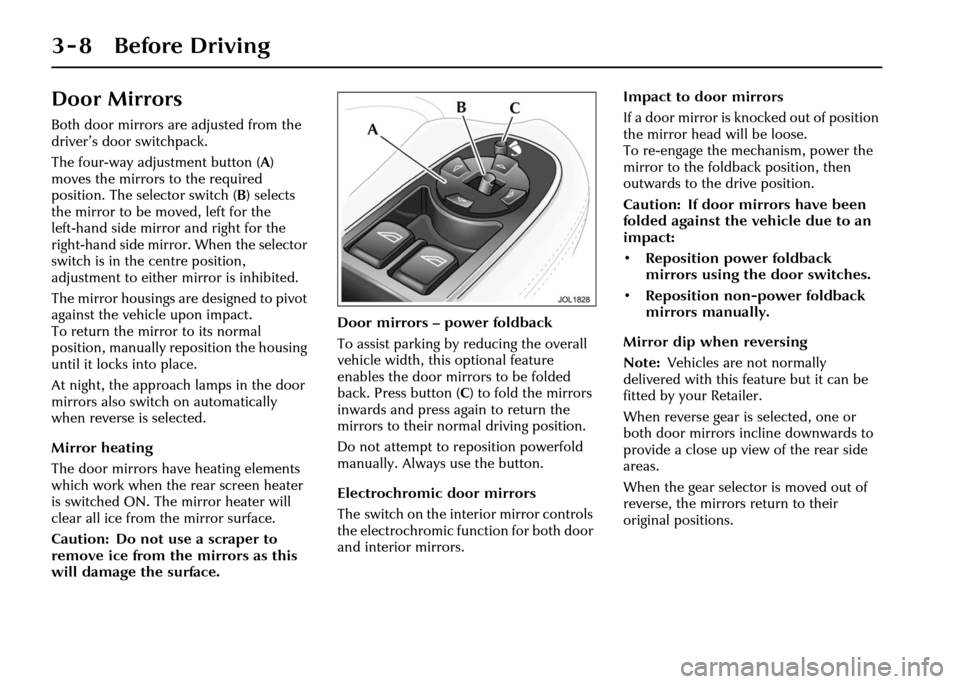
The four-way adjustment button (A)
moves the mirrors to the required
position. The selector switch ( B) selects
the mirror to be moved, left for the
left-hand side mirror and right for the
right-hand side mirror. When the selector
switch is in the centre position,
adjustment to either mirror is inhibited.
The mirror housings are designed to pivot
against the vehicle upon impact.
To return the mirror to its normal
position, manually re position the housing
until it locks into place.
At night, the approach lamps in the door
mirrors also switch on automatically
when reverse is selected.
Mirror heating
The door mirrors have heating elements
which work when the rear screen heater
is switched ON. The mirror heater will
clear all ice from the mirror surface.
Caution: Do not use a scraper to
remove ice from the mirrors as this
will damage the surface. Door mirrors – power foldback
To assist parking by reducing the overall
vehicle width, this optional feature
enables the door mirrors to be folded
back. Press button (
C) to fold the mirrors
inwards and press again to return the
mirrors to their normal driving position.
Do not attempt to re position powerfold
manually. Always use the button.
Electrochromic door mirrors
The switch on the interior mirror controls
the electrochromic function for both door
and interior mirrors. Impact to door mirrors
If a door mirror is knocked out of position
the mirror head will be loose.
To re-engage the mechanism, power the
mirror to the foldback position, then
outwards to the drive position.
Caution: If door mirrors have been
folded against the vehicle due to an
impact:
• Reposition power foldback
mirrors using the door switches.
• Reposition non- power foldback
mirrors manually.
Mirror dip when reversing
Note: Vehicles are not normally
delivered with this feature but it can be
fitted by your Retailer.
When reverse gear is selected, one or
both door mirrors incline downwards to
provide a close up view of the rear side
areas.
When the gear selector is moved out of
reverse, the mirrors return to their
original positions.
Page 65 of 227
3 - 26 Before Driving
• Never modify the seat harness or buckles as this may affect the quick
release mechanism.
• Always secure your child correctly, even for a short journey.
• Follow the manufacturer’s instructions for harness adjustments.
Booster seats
If a booster seat is used, position the lap
section of the adult seat belt over the
child’s pelvis. The diagonal seat belt
should rest on the child’s shoulder,
not the neck.Check List – Non-LATCH Child
Restraints
Follow the check list each time a child
travels in the vehicle:
• Always attach the top tether when
installing a forward-facing child seat.
• Carefully follow the instructions provided by the manufacturer of the
restraint system.
• Always use the appropriate child restraints and adjust harnesses for
every child, every trip.
• Avoid dressing a child in bulky clothing and do not place any objects
between the child and the restraint
system.
• No child seat is completely child- proof. Encourage your child not to
play with buckle or harness. • Regularly check the fit of your child
seat and replace seats or harnesses
that show signs of wear.
• Ensure that you have removed all slack from the adult seat belt and that
the automatic locking device is
activated.
• Never leave a child unsupervised in the vehicle.
• Activate the rear door child safety locks (see page 2 - 14).
• Ensure your child does not exit the vehicle from the side where there is
traffic.
• Set your child a good example – always wear your seat belt.
Page 69 of 227
3 - 30 Before Driving
Check List – LATCH Child
Restraints
Follow the check list each time your child
travels in the vehicle:
• Always attach the top tether when installing a forward-facing seat.
• Carefully follow the instructions supplied with the child seat.
• Always give the seat a final pull to ensure the lower anchors are secure,
even if the seat has indicators to show
that the seat connectors are latched.
• Always use the appropriate child restraints and adjust harnesses for
every child, every trip.
• Make sure you use a seat with the correct weight range for your child. • Avoid dressing your child in bulky
clothing and do not place any objects
between the child and the restraint
system.
• Regularly check the fit of your child seat and replace seats or harnesses
that show signs of wear.
• No child seat is completely child- proof. Encourage your child not to
play with the buckle or harness.
• Never leave a child unsupervised in the vehicle.
• Activate the rear door child safety locks (see page 2 - 14).
• Ensure your child does not exit the vehicle from the side where there is
traffic.
• Set your child a good example – always wear your seat belt.
Page 135 of 227
4-64 On the Road
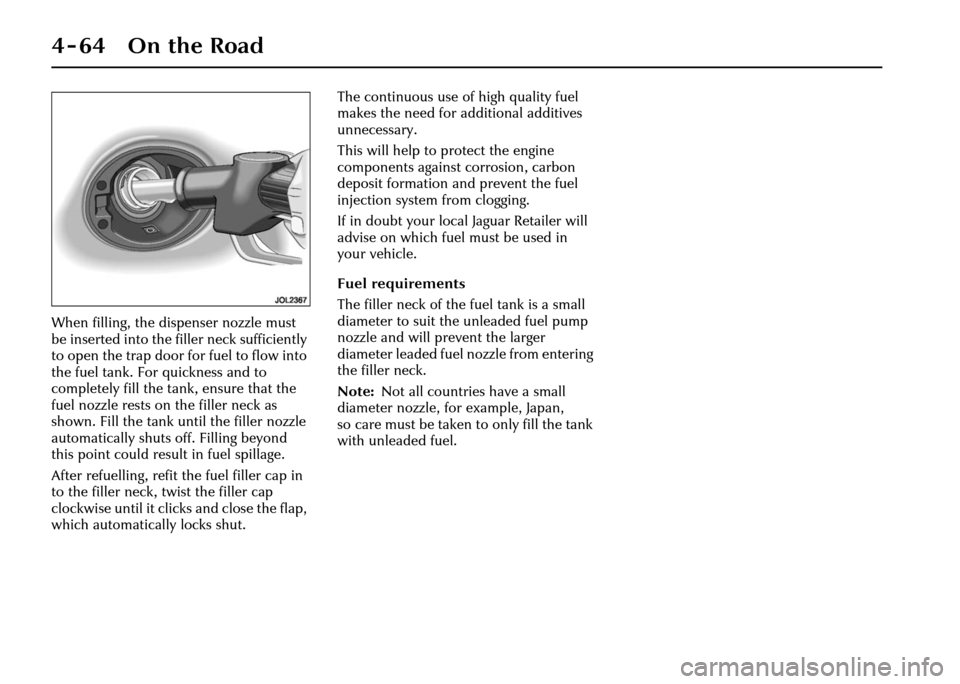
When filling, the dispenser nozzle must
be inserted into the filler neck sufficiently
to open the trap door for fuel to flow into
the fuel tank. For quickness and to
completely fill the ta nk, ensure that the
fuel nozzle rests on the filler neck as
shown. Fill the tank until the filler nozzle
automatically shuts off. Filling beyond
this point could result in fuel spillage.
After refuelling, refit the fuel filler cap in
to the filler neck, twist the filler cap
clockwise until it clicks and close the flap,
which automatically locks shut. The continuous use of high quality fuel
makes the need for a
dditional additives
unnecessary.
This will help to protect the engine
components against corrosion, carbon
deposit formation and prevent the fuel
injection system from clogging.
If in doubt your local Jaguar Retailer will
advise on which fuel must be used in
your vehicle.
Fuel requirements
The filler neck of the fuel tank is a small
diameter to suit the unleaded fuel pump
nozzle and will prevent the larger
diameter leaded fuel nozzle from entering
the filler neck.
Note: Not all countries have a small
diameter nozzle, for example, Japan,
so care must be taken to only fill the tank
with unleaded fuel.
Page 177 of 227
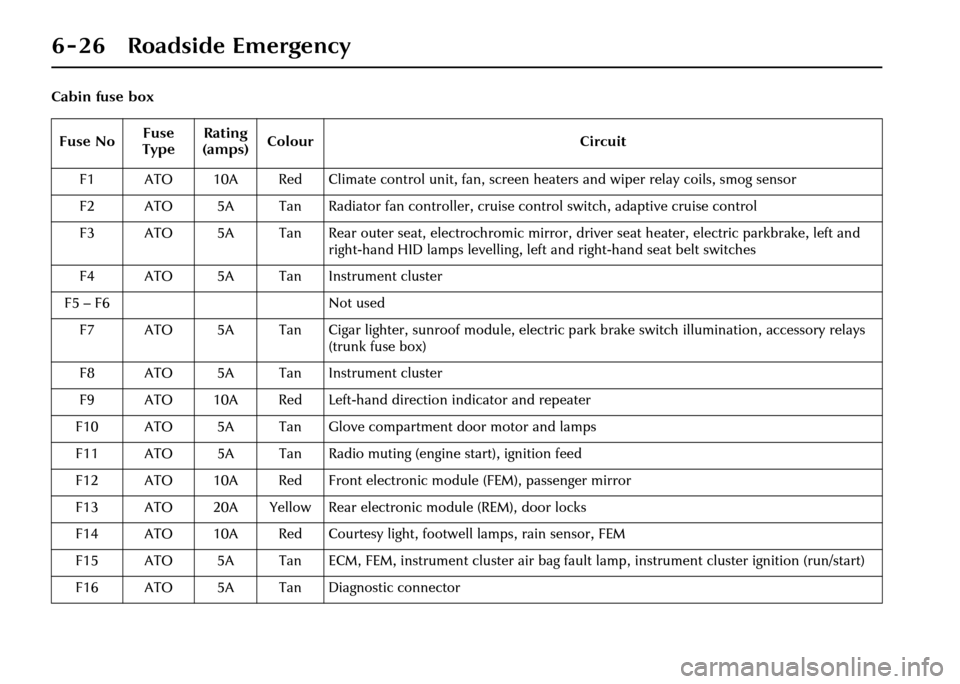
6 - 26 Roadside Emergency
Cabin fuse boxFuse No Fuse
Type Rating
(amps) Colour
Circuit
F1 ATO 10A Red Climate control unit, fan, screen heaters and wiper relay coils, smog sensor
F2 ATO 5A Tan Radiator fan controller, cruise control switch, adaptive cruise control
F3 ATO 5A Tan Rear outer seat, electrochromic mirror, driver seat heater, electric parkbrake, left and right-hand HID lamps levelling, left and right-hand seat belt switches
F4 ATO 5A Tan Instrument cluster
F5 – F6 Not used
F7 ATO 5A Tan Cigar lighter, sunroof module, electric park brake switch illumination, accessory relays (trunk fuse box)
F8 ATO 5A Tan Instrument cluster
F9 ATO 10A Red Left-hand direction indicator and repeater
F10 ATO 5A Tan Glove compartm ent door motor and lamps
F11 ATO 5A Tan Radio muting (engine start), ignition feed
F12 ATO 10A Red Front electronic module (FEM), passenger mirror
F13 ATO 20A Yellow Rear electronic module (REM), door locks
F14 ATO 10A Red Courtesy light, footwell lamps, rain sensor, FEM
F15 ATO 5A Tan ECM, FEM, instrument cluster air bag fa ult lamp, instrument cluster ignition (run/start)
F16 ATO 5A Tan Diagnostic connector
Page 220 of 227
Index
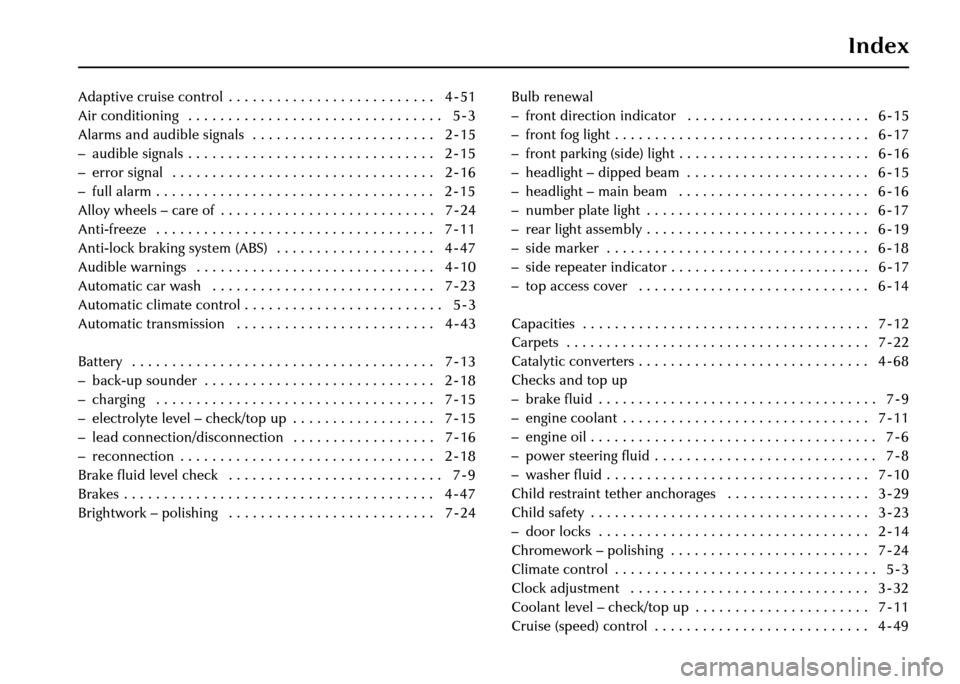
Adaptive cruise control . . . . . . . . . . . . . . . . . . . . . . . . . . 4 - 51
Air conditioning . . . . . . . . . . . . . . . . . . . . . . . . . . . . . . . . 5 - 3
Alarms and audible signals . . . . . . . . . . . . . . . . . . . . . . . 2 - 15
– audible signals . . . . . . . . . . . . . . . . . . . . . . . . . . . . . . . 2 - 15
– error signal . . . . . . . . . . . . . . . . . . . . . . . . . . . . . . . . . 2 - 16
– full alarm . . . . . . . . . . . . . . . . . . . . . . . . . . . . . . . . . . . 2 - 15
Alloy wheels – care of . . . . . . . . . . . . . . . . . . . . . . . . . . . 7 - 24
Anti-freeze . . . . . . . . . . . . . . . . . . . . . . . . . . . . . . . . . . . 7 - 11
Anti-lock braking system (ABS) . . . . . . . . . . . . . . . . . . . . 4 - 47
Audible warnings . . . . . . . . . . . . . . . . . . . . . . . . . . . . . . 4 - 10
Automatic car wash . . . . . . . . . . . . . . . . . . . . . . . . . . . . 7 - 23
Automatic climate control . . . . . . . . . . . . . . . . . . . . . . . . . 5 - 3
Automatic transmission . . . . . . . . . . . . . . . . . . . . . . . . . 4 - 43
B
Battery . . . . . . . . . . . . . . . . . . . . . . . . . . . . . . . . . . . . . . 7 - 13
– back-up sounder . . . . . . . . . . . . . . . . . . . . . . . . . . . . . 2 - 18
– charging . . . . . . . . . . . . . . . . . . . . . . . . . . . . . . . . . . . 7 - 15
– electrolyte level – check/top up . . . . . . . . . . . . . . . . . . 7 - 15
– lead connection/disconnection . . . . . . . . . . . . . . . . . . 7 - 16
– reconnection . . . . . . . . . . . . . . . . . . . . . . . . . . . . . . . . 2 - 18
Brake fluid level check . . . . . . . . . . . . . . . . . . . . . . . . . . . 7 - 9
Brakes . . . . . . . . . . . . . . . . . . . . . . . . . . . . . . . . . . . . . . . 4 - 47
Brightwork – polishing . . . . . . . . . . . . . . . . . . . . . . . . . . 7 - 24 Bulb renewal
– front direction indicator . . . . . . . . . . . . . . . . . . . . . . . 6 - 15
– front fog light . . . . . . . . . . . . . . . . . . . . . . . . . . . . . . . . 6 - 17
– front parking (side) light . . . . . . . . . . . . . . . . . . . . . . . . 6 - 16
– headlight – dipped beam . . . . . . . . . . . . . . . . . . . . . . . 6 - 15
– headlight – main beam . . . . . . . . . . . . . . . . . . . . . . . . 6 - 16
– number plate light . . . . . . . . . . . . . . . . . . . . . . . . . . . . 6 - 17
– rear light assembly . . . . . . . . . . . . . . . . . . . . . . . . . . . . 6 - 19
– side marker . . . . . . . . . . . . . . . . . . . . . . . . . . . . . . . . . 6 - 18
– side repeater indicator . . . . . . . . . . . . . . . . . . . . . . . . . 6 - 17
– top access cover . . . . . . . . . . . . . . . . . . . . . . . . . . . . . 6 - 14
C
Capacities . . . . . . . . . . . . . . . . . . . . . . . . . . . . . . . . . . . . 7 - 12
Carpets . . . . . . . . . . . . . . . . . . . . . . . . . . . . . . . . . . . . . . 7 - 22
Catalytic converters . . . . . . . . . . . . . . . . . . . . . . . . . . . . . 4 - 68
Checks and top up
– brake fluid . . . . . . . . . . . . . . . . . . . . . . . . . . . . . . . . . . . 7 - 9
– engine coolant . . . . . . . . . . . . . . . . . . . . . . . . . . . . . . . 7 - 11
– engine oil . . . . . . . . . . . . . . . . . . . . . . . . . . . . . . . . . . . . 7 - 6
– power steering fluid . . . . . . . . . . . . . . . . . . . . . . . . . . . . 7 - 8
– washer fluid . . . . . . . . . . . . . . . . . . . . . . . . . . . . . . . . . 7 - 10
Child restraint tether anchorages . . . . . . . . . . . . . . . . . . 3 - 29
Child safety . . . . . . . . . . . . . . . . . . . . . . . . . . . . . . . . . . . 3 - 23
– door locks . . . . . . . . . . . . . . . . . . . . . . . . . . . . . . . . . . 2 - 14
Chromework – polishing . . . . . . . . . . . . . . . . . . . . . . . . . 7 - 24
Climate control . . . . . . . . . . . . . . . . . . . . . . . . . . . . . . . . . 5 - 3
Clock adjustment . . . . . . . . . . . . . . . . . . . . . . . . . . . . . . 3 - 32
Coolant level – check/top up . . . . . . . . . . . . . . . . . . . . . . 7 - 11
Cruise (speed) control . . . . . . . . . . . . . . . . . . . . . . . . . . . 4 - 49
Page 223 of 227
Index
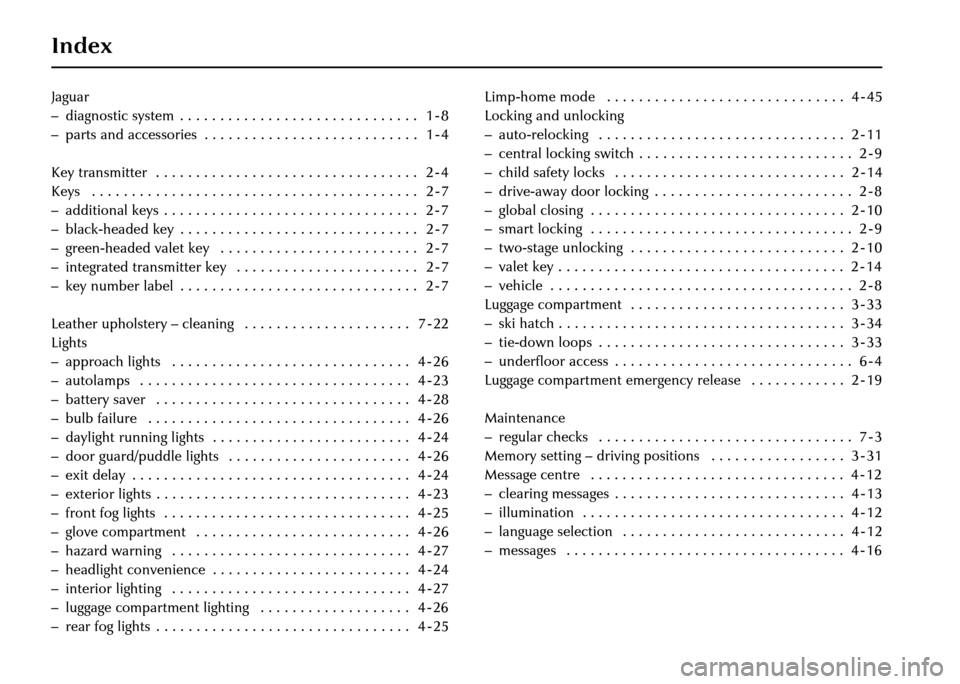
Jaguar
– diagnostic system . . . . . . . . . . . . . . . . . . . . . . . . . . . . . . 1 - 8
– parts and accessories . . . . . . . . . . . . . . . . . . . . . . . . . . . 1 - 4
K
Key transmitter . . . . . . . . . . . . . . . . . . . . . . . . . . . . . . . . . 2 - 4
Keys . . . . . . . . . . . . . . . . . . . . . . . . . . . . . . . . . . . . . . . . . 2 - 7
– additional keys . . . . . . . . . . . . . . . . . . . . . . . . . . . . . . . . 2 - 7
– black-headed key . . . . . . . . . . . . . . . . . . . . . . . . . . . . . . 2 - 7
– green-headed valet key . . . . . . . . . . . . . . . . . . . . . . . . . 2 - 7
– integrated transmitter key . . . . . . . . . . . . . . . . . . . . . . . 2 - 7
– key number label . . . . . . . . . . . . . . . . . . . . . . . . . . . . . . 2 - 7
L
Leather upholstery – cleaning . . . . . . . . . . . . . . . . . . . . . 7 - 22
Lights
– approach lights . . . . . . . . . . . . . . . . . . . . . . . . . . . . . . 4 - 26
– autolamps . . . . . . . . . . . . . . . . . . . . . . . . . . . . . . . . . . 4 - 23
– battery saver . . . . . . . . . . . . . . . . . . . . . . . . . . . . . . . . 4 - 28
– bulb failure . . . . . . . . . . . . . . . . . . . . . . . . . . . . . . . . . 4 - 26
– daylight running lights . . . . . . . . . . . . . . . . . . . . . . . . . 4 - 24
– door guard/puddle lights . . . . . . . . . . . . . . . . . . . . . . . 4 - 26
– exit delay . . . . . . . . . . . . . . . . . . . . . . . . . . . . . . . . . . . 4 - 24
– exterior lights . . . . . . . . . . . . . . . . . . . . . . . . . . . . . . . . 4 - 23
– front fog lights . . . . . . . . . . . . . . . . . . . . . . . . . . . . . . . 4 - 25
– glove compartment . . . . . . . . . . . . . . . . . . . . . . . . . . . 4 - 26
– hazard warning . . . . . . . . . . . . . . . . . . . . . . . . . . . . . . 4 - 27
– headlight convenience . . . . . . . . . . . . . . . . . . . . . . . . . 4 - 24
– interior lighting . . . . . . . . . . . . . . . . . . . . . . . . . . . . . . 4 - 27
– luggage compartment lighting . . . . . . . . . . . . . . . . . . . 4 - 26
– rear fog lights . . . . . . . . . . . . . . . . . . . . . . . . . . . . . . . . 4 - 25Limp-home mode . . . . . . . . . . . . . . . . . . . . . . . . . . . . . . 4 - 45
Locking and unlocking
– auto-relocking . . . . . . . . . . . . . . . . . . . . . . . . . . . . . . . 2 - 11
– central locking switch . . . . . . . . . . . . . . . . . . . . . . . . . . . 2 - 9
– child safety locks . . . . . . . . . . . . . . . . . . . . . . . . . . . . . 2 - 14
– drive-away door locking . . . . . . . . . . . . . . . . . . . . . . . . . 2 - 8
– global closing . . . . . . . . . . . . . . . . . . . . . . . . . . . . . . . . 2 - 10
– smart locking . . . . . . . . . . . . . . . . . . . . . . . . . . . . . . . . . 2 - 9
– two-stage unlocking . . . . . . . . . . . . . . . . . . . . . . . . . . . 2 - 10
– valet key . . . . . . . . . . . . . . . . . . . . . . . . . . . . . . . . . . . . 2 - 14
– vehicle . . . . . . . . . . . . . . . . . . . . . . . . . . . . . . . . . . . . . . 2 - 8
Luggage compartment . . . . . . . . . . . . . . . . . . . . . . . . . . . 3 - 33
– ski hatch . . . . . . . . . . . . . . . . . . . . . . . . . . . . . . . . . . . . 3 - 34
– tie-down loops . . . . . . . . . . . . . . . . . . . . . . . . . . . . . . . 3 - 33
– underfloor access . . . . . . . . . . . . . . . . . . . . . . . . . . . . . . 6 - 4
Luggage compartment emergency release . . . . . . . . . . . . 2 - 19
M
Maintenance
– regular checks . . . . . . . . . . . . . . . . . . . . . . . . . . . . . . . . 7 - 3
Memory setting – driving positions . . . . . . . . . . . . . . . . . 3 - 31
Message centre . . . . . . . . . . . . . . . . . . . . . . . . . . . . . . . . 4 - 12
– clearing messages . . . . . . . . . . . . . . . . . . . . . . . . . . . . . 4 - 13
– illumination . . . . . . . . . . . . . . . . . . . . . . . . . . . . . . . . . 4 - 12
– language selection . . . . . . . . . . . . . . . . . . . . . . . . . . . . 4 - 12
– messages . . . . . . . . . . . . . . . . . . . . . . . . . . . . . . . . . . . 4 - 16